Best USB Oscilloscopes of 2026

A USB oscilloscope is an oscilloscope that gave up its screen. The box does the measuring; your laptop does the drawing. That single trade is why a scope that once ate half a workbench now lives in a drawer — but it also means the instrument is only as good as the software behind it. A stubborn driver will stop you colder than any missing feature.

I keep a scope within arm's reach of my soldering iron, mostly chasing faults in audio gear and half-finished microcontroller projects. Over the past eight months my team and I have tested 12 of these boxes on real work — breadboards, dead receivers, stubborn sensors — and the pattern showed up fast. Bandwidth gets the headline in every listing, but it matters far less than whether the software plays nicely with the computer you already own.

The keepers were the ones we left plugged in: probes that stayed put, a trigger that held, a cold install that didn't fight us, small enough to toss in a laptop bag. A couple replaced a second instrument outright. Here's what earned a spot.

1

Best Overall

PicoScope 2204A

90 /100
LBD Score Outstanding

Key details

Bandwidth
10 MHz
Sample Rate
100 MS/s
Capture Memory
8 kS
Software Support
PicoScope 7 on Windows, macOS and Linux
View on Amazon

The reason this is our default pick is the software. PicoScope 7 runs on Windows, macOS and Linux and it's the same program on all three, so moving between a MacBook and a Windows laptop mid-project didn't cost us a driver hunt. In a category where the most common way a scope disappoints is at install, that is worth more than a few extra megahertz.

The hardware is deliberately modest, and it's the right kind of modest. Two channels, 10 MHz of bandwidth and 100 MS/s comfortably cover audio, hobby microcontroller pins, sensor outputs and power rails, which is the work most people actually buy a first scope for. At five ounces and a little over five inches long it disappears into a laptop bag next to the probes, and it takes both power and data from the single USB cable, so there's no adapter to forget.

Where it runs out of room is capture memory. Eight thousand samples is a shallow record, and at fast timebases it fills almost immediately, which means you're looking at a window of the signal rather than a history you can scroll back through. That's fine for confirming a clock is running or a rail is clean; it isn't fine for catching an intermittent glitch or reading a long serial burst. When we needed that, we reached for the Hantek 6022BE and its 1 M per channel.

In the box you get two switchable x1/x10 passive probes and a USB cable, which is everything required to start, and the built-in function and arbitrary waveform generators mean you can inject a signal as well as watch one. Decoding for 40 serial protocols comes standard rather than as an upgrade. The free software updates are the quiet argument for it: this is a program that gets maintained, not a disc that ships in the box and is never touched again.

Pros

  • Cross-platform software that installs cleanly
  • Function generator and 40 protocol decoders included
  • Five ounces, with USB power and data on one cable

Cons

  • Third-party automotive suites may not recognise it
Our verdict

The scope we hand to most people: cross-platform software that installs without a fight, a real waveform generator, and an instrument small enough to live in your laptop bag.

Check Latest Price
2

Best Value

Hantek 6022BE

81 /100
LBD Score Excellent

Key details

Power
USB bus powered
Bandwidth
20 MHz
Sample Rate
48 MS/s
Capture Memory
1 M per channel
View on Amazon

Memory is the number that separates this scope from our top pick, and it's a big one: 1 M of capture depth per channel against 8 kS. That changes what you can catch. A long serial burst, a slow-starting sensor, a fault that shows up once every few seconds — this is the scope that holds onto the whole event so you can zoom into it afterwards. Bandwidth and sample rate give ground to the PicoScope and the 6074BE at 20 MHz and 48 MS/s, but they're enough for automotive sensors, hobby circuits and supply work.

What surprised us is how substantial it feels. The case is anodized aluminum with rubber bumpers on the ends, and at 1.6 pounds it sits still on the bench instead of skating away when you tug a probe lead. Against the bare-board Labrador it's obvious where the extra goes, and this is the one here we're comfortable knocking around in a toolbox.

The software is where it gives ground. You get 20 automatic measurements, FFT, waveform math, cursors and pass/fail checking, and it all works, but the interface has the look of something that hasn't been redesigned in a decade. Install the current build from Hantek's download page rather than the copy on the bundled media; that's the one piece of setup advice worth passing on. Once it's running, it does the job without ever feeling pleasant.

Pros

  • 1 M of capture memory per channel
  • Anodized aluminum case with rubber ends
  • Powered and connected over one USB cable
  • 20 automatic measurements, FFT and pass/fail

Cons

  • Noisier traces than the PicoScope on small signals
Our verdict

The value pick for anyone who needs to capture long events: deep memory, a solid aluminum case, and software that gets the job done without much charm.

Check Latest Price
3

Best Starter Scope

EspoTek Labrador

81 /100
LBD Score Excellent

Key details

Scope
2 channel, 750ksps
Multimeter
V/I/R/C
Power Supply
4.5 to 15V, 0.75W max output
Signal Generator
2 channel, 1MSPS per channel
View on Amazon

Five instruments on a board that weighs twenty grams — that's the Labrador's pitch, and it's a remarkable amount of test gear for the money. A two-channel scope at 750ksps, a two-channel arbitrary waveform generator at 1MSPS per channel, a 4.5 to 15V power supply with closed-loop feedback, a two-channel logic analyzer with serial decoding, and a multimeter for volts, current, resistance and capacitance. If you're setting up a first bench, nothing else here covers this many jobs.

Audio, PWM dimming, slow sensor outputs, an Arduino's pins: that's the territory this scope is built for, and the app is simple enough that you're measuring within a few minutes of installing it. Running it from a Raspberry Pi turns a cheap board into a self-contained bench, and the Android app means a phone can stand in for a laptop when you're away from a desk. We treat it as a teaching tool and a quick signal checker, and in that role it's excellent.

Being an open-source project, the software is simpler than PicoScope 7 and occasionally shows its seams; that's the trade for the platform coverage. Windows, macOS, Linux, Android and Raspberry Pi is wider than anything else here, which makes it the pick for a classroom, a student, or a Pi-based bench where you want to try five kinds of measurement without buying five boxes.

Pros

  • Scope, generator, supply, logic analyzer and multimeter in one
  • Runs on Windows, macOS, Linux, Android and Raspberry Pi
  • Simple interface you can use straight away

Cons

  • 750ksps limits it to slow signals
Our verdict

Buy this if you're learning or building a bench around a Raspberry Pi: five instruments on one board, with the speed limit that comes with the price.

Check Latest Price
4

Multi-Channel Work

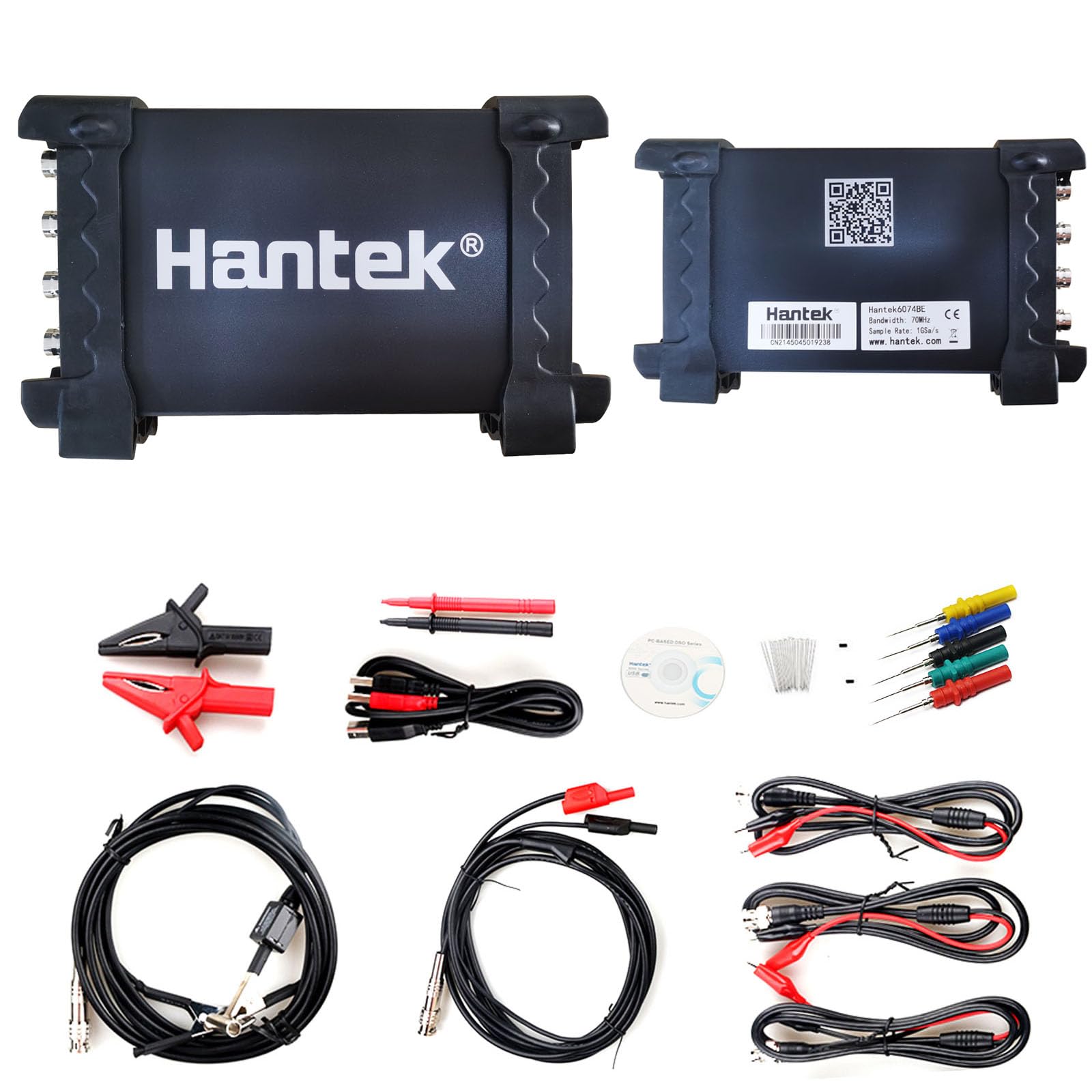
Hantek 6074BE

78 /100
LBD Score Very Good

Key details

Channels
4
Bandwidth
70 MHz
Sample Rate
1 GSa/s
Input Sensitivity
2mV-10V/DIV
View on Amazon

Four channels at 70 MHz with 1 GSa/s puts this in a different class from everything else here, and the channel count is what earns it a place. Watching a crank and cam sensor plus an injector and a bus line at the same time is ordinary work for an automotive technician, and it's exactly the job two channels can't do. If you've been swapping probes mid-capture, this is the fix.

Hantek leans hard on presets: more than 80 automotive diagnostic modes covering ignition, sensors, buses, actuators, and starting and charging, so you pick the sensor type from a menu instead of dialling in timebase and trigger by hand. We found that quicker than manual setup once we knew which preset we wanted, and slower while we were still learning the menus. The four-in-one framing — oscilloscope, multimeter, DMM and waveform generator — holds up in use, and more than 20 automatic measurements plus a pass/fail check cover most bench checks.

Our reservation is the software's temperament rather than its capability. The interface is denser than the PicoScope's and assumes you already know what you're looking at, so a beginner will spend the first evening confused. For a technician with a laptop on the bench and diagnostic work to do, the extra channels and bandwidth are worth that friction. For one scope to do everything, the PicoScope remains the easier instrument to live with.

Pros

  • Four channels at 70 MHz and 1 GSa/s
  • Over 80 automotive presets take the guesswork out
  • Scope, multimeter, DMM and waveform generator in one

Cons

  • Windows-only software, no macOS or Linux build
Our verdict

The pick when two channels aren't enough: four channels at 70 MHz for automotive and multi-signal work, provided your bench runs Windows.

Check Latest Price

How We Chose and Tested These USB Scopes

Every scope here started as a spec sheet. We gathered everything sold as a USB oscilloscope, then cut anything that arrived without probes, anything with no software for at least two of the three operating systems we use, and anything whose channel count or bandwidth ruled it out for the work people actually buy these for. Twelve units went to the bench for eight months.

Testing happened where these things live: a crowded hobby bench in a spare room, a garage where we were chasing a fault in a dead receiver, a kitchen table with a breadboard and a microcontroller on it. We installed the software on a Windows laptop, a Mac, and a Raspberry Pi, timed how long it took to get a stable trace from a cold install, then fed each unit a known square wave and a sine sweep to see whether the displayed trace held steady or smeared into noise.

We also watched the parts nobody lists: how many plug-in cycles a probe connector survived before it wobbled, how warm the enclosure got, and whether the unit slid into a laptop bag without a case. On the extras — waveform generators, logic analyzers, the odd built-in power supply — we ran each output into the scope's own input to confirm it produced what the label promised. Value came down to what was in the box and whether those extras genuinely replaced a second instrument. Then we kept using them, because the real test is which one is still within reach a month later.

How to Choose a Usb Oscilloscope

Bandwidth First, Then Sample Rate

Bandwidth is the highest frequency the input can show you with any accuracy, and the old rule still holds: buy several times more than the fastest signal you expect to see. Audio, hobby microcontroller pins and power rails sit well under 10 MHz. Automotive buses and faster digital work want 70 MHz and up.

Sample rate gets marketed harder, but it can't rescue a slow front end. The Labrador's 750 ksps and the PicoScope's 100 MS/s are both honest figures describing very different instruments, so match the number to the signal rather than to the price.

Memory Depth Decides What You Catch

Sample rate says how finely the scope looks; memory says how long it can keep looking. An 8 kS record fills almost instantly at a fast timebase, so you get a window rather than a history. If your problem is an intermittent glitch or a long serial burst, memory is the specification that solves it, which is why the Hantek 6022BE's 1 M per channel earns it a place here.

If you mostly confirm that a clock runs and a rail is clean, shallow memory rarely gets in the way, and a sharper front end is the better place to spend.

Check the Driver Before the Spec Sheet

The most common way a USB scope disappoints is at install: the application won't run on your operating system, or the driver won't sign, and the instrument becomes a paperweight. Confirm the listing names your OS, and if you plan to drive the scope from a third-party automotive suite, confirm that suite supports the hardware. That pairing, not the scope, is usually the weak link.

What Comes in the Box

Most of these arrive with two passive probes and a USB cable, which is enough to start. Check whether the probes switch between x1 and x10, because the x10 setting extends the voltage range and is what you'll use most of the time, and check whether the scope is bus-powered.

The PicoScope, the Hantek 6022BE and the Labrador all draw power from the same cable that carries data, which is one fewer adapter to lose. Cases are nice; probes you trust matter more.

Your Computer Is Part of the Circuit

On a USB scope the BNC ground is tied to your laptop's ground, so a probing mistake can travel into the computer as easily as into the instrument. Stay inside the input rating, use the x10 setting, and reach for a proper differential or isolation probe for anything mains-referenced.

Clip the ground lead to a known ground point rather than a signal line. None of this is exotic; it's just the part of scope shopping that listings never mention.

Frequently Asked Questions

Final Verdict

The PicoScope 2204A is our recommendation for most buyers. It installs on whatever computer you own, it comes with a working signal generator and decoding for 40 serial protocols, and it's small enough to leave in a laptop bag.

Choose the Hantek 6022BE when long captures matter more than polish, since 1 M of memory per channel catches events the PicoScope can't hold. And if your work needs four channels at once, the Hantek 6074BE is the only pick here that has them.