Best Single-Board Computers of 2026

A single-board computer is sold as the cheapest way into a real computer, and it usually is — right up until you're on the floor at 11 p.m. with a board, a bare microSD card, and no idea whether your phone charger will fry it. The board is rarely the problem. What decides a build is everything around it: enough amperage, a heatsink that keeps the chip off its thermal ceiling, a case that still exposes the pins you need, an OS someone is still updating. Get those right and you have a media server or a retro console; get them wrong and it lives in a drawer.

We've spent seven months with 12 boards, from bare palm-sized units to fan-cooled developer kits, and the ones that impressed on paper weren't always the ones I kept plugged in. Bundled kits earn their premium more often than not, and clock speed tells you almost nothing — thermals and ongoing software support decide how a board actually feels an hour in. Below are the ones that kept working after the novelty wore off.

1

Best Overall

Raspberry Pi 5 8GB

94 /100
LBD Score Outstanding

Key details

RAM
8 GB LPDDR4X
Processor
Quad-core Cortex-A76, 2.4 GHz
USB Ports
4
Video Output
2x micro HDMI, 4Kp60
View on Amazon

Eight gigabytes of LPDDR4X and a 2.4 GHz Cortex-A76 on a board four inches across is the short version of why the Raspberry Pi 5 is our top pick. It's the first Pi we've been happy to treat as a general-purpose computer rather than a project board: dual micro HDMI outputs drive two 4K displays at 60 Hz, four USB ports cover a keyboard, mouse, and a couple of drives, and 802.11ac Wi-Fi and Bluetooth are built in.

The memory is what sells it. Eight gigabytes leaves room for a browser full of tabs, a container or two, and the desktop at the same time — the workload that made earlier Pis feel like a compromise. It runs Raspberry Pi OS, Debian, and other Linux distributions, and that support is the real advantage: if a tutorial exists for a single-board computer, it was almost certainly written for this family.

The box contains the board and nothing else. A USB-C power supply, a microSD card, a case, and cooling are all extra, and the 5 runs warmer than earlier models — sustained work pulls it into throttling without a heatsink, so an active cooler is what we fit before doing anything real with one. We treat those parts as the actual purchase price rather than accessories.

Which makes the 8 GB version the priciest Pi here, and it earns that only if you'll use the memory. For a Pi-hole, a print server, or a Klipper host, the Raspberry Pi 3 Model B+ or the Le Potato does the job for far less. For anything you'll sit in front of, this is the board to start with.

Pros

  • 8 GB of RAM for desktop-class workloads
  • Fastest general-purpose CPU in this group
  • Dual 4Kp60 HDMI and four USB ports
  • Best software and documentation support here

Cons

  • Runs hot under load without a heatsink or fan
  • Board only
Our verdict

The best all-round board here: fast, superbly supported, and roomy enough for a real desktop, provided you budget for a cooler, a power supply, and a card.

Check Latest Price
2

Best Kit for First-Timers

CanaKit Raspberry Pi 4 4GB Starter PRO Kit

96 /100
LBD Score Outstanding

Key details

RAM
4 GB LPDDR4
Storage
32 GB microSD, pre-loaded
Processor
Quad-core, 1.5 GHz
In The Box
Case, fan, heatsinks, power supply, HDMI cable, card reader
View on Amazon

The box is the pitch. Inside is a Raspberry Pi 4 with 4 GB of RAM, a 32 GB EVO+ microSD card already loaded with the OS, a USB card reader, a gloss case with a fan mount and a low-noise bearing fan, a set of heat sinks, a 3.5 A USB-C power supply with a noise filter, a six-foot micro HDMI cable, and CanaKit's PiSwitch — an in-line button that lets you shut the thing down without pulling the plug.

That switch is the detail we appreciate most, because it's the one most kits forget and the one every build ends up improvising around. Assembly is tool-less and takes minutes: board onto the baseplate, heat sinks on, case closed, card in. The quick-start booklet and GPIO reference card are in there too, which is why this is the kit we point beginners toward — you skip the part where you discover you bought the wrong power supply.

The catch is the board itself. The Pi 4 is a generation behind: 4 GB and a 1.5 GHz quad-core run a desktop, a media server, or an Octoprint host happily, but they won't keep pace with the Pi 5 on heavier work. If you want the newer board with the same everything-included approach, the CanaKit Pi 5 kit is the step up. If you want the gentlest possible start, this is still the one.

Pros

  • Everything needed except a monitor and keyboard
  • Card arrives pre-loaded with the OS
  • In-line power switch saves yanking the cable
  • Tool-free assembly in minutes

Cons

  • Pi 4 hardware, so less speed and memory than a Pi 5
Our verdict

The kit we hand to a first-timer: everything but a monitor and keyboard, tool-free assembly, and a proper power switch, on a board that's one generation behind.

Check Latest Price
3

Best Complete Pi 5 Setup

CanaKit Raspberry Pi 5 Starter Kit PRO 128GB

91 /100
LBD Score Outstanding

Key details

RAM
8 GB
Cooling
Low-noise fan and anodized heatsink
Storage
128 GB microSD with Raspberry Pi OS
In The Box
Turbine Black case, two 4K display cables, card reader
View on Amazon

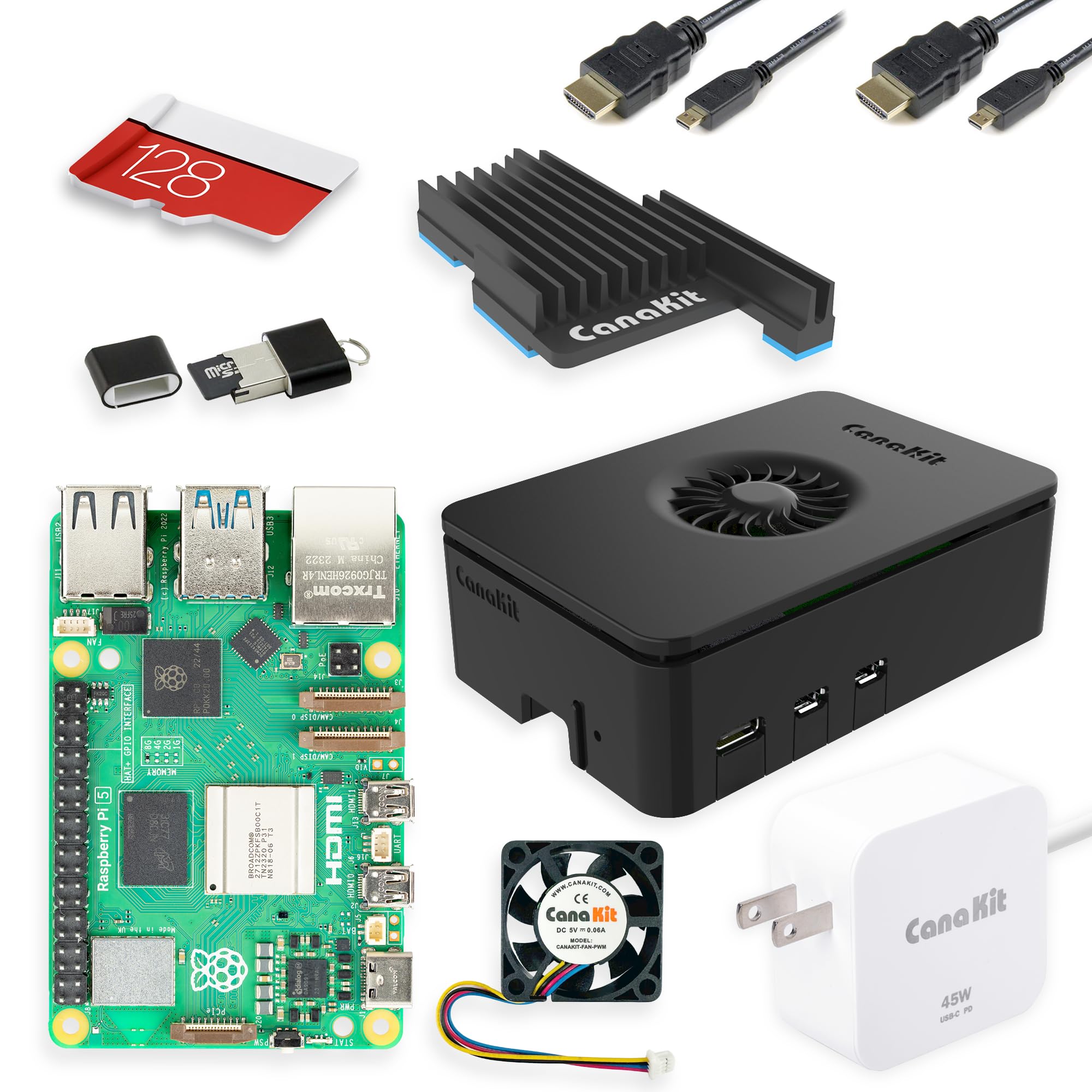
Spend the premium over the bare board and you get a Turbine Black case, a low-noise bearing fan, a black anodized mega heat sink, two six-foot 4K display cables, a USB card reader, and a 128 GB microSD card with 64-bit Raspberry Pi OS already written to it. For a Pi 5 build, that covers the two things that actually trip people up: cooling and storage.

We like that combination. The 128 GB card means no hunting for a spare, the fan and heat sink mean the board can run flat out inside a closed case, and the second display cable means dual monitors work on day one. The gap is the power supply: it isn't among the included items, so order a proper USB-C supply with the kit or you'll be unpacking a very quiet paperweight.

The case is the other consideration, and it points at who this suits. It's built for a fixed-purpose machine — a desktop, a Home Assistant box, a media player — rather than a breadboard. If your winter involves wiring sensors to the GPIO header, buy the bare board and pick a case that leaves the pins exposed; if you want a Pi 5 that's finished the day it arrives, this is it.

Pros

  • 128 GB card arrives with the OS installed
  • Fan and anodized heat sink included
  • Two 4K display cables for dual monitors

Cons

  • No USB-C power supply in the parts list
  • Case top must come off to reach the GPIO pins
Our verdict

The shortest route to a finished Pi 5 — cooling, case, and a pre-loaded 128 GB card — as long as you add a USB-C power supply and don't need frequent GPIO access.

Check Latest Price
4

Best Budget Board

Libre Computer Le Potato 2GB

86 /100
LBD Score Excellent

Key details

RAM
2 GB DDR3
Cooling
Anodized heatsink included
Wireless
USB Wi-Fi adapter included
Processor Speed
1.4 GHz
View on Amazon

Not every board needs to be a computer you sit in front of. Pi-hole, a print server, a Klipper host for a 3D printer, a small service that has to stay up — those jobs want a cheap, quiet, low-draw board, and that's the ground the Le Potato holds better than anything else here.

The AML-S905X-CC pairs 2 GB of DDR3 with a 1.4 GHz processor and four USB ports, and the maker rates it at under a watt for lighter work, which is the number that matters when the thing lives in a cupboard for years. It needs a microSD card or eMMC flashed with the right image, and the correct bootloader is what gets you HDMI output — this is not a plug-in-and-go board.

What makes the bundle is the accessories. The anodized heat sink and the USB Wi-Fi adapter are the two items people forget to order, and including both is worth more at this end of the group than a benchmark win. The trade-off is software: documentation is thinner than the Pi's, so expect forum threads rather than a manual, and 2 GB suits services rather than a desktop. Buy it for one permanent job, not for learning Linux.

Pros

  • Cheapest complete board in this group
  • Heat sink and USB Wi-Fi adapter included
  • Low draw for always-on duty

Cons

  • Documentation is thinner than the Pi's
  • 2 GB of RAM rules out desktop use
Our verdict

Our budget pick: a Pi-shaped Linux board that arrives with the heatsink and Wi-Fi adapter people forget, best for one small always-on job.

Check Latest Price
5

Best for AI at the Edge

NVIDIA Jetson Orin Nano Super Dev Kit

84 /100
LBD Score Excellent

Key details

CPU
6-core Arm Cortex-A78AE
RAM
8 GB LPDDR4X
Module
Jetson Orin Nano 8GB on reference carrier board
USB Ports
5
View on Amazon

Running a model on your own desk is a different kind of workload from running a desktop, and the Jetson Orin Nano Super is the board here built for it. An 8 GB Orin Nano module sits on a reference carrier board with five USB ports, DisplayPort, Ethernet, and GPIO, and it runs the same NVIDIA AI stack used on the bigger modules — Isaac for robotics, DeepStream for vision, Riva for speech.

That's what the money goes to. The unified memory is shared between CPU and GPU, so small language models and vision pipelines run locally instead of in someone else's cloud, and the six-core Cortex-A78AE handles the rest of the system. As a plain Linux computer it's perfectly usable; as an inference box it's in a different class from every Pi on this page.

The cost isn't only financial. Setup is the weakest part of the experience — SDK Manager and JetPack are particular about host machines and Ubuntu versions, and this is not a board you hand to someone whose last computer ran Windows. One practical detail worth knowing before you order: output is DisplayPort, so plan on a matching monitor or a good quality adapter rather than the cheap one in a drawer.

Our recommendation is narrow and confident: buy it if AI inference is the project, and skip it for everything else, where the Raspberry Pi 5 is cheaper, faster to set up, and better documented. Between the two Jetsons, this is the one that makes sense for a single desk — the AGX Orin only earns its place when a team is prototyping at scale.

Pros

  • CUDA and the Jetson AI stack ready to go
  • Runs small language and vision models locally
  • Five USB ports on the carrier board

Cons

  • Setup is not beginner-friendly
  • Needs a DisplayPort monitor or a reliable adapter
Our verdict

The AI pick: 8 GB of unified memory and the CUDA stack in one kit, with a setup process that assumes real Linux experience.

Check Latest Price
6

Best for Arduino and Real-Time Control

Arduino UNO Q 4GB

87 /100
LBD Score Excellent

Key details

RAM
4 GB LPDDR4
Storage
32 GB eMMC
Processors
Qualcomm QRB2210 at 2 GHz plus STM32U585 MCU
Form Factor
UNO, shield compatible
View on Amazon

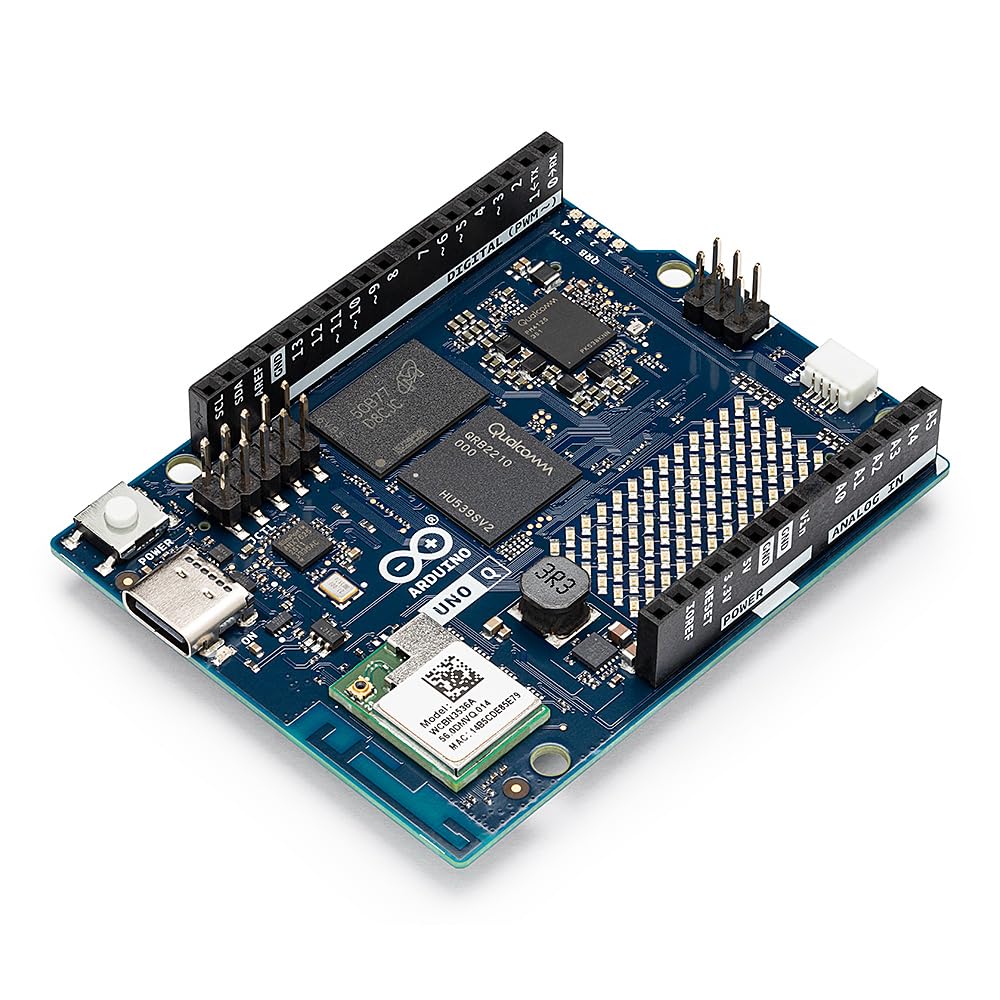
Two processors share the UNO Q's board, and that's the whole idea. A 2 GHz quad-core Qualcomm QRB2210 with an Adreno GPU runs Debian, so it handles Python, vision, and networking like any small Linux computer; an STM32U585 microcontroller sits alongside it for the real-time work — reading sensors, driving pins, responding instantly while Linux is still booting. There's 4 GB of LPDDR4, 32 GB of eMMC, Wi-Fi 5 and Bluetooth 5.1, and an 8x13 LED matrix on the board itself.

For anyone with a drawer of Arduino gear, the appeal is the form factor. It's laid out as an UNO, so existing shields fit, and the Qwiic connector takes Modulino nodes and sensors without a breadboard in sight. Sketches and Python live on the same board, which is exactly the seam most hybrid projects fall apart on.

The trade-offs are real, though. There is one USB-C port, so plan on a hub; 4 GB and a 2 GHz Cortex-A53 don't match a Pi 5 as a desktop; and the tooling is still settling, with some rough edges reported around the Linux side and the link between the two processors. At this price those are fair trades for a board that genuinely does both jobs, and the value story — a microcontroller and a computer on one piece of silicon — is why it made the list. We just wouldn't make it your first Linux machine.

Pros

  • Real-time MCU and Linux processor on one board
  • 4 GB RAM and 32 GB eMMC at a budget price
  • Takes standard UNO shields

Cons

  • Only one USB-C port
  • Tooling and examples are still maturing
Our verdict

The hybrid pick for Arduino regulars: a real-time MCU and a Debian-capable quad-core on one shield-compatible board, at a budget price.

Check Latest Price
7

Headless Services

Raspberry Pi 3 Model B+

91 /100
LBD Score Outstanding

Key details

RAM
1 GB LPDDR3
Processor
Quad-core, 1.4 GHz
USB Ports
4
Connectivity
Ethernet, Wi-Fi, Bluetooth
View on Amazon

A 1 GB Pi with a 1.4 GHz quad-core looks like a museum piece next to the Pi 5, and as a desktop it is one. As a headless workhorse it isn't, which is why we still recommend it: a Pi-hole, a DNS server, a print server, a network bridge for a wireless sensor — the jobs where the board sits in a cupboard and you forget it exists. It runs the same Raspberry Pi OS as the Pi 5, so every guide you find applies, and the price is the lowest of any Raspberry Pi here.

The hardware is honest about what it is: four USB ports, Ethernet, Wi-Fi, Bluetooth, and the standard 40-pin GPIO header, in a board that has been running in kitchens and server cupboards for years. What it cannot do is hold a browser with a modern website in it. If your plan involves a monitor at all, spend more; if it involves an SSH session and a service that starts on boot, this is enough.

Pros

  • Lowest-cost Raspberry Pi board here
  • Four USB ports, Ethernet, and standard GPIO
  • Runs the same Raspberry Pi OS as the Pi 5

Cons

  • 1 GB of RAM limits it to headless jobs
  • Older, slower CPU than everything else here
Our verdict

The cheapest way into the Raspberry Pi ecosystem: fine as a headless service board, frustrating the moment you want a desktop.

Check Latest Price
8

Heavy AI Development

NVIDIA Jetson AGX Orin 64GB Dev Kit

82 /100
LBD Score Excellent

Key details

CPU
12-core Arm
RAM
64 GB LPDDR4X
Power Supply
90 W adapter included
AI Performance
Up to 275 TOPS
View on Amazon

Sixty-four gigabytes of LPDDR4X, a 12-core Arm CPU, and up to 275 TOPS of AI performance on a board you can hold in one hand. The AGX Orin developer kit is not in the same conversation as the Pis: it ships with a 90 W power brick, it runs Ubuntu, and it will happily act as a fully loaded Linux workstation with a GPU attached.

The reason to buy the developer kit rather than a module is flexibility. It can emulate every Jetson Orin module, so a team can prototype on one board and then deploy to the smaller, cheaper module that fits the product. Isaac for robotics, DeepStream for vision, and Riva for speech are all part of the stack, and the ecosystem of cameras and sensors built around Jetson is the other half of the value.

The friction is the same friction the Orin Nano has, at a higher stakes level. Setup and compatibility are particular: SDK Manager, Ubuntu versions, and container images that may or may not match what you're running. This is a board that rewards someone who has done it before and punishes an afternoon of improvisation.

So our recommendation comes with a fence around it. If you're prototyping autonomous machines, multi-camera vision, or on-device models too large for 8 GB, this is the ceiling of this group and worth the money. If you're one person experimenting with a local model, the Orin Nano Super does most of it for a fraction of the cost, and if you want a computer, buy the Raspberry Pi 5 and stop reading.

Pros

  • 64 GB unified memory and up to 275 TOPS
  • Emulates every Jetson Orin module
  • Full NVIDIA AI stack with a 90 W supply

Cons

  • Workstation-class price
  • Setup assumes deep Linux and SDK experience
Our verdict

The most compute here by a wide margin, for teams building robots or vision systems who can absorb a workstation price and a Linux learning curve.

Check Latest Price

How We Picked and Tested a Dozen Boards

The shortlist started before anything was plugged in. We gathered around 40 current boards, then cut the ones whose maker had stopped shipping OS images, whose documentation was a dead forum thread, or that had no accessory ecosystem worth mentioning. From that pile we bought 12, spread across bare boards, boxed starter kits, and AI-focused developer kits, and lived with them for seven months.

Every board got the same first night. We flashed its current official image, timed everything from unboxing to a login prompt, and wrote down what was missing from the box — a power supply, a card, a heatsink, a cable. Kits got the harder look: we counted what actually shipped, checked the amperage printed on the bundled supply, and asked whether a first-timer could reach a desktop without placing a second order.

Then each one went into a real job for at least two weeks: one as a headless home server doing nightly backups and hosting a photo library, one under the living room TV pushing 1080p and 4K, one on the workbench driving camera modules and GPIO sensors, one set up as a retro console for my kids. We logged core temperature and clock speed through a 30-minute sustained load to see which boards throttled, metered draw at the wall at idle and under load, and ran a 72-hour uptime soak on every unit. Connectivity was tested where it lives — WiFi throughput from two rooms away, Ethernet, dual displays, USB — and we tried a stack of common add-on boards to see what seated properly and what collided with a case or heatsink.

Last, we pulled the power mid-write on each board and watched what happened on the next boot. The ones that scored highest did the boring things well: started every time, stayed cool, and shipped with software that was still being updated.

How to Choose a Single-Board Computer

Decide how much board you need

Start with the job, not the chip. A headless service — Pi-hole, a print server, a Klipper host for a 3D printer — runs comfortably on 2 GB, which is exactly what the Le Potato is for. A desktop with a browser and a couple of tabs needs 4 GB at the outside and 8 GB to feel pleasant; the Raspberry Pi 5 is the board here that makes that comfortable.

Buy memory for the work you have. The 8 GB premium is wasted on a board that only answers DNS queries, and 1 GB is a decision you regret the first time you open a browser on it.

Read the parts list, not the word kit

Bare boards arrive as a board. You supply a power supply, a microSD card, a case, and cooling — fine if you enjoy choosing parts, a nuisance if you don't. Kits vary far more than the label suggests: the CanaKit Pi 4 kit includes the supply, the card, the case, cooling, and a switched cable, while the CanaKit Pi 5 kit's parts list covers everything except the power supply.

Check the contents line by line before ordering, and match the supply to what the board actually asks for rather than reaching for a phone charger.

Cooling decides how fast it stays

The Pi 5 runs at full speed in bursts with nothing attached. Put it through a long compile, a transcode, or a busy server without a heatsink and it slows itself down. A heatsink is the minimum; an active cooler is what we fit to a board living inside a closed case.

The enclosure matters too. Some cases carry the fan and heatsink on the lid, so reaching the GPIO header means taking the whole stack apart — check that before you buy if you plan to wire anything to the pins.

Software support is the hidden specification

Two boards with similar chips can be very different to live with, because what you're really buying is documentation. Raspberry Pi OS has the deepest library of guides; the Le Potato leans on community threads and a correctly flashed image; the Jetson boards use NVIDIA's own stack, which is powerful and particular about versions.

Before you commit, search for a tutorial for your actual project on that actual board. If it doesn't exist, you'll be writing it.

Pay for AI acceleration only if you'll use it

The Jetson boards exist for one reason: CUDA. The Orin Nano Super pairs 8 GB of unified memory with the NVIDIA stack and runs small language and vision models locally; the AGX Orin goes far beyond it at a workstation price. If your project is a dashboard, a media server, or a robot with a bump sensor, that silicon is money doing nothing.

If you're running inference on camera feeds, it's the only hardware in this group built for the job.

Frequently Asked Questions

Final Verdict

The Raspberry Pi 5 with 8 GB is the board we recommend to almost everyone, because it's the one here that's equally happy as a desktop, a server, and a project platform — and because the software and guides behind it are the best documented of the group. Add a cooler and a proper USB-C power supply and it's a complete computer.

If you've never set one up, the CanaKit Pi 4 kit removes every excuse and gets you running in an evening. If your work is AI inference rather than general computing, skip both and start with the Orin Nano Super.