Best Soldering Stations of 2026

The worst soldering mistakes don't announce themselves. A joint looks bright and tidy, then a month later the cable cuts out and you're chasing a connection that was never really made. Almost always the culprit is heat: a tip that drops 30 degrees the moment it touches a ground plane, or one that runs so hot it lifts a pad before the solder flows.

I've soldered my share of instrument cables and keyboard PCBs, and over the past six months my team and I put 12 stations through real repairs, not scrap-board demos. What separated them had little to do with the wattage printed on the box. It was thermal recovery, presets you can actually reach mid-joint, a sleep mode that keeps a tip from cooking while you hunt for parts, and how much of the box was genuinely useful — extra tips, brass wool, helping hands.

Some of these are straightforward irons with a dial and a readout; a couple add hot air for surface-mount work. All of them held temperature when it counted.

1

Best Overall

Hakko FX888DX-010

93 /100
LBD Score Outstanding

Key details

Weight
3.8 lb
Wattage
65 watts
Controls
Rotary encoder, digital display
Included Tip
T18-D16 chisel, 1.6 mm
View on Amazon

The first thing we do with a new station is change the temperature a dozen times in a row, because that's the interaction you repeat all day. On the FX888DX it's one knurled dial: turn to wake the display, turn to set, press to lock it in. No function key, no menu tree, no manual. That's why the rest of this group gets measured against it.

The base earns its keep the same quiet way. At 3.8 pounds with a wide stance it stays put when the cable tugs, and the holder takes the handpiece in one motion instead of a wiggle. The included T18-D16 is a 1.6 mm chisel — the shape we reach for by default on through-hole work and general board repair — and the iron climbs back to temperature between joints rather than sagging on the third one.

Sixty-five watts is modest beside the 100-watt irons here, and that's the honest boundary. On thick wire, big connectors, and boards with a lot of copper pour, you'll wait a beat longer than you would with more power. For headers, switches, wires, and the odd lifted pad, the control more than covers the difference.

Tips are the long game, and T18 is one of the families you can still buy in plenty of shapes without hunting. They swap in seconds, which matters more than it sounds when you're moving between a chisel and a fine point on one board. There's no warranty statement on this one, and that's the single thing we want in writing at this end of the group.

Pros

  • One-dial temperature changes, no menu diving
  • Holds temperature through a run of joints
  • T18 tip family in many shapes, quick to swap
  • Heavy, stable base and a holder that takes one motion

Cons

  • No warranty statement in the listing
Our verdict

We recommend the FX888DX for any bench where boards get soldered regularly: the dial, the steady base, and the T18 tips make it the easiest station here to live with.

Check Latest Price
2

Best for Shared Benches

Weller WE1010NA

93 /100
LBD Score Outstanding

Key details

Weight
5.5 lb
Display
LCD
Wattage
70 watts
Temperature Stability
±4 °F
View on Amazon

A station one person uses doesn't need a lock. A station on a shared bench does, and the WE1010NA is the only pick here that solves it: you can lock the setpoint and password-protect the settings so nobody nudges the temperature halfway through a project.

That feature got it into the group; the day-to-day keeps it there. The 70-watt element is rated to hold within 4 °F, and standby plus auto-setback drop the tip to a holding temperature when it sits — the detail that stretches tip life on an iron that's switched on all afternoon. The silicon cable stays limp and out of the way, the ESD-safe station is the right spec for board work, and the PH70 rest with its sponge puts the tip where your hand expects it.

Two things to know before you commit. The menu takes a few minutes and a thin manual to learn — fine once, tedious on day one. And heating-element failures do turn up, so buy where returns are easy and register the one-year warranty the week it arrives.

Pros

  • Setpoint lock and password protection
  • ±4 °F stability from a 70 W element
  • Standby and auto-setback protect the tip
  • Limp silicon cable and a secure rest

Cons

  • LCD has no backlight
Our verdict

We recommend the WE1010NA where more than one person uses the iron or the setpoint has to stay put: the lock and the ±4 °F stability are what you're paying for.

Check Latest Price
3

Best Value

YIHUA 939D+

91 /100
LBD Score Outstanding

Key details

Weight
4.76 lb
Display
LED, °F/°C
Front Panel
Brushed aluminum
Temperature Range
392 to 896 °F
View on Amazon

The front panel is brushed aluminum, which sounds like a trim detail until you've parked a hot iron against a plastic-faced station. That panel is the tell for the rest of the 939D+: the holder is a real metal bracket on a base heavy enough that it doesn't skate, and the iron drops into the cradle without hunting. For the money, this is the best-built station of the group.

Heat is the other half of the argument. It comes up fast and settles, and the PID loop holds where you put it while you work a row of header pins. The 907E iron detaches at the handle, so a swap is a two-second job rather than a bench teardown, and you get both a brass-wool cleaner and a sponge instead of having to choose.

The catch is the display, which can read well above what the tip actually reaches. That's fixable — the station has a calibration routine, and a tip thermometer or a known melting point gets you an offset you can trust — and once you've done it the number stops mattering. Do it in the first week, while you're still inside the return window.

Pros

  • Metal panel and a weighted, non-tipping holder
  • Fast heat with PID stabilization
  • Brass wool and sponge both included
  • Detachable iron handle for quick swaps

Cons

  • Some units fail within weeks of use
Our verdict

Our value pick: the 939D+ gives a first serious station a metal chassis, quick heat, and PID control, provided you calibrate it once and check it early.

Check Latest Price
4

Best Kit

X-Tronic 3060-PRO

91 /100
LBD Score Outstanding

Key details

Wattage
75 watts
Kit Contents
16 pieces including magnifier lamp
Temperature Range
194 to 896 °F
Temperature Stability
±3.6 °F
View on Amazon

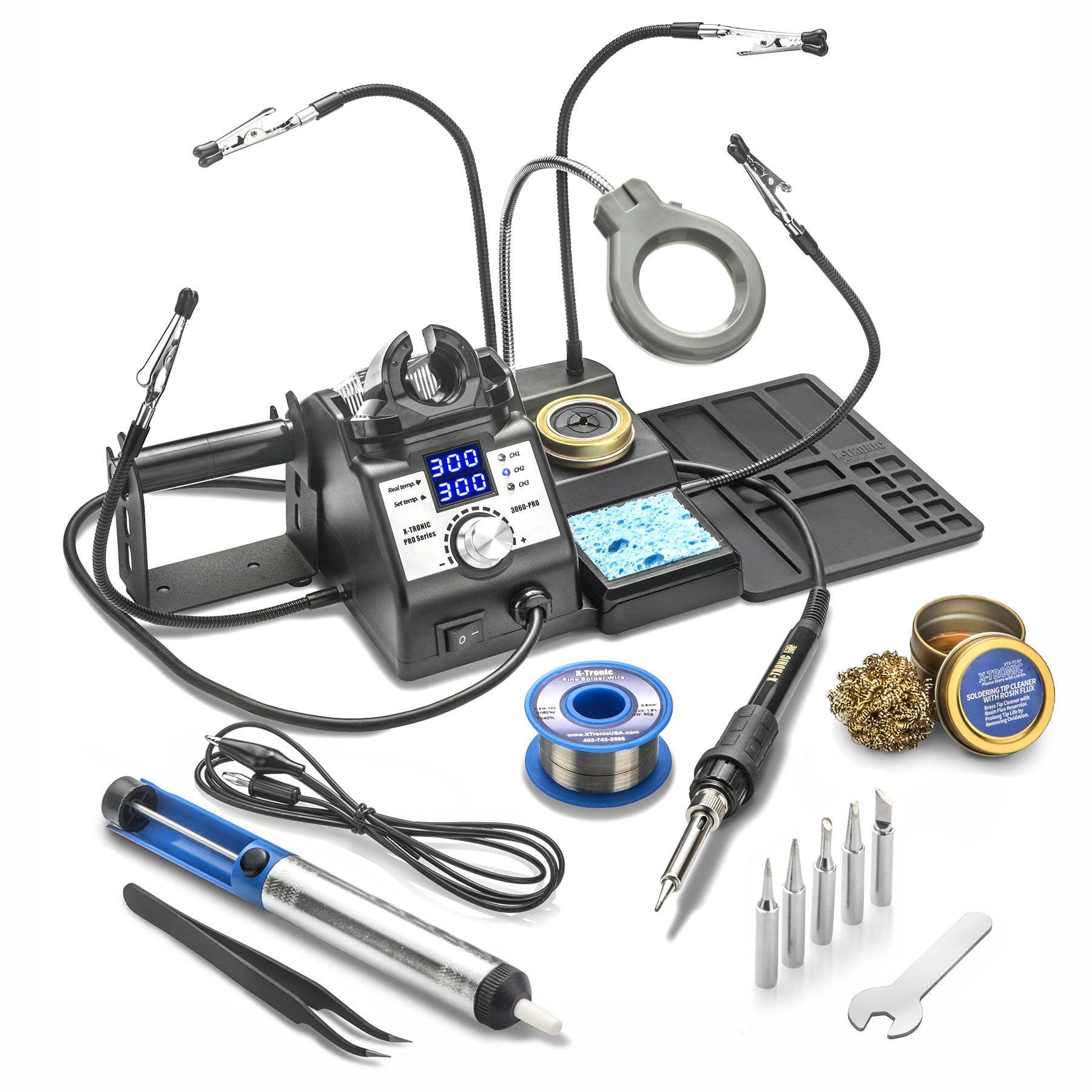
Unpacking the 3060-PRO takes a while: five spare tips, a solder sucker, tweezers, a roll of solder, a brass sponge charged with flux, a spool holder that clamps to the station, four helping hands, and a magnifier lamp on a flex arm. Sixteen pieces in all, and the box is the pitch.

Two of those pieces are why it's here. Helping hands and a lit magnifier are the things a new bench never has, and having both in the box changes how quickly you can start. The rest is sound: set and actual temperatures on separate readouts, a sleep timer at 5, 10, or 30 minutes, ±3.6 °F stability across 194 to 896 °F, and an anti-static grounding wire for the board in front of you. We think it's the best-equipped station here for someone starting from nothing.

The iron itself is a 60-watt handpiece inside a 75-watt station, so thick wire and heavy ground planes take patience rather than speed. If that's most of your work, put the money into power instead. If it's occasional, the helping hands and the light will save you more time this year than extra watts would.

Pros

  • Sixteen-piece kit covers a bare bench
  • Helping hands, magnifier lamp, and spool holder included
  • Separate readouts for set and actual temperature
  • Anti-static grounding wire for board work

Cons

  • Some units fail around eleven months
Our verdict

For a bench built from nothing, we start with the 3060-PRO — the kit covers the third hand, the light, and the spares you'd otherwise buy one at a time.

Check Latest Price
5

Best Compact 2-In-1

WEP 882D

89 /100
LBD Score Excellent

Key details

Weight
2.43 lb
Wattage
750 watts
Displays
Separate LED readouts for iron and hot air
Temperature Range
212 to 896 °F
View on Amazon

Two tools share one 1.1 kg housing here, with separate power switches so the iron can run while the gun stays cold. That's a small thing that turns out to matter: most of a soldering session doesn't need hot air, and a gun left idling just cooks its nozzle.

The gun does what a gun should — heat-shrink, small surface-mount removal, warming a joint an iron can't reach — with standby when you set it down and a shutdown cycle that keeps air moving while the element cools. Between them you get 750 watts, 212 to 896 °F, PID control on both sides, and a calibration function. Five tips, three nozzles, two spools of solder, tweezers, a pump, and brass wool come in the box.

Where it stops is thermal mass. On a multilayer board with a big ground plane, or a connector soldered to one, the gun takes a long time to get there and the iron isn't far behind. We take the 882D for a small bench doing repairs and hobby work, where that ceiling rarely comes up. One habit worth forming: both switches sit right on the front and are easy to bump, so check them before you plug in.

Pros

  • Iron and hot air with independent switches
  • Compact 1.1 kg body fits a small bench
  • Standby for the gun and sleep for the iron
  • Full accessory set including two solder spools

Cons

  • Hot air struggles on large ground planes
Our verdict

We recommend the 882D to anyone who needs hot air now and then but doesn't want a rework tower on the desk; it's small, quick, and clear about its limits.

Check Latest Price
6

Best for Beginners

WEP 927-IV

88 /100
LBD Score Excellent

Key details

Weight
2.25 lb
Presets
3 channels
Wattage
110 watts
Temperature Range
194 to 896 °F
View on Amazon

A first station needs three things: heat that arrives quickly, a holder that doesn't tip, and somewhere to put the parts you aren't soldering yet. The 927-IV is built around that list — 110 watts, three preset buttons on the front, tip storage slots in the base, two helping hands, and a magnifier on a flex arm with LEDs in it.

The presets are the feature we actually use. Save the two or three temperatures your work lives at and you stop dialing numbers between jobs, and the sleep mode drops the tip down instead of leaving it cooking. It reaches temperature fast, the base is compact enough to sit beside a keyboard, and everything tucks into one footprint instead of creeping across the desk.

Two things to plan around. This model uses WEP's own #1400 tip series, so order spares with the station rather than after your first dead tip. And the temperature can run short of the setpoint, so the honest test is to give it the job you'll do most in the first week and send it back inside the window if it can't hold your working range. Do that and it's the friendliest station here to learn on.

Pros

  • Three preset channels for repeat temperatures
  • Built-in helping hands and LED magnifier
  • Fast 110 W heating with sleep mode
  • Compact footprint with tip storage in the base

Cons

  • Magnifier is small for close board work
Our verdict

The station we hand first-time buyers is the 927-IV: presets, helping hands, and quick heat shorten the learning curve more than another 20 watts ever would.

Check Latest Price
7

Repair Shop Bench

YIHUA 853D 2A USB

90 /100
LBD Score Outstanding

Key details

Air Volume
Up to 120 L/min
DC Power Supply
0–15 V, 0–2 A
Iron Temperature
392 to 896 °F
Hot Air Temperature
212 to 896 °F
View on Amazon

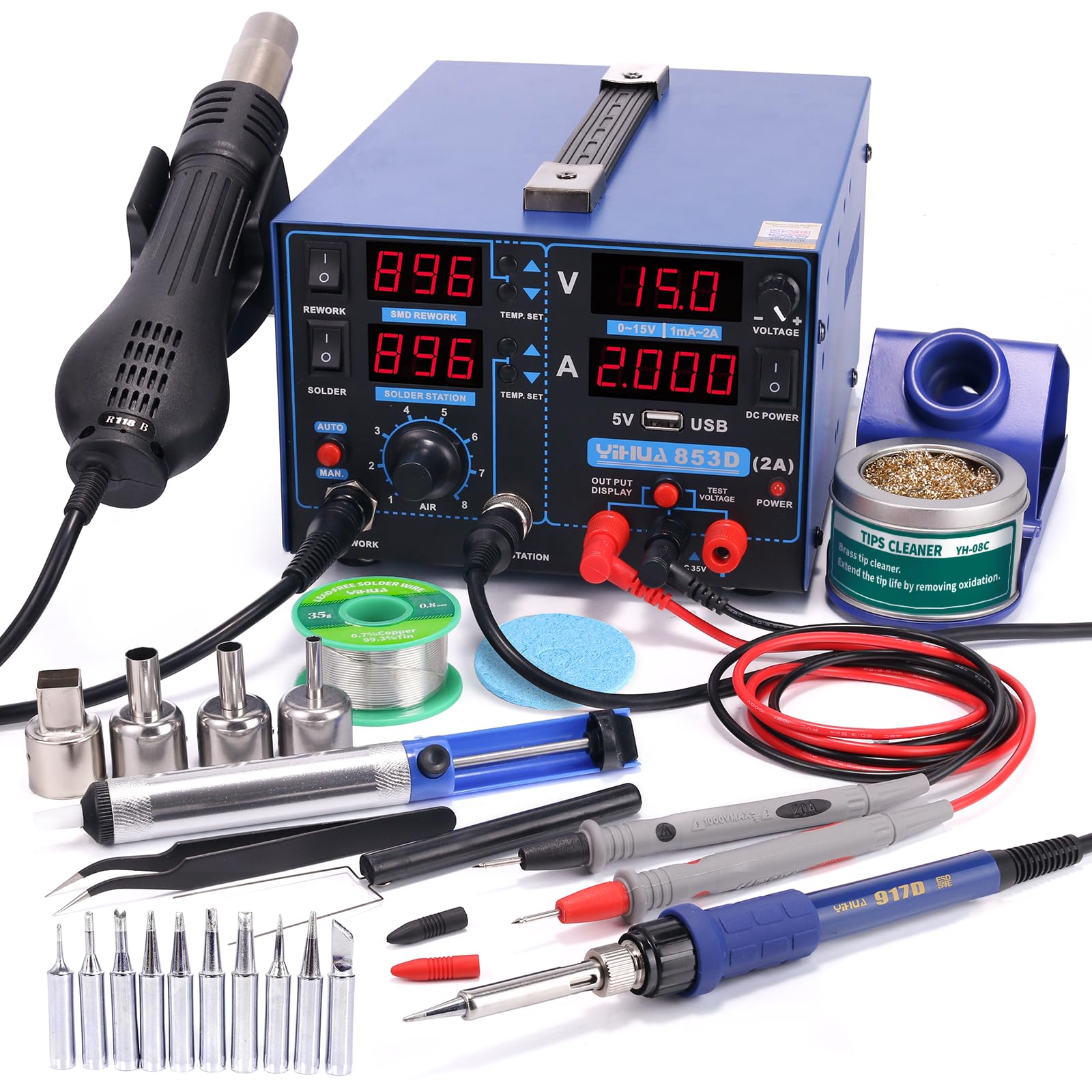
Three power cords become one. That's the pitch of a combined station, and on the 853D it mostly holds: a soldering iron, a hot air gun, and a DC supply with its own meter, all on a single cord and a single footprint.

The iron runs 392 to 896 °F and the gun 212 to 896 °F with adjustable airflow up to 120 L/min, both under PID control, and a fail-safe cuts the heater if the airflow stops — the detail we want on any tool that can sit at 896 °F with a fan behind it. The gun sleeps in its cradle, which is the difference between a bench tool and a fire risk on a busy afternoon.

The supply is what separates this from the other 2-in-1s here: 0 to 15 V at 0 to 2 A, a 5 V USB port, and a 35 V meter. That's enough to run a board you're working on or check a battery without reaching for a second box, and on radio repairs it saves a walk across the shop.

Where it earns its place is a bench that genuinely needs all three — repair work with a radio or a power rail in the mix, an iron and a gun already out, a supply as the next thing you reach for. If the supply is a bonus rather than a requirement, the 882D does iron-and-air in a fraction of the footprint, and the 939D+ does the iron half better for far less.

Pros

  • Iron, hot air, and DC supply on one cord
  • Adjustable airflow to 120 L/min with fail-safe
  • Sleep and auto-shutdown on the hot air side
  • Ten iron tips and four nozzles included

Cons

  • DC supply and voltmeter are the least dependable parts
  • Heavy at 4.76 kg and deep on the bench
Our verdict

We recommend the 853D when you need an iron, hot air, and a bench supply together; if the supply is a bonus rather than a requirement, buy smaller.

Check Latest Price

How We Tested the Best Soldering Stations

We started by gathering every station we could find with an adjustable temperature and a digital readout, then cut the list with three filters: tips that are still easy to buy, a range that covers both leaded and lead-free solder, and what actually ships in the box. That left 12 stations, which we bought at retail and kept on the bench for six months.

Heating speed came first. We timed each one from a cold start to a working temperature with a stopwatch, then ran a recovery test — a joint to a scrap ground plane, eyes on the readout — and checked tip temperature with a thermocouple before and after a heavy joint to see how far it sagged and how fast it climbed back. A 90-minute session showed which ones drifted, and we came back the next morning to see whether the setting landed where it had the day before.

Then the real work: reflowing header pins on microcontroller boards, replacing capacitors on a monitor's power board, splicing instrument cables, drag-soldering a fine-pitch chip, and, on the two-in-one units, lifting an SMD resistor with hot air. We noted whether the grip got hot after an hour, whether the display was readable from a normal sitting position, and how much bench the base actually ate up.

Ease of use we judged by setting one up without the manual, switching presets mid-project, and letting it idle to see whether sleep mode kicked in and how it came back. Durability meant wrapping the cord around the body the way you would when clearing the bench, tugging at the strain relief, and changing tips while hot. Finally we priced out what the included tips, brass wool, helping hands, solder, and tweezers would cost on their own, because a bare station and a full kit aren't the same value even at the same wattage.

How to Choose a Soldering Station

Start with the joint, not the station

Hot air is the feature that sells 2-in-1 stations and the one most people use least. It earns its bench space for surface-mount removal, shrinking heat-shrink tubing, and warming a joint an iron can't reach. If your work is through-hole parts, wires, connectors, and the occasional switch, an iron-only station with better control will serve you longer than a cheap combo whose gun lives in its cradle.

Our rule is simple: buy the gun when you can name the job it's for. If you can't, put the money into the iron.

What wattage actually buys

Wattage gets quoted inconsistently — sometimes the whole station, sometimes just the handpiece — and it measures something narrower than most shoppers assume. What you're buying is recovery: how quickly the tip climbs back after dumping heat into a joint. A well-regulated 65-watt iron holds temperature better than a loosely controlled 110-watt one.

Where headroom does show up is thermal mass: thick wire, big connectors, ground planes. If that's your daily work, pay for power. If it's occasional, pay for control.

The display is a setpoint, not a measurement

The number on the screen is what the station is trying to reach, not what the tip is doing. Most of these use PID control and most offer a calibration routine, and a station that reads high will still solder beautifully once you learn its offset.

So check once, in the first week: bring the tip to your working temperature, compare it with a tip thermometer or a known alloy's melting point, then run the calibration and note the offset. That half hour is worth more than any extra degree of claimed range.

Tips are the recurring cost

Tip families — T18, the 900M-style, and maker-specific series — differ in price and, more importantly, in how many shapes you can still buy in two years. A 1.6 mm chisel covers most through-hole and wire work; add a fine conical and a wide blade and you've covered nearly everything a home bench meets.

Before you order, look up whether spare tips exist in the shapes you use and what they cost. A cheap station with expensive or scarce tips is the more costly purchase.

Stands, space, and the paperwork

Two things get overlooked. The first is the holder: one that tips, or a cradle that grabs, costs somebody a burned finger eventually, so base weight matters more than it looks in photos. The second is warranty coverage. Most stations here carry twelve months of manufacturer support; at least one lists none at all.

Read that line before you buy, because heaters and wands are the parts that fail first, and a warranty is what turns a failure into an inconvenience.

Frequently Asked Questions

Final Verdict

Our bench pick is the Hakko FX888DX. The dial, the stable base, and the T18 tip family make it the easiest station here to live with day after day, and nothing in this group is better at simply holding a temperature while you work.

Two requirements change that. If the station is shared or the settings must not drift, the Weller WE1010NA's setpoint lock is worth the extra. If you need hot air, the WEP 882D does the iron-and-air job in a fraction of the bench — and the YIHUA 939D+ gives budget buyers a metal chassis and real PID control.