Best PC Cases of 2026

A PC case is the part of a build you look at every day, so it's tempting to buy the one with the most glass. Then summer arrives, the fans ramp up like a hair dryer, and you remember that every pane of tempered glass is a place air can't get in. The right case fixes both: it feeds your components cool air, gives the cables somewhere to hide, and leaves enough elbow room that the build is fun instead of a fight.

My team and I spent six months building in, rebuilding in, and living with 12 cases, from compact mesh boxes to a full tower with a screen in the glass. What separates them rarely shows up on a spec sheet: whether the panels come off without a fight, whether the front actually feeds the fans behind it, and whether your cables disappear once the side goes back on. Included fans, radiator clearance, and front USB-C are on nearly every box now, so we judged how those claims held up. Below are the ones I'd happily build in twice.

1

Best Overall

NZXT H6 Flow

96 /100
LBD Score Outstanding

Key details

Weight
20.7 lb
Dimensions
16.34"D x 11.3"W x 17.13"H
Included Fans
3 × 120mm angled
Motherboard Support
ATX, micro-ATX, mini-ITX
View on Amazon

The three included fans don't sit behind the front panel. They're angled into the front-right corner, blowing across the motherboard and toward the rear exhaust, which is why the H6 Flow cools as well as it does with only three fans. The dual-chamber layout puts the power supply and drives behind the motherboard rather than under it, so the glass side shows components instead of a cable basement. At 16.34 by 11.3 by 17.13 inches it tucks under a desk, and it takes ATX, micro-ATX, and mini-ITX boards.

What made it our top pick is how little you give up. Three 120mm fans come included, the perforated top and side panels feed them without a solid front getting in the way, and the wraparound glass shows the build off without choking it. Wide channels, hooks, and straps handle cabling, and the front and side panels are held by simple clips rather than thumbscrews.

The bottom fan mount is empty out of the box, and that's the one addition worth making, since a fan there feeds the graphics card directly. At 9.4 kg the case is heavier than its compact footprint suggests, so lift it with both hands once it's loaded. Otherwise it's hard to fault: we were in and out of this one repeatedly during testing and never once went looking for a screwdriver.

Pros

  • Three angled 120mm fans included and well placed
  • Dual-chamber layout hides the PSU and drives
  • Tool-less side panels and wide cable channels
  • Takes ATX, micro-ATX, and mini-ITX boards

Cons

  • Bottom GPU intake fan not included
Our verdict

Our pick for most ATX builds: three well-placed fans, a dual-chamber shell, and glass that shows off the parts without blocking the air.
Check Latest Price
2

Best Value

Lian Li V100

94 /100
LBD Score Outstanding

Key details

Included Fans
4 × 120mm PWM ARGB
Max GPU Length
420 mm
Motherboard Support
ATX, micro-ATX, mini-ITX
Max CPU Cooler Height
178 mm
View on Amazon

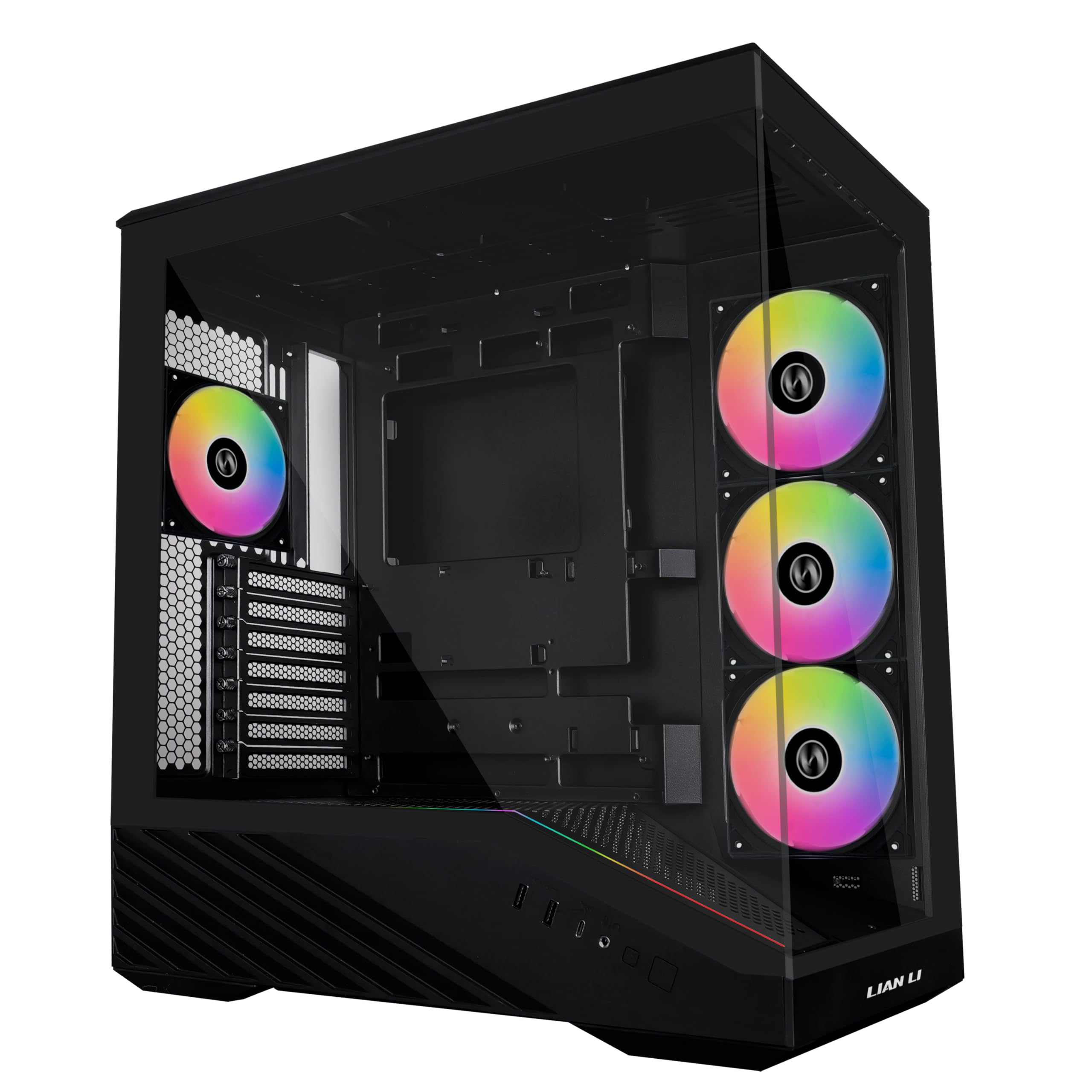
Back-connect motherboards move their power and data connectors to the back of the board, which is the cleanest cable-free look a build can have, and it only works if the case is cut for it. The V100 is set up for exactly that, in both ATX and micro-ATX sizes, and it also takes a 420mm graphics card, a 178mm CPU cooler, and a 360mm radiator in the roof. For an entry-price case, that's an unusual amount of forward planning, and it's the reason this one is our value pick.

What we keep coming back to is the bundle. Four 120mm PWM ARGB fans arrive pre-installed and daisy-chained, along with a 26-LED strip that syncs with your motherboard software. You can finish the build the day the case arrives instead of waiting on a fan order, and the lighting is addressable rather than a fixed rainbow.

The compromises are mostly cosmetic. The front panel mixes plastic with steel and glass, so it doesn't have the all-metal heft of the Corsair 4000D RS, and the interior is a conventional bottom-mount layout rather than a dual chamber. The thumb screws and the tool-less side panels are the parts you touch most, and they hold up. If your board is a standard one, you still get the access and the fan bundle — you just don't get the hidden-cable trick.

Pros

  • Four PWM ARGB fans and an LED strip included
  • Supports back-connect ATX and micro-ATX boards
  • 420mm GPU and 178mm cooler clearance
  • Tool-less side panels

Cons

  • One-year warranty is the shortest here
Our verdict

A complete cooling kit and back-connect support at an entry price — the one we point at anyone who wants the fans and lighting sorted in the box.

Check Latest Price
3

Best Budget

NZXT H5 Flow

91 /100
LBD Score Outstanding

Key details

Top Radiator
Up to 240mm
Included Fans
2 × 120mm
Front Radiator
Up to 360mm
Motherboard Support
ATX, micro-ATX
View on Amazon

The smartest thing about the H5 Flow is under the graphics card. The power supply shroud is perforated on its side and its floor, so two bottom-mounted fans can pull air straight up into the GPU instead of leaving it to breathe in a dead corner. At the lowest price in this group that's real engineering rather than a mesh panel and a hope, and it's why this is where we point anyone whose budget is fixed.

The rest is deliberately plain: ultra-fine mesh across the front, top, and side, two pre-installed 120mm Quiet Airflow fans — one front, one rear — and room for a 360mm radiator up front and a 240mm up top. Two fans is the honest minimum, so plan on a bottom intake to make that vented shroud earn its keep; the case is laid out around it.

Building in it is straightforward. Wide channels, hooks, and straps handle the cabling, the panels come off easily, and at 8 kg it sits steady on a desk. There's no lighting and no glass-front drama — the tempered glass side is there to show the parts, not the case. What you're paying for is mesh and a vented floor, and both are done properly.

Pros

  • Vented PSU shroud feeds the GPU from below
  • Mesh on front, top, and side
  • 360mm front and 240mm top radiator support
  • Lowest price in this roundup

Cons

  • Only two fans included
Our verdict

The budget case we trust: a vented shroud that feeds the GPU, mesh on three sides, and a price that leaves room for the extra fan it needs.

Check Latest Price
4

Best for Rebuilding

Corsair 4000D RS ARGB

92 /100
LBD Score Outstanding

Key details

Dimensions
19.17"D x 9.41"W x 19.13"H
Included Fans
3 × 120mm RS ARGB PWM
Radiator Support
Dual 360mm
Motherboard Support
ATX, micro-ATX, mini-ITX
View on Amazon

Corsair's InfiniRail is the detail that separates the 4000D RS from every other mid-tower here. The front and roof fan mounts are sliding steel rails rather than fixed hole patterns, so a 140mm fan sits where you want it instead of where the stamping allows. The FRAME system goes further, letting you swap the motherboard tray and other panels instead of replacing the whole chassis when your needs change.

Three RS ARGB PWM fans come pre-installed in the front, daisy-chainable on 4-pin PWM with a Zero RPM mode for near-silent idling, and the internal side panel works as a cable cover or comes off so you can mount fans to it. There's an anti-sag bracket for heavy graphics cards and support for dual 360mm radiators, so a big card and a thick AIO can share the case without a fight.

Where it earns its price is adaptability. We spent longer than we needed to sliding rails and re-routing cables, and that's the point: this is a case for someone who swaps coolers and reconfigures airflow every year or two. The front panel's three-dimensional Y perforation moves air without a flat sheet of mesh, and the whole thing looks tidy enough to leave the glass on.

One thing to know before you commit: at 8.2 kg and just over 19 inches in each direction, it's a full-size mid-tower rather than a compact one, and it will dominate a small desk. If you build once and close the panel for three years, the H6 Flow gets you similar airflow for less.

Pros

  • InfiniRail mounts slide to fit different fan sizes
  • FRAME system lets you swap panels and trays
  • Three RS ARGB PWM fans included
  • Dual 360mm radiator support and GPU anti-sag

Cons

  • Rear exhaust fan is a separate purchase
Our verdict

For builders who reconfigure every year: sliding fan rails and swappable panels make this the most adaptable case here, if you'll actually use them.

Check Latest Price
5

Best Full-Tower

Antec Flux Pro

91 /100
LBD Score Outstanding

Key details

Included Fans
6 PWM
Expansion Slots
8
Radiator Support
420mm + 360mm together
Motherboard Support
E-ATX, ATX, micro-ATX, mini-ITX
View on Amazon

Twenty-nine pounds and 21.45 inches tall, with walnut strips across the front and mesh intakes running down both sides of them. The Flux Pro doesn't look like a gaming case, which is part of why it's here: it's a full tower you can leave in a living room, and it doesn't need RGB to justify the space it takes up.

The capacity is the real story. A 420mm radiator goes in the roof and a 360mm in front at the same time — no other case here lists both — and the 90° iShift mount turns the power supply on its side so its cables exit toward the back panel instead of into a basement. Six PWM fans come pre-installed, including two reverse-blade units on the shroud pushing air up at the graphics card, and the top, front, and shroud brackets lift out so radiator work happens outside the case.

The CPU and GPU temperature display on the front sounded like a gimmick to us until we were setting a fan curve and could watch the numbers move without alt-tabbing to a monitoring app. That's the pattern with this case: the features that look like box copy turn out to be the ones you use. The removable brackets are the other one — fitting a 420mm radiator on a bench and lowering the whole assembly in is a different job from wrestling it into place.

The cost is weight. Twenty-nine pounds empty means two people for the lift, and a loaded one isn't something you move on your own. Eight expansion slots and ten internal drive bays make it the only case here that won't run out of places to put things.

Pros

  • 420mm and 360mm radiators fitted at once
  • Six PWM fans included, two reverse-blade
  • Removable top, front, and shroud brackets
  • Front CPU and GPU temperature display

Cons

  • 20.86-inch depth needs a roomy desk
Our verdict

The full-tower answer for thick radiators and quiet builds: a 420mm and a 360mm at once, six PWM fans, and a walnut front that hides the hardware.

Check Latest Price
6

Small Desks

Lian Li A3-mATX

93 /100
LBD Score Outstanding

Key details

Volume
26.3 L
Included Fans
None
Max GPU Length
415 mm
Motherboard Support
Micro-ATX, mini-ITX
View on Amazon

26.3 litres is small enough to share a desk with a monitor, and the A3-mATX still takes a 415mm graphics card, a 360mm radiator in the roof, up to ten 120mm fans, and an ATX power supply mounted at the front or the side. That combination is the whole point: a micro-ATX board and a full-size card in a box that doesn't need a table of its own.

We kept a small case in a roundup of mid-towers because this one doesn't ask you to downsize your hardware, only your footprint. Steel mesh on the side and top gives it the airflow a high-wattage card needs, the walnut front makes it the best-looking small case here, and the clearances back it up — a thick 360mm radiator and a long card are exactly the loadout it's designed around.

There are two costs. No fans come in the box — the price buys the chassis and nothing else — so add a full set to your budget before you compare it with the K2 or the H5 Flow. And there is very little room behind the motherboard, which is why a modular power supply and flat cables stop being nice-to-haves. Everything is reachable, the panels come off easily, and the mesh means you can see the compromise rather than hide it.

Pros

  • 26.3 L with 415mm GPU clearance
  • 360mm radiator and up to ten 120mm fans
  • Walnut front panel and steel mesh sides
  • ATX or SFX power supply, front or side mounted

Cons

  • Almost no cable space behind the motherboard
Our verdict

Buy it for the footprint: 26.3 litres that still takes a 415mm card and a 360mm radiator, provided you supply the fans and keep your cables flat.

Check Latest Price
7

Fan-Heavy First Builds

MUSETEX K2

91 /100
LBD Score Outstanding

Key details

Front I/O
USB-C, 2 × USB 3.0
Included Fans
7 × 120mm PWM ARGB
Max GPU Length
400 mm
Max CPU Cooler Height
165 mm
View on Amazon

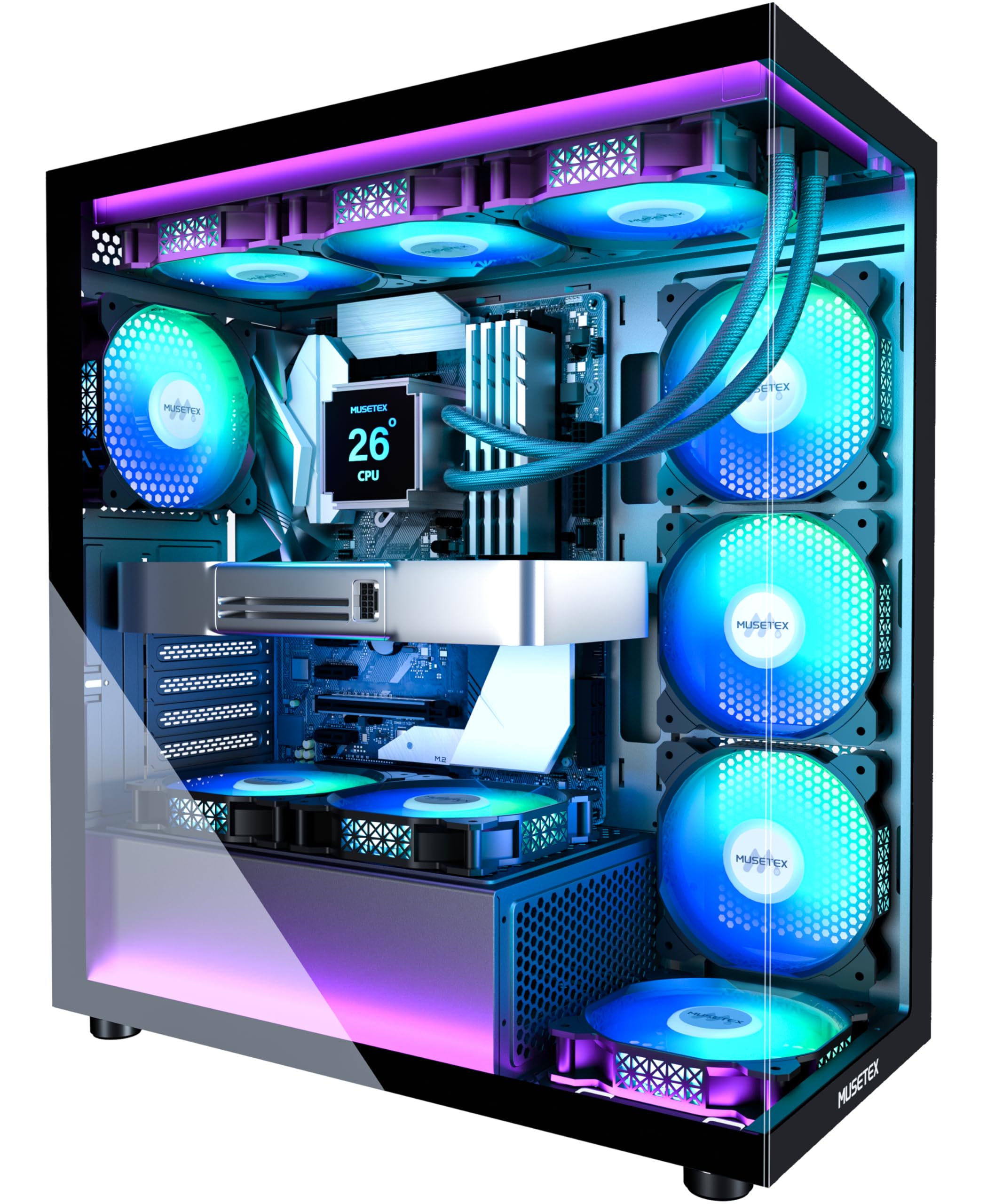
Seven 120mm PWM ARGB fans come pre-installed, behind a front panel and a side panel that are both tempered glass. That's the pitch, and it holds together: the fans are speed-adjustable from 600 to 1,300 RPM, the lighting runs through your motherboard's ARGB software rather than a proprietary app, and the whole set arrives already wired.

The chassis underneath is a conventional ATX mid-tower done properly. Clearances are 400mm for a graphics card and 360mm for a radiator, so a 40-series card and a top-mounted AIO fit without gymnastics. The front I/O covers USB-C, two USB 3.0 ports, and separate headphone and mic jacks, and the bottom dust filter is a solid piece rather than a flimsy sheet.

Assembly is straightforward: the top comes off for an AIO, the glass panels lift away, and there are velcro straps and channels behind the right side panel. One thing we do before mounting a board in a case at this price is check the motherboard standoffs are tight — a loose one is a five-second fix that saves an hour of head-scratching.

What you're buying here is a light show wrapped around a competent mid-tower, and at this price that's a fair trade. The airflow, the card clearance, and the routing are all sorted. Check your power supply length and cooler height against it before you order and the rest takes care of itself.

Pros

  • Seven PWM ARGB fans pre-installed and wired
  • Dual tempered glass panels front and side
  • 400mm GPU and 360mm radiator clearance
  • USB-C plus two USB 3.0 on the front panel

Cons

  • Power supply capped at 140mm with the drive holder in
  • CPU cooler limited to 165mm
Our verdict

Seven ARGB fans, two glass panels, and front USB-C in one box — the value pick for a first build that has to look like a showcase.

Check Latest Price
8

Showcase Builds

HYTE Y70 Touch Infinite

92 /100
LBD Score Outstanding

Key details

Display
14.9-inch 2.5K touchscreen
Vertical GPU
4-slot, PCIe 4.0 riser included
Radiator Support
360mm side and top
Motherboard Support
ATX
View on Amazon

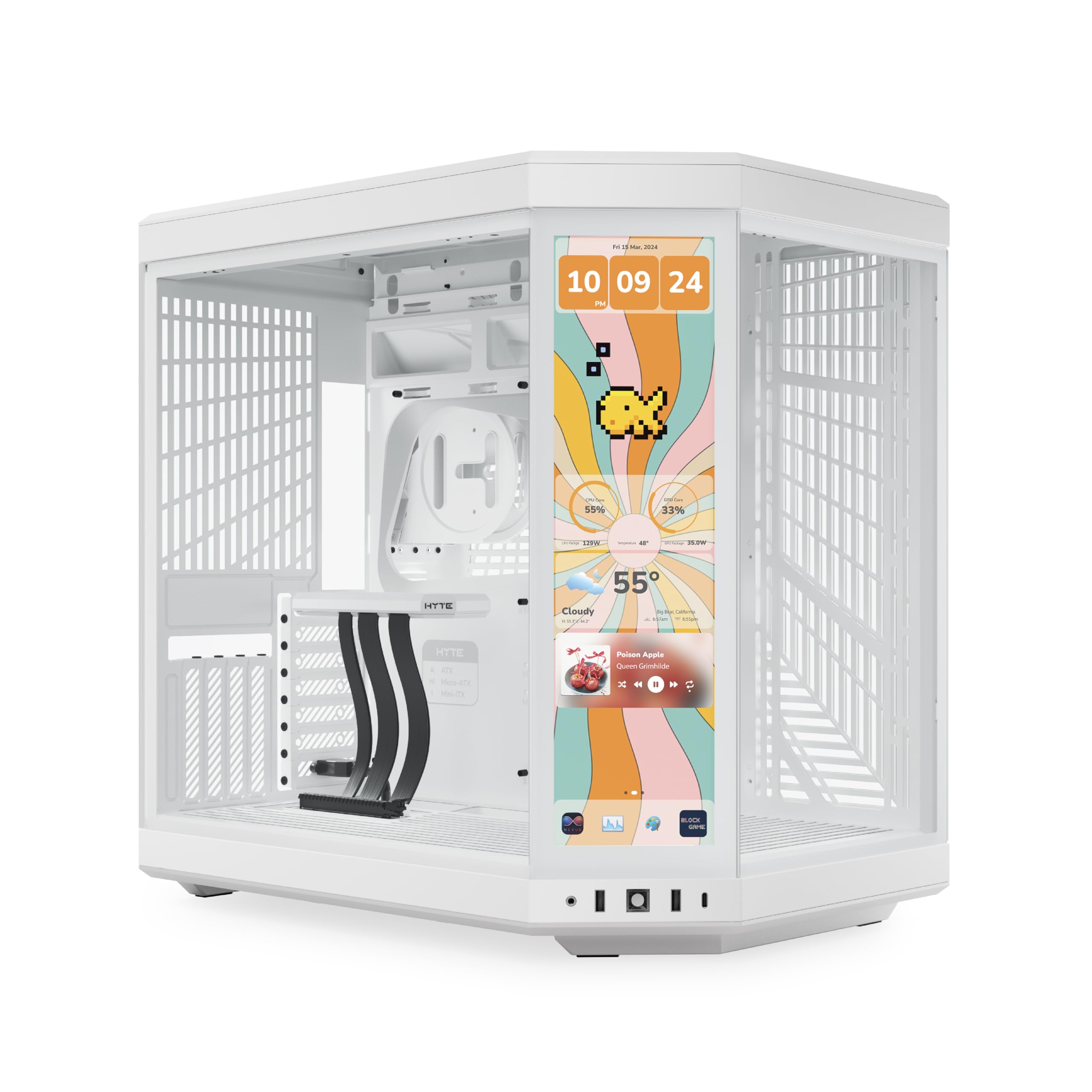
The 14.9-inch display in the corner of the Y70 Touch Infinite is a real touchscreen: 682 x 2560 resolution, 60Hz, ten-point multi-touch, mounted in the glass at an angle you can actually read from a chair. It's the only case here with a screen, and it changes what the case is for — this is a display piece that happens to hold a computer.

What surprised us is how much chassis sits behind the screen. Dual-chamber layout, three-panel panoramic glass, a four-slot vertical graphics card mount with a color-matched PCIe 4.0 riser in the box, and room for a 360mm radiator in the side and another in the top. Cable tie-downs are everywhere, and the glass panels come off easily enough that swapping a card doesn't turn into a project.

Practical matters: it's 24.4 pounds and 23 inches deep, so measure the desk before you fall for the screen. The glass shows everything, too — dust, fingerprints, and every cable you didn't route properly, which puts a premium on doing the back of the case as carefully as the front.

None of that makes it a sensible first case, and it isn't meant to be. What it is: the one case here that gives you something to do with the build once it's finished — a temperature panel, a system monitor, a looping video on the glass. If the machine is going on a desk where people will look at it, the premium buys something nothing else here offers. If it's going under the desk, spend the money on the graphics card.

Pros

  • Real 14.9-inch 2.5K multi-touch display built in
  • Four-slot vertical GPU with PCIe 4.0 riser
  • 360mm radiators in the side and the top
  • Dual-chamber layout with three-panel glass

Cons

  • No fans included at a premium price
Our verdict

A showpiece with a working touchscreen; worth the premium if the build is going on display, not if it's going under the desk.

Check Latest Price

How We Tested PC Cases

We started with the cases that kept surfacing in owner reviews and build threads, then filtered by form factor and price until the shortlist covered ATX mid-towers, dual-chamber designs, a full tower, and one small mATX box. That left 12, and each one got the same six months: built once with an air cooler and a mid-range card, then torn down and rebuilt with a triple-fan GPU and a 360mm AIO, plus a 420mm radiator in the cases that claimed to fit one.

I did the cable routing myself every time, with the same 24-pin, three PCIe leads, and a front USB-C header, and noted whether the back panel closed flush or needed a knee on it. Long-card clearance got checked by actually installing one and seeing how tight the power cable bend was; radiator space got checked against the motherboard heatsinks. For build quality I ran a thumb along every edge, flexed the side panels, and looked at how evenly each glass pane sat in its frame, since a crooked pane is the kind of thing you notice every single day.

For airflow, every case ran on its own included fans first, with the same 30-minute gaming loop and 20-minute render, CPU and GPU temperatures logged and fan noise judged from a chair away. Dust filters came out and went back in a dozen times to see which ones warped or rattled, and the whole group ran for weeks at a stretch to see what actually collected inside. Appearance is subjective, but tint depth, glare across curved glass and the touchscreen models, and the finish on mesh and wood fronts are not, so those we compared side by side under the same lamp.

How to Choose a Pc Case

Fit the motherboard and the graphics card first

Every case here lists the board sizes it takes — ATX, micro-ATX, mini-ITX — and that's the hard filter: an ATX board won't go into a micro-ATX chassis, though a smaller board fits a bigger case fine. Then check graphics card length. The K2 allows 400mm, the A3-mATX 415mm and the V100 420mm, which covers most current cards, but the number that catches people is depth with the power cables plugged in. Measure the card from the bracket to the tip and add a couple of centimeters.

CPU cooler height is the other measurement worth taking before you order. The K2 tops out at 165mm and the V100 at 178mm, which is the difference between a big air cooler fitting and a returned case.

Count the fans that come in the box

The sticker price hides one of the biggest differences between these cases. The Lian Li A3-mATX ships with no fans at all, the H5 Flow with two, the K2 with seven. A set of decent 120mm fans adds real money to a bare chassis, so the cheaper-looking case often isn't. Total up what it costs to fill the mounts you plan to use, then compare.

Decide between a wind tunnel and a display case

Mesh front panels move air; solid glass looks better and blocks it. Dual-chamber and panoramic designs get around this by pulling intake from the side and the floor — the H6 Flow angles its front fans across the board for a similar reason. A glass-fronted case with no side or bottom intake is a warm box with a nice window, so decide which matters more before you fall for a photograph. If the build is for looking at, budget for the fans that make the look survivable.

Look behind the motherboard

Cable space is the quiet specification that decides whether a build takes an hour or an evening, and it's tightest exactly where people want it most: small cases. The A3-mATX fits a 415mm card into 26.3 litres, and the cost is a rear chamber with almost no depth. In a compact case, plan on a modular power supply, flat cables and routing before you mount anything. In a mid-tower, wide channels and velcro straps do most of the work for you.

Measure the space, not the volume

Cases are quoted in litres and inches, and neither tells you whether it fits where you want it. A full tower like the Flux Pro is 20.86 inches deep — deeper than plenty of desks — while a compact dual-chamber can be shorter and almost as wide. Measure the space, add clearance at the back for cable bend and at the top for exhaust, and check what the desk or shelf will take. Then take the case's depth and compare it with the gap you actually have.

Frequently Asked Questions

Final Verdict

Most people building an ATX system should buy the NZXT H6 Flow. Three angled fans and a dual-chamber interior do the cooling, the glass shows the build off without blocking it, and the price leaves room for the extra intake fan it wants.

Change the pick when your hardware demands it. The Antec Flux Pro is the only case here that takes a 420mm and a 360mm radiator together; the Lian Li A3-mATX is the one to choose if the case has to live on a small desk; and the HYTE Y70 Touch Infinite earns its premium only if the build itself is the thing people will look at.