Best GPUs for Video Editing of 2026

The moment your timeline stops playing back smoothly is when you start shopping for a graphics card. A GPU won't make you a better editor, but it decides whether scrubbing a 4K multicam sequence feels instant or like watching a buffering wheel. What I didn't expect after months with these cards is how little the clock speeds on the box matter compared with memory capacity and how calmly a card sheds heat at the end of a long render.

My team and I have spent the past six months with eight cards in the same editing rig, from 8GB budget picks to 16GB models. We timed exports, listened for coil whine and fan ramp in a quiet room, and lived with each through a couple of driver updates. The pattern held: capacity is what separates a card that ages well from one that chokes once you stack noise reduction on 6K footage, and quiet cooling beats a benchmark win by two seconds every day. The picks below are the ones I'd install in my own machine.

1

Best Overall

GIGABYTE RTX 5070 Ti Gaming OC 16G

88 /100
LBD Score Excellent

Key details

Fans
3
Memory
16GB GDDR7 256-bit
Boost Clock
2600 MHz
Card Length
13.46 in
View on Amazon

Sixteen gigabytes of GDDR7 on a 256-bit memory interface is the number that wins this one for editing, and it is why we hand the top spot to the most expensive card in the roundup. On a 4K timeline with a grade, noise reduction, and two or three GPU effects stacked, memory is what runs out first. No other card here pairs 16GB with the newer memory generation, so it has both the most headroom and the fastest path to it.

The cooler is the part we did not expect to like as much. Three fans and a 3.9-pound body keep the card composed through long exports; we pushed repeated renders at it and got a low, steady whoosh rather than the ramping whine that makes a desk build unpleasant. The 2600 MHz boost is not the headline here, but it keeps effect previews and GPU-accelerated grades moving with the timeline instead of behind it.

At 13.46 inches long it is also the biggest card we are recommending, and that is a measurement worth taking before you order. A mid-tower with the drive cage clear is fine; a compact case or a prebuilt with a front-mounted radiator needs the distance from the PCIe bracket checked first. With a card this heavy, a support bracket is worth the few dollars.

Price is the honest catch, and we are not going to pretend it is a small one. What you are buying is a card that will not be the reason you cannot move to a 4K or 6K timeline next year, and for anyone editing for money that math usually works out. If it does not, the 16GB Radeon cards below get you most of the memory for considerably less.

Pros

  • 16GB GDDR7 on a 256-bit bus
  • Stays quiet through sustained exports
  • Runs cool under long loads

Cons

  • 13.46 inches long; measure the case
  • Premium price against the rest of the set
Our verdict

We recommend it for anyone cutting 4K multicam or heavy effects: the most memory headroom here, and it stays quiet while using it.
Check Latest Price
2

Best Value

ASUS Dual RX 9060 XT 16GB

91 /100
LBD Score Outstanding

Key details

Memory
16GB GDDR6
GPU Clock
3250 MHz
Slot Width
2.5-slot
Card Length
8 in
View on Amazon

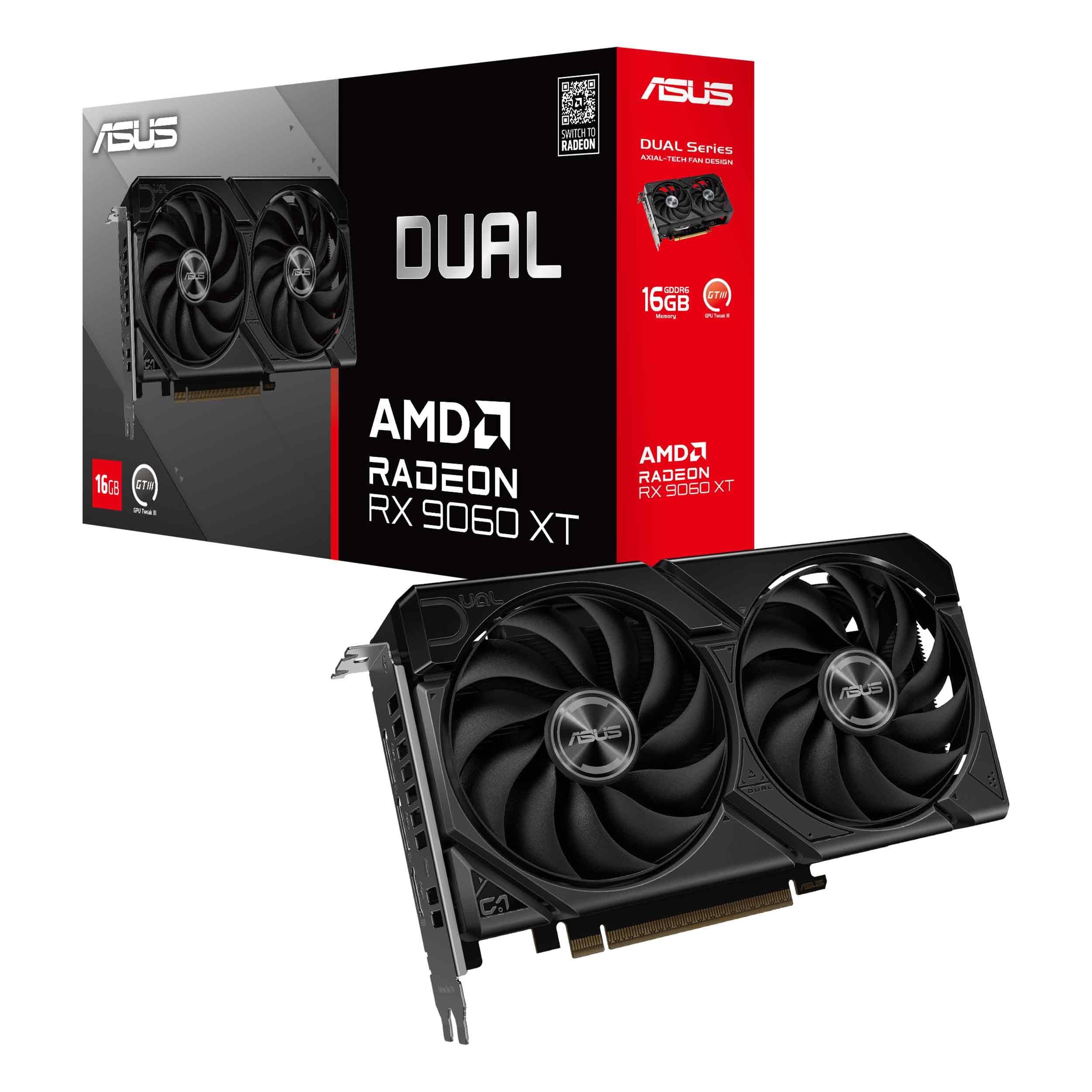
Eight inches long and 2.5 slots thick is a strange way to describe a 16GB card, and it is exactly why this one earns a place. Most of the sixteen-gigabyte cards in this set are twelve-inch three-fan slabs. This fits a compact build without giving up the memory that makes 4K editing workable in the first place.

We think it is the best value of the group. You get 16GB of GDDR6, a 3250 MHz clock, and a cooler quiet enough that fan noise barely registered during our exports. The dual BIOS switch lets you pick a quiet profile or a performance one, and 0dB mode stops the fans entirely while you are cutting and the card is idling. Under a long render they spin up, but they do not intrude.

The compromise is the memory type: GDDR6 rather than the GDDR7 on the GeForce cards, with two fans instead of three, so it works harder during a sustained render than the bigger models do. For 1080p and 1440p timelines with ordinary effects, none of that shows up in a way you will notice. Give it a case with real front-to-back airflow and it will do a full day of editing without complaint.

Pros

  • 16GB of VRAM in an eight-inch card
  • 0dB mode and a quiet dual-fan cooler
  • Dual BIOS quiet and performance profiles

Cons

  • GDDR6 rather than the newer GDDR7
Our verdict

For a compact build that still needs 16GB, this is the card we point to: small, quiet, and the least expensive way into that much memory here.

Check Latest Price
3

Best for Multi-Monitor Setups

ASUS Prime RX 9070 EVO 16GB

92 /100
LBD Score Outstanding

Key details

Memory
16GB GDDR6
Slot Width
2.5-slot
Boost Clock
2610 MHz
Card Length
12 in
View on Amazon

Five display outputs is the detail that makes this card interesting for an editing desk: two HDMI 2.1b and three DisplayPort 2.1a, enough for a pair of editing monitors, a calibrated reference panel, and a client screen without adding a switcher. It also looks like a piece of equipment rather than a toy, matte and plain with no lighting to turn off.

Cooling is where the Prime earns its keep. A phase-change thermal pad sits between the GPU and the heatsink, the dual-ball fan bearings are rated to last twice as long as sleeve designs, and the 2.5-slot body leaves room for the heatsink without burying the slot below. We ran it through a stack of exports and it stayed cool and quiet, with the fans stopping altogether at idle.

Twelve inches of card is the practical catch: this is a mid-tower part, not a compact one, and it takes a 2.5-slot hole in your board. The 2610 MHz OC boost leaves it a step behind the 9070 XT below on raw throughput, but it is the easier card to live with and the only one here that will drive four screens out of the box.

Pros

  • Five display outputs for a multi-screen desk
  • Quiet under load with a zero-fan idle
  • Phase-change pad and dual-ball bearings

Cons

  • Twelve inches long; not a compact-case card
Our verdict

We like it for a multi-monitor desk: five outputs, a quiet 2.5-slot cooler, and 16GB of memory without a showy design.

Check Latest Price
4

Most Powerful

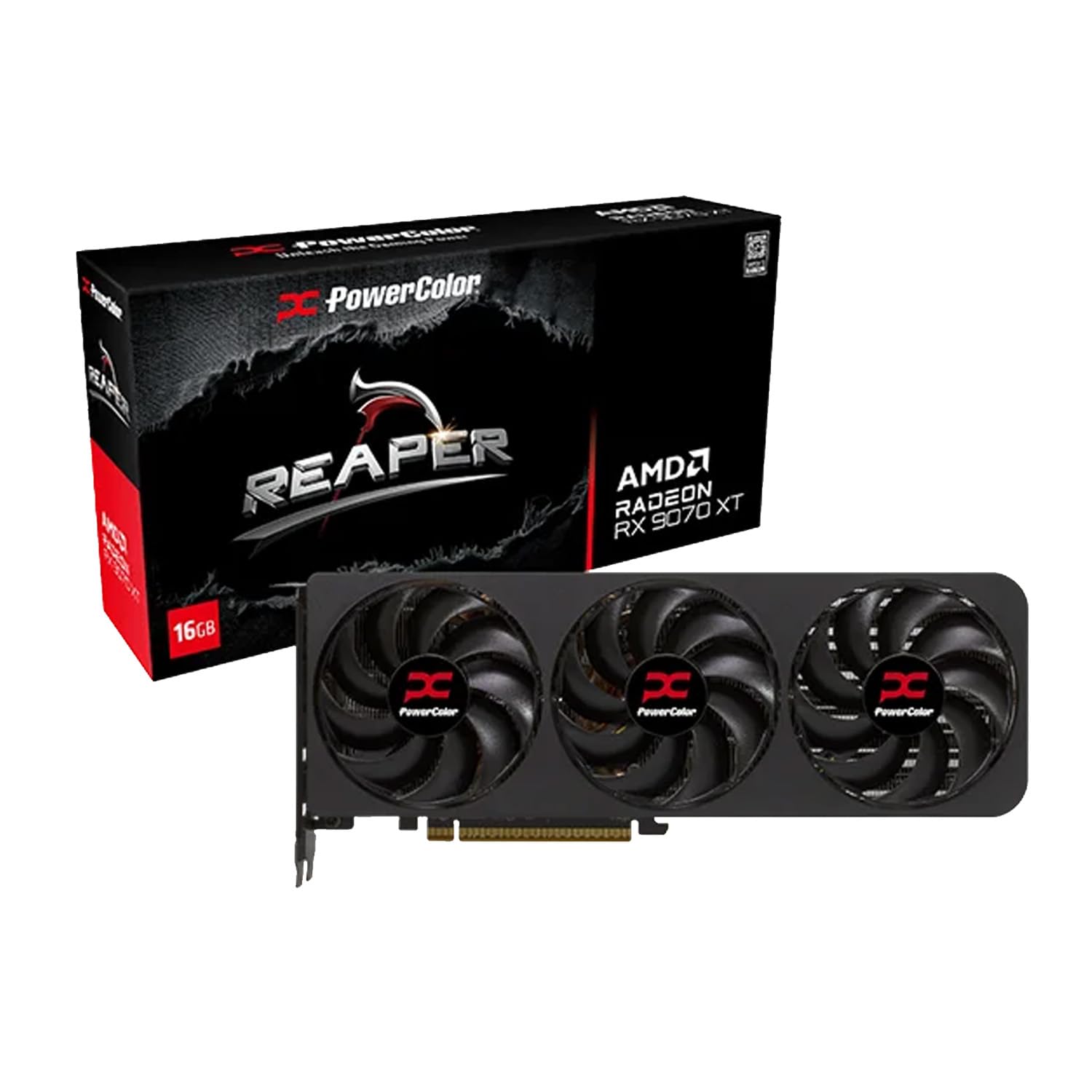
PowerColor Reaper RX 9070 XT 16GB

85 /100
LBD Score Excellent

Key details

Memory
16GB GDDR6
Card Length
289 mm
Minimum PSU
750W
Power Connectors
Two 8-pin
View on Amazon

Two 8-pin connectors and a 750W power supply minimum is the entry fee, and it is worth saying up front, because everything else about this card is about doing more with less space. If your supply is a 650W unit with a single 8-pin lead, the Prime RX 9070 above is the safer call and you will barely feel the difference in an editing timeline.

At 289 mm it is the shortest 9070 XT in this roundup, which changes what is possible: a mid-tower with a front radiator, a case with a drive cage you would rather not remove, a board where a 12-inch card would foul the front fans. The triple-fan cooler handles the heat without drama, and during our long renders the fans stayed on the polite side of audible.

Sixteen gigabytes of GDDR6 and a 2400 MHz clock give it the most raw throughput of anything here. For editing that means GPU-accelerated effects, noise reduction, and color work that do not queue up behind the processor, plus enough memory to keep a 4K timeline resident instead of trickling in from storage on every scrub.

One spec sheet line gives the trade away: a two-year limited warranty where most cards here carry three. That is the price of the throughput and the compact body, and it is a fair one, but it is why we stop short of calling this the default choice. Feed it properly and it delivers the most editing muscle per dollar in this set.

Pros

  • Shortest 9070 XT body at 289 mm
  • Quiet triple-fan cooling, no coil whine
  • Most raw throughput in this roundup

Cons

  • Two-year warranty, shortest in this set
Our verdict

With a 750W supply behind it, we recommend this for heavy 4K timelines: the most throughput here in the shortest body.

Check Latest Price
5

Best Compact NVIDIA

GIGABYTE RTX 5060 WINDFORCE OC 8G

91 /100
LBD Score Outstanding

Key details

Fans
2
Memory
8GB GDDR7 128-bit
Boost Clock
2512 MHz
Card Length
7.83 in
View on Amazon

GDDR7 memory on an 8GB card with a 7.83-inch board is an unusual combination, and it is what makes a small build feel current rather than like a compromise. The 128-bit interface runs at 28000 MHz and the boost clock sits at 2512 MHz, with PCIe 5.0 on the connector so a newer motherboard is not held back by the card.

We think it is the right NVIDIA card for a 1080p or light 1440p editing setup in a compact case. It fitted every build we tried without touching a drive cage, the dual-fan cooler stayed quiet through ordinary exports, and timeline scrubbing was smooth once footage was in a friendly codec. If your desk is small and your projects are modest, this is the tidy answer.

Two fans mean less thermal margin than the three-fan models, so it gets audible before they do during a long render. It also sits in the middle of the price range rather than at the bottom, which is worth knowing before you assume the smallest card is the cheap one. For a cutting station that lives on 1080p proxies, it is plenty of card.

Pros

  • GDDR7 memory and PCIe 5.0
  • Short 7.83-inch board fits small cases
  • Quiet dual-fan cooler in normal use

Cons

  • 8GB of VRAM caps heavy 4K effects
  • 128-bit bus limits memory throughput
Our verdict

For a compact 1080p editing build, we recommend it: current-generation memory and a short board, as long as 8GB fits your timeline.

Check Latest Price
6

Prebuilt Upgrades

MSI RTX 3050 Ventus 2X 6G OC

89 /100
LBD Score Excellent

Key details

Fans
2
Memory
6GB GDDR6 96-bit
Boost Clock
1492 MHz
Card Length
7.4 in
View on Amazon

It is the least expensive card we are recommending here, and it is the one that makes sense for someone with an older desktop they would rather not rebuild. Six gigabytes of GDDR6 on a 96-bit bus, a 1492 MHz boost, and a 7.4-inch board that fits where a twelve-inch card simply will not go.

What matters more is that it draws its power from the PCIe slot, with no six- or eight-pin cable to run. That is the difference between a twenty-minute swap and a power supply upgrade, and it is why this card keeps turning up in hand-me-down builds. Seating it and installing drivers was the whole job in our testing; nothing else needed to change.

What it is built for is HD and 1080p timelines, photo work, and the AI tools in Lightroom and Photoshop that choke on a few gigabytes of shared system memory. As a way to make an old desktop useful again, and to take some load off the processor while you are at it, we think it is a smart buy and the least risky way to spend the smallest amount here.

Pros

  • Slot-powered, with no auxiliary cable
  • Small 7.4-inch board for tight cases
  • Lowest-cost route to a working GPU

Cons

  • 6GB and a 96-bit bus limit it to HD work
Our verdict

We recommend it for reviving an older desktop: no power cable to run, no new PSU, and enough memory for HD and 1080p editing.

Check Latest Price
7

Budget Intel Builds

Intel Arc A750 8GB

86 /100
LBD Score Excellent

Key details

Memory
8GB GDDR6
Interface
PCIe 4.0
Max Resolution
3840 x 2160
View on Amazon

Drivers are the question with any Intel card, and this one is no exception. Arc has come a long way since launch, but it is still the platform where you read the release notes before you update, and where a new game or a new editor version can behave differently on day one than it does a month later.

What it has going for it is quiet operation, a single-fan shroud that stays discreet under load, and a straightforward 8GB of GDDR6 on a PCIe 4.0 interface. It is also fussier about the rest of the system than the GeForce and Radeon cards: it wants a recent platform with Resizable BAR enabled in the motherboard firmware, and older boards can leave performance sitting on the table.

The honest position is that we recommend it to a narrow reader: someone with a recent Intel platform, a spare machine to fill, and the patience to keep drivers current. For everyone else, the extra money a GeForce card costs buys fewer surprises. It is a good card in the right box and a frustrating one in the wrong one.

Pros

  • Quiet even when the fans ramp
  • 8GB of GDDR6 at a budget position
  • Straightforward PCIe 4.0 fit

Cons

  • Wants a recent platform with Resizable BAR
  • Driver maturity still lags the alternatives
Our verdict

We recommend it for a recent Intel build on a tight budget, where its quiet cooler and 8GB make sense, as long as you keep drivers current.

Check Latest Price

How We Tested These Cards on Real Editing Work

Every card here started on a long list pulled from spec sheets, then got cut down by what actually affects editing: at least 6GB of memory with 16GB preferred, PCIe 4.0 or newer, a cooler that fits in a normal case, and power connectors most people already have. That left eight cards, spanning budget 8GB options up to 16GB models built for 4K and 6K timelines.

Each one went into the same editing machine — same processor, 64GB of RAM, same scratch drive — and stayed there for at least a week of real work. That meant a three-camera 4K multicam sequence, a 6K clip with noise reduction and a heavy grade, and exports to both H.264 and H.265, timed to the second. We kept a running tally of export time per dollar, because the fastest card is rarely the smartest buy.

Noise got measured with a meter a foot from the case during a 20-minute export, and we noted when each card's fans stopped entirely at idle. We watched memory usage on the heaviest project to see whether an 8GB card spilled into system RAM and stalled playback. Halfway through, we installed a new driver release on every card and reopened our oldest project files to check nothing broke. We also ran each into a pair of 4K monitors to confirm outputs and refresh rates, checked whether a 2.5-slot cooler cleared the slot below, and looked at how each card sat behind a glass panel — backplate, sag, and all.

How to Choose a Gpu for Video Editing

Start With Memory, Then Its Generation

Editing eats VRAM in a way gaming mostly does not. A 4K timeline, a grade, noise reduction, and two GPU effects stack up until the card starts shuffling data to system memory, and that is when the timeline stops feeling instant. Sixteen gigabytes is the comfortable place to be for 4K work, 8GB is fine for 1080p and light 1440p, and 6GB belongs to HD and photo work.

Generation matters next. GDDR7 moves data faster than GDDR6 at the same capacity, which is part of why the 16GB GDDR7 card at the top of this list leads. If you cut 4K multicam, buy capacity first and memory speed second, because running out is worse than running slowly.

Measure the Card, Not Just the Case

Listings call a 12-inch triple-fan card compact and a 289 mm card short, so ignore the adjective and measure from the PCIe bracket to whatever sits in front of it: a drive cage, a radiator, a front fan. Leave an inch for cable clearance. Slot thickness matters too, since a 2.5-slot cooler can block the slot you were saving for a capture card.

Then count power leads. A 750W unit with two 8-pin cables will feed the biggest card here; a 650W unit with one cable is a reason to choose a smaller card rather than an adapter.

Match the Card to the Software You Cut In

Most editing applications are tuned first for NVIDIA's CUDA path, which is why the GeForce cards here are the safe default. Radeon cards do the same work, but a handful of effects and plug-ins are CUDA-only, so check your editor's list of GPU-accelerated features before you switch teams.

Intel's Arc is the third path and the one whose behavior changes most between driver releases. Five minutes on your software vendor's hardware support page is worth more than any benchmark chart you will find.

Cooling and Noise Over a Full Working Day

An export is a sustained load, not a ninety-second gaming burst, so a card that seems quiet in a benchmark can wear on you by the third render. Three fans generally mean lower rpm for the same heat, and a zero-fan idle mode keeps a desk build silent while you are cutting.

If the machine sits beside you, favor the bigger cooler and set a custom fan curve. Most vendor utilities let you trade a few degrees for a lot less noise, and that trade is nearly always worth it for an editing machine.

Count Your Display Outputs

An editing desk grows: a timeline monitor, a full-screen preview, a calibrated reference panel, and occasionally a client screen. The Prime RX 9070 here offers five outputs, which is unusual and genuinely useful; most cards give you three or four.

Decide how many screens you actually run before you buy, and check the connector mix. HDMI 2.1b and DisplayPort 2.1a are what you want if a 4K high-refresh panel is part of the plan, and a card with the wrong mix can force a dongle into a chain you would rather keep clean.

Frequently Asked Questions

Final Verdict

Our recommendation is the GIGABYTE RTX 5070 Ti Gaming OC 16G for anyone whose work regularly lands on a 4K timeline. It has the memory headroom and the quiet cooler to make long days shorter, and it will be the last of these cards to run out of room as your projects grow heavier.

If your case is small, the ASUS Dual RX 9060 XT 16GB gets you the same 16GB for a good deal less money at eight inches long. And if you already own a 750W supply and want maximum throughput, the PowerColor Reaper RX 9070 XT is the one to put in the cart.