Best Gaming Mice of 2026

A gaming mouse is the one piece of gear your hand never leaves, which is why the wrong one gets old fast. In the first hour you notice the shape; by the third, the scroll wheel; after a long workday, the weight. I have used plenty of mice that looked fine on a spec sheet and turned into a wrist ache by Thursday. The right one fixes that by disappearing under your hand, but only if its shape, weight, and buttons suit how you play.

Over the past six months, my team and I tested 14 gaming mice, from featherweight wireless models to wired ergonomic shapes with more buttons than I needed. We weighed each one, lived with its software, and played everything from fast shooters to click-heavy strategy games. What separated the good ones was not a single headline number. It was whether the shape disappeared in my hand, the clicks stayed crisp, and the battery did not tap out mid-session. The picks below are the ones that kept earning a spot on my desk.

1

Best Overall

Razer Viper V3 Pro

92 /100
LBD Score Outstanding

Key details

Sensor
35,000 DPI Focus Pro
Weight
1.9 oz
Battery Life
95 hours
Max Polling Rate
8,000 Hz wireless
View on Amazon

Fifty-four grams is light enough that the first few swipes feel like a mistake, as if the mouse has arrived before you asked it to. Two evenings in, we stopped noticing it entirely, which is the nicest thing we can say about a gaming mouse. The shape does much of that work: a low, rounded back a claw grip can pull into the palm, a shallow hump a palm gripper can settle onto, and a shell narrow enough at the front that the buttons sit under your fingers rather than ahead of them. If you like a tall arch filling the middle of your hand, try one in person first.

The hardware is the current esports standard — a Focus Pro 35K sensor, Gen-3 optical switches rated for 90 million clicks, and a HyperPolling dongle that delivers a true 8,000 Hz over wireless. We will be blunt about the polling: the gap between 1,000 Hz and 8,000 Hz is not something most players will feel, and it eats battery. At the standard rate the rated 95 hours is generous; leave it at 8,000 and the USB-C cable becomes part of your routine.

Click faults can turn up inside the first year, so the two-year warranty is worth registering as part of what you paid for. What we kept coming back to is how little the mouse asks of you — no weight kit to fiddle with, no button grid to learn, nothing between your hand and the shot.

Pros

  • 54 g makes fast swipes feel effortless
  • 95 hours of rated battery at standard polling
  • Shape works for claw and palm grips
  • 8,000 Hz dongle included in the box

Cons

  • Premium price for esports-grade gains
  • Dongle required, with no Bluetooth fallback
Our verdict

We recommend the Viper V3 Pro to anyone who wants one mouse for competitive shooters and everything else — it is the lightest wireless pick here and the easiest to live with.
Check Latest Price
2

Best for Quiet, Tunable Clicks

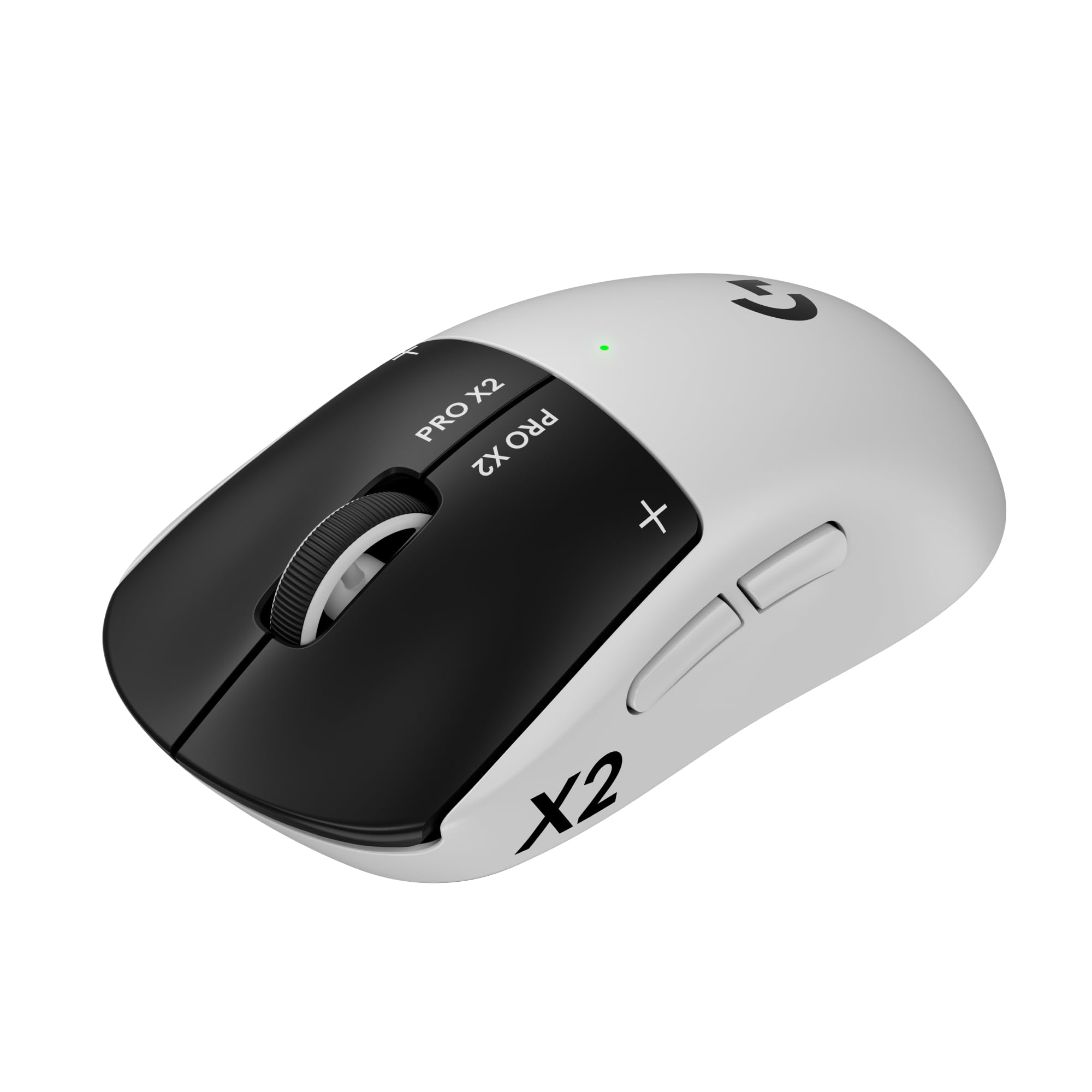
Logitech G PRO X2 SUPERSTRIKE

90 /100
LBD Score Outstanding

Key details

Weight
2.15 oz
Buttons
5
Battery Life
60 hours
Click System
Haptic inductive, 10 actuation levels
View on Amazon

Press a button on the G PRO X2 and almost nothing happens in the room. The feedback arrives in your fingertip instead: Logitech replaced the mechanical switch with an electromagnetic field and a small haptic pulse, so the click feels crisp and deliberate without the plastic snap most gaming mice make. In a quiet office or a shared room it is genuinely strange for the first hour, and then it is hard to go back.

What we did not expect to care about was the tuning. The mouse offers ten actuation points and five rapid-trigger levels, so a press can register at the lightest touch or wait for a deliberate squeeze, and the difference is real in a shooter where a stray tap costs a round. It also takes a session of trial and error to find your setting, which makes this a mouse for someone who enjoys dialing things in rather than someone who wants to plug in and play.

Around that click sits a 61-gram right-handed shell with five buttons and LIGHTSPEED wireless running at up to 8 kHz. The scroll wheel is the one part that feels ordinary; its detents are neither as crisp nor as quiet as the primary buttons, and it is the first thing we noticed after the novelty of the clicks wore off.

Pros

  • Near-silent clicks you can still feel
  • Ten actuation points and five rapid-trigger levels
  • 61 g with a right-handed shape
  • USB-C charging over LIGHTSPEED wireless

Cons

  • Premium price even for a flagship
  • 60-hour rating trails the Viper's 95
Our verdict

Worth the money for players who want near-silent, deeply adjustable clicks — nothing else here lets you tune a press this far.

Check Latest Price
3

Best for Buttons and Comfort

Logitech G502 LIGHTSPEED

93 /100
LBD Score Outstanding

Key details

Buttons
11 programmable
Charging
USB-C or POWERPLAY
Battery Life
60 hours
Adjustable Weights
Four 2 g and two 4 g
View on Amazon

Eleven programmable buttons is more than most games need and exactly what the right ones demand. The G502 puts them where your fingers already rest: two beside the left button, a thumb cluster under a rubberized rest, and a scroll wheel that tilts sideways for two more inputs. In an MMO that is a hotbar; in a spreadsheet it is a shortcut panel.

Weight is the trade. Even without the six included weights — four at 2 g and two at 4 g — this is a substantial mouse rather than a flick machine, and the tunable base lets you shift the balance forward or back until lift-off feels even. The metal-spring tensioning on the primary buttons is a detail we noticed right away: left and right stay light and crisp despite the bulk, and the free-spin scroll mode is the kind of feature you end up using for long documents more than for games.

Wireless is what earns it a place here rather than in a drawer. The layout alone would make it a wired MMO mouse; the LIGHTSPEED link means no cable to fight on a desk that is already crowded. Rated battery life is a solid but unremarkable 60 hours, and POWERPLAY compatibility is the tidy answer — set it on Logitech's charging pad and the battery question mostly disappears, provided you are willing to buy the pad.

Pros

  • Eleven buttons within easy finger reach
  • Six weights tune total mass and balance
  • Free-spinning scroll wheel for long pages
  • POWERPLAY compatible for pad charging

Cons

  • Charging faults can appear inside the first year
  • Dongle-only wireless, with no Bluetooth
Our verdict

For hotbar-heavy games and desk work alike, the G502 LIGHTSPEED is the most flexible mouse here, as long as you do not mind some heft.

Check Latest Price
4

Best Wired Value

Razer Basilisk V3

93 /100
LBD Score Outstanding

Key details

Sensor
26,000 DPI optical
Buttons
11 programmable
Connection
Wired USB
Scroll Wheel
HyperScroll, tactile and free-spin
View on Amazon

Wired, inexpensive, and covered in buttons — the Basilisk V3 is the pick for anyone who wants an ergonomic mouse without a charging routine. The right side is sculpted with a thumb rest that takes some of your hand's weight off the desk, and the eleven programmable inputs include a tilt wheel that adds two more without moving your fingers off the primary buttons.

That scroll wheel is the party trick: a clutch switches it between clicky detents and a free-spin mode that keeps rolling after a flick. Great for long menus, less great for precision zooming if you leave it in the wrong mode. Going optical on the main switches is the right call at this price — they are rated to 70 million clicks with a 0.2 ms actuation — because switches are usually what give out first.

The cable is what you pay for never charging, and it drags on wide swipes unless you give it slack or clip a bungee to the desk. The rest is straightforward: 26,000 DPI is more sensor than most players will use, the eleven lighting zones can be dimmed or switched off, and the shape suits palm and relaxed claw grips better than the flatter esports mice here. Two years of warranty covers a mouse that gets used every day.

Pros

  • Thumb rest and 11 buttons at a budget price
  • Clutch switches the wheel to free-spin
  • Optical switches rated to 70 million clicks
  • No battery to charge or manage

Cons

  • Wheel can drift or scroll on its own
Our verdict

Buy the Basilisk V3 if you want an ergonomic, button-heavy mouse without a charging routine — it is the best value in this group by a wide margin.

Check Latest Price
5

Best Budget MMO Mouse

Redragon M908

89 /100
LBD Score Excellent

Key details

Sensor
12,400 DPI optical
Weight
6.17 oz
Buttons
18 programmable
Connection
Wired USB, 6 ft cable
View on Amazon

Twelve buttons under your thumb, six more on top, and a price that makes the whole thing feel like a mistake in your favor. The M908 is the MMO mouse for someone who wants a hotbar under their hand without paying flagship money, and the sculpted right side with its recessed finger grooves is far more comfortable than the price suggests.

It takes a few sessions before the side buttons stop surprising you. The three rows sit close together, so early play is a lot of hitting the wrong ability; once the muscle memory lands, twelve inputs under one thumb beat reaching for the number row. The 175 grams is the other half of that trade — this is a big, planted mouse for palm grips and deliberate aiming, not for flick shots in a shooter.

Five onboard profiles mean your macros travel to another PC with the mouse, which matters more day to day than the 12,400 DPI on the box, and the braided cable and Teflon feet keep the glide smooth even on a bare desk. Setup is the weak spot: the configuration utility is slow to open and unreliable at saving, so map your binds once, save the profile, and do not plan on tweaking mid-session.

Pros

  • Twelve thumb buttons for MMO hotbars
  • Five onboard profiles travel between PCs
  • Lowest price of any pick here
  • Sculpted grip with recessed finger grooves

Cons

  • Wired only, with no wireless version
  • Buttons can stop responding over time
Our verdict

MMO players on a budget should start here: twelve thumb buttons and five saved profiles for the least money on this list.

Check Latest Price

How We Tested the Best Gaming Mice

We built the shortlist from spec sheets, retailer listings, and the features that come up again and again in owner reviews: weight, grip shape, programmable buttons, wired versus wireless, and battery claims. We filtered for shapes that could suit a range of hand sizes and grip styles, then brought in 14 mice across price points.

For six months, those 14 mice shared desk duty. I used them through workdays of spreadsheets and documents, evening rounds of fast shooters, and longer MMO sessions where side buttons earn their keep. My team rotated them among palm, claw, and fingertip grips and different hand sizes. We weighed each one on a kitchen scale, checked for shell flex and creaks, and noted whether the cable or receiver got in the way.

Performance testing meant tracking slow cursor movement at low sensitivity, lifting the mouse off the pad, and repeating quick flicks to see if the pointer landed where I expected. Button responsiveness got a more annoying test: rapid double-clicks, macros, and side-button combos until we found mushiness or accidental presses. For scroll wheels, we scrolled long documents and switched between free-spin and ratcheted modes where available, listening for skipped steps. Battery life was tracked from full charge to the low-battery warning during normal daily use, with notes on how much RGB and polling rate changed the drain. Durability came from six months of daily handling, drops, cable yanks, and backpack travel, plus a final check for rattles and worn feet. Value was the last filter: we compared what each mouse could actually do against what it cost, not just what the spec sheet promised.

How to Choose a Gaming Mouse

Weight and Grip Come Before Sensor Specs

A 54-gram mouse and a 175-gram one are different tools, not different quality levels. Light mice make wide, fast swipes easier and take strain off your forearm over a long session; heavy, palm-filling shapes steady small movements and give a cluster of buttons somewhere to sit. Grip decides the rest: claw grippers want a low back they can pull into the palm, palm grippers want a tall hump and a thumb rest.

Settle weight class and shape first, then compare sensors. The picks here run from 54 to 175 grams, and that spread explains more about how each one feels than any resolution figure will.

Wireless or Wired Is Now a Question About Chores

The latency argument is settled. LIGHTSPEED and HyperSpeed links are stable enough that a cable is a convenience question, not a performance one. What you are really choosing is a maintenance routine: wireless means a charging cable, a battery gauge to watch, and a mouse that quits mid-match if you ignore both, while wired means a tether you manage with slack or a bungee.

If you never want to think about it, the Basilisk V3 is the least fussy pick here. If you want the clean desk, go wireless and treat charging like you treat your phone.

Count the Buttons You Can Actually Reach

A spec sheet counts every button, including the two your thumb cannot comfortably find. What matters is whether a thumb cluster falls under the pad of your thumb and whether the side buttons are separated enough to identify by feel. MMO players should hold out for a twelve-button grid plus onboard profiles so macros travel with the mouse.

Everyone else is usually better off with five or six well-placed buttons and less to mis-click. The M908 and the G502 sit at the crowded end of this list; the Viper is at the clean end.

Clicks and Wheels Are What Wear Out

Sensors outlive everything else on a mouse. Switches and wheels are what give out, so the mechanism deserves more attention than the DPI figure. Optical switches sidestep the metal contacts that produce double-clicking over time, and the rated lifespans on these picks run to 70 and 90 million clicks.

The wheel is the other wear point, and its feel splits people: clicky detents for precise weapon switching, free-spin for long menus. We prefer a tactile wheel you can trust, with free-spin as a bonus mode rather than your default.

Software, Profiles, and What to Set Once

Every maker wants an app installed: Logitech G HUB, Razer Synapse, Redragon's utility. Use it once to set DPI steps, polling rate, and button maps, then save those settings to the mouse's onboard memory and close it. That is the difference between a mouse that behaves the same on a friend's PC and one that reverts to defaults.

Budget software is the least polished part of this market, so set your binds and leave them rather than tuning between matches.

Frequently Asked Questions

Final Verdict

The Viper V3 Pro is the mouse we point most people to: 54 grams, 95 hours of wireless, and a shape that does not punish either grip. Spend more on the G PRO X2 only if near-silent, deeply tunable clicks are the thing you have been missing.

Spend less on the Basilisk V3 if you would rather skip charging entirely — it gives up wireless and the low weight, and not much else you will notice in everyday play. The M908 remains the answer for hotbar-heavy games on a tight budget.