Best Lightweight Gaming Mice of 2026

A mouse that weighs less than a candy bar is a strange thing to fall in love with, but it happens fast — the first time you flick one across a pad in a firefight, your old 90-gram standby starts to feel like a paperweight. The catch is that trimming weight is a series of small trades: shell rigidity, battery life, button count, and how much the sides flex when you squeeze.

My team and I have spent six months with 12 ultralight mice, and the spec sheet turned out to be a poor predictor of which ones we reached for. Polling rates keep climbing into the thousands of hertz, but on a standard 60 Hz monitor most players won't feel the difference — what you feel is shape, weight distribution, and whether the shell creaks mid-swipe.

Your grip matters more than any sensor here: claw-gripping a tall hump gets painful, and palming a tiny symmetrical shell never feels settled. Below you'll find wired and tri-mode wireless picks alike, all of them fast and none of them flimsy.

1

Best Overall

Razer Viper V3 Pro

92 /100
LBD Score Outstanding

Key details

Sensor
35,000 DPI
Weight
1.94 oz
Battery
Up to 95 hours
Wireless Polling
8,000 Hz
View on Amazon

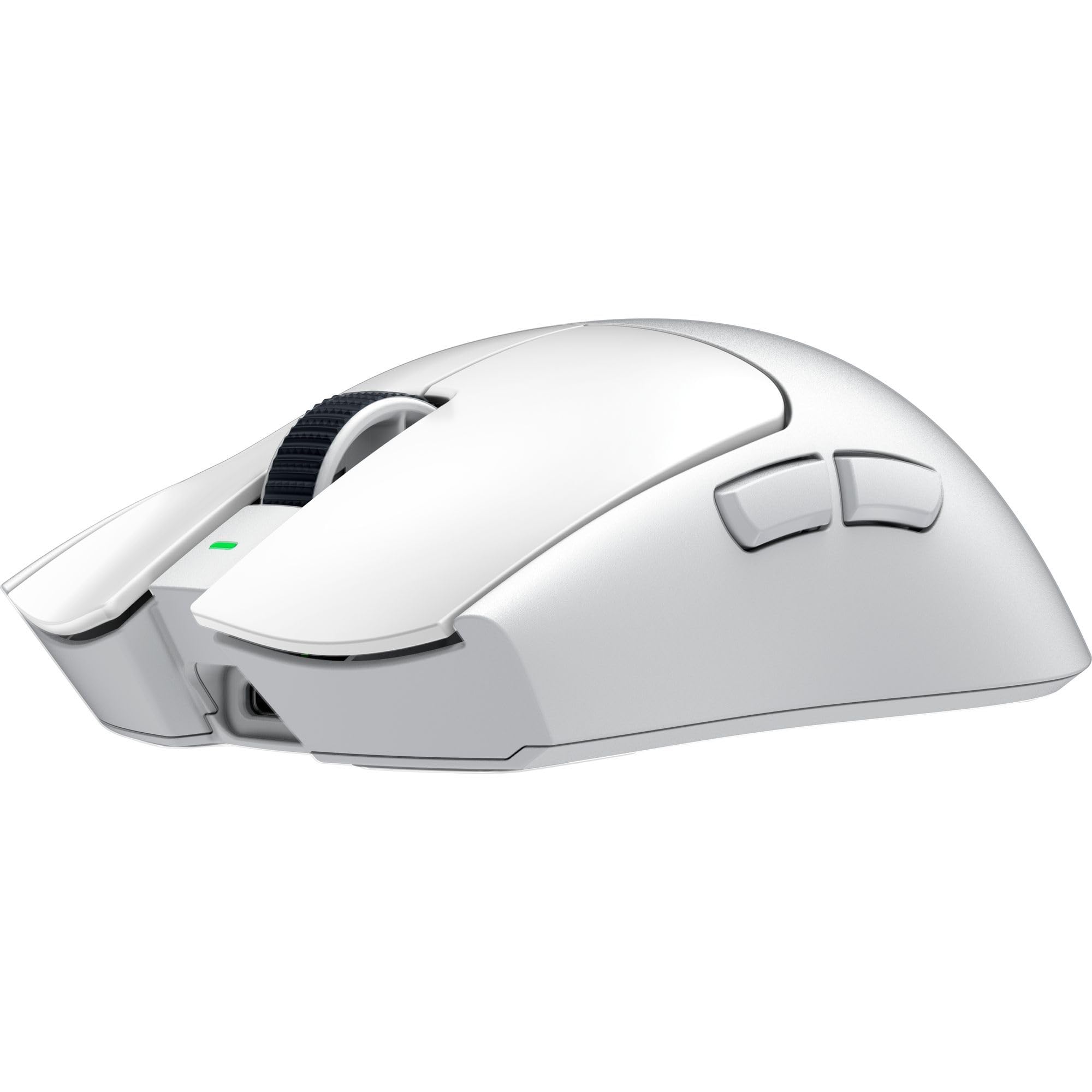
At 55 grams, the Viper V3 Pro lands in the weight class we recommend first: light enough for quick flicks, heavy enough that your hand still knows where the mouse is. It pairs that with true 8,000 Hz wireless and a 95-hour battery, and that combination makes it the easiest mouse here to recommend as a default. The 35,000 DPI sensor and Gen-3 optical switches are more than most players need, but they give the mouse a precise, immediate feel that suits fast aim.

The 8K polling is the headline, yet we paid more attention to how little the wireless setup gets in the way. The HyperPolling dongle is included, so there is no extra purchase to unlock the top rate, and the 95-hour rating means the cable can stay in the bag for most weeks. Eight programmable controls also give you room to set up macros or weapon swaps without reaching for the keyboard.

Where it gives ground is on weight, not performance. At 55 g it is lighter than the Logitech but heavier than the 39 g Attack Shark and the 43 g RK, so a pure speed chaser has a case for going lower. The difference is not dramatic in hand, and the Viper's more substantial shell is part of why it works as an everyday mouse rather than a specialist.

The 90-million-click switch rating and included 8K dongle are the practical details that keep it feeling current. Its 55 g shell is the rare ultralight that still works as an everyday mouse, and that is the part that matters after the novelty of the weight wears off.

Pros

  • Balanced 55 g esports weight
  • True 8,000 Hz wireless included
  • Up to 95 hours of battery
  • 35K sensor and 90M-click switches

Cons

  • Premium price tier
  • 8K polling shortens battery life
Our verdict

The Viper V3 Pro is the best lightweight mouse here for most players, pairing 55 g wireless speed with long battery life and a precise sensor.

Check Latest Price
2

Best Wireless All-Rounder

Logitech G Pro X Superlight 2

90 /100
LBD Score Outstanding

Key details

Sensor
32,000 DPI
Weight
2.12 oz
Battery
Up to 95 hours
Polling Rate
2,000 Hz
View on Amazon

The G Pro X Superlight 2 is the least surprising mouse here, and that is exactly why it works. The shape will be familiar to anyone who has used a Logitech esports mouse, the 60 g shell disappears under a claw or palm grip, and the LIGHTFORCE hybrid switches give clicks a crisp, positive feel. The HERO 2 sensor and 95-hour battery keep it competitive on paper, even without an 8K headline.

We recommend it to the player who wants one wireless mouse for competitive games and daily work, because the shape, USB-C charging, and wireless reliability make it easy to live with. The 2,000 Hz polling is a step below the 8K Razer models, but the difference is hard to feel outside a high-refresh setup. What we like most is the consistency: the wireless connection held steady, and the shape never asked us to adjust our grip mid-session.

The scroll wheel is the part to watch over the long term; skipping and reverse scrolling are the failures to look for, and that is why the return window matters. Otherwise the hardware feels solid, and the optional PowerPlay compatibility turns it into a long-term desk mouse rather than one you replace when the battery ages.

Pros

  • 60 g shell with a proven shape
  • Up to 95 hours of battery
  • LIGHTFORCE clicks feel crisp
  • USB-C and PowerPlay support

Cons

  • Heavier than the ultralight picks
Our verdict

The G Pro X Superlight 2 is the safer wireless all-rounder, with a familiar 60 g shape, crisp clicks, and battery life that covers long sessions.

Check Latest Price
3

Best Ultralight

Attack Shark R5 Ultra

86 /100
LBD Score Excellent

Key details

Sensor
42,000 DPI
Weight
1.38 oz
Connectivity
2.4 GHz, Bluetooth, USB
Wireless Polling
8,000 Hz
View on Amazon

At 39 grams, the R5 Ultra makes the 55 g mice here feel almost ordinary. The injection-molded carbon-fiber shell is the reason it gets that low without looking like a hollow toy, and the 42,000 DPI PAW3950 MAX sensor plus 8,000 Hz wireless put it at the pointy end of this group. For a fingertip player chasing the fastest possible flick, it is the specialist pick.

We were impressed by how complete the package is for such a light mouse: tri-mode connectivity, five programmable buttons, and a web-based driver that avoids a local install. The trade-off is that a 39 g shell gives your palm very little to rest on, so it rewards a light grip and punishes a heavy hand. That is the price of the weight, and it is worth paying only if you already know you like a minimal shell.

The sensor and 8K wireless are the real advantages, not the carbon-fiber marketing. In fast tracking the R5 Ultra felt direct and stable, and the PTFE feet gave it a quick glide. This is a dedicated speed mouse, not the only mouse on your desk; the focused 39 g build is the reason to choose it over a safer all-rounder.

Pros

  • 39 g carbon-fiber shell
  • 8,000 Hz wireless polling
  • 42K PAW3950 MAX sensor
  • Tri-mode connectivity

Cons

  • Battery drains quickly at high polling
  • Web driver feels less polished
Our verdict

The R5 Ultra is the speed specialist for fingertip players, using a 39 g carbon-fiber shell and 8K wireless to make fast flicks feel almost effortless.

Check Latest Price
4

Best Budget Ultralight

RK Royal Kludge M30

84 /100
LBD Score Excellent

Key details

Sensor
24,000 DPI
Weight
1.52 oz
Battery
24 hours at 1,000 Hz
Connectivity
2.4 GHz, Bluetooth, USB-C
View on Amazon

The RK M30 is the least expensive way into the sub-50 g club here, and at 43 g it does not feel like a disposable mouse. The 24,000 DPI PAW3311 sensor, 1,000 Hz polling, and five programmable buttons cover the basics, while tri-mode connectivity lets it move between a gaming desktop and a work laptop without a dongle swap.

We like it as a first ultralight or a compact second mouse. The shape is small and easy to control with a fingertip grip, and Bluetooth is genuinely useful when you are traveling light. For casual play and everyday work, the 1,000 Hz connection is stable enough; the difference shows up when you push fast flicks against the premium sensors.

The 24-hour battery rating at 1,000 Hz is the main compromise, and it is worth taking seriously if you hate charging. The 250 mAh cell is small to keep the weight down, and the mouse is happiest on a desk where a USB-C cable is always nearby. That small cell is the tell: this is a starter ultralight, not a tournament mouse you can ignore between charges.

Pros

  • 43 g ultralight shell
  • Tri-mode wireless and USB-C
  • 24,000 DPI sensor
  • Five programmable buttons

Cons

  • Small shell may not suit palm grips
  • No 8K polling option
Our verdict

The RK M30 is the budget ultralight to try first, with a 43 g shell, tri-mode wireless, and a sensor that suits casual play more than ranked grinding.

Check Latest Price
5

Best for Style

GravaStar MercuryM2

90 /100
LBD Score Outstanding

Key details

Sensor
26,000 DPI
Weight
2.79 oz
Battery
Up to 85 hours
Connectivity
2.4 GHz, Bluetooth, USB-C
View on Amazon

The MercuryM2 looks like it belongs on a sci-fi desk, with a hollowed-out shell and lighting that makes the mouse part of the setup. At 79 g it is at the top of the lightweight class, not the bottom, but the shell feels more planted than the 39 g and 43 g specialists. The 26,000 DPI sensor, 1,000 Hz polling, and up to 85 hours of battery make it a practical wireless mouse underneath the styling.

We noticed the shape first: the hump and sides give a palm grip something to hold, which is why it suits longer sessions better than the tiny ultralights. The hollow design keeps air moving, and the 79 g weight is a fair trade for that support. It is not the mouse for a fingertip player who wants the absolute minimum mass.

We recommend it when your desk is visible and you want a mouse that looks as considered as the rest of your setup. The RGB modes and the cyberpunk shell are a real reason to pick this over a plain black esports mouse. The battery rating is long enough that the design does not come with a constant charging habit.

The limits are 1,000 Hz polling and 79 g, so a competitive player chasing 8K or the lowest mass has better options. For a work-and-play mouse that stays on the desk, the trade is sensible: you give up a little speed for a shell that is more comfortable to hold and more interesting to look at.

Pros

  • Distinctive cyberpunk hollow shell
  • 79 g shell supports palm grip
  • Up to 85 hours of battery
  • Tri-mode wireless

Cons

  • Software setup takes patience
  • RGB lighting is not office-subtle
Our verdict

The MercuryM2 is the styled wireless pick for a visible desk, trading ultimate lightness for palm support, long battery life, and a distinctive shell.

Check Latest Price
6

Best Battery Life

Razer Viper V4 Pro

88 /100
LBD Score Excellent

Key details

Sensor
50,000 DPI
Weight
1.76 oz
Battery
180 hours at 1,000 Hz
Wireless Polling
8,000 Hz
View on Amazon

The Viper V4 Pro leads with a number that matters more than another DPI headline: 180 hours at 1,000 Hz. At 50 g it is also lighter than the V3 Pro, so you get more battery and less mass in the same esports formula. The 50,000 DPI sensor, 8,000 Hz polling, and Gen-4 optical switches make it the most future-facing mouse here.

We were struck by the optical scroll wheel. It is the kind of part that usually develops a skip or a mushy click long before the sensor gives trouble, and Razer's optical design is a meaningful durability advantage. The 50 g shell still feels solid, and the 8K wireless connection is as quick as the spec suggests.

We recommend it to the player who hates charging. The 180-hour rating at 1,000 Hz covers weeks of ordinary use, and you can drop to 8K when the match matters. It is the newer, more specialized alternative to the V3 Pro, not the default for everyone.

The catch is that 180 hours is a 1,000 Hz figure; at 8,000 Hz the rating drops to 45 hours, so the headline and the esports setting are different ownership experiences. If you leave it at 1K, the V4 Pro is a week-to-week mouse with almost no charging friction. If you insist on 8K, the battery bill arrives sooner.

Pros

  • 50 g esports shell
  • 180 hours at 1,000 Hz
  • True 8,000 Hz wireless
  • Optical scroll wheel

Cons

  • Not the lightest here
Our verdict

The Viper V4 Pro is the long-battery specialist here, pairing a 50 g shell with 180 hours at 1,000 Hz and an optical scroll wheel.

Check Latest Price
7

Wired Value

Glorious Model O Eternal

87 /100
LBD Score Excellent

Key details

Sensor
12,000 DPI
Weight
1.94 oz
Buttons
6 programmable
Connectivity
Wired USB
View on Amazon

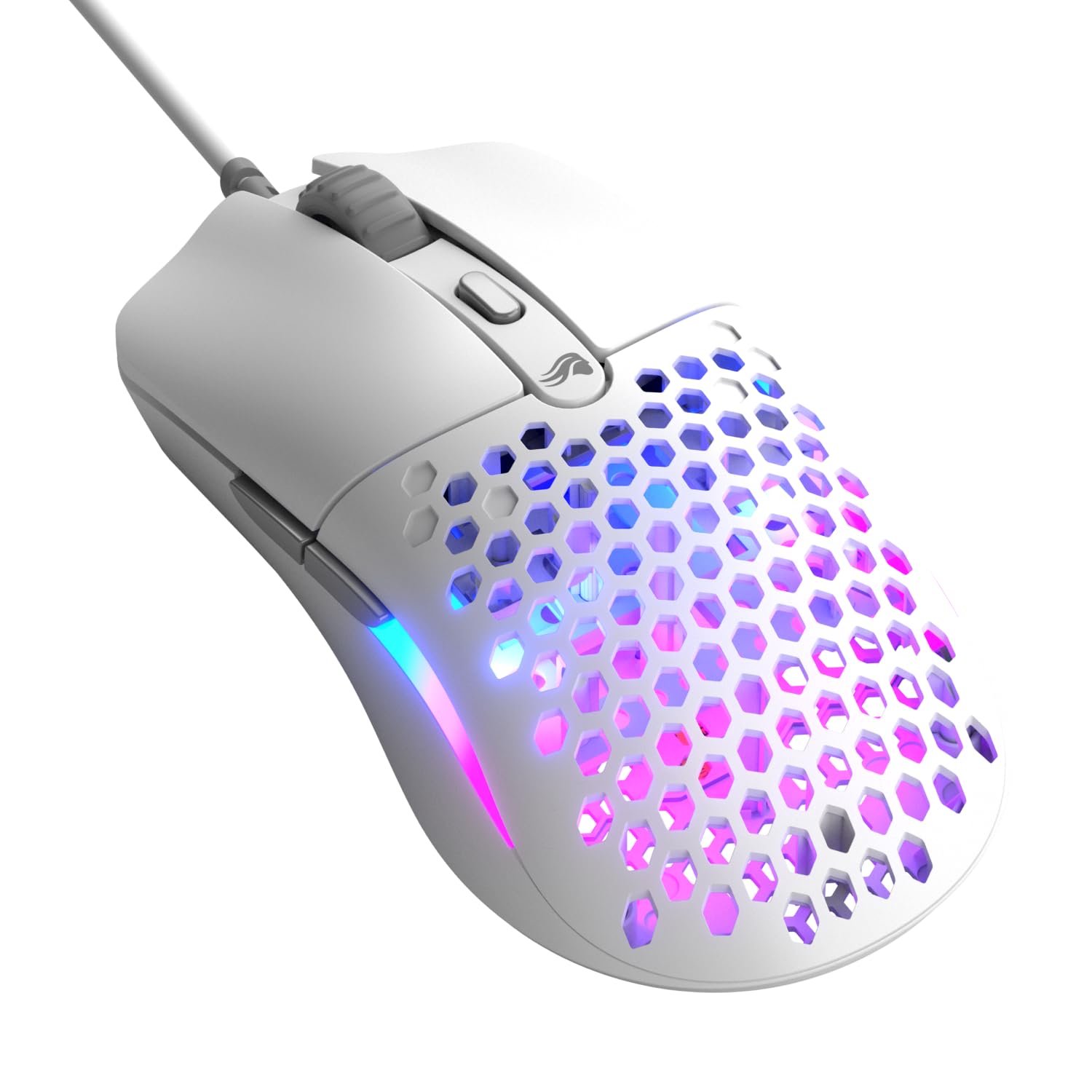
The Model O Eternal is a reminder that wired can still be the simplest route to a 55 g mouse. The honeycomb shell keeps the weight down, the symmetrical shape is easy to settle into, and the 12,000 DPI sensor covers everyday gaming without asking for a premium budget. Six programmable buttons and dual-zone RGB round out a package that feels more complete than the price tier suggests.

We found the 55 g shell quick without feeling fragile, and the 80-million-click switches give the main buttons a crisp, light action. The flexible cable is the other important part: on a clear desk it stays out of the way, and the PTFE feet give it a smooth glide. It is a mouse you can use for work all day and then game on at night.

The durability question is real: the scroll wheel is the part to watch, and skipping is the failure to look for. That does not make it a bad buy; it makes the return window part of the ownership plan. The rest of the mouse feels sturdier than the price tier suggests.

We recommend the Model O Eternal as a first wired ultralight or a backup for a wireless main. It gives you the feel of a 55 g honeycomb mouse without the charging routine, and the six buttons leave room to experiment. The sensor is modest next to the premium picks, but it is not the part that will hold most players back.

Pros

  • 55 g honeycomb shell
  • 80-million-click switches
  • Six programmable buttons
  • Budget-friendly wired option

Cons

  • Wired-only design
  • Honeycomb shell needs cleaning
Our verdict

The Model O Eternal is the wired value pick, offering a 55 g honeycomb shell and six buttons for players who do not want a charging routine.

Check Latest Price
8

First Gaming Mouse

TMKB Falcon M1SE

91 /100
LBD Score Outstanding

Key details

Sensor
12,800 DPI
Weight
2.65 oz
Connectivity
Wired USB
Polling Rate
125–1,000 Hz
View on Amazon

The Falcon M1SE is the bargain of this group, and it still gives you six programmable buttons, a 75 g honeycomb shell, and a 12,800 DPI sensor. For a first gaming mouse or a backup for a laptop, that combination is hard to argue with. The 125–1,000 Hz polling range and paracord cable cover the basics without asking you to learn a complicated setup.

We were surprised by how solid the shell feels for the price. The honeycomb pattern keeps the weight down, but the mouse does not flex under a normal grip, and the main buttons have a clean, quiet click. The 75 g weight is light enough to notice in fast games, yet it still gives your palm something to hold during longer sessions.

The compromises are in the sensor and the cable. The sensor is fine for everyday play, but it is a step behind the premium picks when you push fast flicks, and the cable can catch on a desk edge without a bungee. The six buttons are the real value: you can map macros or weapon swaps without reaching for the keyboard.

We recommend it as a first gaming mouse or a second mouse for a laptop bag. It gives you a taste of the ultralight feel without a charging routine, and the six buttons are useful well beyond gaming. The wired setup is the part that keeps the cost down, and that is the right trade for a mouse this affordable.

Pros

  • 75 g honeycomb shell
  • Six programmable buttons
  • 12,800 DPI sensor
  • Budget-friendly wired option

Cons

  • Wired-only design
Our verdict

The Falcon M1SE is the low-cost first gaming mouse, with a 75 g shell, six programmable buttons, and a wired setup that asks little of you.

Check Latest Price

How We Tested a Dozen Ultralight Gaming Mice

We started by pulling spec sheets for roughly 40 mice and cutting anything that topped 80 grams, lacked a programmable layout, or came from a brand we couldn't get support from. That left 12, a mix of wired and tri-mode wireless models running from 39 grams up to about 79. We bought each one at retail so nothing arrived pre-tuned by a manufacturer.

Every mouse went on the kitchen scale before it went on a desk, since claimed weight and shipping weight are two different numbers and a removable cable can quietly account for several grams. I squeezed the sides of each shell until it flexed, shook them to listen for button rattle, and ran a fingertip along the seams where honeycomb cutouts meet solid plastic.

Then came the actual use. Each mouse spent at least a week as someone's daily driver — aim-trainer drills and ranked matches in the evening, spreadsheets and video calls during the day. I noted how a flick felt at 400 and 1,600 DPI, how many of the programmable buttons I could reach without shifting my grip, and whether a claw or palm grip left the hump digging into my hand after an hour. Every wireless model got paired to both a Mac and a Windows PC, over Bluetooth and its own dongle, then tossed in a backpack for a weekend away.

Battery life got tracked in a notes app from full charge to the first low-battery warning, with polling left at default and then maxed out where the mouse allowed it. We kept using all 12 to the end of testing to watch for double-clicking switches, cable fraying at the strain relief, and skates that went slick or scratchy. What separated the top picks wasn't a spec — it was whether a mouse stayed rigid and predictable after three months of daily use.

How to Choose a Lightweight Gaming Mouse

Choose a weight class that matches your grip

Start with the weight class rather than the lightest number on the page. A 55–60 g wireless mouse is the safe all-round choice for most players: easy to flick, still substantial enough for a palm grip, and usually built with a more comfortable shape than a 39 g specialist. Below 50 g, expect a smaller shell or a honeycomb body, and choose that only if you already like a fingertip or claw grip. The 75–80 g picks here are still light, just not extreme; they suit bigger hands and longer sessions. If you are unsure, 55 g is the sweet spot.

Wireless convenience has a charging cost

Wireless is worth paying for if you hate cable drag, but the battery rating needs reading. A 2.4 GHz dongle is the setting for games; Bluetooth is for a laptop and office work, where a little latency does not matter. High polling rates also drain the battery faster, so a 180-hour headline at 1,000 Hz can shrink to a fraction of that at 8,000 Hz. If charging is the thing you will forget, choose a long battery rating and leave polling at 1K; if you play wired, the whole calculation disappears.

Buy enough sensor and polling, not the biggest number

Sensor numbers are the easiest thing to overbuy. A 35,000 or 50,000 DPI sensor sounds impressive, but most players use a small fraction of that range and adjust in-game sensitivity instead. The same is true of 8,000 Hz polling: it is a real advantage for a high-refresh competitive setup, yet 1,000 Hz is stable and sufficient for everyone else. Spend the difference on a shape that fits your hand and feet that glide well. The Attack Shark's 8K mode is there for spec chasers; the Viper V3 Pro is the better all-round version of the same idea.

Check the scroll wheel and software before the spec sheet

Ultralight shells can flex, and the scroll wheel is the part that most often gives trouble first. Look for a mouse with a switch rating and a return policy you trust, then treat the wheel as a long-term wear item rather than an afterthought. Software matters too: a simple driver that saves your settings is better than a feature-heavy suite you avoid opening. We pay more attention to scroll feel and a clean wireless connection than to another DPI headline.

Frequently Asked Questions

Final Verdict

The Razer Viper V3 Pro is the lightweight gaming mouse we recommend first because it gets the balance right: 55 g, true 8K wireless, a 35K sensor, and enough battery to live with. It is not the absolute lightest, and it is not the cheapest, but no other mouse here combines those advantages as cleanly.

If maximum speed is the goal, the Attack Shark R5 Ultra at 39 g is the specialist choice. If you want a familiar shape and mature software, the Logitech G Pro X Superlight 2 is the steadier daily driver.