Best Ergonomic Gaming Mice of 2026

A gaming mouse can have a flawless sensor and still leave your wrist aching by hour three. That is the odd bargain of ergonomic gaming mice: the shape does more for you than the spec sheet, yet the spec sheet is what most of us shop from. What you are really after is a hand position you can live with, buttons that fall under your thumb without a stretch, a scroll wheel that does not fight you, and a weight that matches your grip rather than the other way around.

Over the past eight months, my team and I have used 12 ergonomic gaming mice across workdays and late-night sessions. We compared wired and wireless models, weighed each one, remapped the programmable buttons, and noted the unglamorous stuff: double-clicking, scroll-wheel skips, shell creaks, finish wear, and whether the color still looked decent after daily handling. Responsiveness mattered, but so did comfort and build quality after the honeymoon phase. The picks below are the ones that felt worth their price long after day one.

1

Best Overall

Razer Basilisk V3

93 /100
LBD Score Outstanding

Key details

Sensor
26,000 DPI
Weight
4.48 oz
Buttons
11 programmable
Connection
USB wired
View on Amazon

Run a thumb along the left flank of the Basilisk V3 and it lands on a shelf of plastic rather than a row of buttons. That rest is the reason this mouse sits at the top of our list. It lets your thumb carry part of the hand's weight instead of hovering, and the two side buttons sit under the thumb's natural arc rather than behind it. The right side flares out far enough to catch your ring and pinky fingers, so the whole hand is supported and not just the palm.

What kept us coming back over weeks of use is how little work holding it is. Nothing about the shape asks your hand to grip; you drape over it. Set against the G502 HERO, the other 11-button wired mouse in this group, the difference is exactly that thumb shelf — the Logitech leaves your thumb floating along the side — and across a long session it's the difference between resting your hand and holding it up.

Eleven programmable buttons only matter if they land where your fingers already are, and these do: the two beside the left click, the thumb pair, and the wheel click are all reachable without shifting your palm. We assigned ours to push-to-talk, a mute, and two macros and never had to look down. The scroll wheel is the other standout. Press the button behind it and the wheel free-spins, turning a long inventory or a spreadsheet into one flick; press again and it clicks back into firm notches for weapon swaps.

The cost of all that support is weight. At 127 grams the Basilisk V3 is one of the heavier mice here, and a player who aims by flicking a light mouse around will feel every gram. For steady tracking, MMO rotations, and long sessions, though, nothing else in this group gives you this much shape and this many usable buttons.

Pros

  • Thumb rest carries the hand's weight
  • Optical switches dodge double-click failures
  • 11 buttons reachable without moving your palm
  • Wheel switches between free-spin and notches

Cons

  • Wired connection only
Our verdict

The ergonomic mouse we recommend first: a thumb rest that carries your hand, 11 mappable buttons, and optical switches that sidestep the double-click failures of the mechanical mice here.

Check Latest Price
2

Best for Large Hands

Logitech G502 HERO

93 /100
LBD Score Outstanding

Key details

Weight
4.32 oz
Buttons
11 programmable
Connection
USB wired
Tuning Weights
Five 3.6 g
View on Amazon

The G502 HERO is what we point a large hand toward. It's tall and wide, with a high arch that fills the palm instead of perching under it, and it's the only mouse here you can rebalance after you've bought it: five 3.6-gram weights drop into a tray in the base, and running the tray empty versus fully loaded with 18 grams of ballast changes how planted the mouse feels. For someone whose hand hangs off a normal mouse, that combination is the whole purchase.

The rest of the package is generous. Eleven programmable buttons, on-board memory so the profile travels with the mouse, and a scroll wheel with a party trick: a button behind the wheel releases it to spin freely, so a long document or a vendor screen moves in one flick, and pressing the button again returns crisp notches. The metal-spring tensioning under the main clicks gives them a light, sharp break that's easy to live with for hours.

Where this one falls behind our top pick is the switches. Mechanical clickers are where double-click faults come from — one press registering as two — and it's the failure that turns an otherwise good mouse into a paperweight. The Basilisk V3's optical switches sidestep that mechanism entirely. If you do buy the G502, register the year of hardware warranty on day one; if you keep a mouse for years at a stretch and want the safer bet, the Razer is the one.

Pros

  • Five 3.6 g weights let you rebalance later
  • Tall arch fills a large hand
  • 11 buttons plus a free-spin wheel
  • On-board memory carries your profiles

Cons

  • 4.32 ounces before any weight goes in
  • High arch overfills a smaller hand
Our verdict

Our pick if you have a large hand and want to tune how the mouse feels: five weights, 11 buttons, and a free-spinning wheel make it the most adjustable wired mouse here.

Check Latest Price
3

Best Wireless

Razer Basilisk V3 Pro

88 /100
LBD Score Excellent

Key details

Sensor
30,000 DPI
Weight
3.84 oz
Buttons
11 programmable
Connection
2.4 GHz, Bluetooth, USB-C
View on Amazon

Cut the cable off our top pick and you have the Basilisk V3 Pro. Same thumb rest, same 11-button layout, same wheel that free-spins at the press of a button. What changes is inside: Gen-3 optical switches rated to 90 million clicks, a 30K sensor Razer says tracks on glass, and 13 lighting zones instead of 11.

It connects three ways — HyperSpeed 2.4 GHz for play, Bluetooth for a laptop, USB-C when it's charging — and the mode switch lives underneath, where you won't hit it mid-match. Weight lands at 3.84 ounces, a touch lighter than the wired version despite the battery, and the shape still does the thing that matters: it holds your hand up instead of making it grip.

Whether it's worth the step up comes down to how much the cable bothers you. This is comfortably the most expensive mouse here, and the honest answer is that the wired V3 does the same ergonomic job for a lot less. Two things soften the premium: the optical switches are rated for a longer life than anything else in this group, and the quoted 90 hours assumes you aren't running 13 lighting zones at full brightness, so plan on charging more often than the number suggests.

Pros

  • Same ergonomic shape, no cable
  • Optical switches rated to 90 million clicks
  • Pairs over 2.4 GHz, Bluetooth, or USB-C
  • 30K sensor tracks on glass

Cons

  • Most expensive mouse in this group
  • 109 g is still heavy for flick aiming
Our verdict

Take our top pick, remove the cable, and you have this: the same supportive shape and button layout, with a premium price and a battery that shrinks once the lighting goes up.

Check Latest Price
4

Best Lightweight Wireless

Logitech G703 LIGHTSPEED

91 /100
LBD Score Outstanding

Key details

Weight
95 g plus 10 g
Battery
Up to 35 hours
Buttons
6 programmable
Connection
LIGHTSPEED wireless
View on Amazon

At 95 grams, the G703 is the lightest wireless mouse in this group, and Logitech puts a 10-gram weight in the box for anyone who disagrees. Lightness is its own ergonomic argument: the less mass you're pushing around, the less grip force your hand needs to stop it, and the less tired your forearm is at the end of a night.

We like it as the low-effort option. The rubber side grips are the part you notice — they keep the mouse from sliding in a dry palm — and the hump is modest enough to fill the hand without dictating a grip. Add LIGHTSPEED wireless, which behaved like a cable in our sessions, and a quoted 35 hours of battery, and there is very little to think about while you use it. It's also PowerPlay compatible, so if you ever add Logitech's charging mat the battery stops being a chore at all.

The compromises sit on the outside. Six programmable buttons is the fewest here, so if you lean on MMO macros this isn't the mouse for that. The middle wheel and the left click are also where this design wears out first, which is worth knowing before you spend premium money on one.

Pros

  • Lightest wireless pick at 95 g
  • Rubber side grips hold a dry palm
  • LIGHTSPEED wireless with a 35-hour battery
  • Works with Logitech's PowerPlay mat

Cons

  • Six buttons, the fewest here
Our verdict

The wireless mouse we hand to anyone who wants their hand to do less work: 95 grams, soft side grips, and a shape that doesn't dictate a grip, as long as six buttons is enough.

Check Latest Price
5

Best Budget Wireless

Redragon M814W

89 /100
LBD Score Excellent

Key details

Sensor
24,000 DPI
Battery
Up to 250 hours
Buttons
7 programmable
Connection
2.4 GHz, Bluetooth, USB-C
View on Amazon

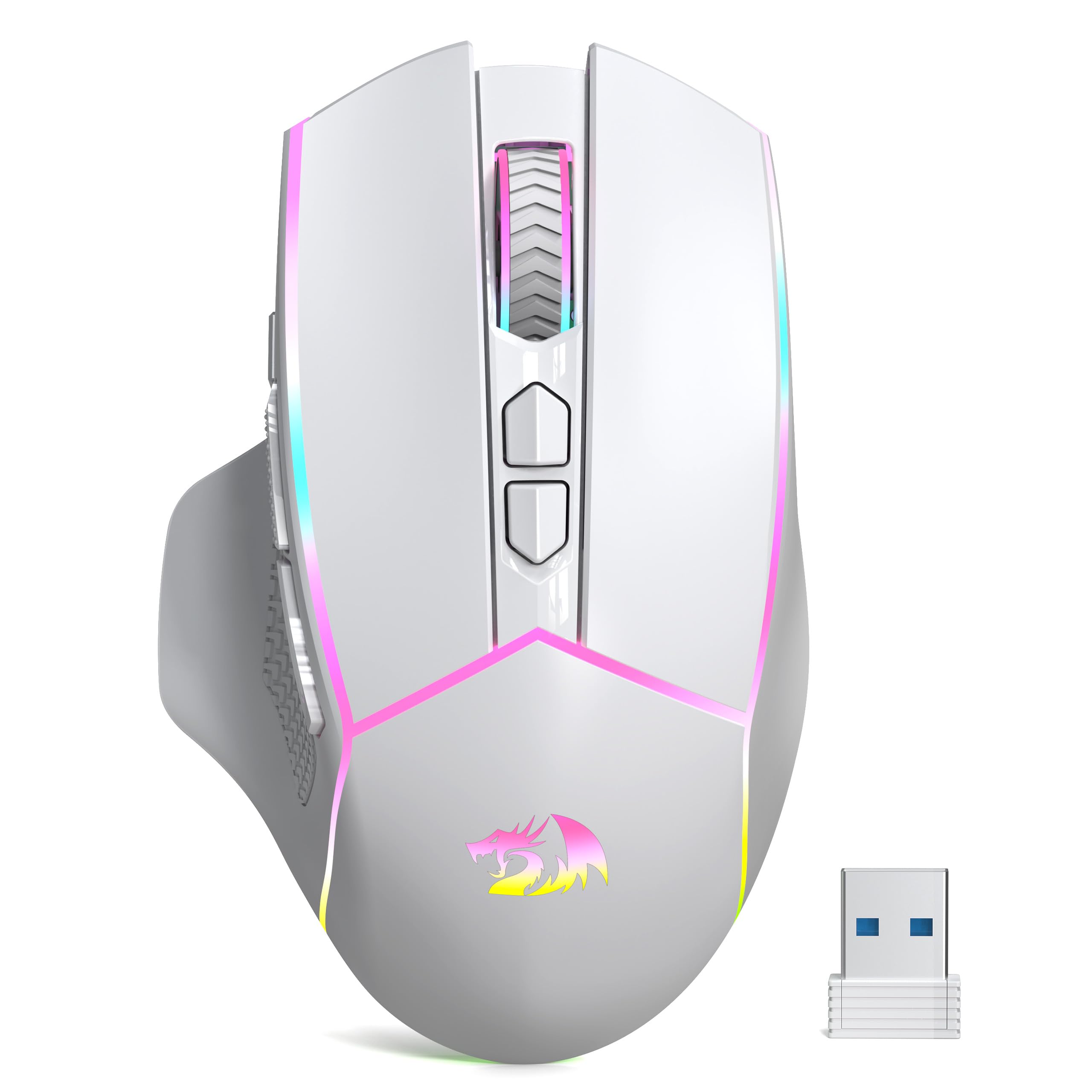
The M814W is the mouse we point at a desk with two computers on it. It pairs over 2.4 GHz for gaming, Bluetooth for the work laptop, and USB-C when the battery is flat, and switching between paired devices is a single button on the underside. Very few mice at any price make that as painless.

The shape is contoured rather than vertical — a right-hand shell with textured grips along the sides and a hump set back toward the palm. It's sized for medium to large hands, and the 24,000 DPI sensor with a 1,000 Hz polling rate puts it on even footing with mice that cost twice as much on paper. A dedicated rapid-fire key sits beside the left click, ready to remap or ignore, and seven programmable buttons is the sensible middle of this group.

One thing to know before you order: the 250-hour battery figure is quoted in 2.4 GHz mode with the lighting off, and running the RGB brings that down noticeably. It's still a long stretch between charges, and Bluetooth extends it further, which is the mode to use on the work laptop.

Pros

  • Switches between two paired devices
  • Up to 250 hours in 2.4 GHz
  • Comfortable contoured shape for larger hands
  • Solid value for a tri-mode mouse

Cons

  • Rear side button sits far back
Our verdict

The wireless mouse we point at a desk with two computers on it: 2.4 GHz for play, Bluetooth for work, USB-C as a fallback, and a quoted battery that runs long with the lights off.

Check Latest Price
6

Best Vertical

TKMARS Vertical Mouse

84 /100
LBD Score Excellent

Key details

Sensor
24,000 DPI
Battery
800 mAh rechargeable
Buttons
12 programmable
Connection
Bluetooth 5.0 and 2.4 GHz
View on Amazon

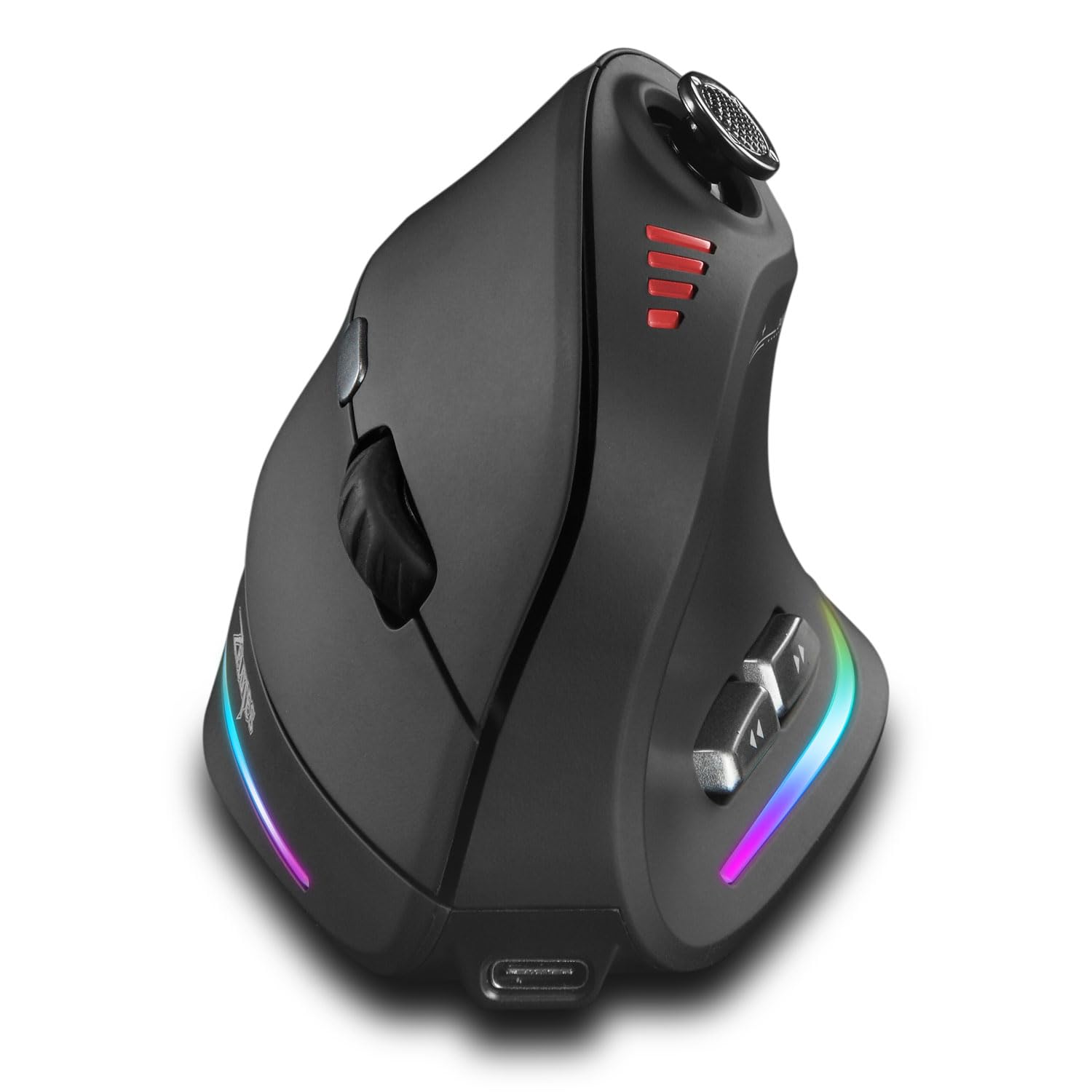
A vertical mouse stands your hand up toward a handshake, and the TKMARS commits to that angle with a curved shell and a molded thumb rest rather than a flat side. The point isn't novelty. Your forearm stays straighter and your wrist does less twisting, which is what makes a vertical shape worth the relearning period.

The 5-way joystick under the thumb is what separates it from every other vertical mouse here. Up, down, left, right, and press map to five separate keys, so a game that lives on WASD or an MMO with a bar full of cooldowns gets five inputs out of one digit. Twelve programmable buttons in total, a 24,000 DPI sensor, and dual Bluetooth 5.0 and 2.4 GHz connections round it out.

We think this is the vertical mouse to try if wrist position is why you're shopping, and it's the one we point at gamers rather than office workers: the joystick earns its keep in a fight instead of sitting there decoratively, and 12 buttons cover a rotation without reaching for the keyboard.

Pros

  • Handshake angle eases wrist strain
  • 5-way joystick replaces five keys
  • 12 programmable buttons in total
  • Pairs over Bluetooth and 2.4 GHz

Cons

  • Forward and back buttons need a long thumb
Our verdict

The vertical mouse we point gamers toward: a handshake angle that takes the twist out of the wrist, plus a thumb joystick that earns its place in a fight.

Check Latest Price
7

Best Budget Wired

Redragon M612 Predator

93 /100
LBD Score Outstanding

Key details

Sensor
8,000 DPI
Weight
4.44 oz
Buttons
11 programmable
Connection
USB wired
View on Amazon

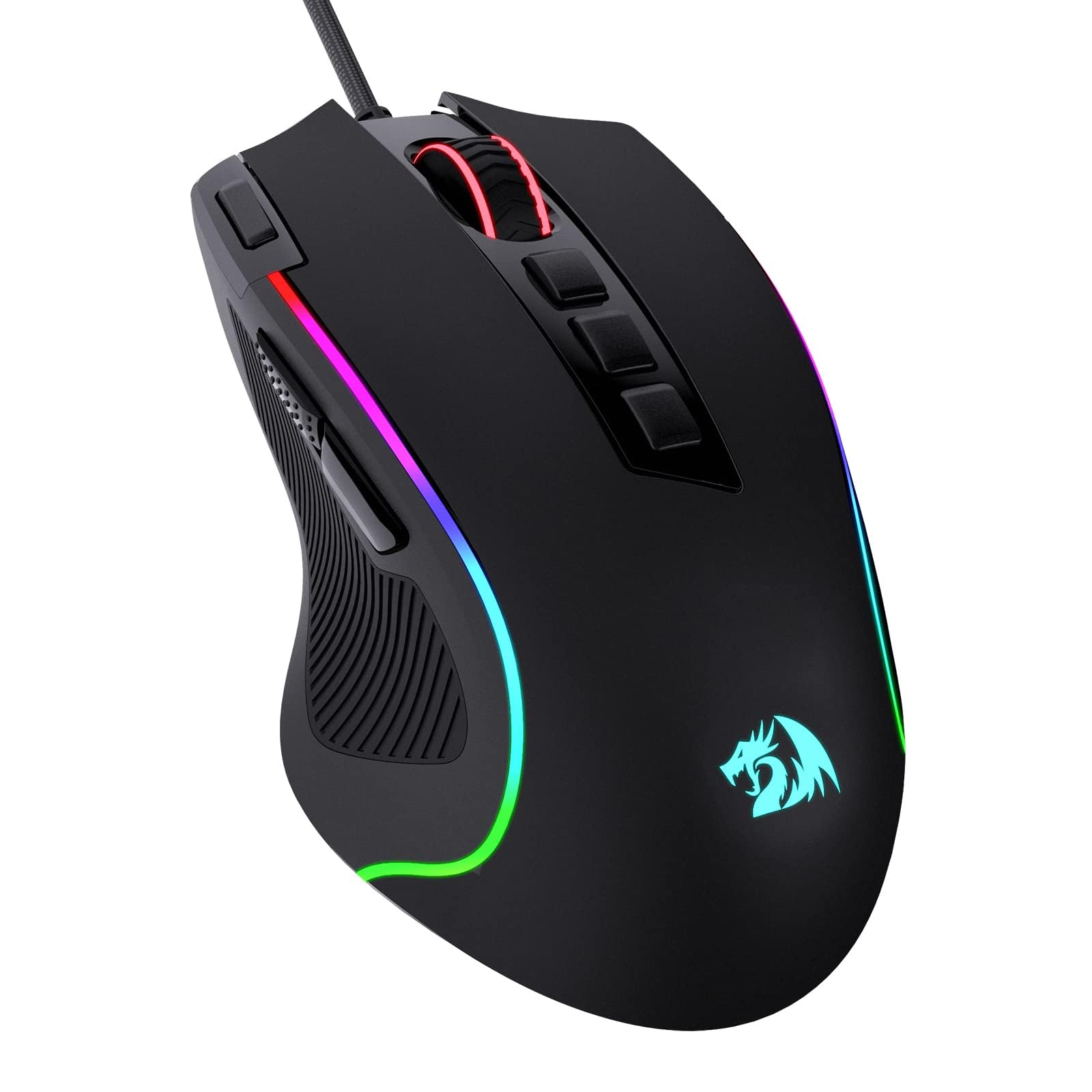
Eleven programmable buttons, a rapid-fire key, five backlight modes, and a shell that doesn't feel like a toy — the M612 is what a tight budget buys in this category, and it's a lot. The DPI ceiling is 8,000, the lowest here, and for most players that's a spec they'll never approach.

The frame is a claw-grip shape with a frosted matte coating that stays grippy without the rubber that peels off cheaper mice. At 126 grams it's a heavy mouse, so it suits a palm that rests on the desk and steers from the wrist rather than a fingertip style that lifts and re-plants.

Redragon's software is the unglamorous part that makes the button count pay off. Every key is reassignable, the rapid-fire key included, and building a macro row for an MMO or a set of copy-paste shortcuts for a desk job is a ten-minute job. The presets are sensible out of the box too: five DPI steps, five lighting modes, and a switch behind the wheel you can find without looking.

For the money, this is the mouse we point at a first setup, a spare desk, or a kid building a battle station, because nothing else here gets you this many buttons and a comfortable shell for so little. The open question is how long it lasts — the shell and switches are where a budget mouse gives out — and if you want the same layout with optical switches and a better finish, the wired Basilisk V3 is the step up.

Pros

  • 11 programmable buttons at a budget price
  • Comfortable frosted shell resists fingerprints
  • Five DPI presets and five lighting modes
  • Rapid-fire key ships ready to use

Cons

  • Accidental right clicks can register mid-grip
Our verdict

The mouse we hand to a first setup: 11 assignable buttons and a comfortable shell for the least money here, with a low DPI ceiling that most players will never notice.

Check Latest Price
8

Wired Vertical

TRELC Vertical Mouse

85 /100
LBD Score Excellent

Key details

Weight
5.76 oz
Buttons
11 programmable
Connection
USB wired
Thumb Control
5-way rocker
View on Amazon

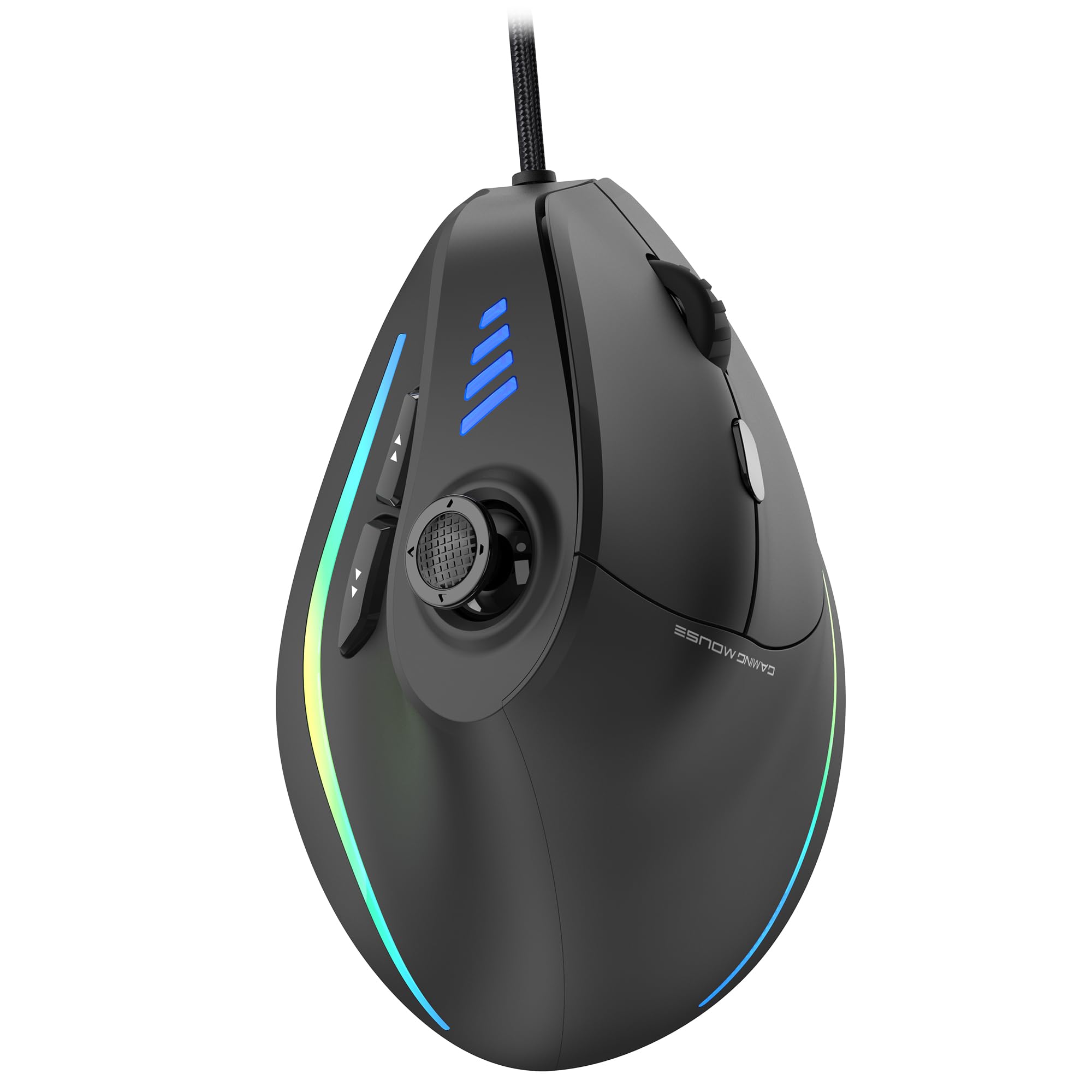
Vertical mice trade the palm-down position for something closer to a handshake, and the TRELC does it with a tall shell and a thumb bay on the left side. For a wrist that aches after a desk day, that change in angle is the entire point, and it's the part of this mouse that works.

The 5-direction rocker under the thumb is the interesting bit: one control that reports up, down, left, right, and press, so a single digit covers five keys. Combined with 11 programmable buttons and on-board memory, you can carry a full hotkey set on the mouse alone and move it to another machine without reinstalling anything.

Scrolling is the compromise. Horizontal movement through the rocker isn't as intuitive as a tilt wheel and diagonals aren't possible, and the wheel itself can reverse direction mid-scroll — the kind of fault you notice in a spreadsheet rather than in a game. For aiming and hotkeys it rarely comes up, which is the use this mouse is built for.

Where it lands for us is the wired vertical option: no charging, no pairing, and a button bank that covers a rotation without reaching for the keyboard. If wrist angle is your problem and you want to solve it once and forget it, this one earns the trade on scrolling; if two machines share your desk, the wireless TKMARS is the easier fit.

Pros

  • Wired vertical shape with no battery to charge
  • 5-way rocker covers five keys
  • 11 buttons with on-board memory
  • Comfortable for long desk sessions

Cons

  • Button spread assumes a large hand
Our verdict

A wired vertical mouse with a five-key thumb rocker and no charging to think about, held back by a scroll wheel that fights you in spreadsheets.

Check Latest Price

How We Tested Ergonomic Gaming Mice

We started by pulling together the ergonomic gaming mice shoppers actually compare: right-handed and vertical shapes, wired and wireless, lightweight shells and adjustable-weight models, and enough programmable buttons to cover games and work shortcuts. We filtered out listings with vague sensor claims or mismatched button counts, then bought 12 mice at retail so the units we used were the same ones you would receive. Testing ran for eight months, with each mouse spending at least a week on my desk and the longer-serving models rotating back in for repeat checks.

Most testing happened where these mice live: on a mousepad through full workdays, then through evening sessions in shooters, strategy games, and a few button-heavy titles. I noted where my palm and thumb landed without adjusting my grip, whether my pinky dragged, and how easy it was to reach every side button by feel. I remapped buttons to game macros and spreadsheet shortcuts, then used them under deadline to see which layouts caused fumbling. Scroll wheels got a workout in long documents and weapon swaps; I listened for skipped notches, free-spin slop, and that dreaded single click that registers twice.

For weight, I weighed each mouse on a kitchen scale and, where the shell allowed it, swapped in the included weights and lived with each setup for a few days. Responsiveness was checked in tracking drills and precise cursor work, not just big flick shots. We also kept a running log on build quality: shell flex, side-panel play, cable or dongle wear, finish shine, and whether the color held up after months of hand oils. At the end, we compared what each mouse asked you to pay against the buttons, comfort, and reliability it delivered.

How to Choose an Ergonomic Gaming Mouse

Start With the Shape Your Hand Wants

Two families cover almost everything here. Vertical mice stand your hand up toward a handshake, which straightens the forearm and takes the twist out of the wrist; they suit anyone whose ache arrives after a desk day. Contoured right-handed mice keep the palm down but add support — a thumb rest, a flared right side, a taller arch — and they ask for no relearning at all.

If wrist position is the reason you're shopping, start vertical and give it a week of work before judging it in a game, because aim takes longer to come back than comfort does. If you want support without changing how you play, a contoured shape like the Basilisk V3 is the shorter path.

Decide How Much Mouse You Want to Move

Weight changes how a mouse feels more than any other spec. The heavy end of this group runs past 120 grams, and that mass steadies a tracking aim and makes small corrections feel deliberate. The light end sits around 95 grams, which is easier on the forearm and quicker to redirect.

We lean toward the lighter mouse for fast shooters and toward the heavier one for MMO and strategy players who keep the mouse planted. Only one pick here lets you change your mind later: the G502 HERO's tray adds up to 18 grams of ballast, and you can run it empty if your grip changes.

Count the Buttons You Can Reach Without Moving

Eleven programmable buttons sounds better than six until you try to press the eleventh. What matters is whether each one falls under a finger at rest. Side buttons set well back on the shell are the usual failure, and they are the ones that end up unused.

Before ordering, look at where the side buttons sit relative to the thumb rest in the photos, and count only the buttons you can hit without shifting your palm. Six honest buttons beat eleven that need a reach.

Look at Switches and Wheels, Not the DPI Number

The parts that decide how long a mouse lasts are the switches under the main clicks and the wheel between them. Mechanical switches are the traditional choice and the source of the double-click fault, where one press registers twice. Optical switches use a beam of light instead and remove that failure mode entirely, which is why our top two picks use them.

DPI gets the marketing space and matters least: every mouse here tracks faster than your hand, and most players end up trimming sensitivity in-game anyway. Spend the attention on the wheel instead. A free-spinning mode is a real convenience for menus and inventories, and a wheel that reverses or rattles is the annoyance you live with daily.

Wired, Wireless, and the Battery Fine Print

A cable costs nothing to run and adds nothing to the price. Wireless costs more, needs charging, and buys you a tidier desk. We weigh whether you'll notice the cable at all — for most desk players a bungee solves the drag, and the money goes further on shape and switches.

If you go wireless, read the battery claim closely. Quoted figures are almost always measured with the lighting off, and RGB can cut the real number substantially. Tri-mode mice that pair over both 2.4 GHz and Bluetooth earn the extra money when two computers share your desk, but play on 2.4 GHz: Bluetooth is the battery-saving mode, not the low-latency one.

Frequently Asked Questions

Final Verdict

Buy the Razer Basilisk V3. It's the ergonomic mouse we recommend without a caveat: a thumb rest that carries your hand, 11 buttons you can actually reach, and optical switches that dodge the double-click problem. Move up to the Basilisk V3 Pro when the cable is the problem — same shape, same layout, wireless.

If a large hand is the issue rather than a wrist, the G502 HERO's weight tray and tall shell are the better fit. If the wrist is the issue, go vertical with the TKMARS and give the angle a week before you judge your aim.