Best Wireless MMO Mice of 2026

An MMO mouse is really a second keyboard hiding under your thumb. A dozen buttons sitting where your thumb already rests means your left hand never has to leave WASD, and after a week it becomes muscle memory you can't unlearn. The catch is that the thumb grid is exactly where cheaper mice fall apart: mushy switches, buttons that fire twice, a battery that quits halfway through a raid.

I've been through a shelf of these over the years, and the differences that actually decide it never show up on the spec sheet. For the past six months my team and I have lived with 10 wireless MMO mice — raid nights, workdays, a few of them shoved into laptop bags — and the winners were the ones we stopped noticing.

One thing worth knowing first: more buttons isn't automatically better. A thumb grid you can identify by feel beats a bigger one you have to glance down at, and a shell that fits your grip will do more for your accuracy than a higher DPI number. The picks below are the ones that earned their spot.

1

Best Overall

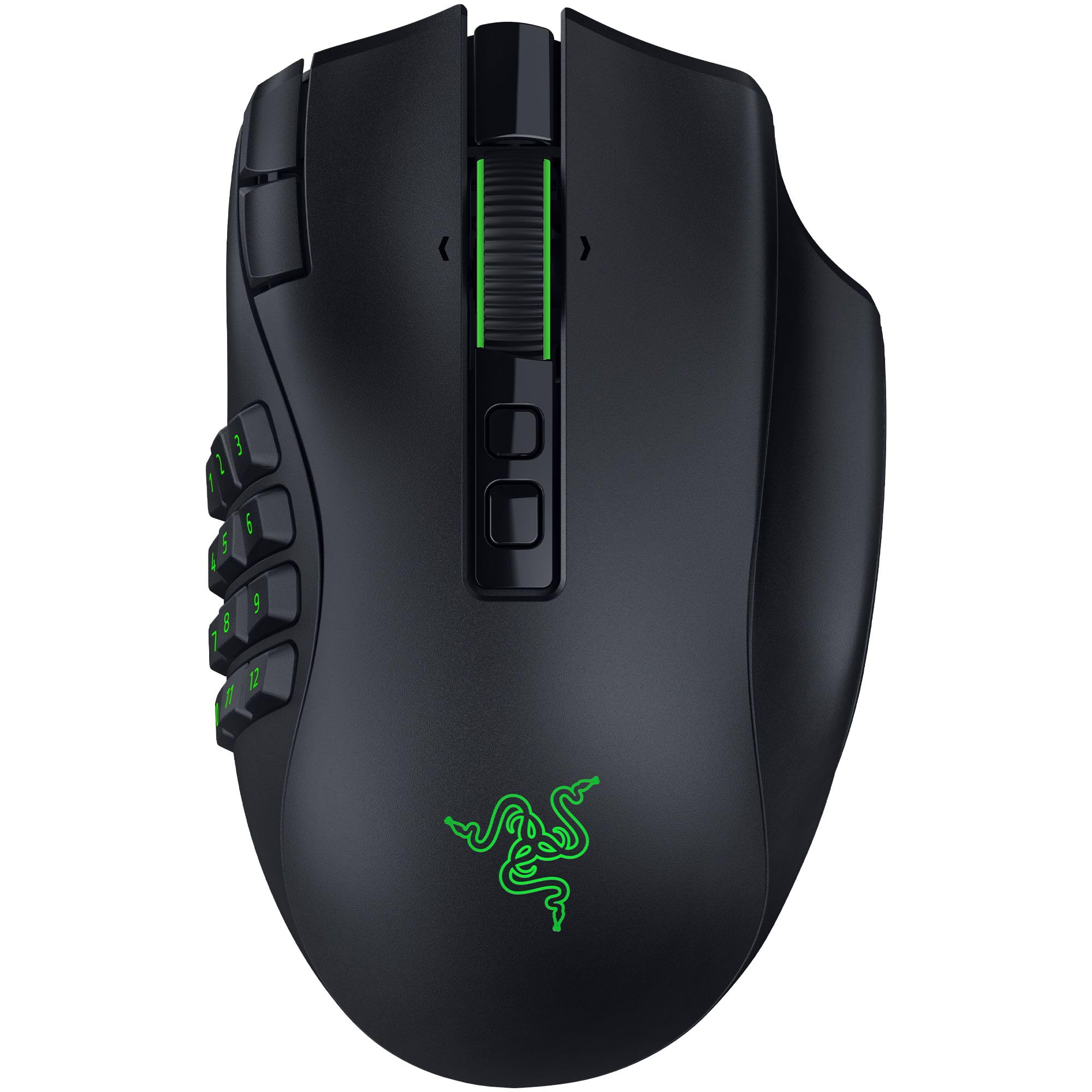
Razer Naga V2 HyperSpeed

81 /100
LBD Score Excellent

Key details

Battery Life
Up to 400 hrs (Bluetooth), 250 hrs (2.4GHz)
Wireless Modes
2.4GHz, Bluetooth
Programmable Buttons
19
View on Amazon

Two hundred fifty hours is the number that settled this one. That is Razer's rating for the Naga V2 HyperSpeed on its 2.4GHz link, with up to 400 hours over Bluetooth, and it turns charging from a weekly chore into something you do a few times a year. No dock, no cable snaking across the desk, no warning light halfway through a raid.

The other half of the case is 19 programmable buttons, the most here outside the Naga V3 Pro. Every one of them takes a macro, and the HyperScroll wheel flips between a free-spin mode for scrolling an inventory and a stepped, tactile one for swapping weapons. We ended up leaving it in free-spin far more than expected; it is as useful in menus as it is in a fight.

The trade-off is the price, which lands in the middle of this group — above both budget picks, a long way below the V3 Pro. What that money buys is the sensor and the battery. The Focus Pro 30K tracks on glass, so a bare desk or a hotel table works as well as a mouse pad, and the dual wireless means the dongle never has to move between machines.

That second radio is the part the spec sheet undersells. Pair it with a laptop and leave the dongle in the desktop, and one mouse covers both without a docking shuffle or a second purchase.

Pros

  • Up to 400 hours on Bluetooth, 250 on 2.4GHz
  • 19 programmable buttons, all macro-capable
  • 2.4GHz and Bluetooth in one mouse
  • HyperScroll free-spin and tactile scrolling

Cons

  • No swappable side plates like the V3 Pro
Our verdict

Nineteen buttons and a 250-hour battery on 2.4GHz make this the wireless MMO mouse we point most players to first.

Check Latest Price
2

Best Value

UtechSmart Venus Pro

89 /100
LBD Score Excellent

Key details

Weight
4.44 oz
Battery Life
Up to 70 hrs
Side Buttons
12
Programmable Buttons
16
View on Amazon

Twelve side buttons is the pitch, and in practice most of us settle on four or five — whichever ones your thumb finds without looking. The Venus Pro makes that easier than most: the body is wide and tall, with a textured finish that keeps your palm planted through a long fight, and it is shaped for larger hands.

Sixteen programmable buttons cover the grid plus the usual clicks, and the weights that drop into the base let you add heft if the stock feel is too light. Battery is rated at 70 hours, with an auto-sleep mode to stretch it between sessions. What we liked most is how little you give up: this is the least expensive mouse in this group, and it does not feel like one in the hand.

The left click is the part to watch. It can start registering a double-click from a single press, or give out entirely, which is the one failure that takes a mouse off your desk mid-campaign. UtechSmart backs it with a 12-month refund-and-replacement warranty, so buy it, keep the receipt, and use the coverage if the click goes soft rather than living with it.

For a first MMO mouse that is a fair trade: the grid, the shape, and the comfort now, with a shorter horizon on the click. If you already know the mouse will live on your desk for years, spend more.

Pros

  • 12 side buttons on the least expensive mouse here
  • Wide, textured body built for larger hands
  • 70-hour battery with auto-sleep mode

Cons

  • 126 grams, heavier than the Razer V3 Pro
  • Charging can be inconsistent
Our verdict

We recommend the Venus Pro to anyone who wants a 12-button thumb grid and a comfortable shape without Razer money.

Check Latest Price
3

Best for Adjustable Weight

Redragon M901P-KS

89 /100
LBD Score Excellent

Key details

Battery Life
Up to 70 hrs (RGB off)
Side Buttons
12
Onboard Profiles
5
Programmable Buttons
16
View on Amazon

The back row of the M901P-KS's thumb grid sits deep enough that reaching it takes a small shift of your hand. That is fine once you know it: park your rarest cooldowns back there and keep the buttons you press every few seconds under the front of your thumb, where the 12-button cluster falls naturally.

What we did not expect to care about is the weight kit. Redragon ships removable weights that drop into the base, and adding a little heft makes a big right-handed shell feel steadier on a low-sensitivity flick. Five onboard profiles save your mappings to the mouse itself, so a setup travels between machines, the battery is rated at 70 hours with the lighting off, and four lighting modes mean you can tone the RGB down to something desk-appropriate.

Sixteen programmable buttons, a 16,000 DPI sensor, and a weight kit for about what a plain gaming mouse costs is a strong argument. We think it suits tinkerers more than anyone else here — you can tune the weight, save five setups on the mouse, and skip the software entirely once it is configured. Against the Venus Pro it gives up some comfort for big hands and gains the adjustability.

Pros

  • Removable weights tune the heft
  • Five profiles stored on the mouse
  • 16 buttons including a 12-button thumb grid

Cons

  • Lighter clicks can fire on a resting thumb
  • One-year warranty
Our verdict

We think tinkerers get the most here: removable weights, five onboard profiles, and 16 buttons for budget-mouse money.

Check Latest Price
4

Best for Multiple Devices

SOLAKAKA SM809 Pro

80 /100
LBD Score Excellent

Key details

Battery Life
Up to 350 hrs
Side Buttons
9
Wireless Modes
2.4GHz, Bluetooth 5.0, USB-C
Programmable Buttons
16
View on Amazon

Setting up the SM809 Pro happens in a browser tab — no installer, no background app, and your mappings save to the mouse itself. That is a nicer arrangement than the usual driver package, especially on a work laptop you do not control. Nine side buttons sit under your thumb, and four magnetic plates let you change both the grip and the button layout.

What impresses us is how much hardware comes with it. The connection covers 2.4GHz, Bluetooth 5.0, and USB-C wired, the only budget-priced mouse here that does all three, and the battery is rated at 350 hours, well past the Redragon and UtechSmart figures. For a laptop-and-desktop house, that is the difference between carrying one mouse and carrying two.

One thing to plan for is that browser setup cutting both ways: there is no desktop profile editor, so every change means opening that page again. And if 2.4GHz is crowded where you play, Bluetooth is the fallback — a little more latency, noticeably fewer dropouts.

Pros

  • Nine side buttons plus seven more
  • 2.4GHz, Bluetooth 5.0, and wired modes
  • Settings save through any browser
  • 350-hour battery rating

Cons

  • No thumb rest for long sessions
  • Side buttons sit where your thumb rests
Our verdict

We like it best as a second-machine mouse: Bluetooth, 2.4GHz, and a browser setup that follows the hardware, not the PC.

Check Latest Price
5

Switching Game Genres

Razer Naga V3 Pro

81 /100
LBD Score Excellent

Key details

Side Plates
12, 6, and 2-button
Battery Life
Up to 280 hrs
Wireless Modes
2.4GHz, Bluetooth, USB
Programmable Buttons
23
View on Amazon

Three magnetic plates do the work here: snap in the 12-button grid for raids, the 6-button plate for a MOBA, and the 2-button plate when you want the mouse to behave like a normal one in a shooter. That is the whole argument for a mouse at the top of this group's price range — one body, three jobs, and a plate you swap between matches without touching any software.

The rest is flagship hardware. Twenty-three programmable buttons is the highest count here, the battery is rated at 280 hours, and the HyperScroll tilt wheel adds a Smart-Reel mode that switches between free-spin and stepped scrolling on its own. The Gen-4 optical switches are rated to 100 million clicks with a lighter actuation than the previous generation, and at 4.16 ounces it stays light for a mouse this big.

Two things we noticed in use. The quick-access buttons beside the left click are awkward to reach without shifting your grip — good for push-to-talk, less good for anything you need mid-fight. And the Gen-4 switches give the left click a faint high-pitched ring that is audible in a quiet room and disappears with a headset on.

This is also the newest design in the group, so the long-term record is not there yet; the two-year warranty is the backstop. If you move between genres every week, the plates earn their place. If you play one MMO and nothing else, the HyperSpeed covers it for less.

Pros

  • Three plates: 12, 6, or 2 side buttons
  • 280-hour battery with multi-mode wireless
  • Optical switches rated to 100 million clicks

Cons

  • Highest price in this group
  • Listing specifies Windows 11
Our verdict

What sells us on the V3 Pro is the plates: one mouse for MMO, MOBA, and shooter duty, at the highest price here.

Check Latest Price

How We Tested the Best Wireless MMO Mice

We started by pulling every current wireless MMO mouse we could find from the major peripheral makers, then filtered hard: at least nine thumb buttons, 2.4GHz or multi-mode wireless, onboard profile storage, and software that lets you remap every key. That narrowed the field to 10 mice, which we bought at retail and tested over six months.

Each one went onto the same desk, the same PC, and the same mousepad, with identical profiles built in an MMO and a MOBA so we were reaching for the same abilities on every grid. They lived through raid nights, long workdays, and travel in a laptop bag.

We noted how each thumb button felt on the press — crisp, mushy, or vague — and whether fast ability rotations produced misfires or accidental double-clicks. We remapped keys, built macros, tried modifier layers, and watched how quickly the software picked up a new profile. Battery life was tracked from a full charge: how many days of real use it delivered, how long a recharge took, and whether the mouse would keep working while plugged in. Across the six months we also checked the shells for wear — side-button wobble, glossy spots, peeling grips — and whether any switch started to feel different than it did in week one.

Comfort got judged by hand size and grip style rather than by consensus: palm and claw grips through three-hour sessions, with notes on where each mouse pushed back, from a thumb rest that sat too high to a grid that crowded the pinky side. We also logged the smaller stuff that decides whether you keep using one — how easy the grid is to read by touch, how much the lighting and weights get in the way, and whether the thing is worth what it asks.

How to Choose a Wireless Mmo Mouse

Count Thumb Buttons, Not Total Buttons

Every maker counts every switch, so a 19-button mouse may still put only 12 under your thumb — the rest are the clicks and the wheel you already use for movement and camera. Decide how many abilities you genuinely map. Twelve covers a full action bar, six is a comfortable half-bar that is easier to learn, and two lets the same mouse pull shooter duty.

Swappable plates are the honest way to buy more than one of those at a time: the Naga V3 Pro ships with 12, 6, and 2-button plates, so one body covers raiding and aiming without a second purchase.

Put 2.4GHz on the Game, Bluetooth on the Rest

The dongle link is the one to play on. It is the low-latency mode on every mouse here and the mode the battery figures are usually quoted against. Bluetooth is better for a laptop, a second machine, or a long trip, and on the Razer picks it nearly doubles the hours.

The trap is the port, not the mouse. A receiver in a hub behind a metal desk will drop inputs no matter what you paid, so use a front-panel USB port or a short extension cable and keep the dongle in line of sight.

Read Battery Ratings With the Lighting Off

Hours on the box assume the RGB is dark and, often, that you are on Bluetooth. Redragon quotes 70 hours with the lighting off; Razer quotes 250 on 2.4GHz and 400 on Bluetooth for the HyperSpeed. Turn that into your own week: ten hours of play makes a 70-hour mouse a two-month proposition and a 250-hour mouse a six-month one.

If you would rather not think about it at all, pick the longest 2.4GHz figure in your budget and leave its cable plugged in behind the desk as a fallback.

Buy for Your Hand, Then the Sensor

MMO mice are large because the grid needs real estate. A wide, tall shell like the Venus Pro suits a palm grip and bigger hands; smaller hands will find the back row of any 12-button grid a stretch, and a 6-button plate is the better answer. Weight is personal — the Venus Pro is 126 grams, the Naga V3 Pro about 118, and the Redragon lets you add or remove heft.

The sensor comes last. Every mouse here tracks well past what an MMO needs, so do not let a DPI number decide a purchase your thumb has to live with.

Set It Up Once and Close the Software

Nearly all the work happens in the first hour: map the grid, save a profile, and you can shut the app. Onboard memory is what makes that portable — the Redragon keeps five profiles on the mouse, and the SOLAKAKA saves mappings through a browser page with nothing installed.

Check the operating system before you order. The Redragon, UtechSmart, and Naga V3 Pro listings specify Windows, while the SOLAKAKA also lists macOS and Linux.

Frequently Asked Questions

Final Verdict

The Razer Naga V2 HyperSpeed is the pick we stand behind for most players. Nineteen buttons, both wireless modes, and a battery you charge a handful of times a year take the two annoyances out of wireless MMO play, and the HyperScroll wheel is genuinely useful outside combat.

If the budget decides it, the UtechSmart Venus Pro puts the same 12-button idea under your thumb for a fraction of the money, with a 12-month replacement warranty standing behind its weak left click. Buy the Naga V3 Pro only if you switch between MMO and shooter layouts often enough to use the plates.