Best Full-Tower PC Cases of 2026

A full tower is the case you buy after something has already failed to fit: the card that grazed the side panel, the radiator that wouldn't clear the heatsinks, the stack of drives with nowhere to go. Bigness is the whole point — room for an E-ATX board, a 420mm radiator, a graphics card long enough to need its own support bracket. What you pay for it is footprint, weight, and a case that no longer slides under the desk.

We've spent seven months building in 10 of these, from glass-and-mesh airflow showcases to silent steel boxes, and what separated them had less to do with looks than I expected. Thin steel and loosely mounted fans buzz at certain speeds, and two extra inches behind the motherboard tray is the difference between a tidy cable job and an hour of swearing. Glass is gorgeous until you're routing four drives' worth of cables past it. The picks below split along those lines, and each one is honest about which side it's on.

1

Best Overall

Antec Flux Pro

91 /100
LBD Score Outstanding

Key details

Dimensions
20.86"D x 9.64"W x 21.45"H
Included Fans
6 PWM fans
Radiator Support
420mm + 360mm simultaneously
Motherboard Support
E-ATX, ATX, Micro-ATX, ITX
View on Amazon

Six PWM fans arrive already mounted in the Antec Flux Pro, and the case can hold a 420mm and a 360mm radiator at the same time. That is the combination we want for a high-end E-ATX build: a large graphics card, a big AIO, and enough fan mounts left over to feed both. The walnut front panel also gives it a warmer look than another black mesh slab, which matters if the case sits in a room rather than a closet.

We especially like the removable cooling brackets on the top, front, and PSU shroud. They let you assemble a radiator and fan stack outside the case, then slide the whole thing in, which turns one of the fussiest parts of a build into a manageable step. The 90-degree PSU mount keeps the power supply in its own zone, and eight expansion slots plus support for up to 12 fans cover the expansion this category promises.

What you accept for all that room is heft: 29 pounds empty and 21.45 inches tall. We don't mind it for a build that stays put, but this is not a case you move for a LAN night or tuck under a low shelf without measuring. The temperature display is a useful glanceable extra, though it won't replace software for real monitoring.

Pros

  • Six PWM fans included
  • 420mm and 360mm radiators together
  • Removable cooling brackets
  • Wood-and-glass finish

Cons

  • 29 pounds empty and 21.45 inches tall
Our verdict

Six PWM fans, dual-radiator room, and a wood-accented chassis make the Flux Pro our default for high-end E-ATX builds that need airflow without a puzzle.

Check Latest Price
2

Best for Massive Custom Loops

Corsair 7000D Airflow

91 /100
LBD Score Outstanding

Key details

Weight
41.2 lb
Included Fans
3x 140mm AirGuide
Radiator Support
3x 360mm or 2x 420mm
Motherboard Support
ATX
View on Amazon

At 41.2 pounds empty, the Corsair 7000D Airflow is the case that reminds you a full tower is furniture with fan mounts. We felt that every time we shifted it, but the weight buys a genuinely massive interior: 11 expansion slots, three 140mm AirGuide fans, and support for three 360mm radiators or two 420mm units at once.

We think it's the right starting point for a custom loop that needs room to grow. The steel front panel is built for airflow rather than silence, and the RapidRoute channel gives the main cable bundle a dedicated path. Cable routing still takes planning: the channel and hinged door are there, but stiff PSU cables can make the door stubborn to close.

The side panels can also be fussy to refit once the case is loaded, so build in the order the manual suggests and leave the panels off until the end. This is a case for a high-wattage build that stays on the floor and has help getting there. If you move your PC often, the Antec Flux Pro is the easier lift, even though it gives up some interior volume.

Pros

  • Massive 11-slot interior
  • Three 360mm or two 420mm radiators
  • Three 140mm AirGuide fans included
  • RapidRoute cable channel

Cons

  • 41.2 pounds empty
  • Side panels are fussy to refit
Our verdict

For a huge, airy build with room for multiple radiators, the 7000D Airflow is the one to get—provided you have help moving it and the floor space to match.

Check Latest Price
3

Best for Storage and Silence

Fractal Define 7 XL

89 /100
LBD Score Excellent

Key details

Weight
41.3 lb
Storage
Up to 18 HDDs and 5 SSDs
Radiator Support
Up to 480mm
Motherboard Support
E-ATX, ATX, Micro-ATX, Mini-ITX
View on Amazon

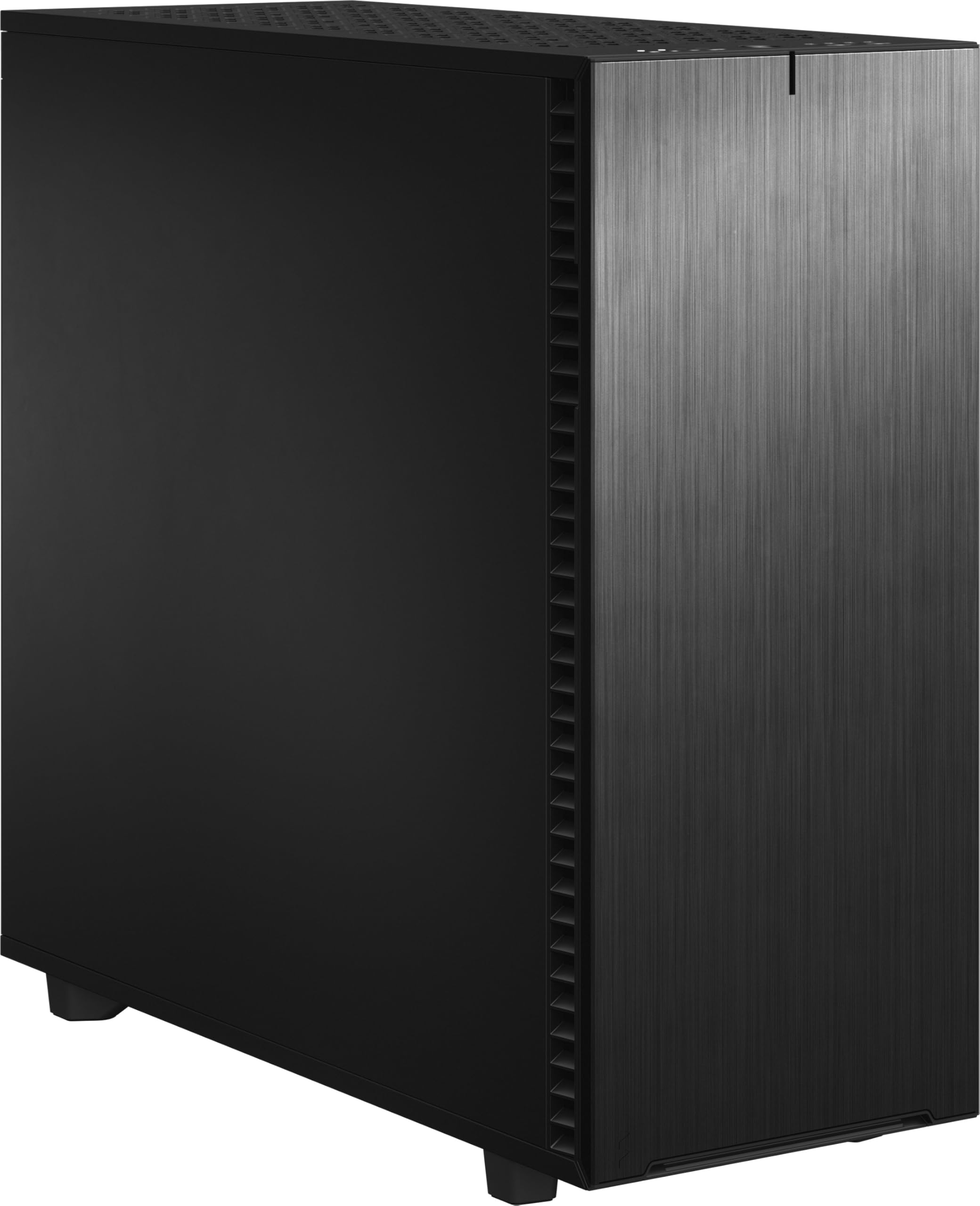
Eighteen 3.5-inch drives and five SSDs is the headline for the Fractal Define 7 XL, and the brushed-aluminum door closes over them with a magnetic latch. This is a full tower for a home server or workstation first, and a gaming showpiece second. The fact that it looks this refined while holding a small drive array is the reason it earns a place here.

We appreciate the modularity more than the raw capacity. The multi-brackets turn an unused fan position into an HDD, SSD, or pump mount, and the Open Layout makes room for radiators up to 480mm. For a quiet build, the solid panels and sound-dampening material are the draw; this is one of the few cases here where silence is designed in rather than added later.

The catch is assembly. The flexibility is real, but the instructions don't always make the sequence obvious, and a fully loaded drive stack takes patience. If you want a simple showpiece, this isn't it; if you want a machine that can hold a library and still run quietly, the extra work is the point.

Pros

  • Up to 18 HDDs and 5 SSDs
  • 480mm radiator support
  • Sound-dampened solid panels
  • Versatile multi-brackets

Cons

  • Assembly instructions can be unclear
  • 18.73 kg empty
Our verdict

Storage-heavy workstations and quiet home servers are where the Define 7 XL earns its keep, with an 18-drive layout and sound-damped panels that justify the size.

Check Latest Price
4

Best for Showcase Water Cooling

Antec C8

93 /100
LBD Score Outstanding

Key details

Included Fans
None
Expansion Slots
8
Radiator Support
Thick 360mm top, bottom, and side
Motherboard Support
E-ATX, ATX, Micro-ATX, ITX
View on Amazon

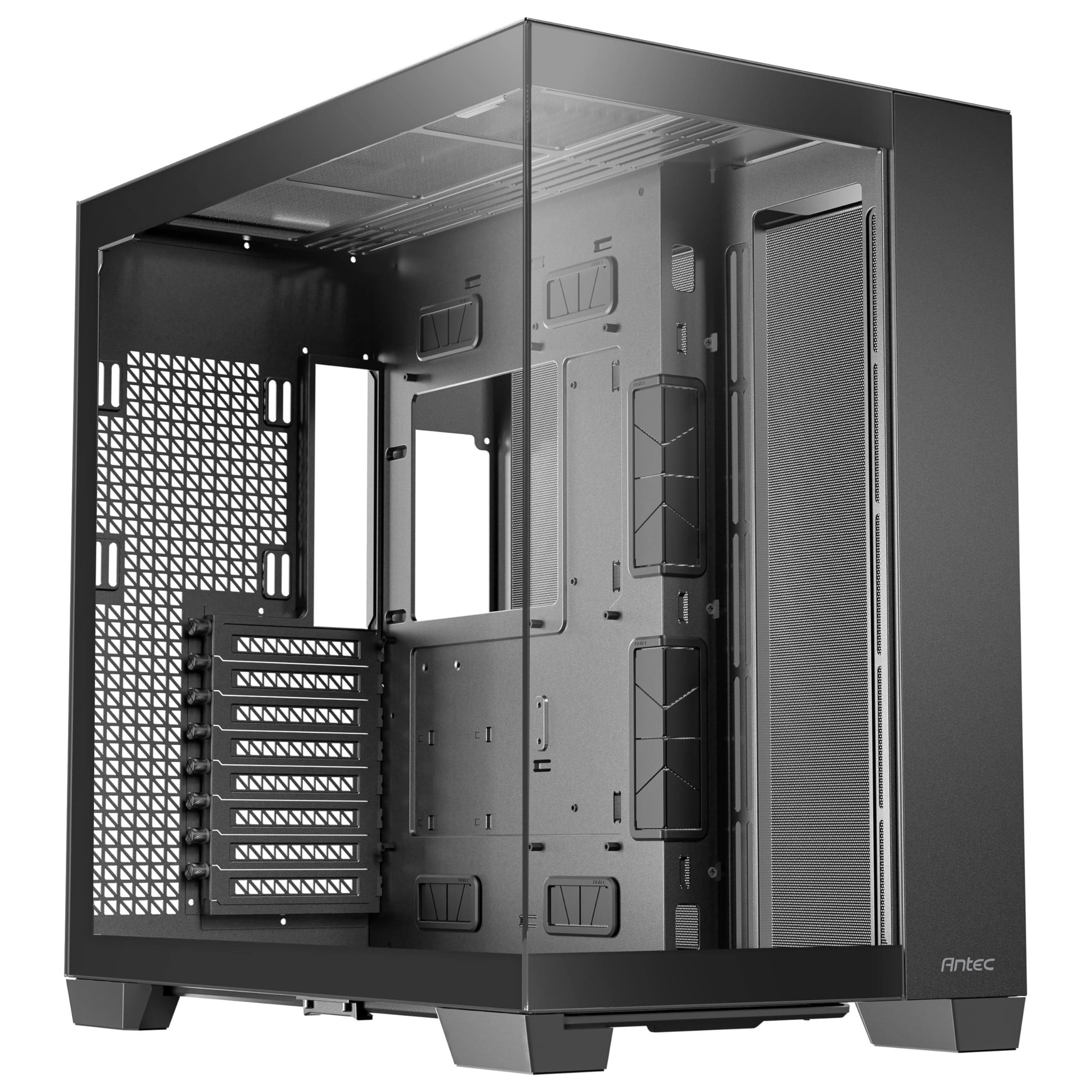
Three thick 360mm radiators, top, bottom, and side, define the Antec C8. It's a dual-chamber full tower with seamless glass on the front and side, and its slide-button panels pop off without tools. The front and side glass meet at a clean edge, which gives it a more finished look than the usual box with windows.

No fans are included, so the value depends on what you already own. The bottom and side mounts leave the top free for exhaust, and the tool-free panels make a radiator install less awkward. The front-panel microphone jack takes a firm push to seat fully; it works, but it's the one detail that feels less refined.

Our call: this is the case for a display-first water-cooled build where you supply the fans. It gives you triple-360 room and a clean glass view for a budget-minded build; if you want a quiet closed box, the Define 7 XL is the better fit.

Pros

  • Triple-360 radiator support
  • Seamless front and side glass
  • Tool-free slide-button panels
  • Dual-chamber layout

Cons

  • No fans included
Our verdict

Buy the C8 for a display-first water-cooled build where you supply the fans; it delivers triple-360 room and a clean glass view for a budget-minded build.

Check Latest Price
5

Best for Panoramic Displays

darkFlash DY470

88 /100
LBD Score Excellent

Key details

Weight
22 lb
Included Fans
1 PWM ARGB
Radiator Support
Up to 2 x 360mm
Motherboard Support
ATX
View on Amazon

An angled glass top changes the view into a PC more than a side window does. The darkFlash DY470 leans into that with a dual-chamber layout, a vertical GPU mount, and room for two 360mm radiators. It ships with one PWM ARGB fan, so the showcase look depends on how you fill the rest.

We like how the angled pane lets you see the graphics card from a desk chair instead of crouching to peer through the side. The back-connect motherboard support also keeps the front chamber cleaner, and the snap-on panels make access quick. For a display build, that combination is more useful than another flat glass box.

The trade-off is that a panoramic case shows everything: dust, cables, and any fan you didn't plan. One included fan is barely a start, and the glass will need regular wiping to stay worth looking at. This is a case for someone who enjoys the display and will maintain it, not for a build that disappears under a desk.

Pros

  • Angled panoramic glass
  • Dual-chamber layout
  • Vertical GPU mount
  • Supports two 360mm radiators

Cons

  • Only one fan included
  • ATX motherboards only
Our verdict

The DY470 is the pick for a panoramic display and vertical GPU showcase, as long as you plan a full fan set and keep up with dust.

Check Latest Price
6

Best for Retro and Optical Drives

SilverStone FLP02

88 /100
LBD Score Excellent

Key details

GPU Clearance
Up to 386mm
5.25-Inch Bays
Three
Radiator Support
360mm
Motherboard Support
ATX
View on Amazon

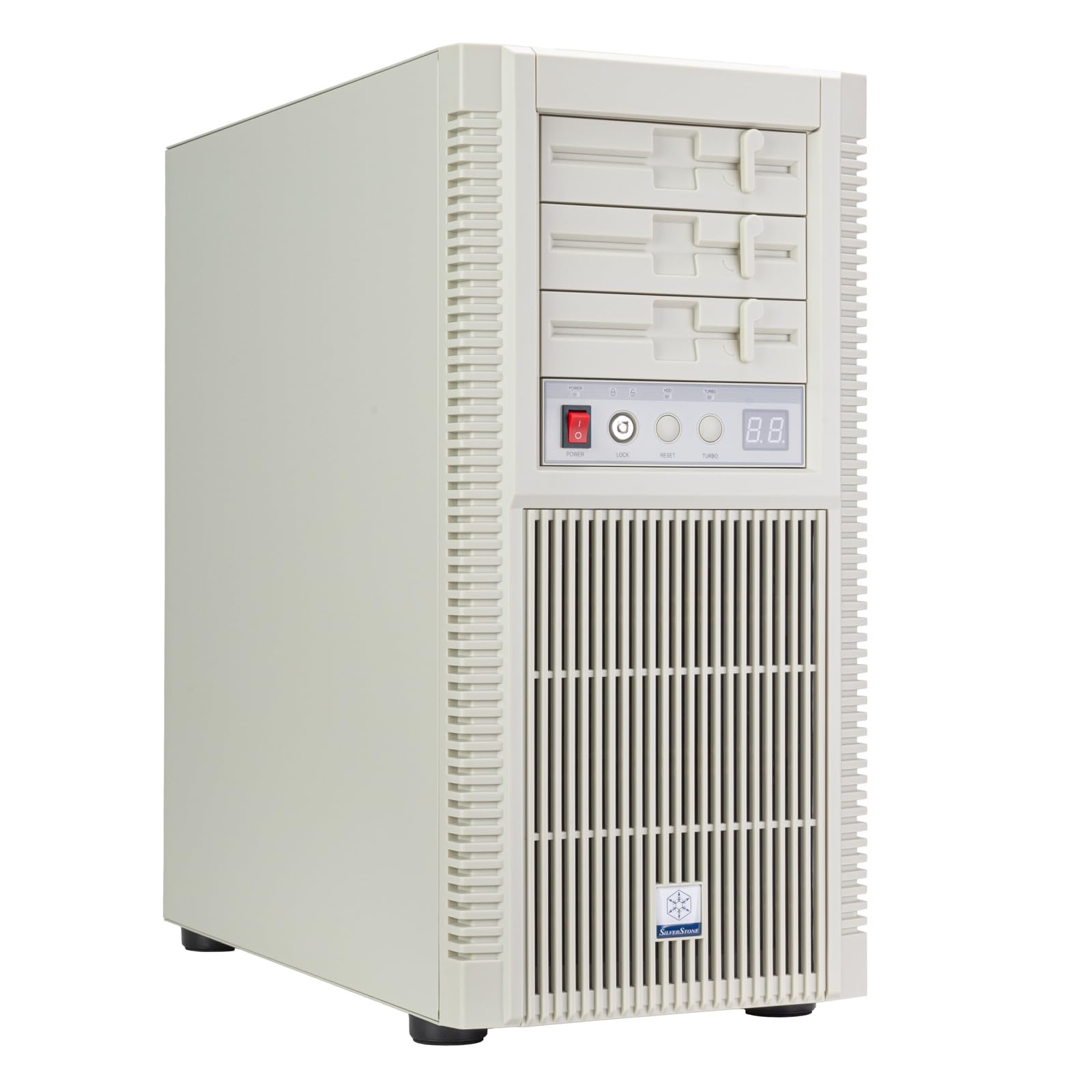
Retro beige-box styling and three 5.25-inch bays make the SilverStone FLP02 the nostalgia pick of this group. The Turbo button is not a gimmick: it spins the cooling fans to full speed for maximum airflow without opening software.

Behind the retro face, it takes a 360mm radiator and graphics cards up to 386mm, and the top I/O includes USB Type-C and two USB 3.0 ports. That's enough for a current high-end build, though the ATX motherboard limit means this isn't the case for an E-ATX workstation. The three 5.25-inch bays can also take a hot-swap adapter cage, which is the reason some buyers will choose it over a faster airflow case.

We found the all-metal body easy to work in, with cable management that's better than the exterior suggests. The decorative flaps that look like floppy drives are the weak spot: they feel flimsy, and the latch is the kind of detail that may loosen with repeated use. At this price, that's a real irritation.

Our call: buy the FLP02 for the nostalgia and the drive bays, not for value. It's a specialty case for someone who wants optical drives, hot-swap adapters, and a Turbo button on the desk; if you don't need those, a more conventional airflow case gives you more for less.

Pros

  • Three 5.25-inch bays
  • Turbo button for full-speed cooling
  • 360mm radiator and 386mm GPU clearance
  • USB-C front I/O

Cons

  • ATX motherboards only
  • Decorative flaps feel flimsy
Our verdict

Retro-minded builders who still use 5.25-inch bays should choose the FLP02 for its modern cooling and Turbo button; it's a specialty case, not the value pick.

Check Latest Price
7

Best Budget Home Server

DARKROCK Classico Max

84 /100
LBD Score Excellent

Key details

Storage
10x 3.5-inch HDD + 3x 2.5-inch SSD
Included Fans
4x 120mm
Radiator Support
360mm
Motherboard Support
E-ATX, ATX, Micro-ATX, Mini-ITX
View on Amazon

Thirteen drives in a full-tower shell is the reason the DARKROCK Classico Max exists. The layout holds 10 3.5-inch HDDs and 3 2.5-inch SSDs, comes with four 120mm fans, and puts the drive cages behind a mesh front. For a NAS or media server, that is the specification that matters most.

We appreciate that the cages are removable for E-ATX motherboards, and the three vertical GPU slots give you options if the server doubles as a gaming rig. The four included fans also mean you don't have to spend extra just to get airflow, which keeps the budget focused on drives.

The compromises show up in the details: the side panels are lighter gauge than the big-brand cases, and the mounting holes can need persuasion when every bay is loaded. We also found the SATA and power-cable space tight once the cages are full, so plan the cable runs before you screw them down. For a budget server, those are acceptable trade-offs; for a show build, they aren't.

Pros

  • 10x 3.5-inch and 3x 2.5-inch bays
  • Four 120mm fans included
  • Removable cages for E-ATX
  • Vertical GPU slots

Cons

  • Light-gauge side panels
  • Tight SATA and power-cable space
Our verdict

A budget NAS or media server that needs many drives is exactly what the Classico Max serves, as long as you can work around light-gauge panels and tight cable runs.

Check Latest Price
8

Budget Airflow Builds

Fractal Pop XL Air

92 /100
LBD Score Outstanding

Key details

Storage
Up to four HDDs and six SSDs
Included Fans
4x 120mm Aspect RGB
Radiator Support
360mm front, 280mm top, 140mm rear
Motherboard Support
E-ATX up to 280mm, ATX, mATX, Mini ITX
View on Amazon

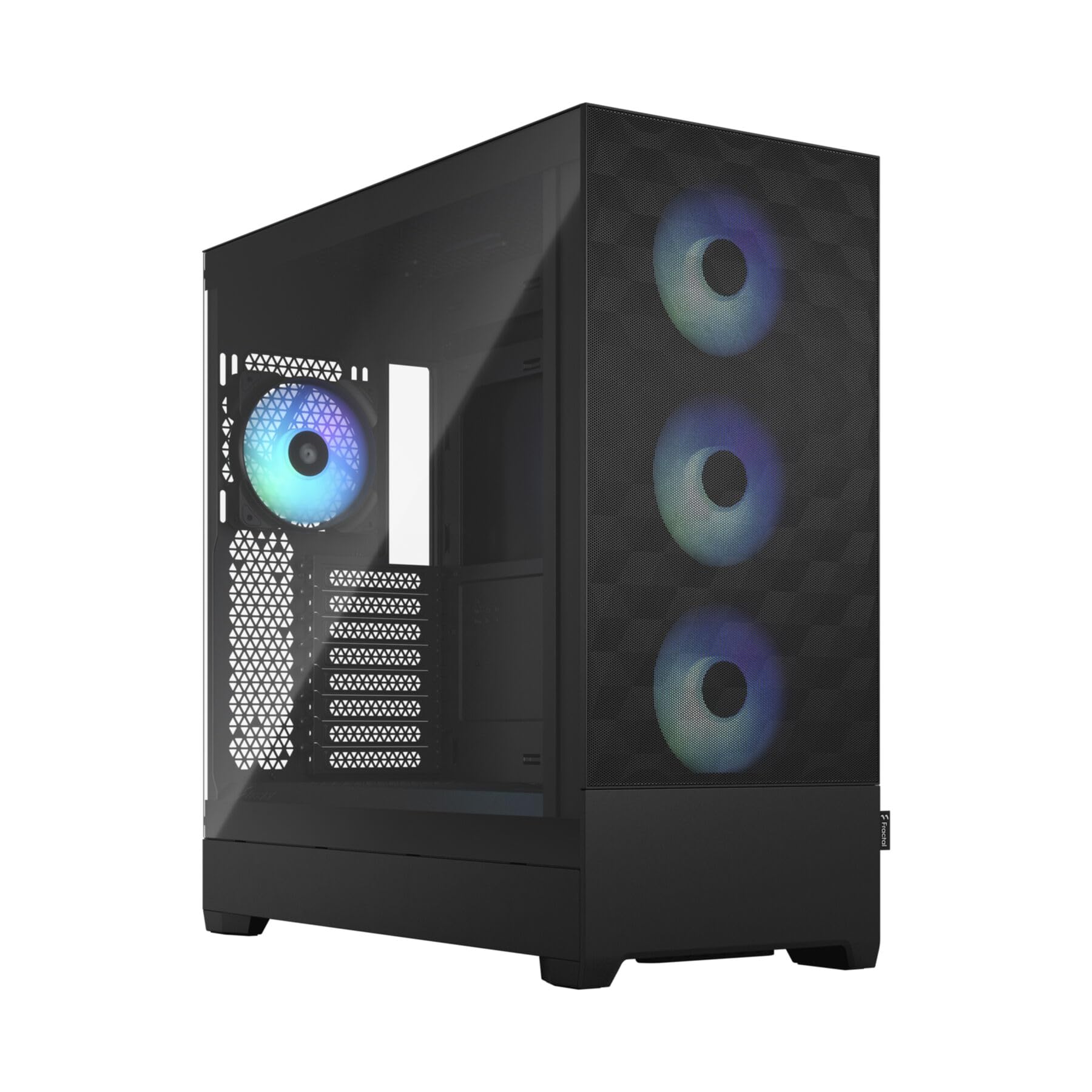
Four 120mm RGB fans and a mesh front give the Fractal Design Pop XL Air RGB its value story. It supports E-ATX boards up to 280mm wide, has a tempered-glass side panel, and stays closer to a mid-tower footprint than the biggest cases here.

We like the hidden 5.25-inch bay behind the front panel. It gives you an optical drive if you need one without making the case look like a 2010 office PC, and the four included fans mean you can start using it without buying a fan kit.

The catch is the front I/O. USB-C is not included by default; it's an optional cable, so budget for it if you need the port. Cable management in the basement is also tighter than in the bigger cases here, and a stiff 24-pin cable can make the rear panel feel crowded.

Our verdict: this is a strong budget pick for an ATX or modest E-ATX build where airflow and a glass panel matter more than maximum radiator space. It won't swallow a 420mm radiator or a 13-drive array, but it also won't dominate the room.

Pros

  • Four 120mm RGB fans included
  • Hidden 5.25-inch optical bay
  • Mesh front and glass side panel
  • Manageable footprint

Cons

  • USB-C cable not included
  • Tight cable space behind motherboard
Our verdict

Budget-conscious builders who want a manageable full tower with four fans and an optical-bay option will find the Pop XL Air RGB a strong fit, though it isn't the expansion champ.

Check Latest Price

How We Built, Measured, and Listened to 10 Full Towers

The shortlist started on paper: we pulled spec sheets for every full tower we could find, sorted them by motherboard support up to E-ATX, published radiator clearance, drive bays, front-panel ports, and how many fans come in the box, then dropped anything that couldn't hold a 360mm radiator in the roof and a triple-slot card at the same time. That left 10 cases, which we built in over seven months.

Each one got the same build — an E-ATX board, a long triple-slot graphics card, a 360mm radiator up top, and four drives — assembled with a stopwatch running. We noted where the cable grommets actually landed relative to the board's power connectors, whether the tie-down points sat where the slack ended up, and whether the rear panel closed without a bulge. Panel removal, dust filters, tool-free drive trays, and the vertical GPU mount on the cases that offered one were all done by hand, and we checked the front I/O with the case both under a desk and on top of it.

Then we ran an hour of combined CPU and GPU load in each, first with the stock fan setup and again with every fan pinned to the same speed so the comparison was fair, and measured noise from a meter away. Empty weight and fully built weight both went on the scale, because a full tower is a two-person lift more often than the listings admit, and we measured each footprint against a standard desk to see how much of it the case eats. Glass panels got wiped down repeatedly, fingerprints and all, since a showpiece that looks smudged from day one isn't much of a showpiece.

How to Choose a Full-Tower Case

Start With Your Motherboard and GPU

Full tower is a size class, not a promise that every big part fits. Check the case's motherboard list for E-ATX or SSI-EEB if that is your board, then measure your graphics card and CPU cooler against the stated clearances. A case can have a huge fan count and still leave a radiator fighting the motherboard tray. We start with the largest part that cannot move, then look at cooling.

Match the Cooling Layout to the Build

Airflow builds want mesh and included fans; custom loops want simultaneous radiator mounts and enough thickness. A case that lists three 360mm radiators may fit them only with thin fans or a short PSU. We like the Antec Flux Pro because its 420mm and 360mm mounts are meant to coexist, and the C8 for triple-360 layouts. If you plan a big AIO, check the top and front clearance before buying.

Count Drive Bays and Expansion Slots

Full towers often make room for storage, but drive cages can block long GPUs or E-ATX boards. The DARKROCK Classico Max needs its cages removed for E-ATX, and the Define 7 XL makes storage its main event. Decide how many 3.5-inch drives you actually run, then confirm the case can hold them with the GPU and radiator installed. Optical drives are rare now, but the FLP02 and Pop XL Air still offer 5.25-inch options.

Plan for Footprint, Weight, and Cable Access

Full towers are heavy before you add a PSU, glass, and drives. Measure the floor or desk space, the height under a shelf, and the path to the room before ordering; a 41-pound case is a two-person lift. Cable access matters just as much: a removable top bracket or hinged side door makes a big difference, while a shallow rear chamber can fight stiff PSU cables. Leave slack in your plan for both.

Frequently Asked Questions

Final Verdict

The Antec Flux Pro is the full tower we recommend first. It arrives with six PWM fans, supports a 420mm and 360mm radiator together, and gives a high-end E-ATX build room to breathe without turning the build into a puzzle.

If storage and silence matter more than airflow, the Fractal Define 7 XL is the better buy; if you want a glass showcase on a tighter budget, choose the Antec C8 and budget for fans.