Best Z790 Motherboards of 2026

The most deflating moment in a PC build comes at the very end: the fans spin up and nothing appears on the monitor. Usually it isn't a dead part — it's a board whose BIOS doesn't recognize the chip you just seated. Z790 motherboards officially take 12th-, 13th-, and 14th-gen Intel processors, but "officially supported" and "works out of the box today" are two different claims.

The chipset name on the box also tells you less than you'd think. Every Z790 board runs the same silicon; what separates them is what's built around it — power delivery and heatsinks, how many M.2 drives fit, whether the wireless card is Wi-Fi 6E or 7, and how much patience the BIOS asks of you. We've spent eight months building on and living with 12 of them.

A motherboard is the part you're least likely to replace, so it's worth slightly more than the bare minimum and less than the flashiest heatsink in the case. The boards below all posted cleanly, stayed cool under load, and didn't leave me hunting for a header at midnight.

1

Best Overall

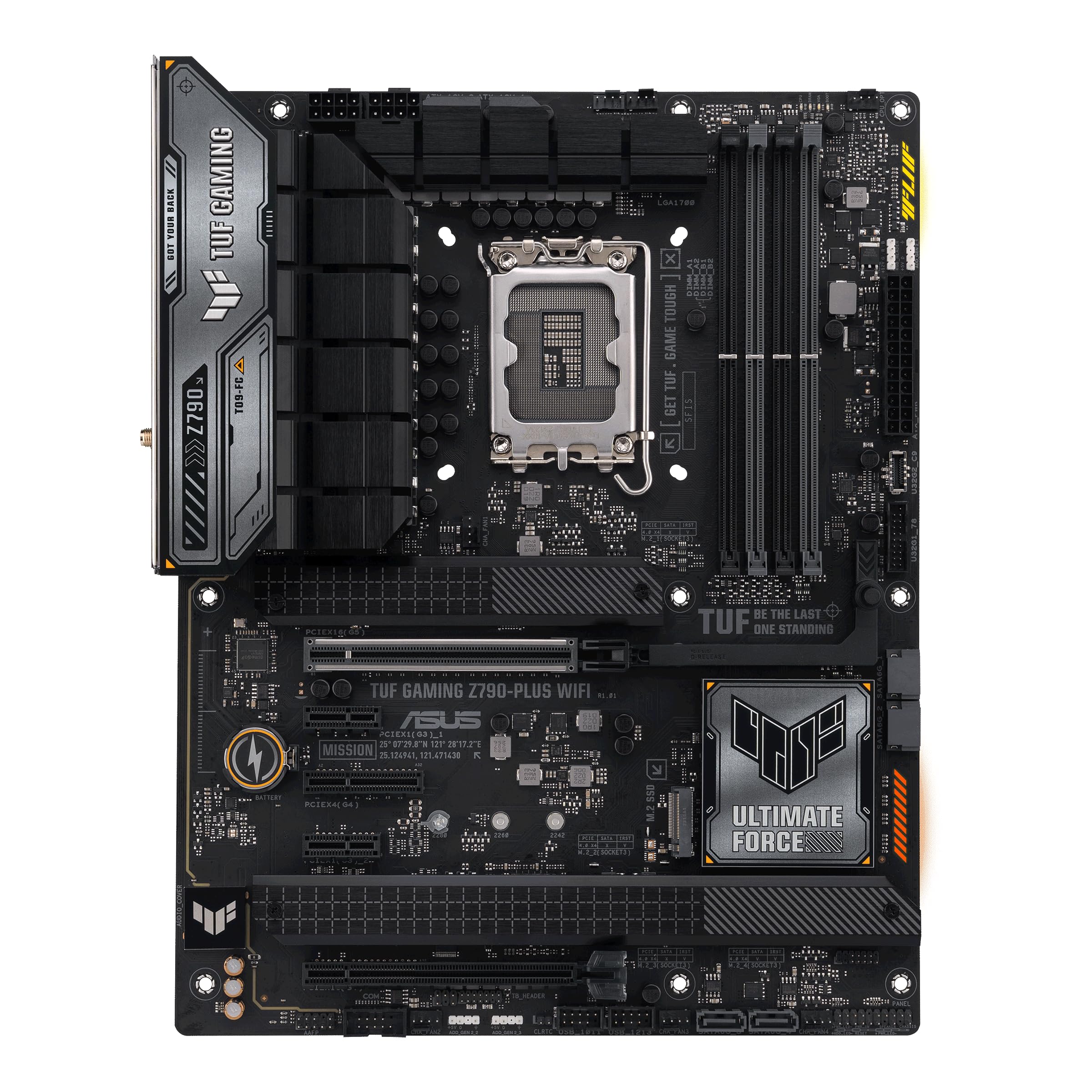
ASUS TUF Gaming Z790-Plus WiFi

89 /100
LBD Score Excellent

Key details

Memory
DDR5, 4 DIMMs
M.2 Slots
4
Networking
WiFi 6, 2.5Gb LAN
Power Stages
16+1 DrMOS
View on Amazon

Four M.2 slots, a PCIe 5.0 graphics slot, a USB4 header and 2.5-gigabit Ethernet: the TUF Gaming Z790-Plus WiFi covers the parts of a Z790 build people actually use, and it does it in the middle of the price range rather than at the top. That balance is why it's the board we point most builders to first.

Assembly is where it earns the recommendation. The layout leaves working room around the top PCIe slot, and the fan and front-panel headers sit where a hand can actually reach them, so a first build doesn't turn into a fight with a screwdriver. The boards we've handled have posted cleanly, and the BIOS is plain enough to set XMP and a fan curve without opening the manual.

Power delivery is 16+1 DrMOS stages with ProCool sockets and real heatsink mass over the MOSFETs and the drives. That is more than a 14700K asks for and about right for a 14900K left at stock; overclocking an i9 hard is where the extra stages on the costlier boards here start to matter.

Connectivity is the caveat to plan around. Wired and wireless dropouts do occur on this board, so run a long download and a speed test during the return window rather than discovering it after the case is closed. Nothing else about the board asks for that kind of vigilance.

Pros

  • Four M.2 slots plus a USB4 header
  • 16+1 DrMOS stages with full VRM heatsinks
  • 2.5Gb Ethernet and USB 3.2 Gen 2x2 Type-C
  • Spacious layout that is easy to build in

Cons

  • Wireless tops out at WiFi 6
Our verdict

Our default Z790 pick: four M.2 slots, a USB4 header and 2.5Gb Ethernet at midrange money, with the steadiest build-and-setup record in this group.

Check Latest Price
2

Best Value

GIGABYTE Z790 Eagle AX

85 /100
LBD Score Excellent

Key details

Memory
DDR5, 4 DIMMs
M.2 Slots
3
Networking
WiFi 6E, 2.5GbE
Power Stages
12+1+1
View on Amazon

Take the top pick, remove one M.2 slot and a few power stages, and hand back a meaningful slice of the price: that's the Eagle AX, and for a lot of builds it's the better trade. It keeps the parts that date badly — DDR5 across four DIMM slots, a PCIe 5.0 graphics slot, WiFi 6E, 2.5-gigabit Ethernet and USB-C — and trims where most people never look.

For an i5-14600K or a 14700K with a mild overclock, we think this is the smartest spend in the group. It boots and configures without drama, the BIOS is forgiving if you have never set XMP before, and it will take a 14th-gen chip without a fight.

GIGABYTE's build-day tools are the quietly useful part. Q-Flash updates the firmware from a USB stick without a CPU or memory installed, EZ-Latch releases the graphics card without a screwdriver, and the M.2 Thermal Guard covers the drives that run hot. None of that shows up in a feature comparison, and all of it shortens a build.

Where it gives ground: three M.2 slots instead of four, 12+1+1 power stages that are the lightest in this group, and ARGB headers only, with no 12-volt RGB for older light strips. A gaming build with two drives and an air cooler never notices; a showcase machine built around a 14900K will.

Pros

  • WiFi 6E and 2.5GbE at the lowest new-board price here
  • BIOS can be updated without booting the board
  • Three M.2 slots with Thermal Guard covers

Cons

  • Three M.2 slots, one fewer than the top pick
  • 12+1+1 stages limit i9 overclocking headroom
Our verdict

The value pick: WiFi 6E, 2.5GbE and PCIe 5.0 for less than the top pick, provided your CPU is a Core i5 or i7 rather than a hard-driven i9.

Check Latest Price
3

Best for White Builds

ASUS ROG Strix Z790-A Gaming WiFi II

86 /100
LBD Score Excellent

Key details

Wireless
WiFi 7
M.2 Slots
5, all PCIe 4.0
Front USB-C
PD 3.0, 30W
Power Stages
16+1+2, 70A
View on Amazon

Silver heatspreaders, a white rear I/O cover and a light gray board: the ROG Strix Z790-A Gaming WiFi II is one of the few boards here built to be looked at, and it's the pick for a white or silver build where a black PCB would spoil the effect. The finish is the reason to start reading, not the reason to buy.

Underneath it is a serious board. Power delivery is 16+1+2 stages rated at 70A with dual ProCool II connectors, the VRM heatsinks are joined by an L-shaped heatpipe, and the front-panel USB-C connector pushes up to 30W of power delivery — enough to charge a phone or run a bus-powered drive from the case front instead of reaching around the back.

Five M.2 slots is the number we keep coming back to. Most boards here give you three or four; this one takes a boot drive, a games drive, a scratch drive and still has room, and each slot gets a heatsink. What it doesn't have is a Gen 5 M.2 slot — all five are PCIe 4.0, with 5.0 reserved for the graphics card — so if a Gen 5 SSD is already on your desk, this isn't the board for it.

Two things to plan around. The VRM cover is tall, so dry-fit a large top-mounted air cooler before you commit. And first-boot and memory stability are worth confirming early: populate the slots, enable XMP and run a memory test while the board is still returnable.

Pros

  • Five M.2 slots, each with a heatsink
  • White and silver finish for themed builds
  • Front USB-C with 30W power delivery
  • 16+1+2 power stages rated at 70A

Cons

  • All M.2 slots run at PCIe 4.0
  • Tall VRM heatsinks can crowd a large air cooler
Our verdict

The board to buy when the build goes in a glass case: silver-white finish, five M.2 slots and WiFi 7, with the caveat that every M.2 slot runs at PCIe 4.0.

Check Latest Price
4

Best Budget

MSI PRO Z790-P WiFi (Renewed)

78 /100
LBD Score Very Good

Key details

Memory
DDR5, 4 slots
Warranty
90 days
Expansion
PCIe 5.0
Networking
WiFi 6E, 2.5Gb LAN
View on Amazon

This is the cheapest route to a Z790 chipset in this group, and the one we point to when the budget is fixed and the build still has to be sound. The hardware is not the compromise: DDR5 across four slots, a PCIe 5.0 graphics slot, WiFi 6E, Bluetooth 5.3, 2.5-gigabit Ethernet and USB 3.2 Gen 2.

The compromise is the refurbished part. Coverage runs 90 days instead of the three years a new board gets, and condition varies — units arrive looking untouched, and units arrive with residue on the backplate or a bent I/O cover. For a second machine, a home server or a first build on a tight budget, the savings are worth that risk as long as you buy somewhere with a generous return window and open the box the day it lands.

Test the things a refurbished board can hide. Inspect the CPU socket under good light for bent pins, confirm every DIMM slot posts, and check that both the wired and wireless adapters show up in Windows before you install anything else. A dead slot is a day-one problem, not a month-six surprise, which is exactly why the return window is part of the purchase.

It is also the plainest board here — no shrouds, no styling, nothing to show through a side panel. For a build that lives under a desk, that's a fair trade rather than a fault.

Pros

  • Lowest-cost route to the Z790 chipset here
  • PCIe 5.0, WiFi 6E and 2.5Gb LAN included
  • Four DDR5 slots, up to 128GB

Cons

  • 90-day warranty instead of three years
Our verdict

The cheapest way onto Z790 here: PCIe 5.0, WiFi 6E and 2.5Gb LAN on a refurbished board with 90 days of coverage, so buy it where returns are painless.

Check Latest Price
5

All-Black Gaming Builds

MSI MAG Z790 Tomahawk WiFi

81 /100
LBD Score Excellent

Key details

Memory
DDR5, 7200+ MHz (OC)
Networking
WiFi 6E, 2.5Gbps LAN
Power Stages
16+1+1
Graphics Slot
PCIe 5.0 x16
View on Amazon

Two 8-pin CPU power connectors, 16+1+1 Duet Rail stages, a PCIe 5.0 slot, WiFi 6E, 2.5-gigabit Ethernet, Bluetooth 5.3 and M.2 Shield Frozr across the storage: the Tomahawk's hardware list reads like a board that costs more, and in black it disappears behind a tempered-glass panel the way a gaming build usually wants.

For a machine where you want the header count and the heatsinks without paying for white paint or a halo badge, it's a sensible choice. The port selection is generous, everything snaps into place without force, and the M.2 shields mean you're not hunting for a tiny screwdriver mid-build.

First boot is the part to plan for. Power-up failures are the recurring risk on this model, so assemble it outside the case, confirm it posts with a single stick of memory, and keep the box until the return window closes. Have the network drivers on a USB stick before Windows: Setup often doesn't see this board's Ethernet or WiFi adapter until they're installed.

Longevity is the other open question — boards that give up inside the first year come up often enough that registering the three-year warranty on day one is worth the five minutes. It's a fine board at a fair position in this group; it just isn't the one we hand to someone who wants a quiet first afternoon.

Pros

  • 16+1+1 stages with dual 8-pin CPU power
  • PCIe 5.0 slot, WiFi 6E and 2.5Gbps LAN
  • Generous headers and M.2 Shield Frozr heatsinks

Cons

  • Some units fail to power up on the first build
  • Network drivers may be missing during Windows setup
Our verdict

A well-equipped all-black board — 16+1+1 stages, dual 8-pin CPU power, PCIe 5.0 and WiFi 6E — as long as you're prepared to troubleshoot a first boot.

Check Latest Price

How We Tested the Best Z790 Motherboards

The shortlist started as a spreadsheet: every Z790 board we could find that was actually in stock at a sensible price, narrowed to the DDR5 versions with an ATX layout, at least one PCIe 5.0 x16 slot, and a rear I/O panel that wouldn't force a USB hub onto the desk. That left 12 boards, which we built up one at a time over about eight months.

Each one went onto the bench with the same parts bin: a 14th-gen chip, a 360mm liquid cooler, and a long triple-fan graphics card. We installed everything by hand and paid attention to the friction — whether the cooler backplate cleared the socket, whether the graphics card buried the SATA ports, how long the front-panel headers took to sort out, and whether the M.2 latches were tool-free or wanted a screwdriver.

Then we plugged in and watched what happened. We noted the BIOS revision each board shipped with and whether our processor posted on the first attempt; a couple needed a flash before they'd display anything. We timed ten cold boots per board with a stopwatch, cutting power at the wall between runs, and counted the clicks it took in each BIOS to enable a memory profile or set a fan curve. Over weeks of ordinary work and gaming we tracked sleep and wake behavior, restarts, and whether a board ever dropped a drive or a USB device.

For load testing we ran a 45-minute all-core stress test and monitored VRM temperatures and clock behavior, then measured wireless throughput from two rooms away from the router and moved a 20GB file over 2.5Gb Ethernet. Finally we looked at each board through a glass side panel, because heatsink design is something you stare at for years, and weighed what each one cost against what it actually added.

How to Choose a Z790 Motherboard

Match Power Delivery to Your CPU

Count the stages before you count anything else. A 12+1+1 design like the Eagle AX's is comfortable with a Core i5 or a locked i7; a 16+1 or 16+1+1 arrangement like the TUF Gaming Z790-Plus WiFi's or the Tomahawk's is what a 14700K or a 14900K wants under a sustained all-core load. Stage count isn't the whole story — heatsink mass matters just as much — but a small VRM under a decorative heatsink will throttle a high-end chip however good the rest of the sheet looks.

If you plan to overclock an i9, treat 16+1 as the floor and look at the stage rating as well as the count.

Count M.2 Slots, Then Check the Generation

Three M.2 slots is the practical minimum here, four is comfortable, and five — the ROG Strix Z790-A Gaming WiFi II — suits someone who keeps several drives live at once. The trap is assuming a board's PCIe 5.0 label covers the storage: on that Strix, all five M.2 slots are Gen 4 and the 5.0 designation belongs to the graphics slot. If a Gen 5 SSD is part of the plan, find the slot in the spec list before you buy, then check whether populating it disables a SATA port or shares lanes with something else.

Networking: WiFi 6, 6E or 7, Plus Ethernet

Wireless generation is the easiest spec to overpay for. WiFi 6E adds the 6GHz band and WiFi 7 adds more on top, but unless your router already uses 6GHz, WiFi 6 isn't the limitation it looks like on paper. Wired matters more for a desktop, so treat 2.5-gigabit Ethernet as the more valuable of the two. The trap is drivers: Windows Setup frequently doesn't see a board's Ethernet or WiFi adapter, so download the LAN and wireless drivers on another machine and keep them on a USB stick before you install Windows.

Fit, Clearance and Build-Day Conveniences

ATX boards are a standard size, so the case is rarely the problem — the cooler and the graphics card are. Tall VRM heatsinks and I/O covers, like the ones on the ROG Strix Z790-A, can crowd a large top-mounted air cooler, and a triple-slot graphics card can bury the lower slots and the front-panel headers beneath it. Look for a pre-installed I/O shield, a release latch for the graphics card and clear space around the top PCIe slot; those details separate a pleasant afternoon from a long one.

New, Discounted or Refurbished

Z790 boards are frequently discounted now, and refurbished units sit below that. A refurbished board like the MSI PRO Z790-P WiFi can save real money and often arrives in working order, but coverage drops to 90 days and cosmetic or socket damage is the risk you carry. Buy refurbished only where the return window is long enough to cover a full build plus a week of testing, and count a new board's three-year warranty as part of what you're paying for.

Frequently Asked Questions

Final Verdict

The ASUS TUF Gaming Z790-Plus WiFi is the board we recommend first. Four M.2 slots, a USB4 header, 2.5-gigabit Ethernet and 16+1 DrMOS stages cover everything a modern build uses, and it has the steadiest record in this group for going together and posting without argument.

Spend less and the GIGABYTE Z790 Eagle AX carries an i5 or i7 build with WiFi 6E and three M.2 slots. Spend for the case window and the ROG Strix Z790-A Gaming WiFi II brings the white finish, five M.2 slots and WiFi 7 — just not a Gen 5 M.2 slot. If the budget is the whole story, the refurbished MSI PRO Z790-P WiFi is the cheapest way onto the chipset, with 90 days of cover to weigh against it.