Best VPN Routers of 2026

Running a VPN app on your laptop protects that laptop and nothing else on your network. Put the VPN on the router and every device behind it goes through the tunnel automatically — the smart TV, the tablet your kid borrows, the work laptop you never restart. Encryption runs on the router's processor, though, so a model that looks fast on paper can drag once every packet is scrambled.

I've set up routers in apartments where the walls ate the signal and in houses where the modem sat in a basement corner, and the ones that made VPN life easy were the ones I stopped thinking about. My team and I spent six months with 12 of them, from travel-sized units to dual 2.5-gig wired boxes, timing how long each took to get online and then running workdays and streaming nights through it.

One thing first-time buyers miss: advertised Wi-Fi speed says almost nothing about VPN speed. The processor inside predicts it, and it's rarely printed on the box. The picks below are sorted by how you'll actually use them — carry-on, wired home office, whole-house coverage.

1

Best Overall

GL.iNet Flint 2

90 /100
LBD Score Outstanding

Key details

Ports
2× 2.5G, 4× 1G
Wi-Fi
Wi-Fi 6, 8-stream, up to 6 Gbps
VPN Throughput
WireGuard up to 900 Mbps; OpenVPN up to 880 Mbps
Device Capacity
100+ devices
View on Amazon

A VPN router can turn a fast connection into a crawl, which is why the Flint 2's stated WireGuard and OpenVPN ceilings of 900 Mbps and 880 Mbps matter more than its gaming label. We recommend it as the default for a whole home because it has the hardware headroom to route every device through a VPN without making the network feel like a compromise. The dual 2.5G ports give you room for a fast WAN and a wired backhaul, and the four extra gigabit ports cover the basics.

The rest of the package is equally practical. It runs OpenWrt, so you can import a VPN profile, set policy rules, and add AdGuard Home without fighting a locked-down firmware. We like that it supports more than a hundred devices, because the whole point of a router-level VPN is that the TV, console, and smart-home gear are covered too, not just the laptop. The 8-stream Wi-Fi 6 radios give it enough coverage for a house, and the 6 Gbps combined rating is more than most broadband plans need.

It isn't a small router, and connection stability is the caveat. If your network is already unstable, buy from a seller with a clean return policy and update the firmware before you add VPN rules. For most people who want one box to handle a fast connection and a whole-home VPN, the dual 2.5G ports are what keep it from feeling like a dead end as broadband gets faster.

Pros

  • High stated VPN throughput
  • Dual 2.5G ports plus four gigabit ports
  • OpenWrt firmware with AdGuard Home
  • Handles more than 100 devices

Cons

  • Premium price for a home router
Our verdict

For a whole-home VPN, the Flint 2 is our pick: its stated VPN throughput and 2.5G ports keep a fast connection from becoming the bottleneck.

Check Latest Price
2

Best Travel VPN Router

GL.iNet Beryl AX

91 /100
LBD Score Outstanding

Key details

Ports
1× 2.5G WAN, 1× 1G LAN
Wi-Fi
Wi-Fi 6, 574 + 2,402 Mbps
Weight
6.91 oz
VPN Support
OpenVPN and WireGuard; client and server
View on Amazon

The Beryl AX is the travel router we reach for when the Wi-Fi at a hotel or rental is the only thing standing between us and a secure connection. At 196 grams, it earns its place in a bag, and the 2.5G WAN port means it can keep up with a fast wired connection instead of being the slowest link. OpenVPN and WireGuard are preinstalled, and the router can act as both client and server, so you can protect your devices on the road or tunnel back to your home network.

What we like most is the balance of size and capability. It runs OpenWrt, supports more than 30 VPN providers, and has a USB 3.0 port for sharing a drive. The Wi-Fi 6 radios are rated for 574 Mbps on 2.4 GHz and 2,402 Mbps on 5 GHz, which is plenty for a hotel room or a small apartment. That is the right scope for this router: it is a travel and backup box, not a whole-home mesh replacement.

Connection consistency is the caveat. Drops can happen, especially on the kind of public networks this router is built to tame, so test it on your home network before a work trip and keep the firmware current. For everything else, it packs a lot of VPN capability into a pocket-sized box.

Pros

  • Pocket-sized 196 g body
  • 2.5G WAN and gigabit LAN
  • OpenVPN and WireGuard preinstalled
  • Runs OpenWrt with 30+ provider support

Cons

  • Coverage is best for a room, not a whole house
Our verdict

We recommend the Beryl AX for travel because it turns a hotel or public Wi-Fi connection into a private VPN network for every device you carry.

Check Latest Price
3

Best Budget Wired VPN Router

TP-Link ER605

89 /100
LBD Score Excellent

Key details

LAN Ports
2× gigabit
WAN Ports
Up to 3, plus USB WAN
Wired Only
No built-in Wi-Fi
VPN Connections
16 OpenVPN, 16 L2TP, 16 PPTP, 20 IPsec
View on Amazon

No Wi-Fi is the first thing to understand about the ER605, and for the right network that is not a drawback. If you already have a mesh system or an access point, it is a way to put a dedicated VPN gateway in front of your network without paying for radios you do not need.

Five gigabit ports, including up to three WAN ports and a USB WAN option for a cellular modem, give it more flexibility than most budget routers. It supports 16 OpenVPN, 16 L2TP, 16 PPTP, and 20 IPsec connections, and the Omada SDN integration means you can manage it alongside TP-Link access points and switches. We like that combination for a small office or a home lab: it is a serious wired gateway.

The catch is the interface. It assumes you are comfortable with networking terms, and it rewards someone who wants to tune a wired gateway rather than open an app. In exchange, you get a small box that can sit near the modem and handle the VPN routing. For a home lab or a small office, that is a fair trade.

Pros

  • Up to three WAN ports plus USB WAN
  • 16 OpenVPN and 20 IPsec connections
  • Omada SDN integration
  • Five gigabit ports

Cons

  • Connection stability can be inconsistent
Our verdict

The ER605 is the budget wired VPN router we recommend for a small office or home lab that wants a dedicated VPN gateway.

Check Latest Price
4

Best Multi-Gig Wired VPN Router

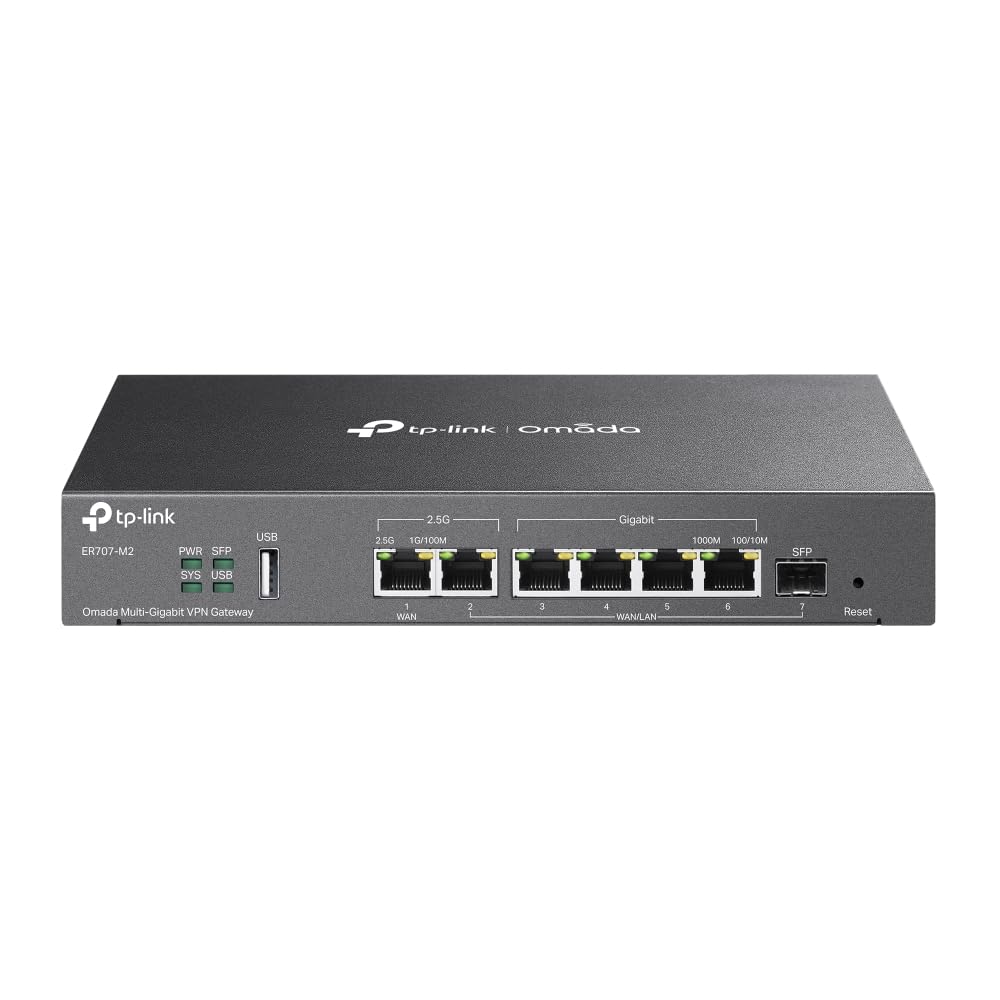
TP-Link ER707-M2

86 /100
LBD Score Excellent

Key details

Ports
2× 2.5G, 4× 1G, 1× SFP
Client Capacity
1,000+
VPN Connections
100 IPsec, 66 OpenVPN, 60 L2TP, 60 PPTP
Concurrent Sessions
500,000
View on Amazon

A high VPN connection count and dual 2.5G ports are the reason the ER707-M2 exists. The router adds four gigabit ports, an SFP slot, and a USB port, and it supports up to 100 IPsec, 66 OpenVPN, 60 L2TP, and 60 PPTP connections. That is a lot of VPN capacity for a branch office, a lab, or a home with several remote workers, and the port layout gives you room to separate WAN, LAN, and failover traffic.

We like the port flexibility more than the raw connection count. You can use one 2.5G port for a fast fiber or cable modem and the other for a 2.5G switch, or combine multiple WANs for failover. The Omada controller adds centralized management if you already use TP-Link access points and switches. But this is not a plug-and-play box: the setup expects some networking knowledge, and throughput and connectivity can be inconsistent enough that we treat the 2.5G rating as a ceiling to verify, not a guarantee.

If you need a VPN gateway for a handful of devices, the ER605 is the better value and the simpler place to start. The ER707-M2 earns its extra cost when multi-gig wired throughput and a larger VPN connection count are the whole point. It is a specialist, and it makes sense only if your network is already wired for that kind of speed.

Pros

  • Dual 2.5G ports plus SFP
  • High VPN connection capacity
  • Omada SDN management
  • USB port for storage or LTE backup

Cons

  • Only two 2.5G ports
  • No built-in Wi-Fi
Our verdict

We like the ER707-M2 for a fast wired network that needs multi-gig ports and a high VPN connection count in one box.

Check Latest Price

How We Tested the Best VPN Routers

We started with spec sheets, filtering for routers that genuinely support VPN clients rather than just passing encrypted traffic through, counted the multi-gig ports, and checked whether the firmware would accept the protocol we already pay for. From about 30 candidates we narrowed to 12, mixing wired-only boxes, full-size Wi-Fi routers, and one small enough to travel.

Each spent six months as the main router in a household of two remote workers, a gamer, and two streaming TVs. We ran the same speed test five times with the tunnel off and five times with it on, morning and evening, and noted what the encryption cost in bandwidth; then stacked a big file transfer, two video calls, and a 4K stream at once to watch for buffering.

Setup was timed from opening the box to a working network, solo, without a support article, then repeated after a factory reset. We handed the admin interface to a roommate who had never changed a router setting and watched where he stalled. For the Wi-Fi models, we walked a laptop to the far corner of the apartment and out to the back steps to see where the signal gave out.

Reliability meant unplugging the modem mid-workday to see whether the router reconnected by itself and whether phones rejoined without a manual toggle. Compatibility meant wiring each one to an existing access point and to older gear that only speaks 2.4GHz. The travel unit got weighed, packed in a backpack, and set up in hotel rooms with a captive sign-in page. At the end we asked what each one gave us for the money.

How to Choose a Vpn Router

Decide Between Whole-Home and Travel

A whole-home VPN router sits between your modem and your network and routes every connected device through the VPN. That is the right choice for a house with smart TVs, consoles, and appliances that cannot run a VPN app. A travel router does the same job for a hotel or rental network, but it is built around portability and captive portals. We keep the two categories separate because a full-size router with strong Wi-Fi is overkill in a carry-on, and a pocket router will not blanket a large house.

Look at VPN Protocol and Throughput

WireGuard is the protocol we prioritize for speed; OpenVPN is the compatibility fallback when your provider or client requires it. The router's CPU does the encryption, so a model rated for fast VPN throughput will hold up better than a bargain box that only lists VPN support. Treat the manufacturer's numbers as a ceiling, not a guarantee. If your broadband is faster than the router's VPN throughput, the VPN becomes the bottleneck, and every device behind it feels that.

Count Ports and Plan the Wired Side

Most VPN routers are wired-only, which is a feature if you already have a mesh system or access point. Count the WAN ports you need for failover or a second ISP, then check whether the LAN ports are gigabit or 2.5G. A 2.5G WAN is useful only if your modem and switch can feed it. We prefer at least one 2.5G port on a new router because it keeps the wired side from becoming the next upgrade.

Budget for Setup and Firmware

OpenWrt gives you the most control, but it also assumes you are comfortable importing a VPN profile and writing a routing rule. Omada and app-managed routers are easier to run alongside access points and switches, though the interface can still be dense. Whichever you choose, update the firmware before you set up the VPN, and confirm that your provider offers a router configuration or WireGuard keys. The setup you can finish is more useful than the one with the longest feature list.

Frequently Asked Questions

Final Verdict

For most people who want a whole-home VPN, we recommend the GL.iNet Flint 2: its stated VPN throughput and dual 2.5G ports keep a fast connection from becoming the bottleneck. If the VPN needs to travel with you, choose the Beryl AX; if you are building a wired network on a budget and already have Wi-Fi covered, the ER605 is the value choice. The ER707-M2 earns its place only when multi-gig wired throughput and a large VPN connection count are the point.