Best USB-C Hubs of 2026

A USB-C hub is the simplest fix in computing — one slim thing that turns a single port into a display output, a network jack, a card reader, and a few places for a mouse and a flash drive. The catch is how the cheap ones fail: the monitor blinks out the moment a file copy starts, Ethernet drops mid-meeting, and the aluminum gets warm enough that you move it off your leg. I've carried some version of these for years, and the flaws never appear in the first five minutes — they appear in week three.

My team and I spent four months with 14 hubs, and the pattern held: the keepers are the ones that stay connected under load, not the ones with the longest spec sheet. A hub's advertised power delivery is a ceiling, not a promise — once a display and a couple of drives are pulling from the same controller, charging speed and data speed start competing for the same headroom. Every pick below earned its spot by surviving that, whether it lives on a desk, in a bag, or at the end of a tray table.

1

Best Overall

Hiearcool 7-in-1 USB-C Hub

93 /100
LBD Score Outstanding

Key details

HDMI
4K@30Hz
USB Data
5Gbps USB 3.0
Card Readers
SD/TF
Power Delivery
100W pass-through
View on Amazon

The first thing we noticed about the Hiearcool is how little space it takes up for a seven-port hub. At 1.8 ounces and a third of an inch thick, it slides into the same sleeve as a laptop, and the aluminum shell feels more substantial than the plastic cases on several hubs here. You get HDMI, USB-A, USB-C pass-through charging, and SD/TF readers in one piece, which is the combination most people actually need for a monitor, a mouse, a thumb drive, and a camera card.

We like the 100W pass-through rating because it leaves headroom for a laptop charger while the hub is running a display and a couple of drives. The HDMI output is 4K at 30Hz, which is fine for spreadsheets, slides, and video calls; it is not the 60Hz connection we want for fast-moving video or a high-refresh monitor. The 5Gbps USB-A ports are quick enough for external SSDs and flash drives, and the card slots mean you can leave a separate reader at home.

What sold us on it as the default is the balance: it covers the everyday ports without making you pay for Ethernet or 10Gbps data you may never use. The body does get warm when charging and HDMI are both active, so keep it out from under a laptop stand rather than buried in a tangle of cables. For a bag, a dorm desk, or a hybrid work setup, that is a trade we are happy to make.

Pros

  • Seven ports cover monitor, peripherals, and cards
  • 100W pass-through keeps a laptop charged
  • Aluminum body is light for travel
  • SD/TF slots remove a separate reader

Cons

  • No Ethernet port
Our verdict

We think this is the hub most people should buy: seven useful ports, 100W pass-through, and a compact aluminum body without a dock premium.

Check Latest Price
2

Best Full-Featured

UGREEN Revodok Pro 9-in-1

91 /100
LBD Score Outstanding

Key details

HDMI
4K@60Hz
Ethernet
Gigabit
Data Speed
10Gbps
Power Delivery
100W pass-through
View on Amazon

The Revodok Pro 9-in-1 earns its place with the two ports the cheaper hubs leave out: 4K60 HDMI and gigabit Ethernet. If you have a 27-inch or larger monitor, the 60Hz refresh is the difference between a desktop that feels native and one that feels like a compromise. Add SD/TF readers and 10Gbps data ports, and it can replace a bulky dock on a desk where a laptop is the only computer.

We tested it as a one-cable desk hub: HDMI to a monitor, Ethernet to the router, a couple of USB drives, and the laptop charger in the PD port. The aluminum case stays put, and the port layout is spaced well enough that a fat HDMI cable does not block the USB-A ports next to it. The 100W PD input is generous, though the hub reserves some power for its own operation, so a high-wattage laptop may still show a charging warning under a full load.

The caveat is heat. With Ethernet, HDMI, and charging all active, the case gets warm enough that it should stay exposed rather than buried under a monitor stand or a stack of papers. That is a small habit to adopt for the extra ports and 60Hz output.

Pros

  • 4K60 HDMI is sharper for large monitors
  • Gigabit Ethernet adds a stable wired connection
  • 10Gbps data ports move large files quickly
  • SD/TF readers cover camera cards

Cons

  • Only the HDMI port outputs video
Our verdict

We reach for this one when the desk needs 4K60, Ethernet, and fast card transfers; it is the closest thing here to a full dock.

Check Latest Price
3

Best for Ethernet

Anker 6-in-1 Ethernet Hub

92 /100
LBD Score Outstanding

Key details

HDMI
4K@30Hz
Ports
6-in-1
Wired Network
Ethernet port
Power Delivery
65W pass-through
View on Amazon

The Ethernet port is the reason to pick the Anker 6-in-1: it adds a wired connection to a compact desktop hub without turning it into a full dock. The aluminum body is small enough to live behind a monitor, and HDMI, two USB-A ports, one USB-C data port, and 65W pass-through charging cover the rest of a basic desk setup. It is the hub for a desk where Wi-Fi is the weak link and the laptop moves between home and office.

We like the port layout for a permanent desk: the Ethernet jack sits at one end, so a stiff cable does not fight the HDMI lead, and the short built-in cable reaches a laptop stand without a loop of slack. The 65W pass-through is enough for a MacBook Air or a thin Windows laptop, but a 16-inch workstation will want more. For video calls, file transfers, and remote desktop work, the cable takes one variable out of the day. The single HDMI output is enough for a second screen; this is not a multi-monitor dock. If you need a wired connection and a monitor, it is the simplest one here.

Pros

  • Ethernet port stabilizes a desk connection
  • Compact aluminum body fits behind a monitor
  • 65W pass-through charges a thin laptop
  • HDMI adds a second screen

Cons

  • No SD card reader
Our verdict

If your workday depends on a wired connection, this compact Anker is the hub we choose: Ethernet, HDMI, and pass-through charging in one small body.

Check Latest Price
4

Best Budget

BENFEI 5-in-1 USB-C Hub

93 /100
LBD Score Outstanding

Key details

HDMI
4K@30Hz
USB Data
10Gbps USB-A 3.2
USB Ports
1 USB 3.2, 2 USB 2.0
Power Delivery
90W pass-through
View on Amazon

BENFEI's five-in-one is the smallest and least expensive hub in this group, and the silicone-woven cable is the detail that makes it feel less disposable than the price suggests. It bends without kinking, so it lies flat in a bag and does not put a permanent bend near the plug. You get HDMI, a 100W PD input, one 10Gbps USB-A 3.2 port, and two USB 2.0 ports for a keyboard and mouse.

The port split is deliberate: one fast USB-A for an external SSD or flash drive, two slower ports for peripherals that do not need speed. HDMI is 4K at 30Hz, which is fine for a presentation or a hotel TV, and the pass-through charging is rated for 90W to the laptop after the hub takes its share. If you need two fast drives at once, this is not the hub; for the usual mix of a monitor, a drive, and a receiver, it is enough.

What we appreciate most is the size-to-usefulness ratio. The aluminum case is small enough to leave in a pocket, and the flexible cable means it does not dominate a small café table. For a commuter bag or a secondary setup, it earns its place.

Pros

  • Silicone cable resists kinks and packs flat
  • 10Gbps USB-A port handles fast drives
  • 90W pass-through keeps a laptop charged
  • Aluminum body is small and light

Cons

  • No Ethernet or card reader
Our verdict

This is the travel hub we grab when the bag is already full: light, flexible, and cheap enough to leave in a laptop sleeve.

Check Latest Price
5

Data-Only Setups

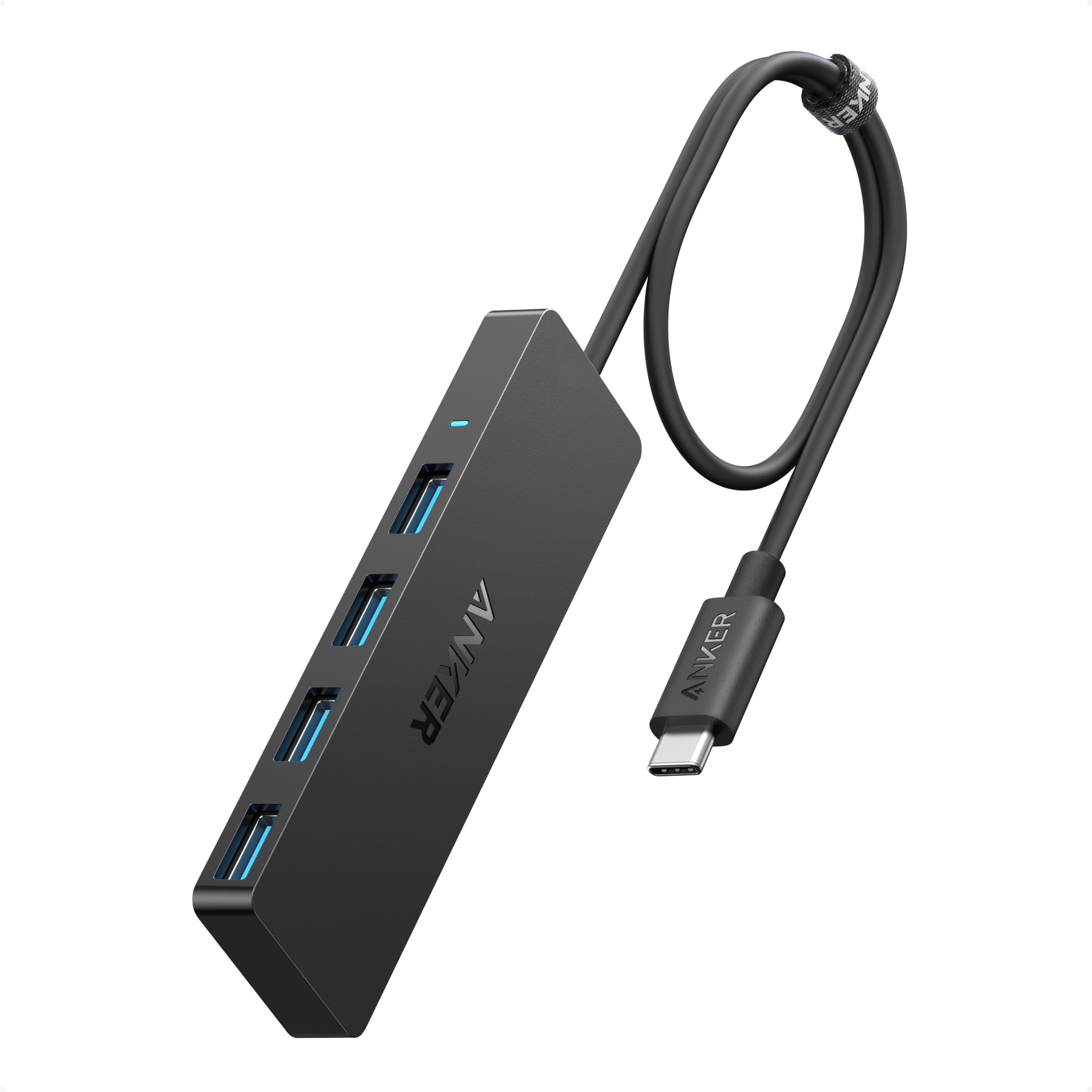
Anker 4-in-1 USB Extender

94 /100
LBD Score Outstanding

Key details

Ports
4-in-1 USB-A
Charging
Not supported
Data Speed
5Gbps
Cable Length
2 ft
View on Amazon

The 2-foot cable is the first thing that makes the Anker 4-in-1 useful: it turns one USB-C port into four USB-A ports and lets the hub sit where you need it instead of hanging off the side of a laptop. That sounds minor until you have a desktop PC with rear ports, a Mac mini, or a laptop stand that puts the USB-C port in an awkward place. The cable is the feature.

Data transfer tops out at 5Gbps, which is fine for a keyboard, mouse, webcam, and external SSD, and the plastic body is light enough to tuck behind a monitor. If you move large video files all day, the BENFEI's 10Gbps port is the faster choice; for peripherals, 5Gbps is plenty. For a desktop or a secondary setup where you just need more USB-A, it is the cleanest solution here. It is also the one hub in this group we leave plugged in and forget about, which is exactly what a data-only splitter should do.

Pros

  • 2-foot cable reaches awkward ports
  • Four USB-A ports add peripherals
  • 5Gbps data is enough for drives and webcams
  • Compact body hides behind a monitor

Cons

  • No charging or video output
Our verdict

We keep this hub on the desk for extra USB-A ports; the 2-foot cable is the reason it beats a stubby splitter.

Check Latest Price

How We Tested 14 USB-C Hubs

We started with more than 60 hubs from brands we've relied on for years and from smaller makers with unusually specific listings, then filtered by port mix, power delivery rating, and whether the specs were stated outright rather than implied. Fourteen made the cut, ranging from bare-bones splitters to aluminum models with card readers and Ethernet built in. Testing ran four months, and every hub moved between a home desk, a commute bag, and whatever hotel room or conference room I landed in that week.

Compatibility came first. I plugged each hub into a MacBook, a Windows ultrabook, an iPad, and a handheld gaming console, noting whether the external display woke on the first try or needed a replug, and whether the laptop charged at its normal rate through the hub's power port — read off an inline USB-C power meter while a 4K monitor and two drives were also running.

For data, I copied a 20GB folder through the USB-A ports and off an SD card, timing each transfer and watching for stalls once other ports were busy. Ethernet got a real workload: a 10GB network transfer during a video call, then a cable pull to see how quickly the adapter recovered. Heat got its own check — an hour of passthrough charging with 4K output, followed by a thermometer reading and a note on whether the shell was uncomfortable to hold.

Durability and size rounded things out. Each hub spent two weeks loose in a bag with keys and a water bottle, and I bent the cable at the strain relief and wiggled the connector in the port to feel for play. I also weighed every one and traced its footprint on a tray table, because a hub that crowds the laptop next to it isn't actually compact.

How to Choose a Usb-C Hub

Start With the Ports You Actually Use

Count the devices that stay plugged in: a monitor, a mouse receiver, a thumb drive, a card from a camera, an Ethernet cable. That list decides whether you need a 5-in-1 or a 9-in-1. A hub with HDMI, two USB-A ports, and a card reader covers most laptop setups; Ethernet and a second high-speed USB-C port are the upgrades worth paying for when your work depends on them.

Check that each port does the job you expect. On many hubs the USB-C port is for charging only, not data or video, and a card slot can share one reader between SD and microSD rather than working as two separate slots.

Match HDMI to Your Monitor

4K at 30Hz is fine for spreadsheets, slides, and video calls, and it is what most budget hubs deliver. A 4K60 port is the better match for a large monitor or any screen where you notice cursor lag and motion blur. The hub cannot upgrade what your laptop outputs, so confirm the laptop's USB-C port supports DisplayPort Alt Mode or Thunderbolt before expecting video at all.

One HDMI port is also not a dual-monitor promise. If you need two external screens, start with a Thunderbolt dock or a hub explicitly rated for dual displays rather than assuming the extra USB-C ports will carry video.

Understand Pass-Through Power

A 100W PD input does not mean 100W reaches your laptop. The hub reserves some power for its own operation, which is why a 100W-rated hub may pass through 85W or 90W, and why a 65W hub can be tight for a large workstation. Match the hub to your laptop's charger: a thin ultraportable is comfortable on 65W, while a 16-inch performance laptop wants more headroom.

Use the laptop's own charger or a charger rated above the laptop's requirement. If the laptop shows a slow-charging warning while the hub is running a monitor and a drive, the hub is sharing a budget that was already tight.

Choose Between 5Gbps and 10Gbps Data

For a keyboard, mouse, webcam, and the occasional thumb drive, 5Gbps is plenty. The faster 10Gbps ports matter when you move large video files or work from an external SSD all day. A hub with one fast USB-A port and two slower USB 2.0 ports can be a smart split: the fast port goes to the drive, and the slow ports handle peripherals that do not need bandwidth.

Card reader speed is separate from USB speed, so do not assume a 10Gbps hub will ingest camera cards at that rate. If card transfers are a core part of your day, check the reader's own rating or plan to use a dedicated reader.

Plan for Heat, Cable Length, and Warranty

Aluminum cases spread heat better than plastic, but any hub can run warm when it is charging a laptop and driving HDMI or Ethernet at the same time. Keep it exposed rather than buried under a monitor stand, and treat a hub that becomes too hot to touch or repeatedly drops its connection as a return candidate.

Cable length and port spacing are the quiet ergonomic choices. A 2-foot cable is useful on a desktop with rear ports, while a short stub is better for a bag. Check the warranty and the return window before you commit; these are small accessories, and a no-hassle exchange is worth more than a slightly lower price.

Frequently Asked Questions

Final Verdict

For most people, the Hiearcool 7-in-1 is the one to buy: it covers HDMI, USB-A, SD/TF, and 100W pass-through in a compact aluminum body, and it does not make you pay for Ethernet or 10Gbps data you may never use. If you need a permanent desk dock, the UGREEN Revodok Pro 9-in-1 adds 4K60 HDMI, Ethernet, and faster data. For a wired office on a tighter budget, the Anker 6-in-1 Ethernet is the compact alternative.