Best Tesla USB Hubs of 2026

The two USB-C ports in a Tesla console feel generous for about a week. Then one gets claimed by a flash drive, the other by your phone, and your passenger is holding a cable with nowhere to plug it in. A hub splits those ports into three or four and, done right, disappears into the console.

I've had one in my own console most of this year and stopped noticing it within a week. We've since put 14 hubs through four months of commuting and road trips, and the ones that held up share more than port count: they seat flush, keep their grip, and don't fight the lid.

Worth knowing before you buy: the wattage on the box is usually the hub's total draw, split across every port, so two phones charging together will be slower than one. Your car's year matters more than any spec sheet — the console was reshaped between the older Model 3 and Model Y and the Highland and Juniper cars. Every pick below clears both bars.

1

Best Overall

TUDEAO Hidden Console Hub

86 /100
LBD Score Excellent

Key details

Fits
Model 3 Highland 2024–2027, Model Y Juniper, Model Y L
Mount
Recessed below the console cover
Charging
45W hub output, two retractable USB-C cables
Warranty
6 months
View on Amazon

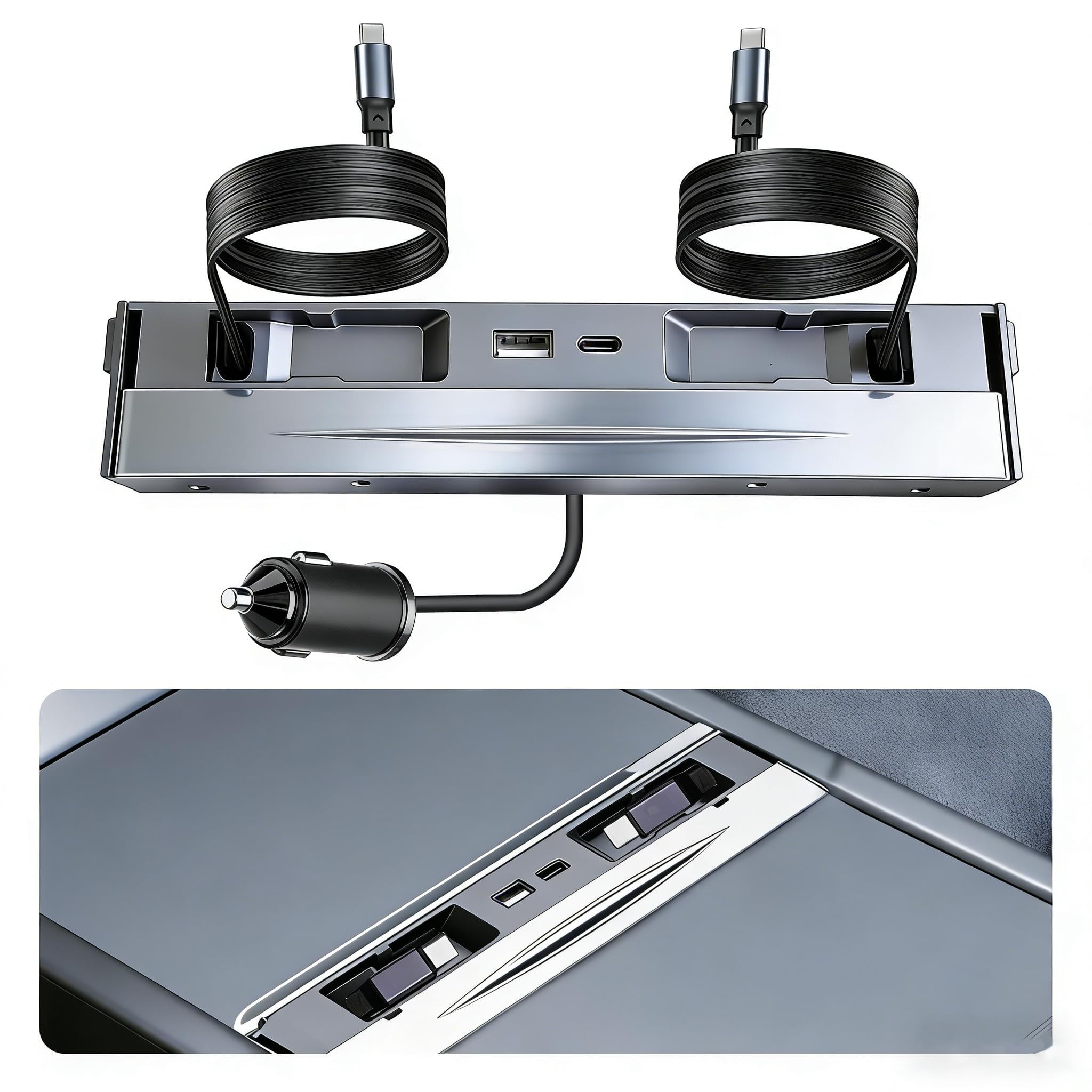
The thing that goes wrong with a console hub usually isn't power — it's the lid. A hub that sits proud of the compartment holds the sliding door open, and an open door leaves the console light on. The Tudeao sits recessed instead, so the cover slides shut and everything goes dark until you open it again. We had it in and charging well inside a minute: angle it into the well, twist, plug it into the console's own port. That single detail is most of why we recommend it first.

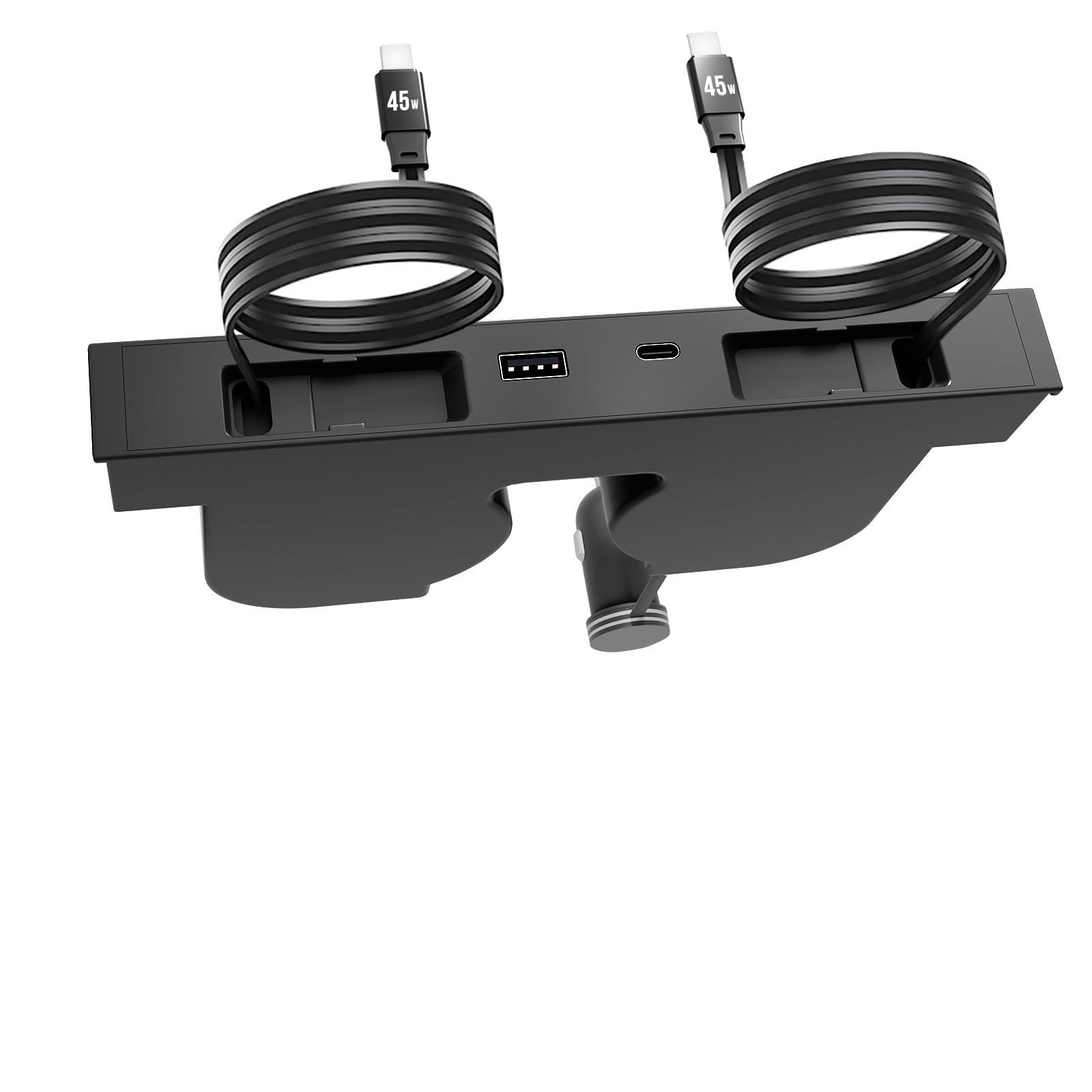
Charging is rated at 45 watts for the hub, spread across two built-in USB-C cables that pull out when you need them and retract with a tug. That's a phone-and-tablet figure. If a laptop is regularly in the car, the Jowua's 130 watts is the number that matters, and it's the reason to spend more than this.

Fit covers the cars most people are shopping now: Model 3 Highland from 2024, Model Y Juniper, plus the Model Y L and Performance consoles. The finish is plain black and disappears into the well, which we prefer to hubs that announce themselves with a light bar or a logo. The six-month warranty is the one place it feels thin.

What we appreciate most is how little it asks of you. No app, no cord routed down to the 12V socket, no organizer tray sold separately — the things the pricier hubs want before they look right. It's a hub you install once and stop thinking about, which is the highest compliment this category allows.

Pros

  • Console lid closes over it, light and all
  • Two retractable USB-C cables built in
  • Twist-in install, no tools or 12V cord
  • Fits Model Y L and Performance consoles

Cons

  • 45W hub output, so laptops are out
  • Only for Highland and Juniper-era consoles
Our verdict

Our pick for any Highland or Juniper console: it closes under the lid, installs in seconds, and runs two retractable USB-C cables that suit phones rather than laptops.

Check Latest Price
2

Best for Glove Box Data

Arcoche Glove Box Hub

84 /100
LBD Score Excellent

Key details

Fits
Model 3 Highland, Model Y Juniper, Cybertruck
Ports
4 USB-A (one USB 3.0, three USB 2.0)
Finish
ABS with suede exterior
Weight
4.8 oz
View on Amazon

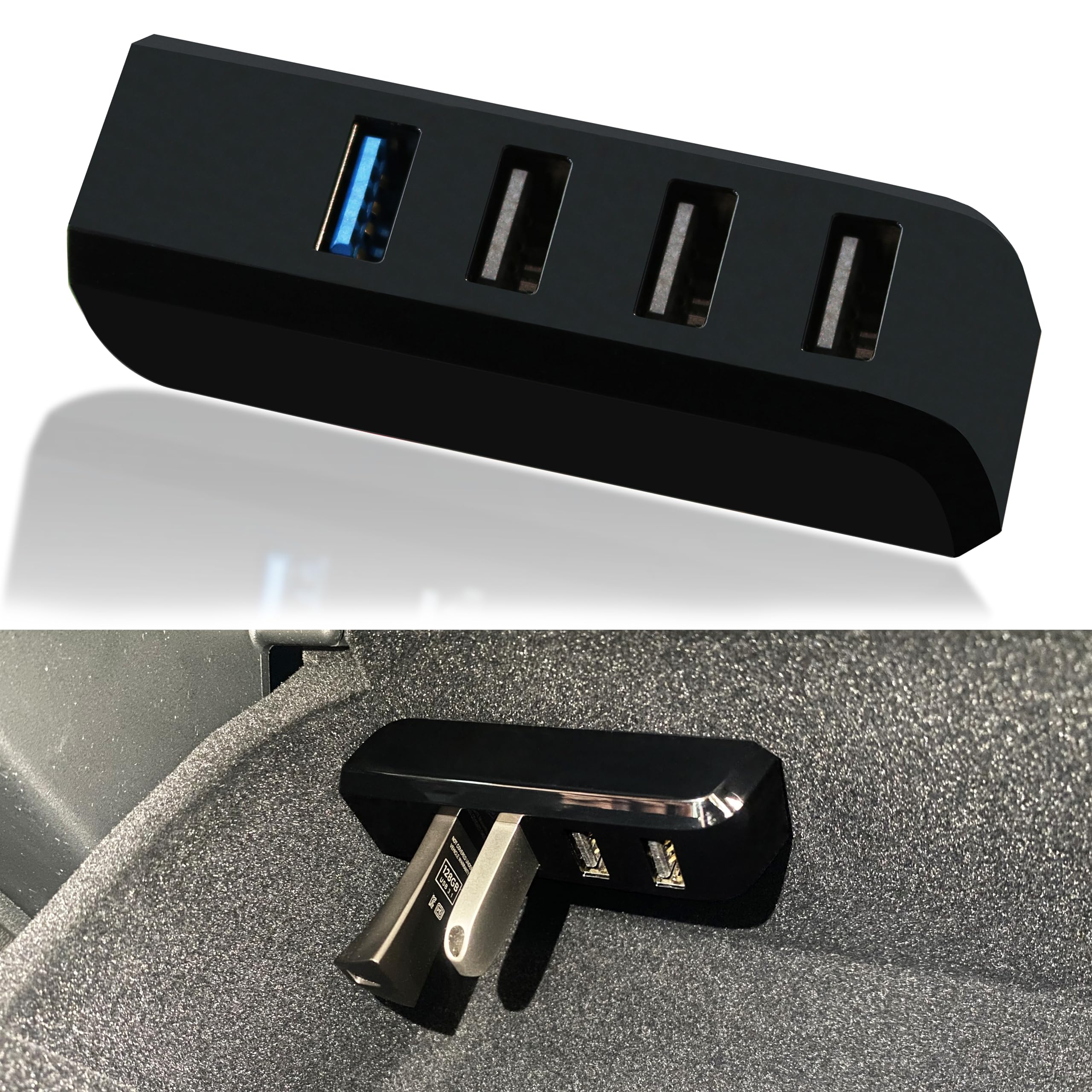
A Highland glove box holds a single USB-A outlet, and the Sentry drive that lives in it is exactly the wrong shape — it collides with the drawer every time it closes. The Arcoche sits at a right angle so the drive ends up nearly flush, then adds three more outlets beside it. The suede-textured shell matches the compartment lining, so it reads as part of the car rather than a dongle wedged into the felt.

The port order is what we like about it. The blue USB 3.0 port sits at the end and is meant for the dashcam thumb drive; the three USB 2.0 ports take the low-stakes stuff — a music stick, a game controller, a radar detector lead. That's the correct hierarchy for a glove box, because the drive recording your car wants the fast lane and nothing else there needs it. Fit is specific: the 2024-and-newer Model 3 Highland, the 2025-and-newer Model Y Juniper, and the Cybertruck.

The limits are worth naming. It's USB-A only, so anything with a USB-C plug needs an adapter, and the three 2.0 ports will trickle a phone rather than charge it — this is a data part, not a charger. On the older cars, the 2021–2023 Model 3 and the 2021–2024 Model Y, the Leikaendi version is the one built for those compartments.

Pros

  • Four USB-A ports from one glove box outlet
  • Sits shallow enough for the drawer to close
  • USB 3.0 port kept for the dashcam drive
  • Suede finish matches the compartment lining

Cons

  • USB-A only, so USB-C gear needs adapters
  • Fits 2024-and-newer cars only
Our verdict

The glove box answer for a 2024-or-newer car: four USB-A ports in a body shallow enough that the drawer still shuts on your Sentry drive.

Check Latest Price
3

Best for Older Model 3 and Model Y

Leikaendi Glove Box Hub

82 /100
LBD Score Excellent

Key details

Fits
Model 3 2021–2023, Model Y 2021–2024
Size
2.95 x 0.98 x 1.06 in
Ports
4 USB-A (one USB 3.0, three USB 2.0)
Warranty
None
View on Amazon

This is the least expensive glove box hub in the group, and for a car from the older generation it's also the right one. It turns a single USB-A outlet into four — one USB 3.0 for the Sentry drive, three USB 2.0 for music and controllers — in a body just under three inches long that leaves the factory storage stick its clearance.

The outlet in your glove box decides this purchase. The 2024-and-later Model 3 moved to USB-C there, and this hub's USB-A plug won't physically seat in it; if that's your car, the Arcoche is the fit. On the 2021–2023 Model 3 and the 2021–2024 Model Y it's plug and play, with one quirk: the plug only seats one way, and the raised ridge on the right of the compartment is where it can end up sitting crooked.

At about an ounce it feels like nothing in the hand, which suits a part you install once and never touch again — though it's the least substantial thing here, and there's no warranty standing behind it. What it does not do is charge: the 2.0 ports will barely move a phone's battery. Buy it to keep devices connected, not to top them up.

Pros

  • Four ports from one glove box outlet
  • Clearance for the factory Sentry stick
  • Cheapest glove box hub here
  • Plug and play, nothing to set up

Cons

  • No warranty of any kind
Our verdict

The cheapest way to add data ports to a 2021–2023 Model 3 or 2021–2024 Model Y glove box — provided that car still has the USB-A outlet it needs.

Check Latest Price
4

Best Premium Pick

Jowua 130W LED Hub

89 /100
LBD Score Excellent

Key details

Fits
Model 3 Highland 2024+, Model Y 2025+
Power
130W total
Warranty
1 year
Connections
2 USB-C, 1 USB-A, 1 built-in USB-C cable
View on Amazon

130 watts is the highest figure here, and it arrives through four connections: two USB-C ports, a USB-A port and a built-in USB-C cable. Dynamic power management splits that total across whatever is plugged in, so a laptop on one port and two phones on the others all get a workable share. It's the only hub in this group built to take a laptop.

The finish is the other reason it costs more. Matte grey, no light bar — the LED is integrated into the housing rather than tacked on — and it sits in the console like a factory part. We like that LED more than we expected to; it reads as ambient trim instead of gadget lighting. Power comes off the car's 12V outlet, which keeps the console's own ports free but takes the cigarette lighter socket and leaves a cord to route. Jowua's console organizer hides that cord, and it's a separate purchase.

It's built for a 2025 Model Y and a Model 3 Highland from 2024 on. If your charging is phones and watches, the Tudeao does that job for a fraction of the money; the gap between them is watts and finish, not fit. At 350 grams it has real heft, and it carries a one-year warranty.

Pros

  • 130W split across four connections
  • Factory-grade matte finish with integrated LED
  • One-year warranty
  • Keeps the console's own ports free

Cons

  • Takes over the 12V outlet
  • Priciest hub in this group
Our verdict

The hub to buy when a laptop or four devices ride with you: the most power in this group, the best finish, and a price that reflects both.

Check Latest Price
5

Best for Back Seat Passengers

Lalunte 130W Hub

82 /100
LBD Score Excellent

Key details

Fits
Model 3 2024–2026, Model Y 2025–2026
Power
130W total
Cables
Two 39 in retractable USB-C
Extra Ports
USB-A and USB-C at 5V/2.4A
View on Amazon

Thirty-nine inches of cable sounds like a spec-sheet detail until a rear-seat passenger asks for a charger and you're passing a phone backwards over the armrest. The Lalunte runs two retractable flat cables that reach the back seat, and gives each one 65 watts — enough for two people to fast-charge at once instead of one charging while the other waits. A USB-A port and a second USB-C port at 5V/2.4A round out the four connections.

Installation is twist-and-lock, done in seconds without tools, and the sliding cover keeps dust and the occasional spill out of the ports when nothing is plugged in. That cover is the detail we appreciate most in daily use — it's the difference between a hub you can wipe down and one you can't.

Our reservation is the retractor, and it's the one every hub of this shape invites: a cable that won't stay extended when you pull it out, or won't go back in, and once it starts it generally gets worse. There's no fix short of replacing the unit. For charging two phones and a laptop at once, this is still the one we reach for.

What it doesn't give you is headroom. 130 watts stops sounding like a lot once four devices are plugged in, because the total is shared and a laptop plus two phones doesn't leave much for the last port. That's the trade for the reach — the cables get to the back seat, but the power is finite.

Pros

  • Two 39-inch cables reach the back seat
  • 65W on each cable
  • Sliding cover keeps dust and spills out
  • Twist-in install, no tools

Cons

  • A cable can stop staying extended
Our verdict

The pick for a car that carries passengers: two 39-inch retractable cables at 65 watts each, and a sliding cover that shrugs off spills.

Check Latest Price
6

Budget Charging

Leikaendi Console Hub

80 /100
LBD Score Excellent

Key details

Fits
Model 3 2021–2023, Model Y 2021–2024
Ports
2 USB-C, 2 USB-A
Profile
0.45 in thick
Fast Charging
27W on USB-C1
View on Amazon

Nothing on this hub moves. Two USB-C ports and two USB-A ports are fixed in a body 0.45 inch thick that tilts and slides into the well of a pre-refresh console, sitting flush in silver-grey. The first USB-C port carries 27 watts, the second 5V/3A, and the two USB-A ports handle ordinary charging. No cables are included, so budget for the ones you actually want.

What we like is the shape rather than any single number: no retractable cable to jam, no cover to remember, nothing between your phone and the port except a cable you already own. On a 2021–2023 Model 3 or a 2021–2024 Model Y, that's the sensible way to spend the least money here. If you already own two USB-C cables, setup is the entire job — nothing to pair, nothing to update, no door to close and forget.

Pros

  • Four fixed ports, nothing to jam or break
  • Slides flush into the pre-refresh console
  • Cheapest console hub here

Cons

  • No cables included
  • 27W is the lowest fast charge here
Our verdict

The budget answer for a 2021–2023 Model 3 or 2021–2024 Model Y console: four fixed ports, 27W on one of them, and nothing that moves.

Check Latest Price
7

Hidden Install

DGXWLLW Sunken Hub

83 /100
LBD Score Excellent

Key details

Fits
Model 3 Highland 2024–2026, Model Y Juniper 2025–2026, Model Y L
Mount
Sunken below the console lid
Power
117W total
Cables
Two 45W, 39 in retractable
View on Amazon

117 watts arrives here as two 45-watt USB-C cables, which is the useful way to split it: two devices fast-charging side by side instead of one swallowing the whole budget. Each cable pulls out to 39 inches and retracts with a tug, and the assembly is rated close to what the premium hubs claim at a midrange price.

The design is the reason to pick this over the plug-in hubs. Instead of sitting flush with the console cover, it nestles below the surface, so the sliding door shuts over the entire thing and you don't see a charger until you pull a cable. On a center console that's already crowded, that's a small daily win.

It fits the Model 3 Highland from 2024, the Model Y Juniper from 2025, and the Model Y L. Installation is the usual diagonal insert and twist, seconds without tools, and the housing ends up level with the console floor.

What settles it for us is the combination: near-premium power, a console that still looks factory, and a midrange price. The Jowua is the better-built object and the Lalunte reaches the back seat; this one splits the difference, and for most Juniper and Highland drivers the difference is enough. Reaching a little further into the well each time you plug in is the trade — a second of your day for a console nobody notices.

Pros

  • 117W across two 45W cables
  • Sits below the sliding door, out of sight
  • Fits Highland, Juniper and Model Y L
  • Twist-in install, no tools

Cons

  • A cable can fail to retract
Our verdict

A Highland or Juniper console hub that hides below the sliding door and feeds two 45-watt cables — near-premium power without the premium price.

Check Latest Price
8

Mixed Connectors

TPARTS 60W Hidden Hub

84 /100
LBD Score Excellent

Key details

Fits
Model 3 Highland, Model Y Juniper, Model Y L
Power
60W GaN
Warranty
1 year
In The Box
Retractable cable and USB-C to Lightning adapter
View on Amazon

If your household still runs Lightning devices — an older iPhone, a pair of AirPods — the Tparts is the only hub in this group that ships with a Type-C to Lightning adapter in the box. It's a small inclusion that solves a real annoyance: the car moved to USB-C, and half the gear in your bag didn't.

The rest of the hardware is 60W GaN charging, a retractable cable that releases with a button press and pulls back when you're done, and integrated LEDs that light the console rather than the cabin. It's built for the Model 3 Highland, the Model Y Juniper and the Model Y L.

Two things to know. The fixed ports sit where the sliding door travels, so a cable left plugged into one gets caught when the door comes forward. And the L-shaped USB-C connector is the joint to check when the hub first arrives. Neither is a reason to skip it, but both are worth a look in the first week.

At 60 watts it charges a phone quickly and a laptop slowly, and what you're paying for is the finish, the light and the Lightning adapter rather than raw output — none of which are gimmicks in a car full of mixed connectors. The button release is the detail we keep coming back to: one hand, one motion, no fishing around in the well.

Pros

  • Ships with a USB-C to Lightning adapter
  • Button-release retraction, one hand
  • LEDs light the console at night
  • One-year warranty

Cons

  • Costs more than the midrange hubs at 60W
Our verdict

The only hub here with a Lightning adapter in the box, plus LEDs and a button-release cable — worth it if your household still runs older iPhones and AirPods.

Check Latest Price

How We Chose and Tested Tesla USB Hubs

We started from more than 40 listings and read the fitment notes on every one, because the loudest complaint in this category is a hub that claims to fit a model and then doesn't. Anything that didn't name a specific year got dropped, leaving 14 hubs across both styles — the kind that fills the center console and the kind that lives in the glove box.

Installation and fit came first. Each hub went into a real car spanning both console generations, and we timed the first install one-handed while parked. Then we checked whether the shell sat flush, whether the lid or sliding door still closed, and whether the unit shifted when we pushed a cable in. Plug orientation got its own notes: which way the ports faced, and whether a right-angle cable or bulky adapter would foul the lid or the phone tray.

Charging speed was logged, not eyeballed. With a phone below 10 percent, we recorded the battery level every ten minutes for half an hour, once alone and once with a second device drawing from the hub, since the wattage on the box is a total rather than a per-port promise. For connectivity, we moved a batch of video files off a flash drive through each hub and confirmed they played back, then paired a wireless controller and watched for input lag.

Durability and build quality ran the full four months, through commutes, school runs, and two long road trips. Every retractable cable got cycled dozens of times to see if it still locked into place, hubs stayed plugged in through hot afternoons and cold mornings, and we listened for rattles on the same stretch of patched asphalt. At the end we checked each one for scuffed housings, loose seams, and ports that had gone soft.

How to Choose a Tesla Usb Hub

Glove Box or Center Console?

This is the first fork, and it decides everything else. A glove box hub is a data splitter: it turns the single outlet feeding Sentry mode and dashcam clips into four, so a thumb drive, a music stick and a controller can all stay plugged in. A console hub is for charging, and it's the one you'll touch every day.

Neither does the other's job. A glove box splitter won't fast-charge a phone, and a console dock has no path to your dashcam drive. Most owners should solve the console first, then add the glove box splitter if they're tired of swapping drives in and out.

Match the Outlet, Then the Model Year

The glove box outlet changed. The 2024-and-later Model 3 uses USB-C there, so a USB-A splitter physically won't seat — which is why the two glove box hubs here split by year rather than by brand. The console changed too, at Highland (2024+) and Juniper (2025+), and a pre-refresh console hub won't drop into the newer well.

The fix is unglamorous: shine a phone light into your own glove box and look at the outlet before you order anything, then read the fit list for your exact trim instead of stopping at the model name.

One Fast Port, Three Slow Ones

Four ports rarely means four of the same thing. On the glove box splitters here it's one USB 3.0 port in blue and three USB 2.0 ports, which is the right arrangement only if the fast port goes to the drive recording your car. Put the dashcam or Sentry drive there and keep music, controllers and charging leads on the rest.

Reading the port list tells you more than the port count does. A hub advertising four ports with one fast lane is a data part; four ports at 5V/2.4A is a charger. Buy the one that matches what you're actually plugging in.

What Wattage Actually Buys

27 watts gets a modern phone to a fast charge; 65 watts will move a laptop's battery; 130 watts covers a laptop and two phones at once. Two rules keep the numbers honest. The total is shared, so a 130-watt hub with four devices attached isn't giving any single one of them 130 watts. And the device decides — a phone that tops out at 27 watts won't charge faster on a 130-watt hub.

Match the total to the biggest thing you actually plug in. That's the only case where the Jowua's 130 watts or the Lalunte's two 65-watt cables earn their price over a 45-watt hub that handles phones just fine.

Lid Clearance and the Retractor

Two details decide whether you resent a console hub by month three. The first is clearance: a hub that sits proud of the compartment holds the sliding door open, and the console light stays on with it. Recessed and sunken designs leave the door free to shut.

The second is the retractor. Pull-out cables are the part that fails, sometimes within days, and once one stops staying extended it doesn't come back. If you want the lowest-risk shape in this category, buy fixed ports and bring your own cable.

Frequently Asked Questions

Final Verdict

Buy the Tudeao for a Model 3 Highland or a Model Y Juniper. It shuts under the console lid, twists in without tools, and puts two retractable USB-C cables exactly where your hand goes — enough charging for the phones most people actually carry.

Spend up only for a specific reason: the Lalunte when the back seat charges too, or the Jowua when a laptop rides in the car. And on a 2021–2023 Model 3 or a 2021–2024 Model Y, skip the retractable designs and take the fixed-port Leikaendi — fewer parts, less money, nothing to jam.