Best Thunderbolt 4 Cables of 2026

A Thunderbolt 4 cable is the least exciting thing on your desk and the one most likely to quietly hold your setup back. Any USB-C cable fits the port, but only a certified few carry 40Gbps of data, drive an 8K display, and push 240 watts at once. The wrong one fails quietly — slower copies, a second monitor stuck at a lower resolution, a laptop charging at half speed while you blame the dock.

I keep a drawer full of USB-C cables that should work, so over four months my team and I ran 14 Thunderbolt 4 and USB4 cables through real workdays, docks, and more plug cycles than any cable deserves. What separated them had little to do with how they looked.

Certification is what people get wrong first: "Thunderbolt 4 compatible" isn't the same as certified, and the cables that fudge it are the ones that drop a display mid-call. Power ratings are the second, since some top out at 100W — enough for a tablet, not a laptop that pulls more. Length, flexibility, and whether the plug seats fully in a case-covered phone sort out the rest. The picks below are the ones we stopped worrying about.

1

Best Overall

Cable Matters Thunderbolt 4 Cable (1m)

94 /100
LBD Score Outstanding

Key details

Length
3.3 ft (1 m)
Charging
240W
Data Rate
40 Gbps
Certification
Intel-certified Thunderbolt 4
View on Amazon

Intel publishes the cables it certifies, and this one is on the list — the first thing we check in a category where a lot of cables print 40Gbps on the box and have never been near a certification lab. Cable Matters also rates it for 240W of Power Delivery, one 8K or two 4K displays at 60Hz, and full backward compatibility with Thunderbolt 3 and USB4 gear. Nothing here is a stretch: it is a 3.3-foot cable doing exactly what Thunderbolt 4 promises.

That combination is why it is our default. We ran it to a dock, to a portable SSD, and to a 4K monitor in turn and never had to think about which cable we were holding, which is the highest compliment a cable gets. The connectors seat with a firm click and stay seated when the laptop gets shifted, though the first push into a couple of ports took more force than we expected before it clicked home. It costs less than the premium picks here and more than the budget ones, which is the right place to land for something you plug in every day.

The thing to get right before ordering is the run. Three feet is a desk cable: laptop on the surface, dock within arm's reach, monitor just behind. If the tower sits on the floor or the dock is mounted under the desk, move to one of the two-meter options — there is no certified way to extend a Thunderbolt 4 run, so the measurement is the decision.

Pros

  • Intel-certified Thunderbolt 4 you can verify
  • 240W Power Delivery headroom
  • Holds 40Gbps with 8K or dual 4K output
  • Works with Thunderbolt 3, USB4, and USB-C

Cons

  • Some units fail within months
Our verdict

This is the cable we point most people to: Intel-verified 40Gbps and 240W of charging headroom, at a price that undercuts the premium picks.

Check Latest Price
2

Best Build Quality

Anker Prime Thunderbolt 4 Cable

93 /100
LBD Score Outstanding

Key details

Length
3.3 ft (1 m)
Charging
240W
Warranty
18 months
Data Rate
40 Gbps
View on Amazon

The Prime is the best-built cable in this set, and that is the whole case for it. The overmolds at each end are tight and slightly chamfered, the jacket doesn't kink when you coil it around your hand, and the plugs seat flush instead of standing proud of the port. Under the finish it matches our top pick — 40Gbps, 240W, one 8K or two 4K displays, Thunderbolt 4 certified — and Anker adds an 18-month warranty that the budget cables here don't match. If you have ever had a cable fail at the plug, this is the one that feels like it was built to avoid that.

Where it earns its place is a desk you actually look at: a short run from laptop to dock, a cable that stays where you put it, and a plug that doesn't wobble when you bump the machine. The stiffness that makes it feel substantial also means it holds a loop rather than draping, which is either the reason you like it or the reason you don't. What it buys you over the cheap end of this set is confidence — the connector ends are the part that fails on every cable here, and these are the most carefully finished ones we handled.

Pros

  • Best build quality in this set
  • 240W Power Delivery
  • Certified Thunderbolt 4 with 18-month warranty

Cons

  • 3.3 ft comes up short behind a monitor
Our verdict

Buy the Prime if you want the best-built cable here: certified 40Gbps, 240W charging, and an 18-month warranty to back it.

Check Latest Price
3

Best Budget

Amazon Basics USB4 Cable

92 /100
LBD Score Outstanding

Key details

Length
3.3 ft
Charging
240W
Data Rate
40 Gbps
Certification
USB-IF
View on Amazon

The Amazon Basics cable is the budget answer, and it doesn't ask you to give up much: USB-IF certified, 40Gbps, 240W over 48V/5A, and enough video bandwidth for a single 8K at 60Hz, 4K at 120Hz, or two 4K panels at 60Hz. For a dock, an external SSD enclosure, or a monitor that stays plugged in, that is the entire checklist.

What you give up is the Intel certification. This one is USB-IF certified, which covers the USB4 side of the same job; the two programs overlap a great deal in practice, docks and drives generally don't care which one signed the cable off, and the price reflects the difference. Nothing about it feels premium — plain black jacket, molded ends — but nothing about it feels flimsy either, and it is rated for 5,000 bends at 95 degrees.

The right way to buy this one is in pairs: one for the dock, one for the bag, one for the drawer that always seems to be missing a USB-C cable. It is the least expensive route to 40Gbps and 240W here, and for the jobs where the cable stays put, that is all the cable you need. We would not put it on a machine that gets unplugged twice a day and thrown in a backpack — that is what the braided picks are for.

Pros

  • Lowest-cost 40Gbps and 240W in this set
  • USB-IF certified
  • 8K or dual 4K output
  • Rated for 5,000 bends

Cons

  • Some units fail within months
Our verdict

Our budget recommendation: 40Gbps and 240W for the least money in this set, as long as the cable stays plugged in rather than commuting in a bag.

Check Latest Price
4

Best for Long Runs

OWC Thunderbolt 4 Active Cable

93 /100
LBD Score Outstanding

Key details

Length
6.6 ft (2 m)
Charging
100W
Data Rate
40 Gb/s
Cable Type
Active
View on Amazon

Two meters at the full 40Gb/s is the reason this cable exists, and the reason to pay for it. Passive Thunderbolt 4 tops out around two meters, so anything at that length which actually holds speed carries active electronics in the connector shells — OWC's does, and it is certified Thunderbolt 4 rather than merely compatible. That is what lets the dock live behind the monitor while the laptop lives wherever you left it.

What the length buys you is a cable you stop noticing. The jacket stays round instead of flattening where it bends over a desk edge, and the junctions at the plugs don't flex when the laptop gets pulled toward you — worth having, since the plug is where every cable in this set eventually fails. The plug shells are chunky, though, so measure them against a snug case cutout or a recessed port before you commit.

If your setup is a laptop, a dock at the back of the desk, and a monitor you would rather not unplug, this is the least fussy way to get Thunderbolt 4 across it. It is also the pick where the money goes into distance rather than wattage, which is the trade to accept going in.

Pros

  • Full 40Gb/s at two meters
  • Certified Thunderbolt 4 performance
  • Works with Thunderbolt 3, USB4, and USB-C

Cons

  • Charging tops out at 100W
Our verdict

Two meters at full 40Gb/s with certified Thunderbolt 4 performance makes this the cable for a monitor that sits across the room.

Check Latest Price
5

Best for Mac Displays

Apple Thunderbolt 4 Pro Cable

91 /100
LBD Score Outstanding

Key details

Length
5.9 ft (1.8 m)
Display
HBR3 DisplayPort
Charging
100W
Data Rate
40 Gb/s
View on Amazon

The reason to buy the Apple cable has a name on it: HBR3 DisplayPort output. That is the link rate that matters when a 5K or 6K Apple display is on the other end, and it is the specification cheap 40Gbps cables quietly leave out — which is how a monitor ends up blanking mid-session while every file transfer still works perfectly.

Beyond the display case it is a straightforwardly good cable: 40Gb/s, 100W of charging, a braided jacket that coils without tangling, and enough headroom to daisy-chain up to six Thunderbolt 3 devices. At 1.8 meters it reaches from a laptop to a display arm or a dock tucked behind a monitor without leaving a slack loop on the desk.

It is also the wrong buy if the display isn't the reason you are shopping: for moving files between a laptop and an SSD, it does what a cable at a fraction of the cost does. Where we keep coming back to it is the Mac setup where the screen is the whole point — that is the case this cable was built for, and the only one where the extra money buys something you can actually see.

Pros

  • HBR3 output for 5K and 6K displays
  • 40Gb/s with six-device daisy chaining
  • Braided jacket that coils without tangling

Cons

  • The priciest cable in this set
Our verdict

For a Studio Display or Pro Display XDR, this is the cable we trust: HBR3 output, 40Gb/s, and a braided 1.8 m build that holds its shape.

Check Latest Price
6

Cheap Braided Pick

UGREEN USB4 Cable

93 /100
LBD Score Outstanding

Key details

Jacket
Braided nylon
Length
3.3 ft (1 m)
Charging
240W
Data Rate
40 Gbps
View on Amazon

The braid is the first thing you notice, and the second is the connectors: solid, cleanly seamed, and snug enough that there is no play once they are in. Under the jacket it is a one-meter 240W USB4 cable rated for 40Gbps and 8K at 60Hz, with a claimed 10,000-bend lifespan on the braid. For the least money in this set, that is a lot of cable.

At this price we expected to find the usual corners cut, and we didn't. Throughput and charging are the two places cheap cables get caught, and this one comes through both cleanly at proper USB4 rates. It sits below our top pick on confidence rather than performance — it is a one-meter cable that behaves like a one-meter cable, and one meter is the length most desks actually need.

The jacket is stiff, which on a short run is a feature: the cable holds the shape you give it and stays off the desk instead of sliding into the coffee. Buy it if you want braid, 240W, and 40Gbps without paying for a certification logo. Skip it if your dock has already been fussy about which cables it accepts.

Pros

  • 40Gbps and 240W at a budget price
  • Braided jacket with snug connectors
  • 8K at 60Hz from a single cable

Cons

  • No Intel Thunderbolt certification claim
  • Bulky plug bodies can foul snug cases
Our verdict

The value pick: braided, 40Gbps, 240W, and sturdier connectors than its price suggests, though it carries no Intel certification.

Check Latest Price
7

Charging and Data

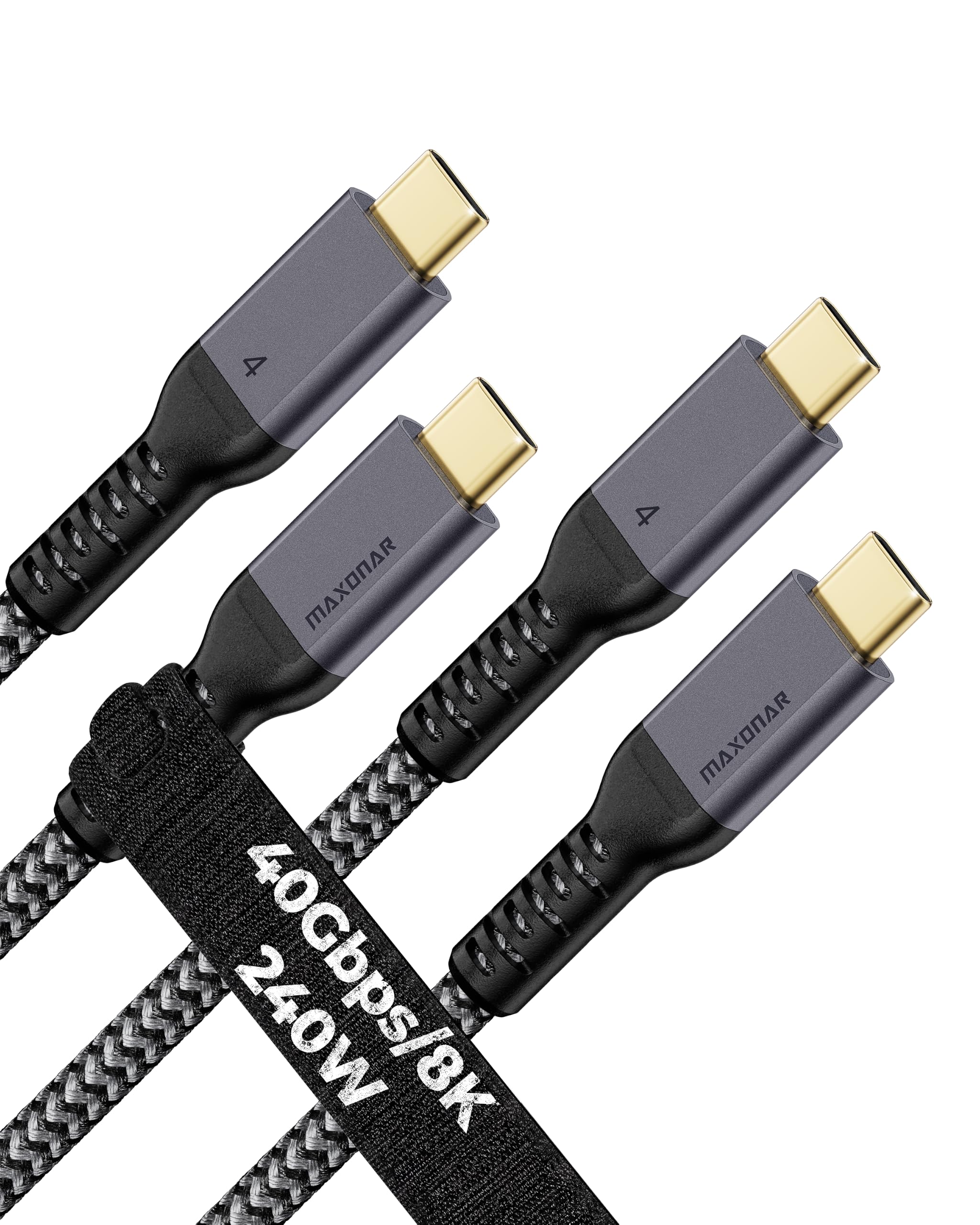
Maxonar Thunderbolt 4 Cable 2-Pack

90 /100
LBD Score Outstanding

Key details

Pack
2 cables
Length
6.6 ft (2 m)
Charging
240W
Data Rate
40 Gbps
View on Amazon

Two 6.6-foot braided cables for roughly what one certified one-meter cable costs is a genuinely useful thing to have in a drawer. The length is what most desks actually want, and a spare means the second one lives in the laptop bag. Both are rated for 40Gbps, 240W with an E-Marker chip, and 8K or dual 4K output, with a two-year support window.

The Thunderbolt part is where we slow down. The picture splits: for charging, for file transfer, and for a 4K display it does the job in most setups, and then there are the setups where it is never recognized as a Thunderbolt cable at all. A 5K monitor is where that failure turns up most often. A cable can pass 40Gbps of files all day and still lose a display handshake, and this is the pick in our set where that gap shows.

Links that drop and re-establish are the other thing to plan for. On a desk where a reconnect costs you a second, that is an annoyance; on a dock driving a display through a meeting, it is the whole problem. Treat it as a general-purpose USB-C cable with a long reach rather than as the backbone of a Thunderbolt desk.

So buy the two-pack for charging, for drives, for the bag cable and the desk cable — the value is real and the braid looks better than the price implies. Leave the certified picks to do the work between a dock and a display, and accept that the money saved here is paying for length rather than reassurance.

Pros

  • Two 6.6 ft braided cables in one pack
  • 240W charging with an E-Marker chip
  • Two-year support window

Cons

  • Stiff braided jacket holds its shape
Our verdict

Buy it for two long charging and data cables at a low price, not for the Thunderbolt dock or the 5K display on your desk.

Check Latest Price

How We Tested Thunderbolt 4 Cables

We built the shortlist from spec sheets, since that's mostly what you get with a cable: every option claiming Thunderbolt 4 or USB4 certification, 40Gbps data, 8K output, and at least 100W of power delivery, then narrowed to 14 spread across lengths from about a meter to 2 meters, jacket styles, and price. Certification markings were checked before anything got plugged in.

Over four months, those cables lived where cables actually live — coiled between a laptop, a dock, and two monitors; stuffed into a messenger bag; dangling off the arm of a couch; and on a bench where we connected and disconnected each one 50 times. For speed, we copied the same 100GB folder of raw video to an external SSD with every cable and watched whether throughput held or sagged on repeat runs. For video, we drove an 8K display through a dock, then nudged the desk and wiggled each connector to see whether the image flickered or the signal dropped.

Charging got its own round: each cable went into the same power-hungry laptop while we read the wattage the system reported, then into a phone in a thick case to check whether the plug seated all the way. We also swapped each one between a Mac, a Windows laptop, an iPad, and a handheld to confirm the dock, display, and drive all showed up at once. Every cable was measured against its listed length, bent hard at the strain relief, and coiled tight in a bag for a week to see whether it kinked or held a memory. Value came last: cost per foot against what the cable actually delivered.

How to Choose a Thunderbolt 4 Cable

Start With Certification You Can Check

Thunderbolt 4 is a certification, not an adjective, and the difference shows up in the places you notice late: a link that holds through a two-hour export, a 5K display that wakes on the first try. Intel publishes the cables it certifies, and USB-IF lists certified USB4 cables; a listing that names neither is asking you to take its word.

The trap is a cable that moves 40Gbps of files all day and still fails a display handshake at the monitor. That is why a certified one-meter cable beats a cheaper two-meter one for anything you plug in daily.

Match the Length to the Run, Not the Desk

Passive Thunderbolt 4 holds full 40Gb/s to about two meters. Past that, the cables that keep their speed have active electronics in the connector shells, which is why OWC's two-meter active cable costs what it does.

Measure where the laptop actually sits before you order. A cable that lands a foot short turns into an adapter chain, and that is where bandwidth and reliability go to die. If you need distance but not speed, a long charging cable plus a short certified one is the cheaper pairing.

Decide How Much Charging Headroom You Need

Every cable here carries at least 100W; four of them go to 240W. The gap only matters at the top. A 240W cable is E-marked to negotiate USB PD 3.1's extended range, so it is the one that will not cap your next laptop, while 100W is plenty for a MacBook Air or an iPad.

Our rule: buy 240W at one meter, where it costs almost nothing extra, and accept 100W at two meters, where the length is what you are actually paying for.

Check the Display Case Before the Spec Sheet

One 8K or two 4K displays reads like more than most people need until a 5K panel is sitting on the desk. Video over USB-C rides on DisplayPort Alt Mode, and the higher link rates that 5K and 6K Apple displays want are the first thing a cheap cable drops; HBR3 support is the specification to look for.

Check the monitor for daisy-chaining before you plan two screens from one port. The cable cannot add a feature the display does not have.

Fit, Thickness, and the Plug That Won't Seat

A 240W cable is a bundle of shielded conductors, so it is thicker and stiffer than the charging cable in your bag, and its plug shell is wider. That matters if a phone lives in a thick case or a laptop port is recessed — check the connector's outside dimensions against the cutout before you commit.

Buy the length the run needs rather than coiling three extra feet behind the desk, and match the jacket to the job: braid for a cable that travels, softer TPE for one that never moves.

Frequently Asked Questions

Final Verdict

For most desks, the Cable Matters one-meter cable is the buy: Intel-certified, 240W, 40Gbps, and cheaper than the premium picks without giving anything meaningful up.

Spend more only for a reason. Reaching a monitor across the room at full speed is OWC's job. A 5K Apple display is the one case where the Apple cable's HBR3 output justifies the premium. And if the cable will live behind a dock that never moves, Amazon Basics delivers the same 40Gbps and 240W for less.