Best Tablets for Reading Books of 2026

An e-reader is easy on your eyes and runs for weeks between charges, but it can't do much beyond putting a book in front of you. A full tablet does everything else — streaming, email, a hundred open tabs — and then makes you squint through the glare and hunt for an outlet by dinnertime. That's the trade-off, and it's the whole decision.

I've read on everything from early e-paper screens to a cracked phone, and the screen still matters more than the spec sheet. My team and I spent six months reading on 12 devices — dedicated readers, a color model, and full Android tablets — tracking real battery life, page-turn speed, and whether our place in a book survived switching devices mid-chapter.

The surprise was how quickly a slow refresh stops bothering you, while a device that needs charging every night gets abandoned by week two. Reliability, firmware updates, and whether the extra spend buys something you'll actually notice ended up mattering more than any single spec — the picks below are the ones we kept reaching for.

1

Best Overall

Kindle Paperwhite (2024)

93 /100
LBD Score Outstanding

Key details

Battery
Up to 12 weeks
Display
7-inch glare-free
Storage
16 GB
Front Light
White to amber
View on Amazon

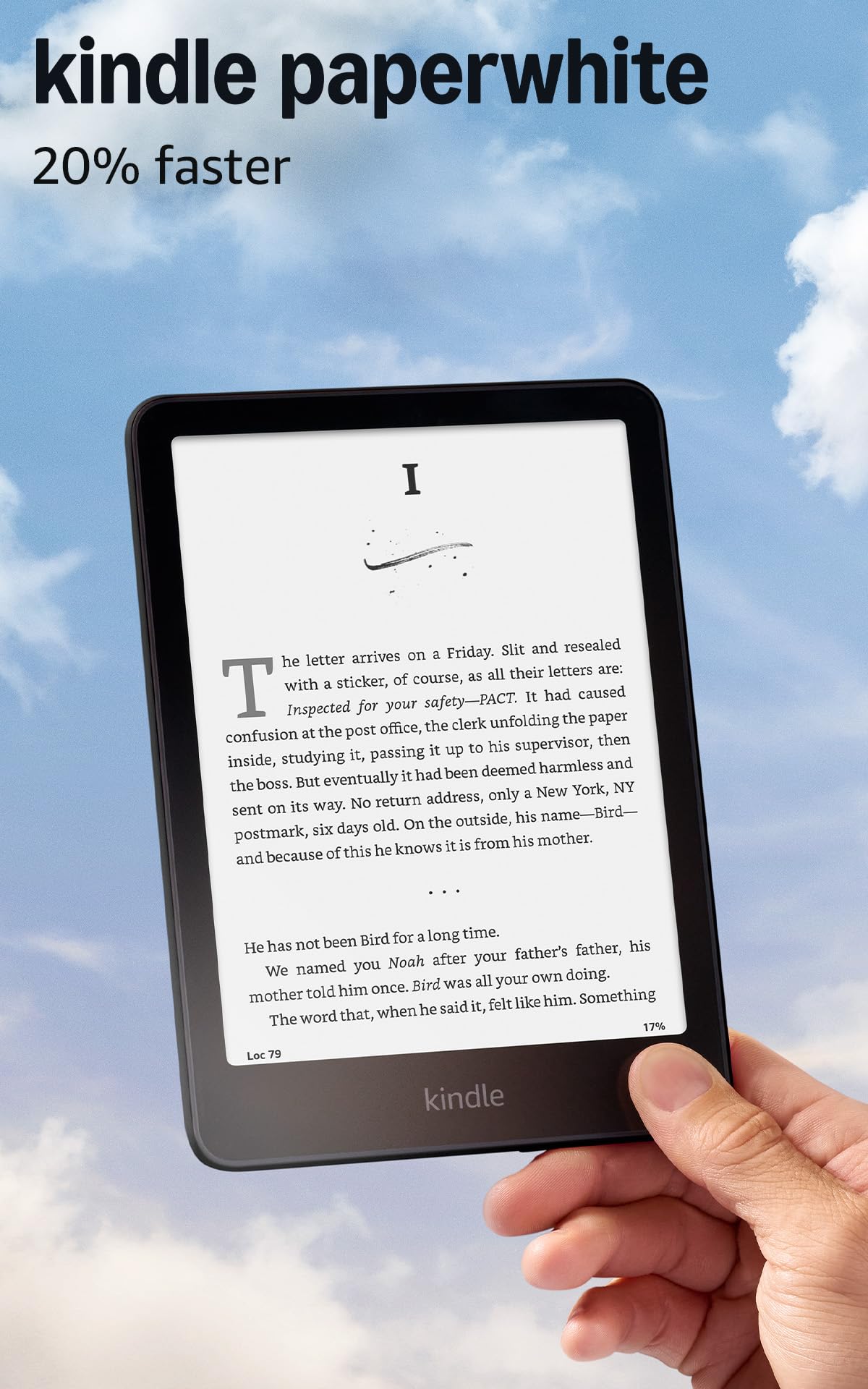
The 7-inch screen is the part that sold us: it is glare-free, sharp enough for long chapters, and large enough that you are not turning pages every few seconds. The front light adjusts from white to amber, which made late-night reading easier on our eyes. Page turns are quick, and the interface stays out of the way.

Battery life is rated at up to 12 weeks, and 16GB holds thousands of books. In our time with it, we stopped thinking about charging between sessions, which is the real luxury of an e-reader. The distraction-free software matters too: no social feeds, no notifications, no app maze pulling you out of a chapter.

The trade-off is the Kindle ecosystem. You are buying into Amazon's bookstore, so if your library lives elsewhere, check the app situation before committing. For most novel readers, that is a small price for a screen and battery this good. What settled it for us was how little attention the device asked for. It disappeared into the book.

Pros

  • Glare-free 7-inch display
  • Weeks of battery life
  • Warm adjustable front light
  • Distraction-free reading

Cons

  • No physical page-turn buttons
Our verdict

For most people who read for hours, this is the one we recommend: a glare-free 7-inch screen, warm front light, and weeks of battery in a distraction-free package.

Check Latest Price
2

Best for Color and Buttons

Kobo Libra Colour

87 /100
LBD Score Excellent

Key details

Battery
Up to 4 weeks
Display
7-inch color E Ink
Storage
32 GB
Waterproof
IPX8
View on Amazon

The physical page-turn buttons are the reason to look at the Kobo Libra Colour. The raised edge gives your thumb a place to rest, and the buttons click without a rethink. We found ourselves reading longer stretches because we were not reaching across the screen to turn a page.

The 7-inch color E Ink screen is the other draw, and it is a specific pleasure rather than a universal upgrade. Book covers, highlighted passages, and comics look richer. Library borrowers have a smoother path here too, since Kobo works with Libby and OverDrive. For straight novels, the Paperwhite remains our simpler pick, but the Kobo is the one we reach for when the page has pictures.

Kobo lists 32GB, up to four weeks of battery, and IPX8 waterproofing. We appreciated the storage for graphic novels and the waterproofing for bath reading. The buttons are the part we missed when we went back to a touchscreen.

Pros

  • Physical page-turn buttons
  • Color E Ink for covers and comics
  • IPX8 waterproofing
  • 32GB storage

Cons

  • Premium price for color and buttons
  • Color layer softens fine text
Our verdict

Choose the Kobo Libra Colour if you want physical page buttons, a color E Ink screen for comics, and waterproofing for bath reading.

Check Latest Price
3

Best Budget Color Tablet

Amazon Fire HD 10

91 /100
LBD Score Outstanding

Key details

Memory
4 GB RAM
Battery
Up to 13 hours video
Display
10.1-inch 1080p
Storage
32 GB
View on Amazon

The Fire HD 10 is the budget escape hatch in this group. Its 10.1-inch 1080p screen is the reason to pick it: comics, magazines, and picture-heavy books look bright and colorful in a way no E Ink screen here matches. The 4GB of RAM and 32GB of storage are enough to get started, and the Like-New refurbished unit comes with the same limited warranty as a new device.

The catch is that this is a tablet first and a reader second. We had to check that the reading apps we use are available for Fire tablets, and the pace is fine for page turns and magazines but can feel sluggish with heavier apps. The color screen is also an LCD, so it is less restful for long text than E Ink.

Where it wins is color and size for the money. If you want one cheap screen for comics, magazines, and the occasional novel, it earns a place. If you want a dedicated page-turner, the Paperwhite is the better tool. We kept the Fire around for the big color pages, not for a 400-page novel.

Pros

  • Big 1080p color screen
  • Like-New unit with warranty
  • 32GB storage and 4GB RAM
  • Good for comics and magazines

Cons

  • Battery life is measured in hours, not weeks
  • 10.1-inch body is awkward for one-handed reading
Our verdict

We keep this on the list for budget-minded readers who want a big color screen for comics and magazines, not a dedicated page-turner.

Check Latest Price
4

Pocket Reading

XTEINK X4 Pro

80 /100
LBD Score Excellent

Key details

Weight
2.5 oz
Battery
1100 mAh
Display
4.3-inch E Ink
Storage
16 GB
View on Amazon

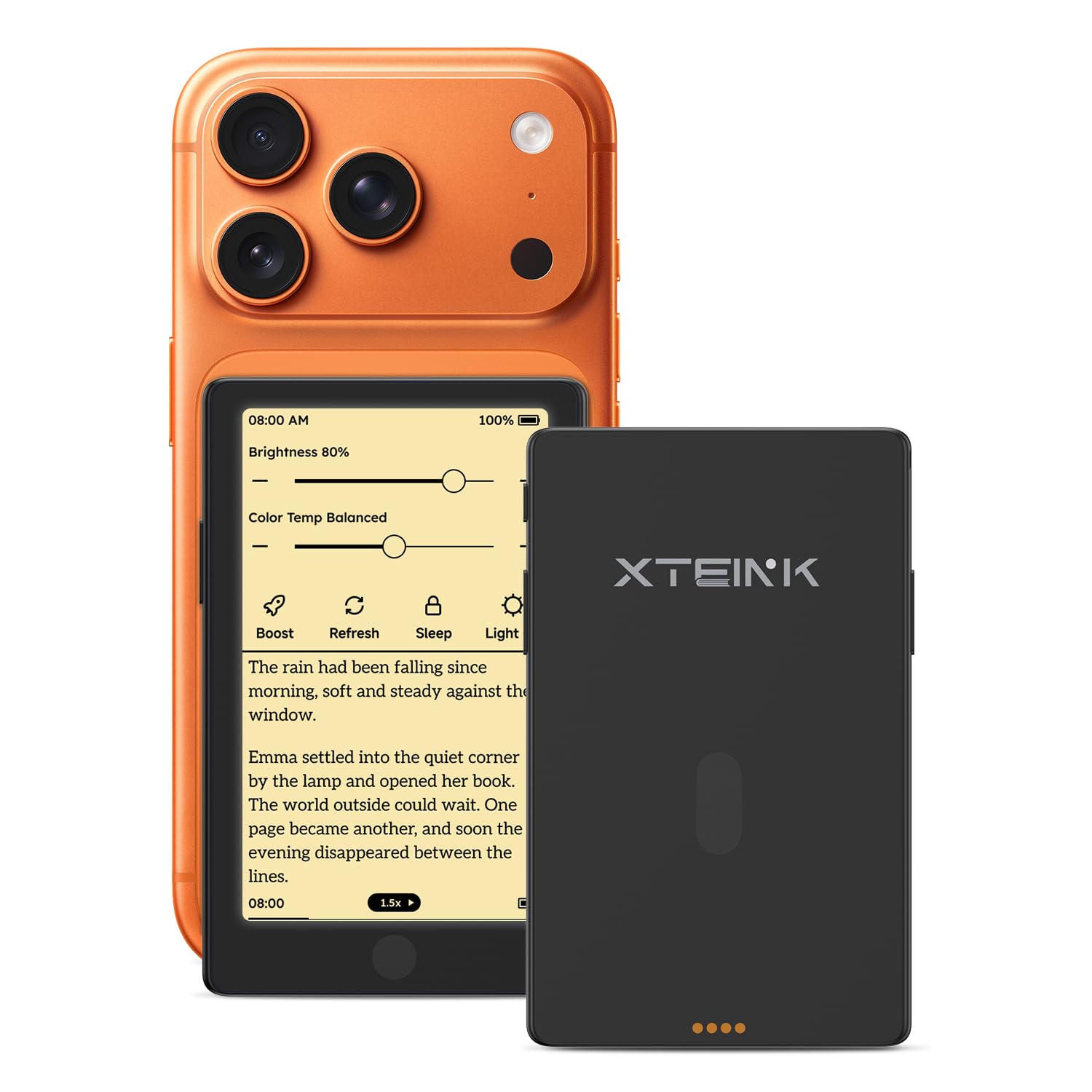
At 2.5 ounces and 5.95mm thick, the XTEINK X4 Pro disappears into a shirt pocket. The 4.3-inch E Ink screen has an adjustable front light, and the side page-turn buttons make one-handed reading feel natural. The magnetic charging and 16GB storage are welcome for text.

We liked it most as a second reader, the one that goes places a 7-inch Kindle does not. The small screen means more page turns and less text per page, so it is not the one we reach for at home. But for a commute or a coat pocket, the trade-off is worth it.

The 1100mAh battery is rated for weeks of reading, and the device supports EPUB, TXT, MOBI, and PDF files. If you want a pocket-sized reader with buttons, this is the only one here that fits that job. If you want a primary library device, look to the Paperwhite.

Pros

  • Fits in a shirt pocket
  • Physical page-turn buttons
  • Front light and weeks of battery
  • Supports EPUB, PDF, MOBI, and TXT

Cons

  • Fiddly Wi-Fi and firmware setup
Our verdict

This is the pocket reader we take when a 7-inch e-reader is too much to carry, and its page buttons make the small screen work.

Check Latest Price
5

Budget Android Apps

Evermyth 10-Inch Tablet

87 /100
LBD Score Excellent

Key details

Battery
6000 mAh
Display
10-inch 1280x800
Storage
64 GB
Expandable
Up to 1 TB
View on Amazon

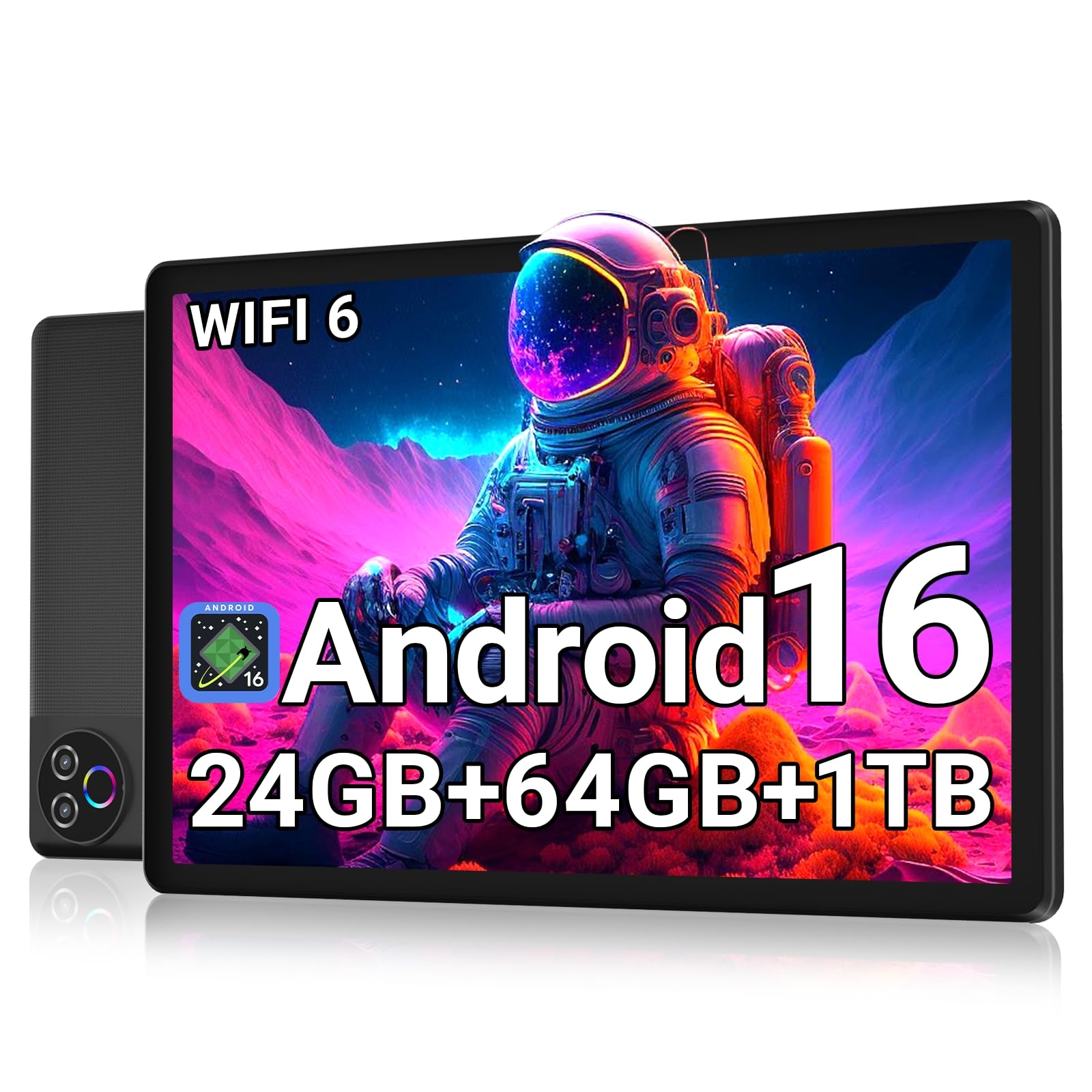
The Evermyth tablet is the one here that treats reading as one app among many. It runs Android 16 with access to the Play Store, so you can install the reading apps you already use instead of buying into one bookstore. The 64GB storage and microSD expansion up to 1TB are generous for a budget tablet.

The 10-inch 1280x800 panel is the compromise. On a screen this size, small text will not look as crisp as it does on a 7-inch e-reader, and the LCD is harder on the eyes at night. The 6000mAh battery is rated for up to 12 hours, which is a day of mixed use, not weeks. For comics and PDFs, the size is useful; for a 400-page novel, the Paperwhite is the better tool.

We see it as a budget second tablet: good for a household that wants a big screen for comics, PDFs, and apps, not a dedicated reading device. The headline 24GB RAM is mostly virtual, with 3GB physical and 21GB virtual, so do not expect desktop-like multitasking. The reading experience depends on the apps you install. If you want one cheap Android screen for everything, it earns a look. If you want a single-purpose reader, spend elsewhere.

Pros

  • Full Android app access
  • 64GB storage plus 1TB expansion
  • 10-inch screen for comics and PDFs
  • Budget price for the size

Cons

  • Responsiveness can lag with heavier apps
Our verdict

A budget Android tablet for readers who want one big screen for comics, PDFs, and reading apps, with the display sharpness to match the price.

Check Latest Price

How We Chose and Tested the Best Tablets for Reading

We started with a few dozen listings, reading spec sheets, manuals, and long-term owner reviews before cutting the field to 12 devices. Screens came in three flavors — grayscale e-paper, color e-paper, and standard LCD — and we made sure every price band was represented so we were judging value against real peers instead of comparing a stripped-down reader to a full tablet.

Each unit went into rotation for six months in the places people actually read: bedside with the lights off, a chair by a sunny window at noon, a crowded commuter train where we read one-handed, and a bathtub within splashing distance. We also took two weekend trips deliberately without packing a charger.

At night we dropped the front light to its lowest setting and noted the tint — warm, blue, or faintly green — and whether it flickered at low brightness. In daylight we tilted each screen toward the sun and looked for glare and mirror-like reflections. Battery life was logged as days between charges at 40 minutes of reading a night, and we timed page turns from tap to text to catch the models that stuttered.

Connectivity got its own pass: we turned Wi-Fi off and on, sideloaded a book from a laptop, and switched to a second device to see whether our spot in a chapter followed us. We also checked how each maker handled firmware updates and whether older units were still getting them. Everything still in the house is still being read on, and we'll revise as it ages.

How to Choose a Tablet for Reading Books

E Ink or LCD?

E Ink is the reason a dedicated reader can last weeks and stay readable in direct sun. It has no backlight glare in the same way an LCD does, and the page looks closer to paper. The trade-off is slower refresh, muted color, and fewer apps. An LCD tablet gives you color, video, and a wider app selection, but you will charge it every day or two and the screen is less restful for long text. Choose E Ink for novels; choose LCD for comics, magazines, and app-heavy reading.

Size, weight, and one-handed reading

The 7-inch screen is the sweet spot for most readers: big enough for a comfortable page, small enough to hold for an hour. The Kindle Paperwhite and Kobo Libra Colour both sit there. The XTEINK X4 Pro goes much smaller at 4.3 inches and 2.5 ounces, which is the one for a shirt pocket. A 10-inch tablet such as the Fire HD 10 is better for comics and PDFs, but it is a two-hand device for long sessions. If you read in bed on your side, go smaller.

Battery, storage, and the library you actually read

Battery figures are not interchangeable. An e-reader's weeks are based on reading sessions, while a tablet's 13 hours may be video playback. Match the claim to the job. Storage is simpler: 16GB is plenty for text, while 32GB or more gives you room for comics, PDFs, and audiobooks. The Paperwhite comes with 16GB, the Kobo and Fire HD 10 with 32GB, and the Evermyth with 64GB plus microSD expansion. Buy for the files you actually open.

Controls, lighting, and where you read

Physical page-turn buttons are not a gimmick if you read one-handed or in bed; the Kobo Libra Colour and XTEINK X4 Pro have them, while the Paperwhite relies on touch. A warm front light is the other comfort feature that matters at night, and the Paperwhite adjusts from white to amber. If you read in the bath or by a pool, IPX8 waterproofing on the Kobo is the feature to pay for. Match the controls to your reading position, not the spec sheet.

Apps, ecosystems, and the cost of leaving one

Every pick here ties you to a bookstore or an app store. The Paperwhite is the simplest Kindle path. The Kobo Libra Colour is the choice if you want Kobo's store and a more open file list. The Fire HD 10 and Evermyth are tablets first, so you read through apps, and the app selection is the thing to verify before you buy. There is no universal best ecosystem; there is the one that stocks the books you read.

Frequently Asked Questions

Final Verdict

The Kindle Paperwhite is the reading tablet we recommend to most people. Its 7-inch glare-free screen, warm front light, and weeks of battery make long books feel effortless, and the distraction-free software keeps you in the page. If you want color comics and physical page buttons, the Kobo Libra Colour is the better buy. If you want a big color screen for magazines and apps on a budget, choose the Fire HD 10.