Best Soldering Irons for Electronics of 2026

A soldering iron is the rare tool that can turn a five-minute repair into a ruined board. The failure is almost never dramatic — it's a tip that reads 700 degrees on the dial but delivers less, so you linger on the joint, and by the time the solder finally flows you've lifted a pad. What you actually want is an iron that gets in, melts fast, and gets out before the board notices.

Wattage alone won't tell you that. Two irons with the same number on the box behave completely differently depending on how much metal sits behind the tip and how quickly it claws back heat after a thick joint drains it away. I'm also suspicious of bundled accessories: a kit with twelve pieces is worth less than one with a pump that doesn't jam and tips you can actually buy again next year. We spent six months with 14 soldering irons and stations — pocket-sized portables, adjustable kits, full digital benches — putting them through real repairs instead of test joints.

What separates them comes down to how you work. A bench iron that holds temperature for an hour is the wrong tool for a junction box on a ladder, and a portable that fits in a shirt pocket won't tin heavy gauge wire. The picks below split along that line.

1

Best Overall

Weller WE1010NA Digital Station

93 /100
LBD Score Outstanding

Key details

Power
70W
Display
LCD
Included Tip
1.6 mm screwdriver
Temperature Stability
±4 °F (2 °C)
View on Amazon

Seventy watts and a stated temperature stability of plus or minus 4°F (2°C) are the two figures that put the WE1010NA at the top of this list. Wattage is about recovery — how quickly the tip climbs back after a ground plane pulls heat out of it — but stability is about everything else. A tip that sags between joints leaves dull, grainy fillets; a tip that holds its setpoint gives you the same joint every time. For anyone soldering boards more than occasionally, that repeatability is the whole purchase.

The rest of the station is built to stay out of your way: an ESD-safe body with a grounded iron, a heat-resistant silicone cable that lies on the bench instead of coiling off it, a temperature lock so a sleeve cannot nudge your setting, and standby with auto setback that drops the heat when the iron sits in the rest. We also rate the PH70 cradle — a real stand with a sponge, not the bent wire most kits include.

The 5.5-pound body and 12.5-inch depth tell you where this belongs: a dedicated bench, not a drawer. The risk at this level is a heating element that quits inside a year, which is what the one-year warranty covers, so give it a long session in the first week while the return window is still open.

Pros

  • Holds setpoint within ±4°F
  • ESD-safe station with temperature lock
  • Standby and auto setback protect tips
  • 70W element recovers quickly

Cons

  • Ships with a single 1.6 mm tip
  • LCD is not backlit
Our verdict

For regular board work, this is the station we trust: it holds setpoint within a few degrees, grounds the tip, and gets out of the way.

Check Latest Price
2

Best Value Station

YIHUA 939D+ Soldering Station

91 /100
LBD Score Outstanding

Key details

Control
PID
Front Panel
Brushed aluminum
Included Iron
907E detachable
Temperature Range
392 to 896 °F
View on Amazon

Midrange money buys station hardware here: a PID-controlled detachable 907E iron, a brushed aluminum front panel that shrugs off a slipped tip, a metal cradle with a brass cleaner beside the sponge, and a range from 392°F to 896°F on a °C/°F display you can read from across the bench.

We recommend it to anyone who wants station behavior without the premium spend. It heats quickly, holds a setting, and uses standard 907E tips, so you are not locked into an expensive ecosystem. The catch is the readout, which can sit well above what the tip actually reaches — a real problem when the screen says 800 and the joint wants 700. Calibrate the station against a tip thermometer once and the offset stops mattering; it is the first thing we set up on any station that allows it.

It is also bench furniture at roughly 2.16 kg, so it suits a desk where the iron stays out between sessions. Thick wire and big pads are where it runs out of headroom, and that is the job for the broad tip and a beat of patience rather than the fine one.

Pros

  • PID control across 392–896°F
  • Brass tip cleaner and metal panel
  • Detachable 907E iron with °C/°F display
  • Calibration corrects a drifting readout

Cons

  • Ships without spare tips
Our verdict

We recommend this station to anyone who wants stable, adjustable heat and a metal-bodied bench unit without paying premium money for it.

Check Latest Price
3

Best Kit for Beginners

HANDSKIT 90W Soldering Kit

92 /100
LBD Score Outstanding

Key details

Case
PU carry case
Tips
6 × 900M
Power
90W
Calibration
±99 °C offset
View on Amazon

The case is what sold us: a zipped PU folder with molded spots for the iron, six 900M tips, tweezers, a desoldering pump, a magnifier, solder, and a stand, so a first repair does not begin with a shopping list. The iron inside is a 90W digital pencil with a ceramic core, a stated ten-second warm-up, a live readout, and a temperature memory that returns to your last setting.

Two features matter more than the piece count. Calibration lets you apply an offset of up to 99°C, which is how you correct a tip that runs hot or cold instead of guessing at a dial position, and auto sleep drops the heat when the iron sits idle — the difference between a tip that lasts and one that oxidizes while you hunt for a component. The 900M tip family is the quiet win: replacements are cheap and sold everywhere.

For a first bench the extras do real work. The pump rescues a mis-soldered joint, the tweezers hold a wire while you feed solder, and six shapes cover through-hole and wire work; the magnifier is the one piece we never reached for.

Pros

  • Six 900M tips plus tweezers and pump
  • ±99°C calibration offset
  • Auto sleep and temperature memory
  • 90W ceramic core, ten-second warm-up

Cons

  • Included solder is the weak link
  • Loses heat on back-to-back joints
Our verdict

Buy this kit if you are starting from nothing — the calibration, sleep mode, and six tips cover more ground than the money suggests.

Check Latest Price
4

Best Budget Starter Kit

Plusivo 60W Soldering Kit

91 /100
LBD Score Outstanding

Key details

Power
60W
Solder Wire
0.8 mm
Kit Contents
15-in-1
Temperature Range
392 to 842 °F
View on Amazon

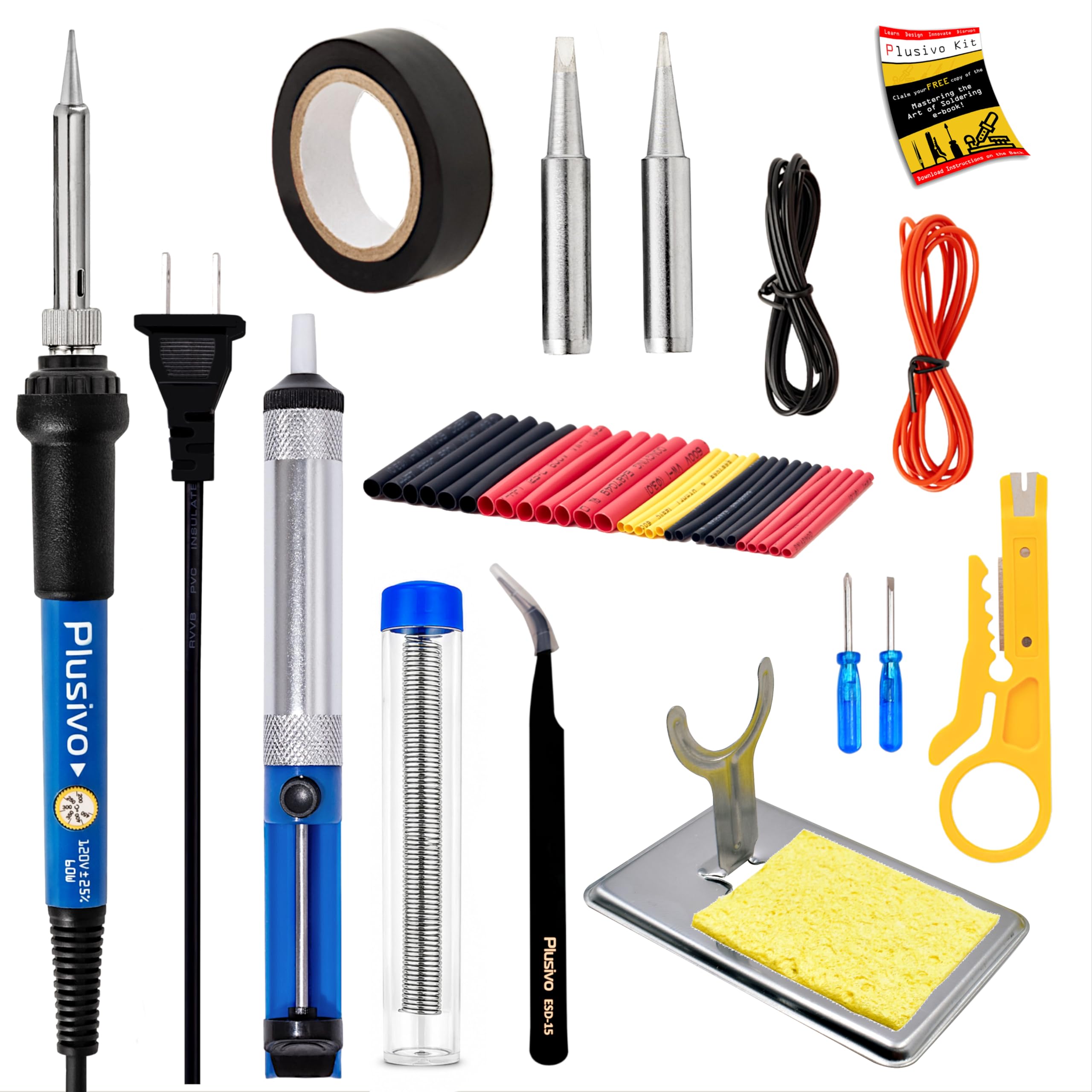
The desoldering pump is what makes this kit worth owning. If your first job is pulling a blown capacitor or redoing a snapped wire, the pump clears the old solder instead of leaving you to fight it. Around it you get a 60W iron with a dial covering 392°F to 842°F, two replaceable tips, 0.8 mm solder, a stand and sponge, heat-shrink tube, and a carton box that keeps the lot together.

The 0.8 mm solder is the right gauge for small joints — thin enough to feed a PCB pad without flooding it — and the heat-shrink is the sleeper item: finish a wire repair and you can seal it the same afternoon instead of taping it up. The iron itself is a plain ceramic-element pencil with four vent holes, which is to say it heats quickly and cools quickly.

For one repair every few months, that is all the iron you need, and this is the box we point people toward when they are buying for a single job. Two tips will not get you into fine-pitch work, so if the board has 0.5 mm parts, plan on adding a finer tip or choosing a different iron. And the solder is not labeled leaded or lead-free — assume it is leaded, work near an open window, and wash your hands after.

Pros

  • Desoldering pump and heat-shrink included
  • 0.8 mm solder suits small joints
  • Dial covers 392–842°F
  • Carton box keeps the kit together

Cons

  • Stand is light and tips easily
Our verdict

Our pick for a single repair: the pump, solder, and spare tips get you through one job without placing a second order.

Check Latest Price
5

Best Portable

PINECIL Portable Soldering Iron

92 /100
LBD Score Outstanding

Key details

Input
USB-C PD/QC 3.0 or DC5525
Power
65W
Length
6.1 in
Weight
2.12 oz
View on Amazon

Sixty grams and six inches long: the PINECIL is the iron that goes in a laptop bag. Power comes over USB-C with PD or QC 3.0, or through a DC5525 barrel jack, and the 65W element gets to temperature fast enough that a repair does not turn into a waiting game.

What we like most is that nothing about it feels like a travel compromise. There is a live temperature readout, a control wheel that makes setpoint changes quick, tip changes that take seconds, and standby that drops the heat with a small sleep indicator when you set it down. Pair it with a 65W laptop brick that speaks PD and it behaves; not every USB-C charger negotiates happily, and a weak one leaves you underpowered.

It is not a station replacement for a heavy session. The small body has less thermal mass behind the tip, so big pads and thick wire go slower than on a 70W bench unit — fine for board work and connectors, less so for amplifier chassis and ground planes.

Pros

  • 60 g and 6.1 inches
  • USB-C PD/QC 3.0 or DC barrel power
  • Live readout and quick tip changes
  • Auto standby drops heat when idle

Cons

  • No charger in the box
Our verdict

We keep coming back to this one for small benches and travel — bring a 65W PD charger and it solders like a much bigger iron.

Check Latest Price
6

Budget Readout

Liouhoum 936H Soldering Iron

91 /100
LBD Score Outstanding

Key details

Power
80W
Weight
4.41 oz
Auto Sleep
5 min on stand
Max Temperature
480 °C
View on Amazon

Sleep mode is the reason to look at this one. Set the iron on its stand and after five minutes it drops the temperature by itself — the kind of feature usually reserved for stations. Add a live LCD, calibration, temperature memory, and an assortment of 900-series tips, and the feature list reads like a station's, in a 125-gram pencil you hold like a pen.

Where it gives ground is sustained heat: heavy wire and big pads pull the tip down faster than the element brings it back, so keep the broad tip fitted for those jobs and let it recover between joints. On board work it holds its own, and switching the readout between Celsius and Fahrenheit is a small mercy when you are following a guide written in the other one.

We think it is the best value in this set for someone who wants a readout and real heat control without moving up to a station, and the calibration function means a tip that reads wrong gets corrected rather than replaced.

Pros

  • Auto sleep after five minutes on the stand
  • LCD readout with calibration
  • Takes standard 900-series tips
  • Light 125 g body with rubberized handle

Cons

  • Cord is only 4.3 ft
Our verdict

The lowest-cost way here to get a digital readout, calibration, and sleep mode in a pencil iron that fits in a drawer.

Check Latest Price

How We Chose and Tested the Best Soldering Irons

We built the shortlist from spec sheets, repair-forum reputation, and one practical filter: could I buy a replacement tip for this iron, in a size I actually use, without hunting? Anything that failed that test came off the list regardless of price. From there we bought 14 units across three rough tiers — pocket-sized portables, all-in-one kits, and benchtop stations with digital readouts — and lived with them for six months.

Every iron did the same jobs in turn: reflowing a cracked USB-C port, swapping a mechanical keyboard switch, soldering headers onto a microcontroller board, tinning 12-gauge wire, and repairing a guitar cable. Some of that happened at a garage bench, some at a desk in an apartment with the window open, and some on a folding table at a weekend repair meet where the only power on offer was a battery bank.

We timed each one from cold plug-in to a melted bead of solder rather than trusting the published figure, then timed it again after half an hour of idling. A thermocouple held to the tip at three dial settings told us whether the display number was real or decorative, and a heavy ground plane showed how fast the iron recovered once the work pulled heat away. A continuity check from tip to plug confirmed which ESD-safe claims were connected to anything.

The unglamorous details got written down too: whether the grip was still comfortable after two hours, whether the cable was stiff enough to drag the iron off its stand, whether the stand tipped when the iron went in. We swapped to a fine conical tip mid-build with the iron hot, and inspected tip plating for wear after several weeks of use. We also turned each one down to its lowest setting to see whether it would idle cool enough to work beside a plastic connector. A few of them never made it back off my bench.

How to Choose a Soldering Iron for Electronics

Temperature control matters more than wattage

A 60W iron and a 70W iron differ less in peak heat than in how fast they climb back after a joint drains the tip. What changes your results is stability: a station that holds within a few degrees gives consistent fillets, while a knob-only pencil can drift well away from the number on the dial. A digital readout only helps if it is accurate, so check yours against a tip thermometer or use the calibration function before you trust it.

Fit the tip to the joint

Tips decide what you can actually solder, and they are where budget irons hide their costs. A 1.6 mm screwdriver handles wire and through-hole pads; 0.5 mm pitch work wants a fine conical or a small chisel. Standard 900-series tips are cheap and stocked everywhere, while proprietary cartridges cost more and tie you to one maker — worth it if you solder daily. Check what ships in the box, because a station with one coarse tip usually means a second purchase before your first board.

Station, pencil, or portable

A station gives you a weighted base, a proper cradle, sleep timers, and often a grounded ESD-safe tip; it is the right choice if the iron lives on a desk. A pencil iron costs less and stores in a drawer, but you supply the stand and the discipline. Portable USB-C irons sit between the two: 65W through a PD charger is genuinely capable on boards, but the charger is part of the purchase and heavy joints still favor a station.

What a kit should actually contain

Kits sell on piece count, and plenty of those pieces never leave the box. The items that earn their place are a desoldering pump, a couple of spare tips in shapes you will use, fine solder, and a stand that does not tip. A magnifier and heat-shrink are genuinely handy; a third pair of tweezers is filler. If the bundled solder is not labeled leaded or lead-free, assume it is leaded and buy a labeled spool for indoor work.

Test it while you can still return it

Budget irons are where early failures show up, so make the first session a test: bring it to temperature, let it idle for ten minutes, run a few joints, and try the sleep or standby function. Do all of that inside the return window. If the tip will not wet with solder or the display drifts, send it back before you build a project around it.

Frequently Asked Questions

Final Verdict

The Weller WE1010NA is the iron we recommend to anyone who solders boards with any regularity: its tip holds setpoint within a few degrees, the station is ESD-safe, and standby protects both tips and components between joints. If that is more station than your bench needs, the YIHUA 939D+ does the same work in plainer clothes — PID control, a metal body, standard tips — as long as you calibrate it once.

Starting from nothing, the HANDSKIT kit puts a calibratable 90W iron, six tips, and a pump in one case, and it is the version of this purchase we would hand to a beginner.