Best Smart Locks of 2026

A smart lock is supposed to retire your house key, and it only earns that on the porch — in the rain, with an armload of groceries, when the fingerprint reader has half a second to decide you're you. I've done my share of key-digging in the dark, so we tested these the way a household actually lives: damp hands, cold mornings, kids barreling through the door, a dog walker who needs in once a day. Twelve locks went onto front doors, side doors, and one drafty garage entry over the past six months.

What first-time buyers don't hear is that the fingerprint sensor decides whether you love the lock, not the keypad, and it behaves differently with damp, dry, or lotioned hands. Installation is the second surprise: most swap onto an existing deadbolt with a screwdriver in under half an hour, but a few want a bigger hole in your door. Auto-lock, codes for guests, and a connection that doesn't drop matter far more day to day than voice assistants — the picks below got all three right.

1

Best Overall

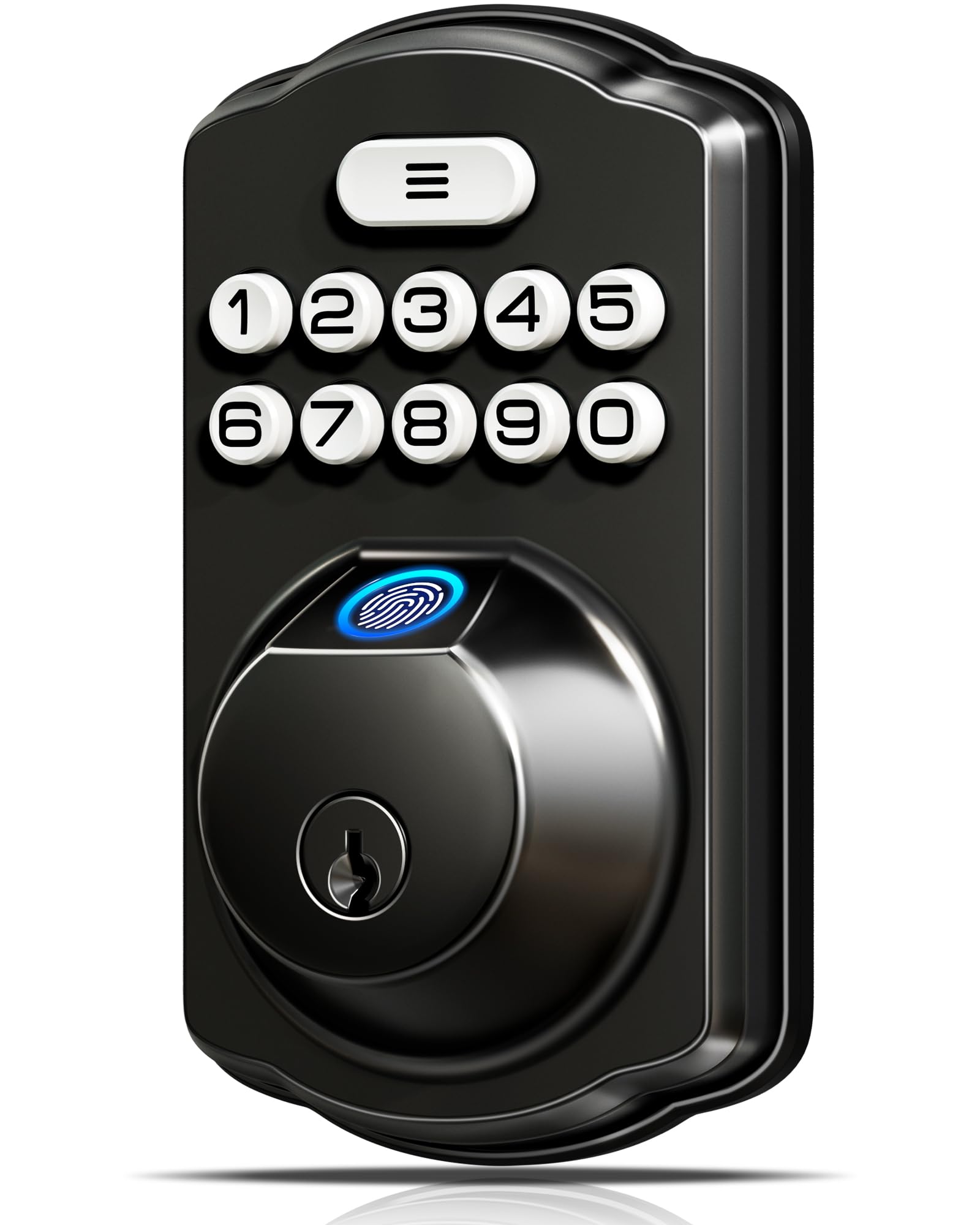
Veise KS02A Fingerprint Lock

89 /100
LBD Score Excellent

Key details

Battery Life
Up to 365 days
Unlock Methods
Fingerprint, passcode, key
Weather Rating
IP54
Fingerprint Capacity
20 fingerprints
View on Amazon

The KS02A is a deadbolt-only lock, so it replaces the bolt above your existing lever rather than the whole handle. You get a fingerprint reader, a backlit keypad, two mechanical keys, 20 fingerprint slots, and 20 user codes. It runs on four AA batteries, carries an IP54 weather rating and ANSI Grade 3 certification, and allows an auto-lock delay from 10 to 99 seconds. Holding any key for two seconds locks the door from outside.

That combination is why it earns the top spot for most front doors. We like that it doesn't depend on Wi-Fi, a hub, or an app to let you in; the fingerprint and code work on their own, and the key is there when the battery or sensor has a bad day. The feature we appreciate most is one-touch locking: you can secure the door on the way out without waking the keypad or fishing for a phone. The trade-off is real: there is no app, no remote unlock, and no entry history. If you want to check the door from the office or let a dog walker in from another city, this is not that lock.

Installation is the other reason it sits here. The mounting is designed for standard deadbolt prep, and setup is straightforward once you confirm the door is square and the bolt lines up before you tighten everything. The fingerprint reader is not magic: dry, clean fingers read best, and a wet thumb on a rainy day may need a second tap or the keypad. For a household that wants reliable keyless entry without a network, that is an easy trade to make.

Pros

  • Fingerprint and code work without Wi-Fi
  • 20 fingerprints and 20 user codes
  • ANSI Grade 3, IP54, one-year battery claim
  • One-touch locking and adjustable auto-lock

Cons

  • No app, remote access, or entry history
  • Deadbolt only; handle not included
Our verdict

Our top pick for most front doors: a fingerprint deadbolt that keeps working without Wi-Fi and asks nothing of your phone.
Check Latest Price
2

Best Connected

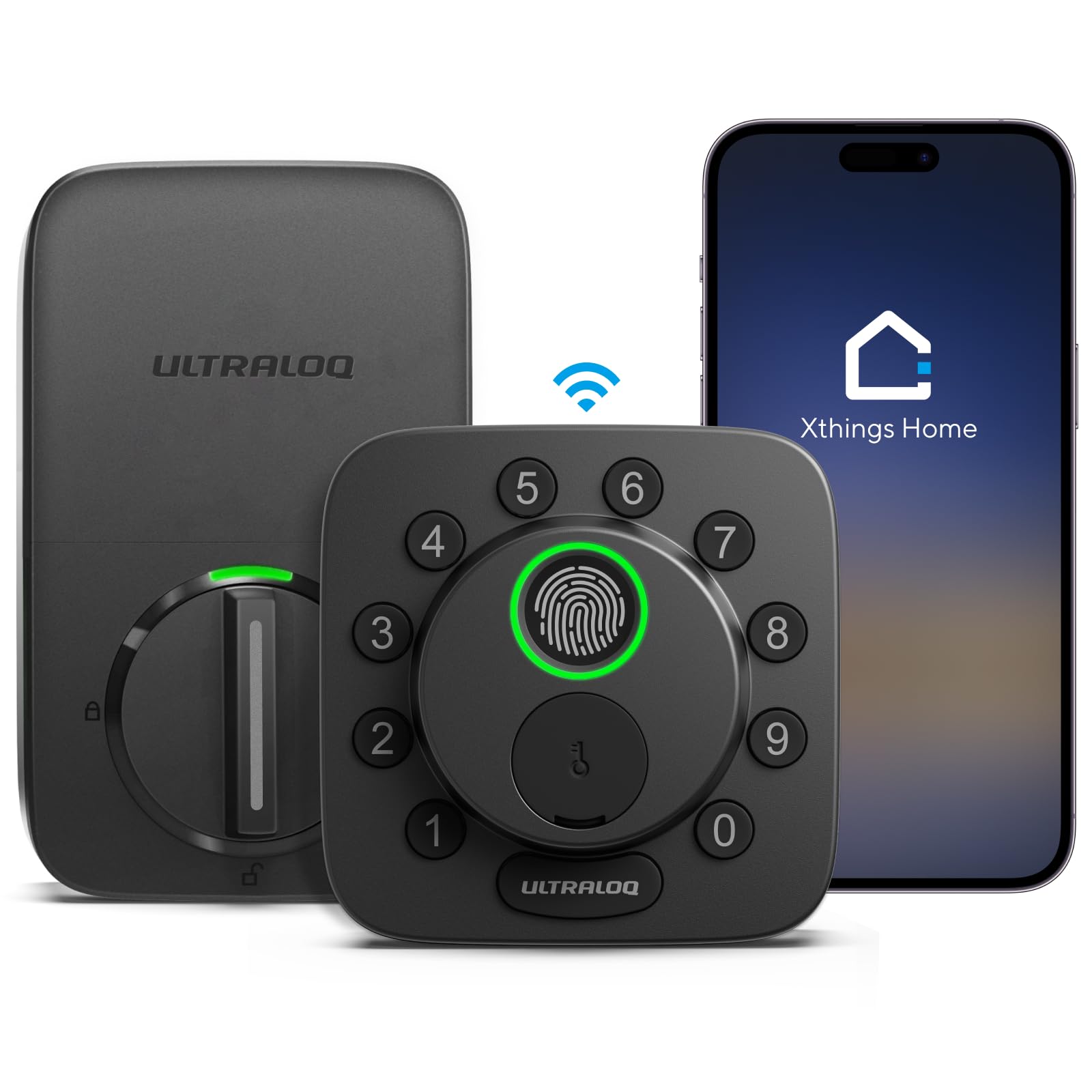
ULTRALOQ Bolt SE

88 /100
LBD Score Excellent

Key details

Connectivity
Wi-Fi, Bluetooth, Matter
Certification
BHMA certified
Code Capacity
50 passcodes
Fingerprint Capacity
50 fingerprints
View on Amazon

If your smart home already runs on Apple Home, Alexa, Google, or SmartThings, the ULTRALOQ Bolt SE is the one that tries to speak all their languages. It combines built-in Wi-Fi, Bluetooth, and Matter over Thread with a fingerprint reader, keypad, app, web portal, and eKey sharing. The capacity is unusually generous: 50 fingerprints and 50 passcodes, plus two emergency keys. It is the most flexible connected lock in this set, and that is why it is our connected pick.

We like that the Bolt SE does not force one way in. A family can use fingerprints, a cleaner can get a time-limited code, and a neighbor can get an eKey without a physical key changing hands. The 50-print capacity is more than most households need, but it makes sense for a small office or a rental with regular turnover. We also appreciate that Matter over Thread gives it a path into Apple Home and other ecosystems without relying only on the ULTRALOQ app.

The catch is the one we care about most: remote access is the least settled part. The lock's Wi-Fi and bridge connection can drop, and that is exactly the feature people buy a connected lock for. Fingerprint reads are quick when they register, but the sensor is not immune to wet or worn fingers; the auto-unlock geofence is also inconsistent enough that we treat it as a bonus, not the main way in. Keep a code and the emergency key active, and test the app from outside your home during the return window.

As a piece of hardware, it feels dense and well finished, and the keypad is glove-friendly. The app is where the experience lives, though, and it asks you to be a little patient with setup. For a tech-forward household that wants the widest access menu, that is a reasonable trade; for someone who wants a lock to disappear into the door, the simpler picks here are easier to live with.

Pros

  • Wi-Fi, Bluetooth, and Matter connectivity
  • 50 fingerprints and 50 passcodes
  • Remote eKeys and app or web management
  • BHMA certified zinc body

Cons

  • Remote access can drop
  • Auto-unlock and fingerprint are inconsistent
Our verdict

The connected pick we reach for when a household wants Matter, Wi-Fi, and a 50-print capacity, with a code and key kept as backup.

Check Latest Price
3

Best Bluetooth-Only

Wyze Lock Bolt

90 /100
LBD Score Outstanding

Key details

Fire Rating
UL 20-minute
Connectivity
Bluetooth
Unlock Methods
Fingerprint, keypad, app
Weather Rating
IPX5
View on Amazon

The Wyze Lock Bolt makes a deliberate trade: it skips Wi-Fi entirely and keeps everything local. You get a fingerprint reader, a backlit keypad, and a Bluetooth app, along with auto-lock, IPX5 weather resistance, and a BHMA listing with a UL 20-minute fire rating. It is a deadbolt replacement, not a handle set, and the app works only when you are within Bluetooth range.

We think that is the right trade for a lot of doors. The fingerprint reader and keypad handle everyday entry, and the Bluetooth app is there for setup, temporary access, and checking the lock when you are nearby. Because it is not trying to hold a Wi-Fi connection, there is less to go wrong in the cloud. The app is local, not remote: you cannot let someone in from across town, and you cannot check the log from work.

The Bluetooth-only design is the point, not a defect, but it does mean this is the wrong lock for a rental with remote check-in or a household that wants to buzz in a delivery. The fingerprint sensor can also be choosy about placement, especially with small or wet fingers; enroll the same finger twice and keep the keypad code ready. For a renter or a household that just wants to stop carrying keys, it is a clean, low-drama choice.

Pros

  • Fingerprint, keypad, and Bluetooth app
  • IPX5 weatherproof and UL 20-minute fire rating
  • No Wi-Fi or cloud dependence

Cons

  • No Wi-Fi or remote access
  • Fingerprint recognition can be inconsistent
Our verdict

We choose this one for local-only keyless entry: fingerprint and keypad work without Wi-Fi, and remote access is deliberately absent.

Check Latest Price
4

Best Budget Fingerprint

TEEHO TE002

89 /100
LBD Score Excellent

Key details

Code Capacity
20 passcodes
Unlock Methods
Fingerprint, passcode, key
Weather Rating
IP54
Fingerprint Capacity
20 fingerprints
View on Amazon

The TE002 is the lowest-cost fingerprint deadbolt in this group, and it spends its money on the right things: a fingerprint reader, a backlit keypad, two physical keys, one-time PINs that delete after use, and 20 fingerprint and 20 code slots. It carries ANSI Grade 3 and IP54 ratings, supports auto-lock, and is claimed to run up to a year on four AA batteries.

The feature we keep coming back to is the one-time PIN. You can give a contractor or a dog walker a code that stops working after one use, then forget about it. The keypad also supports anti-peep entry, so you can add random digits around your code when someone is standing behind you. Those are small things, but they are the kind of small things that make a budget lock feel more thoughtful than its price tier.

Our reservation is the fingerprint reader. It is the reason to buy the TE002, and it is also the part that most often needs a second try, especially with wet or worn prints. The keypad and key are solid backups, and the lock is easy to install on standard prep, but we keep it away from a household where the fingerprint is the only method anyone trusts. For a first smart lock, a rental, or a back door, it is a sensible place to start.

Pros

  • One-time PINs and anti-peep keypad
  • 20 fingerprints and 20 passcodes
  • ANSI Grade 3 and IP54
  • Easy install on standard prep

Cons

  • Fingerprint can miss wet or worn prints
  • No app or remote access
Our verdict

For a first fingerprint lock on a back door or rental, we point to this one for its one-time codes, key backup, and low price tier.

Check Latest Price
5

Best Handle-Set Upgrade

Sifely S Handle Set

89 /100
LBD Score Excellent

Key details

Handle
Reversible handle
Connectivity
Bluetooth, Wi-Fi
Unlock Methods
Fingerprint, code, fob, app, key
Fingerprint Speed
0.3 seconds
View on Amazon

The Sifely S is the pick for someone who wants the whole door to look upgraded, not just the deadbolt. It replaces the deadbolt and the lever with a full handle set, and it packs in fingerprint, code, fob, app, and mechanical key access. The fingerprint sensor is rated at 0.3 seconds, and the handle is reversible for left- or right-hand doors.

We like the fobs more than we expected to. Two key cards are included, and they are an easy way to give a child or a cleaner access without walking them through an app. The app handles codes, logs, and temporary access, and the lock can join Wi-Fi for remote management. For an Airbnb or a multi-door rental, the combination of fobs, codes, and app access is genuinely useful.

The trade-off is long-term confidence. The lock has a mixed record on reliability and durability, and the handle set has more mechanical parts to go wrong than a deadbolt-only design. We don't put it on a door where a failure means being locked out with no backup; keep a mechanical key and a second entry route. The finish and the lever feel are the parts that make it feel more expensive than it is.

Pros

  • Full handle-set replacement
  • Fingerprint, code, fob, app, and key access
  • Two key cards included
  • Reversible handle for left or right doors

Cons

  • Mixed long-term reliability and durability
  • More mechanical parts than a deadbolt-only lock
Our verdict

We see this as the handle-set upgrade for rentals and family doors, with fob access and app management, provided a mechanical key stays close.

Check Latest Price
6

Budget Handle Set

Yamiry YR01

87 /100
LBD Score Excellent

Key details

Finish
Matte black
Connectivity
Bluetooth, Wi-Fi
Install Time
About 10 minutes
Unlock Methods
Fingerprint, code, fob, app, key
View on Amazon

The Yamiry YR01 is the budget way into a handle-set smart lock. It combines a fingerprint reader, keypad, app, two fobs, two mechanical keys, and a physical knob in one matte black package. The listing claims a 10-minute installation, and the lock includes passage mode and auto-lock.

We like the fobs and the passage mode. The fobs are simpler than an app for a cleaner or a grandparent, and passage mode is useful on a back door or an interior office door when you want free coming and going for a stretch. The matte black finish also looks more considered than the price tier suggests, and the included mechanical keys mean you are not stranded if the electronics act up.

The reason it is an also-consider rather than a runner-up is inside operation. The lock can be difficult to lock or unlock from the inside, and the fingerprint reader can take multiple attempts; that matters more on a main front door than on a back door or a garage entry. The build and finish get good marks, and the price is low for a handle set, but we want a mechanical key within reach and a household that is comfortable troubleshooting the app.

Pros

  • Fingerprint, code, fob, app, and key access
  • Passage mode and auto-lock
  • Matte black finish
  • Low-cost handle-set option

Cons

  • Inside operation is less intuitive
  • Fingerprint and Bluetooth can be inconsistent
Our verdict

A budget handle-set pick we keep for back doors and garage entries, where fobs and passage mode matter more than perfect inside operation.

Check Latest Price

How We Tested the Best Smart Locks

We started with a long list of every deadbolt-style lock that promised keyless entry, then narrowed it by what a real door needs: compatibility with a standard deadbolt cutout, a backup key or external power option, and an app that hasn't been abandoned by its maker. That left 12 locks spanning keypad-only deadbolts up through wifi models that talk to a hub.

One person installed each lock with a screwdriver and the included instructions. I timed every install and noted where it got ugly — whether the existing holes lined up, whether the bolt seated without forcing, and whether the app walked me through calibration or left me guessing. Then I enrolled the same six fingers on every lock — mine, my partner's, a 9-year-old's, and my mother's — to see how each reader handled small, dry, and older skin.

After that we just lived with them for six months. I opened each door with dry hands, wet hands, a thumb slick with sunscreen, and once in 30-degree weather with fingers stiff from the cold, writing down every failed read. We watched auto-lock timing with the door left ajar, unlocked remotely from two states away to see whether the app actually connected, and let batteries run down on purpose to check how early the warnings started; two locks sat on an exposed side door through rain and a hose test.

Value came last. We compared what each lock could do without a hub, without a subscription, and without a phone in hand, since that's the version most households actually end up living with.

How to Choose a Smart Lock

Start With the Way You Want to Get In

Fingerprint entry is the fastest everyday option, but it is also the most variable: wet, cold, or worn fingers can need a second try. A keypad code is slower but more dependable, and a mechanical key is the backstop you should never disable. Decide which method you will use most, then make sure the lock includes at least one method that does not depend on a battery, a network, or a phone. The Veise KS02A is built around fingerprint-plus-code; the ULTRALOQ Bolt SE adds app and voice control on top.

Know Whether You Need Remote Access

Built-in Wi-Fi lets you lock, unlock, and manage codes from anywhere, but it is also the part of a smart lock most likely to disappoint. Bluetooth is more local and often more stable, while Matter over Thread can tie a lock into Apple Home, Alexa, or Google without leaning on one app. Some handle sets list Wi-Fi but need a separate gateway for remote use, so check what is in the box. If you only need keyless entry at the door, a local lock like the Wyze Lock Bolt is simpler and less exposed.

Match the Lock to Your Door Prep

A deadbolt-only lock replaces the bolt above your existing handle; a handle set replaces the lever too. Deadbolt swaps are usually the easier install and fit standard prep, while handle sets can solve a mismatched or worn lever but add more mechanical parts. Before ordering, confirm your door already has a deadbolt bore and that the bolt lines up without forcing. The Veise and TEEHO are deadbolt-only; the Sifely and Yamiry replace the whole handle.

Treat Auto-Lock and Egress as Safety Features

Auto-lock is convenient, but it can also leave you outside if the door is not fully closed or the bolt binds. Look for an adjustable delay, a one-touch lock button, and an inside thumb turn that works without power. On a main entry, test the inside operation before you rely on the app. The Veise has an adjustable 10-to-99-second delay and one-touch locking; the Sifely and Yamiry also offer auto-lock, but check the inside operation before you commit. Neither replaces the habit of checking the door.

Budget for Batteries and Guest Access

Most smart locks run on AA batteries, and the cost is not just the cells; it is the annoyance of a low-battery alert at the wrong time. Four AA batteries are common, and the Veise and TEEHO listings claim up to a year of use. Guest access is the other recurring cost: one-time and scheduled codes are more useful than a huge code count. The TEEHO's one-time PINs and the Sifely's fobs are good examples of features that earn their place.

Frequently Asked Questions

Final Verdict

Our default for most front doors is the Veise KS02A. It gives you fingerprint and code entry, a key backup, and a one-year battery claim without making your door depend on Wi-Fi or an app; that is the version of a smart lock we trust most day to day.

If remote access is non-negotiable, the ULTRALOQ Bolt SE is the connected pick to try, provided you keep a code and key active and test the app from outside the house. For an Airbnb handle-set upgrade, the Sifely S is the more useful shape; for a tight budget, the TEEHO TE002.