Best Smart Locks for Airbnb Rentals of 2026

Every host knows the 11:40 p.m. message: the door won't open, and there's a stranger on the porch. I've made that midnight drive with a spare key in my pocket, and it's why I started taking smart locks seriously. A good one lets a guest in without handing over a key you'll never get back, and lets you delete their code the second they leave.

My team and I have spent eight months with 11 of them — keypad deadbolts, fingerprint knobs, app-connected handles — on my own front door and on a rental that turns over every Saturday. What surprised me is how little the app matters once the novelty fades. What decides whether you trust a lock with a paying guest is the mechanism: how the bolt throws, whether the keypad reads a cold thumb, how long it actually runs on batteries.

Auto-lock is the feature hosts lean on hardest, and it's only as good as the lock's sense of whether the door actually shut. Get that wrong and you're resetting codes from a parking lot. The picks below got that right.

1

Best Overall

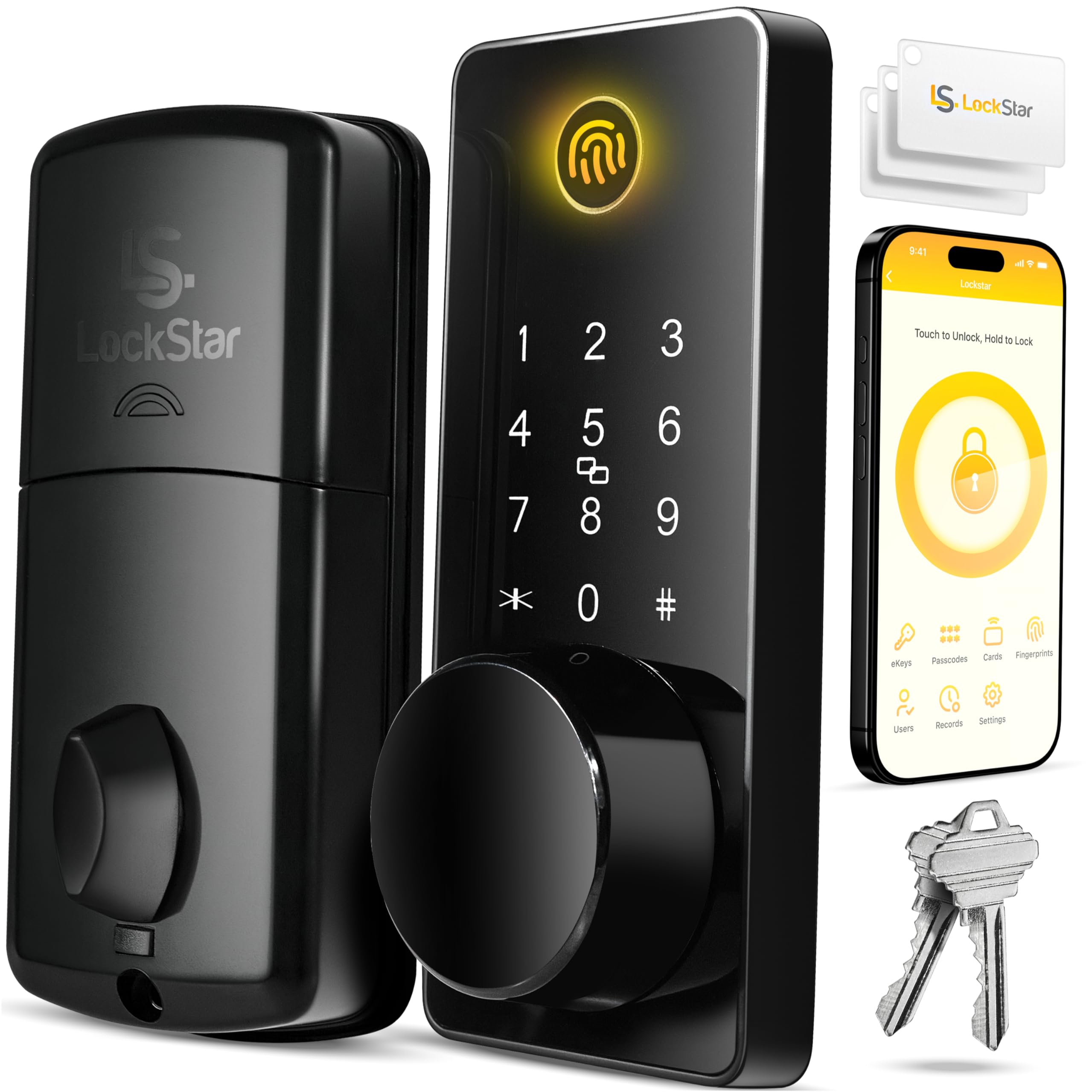
LOCKSTAR Smart Lock

89 /100
LBD Score Excellent

Key details

Door Fit
1.5–1.9 in. wooden doors
Guest Codes
Temporary timed passcodes
Remote Access
WiFi gateway included
Access Methods
App, fingerprint, code, card, fob, key
View on Amazon

A WiFi gateway in the box is the first thing we look for in a rental lock, and the LOCKSTAR includes one. That single choice changes the job: you can issue a timed code from the app before a guest arrives, watch the entry history, and avoid driving over to reprogram the keypad. For an Airbnb with back-to-back stays, that remote management is the feature that matters most, which is why this is our top pick.

The access list is broader than it needs to be, and that's a good thing for a rental. Guests can use a code; family and cleaners can use a fingerprint, card, or fob; and a traditional key is there for the host. We paid more attention to the guest-code side than the fingerprint reader, because a code is the one thing every guest can use without setup. The fingerprint sensor works, though it occasionally takes a second touch, which is a minor annoyance rather than a dealbreaker.

Installation is a screwdriver job, and the box includes the screwdriver and drill piece, which is a small detail we appreciated because it means one less trip to the toolbox. The lock is sized for 1.5–1.9-inch wooden doors, so measure before you order if your door is unusually thick or thin. Auto-lock can be set to close behind you, and the app records who came in and when.

The premium is the main hurdle. If you don't need remote codes or entry history, a keypad-only deadbolt does the core job for much less. But for a rental where you're not on site, the included gateway and turnover-friendly codes are worth the extra.

Pros

  • Included WiFi gateway for remote code changes
  • Timed guest codes and entry history
  • Six access methods, including card, fob, and key
  • Included screwdriver and drill piece for install

Cons

  • Fingerprint sensor can need a second touch
  • Fits only 1.5–1.9 in. wooden doors
Our verdict

For remote Airbnb management, the LOCKSTAR is our default: the included WiFi gateway, timed guest codes, and entry history cover turnover without a separate hub.

Check Latest Price
2

Best Budget

TEEHO TE001

91 /100
LBD Score Outstanding

Key details

Power
4 AA, up to 365 days
Auto-lock
10–99 seconds
Guest Codes
20 codes, one-time code
Weather Resistance
IP54
View on Amazon

A keypad deadbolt with no app or WiFi is the right tool for a host who can reach the property. The TEEHO gives you 20 codes at the keypad, a one-time PIN for a guest that deletes itself after use, and two backup keys for you. Every code change happens at the door, so this is a lock for a property you can reach without a long drive.

For a single rental where you live nearby, that's a sensible way to spend less. We like the one-time code more than the 20 permanent slots, because it solves the cleaner-and-guest overlap without you deleting anything later. The keypad is backlit, the lock is IP54-rated for weather, and the auto-lock timer can be set from 10 to 99 seconds. Check that auto-lock is actually on before your first stay: it's off by default, and the setting is easy to forget.

Installation is straightforward on a standard door, and the two backup keys are a real comfort for a rental: if the keypad ever misbehaves, you're not waiting on a battery change or an app to cooperate. The matte black finish should suit most entry doors, and the lock feels more substantial than its budget position suggests.

Pros

  • 20 codes plus a one-time guest code
  • IP54 weather resistance and backup keys
  • Auto-lock timer from 10 to 99 seconds
  • Simple keypad programming

Cons

  • Auto-lock can be inconsistent
Our verdict

We keep the TEEHO for the local host who wants a low-cost keypad deadbolt; its one-time guest code and backup keys cover simple turnovers without app control.

Check Latest Price
3

Best Budget Fingerprint

Yamiry YR01

87 /100
LBD Score Excellent

Key details

Auto-lock
Yes
Guest Codes
Temporary and permanent codes
Installation
About 10 minutes
Access Methods
Fingerprint, code, app, fob, key
View on Amazon

Five ways in—fingerprint, code, app, fob, and key—is the pitch for the Yamiry YR01. For a rental, the code is the one guests will use; the fingerprint and two included fobs are there for you and the cleaner. The keypad supports temporary and permanent codes, and the lock has a passage mode for stretches when you don't want the door locking behind every trip with an armful of linens.

Installation is a screwdriver job that Yamiry rates at about 10 minutes, and the matte black finish looks clean on a standard door. The keypad is backlit, and the lock includes two fobs and two mechanical keys, so you can hand out access without passing around a phone.

What we appreciate most is the flexibility for a small team. A cleaner can use a fob, a guest can get a time-limited code, and you can keep a physical key as backup. The fingerprint sensor can take a couple of tries, so don't make it the only way in for anyone. For the money, the YR01 is a strong value if you want fingerprint access without moving to a full WiFi system.

Pros

  • Five access methods including fingerprint and fobs
  • Temporary and permanent guest codes
  • Passage mode for open-door stretches
  • About 10-minute installation

Cons

  • Remote management requires a separate gateway
Our verdict

We see the Yamiry YR01 as the on-site host's fingerprint pick: five entry methods, temporary codes, and fob access without a full WiFi system.

Check Latest Price
4

Handle-Set Upgrades

Sifely S

89 /100
LBD Score Excellent

Key details

Handle
Reversible handle
Auto-lock
Yes
Guest Codes
Temporary and permanent codes
Access Methods
Fingerprint, code, app, fob, key
View on Amazon

A handle and a keypad in one piece is what separates the Sifely S from a plain deadbolt. You replace the whole handle set, so guests get a lever instead of a separate knob and deadbolt, and the lock adds fingerprint, code, fob, app, and key access. The included RFID cards give a cleaner or regular handyman another way in without an app.

We see this as the pick for a host who wants a more finished-looking door and manages access locally. The five access methods and temporary codes are plenty for a single property, and the fingerprint reader is quick, while the keypad is backlit for late arrivals.

Installation is straightforward with the included mounting plate and hardware, and the reversible handle helps on left- or right-handed doors. The batteries are easy to reach from the interior, which makes a monthly check less of a chore.

Pros

  • Five access methods including fingerprint and RFID
  • Temporary and permanent guest codes
  • Handle and lock in one unit
  • Reversible handle and included hardware

Cons

  • Remote access requires a gateway
  • Fingerprint reader can be inconsistent
  • Durability is mixed over the long term
Our verdict

We found the Sifely S best for a local host who wants a handle-integrated lock; fingerprint, fob, and code access cover a single rental well.

Check Latest Price
5

Built-In WiFi

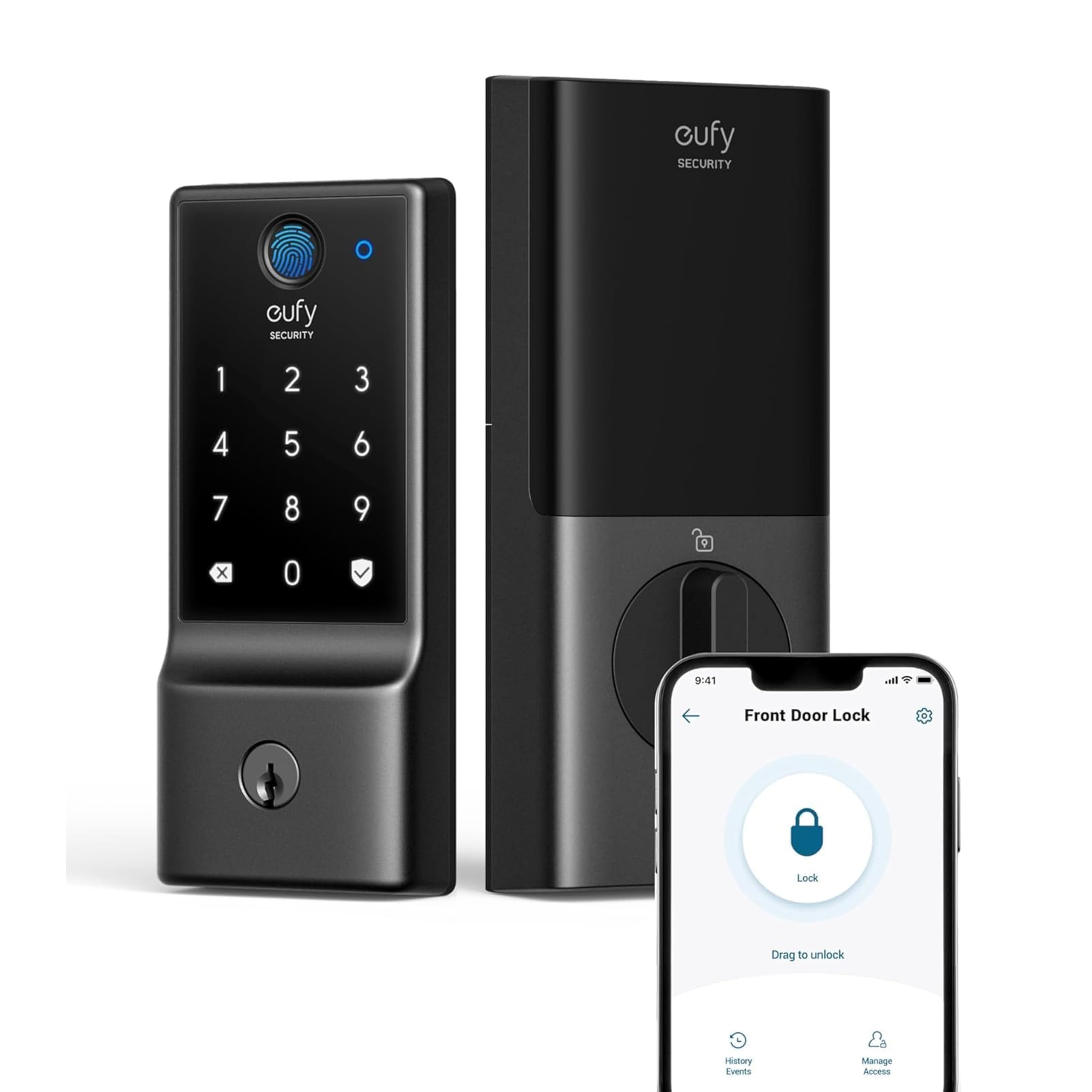
eufy C220

86 /100
LBD Score Excellent

Key details

Battery Life
8 AA, up to 8 months
Remote Access
Built-in WiFi
Access Methods
Fingerprint, code, app, key
Security Rating
BHMA Grade 3
View on Amazon

Built-in WiFi is what sets the eufy C220 apart. There's no gateway to plug in or bridge to lose, and the lock connects directly to your network for app control. The fingerprint reader uses a self-learning sensor that eufy claims gets more accurate with use, and you also get a keypad, a physical key, and auto-lock.

Installation is straightforward, and the lock runs on eight AA batteries. Eufy rates them for about eight months, and the lock includes a physical key plus a keypad for backup. The app can also send alerts and lock or unlock remotely, which is the point of built-in WiFi.

Where the C220 loses ground is battery life. Eight months is the claim, but heavy WiFi and fingerprint use can drain cells much faster, and a rental can't afford a dead lock at check-in. We still see it as a good fit for a host who already uses eufy devices and wants no extra gateway, as long as you treat battery checks as part of turnover.

Pros

  • Built-in WiFi with no gateway
  • Fingerprint, keypad, app, and key access
  • Eight AA batteries rated around eight months
  • Integrates with eufy ecosystem

Cons

  • WiFi connection can be inconsistent
  • Fingerprint reader can be fussy
Our verdict

We like the eufy C220 for eufy households that want built-in WiFi, provided you stay ahead of battery changes.

Check Latest Price
6

Interior Guest Rooms

Yamiry YR04

88 /100
LBD Score Excellent

Key details

Auto-lock
5–99 seconds
Backup Keys
2 included
Guest Codes
20 codes, one-time code
Access Methods
Keypad code, key
View on Amazon

Not every Airbnb door needs a WiFi deadbolt. A guest-room door needs a code, a key backup, and an easy way to let someone in without passing around a key, and the Yamiry YR04 does that job without a full smart-lock installation. It's a keypad knob with 20 codes, a one-time guest code, auto-lock adjustable from 5 to 99 seconds, and two physical keys. For an interior room, that's a practical, low-cost upgrade.

Installation is a screwdriver job that Yamiry rates at less than 15 minutes. The keypad is backlit, the lock is made of aluminum alloy, and auto-lock can be disabled when you want the door to stay open during cleaning. The knob format is the important boundary: it replaces a standard knob, not a deadbolt, so it's best for bedrooms, offices, or interior guest suites.

What we like most is the simplicity: no account, no gateway, and no monthly battery anxiety from WiFi radios. The keypad is responsive, the backlit buttons are easy to see at night, and the two backup keys mean you're not stuck if the electronics act up. If you just want a guest room to stop using a hide-a-key, it's an easy call.

Pros

  • Simple keypad entry for interior doors
  • 20 codes including a one-time guest code
  • Auto-lock adjustable from 5 to 99 seconds
  • Backlit keypad and two backup keys

Cons

  • No app or remote code management
  • No entry history
Our verdict

The Yamiry YR04 is our interior guest-room pick: simple code entry and a key backup, but not a replacement for an exterior deadbolt.

Check Latest Price

How We Tested Smart Locks for Rentals

We started by gathering every keypad and fingerprint lock a host could reasonably install without a professional. The filters were practical: a physical key override had to exist, the lock had to fit a standard wooden door, and it had to run on batteries rather than door wiring. That narrowed the field to 11 units, from plain keypad deadbolts to app-connected fingerprint handles, and we bought every one at retail.

Installation came first, timed solo with a screwdriver and nobody holding the flashlight. I noted whether the existing deadbolt holes lined up or whether I was drilling fresh ones, and how long it took before I could lock the door behind me. Then we programmed the locks — adding codes, deleting them, re-adding, enrolling and removing fingerprints — and finally handed a fresh code to someone who'd never touched the lock, watching from the porch to see whether they got in without texting me.

The rest was ordinary life. I stood in the rain with wet fingers to see whether the reader recognized me on the first press, and checked whether auto-lock fired while the door was still standing open. We watched the keypads at night to see if they were readable without a porch light, logged battery percentages month by month, and ran code changes from 40 miles away — the real host scenario — noting which locks needed an extra gateway or hub to manage that remotely. The hardware itself got a look too: how solid the bolt felt when it threw, and how quickly each finish collected fingerprints and scratches.

How to Choose a Smart Lock for an Airbnb

Start With the Door, Not the Feature List

An exterior entry needs a deadbolt; an interior guest room can use a keypad knob. That distinction matters more than fingerprint readers or Matter support, because a knob-style lock isn't a substitute for a deadbolt on the front door. Measure the door thickness and check the existing bore before ordering. The LOCKSTAR, for example, fits 1.5–1.9-inch wooden doors, while the Yamiry YR04 is a knob for interior rooms.

Decide How You'll Manage Access

Remote management is the difference between a smart lock and a keypad lock. Built-in WiFi, as on the eufy C220, connects directly to your network; the LOCKSTAR includes a WiFi gateway in the box; Bluetooth-only locks like the Sifely S need a separate gateway for remote changes. If you live nearby and can program codes at the door, a keypad-only lock such as the TEEHO is simpler and cheaper. If you manage turnovers from another state, put remote access at the top of your list.

Plan for Power and Backup Access

Every smart lock here runs on AA batteries and includes a mechanical key, but the intervals vary. The TEEHO is rated for up to a year on four AA batteries; the eufy C220 uses eight AA batteries and is rated for about eight months, though heavy use can shorten that. Set a monthly battery check, keep spares in the host's closet, and make sure the key override stays accessible. A lock that dies at check-in is worse than a key under the mat, even if it has more features.

Prioritize Reliability Over Extra Unlock Methods

Fingerprint, fobs, cards, and voice control are nice when they work, but the core job is locking and unlocking every time. Test auto-lock for a week before you rely on it, and check that the fingerprint reader works for the people who will actually use it. We put more weight on locks that keep working than on longer feature lists; a dropped WiFi connection or a battery that drains in weeks defeats the point of remote management. Keep the keypad and key as the fallback.

Frequently Asked Questions

Final Verdict

For most Airbnb hosts, the LOCKSTAR is the lock we recommend. The included WiFi gateway, timed guest codes, entry history, and six access methods cover the real work of a short-term rental, and installation is a screwdriver job with the tools in the box. It costs more than a keypad-only deadbolt, but it saves the separate gateway purchase and the drive to reprogram codes.

If you live near the property and just need simple codes, the TEEHO is the budget choice. If you want built-in WiFi and already use eufy devices, the C220 is capable, provided you stay ahead of battery changes. The Yamiry YR04 is the one for an interior guest-room door, not the front entry.