Best Satellite Messengers of 2026

A satellite messenger is the rare piece of gear you buy hoping it never has to work. The rest of the time, it's a compact way to send a quick 'made it to camp' text from a canyon with no bars, share your location with someone who worries, and keep basic navigation on hand. Every model here needs a subscription to send messages, share tracking, or trigger an SOS response—that's the category's least fun truth—so the real differences come down to how it feels in your hand and how fast it gets a message out when you're cold and impatient.

Over the past nine months, we've tested 12 satellite messengers on weekend hikes, a five-day backpacking trip, car camping in national forests, and long drives through dead zones. We paid close attention to screen visibility in direct sun, glove-friendly controls, battery drain, and whether the thing is small enough to forget in a chest pocket until you need it. The picks below are the ones we kept reaching for—and the ones we'd trust when the bars disappear.

1

Best Overall

Garmin inReach Mini 2

92 /100
LBD Score Outstanding

Key details

Dimensions
2.04 x 1.03 x 3.9 inches
Screen Size
1.27 inches
Battery Life
336 hours
On-Device Navigation
TracBack routing
View on Amazon

A satellite messenger earns its place in a pack on the day your phone is dead, cracked, or buried at the bottom of it, and the inReach Mini 2 is built for exactly that day. A 1.27-inch monochrome screen and a few buttons are enough to send a text, fire a preset, or hold SOS, with no phone in sight. At 2.04 by 1.03 by 3.9 inches it disappears on a shoulder strap or in a chest pocket, which is why it goes out with us instead of staying in the car.

Two features earn their keep beyond the SOS button. TracBack draws a route back to your start point, which is worth more than a topo map when fog drops and every ridge looks alike. The digital compass holds a heading even while you're standing still, so the map stops spinning while you work out which way to turn. MapShare is the third: it posts your position to a page the people at home can refresh, so nobody is sitting by a phone waiting for proof you made camp.

What it isn't is a navigator you'd pick on purpose — the screen is for messages and waypoints, not route planning, and on-device replies are slow work compared with typing on the handset. If reading a map on the device itself matters to you, the Mini 3 Plus is the version that does it, at a price. Everyone else gets the better balance here: small enough to forget, capable enough to send a real message from a place your phone will never see.

Pros

  • Two-way messaging and SOS without a phone
  • Interactive SOS to a 24/7 response center
  • TracBack routing back to your start
  • Location sharing through MapShare

Cons

  • Battery drains faster than the 336-hour rating with tracking
  • Small screen makes on-device replies slow
Our verdict

We recommend the Mini 2 to almost anyone heading off-grid: it sends texts and summons help on its own, in a body that disappears on a shoulder strap.
Check Latest Price
2

Best for Photo and Voice Messaging

Garmin inReach Mini 3 Plus

90 /100
LBD Score Outstanding

Key details

Weight
4.31 oz
Screen Size
1.9-inch color touchscreen
Battery Life
Up to 350 hours
Water Rating
IP67
View on Amazon

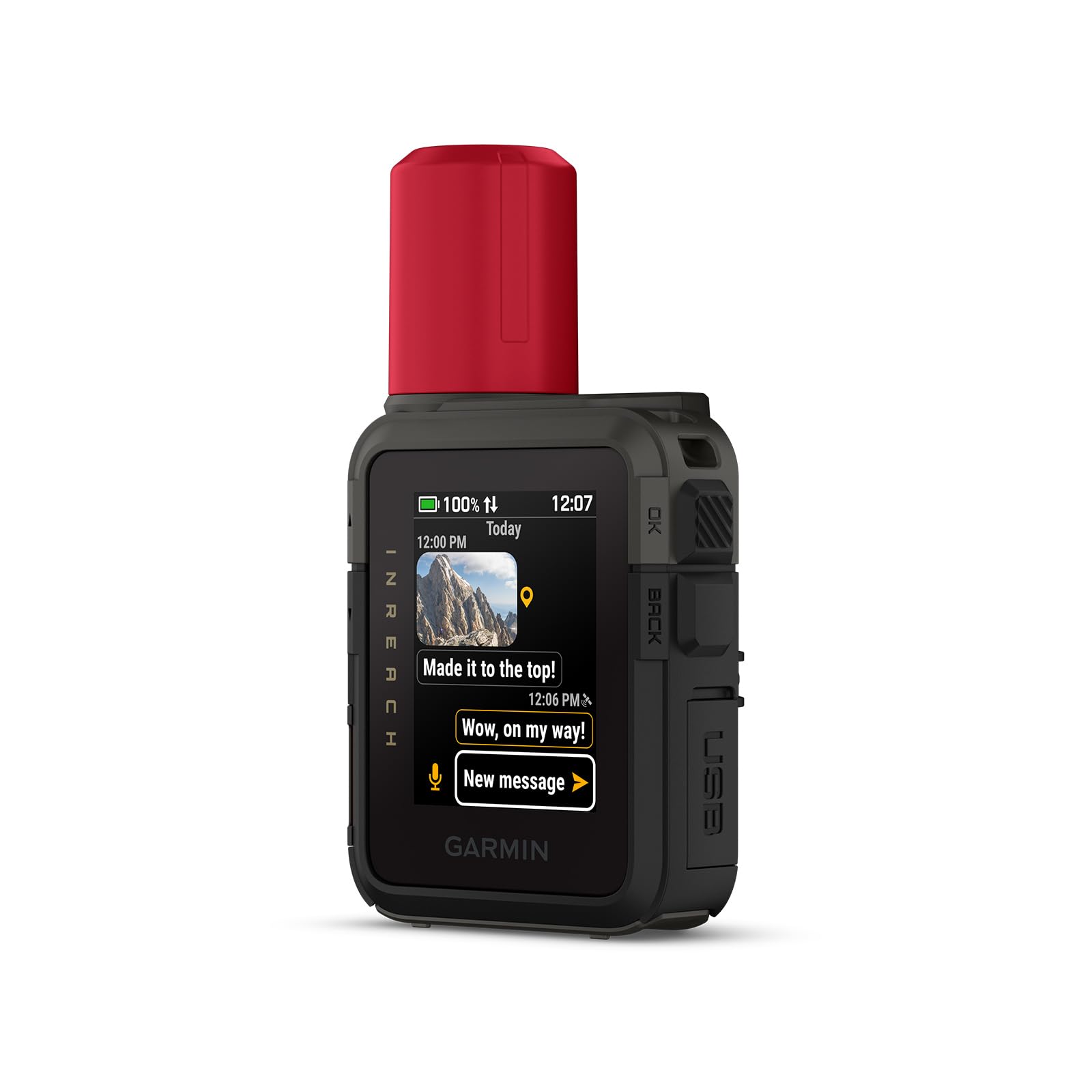
The Mini 3 Plus is the inReach for people who want the device itself to be the interface. The 1.9-inch color touchscreen is the change you notice first: messages are readable at arm's length, the layout makes sense without a manual, and a check-in is a couple of taps instead of a directional pad. It's a capacitive screen, so it wants bare fingers — in winter that is one more reason the paired phone ends up doing the typing.

What makes it worth the step up is the messaging. Photos and voice clips are composed on your phone and pushed out through the device, so the people at home get a picture of the route instead of a coordinate. Garmin rates the battery at up to 350 hours with 10-minute tracking, and the IP67 body means rain and splashes aren't a reason to zip it away. We were struck by how much of the Mini 2's job it covers while feeling like a different class of tool in the hand.

The honest limit is the phone. Photo and voice messaging don't exist without a paired handset, so if the phone is the casualty you're back to texting on a compact screen — which works, just more slowly. That's a fair trade on a week-long trip with someone watching the map at home, and more device than a day hiker needs. The Mini 3 Plus is for the trip where you want to send more than a check-in and can afford the room in your pack and your budget.

Pros

  • 1.9-inch color touchscreen is easy to read
  • Photo, voice, and text messaging over satellite
  • Up to 350 hours of battery with 10-minute tracking
  • IP67 body handles weather and impacts

Cons

  • Photo and voice messaging require a paired phone
  • The most expensive pick in this guide
Our verdict

Buy the Mini 3 Plus if you want the messenger itself to be readable and capable, and you're willing to pay the most here for a screen you can use without squinting.

Check Latest Price
3

Budget SOS

Spot Gen 4

84 /100
LBD Score Excellent

Key details

SOS
One-button alert
Weight
5.01 oz
Tracking
Motion activated
Satellite Network
Globalstar
View on Amazon

The Spot Gen 4 costs a fraction of what the inReach devices do, and it earns that price by doing half the job: it sends. Check-ins, a tracking breadcrumb, and an SOS all go out over the Globalstar network, and nothing comes back — no reply from the person you messaged, no weather, no conversation with a coordinator.

The interface is a handful of buttons and a row of lights, and that is the point. A device that lives in a pack pocket for a season and gets used twice benefits from having nothing to learn: press OK to check in, hold SOS when it matters. We like the tracking behavior in particular, because it can send updates while you're moving and when you stop, so the map at home shows where you paused for lunch rather than a straight line between two dots.

The thing to understand before you buy is the silence. If you need to tell a rescue coordinator which side of the ridge you're on, or hear back that help is on the way, this device can't do it and the inReach picks can. The other half of that silence is confirmation: you press a button, a light blinks, and you wait without learning much. For a hunter or a day hiker who wants a breadcrumb and a panic button, that is enough. For anyone whose plan involves explaining a situation to another human being, it isn't.

Pros

  • Cheapest route to a satellite SOS
  • Button operation with nothing to learn
  • Motion-activated tracking updates

Cons

  • One-way messaging, so no replies come back
  • Little feedback on whether a message went out
Our verdict

Buy the Gen 4 if you want a panic button and a breadcrumb trail and can live without a reply; it is the least expensive way into satellite SOS here.

Check Latest Price

How We Tested Satellite Messengers

We started by pulling together every satellite messenger we could find that advertised two-way messaging, an SOS button, and some form of navigation or location sharing. We filtered out anything that required a phone to send a message and any subscription structure that nickel-and-dimed you for basic check-ins. That left us with 12 units, which we tested over nine months.

Testing happened where these devices live: weekend hikes above treeline, a five-day backpacking trip, car camping in national forests, and rural drives. For each unit, we paired it with a phone, sent scheduled check-ins to a partner, and logged how long it took to acquire a satellite signal from a cold start in open sky versus under tree cover. We composed preset and typed messages with winter gloves on, counted the taps, and noted whether replies arrived. We followed a marked route on each device's navigation screen and checked whether the breadcrumb trail matched our actual path. We also ran the battery down with tracking intervals set to 10 minutes, then repeated with tracking off to see how many days each device lasted.

We carried each device on a chest strap or in a hip pocket for at least a week to judge compactness and whether an incoming alert was noticeable without pulling it out. Screen readability got checked at noon in direct sun and again at dusk. We dropped them from waist height onto rock, stuffed them into wet pack pockets, and used each maker's test mode to confirm the SOS sequence without triggering a real emergency. Every failed send was logged; reliability meant a message went out on the first try, not the third. Finally, we compared what each subscription unlocked against the features we used most to judge whether the plan matched how we used the device.

How to Choose a Satellite Messenger

Decide How Much Your Phone Can Carry

Every messenger here talks to the sky, but they don't all work the same way when the handset is gone. The inReach Mini 2 can compose and send a message on its own, and the Mini 3 Plus adds a screen you can actually read; the Spot Gen 4 needs no phone at all but can only send. If your trips are phone-centric and the device is a backup clipped to a strap, that is a reasonable setup.

The trap is assuming the phone will be there. It's the most likely thing in your pack to die, crack, or get soaked, and the day it does is the day the messenger has to stand alone. Settle this question before screen size or plan tiers.

Check the Network and the Sky Above You

Satellite messengers need a clear view of the satellite, and the network decides where that view has to be. Garmin's inReach devices advertise global two-way coverage, and the Mini 3 Plus names the Iridium network; the Spot Gen 4 runs on Globalstar. Neither one likes a narrow canyon, heavy canopy, or the inside of a tent.

The habit that saves messages is to send from an open spot and give it time before deciding it failed. Walk to a ridge or a clearing for your evening check-in rather than sending from under the trees and hoping.

Price the Subscription Before the Hardware

The purchase is the down payment. Every device here needs an active satellite subscription before it will send anything, and plans differ in how many messages are included, whether preset check-ins count against the allowance, and what it costs to keep the device alive between trips.

A cheaper device on an expensive plan can cost more over three seasons than a better one on a cheap plan. Work out the plan you'd really buy — how many months a year, how many messages — and compare that number next to the hardware.

Weigh the Screen Against the Strap

This is the trade that decides most purchases. A 1.27-inch monochrome screen like the Mini 2's is enough to read a message and send a preset, and it is a big part of why the device is small enough to forget. A 1.9-inch color touchscreen like the Mini 3 Plus's is genuinely easier to use in the field, but touchscreens want bare fingers, which is a poor match for a cold morning, and the larger body costs ounces and dollars.

If you plan to write anything longer than a check-in, you'll be doing it on your phone either way.

Know What the SOS Button Starts

Pressing SOS doesn't launch a rescue directly; it opens a conversation with a monitoring center — Garmin Response for the inReach devices — that confirms your position, tries to reach your emergency contacts, and coordinates with local authorities. Two things follow. You need to be able to stay with the device and keep it under an open sky after you press it, and the registration and contacts on file need to be current.

Register the device the day it arrives and reread the contacts at the start of every season.

Frequently Asked Questions

Final Verdict

The inReach Mini 2 is the one we recommend. It sends two-way messages and summons help without leaning on your phone, it is small enough that you stop noticing it on a strap, and it leaves the most room in the budget for the subscription you'll actually use.

For a week in the backcountry with family watching the map, the Mini 3 Plus and its color screen are worth the step up. If a panic button and a breadcrumb are all you need, the Spot Gen 4 covers that and asks nothing else of you.