Best Raspberry Pi 4 Power Supplies of 2026

The Raspberry Pi 4 is fussy about power in a way that's easy to miss until it bites. Feed it a supply that sags under load and you get the lightning bolt on screen, a CPU that quietly throttles itself, and eventually a corrupted SD card from a write that got cut off. A supply that holds its voltage keeps the board stable; an inline switch means shutdown is a button press instead of yanking the cable.

I've had a Pi running at home for years, and the failures always traced back to the brick, not the board. Over the past five months we've run 14 USB-C supplies through the same three jobs: a desk server, a living-room media center, and a 3D printer controller in the garage. The wattage on the label tells you less than you'd think — what matters is whether voltage holds when the CPU is pinned and the USB ports are loaded, and whether the switch feels like it'll survive a thousand flips. The picks below are the ones that kept their composure.

1

Best Overall

CanaKit 3.5A USB-C

96 /100
LBD Score Outstanding

Key details

Cable
5 ft, 18 AWG
Output
5V 3.5A, 18W
Safety
UL Listed
Compatibility
Raspberry Pi 4
View on Amazon

The CanaKit 3.5A supply is the one we reach for first when a Pi 4 is going into a general-purpose build. The 3.5A, 18W output gives the board more headroom than the official 3A supply, and the noise filter is a sensible extra for a tiny computer that shares a desk with radios, DACs, or sensors. Add the UL listing and 18 AWG cable, and it covers the boring, important parts without asking for much space.

The five-foot cable is the right length for a desk or shelf, and 18 AWG conductors are what we want to see on a Pi 4 supply because thin cables are where voltage drop sneaks in. The fixed cable means one less connection to worry about, though it also means you cannot swap in a longer cord if your layout changes.

Long-term endurance is the reservation we carry. The supply has a mixed record after months of continuous use, and some units stop holding up under accessory load. That does not change our recommendation for a typical Pi 4, but if yours runs around the clock, keep a spare or buy from a seller with easy returns.

Pros

  • 3.5A output gives accessory headroom
  • Noise filter steadies the power feed
  • UL listed with 18 AWG cable
  • Five-foot cable reaches desk setups

Cons

  • No inline power switch
Our verdict

The CanaKit is our default Pi 4 supply: 3.5A of headroom, noise filtering, UL listing, and a five-foot 18 AWG cable, with the missing inline switch as the only daily trade-off.

Check Latest Price
2

Best for Stock Setups

Raspberry Pi 15W USB-C

95 /100
LBD Score Outstanding

Key details

Cable
1.5 m, 18 AWG
Output
5.1V 3A, 15W
Warranty
12 months
Connector
USB-C
View on Amazon

The official Raspberry Pi 15W supply is the baseline against which the others make sense. It outputs 5.1V at 3A over USB-C, uses an 18 AWG cable, and comes from the same company that designs the board. There is no accessory adapter in the box, but the spec is matched to a stock Pi 4 rather than stretched to cover every possible load.

For a stock Pi 4, we recommend it without much hand-wringing. The 5.1V output is the voltage the board expects, and the 18 AWG cable is the right partner; together they make the official supply the least fussy option for a desktop, media player, or small server that is not dragging a stack of drives behind it. The 12-month warranty is a small extra reassurance.

Where it loses ground is headroom. The 3A rating is fine for the board alone, but the 3.5A and 4A supplies here give you more room for USB accessories. We still keep the official supply on hand because it is the one we trust to behave like the Pi 4's own power brick, and the 5.1V output gives it a little margin over a plain 5V adapter.

Pros

  • 5.1V output matches Pi 4 spec
  • 18 AWG cable from the board maker
  • 12-month warranty

Cons

  • No inline power switch
  • Less accessory headroom than 3.5A picks
Our verdict

For a stock Pi 4 and the least second-guessing, the official supply is the one we trust to deliver the voltage the board was designed around.

Check Latest Price
3

Best for Benches

Argon 18W USB-C

90 /100
LBD Score Outstanding

Key details

Input
100-240V AC
Output
5.25V 3.5A, 18W
Safety
UL Listed
Switch
Inline on/off
View on Amazon

The Argon 18W supply is the pick that answers the CanaKit's biggest everyday annoyance: it puts an inline rocker switch on the cable and raises the output to 5.25V at 3.5A. You get USB-C, UL listing, and a fixed cable, with the switch sitting where you can reach it without crawling behind the Pi.

The extra voltage is the detail we pay attention to. A 5.25V supply gives the Pi a little more margin at the connector, which is useful when a drive or HAT is pulling current and the cable is doing its best to steal a few tenths of a volt. The 3.5A rating is the same class as the CanaKit, so this is not a huge leap in headroom, but it is enough to cover a typical accessory load.

The switch is what makes the Argon worth choosing for a bench, kiosk, or classroom Pi. We can cut power without unplugging the cable, and that is a small convenience that turns into a real one when you are swapping SD cards or resetting a headless setup. For a bench, kiosk, or classroom Pi, the switch and voltage margin make it the one we plug in first.

Pros

  • Inline switch is easy to reach
  • 5.25V and 3.5A give accessory margin
  • UL listed
  • Accepts 100-240V AC input

Cons

  • Pricier than the budget picks
Our verdict

We choose the Argon when a Pi 4 needs to be power-cycled often: 3.5A, 5.25V, UL listing, and an inline switch make it the best bench supply in this group.

Check Latest Price
4

Most Current With a Switch

iUniker 20W USB-C

90 /100
LBD Score Outstanding

Key details

Cable
5 ft
Output
4A, 20W
Safety
UL Listed
Switch
Inline on/off
View on Amazon

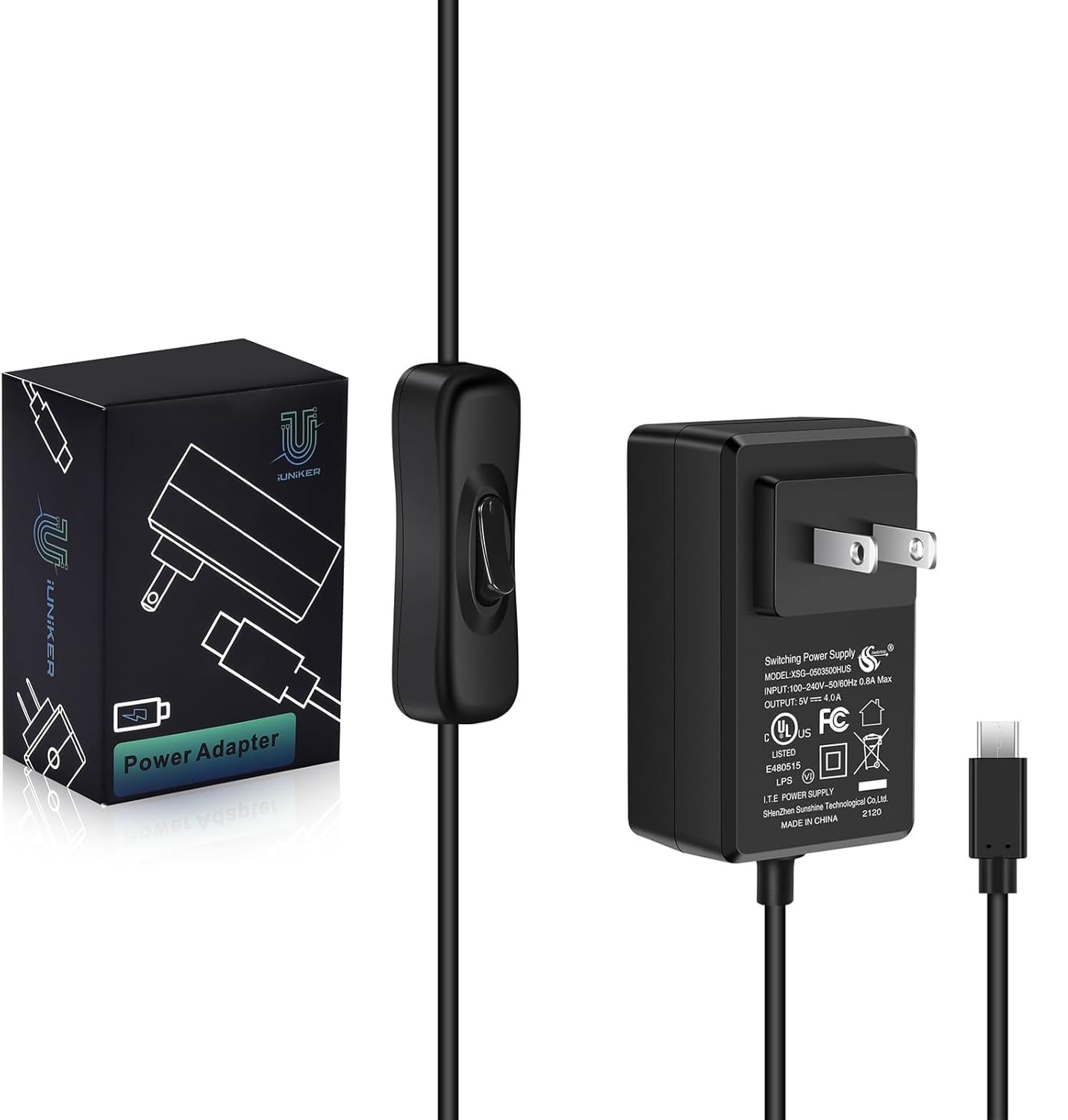
The iUniker adapter leads with the highest current rating in this group: 4A at 20W, plus an inline on/off switch. It is a USB-C supply aimed at the Pi 4 and Orange Pi 5/5B, with a five-foot cable and UL listing, so the headline is not just a big number on a no-name brick.

We recommend it for a Pi 4 that is doing more than idling. The 4A ceiling gives you room for a display, an SSD, or a few USB accessories without the supply being the first thing you blame when the board misbehaves. The switch is the other practical win: it sits inline, so you can power-cycle the Pi without reaching for the outlet. We also like that the cable is long enough to reach a power strip on the floor.

The five-foot cable gives you room to place the Pi away from the outlet, and the UL listing covers the safety basics. For a Pi 4 with a display or a couple of drives, the iUniker makes a strong case on paper and in the hand. It is the supply we reach for when the Pi's accessory load is the unknown.

Pros

  • 4A and 20W are the highest here
  • Inline on/off switch
  • Five-foot cable
  • UL listed

Cons

  • Low-voltage warnings still occur in some setups
Our verdict

The iUniker is the one we point to when a Pi 4 needs the most current and an inline switch in one adapter.

Check Latest Price
5

Best Budget With a Switch

Smraza 5.1V 3A

90 /100
LBD Score Outstanding

Key details

Cable
5 ft
Output
5.1V 3A, 15.3W
Safety
ETL Listed
Switch
Inline on/off
View on Amazon

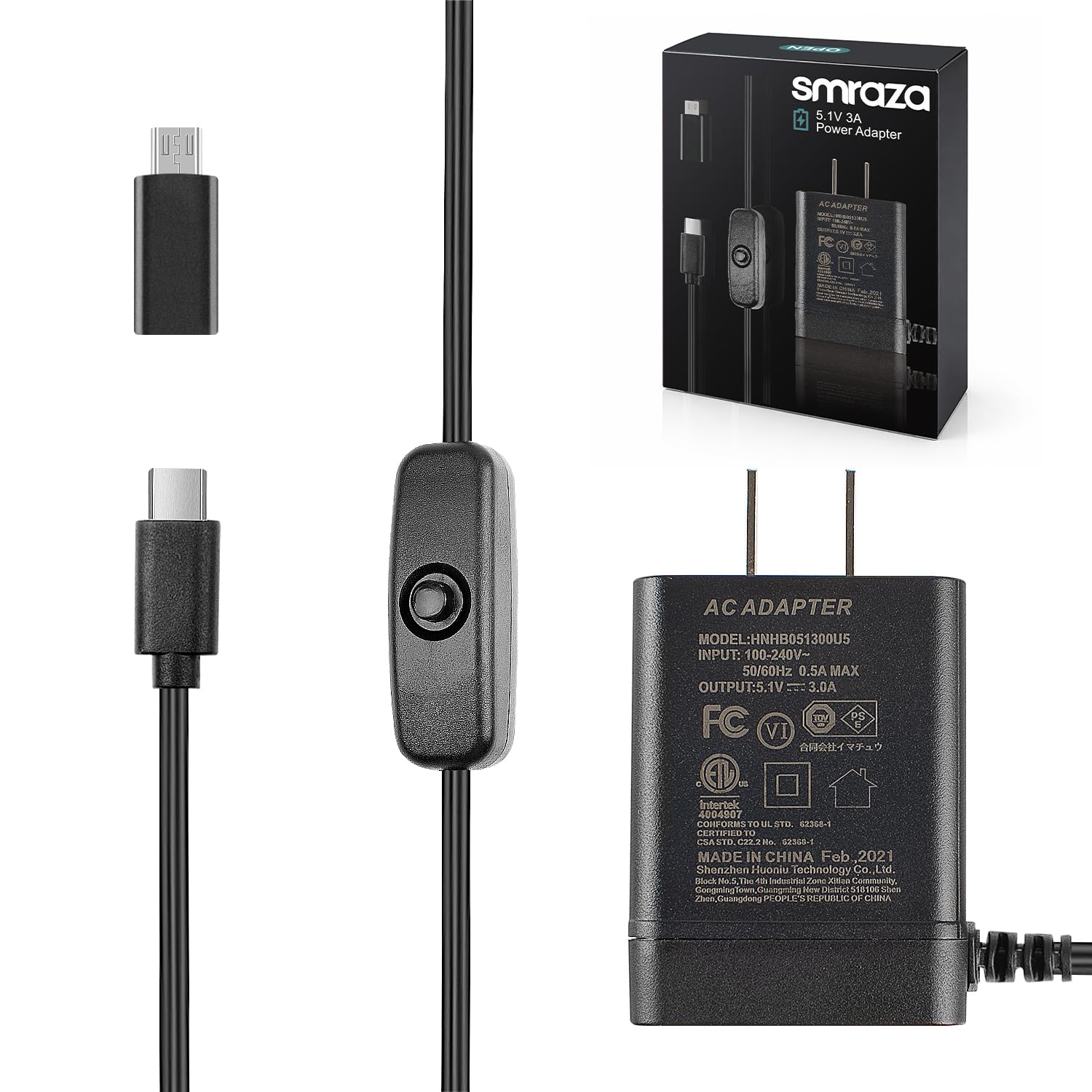
The Smraza supply is the budget-minded pick that covers both sides of a Pi upgrade: USB-C for the Pi 4 and a micro-USB adapter for an older Pi 3. The box includes the adapter, so you can move the same supply between a current board and an older one without buying a second brick.

The output is 5.1V at 3A, which is the standard Pi 4 spec, and the supply is ETL listed. The five-foot cable gives you a little placement freedom, and the inline switch is right where you want it when the Pi is under a desk or inside a case.

We like the switch more than we expected to. On a headless Pi, it is not essential, but when you are swapping SD cards or resetting a test setup, not having to unplug the USB-C connector is a small daily win. The micro-USB adapter is the other detail that makes this one easy to keep in a drawer.

Where it earns its place is as a second supply or a first supply for a mixed Pi 3/Pi 4 household. The switch, the adapter, and the ETL listing are the practical parts, and the supply is simple enough to hand to someone who just wants the Pi to turn on. We keep one in the drawer for exactly that reason.

Pros

  • Inline power switch
  • Includes micro-USB adapter for Pi 3
  • ETL listed
  • Five-foot cable

Cons

  • Only 3A output limits accessory headroom
Our verdict

For a budget Pi 4, or a household that still runs a Pi 3, the Smraza pairs a switch, ETL listing, and micro-USB adapter in one low-cost supply.

Check Latest Price
6

Light-Load Builds

GeeekPi 18W USB-C

90 /100
LBD Score Outstanding

Key details

Output
5V 3.6A, 18W
Safety
UL, TUV, RoHS
Switch
Inline on/off
Includes
Micro-USB adapter
View on Amazon

The GeeekPi 18W supply looks like the obvious value pick on paper: 5V at 3.6A, an inline on/off switch, a micro-USB adapter, and a certification list that includes UL, TUV, and RoHS. We do not rank it higher because the power output is the least consistent part of the package.

The 3.6A rating sits between the standard 3A supplies and the 4A iUniker, and the switch is the same kind of convenience you get on the Argon. The micro-USB adapter also makes it useful if you keep an older Pi 3B+ around. For a light-load Pi 4, those are real advantages, and the price sits in the middle of this group.

Where it falls down is under heavier accessory loads, where low-voltage warnings still show up. That does not make it useless, but it does mean we treat it as a budget alternative for a simple setup rather than the supply we trust for a 24/7 build with drives attached. The switch is nice; the steady rail matters more.

Pros

  • 3.6A and 18W output
  • Inline on/off switch
  • UL, TUV, and RoHS listed
  • Includes micro-USB adapter

Cons

  • Low-voltage warnings under heavier loads
Our verdict

The GeeekPi is worth a look if you need a switch and 3.6A without moving to the premium end of this group.

Check Latest Price
7

Desk and Spares

Miuzei 3A USB-C

86 /100
LBD Score Excellent

Key details

Cable
5 ft
Output
5V 3A
Safety
ETL Listed
Switch
Inline on/off
View on Amazon

The Miuzei supply is a small, simple USB-C brick with one clear trick: an inline on/off switch and a micro-USB adapter in the box. It is aimed at the Pi 4 first, but the adapter lets it serve a Pi 3B+ or 3B without a second purchase.

At 5V/3A, it covers the standard Pi 4 power requirement, and the five-foot cable and ETL listing are the right basics. The switch is the part you notice in daily use: it is easier to reach than the outlet and saves wear on the USB-C connector when you power the board down.

We see it as a spare or a second-setup supply rather than the one we choose for a heavy accessory load. For a Pi 4 on a desk, in a classroom, or in a case that gets opened often, the switch and the micro-USB adapter make it more useful than a plain 3A brick. It is not trying to be the most powerful supply here, and most stock Pi 4 builds do not need it to be.

Pros

  • Inline switch is easy to reach
  • Includes micro-USB adapter
  • ETL listed
  • Five-foot cable

Cons

  • Only 3A output limits accessory headroom
Our verdict

For a desk Pi 4 or a mixed Pi 3/Pi 4 drawer, the Miuzei pairs a handy switch and micro-USB adapter with a safe 3A supply.

Check Latest Price

How We Tested the Best Raspberry Pi 4 Power Supplies

We started with the spec the board actually demands: a real USB-C connector delivering at least 3A at 5V, and documentation we could match to the listing. From there we filtered on the things you only notice after a month of ownership — a UL or ETL safety listing, a cable long enough to reach the back of a TV, a plug slim enough not to crowd the HDMI port beside it, and whether there's a switch at all. Fourteen supplies made the cut and went into service for five months.

Each one rotated through the jobs a Pi 4 actually does around a house: an always-on desk server, a media center behind the living-room TV, and a printer controller in a cold garage. We pinned the CPU with a sustained all-core load while a USB SSD and a wireless dongle drew off the board, then checked the throttling flags and watched for the lightning bolt. We metered voltage under that load, felt the connector and the brick after an hour of it, and noted which ran cool and which got uncomfortably warm.

The switch got its own scrutiny. We flipped each one a few hundred times, confirmed it cut power completely rather than leaving the board in standby, and judged whether it sat where a fingertip could find it in the dark. We tugged at the strain relief, plugged and unplugged every connector 50 times, and mounted each supply on a cased board to see if the plug blocked a neighboring USB port. A couple shipped with a micro-USB adapter for older boards, which we tried to check compatibility. Value came down to whether the extra money bought a switch and a listing you can trust, or just a nicer label.

How to Choose a Raspberry Pi 4 Power Supply

Start with current headroom, then check the cable

The Pi 4's baseline is a 5V supply rated for 3A. That is enough for the board alone, and it is what the official Raspberry Pi unit provides. The 3.5A and 4A supplies in this group are not automatically better for every setup, but they give you margin when you add a display, an SSD, or a HAT. We look at the current rating as headroom, not as a guarantee: a thin cable or a loose connector can undo a generous supply.

Choose a 3A unit for a stock Pi 4 and a 3.5A or 4A unit when you know the Pi will carry accessories. If the Pi already shows a low-voltage warning, do not simply buy the biggest brick; check the cable and connector first, because that is often where the drop happens.

Cable length and gauge matter as much as the brick

USB-C power is not immune to resistance. A long, thin cable drops voltage before the current reaches the Pi, and the board responds with the same low-voltage warning you get from an undersized supply. For a desk or shelf, a five-foot cable is convenient; for a tight enclosure, a shorter cable is easier to manage. We prefer a stated 18 AWG conductor and a molded connector that seats firmly.

When you are shopping, treat a detachable cable as a mixed blessing: it is easier to replace, but it adds another connection that can work loose. A fixed cable is simpler, especially for a Pi that lives in one place.

Decide whether you need an inline switch

An inline switch is a convenience, not a power requirement. It is most useful when the Pi sits under a desk, inside a case, or on a bench where you power it down often. It also saves wear on the USB-C port, because you are not unplugging the connector every time. On a headless Pi that runs continuously, we prefer to spend the budget on current headroom and a certified supply than on a switch.

If you want the switch, the Argon and Smraza are the picks here that combine it with a proper safety listing. If you do not, the CanaKit and official Raspberry Pi supply are simpler and have fewer parts to fail.

Safety certification and voltage margin

Look for a recognized safety mark such as UL, ETL, or TUV, and check that the supply accepts your wall voltage. A regulated 5V output is the minimum; some Pi 4 supplies are listed at 5.1V or 5.25V to give a little margin at the connector. That small step up is not a substitute for a good cable, but it can help a Pi with accessories hold steady.

Higher voltage is not a free upgrade. Stay in the 5V to 5.25V range that the Pi 4 is designed for, and avoid a supply that advertises a fast-charge profile instead of a steady 5V rail. The certification and the voltage spec tell you more about safe, predictable behavior than a decorative amp number.

Match the connector to the board

The Pi 4 uses USB-C; a Pi 3B+ or 3B uses micro-USB. A Pi 4 supply with a micro-USB adapter can serve both, which is why the Smraza, GeeekPi, and Miuzei picks include one. If you only run a Pi 4, skip the adapter and keep the setup simple. If you move between boards, confirm the adapter is in the box rather than assuming the USB-C plug will fit.

Frequently Asked Questions

Final Verdict

Most Pi 4 owners should start with the CanaKit 3.5A supply. It gives you more current headroom than the official 3A unit, adds noise filtering and an 18 AWG cable, and carries a UL listing. The missing inline switch is the one everyday compromise.

If you want that switch without giving up headroom, the Argon 18W is the better buy. If you want the official part and a stock setup, the Raspberry Pi 15W is the simplest match.