Best Raspberry Pi 4 Cases of 2026

The Raspberry Pi 4 is a tiny computer with a real heat problem. Leave one on a desk with no cooling and it throttles itself under load — the clock drops, the video stutters, and you spend the evening blaming your software. A case is the cheapest fix you'll make, as long as it actually moves heat and doesn't bury the ports you need.

I've kept a Pi 4 running as a home file server for two years and have swapped its case more times than I'd admit. Over the past six months, my team and I built, booted, and lived with 12 cases, from fanless aluminum slabs to towers with color-changing ambient light. The surprise was how often the loudest case wasn't the coolest, and how much difference a lid you open constantly makes.

The picks below cover both camps, plus a couple that split the difference. None will turn a Pi 4 into a workstation; they'll just hold it at the speed you paid for.

1

Best Overall

Argon ONE V2

94 /100
LBD Score Outstanding

Key details

Extras
Power button and magnetic GPIO cover
Weight
7.41 oz
Cooling
Aluminum body with built-in fan
Port Layout
All ports moved to the rear panel
View on Amazon

Two full-size HDMI sockets and a power button are the things this case adds that no flat shell can, and they are why it earns the top spot. Argon reroutes every Pi 4 connector to the back edge, so the micro-HDMI adapters and the cable spaghetti that normally sprouts from three sides of the board end up in one tidy row. The button on the front gives you a clean shutdown instead of pulling the USB-C plug out of a running system.

The cooling is a hybrid, which is the right answer for a Pi 4 that does real work. The aluminum body pulls heat off the board and the built-in fan pushes air through it, a combination that holds up better under a long compile or an emulator session than a passive shell alone. The fan curve is programmable, so if it becomes audible during a quiet evening you can dial it back rather than unplugging it.

The magnetic cover over the GPIO header is the detail we reached for most: it lifts off without a screwdriver when you want to poke at pins and drops back on when you're done. There's a path to more later, too — Argon's M.2 expansion board mounts underneath and moves the whole build onto an SSD. If your Pi 4 is a headless box in a cupboard, that's all wasted on you; the Geekworm below does that job silently for a fraction of the money.

Pros

  • Rear-routed ports with two full-size HDMI sockets
  • Power button allows a clean shutdown
  • Aluminum body plus fan handles sustained loads
  • Magnetic GPIO cover lifts off without tools

Cons

  • Premium price against the passive aluminum cases
Our verdict

For a Pi 4 that lives on a desk, this is the case we recommend: rear-facing ports, full-size HDMI and a power button that shuts it down cleanly.

Check Latest Price
2

Best Silent

Geekworm P173

94 /100
LBD Score Outstanding

Key details

Weight
6.14 oz
Cooling
Fanless aluminum heatsink body
Included
Copper CPU shim and thermal pads
Dimensions
90 x 65 x 33 mm
View on Amazon

There is no fan in the P173, and that is the design: the case is the cooler. It's a 174-gram block of aluminum measuring 90 by 65 by 33 mm, with four pillars that press onto the Pi's chips through the supplied thermal pads, plus a copper shim for the CPU in place of a pad. More metal in contact with the board means more heat leaving it.

That makes it the case we choose for a Pi meant to be forgotten about: a Pi-hole, a Home Assistant hub, a media box that runs all day. Nothing spins, nothing whines, there's no bearing to wear out and no fan to collect dust. The board warms the metal, the metal sheds it into the room, and you never hear about it.

Passive has a ceiling worth knowing about. There's no fan mount, so you can't add airflow later, and a Pi 4 held at full load for hours will run warmer here than in one of the actively cooled cases — normal server duty sits well inside that limit. Assembly is a handful of screws, and the SD card and the GPIO ribbon slot stay reachable, which matters more than it sounds when you're reflashing cards every week.

Pros

  • Fanless aluminum body, silent in use
  • Copper CPU shim and thermal pads included
  • SD card and GPIO cable slot stay accessible

Cons

  • No fan mount, so sustained full-load runs stay warmer
Our verdict

For a Pi 4 that runs unattended in a cupboard, a bedroom or a hallway, buy the aluminum slab that cools without a single moving part.

Check Latest Price
3

Best Budget

iUniker Fan Case

92 /100
LBD Score Outstanding

Key details

Weight
2.47 oz
Cooling
40 mm fan plus four heatsinks
Material
ABS
Top Cover
Removable snap-on, GPIO access
View on Amazon

The box holds more than the price suggests: a 40 mm fan, four aluminum heatsinks, screws, rubber feet, a screwdriver and a snap-on lid that comes off for GPIO access without lifting the board out. The ABS shell weighs 70 grams, and the cutouts for USB-C, micro-HDMI, USB and Ethernet line up cleanly on a Pi 4.

Where you plug the fan in decides how the whole thing feels. On the 5V pin it moves plenty of air and makes itself heard; on 3.3V it fades into the background and still holds a normal desktop or media-center load. Moving that wire from 5V to 3.3V is the single change that makes this case livable in a room where people are trying to think.

For a first build, a classroom set or a Pi that lives on a shelf, this is the case we hand people. It covers cooling and protection with nothing else to buy, it goes together in minutes, and it moves considerably more air than the passive aluminum pick above for the same money.

Pros

  • 40 mm fan and four heatsinks in the kit
  • Fan on 3.3V is close to silent
  • Top snaps off for GPIO access

Cons

  • Snap fittings crowd the GPIO header
Our verdict

One of the least expensive ways to add real active cooling: a 40 mm fan, four heatsinks and a top that lifts off for the GPIO pins.

Check Latest Price
4

Best Looking

ElectroCookie Mini Tower

93 /100
LBD Score Outstanding

Key details

Weight
9.88 oz
Cooling
Large heatsink with 4000 rpm fan
Lighting
Colour-changing RGB, brightness control
Material
Aluminum with acrylic cover
View on Amazon

It reads as a small desktop computer rather than a Pi in a box: matte black aluminum on the body, a clear acrylic cover on top, and a light strip down one side that cycles through colors. There's a brightness control for the lighting, which matters more than it sounds — turned down, it's a glow rather than a lamp lighting the wall behind your monitor.

Cooling gets more room than a flat case allows. A large heatsink sits over the CPU and a fan at the base pushes air up through the tower, so the whole thing works like a chimney with a Pi at the bottom of it. Running an emulator front end for an evening, the board stayed comfortably cool and never reached the point where a Pi 4 starts slowing itself down.

The fan is the part to get right. Its exhale direction matters — fitted the wrong way round, the blades foul the housing and the noise gets noticeably worse, so check the diagram in the manual before you close the case up. Even mounted correctly, it's a fan you hear when the Pi is working hard; the Geekworm is the one to pick if silence matters more than looks.

Which is the honest framing: the Argon ONE V2 above does more for less money — rear-routed ports, full-size HDMI, a power button — and this one earns its place on appearance rather than features. If the Pi sits where you'll actually look at it, that's a fair trade; in a cupboard, it isn't.

Pros

  • Tower shape gives the fan somewhere to work
  • RGB lighting with a brightness control
  • Aluminum body and clear cover look the part
  • Clear instructions and quick assembly

Cons

  • Most expensive case in this set
Our verdict

This is the one for a Pi 4 that sits in plain sight: a miniature tower with an RGB glow, a real heatsink and a fan worth mounting correctly.

Check Latest Price
5

Best Kit

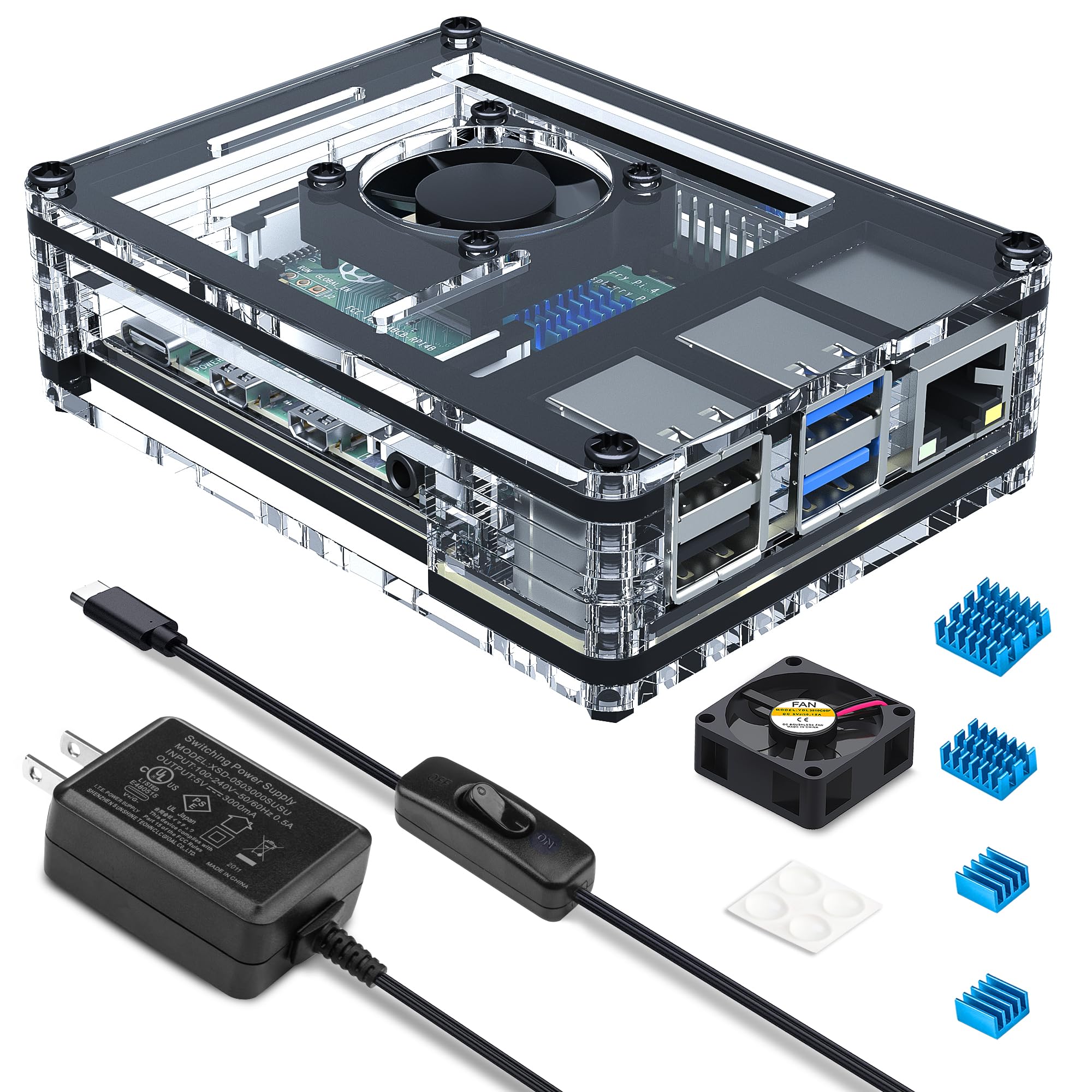
Miuzei Pi 4 Case Kit

87 /100
LBD Score Excellent

Key details

Cooling
30 mm fan plus four heatsinks
Included
5V 3A USB-C supply with switch
Enclosure
Clear acrylic, layered plates
Footprint
3.94 x 5.91 x 2.17 in
View on Amazon

The reason to pick this over the other clear acrylic cases is in the box: a 5V 3A USB-C power supply with an on/off switch, so a bare board becomes a working Pi without a second order. The switch is the quietly useful part — you cut power at the adapter instead of fumbling for the cable — and it's listed as ETL certified, which you don't get on every bundled charger.

Around the board it's the familiar acrylic sandwich: clear plates, a 30 mm fan, four heatsinks and rubber feet, with the board visible through the shell so you can see the activity LED from across the desk. Wire the fan to 3.3V rather than 5V and it disappears into the background while the heatsinks carry most of the cooling.

Pros

  • Includes a switched 5V 3A USB-C supply
  • Fan and four heatsinks in the box
  • Clear shell keeps the board visible

Cons

  • Layered acrylic build takes patience and the instructions are thin
Our verdict

Nothing in the parts drawer? This kit covers the case, the cooling and a switched power supply, so a bare board becomes a working Pi in one order.

Check Latest Price
6

Best for GPIO Work

Argon NEO

91 /100
LBD Score Outstanding

Key details

Lid
Magnetic sliding lid
Cooling
Passive aluminum body, thermal pads
Upgrade
Takes Argon Fan HAT, sold separately
Material
Anodized aluminum
View on Amazon

The lid is the whole idea. It slides off magnetically in about a second, exposing the GPIO header, the camera and display connectors and room for a HAT, then goes back on just as quickly — no screws, no clips, nothing to lose in the carpet.

That makes it the case we keep coming back to for a bench Pi, the one that's a work in progress: a sensor on the header this week, a ribbon cable to a camera the next. It's also the slimmest aluminum option here, and the anodized space grey finish looks like it belongs next to a monitor rather than under a desk.

Cooling is passive and leans on the shell: the aluminum body and the supplied thermal pads draw heat off the board, with no vent openings to help it escape. That's fine for a desktop, a Pi-hole or a light Home Assistant box, and less fine for a Pi pinned at full load for hours. Argon's Fan HAT fits if you decide you want active cooling later, which softens that ceiling considerably.

Pros

  • Magnetic lid opens the header in seconds
  • Slim anodized aluminum body sinks heat
  • Takes the optional Argon Fan HAT

Cons

  • Lid is held by magnets and slides if knocked
Our verdict

If you're constantly clipping a HAT or jumping wires on the header, this case gets out of your way: one magnetic lid, no screws, nothing to lose.

Check Latest Price
7

Retro Game Builds

GeeekPi Game4Pi

89 /100
LBD Score Excellent

Key details

Style
NES-style grey shell
Weight
3.53 oz
Cooling
Built-in 35 mm fan, four heatsinks
Included
Screwdriver and heatsinks
View on Amazon

It's a grey NES-shaped box that turns a Pi 4 into something worth putting under a television. The kit includes the shell, a 35 mm fan, four heatsinks and a screwdriver, and the fan is mounted to pull air sideways across the board rather than straight down onto it.

Fit is what makes or breaks a novelty case, and the cutouts here line up: the USB, Ethernet and micro-HDMI openings sit where the board puts them, and the Pi drops in without forcing anything. The fan moves enough air that the shell stays cool through a gaming session, and the whole thing sits flat and stable on a TV stand.

This is the one we point at when someone is building a RetroPie box for the living room: it cools properly, it costs about what a plain ABS case costs, and it looks like the console it's imitating. One thing to know before you order — the buttons on the front are decoration, and the version with working controllers is a separate listing.

Pros

  • NES-style shell for a RetroPie build
  • 35 mm fan and four heatsinks included
  • Port cutouts line up with the Pi 4

Cons

  • Lid takes a firm push to open and close
Our verdict

For a RetroPie build that should look like the console it's imitating, this is the fun pick: a NES-shaped shell with a fan and heatsinks included.

Check Latest Price

How We Tested Raspberry Pi 4 Cases

We started by pulling every Raspberry Pi 4 case with real review volume, then cut anything that blocked a port, shipped without thermal pads, or cost more than the board inside it. That left 12 cases, tested over six months.

The same 8GB board moved between all of them so the numbers stayed comparable. In each case we ran a sustained all-core load for half an hour, logging core temperature and whether the clock held or stepped down, then repeated the run with the case sitting where it would actually live — a desk, a shelf, a media cabinet behind a TV. We checked that the vents sat over something hot rather than over empty board. Fan noise got its own pass: a meter at arm's length, plus an evening beside it trying to watch something.

Assembly was timed with only the hardware in the box. We noted whether the thermal pads landed on the RAM and the USB controller, whether the fan lead reached the header without stretching, and whether the microSD slot stayed reachable. Every port got a cable — two micro-HDMI, Ethernet, all four USB — and we wrote down which ones needed a shove. Panels were pressed with a thumb to see if they flexed.

Then the lids: a couple dozen open-and-close cycles on each to reach the GPIO pins, watching whether the cover lifted cleanly, seated firmly again, and dragged the fan wire with it. The finishes and lighting got a month in a living room to see how they held up to handling.

How to Choose a Raspberry Pi 4 Case

Active, passive, or both

When a case has a fan, the fan does the work; when it's a metal shell, the shell does. Aluminum bodies like the Geekworm P173 spread heat across the whole case and shed it into the room with no moving parts, which suits a Pi running continuously at light load — a Pi-hole, a dashboard, a small server.

A fan moves far more air and copes with sustained work such as compiling, emulation or a busy media library, but it is also the part that makes noise and eventually wears out. The hybrid, like the Argon ONE V2, pairs a metal body with a fan and is the most forgiving choice if you don't yet know how hard your Pi will work.

Noise is the spec nobody prints

Small fans at full speed are audible, and the same case can feel silent or unbearable depending on which GPIO pin the fan is wired to. Running a 5V fan from the 3.3V rail is the standard fix — less airflow, far less whine — and a few cases let you program a fan curve instead.

Think about where the Pi lives before you choose. On a desk within arm's reach, a passive aluminum case or a quiet acrylic build is easier to live with than a tower with a high-speed fan; in a cupboard, none of it matters.

Put the ports where you need them

A stock Pi 4 has connectors on three sides, which is why a desk build ends up with a fist of cables and two micro-HDMI adapters hanging off the board. A case that reroutes everything to the back panel, like the Argon ONE V2 with its full-size HDMI sockets, removes the adapters entirely and makes the whole thing look like an appliance.

Flat shells leave the ports where the board puts them, which is fine on a shelf and less so where you're plugging in a monitor and keyboard every day.

Will you need the GPIO header?

If the Pi is a finished appliance, a case that covers the header is fine. If you're prototyping — sensors, relays, a ribbon cable to a camera — the case should give you reach without taking the board out.

Removable tops, magnetic lids and reserved cable slots all handle this differently: the Argon NEO's lid lifts off in a second, the iUniker's top snaps off without disturbing the board, and the passive aluminum cases generally leave a slot for a GPIO ribbon rather than the whole header.

Frequently Asked Questions

Final Verdict

The Argon ONE V2 is the case we point most people at, because it fixes the two things a bare Pi 4 is bad at: it pulls the cables to one edge and it lets you shut down cleanly instead of yanking the power. The hybrid cooling then keeps a working board out of trouble, which is more than most cases here manage without a caveat.

If the Pi 4 is a headless box in a cupboard, none of that matters — buy the Geekworm P173 and enjoy never hearing it. That's the fork in the road: a Pi you look at, or a Pi you forget about.