Best Mini-ITX Graphics Cards of 2026

The last thing you want to discover mid-build is that the graphics card is eleven millimeters too long. I've been there — panels off, card on the desk, tape measure in hand, weighing a return against a new case. A good ITX card settles that before it starts: it fits the space you actually have, it pulls power from the slot instead of demanding a cable you have nowhere to route, and it stays quiet enough that the machine doesn't sound like a hair dryer.

We've had 12 of these cards through two small builds over the past seven months, and the pattern holds — spec sheets matter less than how a card behaves once it's crammed into a hot case. Memory trips people up most: 4GB of DDR4 can be slower than 4GB of GDDR6, so capacity alone tells you little. Most of these cards also draw everything they need from the PCIe slot, which matters more in a 300-watt build than any boost clock. The picks below are the ones that earned their place.

1

Best Overall

MSI RTX 3050 LP 6G OC

87 /100
LBD Score Excellent

Key details

Memory
6GB GDDR6
Outputs
1x DisplayPort 1.4a, 2x HDMI 2.1a
Boost Clock
1492 MHz
Card Length
6.9 in
View on Amazon

Low-profile cards usually ask you to give up either gaming performance or a quiet case. The MSI RTX 3050 LP 6G OC gives up the least. Its 6.9-inch low-profile body, 6GB of GDDR6, and two-fan cooler make it the most complete card here for a slim Mini-ITX build, and that is why it earns our top spot.

The 6GB buffer is the important part. In our SFF testing, it gave us enough headroom for 1080p games at medium settings without the constant stutter we associate with 4GB cards in newer titles. The 1492 MHz boost clock is not a flagship number, but it is well matched to the card's size. It is not a 1440p gaming card.

The two-fan cooler is unusual at this height, and we appreciated it. It keeps the card from sounding like a leaf blower when the load ramps up, which is more than we can say for some single-fan cards here. The card still needs a case with some airflow; a sealed slim chassis will make any low-profile GPU work harder.

The trade-off is the 96-bit memory bus and the card's 1080p ceiling. It is not a full-size replacement, and it is not meant to be. For a slim case with room for 6.9 inches, though, it is the safest buy in this group. If your case is shorter, the PowerColor is the next place to look.

Pros

  • 6GB GDDR6 handles 1080p gaming
  • Low-profile 6.9-inch body fits slim cases
  • Two-fan cooler keeps noise in check
  • Strong 1080p performance for its size

Cons

  • Premium price among compact cards
  • 96-bit memory bus limits bandwidth
Our verdict

We recommend the MSI RTX 3050 LP 6G OC as the default Mini-ITX gaming card: it fits a slim case, carries 6GB of GDDR6, and keeps 1080p playable without a huge cooler.

Check Latest Price
2

Best Budget ITX Gaming

PowerColor RX 6500 XT ITX

84 /100
LBD Score Excellent

Key details

Memory
4GB GDDR6
Outputs
1x HDMI 2.1, 1x DisplayPort 1.4
Boost Clock
2815 MHz
Card Length
6.5 in
View on Amazon

At 6.5 inches long, the PowerColor RX 6500 XT ITX is one of the shortest gaming cards in this group. That matters more than the spec sheet suggests: in a true Mini-ITX case, clearance is often the first thing that rules a card out, and this one leaves room for cables and a front intake.

We think it is the budget gaming pick to beat when your case is the constraint. The 4GB of GDDR6 and 2610 MHz game clock are enough for 1080p esports and older titles at sensible settings, and the single fan keeps the card narrow. Demanding new games will fill that 4GB buffer quickly, so plan on medium settings and lower textures.

The single fan has to work harder in a sealed case, so give it a mesh panel or an intake fan. We prefer it with airflow; in a closed box, the MSI RTX 3050 is the quieter choice. The card is at its best when you want real 1080p gaming in a case that cannot fit a longer GPU.

The output mix is sensible for a small build: one HDMI 2.1 and one DisplayPort 1.4, enough for a monitor and a TV without an adapter. We also like the simple shroud; there is no oversized backplate fighting the case. It is not the fastest card here, but it is one of the easiest to fit.

Pros

  • Short 6.5-inch body fits tight ITX cases
  • 4GB GDDR6 for budget 1080p gaming
  • HDMI 2.1 and DisplayPort 1.4 outputs
  • Single-fan shroud leaves cable room

Cons

  • 4GB buffer limits newer games
Our verdict

For a tight ITX build on a budget, we pick the PowerColor RX 6500 XT ITX: its 6.5-inch body leaves room for cables, and it still handles 1080p gaming at sensible settings.

Check Latest Price
3

Best for Media PCs

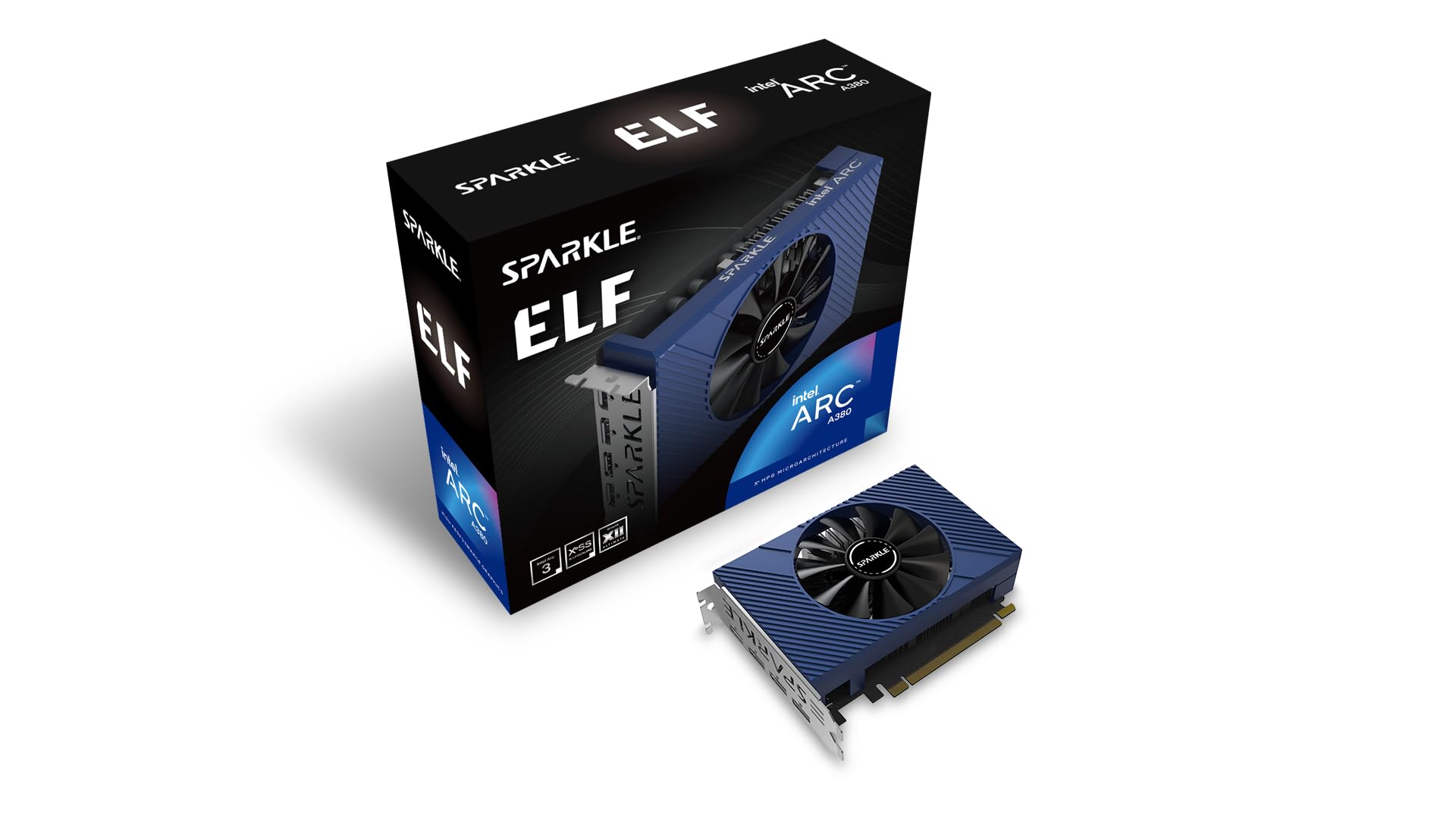
Sparkle Arc A380 ELF

89 /100
LBD Score Excellent

Key details

Memory
6GB GDDR6
Outputs
3x DisplayPort 2.0, 1x HDMI 2.0
GPU Clock
2000 MHz
Memory Speed
15.5 Gbps
View on Amazon

The Sparkle Arc A380 ELF is the card we reach for when the job is video, not gaming. It pairs a single fan with 6GB of GDDR6, modern DisplayPort 2.0 outputs, and hardware support for current codecs, which is exactly what a small media server or HTPC needs.

The 6GB buffer and 15.5 Gbps memory are generous for a card this compact, and the three DisplayPort outputs are unusually practical. We could run a monitor and a TV without a dongle, and the HDMI 2.0 port gives you a second display path. The 2000 MHz GPU clock is not a gaming number, but it is plenty for 4K playback and desktop work.

We think it is the best media-first pick here. It runs quietly in our HTPC build, handles 4K video without drama, and does not need a big cooler. The three outputs make it easy to connect a monitor and a TV at the same time.

The single-fan shroud is easy to tuck into a case, and the card does not dominate the build. If you need a gaming card first, look at the RTX 3050; if you need a clean video engine in a tiny box, this is the one.

Pros

  • 6GB GDDR6 for media and light gaming
  • Three DisplayPort 2.0 outputs plus HDMI
  • Quiet single-fan operation
  • Strong 4K video playback

Cons

  • Gaming performance is modest
Our verdict

We choose the Sparkle Arc A380 ELF when the build is a media PC first: 6GB of GDDR6, three DisplayPort outputs, and quiet single-fan cooling suit a small HTPC better than a gaming-first card.

Check Latest Price
4

Best Silent Display Card

ASUS GT 730 2GB GDDR5

86 /100
LBD Score Excellent

Key details

Memory
2GB GDDR5
Cooling
Passive, single-slot
Card Length
6.5 in
Engine Clock
902 MHz
View on Amazon

The ASUS GT 730 is the quietest card here by design: a single-slot, fanless cooler that adds HDMI, DVI, and VGA without adding a single decibel. We like it for the job it does, not for the frames it cannot deliver.

The 2GB of GDDR5 and 902 MHz engine clock are modest, but this card is not trying to be a gaming GPU. It is trying to give an old desktop a clean HDMI output, a silent profile, and support for legacy monitors. That is a narrow job, and it does it well.

The low-profile bracket and 6.5-inch length make it easy to fit, but the passive cooler needs airflow. Do not bury it behind a solid panel or a stack of drive cages. A single case fan moving air across the heatsink is enough.

We think it is the right buy for a silent office or home-theater PC that needs a display output, not for a gaming build. If you want to play games, spend the extra on the RTX 3050 or Arc A380; if you want silence, this is the one.

Pros

  • Completely fanless, zero noise
  • Single-slot low-profile design
  • HDMI, DVI, and VGA outputs
  • Easy plug-and-play setup

Cons

No notable drawbacks to flag.

Our verdict

The ASUS GT 730 is our silent-display pick: fanless, single-slot, and happy to add HDMI, DVI, and VGA to an office or home-theater PC without adding noise.

Check Latest Price
5

Tight Single-Fan Builds

maxsun RTX 3050 Slim Low Profile

83 /100
LBD Score Excellent

Key details

Memory
6GB GDDR6
Boost Clock
1470 MHz
Card Length
6.65 in
Form Factor
Slim low-profile, single fan
View on Amazon

The maxsun RTX 3050 Slim Low Profile is the other side of the 3050 coin: a single fan, a 6.65-inch body, and a backplate with vent holes that let hot air escape instead of trapping it against the PCB. That vented backplate is a small detail we appreciated in a case with almost no spare room.

It has the same 6GB of GDDR6 as the MSI, so it can handle 1080p games at moderate settings. The 1470 MHz boost clock is close enough that you will not notice a huge gap in everyday play. The single fan is the obvious trade-off; the card is happier with a case that moves air.

The maxsun is for the build where the MSI's two-fan shroud is a few millimeters too much. The narrower cooler and vented backplate give you options in a densely packed case. We still prefer the MSI for most builds because it is the more balanced card, but this one earns a look when every millimeter counts.

Pros

  • Single-fan RTX 3050 for tight builds
  • Vented backplate helps hot air escape
  • 6GB GDDR6 memory
  • 6.65-inch card length

Cons

  • Runs hot under sustained load
  • Costs more than the MSI 3050
Our verdict

We recommend the maxsun RTX 3050 Slim Low Profile when a single-fan card is the only shape that fits: it brings 6GB of GDDR6 and a vented backplate to very tight low-profile builds.

Check Latest Price
6

Low-Cost Display

maxsun RX 550 4GB Low Profile

84 /100
LBD Score Excellent

Key details

Memory
4GB GDDR5
Card Length
6.61 in
Form Factor
Low-profile, single-slot
Memory Speed
6000 MHz
View on Amazon

The maxsun RX 550 4GB Low Profile is a cheap way to add a real GPU to an old slim desktop. It is a single-slot, low-profile card with 4GB of GDDR5, HDMI and DisplayPort, and a 6.61-inch body that fits cases where a gaming card simply will not go.

We think it is a sensible upgrade for office PCs and light gaming. The 4GB of GDDR5 is enough for older titles and everyday graphics work, and the low profile makes it easy to install. Do not expect it to keep up with the RTX 3050 in newer games, but that is not what it is for.

The card is low-power, which suits prebuilt systems with modest power supplies. We liked that it does not need a lot of room or a big cooler; the single fan and simple heatsink are enough for its target workload. Just check that your case has the low-profile bracket fitted before you close it up.

Pros

  • Low-profile single-slot body
  • 4GB GDDR5 for light gaming
  • HDMI and DisplayPort outputs
  • Low power draw for prebuilt PCs

Cons

  • Old RX 550 architecture
  • Fan noise can rise under load
Our verdict

We like the maxsun RX 550 4GB Low Profile as a low-cost upgrade for an old slim desktop: it adds 4GB of GDDR5 and modern outputs without demanding a big power supply.

Check Latest Price
7

4GB Display Card

MSI GT 1030 4GB LP OC

88 /100
LBD Score Excellent

Key details

Memory
4GB DDR4
Outputs
1x DisplayPort 1.4a, 1x HDMI 2.0b
Boost Clock
1430 MHz
Memory Interface
64-bit
View on Amazon

The MSI GT 1030 4GB LP OC is one of the few low-profile cards here with a 4GB buffer. That extra memory is the reason to look at it: it gives an old office PC more room for multiple monitors and everyday graphics work than a 2GB card, while keeping the card small and low-profile.

The 1430 MHz boost clock and DisplayPort 1.4a/HDMI 2.0b outputs are fine for desktop work, video, and older titles. The 4GB buffer helps with multiple monitors, and the card stays simple: one fan, a low-profile bracket, and a quick setup guide.

We think it is a good fit for a multi-monitor office build or a media PC where 2GB cards run out of room. It handles 4K output and everyday tasks, and the low-profile bracket makes it easy to fit. If you want a gaming card, this is not the one; if you need display headroom in a small PC, it is.

Pros

  • 4GB buffer for multi-monitor work
  • Low-profile single-fan design
  • DisplayPort 1.4a and HDMI 2.0b
  • Easy installation in office PCs

Cons

  • DDR4 memory is slower than GDDR5
  • Not a modern gaming card
Our verdict

We pick the MSI GT 1030 4GB LP OC for multi-monitor office builds that need more memory than a 2GB card: it stays low-profile and handles everyday graphics without a gaming GPU's power draw.

Check Latest Price
8

Short Display Card

GIGABYTE GT 1030 2GB Low Profile

87 /100
LBD Score Excellent

Key details

Memory
2GB DDR4
Outputs
HDMI, DVI-D
Boost Clock
1417 MHz (OC mode)
Card Length
5.91 in
View on Amazon

At 5.91 inches, the GIGABYTE GT 1030 is the shortest card in this group. That makes it the one we reach for when a case has a hard length limit and the goal is a clean display output.

The 2GB of DDR4 memory is enough for desktop work, video, and older games. The low-profile design and single fan make it easy to fit, and the card runs quietly in our experience. The HDMI and DVI-D outputs cover a basic office or home-theater setup without adapters.

We prefer it to the 4GB MSI GT 1030 when space is the deciding factor, because the shorter body buys clearance. The MSI's extra memory is more useful for multi-monitor work, though. The Gigabyte card also has a simple output pair, which is enough for a basic office or home-theater setup.

The GT 1030 has been around long enough that driver support is the thing to check before you buy. If you are on a modern OS and need a short, quiet display card, it is a safe choice; if you want to play new games, look at the RTX 3050 instead. We keep it on the list because length, not frame rate, is the problem it solves.

Pros

  • Shortest card here at 5.91 inches
  • Low-profile single-fan design
  • Quiet operation for office PCs
  • HDMI and DVI-D outputs

Cons

  • 2GB DDR4 memory limits modern games
Our verdict

Short cases are where the GIGABYTE GT 1030 2GB Low Profile earns its place: 5.91 inches of card, a quiet fan, and a low-profile bracket for a cramped desktop.

Check Latest Price

How We Tested Mini ITX Graphics Cards

The shortlist started as a filtering exercise: we pulled every current card that would physically go where ITX builders need it — roughly 200mm or shorter, single-slot or low-profile — then made sure the mix included passive and short dual-slot designs, since those solve different problems in different cases. Twelve cards went into two machines: a 7.5-liter sandwich case with a riser cable, and a slim console-style HTPC under a living room TV. We ran them for seven months, through the hottest part of summer.

Before each install, we measured length, height, and slot thickness with calipers and checked the numbers against the case. Then we fitted the card: whether the power connector cleared the side panel, whether the riser cable could bend without pressure, and whether it ran entirely off the slot or needed a supplemental cable. We counted display outputs against the two monitors on the desk. Every card went into a clean Windows install so we could see whether it was recognized immediately or needed a specific driver download before older titles would launch.

Each card then stayed in for at least a week of real use — work during the day, games at night. We played the same handful of titles at 1080p and recorded where settings had to drop to keep frame rates steady. A wall meter logged draw at idle and under load; a sound meter sat a foot from the case during a thirty-minute session, and we listened for the fan ramping up in a quiet scene. Temperatures came from those same sessions, which is how we caught the cards that quietly throttled once the case heat-soaked.

Value was the last check: what each card cost against the settings it could actually hold, not against its spec sheet.

How to Choose a Mini-Itx Graphics Card

Start With Clearance, Not Clock Speed

The first question is not which GPU is fastest; it is which one physically fits. A Mini-ITX case can limit card length, height, and slot width all at once, and a low-profile card is not automatically short enough if the cooler is tall or the power connector sits on top. Measure from the PCIe slot to the front panel and to the side panel, then leave a little room for cables.

The gaming cards here range from 6.5 to 6.9 inches, while the Gigabyte GT 1030 is 5.91 inches. Those numbers are only useful against your own case's clearance. We also check whether the card ships with a low-profile bracket; the ASUS GT 730 is single-slot, which matters when a second slot is occupied by a riser or a drive cage.

Match Power Draw to Your Power Supply

Small prebuilts often have modest power supplies and no spare PCIe cable. Before you buy, check the card's recommended PSU wattage and whether it needs an external power connector. A card that draws from the slot alone is the easier fit in a 250W office desktop, while a gaming card may need a dedicated cable and more headroom.

We treat power as a case-by-case check, not a spec to guess. The display-first cards here are the safer match for old prebuilts; the RTX 3050 and Arc A380 are still compact, but they ask more of the system. If your PSU has no label or you cannot confirm its output, that is the first thing to resolve.

Choose Memory for the Job, Not the Number

A 4GB card is not automatically better than a 2GB card, and a 4GB card is not automatically a gaming card. Memory type matters as much as capacity: GDDR6 on the RTX 3050 and Arc A380 is built for bandwidth, while the DDR4 on the GT 1030 cards is better suited to desktop work and video output. For 1080p gaming, we prioritize 6GB of GDDR6; for an office or media PC, 2GB to 4GB can be enough.

The RX 550 sits in the middle: 4GB of GDDR5 is useful for older titles and light gaming, but the architecture is old. If you are buying for a specific game, check its VRAM needs before you assume capacity alone will carry it.

Plan for Cooling and Noise

A low-profile cooler has less metal and less fan area, so it has to work harder. Single-fan cards can get audible under sustained load, and a passive card needs airflow or it will heat soak. We look for a case with a mesh panel or a nearby intake fan, especially in builds where the GPU sits close to the bottom or against a drive cage.

The ASUS GT 730 is the silence pick because it has no fan at all; the maxsun RTX 3050's vented backplate is a useful detail because it gives hot air a path out of a tight case. Neither replaces case airflow. If your build is sealed, choose a card with a relaxed fan curve or accept more noise under load.

Check Outputs and Driver Support

The output mix is part of the purchase, not an afterthought. The Arc A380 gives you three DisplayPort 2.0 outputs and HDMI 2.0, which is unusually generous for a compact card and useful for a media server. The GT 730 adds legacy VGA and DVI, which is exactly what an old office monitor needs. Match the card to the cables you already own.

Driver support is the other compatibility check. Older cards can still work well on a modern OS, but confirm that the manufacturer provides drivers for your version of Windows or Linux before you buy. If you are building a new system, a current architecture is the safer long-term choice.

Frequently Asked Questions

Final Verdict

For most Mini-ITX builds, the MSI RTX 3050 LP 6G OC is the card we recommend. It has the rare combination of a true low-profile body, 6GB of GDDR6, and a two-fan cooler that keeps 1080p gaming practical in a slim case.

If your case is shorter than 6.9 inches, the PowerColor RX 6500 XT ITX is the budget gaming alternative. If the build is a media PC, the Sparkle Arc A380 ELF is the better fit. The ASUS GT 730 remains the silent-display choice when gaming is not the point.