Best Mini-ITX Motherboards of 2026

A mini-ITX motherboard is a lesson in subtraction. You trade four memory slots for two, a fistful of drive connections for a couple, and every expansion card you might ever want for exactly one slot. What you get back is a full desktop's worth of performance in a box small enough to disappear beside the TV.

The catch is that once the side panel goes on, everything the board skips is permanent, so small details matter more here than on a full-size board. I've built enough of these to know that a second M.2 slot, a front USB-C header, and the ability to flash the BIOS without a supported chip installed separate a keeper from a headache. Over eight months, we assembled 11 mini-ITX systems around current AMD and Intel processors to see which boards got those calls right.

Wireless showed the widest spread — a few boards are a generation ahead on Wi-Fi and wired networking — and that gap, plus how each one behaves on first boot, is baked into the picks below.

1

Best Overall

ASUS ROG Strix B850-I

83 /100
LBD Score Excellent

Key details

Memory
DDR5, 96 GB max
Socket
AM5
Networking
2.5G LAN, Wi-Fi 7
M.2 Storage
2x PCIe 5.0
View on Amazon

Two PCIe 5.0 M.2 slots on a Mini-ITX board is the kind of spec that makes a small build feel less compromised. The ROG Strix B850-I pairs them with a PCIe 5.0 x16 slot, Wi-Fi 7, 2.5G Ethernet, and a 10+2+1 power design rated for 70A per stage. For a current AM5 build around a Ryzen 7000 or 9000 chip, that is the strongest combination in this group.

We think it earns the top spot because it covers the decisions that actually shape a small AM5 system: fast storage, current wireless, and enough power headroom for a high-core CPU. The layout is dense but sensible, with an integrated I/O cover and a heatsink over the primary M.2 slot. It is not the cheapest way into AM5, but it is the one that asks for the fewest compromises.

The second M.2 slot sits on the back of the board, so install that drive before the motherboard goes into the case. We also like the total USB count: 13 ports across the board means fewer hubs in a small build. The 2.5G Ethernet is the connection we trust for everyday use, with Wi-Fi 7 as a strong backup.

Pros

  • Dual PCIe 5.0 M.2 slots
  • Wi-Fi 7 and 2.5G Ethernet
  • Strong 10+2+1 power delivery
  • 13 USB ports in total

Cons

  • Premium price for the feature set
  • Some boards can fail to post
Our verdict

The best default for a current AM5 Mini-ITX build, with dual PCIe 5.0 storage, Wi-Fi 7, and enough power for a high-core Ryzen.

Check Latest Price
2

Best Intel

ASUS ROG Strix B860-I

85 /100
LBD Score Excellent

Key details

Memory
DDR5, 96 GB max
Socket
LGA 1851
Networking
2.5G LAN, Wi-Fi 7
Power Stages
10+1+2+1
View on Amazon

For an Intel Core Ultra Series 2 build, the ROG Strix B860-I is the board we reach for first. It has the LGA 1851 socket, DDR5 support up to 96GB, Wi-Fi 7, 2.5G Ethernet, Thunderbolt 4, and a 10+1+2+1 power stage design. That is a rare combination in Mini-ITX, and it gives a compact Intel system the connectivity of a much larger board.

We like the port selection more than the raw slot count. Thunderbolt 4 and USB-C cover fast external drives and a single-cable dock, while the M.2 storage handles the internal drive. The L-shaped heatpipe and integrated I/O cover are the details that make a dense build look intentional.

The board's rear I/O is where it separates from cheaper Intel options: Thunderbolt 4, USB-C, HDMI, and 2.5G Ethernet cover a small desk without a dock. If you are pairing a Core Ultra 7 or 9 with a fast external SSD, that matters more than a second M.2 slot. Thunderbolt 4 is the feature that makes this board worth the stretch for a compact creative PC.

Pros

  • Thunderbolt 4 and USB-C
  • Wi-Fi 7 and 2.5G Ethernet
  • 10+1+2+1 power stages
  • DDR5 support up to 96 GB

Cons

  • LGA 1851 limits CPU choice to Core Ultra Series 2
  • MediaTek Wi-Fi card is hard to replace
Our verdict

The Intel Mini-ITX board to beat for a Core Ultra build, thanks to Thunderbolt 4, Wi-Fi 7, and a strong power design.

Check Latest Price
3

Best Budget AM5

GIGABYTE A620I AX

80 /100
LBD Score Excellent

Key details

Memory
DDR5, 64 GB max
Socket
AM5
Networking
2.5G LAN, Wi-Fi 6E
M.2 Storage
Single PCIe 4.0
View on Amazon

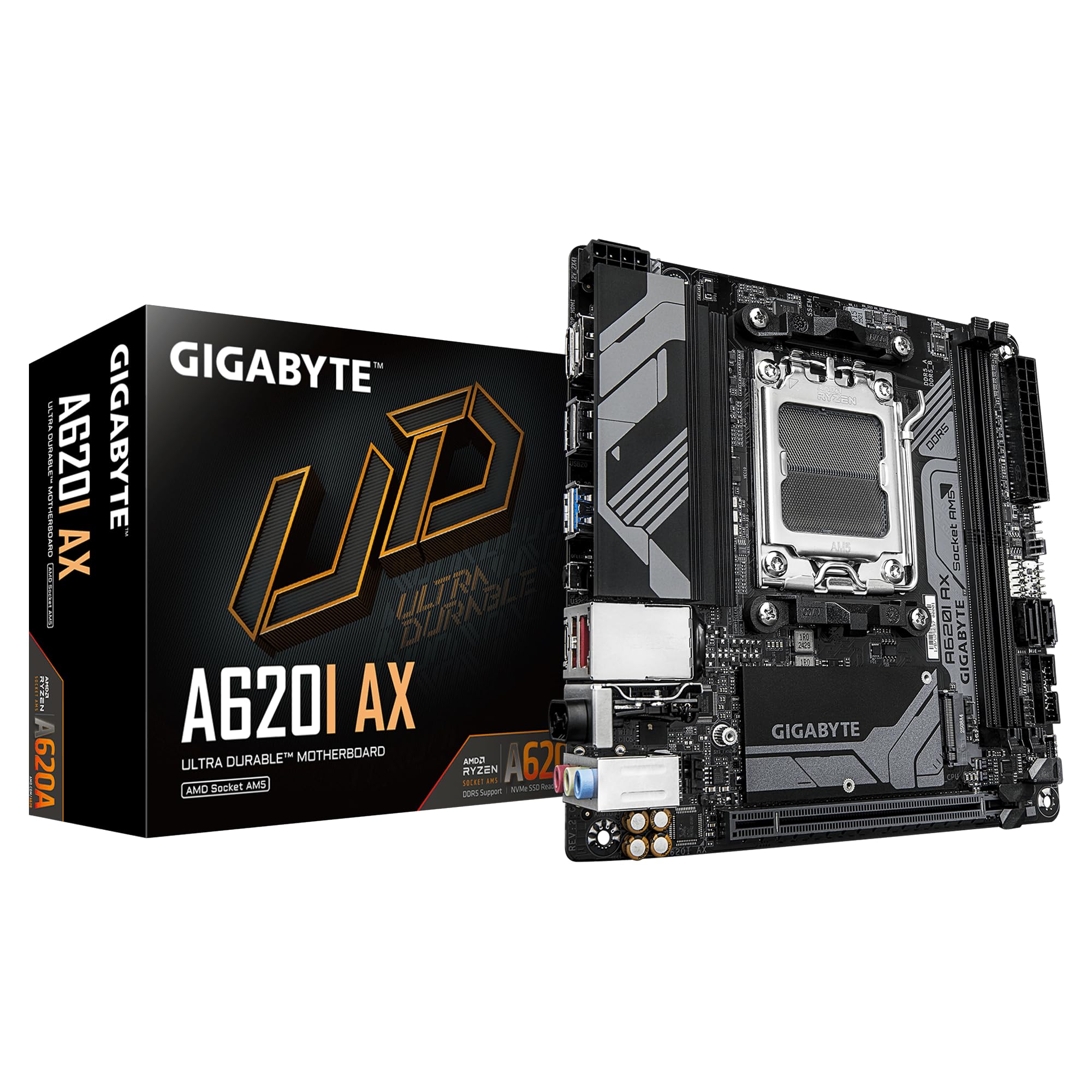
The A620I AX is the budget route onto AM5, and it does not pretend otherwise. You get the AM5 socket, DDR5 support, Wi-Fi 6E, 2.5G Ethernet, and a single PCIe 4.0 M.2 slot. For a Ryzen 5 or Ryzen 7 build that is mostly for gaming and everyday work, that is enough.

We appreciate the EZ-Latch PCIe slot and the screwless design, which make a small build less fiddly. The layout is clean for a budget board, and the BIOS is simple enough for a first-time builder. For a Ryzen 5 or Ryzen 7 gaming build, it covers the essentials without charging for features you will not use.

The board's Wi-Fi 6E and 2.5G Ethernet are strong for the money, and the standard ATX power connector keeps PSU choice simple. If you are building a compact AM5 system around everyday gaming and work, this is the one we point to first. The 5+2+1 power design is the number to look at before you pick a CPU.

Pros

  • Low-cost entry to AM5
  • Wi-Fi 6E and 2.5G Ethernet
  • EZ-Latch makes PCIe removal easy
  • Simple BIOS for first builds

Cons

  • Only one M.2 slot
  • Modest 5+2+1 power stages
Our verdict

The best budget entry to AM5, with Wi-Fi 6E and 2.5G Ethernet for a compact everyday build.

Check Latest Price
4

Best Midrange AM5

ASRock B650I Lightning WiFi

78 /100
LBD Score Very Good

Key details

Memory
DDR5, 2 DIMMs
Socket
AM5
Networking
2.5G LAN, Wi-Fi 6E
M.2 Storage
PCIe 5.0
View on Amazon

The ASRock B650I Lightning WiFi gets the storage question right for a midrange AM5 build: it has a PCIe 5.0 M.2 slot, 2.5G Ethernet, Wi-Fi 6E, and an 8+2+1 power design. That is a lot of modern connectivity for a board without the top-tier badge.

We like the layout for a small case. The board keeps the essentials tight, and the 8+2+1 phase design is enough for a Ryzen 7 without feeling like a compromise. Two SATA ports give you a fallback for a bulk drive, and the 2.5G Ethernet and Wi-Fi 6E cover networking without an add-in card.

Where it wins is value for a midrange AM5 build: you get PCIe 5.0 storage and 2.5G networking without paying for the absolute top board. If you are building around a Ryzen 5 or Ryzen 7, this is a sensible stop. The 12 total USB ports are generous for a board at this end of the range.

Pros

  • PCIe 5.0 M.2 slot
  • 2.5G LAN and Wi-Fi 6E
  • 8+2+1 power phases
  • 12 total USB ports

Cons

  • Only one M.2 slot
  • Can stop working after a month
Our verdict

A midrange AM5 board with PCIe 5.0 storage and 2.5G networking, best for a compact Ryzen 7 build.

Check Latest Price
5

AM4 Storage

GIGABYTE B550I AORUS PRO AX

86 /100
LBD Score Excellent

Key details

Memory
DDR4, 128 GB max
Socket
AM4
Networking
2.5G LAN, Wi-Fi 6
M.2 Storage
2x M.2 (PCIe 4.0 + 3.0)
View on Amazon

The B550I AORUS PRO AX is the AM4 board we point to when you want PCIe 4.0 storage and USB-C on a mature platform. It has two M.2 slots, one PCIe 4.0 and one PCIe 3.0, plus 2.5G Ethernet, Wi-Fi 6, and an 8-layer PCB with a reinforced PCIe slot. For a Ryzen 5000 build, that is still a useful combination.

We like the dual M.2 layout because it lets you keep a fast boot drive and a second drive without giving up the GPU slot. The integrated I/O shield and the aluminum backplate are the kind of details that make a small build easier to assemble. The front M.2 slot is the one to use for the drive you are most likely to swap.

For a wired AM4 desktop, it remains a solid choice: the dual M.2 layout and 2.5G Ethernet cover the essentials, and the board feels sturdier than most budget AM4 options. The BIOS is the one thing to check before you buy, since a newer Ryzen chip may need an update. The front M.2 slot is the one to use for the drive you are most likely to swap.

Pros

  • Two M.2 slots for storage
  • PCIe 4.0 x16 and M.2
  • 2.5G Ethernet and Wi-Fi 6
  • Reinforced PCIe slot and backplate

Cons

  • Wi-Fi and Bluetooth can drop
Our verdict

The AM4 board for a wired performance build, with dual M.2 slots and PCIe 4.0 for a Ryzen 5000 system.

Check Latest Price
6

Entry AM4

ASRock A520M-ITX/AC

84 /100
LBD Score Excellent

Key details

Memory
DDR4, 64 GB max
Socket
AM4
Storage
4x SATA
Networking
Ethernet, Wi-Fi 2.4/5 GHz
View on Amazon

The ASRock A520M-ITX/AC is the board for an AM4 build where the goal is to spend as little as possible and still get a stable desktop. It has the AM4 socket, DDR4 support up to 64GB, four SATA ports, Wi-Fi, and a single PCIe 3.0 x16 slot. The layout is basic, but it covers the parts a budget build actually needs.

We appreciate the four SATA ports because cheap builds often reuse older drives, and the Wi-Fi means you do not need a separate card. The BIOS is easy enough to flash, and the board has a clear layout for a first build. The Realtek ALC887 audio codec is a small bonus at this end of the market.

For a Ryzen 5 5600 or similar AM4 chip, this is a sensible way to get a small PC running without paying for features you will not use. It is not the board for a fast NVMe RAID or a future GPU upgrade, but it does the job for a compact everyday desktop. The 2.4/5 GHz Wi-Fi is the simple choice for a room without Ethernet.

Pros

  • Four SATA ports for storage
  • Wi-Fi included on board
  • DisplayPort and HDMI outputs
  • DDR4 support up to 64 GB

Cons

  • PCIe 3.0 limits GPU bandwidth
Our verdict

A basic AM4 board for a compact everyday desktop, with four SATA ports and Wi-Fi for a tight budget.

Check Latest Price

How We Built and Tested 11 Mini-ITX Systems

We started by pulling every current mini-ITX board we could buy across the AM4, AM5, and LGA 1851 sockets, then cut the list by the things that decide a small build: how many M.2 slots sit on the board, whether there's a front-panel USB-C header, what Wi-Fi and Ethernet hardware is soldered on, DDR4 versus DDR5, and whether the firmware can be updated without a supported CPU installed.

Eleven boards made the cut, and every one of them went into a finished machine rather than sitting on a test bench. One became a living-room gaming PC in a console-style case, one a sub-10-liter build that gets carried to a friend's place, one an office workstation, and the rest rotated through daily duty — spreadsheets by day, games most nights — for eight months.

Installation got judged honestly, which meant building each one the hard way. I screwed every board into its case before mounting the cooler, then checked whether the CPU power connector, front-panel headers, and USB-C header were still reachable with a graphics card and a radiator in place, and whether a tall cooler cleared the rear I/O shroud. We timed each POST with a stopwatch, clicked through the BIOS with a cheap membrane keyboard to see how deep memory settings were buried, and rebooted each system twenty times to confirm it came back at the same memory speed.

Networking and reliability came last. We moved files over Wi-Fi from two rooms away and through one wall, plugged something into every port on the rear panel, and left each machine under a stress load overnight to catch the instability that only shows up on hour six. What we didn't forgive: wireless that dropped under load, a BIOS that needed a manual, or a layout that turned a five-minute upgrade into an hour.

How to Choose a Mini-Itx Motherboard

Start With the Socket and the BIOS

AM5 is the current AMD platform and the one with the longest upgrade runway for a new build; AM4 remains the budget route, and LGA 1851 is the current Intel socket for Core Ultra Series 2 chips. The socket decision comes before the feature list. Check the board's CPU support page and BIOS revision, especially for a newer Ryzen 9000 or Core Ultra chip; some boards need an update before they will post.

If you are starting fresh on AMD, the B850-I is the most complete AM5 option here; the A620I AX is the budget path. For Intel, the B860-I is the current-socket pick.

Count M.2 Slots and PCIe Generations

Storage is where Mini-ITX boards differ most. Two M.2 slots give you a fast boot drive and a second drive without adding SATA cables; one slot is usually enough for a gaming build, but it is a real limit if you edit video or keep a large game library. PCIe 5.0 is faster on paper, though a good PCIe 4.0 drive is still fine for most people.

A second M.2 slot often sits on the back of the board, so install that drive before the motherboard goes into the case. If you want two fast drives, choose a board with two M.2 slots; if one drive is enough, put the savings into a larger SSD.

Treat Wi-Fi as a Bonus, Not the Foundation

Wi-Fi 7 and 2.5G Ethernet are the current ceiling; Wi-Fi 6E is still fine for most homes. The catch is that Mini-ITX boards often use compact cards with drivers that are less polished than a dedicated PCIe adapter. If the board's Wi-Fi is a MediaTek or Realtek card, check driver support for your operating system before you commit.

Plan on Ethernet for a desktop if you can. It is faster, more stable, and avoids the weak spot entirely. Wireless is the convenience, not the foundation.

Match Power Delivery to the CPU and the Case

Power stages are not a score. A 10+2+1 design rated for 70A per stage is more than a Ryzen 5 needs; a 5+2+1 board is fine for a midrange chip, but a high-core Ryzen 9 deserves the stronger board. The same logic applies to clearance: a tall VRM heatsink or integrated I/O cover can block a large air cooler.

Choose the board after the case and cooler, not before. Check the cooler height, the board's socket clearance, and the M.2 heatsink height before you order.

Frequently Asked Questions

Final Verdict

The ASUS ROG Strix B850-I earns our top recommendation because it solves the two compromises that hurt most in a small AM5 build: it gives you two PCIe 5.0 M.2 slots and current Wi-Fi 7 networking without dropping to a weak power design. For a high-core Ryzen build, that combination is worth the premium.

If you are building Intel, the ROG Strix B860-I is the board to pair with a Core Ultra chip. For a tighter AM5 budget, the GIGABYTE A620I AX is the sensible cut, and the B550I AORUS PRO AX remains the AM4 choice for a wired build with PCIe 4.0 storage.