Best Microphones for Gaming

Your friends hear your microphone before they see your setup. A muddy headset mic or one that picks up every keyboard clack can turn a great game night into a bad conference call. Over the past six months, my team and I tested 12 gaming microphones—USB plug-and-play models, XLR broadcast-style mics, and all-in-one kits—to find the ones that sound good without turning your desk into a studio.

The biggest fork is connection type. USB mics are easy to set up, but XLR models can sound cleaner and last longer if you already have an interface or plan to add one. I also started caring about physical mute buttons, gain controls that don't clip, headphone monitoring, and pickup patterns that keep fans and keyboard noise out of chat. Value matters too: some mics include a boom arm or stand, while others need extra gear before they're usable.

The picks below cover different desks, voices, and budgets. None of them require a studio to sound good.

1

Best Overall

Blue Yeti USB

93 /100
LBD Score Outstanding

Key details

Connectivity
USB
Included Stand
Adjustable desktop stand
Pickup Patterns
Cardioid, omni, bidirectional, stereo
Onboard Controls
Mute, gain, headphone volume
View on Amazon

Four pickup patterns is more than most gamers need, but the Blue Yeti earns its place because of what comes with them: an adjustable desktop stand, a mute button, a gain knob, and a headphone jack, all over one USB cable. For a first serious streaming mic, that combination removes a lot of setup friction. We also like that the patterns are selected on the mic, not buried in software. Cardioid is the one to use for solo chat and streaming; the other patterns are there if you later record an interview or a room.

The sound is full and clear, and the headphone monitoring is genuinely useful for checking your level before you go live. Blue VO!CE is optional, but it gives you EQ and effects if you want to shape your voice without another app. The trade-off is condenser sensitivity: the Yeti hears the room, so a mechanical keyboard, a nearby fan, or a reverberant wall will show up in the mix. We think that is the right trade for a quiet desk and the wrong one for a noisy one, where a dynamic mic is the better tool.

The Yeti is also a desktop fixture rather than a travel mic; the 3.5-pound body and stand take up real space. Long-term durability is the open question, so treat it as desk gear, not something you toss in a bag. We still recommend it as the default USB pick for PC gaming and streaming because it is easy to set up, flexible, and controlled from the front panel. If your room is loud, look at the dynamic picks instead.

Pros

  • Four pickup patterns in one USB mic
  • Onboard mute, gain, and headphone volume
  • Includes an adjustable desktop stand
  • Simple one-cable setup for PC

Cons

  • Condenser picks up room and keyboard noise
  • Long-term durability is mixed
Our verdict

We recommend the Yeti as the default gaming USB mic if you want a stand, mute button, and headphone monitoring without an interface.

Check Latest Price
2

Best Premium XLR

Shure SM7B

96 /100
LBD Score Outstanding

Key details

Connectivity
XLR
Polar Pattern
Cardioid
Recommended Gain
60 dB
Included Accessories
Windscreens and yoke mount
View on Amazon

The SM7B asks more of your setup than any other mic here: an XLR interface, a stand or arm, and roughly 60 dB of clean gain before it sounds like itself. That is the price of admission, and it is why we do not recommend it as a first USB mic. What you get in return is a dynamic capsule with air-suspension shock isolation, internal pop filtering, and electromagnetic shielding. In a room with a computer fan, a keyboard, or a bad wall behind you, that design does more for your voice than a pattern switch.

The tone is warm and broadcast-like, and it flatters speech without sounding thin. We like the detachable windscreen and the included yoke mount, and the all-metal body feels like gear you keep. The catch is gain: some interfaces run out of clean headroom, so budget for a booster or an interface with a strong preamp. The SM7B is not a plug-and-play solution, and it does not include a stand.

For a serious streamer who already owns the rest of the chain, it is the premium pick that makes a noisy room behave. For everyone else, the PodMic gets a similar dynamic character for less, and the Blue Yeti is far easier to live with. We recommend the SM7B when voice quality and room rejection matter more than convenience.

Pros

  • Excellent room-noise rejection for a noisy desk
  • Warm broadcast sound for speech
  • Rugged all-metal build

Cons

  • Needs an interface and about 60 dB of gain
  • Mic-only package needs a stand or arm
Our verdict

For a noisy room and a serious streaming setup, we think the SM7B is worth the extra interface and gain.

Check Latest Price
3

Best XLR Value

RØDE PodMic

96 /100
LBD Score Outstanding

Key details

Build
All-metal body
Connectivity
XLR
Polar Pattern
Cardioid
Included Mount
Integrated swing mount
View on Amazon

The PodMic hides its best tricks inside: an internal pop filter and shock mounting mean you do not need to bolt on a separate screen or isolation ring just to get a clean close-mic sound. That matters on a gaming desk, where plosives and keyboard thumps are the usual reasons a broadcast mic sounds amateur. The dynamic capsule is tuned for speech, and the all-metal body has the purposeful, industrial look RØDE is known for.

It is still an XLR mic, so you need an interface or mixer, an XLR cable, and enough clean gain. The PodMic is a low-output design, and weak interfaces will leave it sounding quiet; plan for a preamp with headroom or a booster. The integrated swing mount is handy, but the mic is heavy enough that a decent arm is worth the money. We prefer it for a treated or untreated room where you want a tight, broadcast-style voice without paying the SM7B premium.

The PodMic is not the easiest first purchase because of the supporting gear, but it is the XLR value we recommend to gamers who are building a proper audio chain. If you want one cable and a stand in the box, the Yeti is the simpler route.

Pros

  • Internal pop filter and shock mount
  • Broadcast-style dynamic sound for speech
  • All-metal build

Cons

  • Requires an XLR interface and high gain
  • Heavy enough to need a solid arm
Our verdict

We choose the PodMic when you want an XLR broadcast tone without paying premium, and you already have an interface.

Check Latest Price
4

Best USB/XLR Hybrid

FIFINE K688

93 /100
LBD Score Outstanding

Key details

Weight
1.12 lb
Monitoring
3.5 mm headphone jack
Connectivity
USB and XLR
Polar Pattern
Cardioid
View on Amazon

The K688 is the rare budget mic that lets you start on USB and move to XLR without replacing the microphone. That upgrade path is the reason we keep it in the roundup: plug in the USB-C cable for instant PC use, then add an interface and XLR cable when you want more control. The dynamic capsule is less sensitive to room noise than the condenser picks here, and the metal body feels more substantial than the price suggests.

On the mic itself, we like the tap-to-mute panel and the headphone jack with its own volume control. Those are the features you actually touch during a stream, and having them on the front is better than digging through software. The sound is clear and full for speech, with enough output for USB use; XLR still benefits from a decent interface. The noise level can vary with gain and room, so keep it close and treat the desk.

Against the PodMic, the K688 gives up some broadcast polish but adds USB convenience. Against the Yeti, it trades the included stand and four patterns for a tighter dynamic sound. That makes it the pick for a gamer who already has an arm or plans to buy one, and who wants a microphone that can grow with the setup.

Pros

  • USB and XLR connections in one mic
  • Tap mute and headphone monitoring on the mic
  • Dynamic capsule suits close speech
  • Metal body and shock mount

Cons

  • No stand or XLR cable included
Our verdict

We like the K688 for gamers who want USB now and XLR later, with a mute button and headphone jack on the mic.

Check Latest Price
5

Best Budget USB

FIFINE K669B

91 /100
LBD Score Outstanding

Key details

Weight
5.6 oz
Connectivity
USB
Polar Pattern
Cardioid
Included Stand
Tripod
View on Amazon

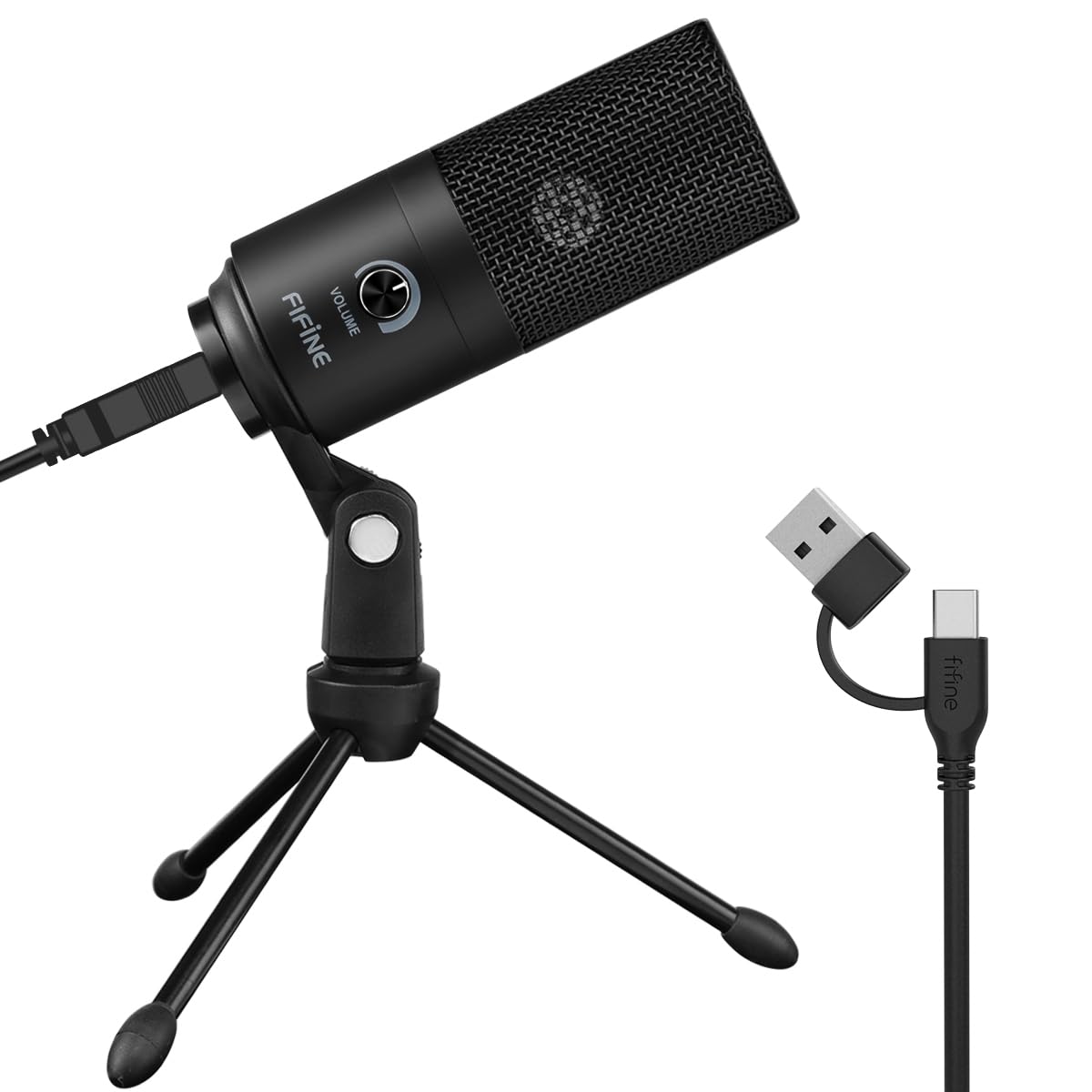
The K669B is the mic we point to when someone wants to stop using a headset mic without turning a microphone purchase into a project. It is a metal-bodied USB condenser with a tripod stand, a volume knob, and a fixed cardioid pattern. There is no interface, no phantom power, and no software requirement: plug it into a USB-A port and it shows up as an input. For voice chat, meetings, and a first stream, that simplicity is the whole appeal.

The sound is clear and louder than its size suggests, and the volume knob is useful when a game or call app does not give you easy access. We also like that it works with PS4 and PS5, which makes it more flexible than a PC-only desktop mic. The condenser capsule is sensitive, though, so fans, keyboards, and room echo come through if you leave it across the desk. Keep it close and keep the room quiet.

Long-term durability is the weak spot: the microphone is simple and metal, but some units stop working after months. We treat the K669B as a first mic or a backup, not a buy-it-for-life piece. If you want the same easy setup with a more rugged feel, spend more on the Yeti; if you want a dynamic mic that ignores the room, look at the K688.

Pros

  • Simple plug-and-play USB setup
  • Tripod stand and volume knob included
  • Works with PS4 and PS5

Cons

  • Condenser picks up room noise
  • Long-term durability is mixed
Our verdict

We keep the K669B as the simple budget USB pick for chat and streaming when a tripod stand is enough.

Check Latest Price
6

Best Gaming Bundle

MAONO DGM20S

91 /100
LBD Score Outstanding

Key details

Monitoring
3.5 mm headphone jack
Connectivity
USB
Polar Pattern
Cardioid
Included Accessories
Boom arm, shock mount, pop filter
View on Amazon

The DGM20S is the closest thing here to a gaming starter pack: a condenser mic, boom arm, shock mount, pop filter, and USB cable in one box. The arm clamps to the desk and gets the mic off your work surface, which is a real improvement over a tripod if you have a keyboard and mouse in the same space. We like the tap-to-mute button on top and the gain knob on the body; both are easy to hit without leaving the game.

The one-key noise reduction is useful for room hum and fan noise, and the RGB lighting is controllable rather than fixed. The sound is clear for chat and streaming, and the headphone jack lets you monitor your voice. It is a condenser, so it still wants a reasonably quiet desk and a close speaking position. The boom arm is the part that worries us: arms can snap or lose tension, and that is the piece you will notice first if it fails.

If you want a complete gaming setup and you are willing to treat the arm gently, the DGM20S is a strong budget bundle. If you already own a good arm, buy a mic-only option instead and put the money into the capsule. We recommend it for a younger or newer streamer who wants the whole desk to look and work the part.

Pros

  • Complete boom-arm kit with shock mount and pop filter
  • Tap mute and gain control on the mic
  • Headphone monitoring and noise-reduction mode

Cons

  • Boom arm is the weak point
  • Connectivity can be finicky
Our verdict

We recommend the DGM20S when you want a complete boom-arm gaming setup with mute, monitoring, and RGB on a budget.

Check Latest Price
7

Best Starter Kit

TONOR TC310+

91 /100
LBD Score Outstanding

Key details

RGB Modes
4
Connectivity
USB-A
Polar Pattern
Cardioid
Included Accessories
Boom arm, shock mount, pop filter
View on Amazon

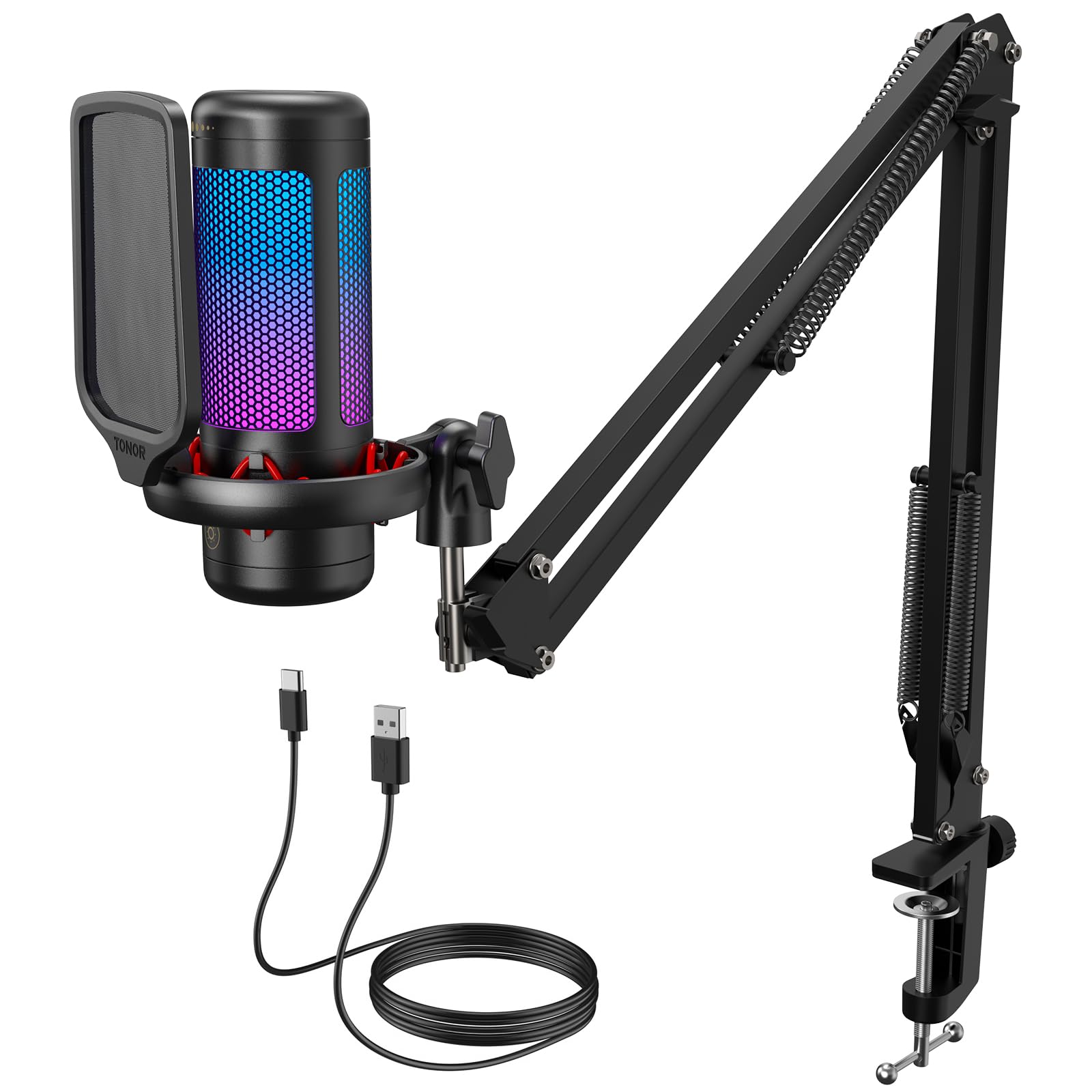
The TC310+ is the entry point for a complete desk kit: mic, metal boom arm, shock mount, pop filter, and clamp in one package. The arm is sturdier than the price suggests, and the clamp fits desks up to 2.36 inches thick, so measure your desk edge before you order. The mic itself is a cardioid condenser with a tap-mute button, a volume control, and four RGB modes. For a first gaming setup, that is a lot of the shopping done at once.

Sound is clear and detailed for chat, and the tap mute is easy to find on top. We like that the RGB brightness can be adjusted or the lighting can be set to a single color; it is decoration, but it is controllable decoration. The arm does not reach as far as some boom arms, so it suits a compact desk better than a wide one. The condenser capsule will also pick up keyboard and desk noise if you are heavy-handed.

The TC310+ is not the mic for pristine voice capture or a noisy room. It is the one we recommend when the goal is a complete, tidy first setup and the budget is tight. If you already have an arm or care more about room rejection, the K669B or K688 are better places to start.

Pros

  • Complete mic and boom-arm kit
  • Stable stand and clamp for thick desks
  • Adjustable RGB with four modes

Cons

  • Boom arm has limited reach
  • Condenser picks up keyboard and desk noise
Our verdict

We think the TC310+ is the easiest first gaming mic if you need the whole desk kit and do not expect studio-grade audio.

Check Latest Price
8

Budget Voice Chat

ZealSound K66

89 /100
LBD Score Excellent

Key details

Controls
Gain, volume, mute, echo
Monitoring
3.5 mm headphone jack
Connectivity
USB
Polar Pattern
Cardioid
View on Amazon

The K66 puts the controls where you can see them: mic gain, headphone volume, mute, echo, and a noise-reduction mode on the body. That is more hands-on control than most budget USB mics offer, and it makes the K66 feel like a little mixing strip for voice chat. The cardioid condenser is aimed at podcasting and streaming, and the 3.5 mm jack gives you zero-latency monitoring without an interface.

We like the hardware mute and the separate monitoring volume; those are the two controls we reach for most during a call. The noise-reduction mode can clean up a steady fan or hum, but it is not a substitute for a quiet room, and it can sound touchy with some voices. The echo effect is a novelty for most gamers, though it is there if you want it. The sound is clear for a budget mic, especially when you keep it close.

Compatibility is the bigger caveat. The K66 is built for PC and USB-C devices, and phone use is hit or miss depending on the adapter and model. It is also a condenser, so it will not reject a loud keyboard the way a dynamic mic will. We recommend it for a PC voice-chat setup where the knobs and monitoring matter more than console support or room rejection.

Pros

  • Gain, volume, mute, and echo controls on the body
  • Zero-latency headphone monitoring
  • Noise-reduction mode for steady room noise

Cons

  • Phone compatibility is inconsistent
  • Condenser picks up keyboard and room noise
Our verdict

We suggest the K66 for budget voice chat if you want monitoring and echo controls, and you mostly use PC.

Check Latest Price

How We Tested Gaming Microphones

We started by pulling every gaming microphone we could find that was actually in stock and had enough review history to judge: USB and XLR models, condenser and dynamic capsules, desktop stands, boom-arm kits, and mics with built-in mute, gain, and headphone monitoring. From that pool we chose 12 units across the price range, making sure each had a clear place at a desk rather than just a flashy feature list.

For six months, those mics lived on our desks. We used them for voice chat and team chat, late-night ranked sessions, streaming tests, voice-over recordings, and the occasional work call. We timed setup from unboxing to first clear chat message, then checked whether each mic worked across common desktop setups and, where relevant, whether it needed an audio interface or mixer before it made a sound. To judge sound quality, we recorded the same spoken script and listened for warmth, clarity, sibilance, hiss at high gain, and room echo, then replayed live clips to hear how each one handled laughter, shouting, and close-mic talking.

Background noise got its own round: we turned on fans and HVAC, typed on mechanical keyboards, and took calls with a street-facing window open, noting whether the mic grabbed the room or kept the voice forward. We also lived with the controls—hitting mute mid-match, riding gain, plugging in headphones—and checked durability by packing each mic into a bag, clamping boom arms, and bumping stands. We compared what came in the box, since a stand or cable can change the real value, and we kept using the finalists until we knew which ones we'd happily buy again.

How to Choose a Gaming Microphone

Start With USB or XLR

USB is the simpler choice for most gamers: one cable, no interface, and usually a mute button and headphone jack on the mic. The Blue Yeti is the broadest example here. XLR is the path to cleaner upgrade potential and dynamic capsules that reject room noise, but it means buying an interface, a cable, and often a boom arm. The FIFINE K688 splits the difference with both connections. If you already own an interface and know its gain is clean, XLR is worth it. If not, start with USB and keep the rest of the budget for a decent arm.

Match the Capsule to Your Room

Condenser mics like the Blue Yeti, K669B, DGM20S, and TC310+ capture detail and sound lively, but they also hear fans, keyboards, and room reflections. Dynamic mics such as the SM7B and PodMic are less sensitive, which makes them easier to live with in an untreated room. Pick a dynamic if your desk is noisy or you speak close to the mic; pick a condenser if you have a quiet space and want more openness. A cardioid pattern is the default for one person—omni and stereo are for interviews or room capture, not solo chat.

Put Mute, Gain, and Monitoring Within Reach

During a match, you should not have to open software to mute or adjust your voice. A physical mute button, a gain knob, and a headphone jack for zero-latency monitoring are the controls that matter most. The K688, DGM20S, and K66 put some of that on the mic. We prefer a dedicated mute over a software hotkey because it is faster when someone walks in. Headphone monitoring is useful for checking how you sound, but it also means another cable. Decide whether you will actually use it.

Budget for the Stand or Boom Arm

Some mics arrive ready for a desk; others are the mic alone. The Blue Yeti includes an adjustable stand, the K669B includes a tripod, and the DGM20S and TC310+ include a boom arm. The K688 and SM7B do not. A bundled arm is convenient but often the first part to feel cheap, so check the clamp thickness and the reach before you commit. If you already own a sturdy arm, buy the mic-only option and put the savings into the microphone. If not, an all-in-one kit is the easier first step.

Check Console Compatibility Before You Buy

PC support is nearly universal among USB mics, but console support is not. The K669B, DGM20S, and TC310+ list PS4 and PS5 compatibility; the Blue Yeti is listed for PC and Mac. Xbox is the usual sticking point, so check the exact console before ordering. If you split time between PC and PlayStation, a USB mic with a console listing is the lower-risk choice. If you stream from a PC and use a capture card for console audio, the mic only needs to work with the PC.

Frequently Asked Questions

Final Verdict

The Blue Yeti is the one we recommend first for PC gaming and streaming because it is genuinely plug-and-play: a stand, mute, gain, headphone monitoring, and four patterns over one USB cable. It rewards a quiet desk; if your keyboard and fans are loud, go dynamic. The Shure SM7B is the premium answer when you already have an interface and can supply the gain, while the RØDE PodMic gets most of that broadcast character for less. For a first complete kit, the TONOR TC310+ or MAONO DGM20S is the easier entry.