Best Laptop Cooling Pads of 2026

The moment you notice your laptop's fans, the damage is usually done: the chassis is hot against your legs, the keyboard is warm under your wrists, and the export that should have taken ten minutes is grinding. A cooling pad isn't a cure for a poorly ventilated laptop, but it helps — it pushes air across the vents hidden underneath and lifts the machine to a typing angle your neck will notice by mid-afternoon. My team and I spent seven months with 12 of them, from fold-flat travel pads to desk-sized stands with software-controlled fans.

Here's what the spec sheets bury: fan count has almost nothing to do with cooling. Five small fans can move less air, and make more noise, than one large one turning slowly. I also learned to care about the things reviews gloss over — a pad that slides when you type is infuriating, and a pass-through port you can't actually use is a wasted outlet. Lighting is a taste question, not a thermal one. The picks below are the ones that kept their cool, and their footing, at a volume I could live with.

1

Best Overall

TECKNET Cooling Pad

89 /100
LBD Score Excellent

Key details

Fans
3 x 110 mm, 1200 RPM
USB Ports
2
Laptop Fit
12-17 in
Height Settings
2
View on Amazon

Three 110 mm fans at 1200 RPM is a modest spec next to the eight- and nine-fan pads on this list, and that restraint is why the TECKNET is our top pick. It fits everything from a 12-inch ultrabook to a 17-inch machine, the metal mesh is stiff enough that a laptop does not sag toward the blades, and at 1.1 inches thick it slides into the same sleeve as the computer. We kept coming back to the balance: it moves real air without the high-pitched whine small, fast fans produce.

The small decisions are right too. Two USB ports mean the pad takes one and gives one back, so cooling does not cost you your mouse. Rubber strips on the surface and two front lips hold the laptop when you tip the stand up, and the on/off switch sits on the cable where you can reach it. Nothing needs software, and nothing needs configuring twice.

It is a mesh pad, not a sealed chamber, so it blows room air across the base rather than pressurizing it into an intake. On a 13- or 15-inch laptop with vents across the bottom, that is exactly enough. On a 17-inch gaming rig that is throttling under sustained load, the Razer and the llano push harder where it counts, and the gap is real.

What we did not expect to appreciate is how little the angle matters here. The pad is shallow and the tilt is gentle, so the laptop sits comfortably without the front edge digging into your wrists, and the two settings turn out to be the two you want. If you prefer to fine-tune, the Kootek's six detents are the better buy — but most desks land right on the first position.

Pros

  • Fits 12- to 17-inch laptops
  • Quiet 110 mm fans at 1200 RPM
  • Second USB port gives one back
  • Slim enough to travel at 1.1 inches

Cons

  • Airflow is a broad wash, not intake pressure
Our verdict

Our top pick: three 110 mm fans cool a 12- to 17-inch laptop quietly, and the second USB port means you lose nothing by plugging it in.

Check Latest Price
2

Best for 17-Inch Laptops

havit HV-F2056

89 /100
LBD Score Excellent

Key details

Fans
3
Weight
1.5 lb
Laptop Fit
15.6-17 in
Height Settings
2
View on Amazon

Ask for a pad that suits a 17-inch laptop and the havit is the answer we give most often. It is built around 15.6- to 17-inch machines, weighs about a pound and a half, and at 1.18 inches thick it is the pad here most likely to leave the house with you. Nothing about it is clever; the whole design is three fans, a metal mesh deck, two height settings, and a switch.

That is the point. The havit supports a big chassis edge to edge, tips up enough to fix your posture at a desk, and runs quietly enough that the laptop's own fans are louder. For a 17-inch machine that moves between a kitchen table and an office, this is the pick — you get the cooling without carrying a two-pound slab.

Two things to weigh before you order. The packaged cable is USB-A to USB-A, so a laptop with only USB-C ports needs an adapter before the fans will spin; that is the detail that stops a setup cold. And the fans are the part that goes quiet over time, with a dead fan or a loose port the usual failure — so treat the cable gently and do not coil it around the frame.

Pros

  • Fits 15.6- to 17-inch laptops
  • 1.5 pounds and 1.18 inches thick
  • Quiet enough to disappear under laptop fans

Cons

  • USB-A to USB-A cable; USB-C laptops need an adapter
  • Fans and ports are the first thing to fail
Our verdict

The light, thin pick for a 15.6- to 17-inch laptop, provided you have a plain USB-A port free to power it.

Check Latest Price
3

Best Budget

KYOLLY Ultra Slim Cooling Pad

85 /100
LBD Score Excellent

Key details

Fans
2
Weight
1.8 lb
Laptop Fit
up to 15.6 in
Height Settings
5
View on Amazon

The KYOLLY is the least expensive pad we recommend, and it does not read that way on the desk. Two large fans under a metal mesh, a rolling wheel for fan speed, five height settings, and two USB ports — for a laptop up to 15.6 inches, that covers everything the midrange mesh pads do.

Size is the real argument. At 14.29 by 10.2 inches and 1.8 pounds it is the smallest pad here, which means it sits under a 13- or 14-inch laptop without a skirt of empty mesh hanging off both sides. Five detents is more tilt adjustment than anything else at this size, and the wheel lets you drop the fans to a whisper for a meeting or a quiet room.

What we appreciate is that nothing feels stripped out to reach the price. The speed wheel is a better control than the on/off switches on pads that cost more, the front baffles hold a laptop in place, and the whole thing feels solid in the hand. Two caveats: the USB cable is short, so a laptop with ports on the far side will drag the pad around unless you add an extension, and the plastic around the fans is the part to watch — a cracked housing takes a fan with it.

Pros

  • Two large fans, quiet at low speed
  • Five height settings at this size
  • Compact footprint for 13- and 14-inch laptops

Cons

  • Short USB cable limits where it sits
  • Plastic fan housings feel fragile
Our verdict

The budget pick that does not feel like one: two quiet fans, five height settings, and a size that suits a 13- or 14-inch laptop.

Check Latest Price
4

Best for Adjustable Angles

Kootek LCP04 Cooling Pad

89 /100
LBD Score Excellent

Key details

Fans
5 (1 large, 4 small)
USB Hub
2 ports
Laptop Fit
12-17 in
Height Settings
6
View on Amazon

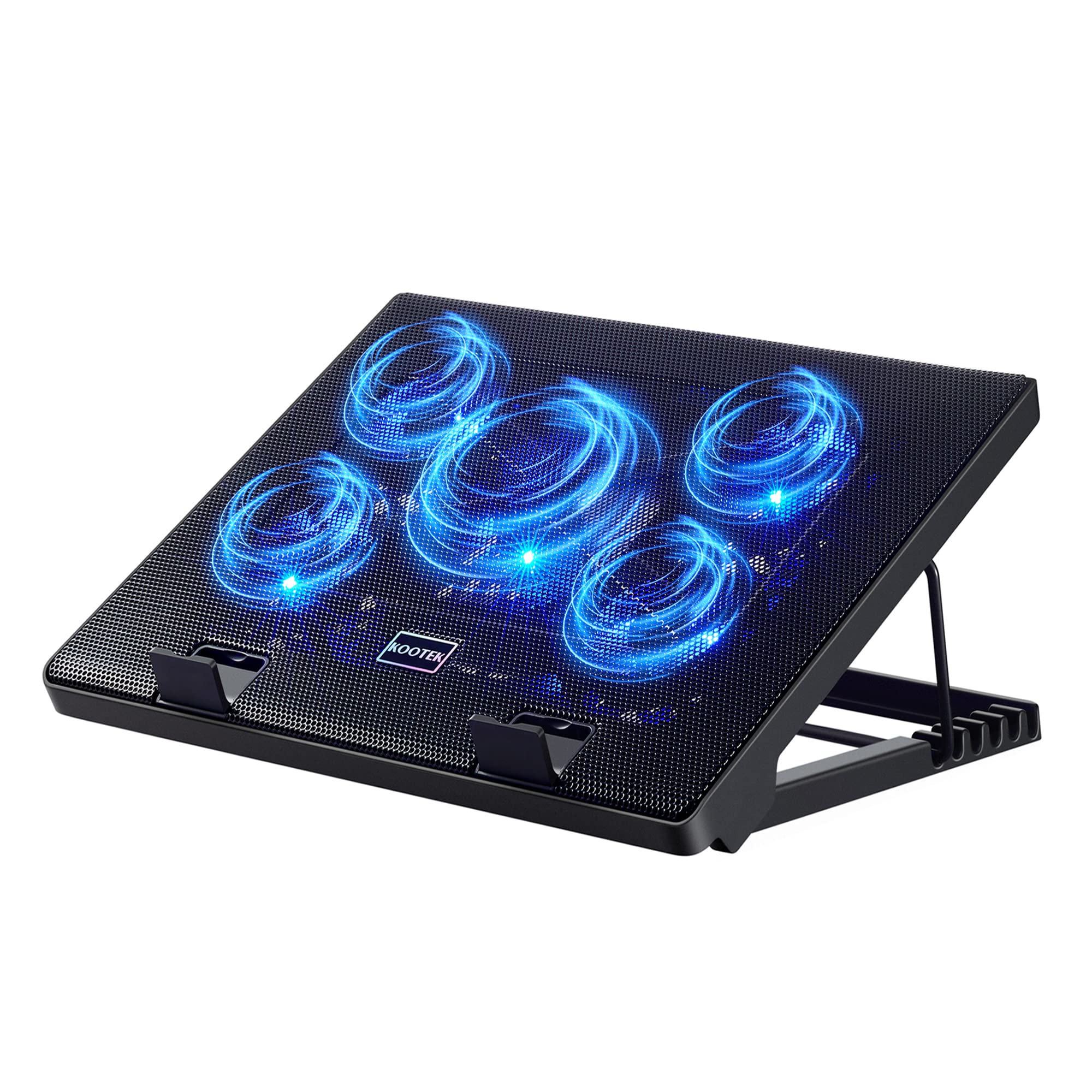
The Kootek's plastic base flexes, and the pad rocks a little when you carry it by one corner. Set a laptop on it and tip the stand up, though, and the design makes its case: this is a stand that happens to cool, rather than a slab with a lip on the front.

Five fans — one 4.72-inch in the middle, four 2.76-inch around it — spread air across more of the base than the three-fan pads here. The dual USB hub is the practical part: the pad takes one port and hands you extra connectivity, so cooling does not cost you a peripheral.

Six height settings is the most here by a wide margin — the AICHESON's four are next, and everyone else offers two — and we think that range does more for a desk typist than another fan would. The trade is that a steep tilt under a heavy 17-inch machine puts real load on the front stoppers, which hold less firmly than the Targus's rubber deck.

Two more things show up in daily use. The blue LEDs are bright enough to notice in a dark room, so a bedroom desk is not where this one shines. And the bottom tab that keeps a heavy laptop from sliding forward is the part that gives way first under a big machine — worth knowing before you park a 17-inch gaming laptop on the steepest setting.

Pros

  • Six height settings, the most here
  • Five fans spread across a wide base
  • Built-in two-port USB hub

Cons

  • Base flexes and rocks when carried
  • Front tab can give way under a heavy laptop
Our verdict

The most adjustable pad here, and the one to buy if you type on the laptop's own keyboard for hours at a time.

Check Latest Price
5

Best for Lap Use

Targus Chill Mat AWE55US

89 /100
LBD Score Excellent

Key details

Fans
2
Weight
2 lb
Surface
Mesh over neoprene
Laptop Fit
up to 17 in
View on Amazon

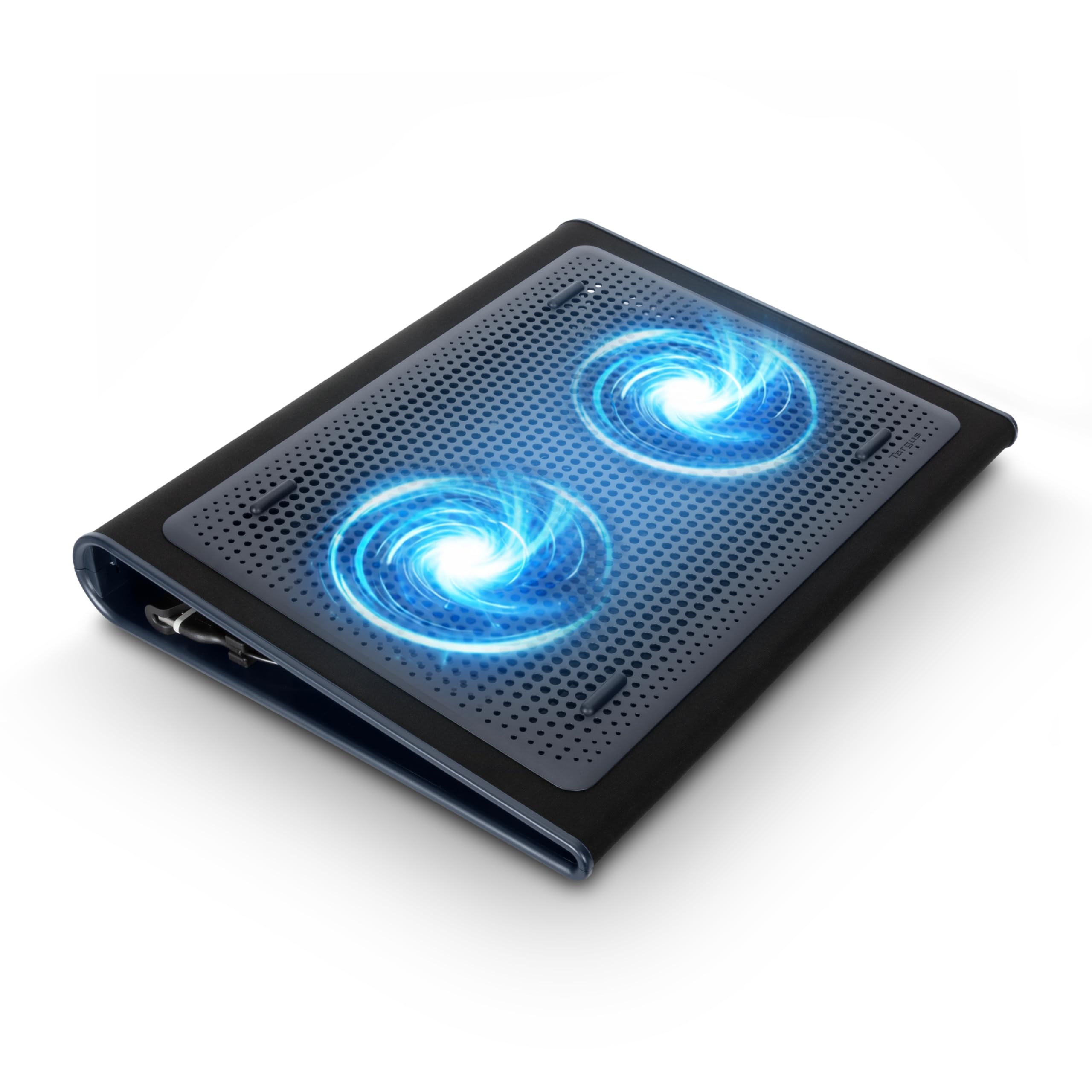
Every other pad here assumes a desk. The Targus Chill Mat assumes a couch. The bottom is soft neoprene that sits comfortably on your legs, the top is open mesh, and the fans draw air in from the sides rather than the base — so a blanket, a cushion, or a crossed leg does not starve them.

We found it the most stable pad in the group. Four rubber stops on the face and a fixed ergonomic tilt hold a 17-inch laptop exactly where you put it, and the mat does not creep on fabric. The trade-off is built into the same design: the tilt is fixed, so there is no raising the screen to eye level for a long session — which is where the Kootek's six detents or the KYOLLY's five earn their keep.

Cooling is honest but gentle. Two fans move enough air to stop a laptop's underside from cooking your legs and to take the edge off idle temperatures, and they do it quietly. It will not rescue a gaming laptop under load; the sealed-chamber pads are the ones for that. The fans are also the part that eventually fails, though the mat itself has almost nothing else to go wrong.

Pros

  • Padded neoprene base for lap use
  • Side intakes keep working on a blanket
  • Laptop stays put on the rubber-stopped face

Cons

  • Fixed tilt, no height adjustment
Our verdict

The pad to buy if your laptop actually sits on your lap: a padded, stable mat with side-drawing fans and no desk required.

Check Latest Price
6

Best Premium

Razer Laptop Cooling Pad

85 /100
LBD Score Excellent

Key details

Fan
1 x 140 mm, 3000 RPM
Weight
5.8 lb
USB Hub
3 x Type-A
Laptop Fit
14-18 in
View on Amazon

The Razer is the only pad here that treats a laptop's intake as something to pressurize. One 140 mm brushless fan spins to 3000 RPM inside a chamber sealed to the underside with foam, and three magnetic frames let you match the opening to a 14- to 18-inch machine. The mesh pads blow air at the base; this one pushes it in.

The software is the other half of the design. Preset and custom fan curves in Razer's app tie fan speed to component temperatures instead of leaving you to guess, and a three-port USB-A hub on the back covers the ports the chamber blocks. The Chroma lighting is a bonus if your desk already runs on it and a distraction if it does not.

It works as a stand too — the chamber lifts the machine to a working angle, and the foam seals make real contact with a big laptop's vents rather than hovering above them. What we do not like is the noise. Below medium it is fine; above it, this and the llano are the loudest pads here, and a headset becomes part of the setup.

That is the honest trade. The gains show up under sustained load, where a sealed chamber changes how much air reaches the heatsink. During email and video calls you are paying a premium for a very good stand. If your laptop never runs hot, this is more cooler than you need.

Pros

  • Sealed chamber pushes air into the intake
  • Temperature-linked fan curves in software
  • Three-port USB-A hub on the back

Cons

  • Loud above medium fan speed
  • Heavy and shaped to stay on a desk
Our verdict

The one to buy for a hot gaming laptop: a sealed chamber that forces air into the intake, with software worth learning.

Check Latest Price
7

Large Gaming Laptops

llano V12 Ultra

88 /100
LBD Score Excellent

Key details

Fan
1 x 5.5 in, 2800 RPM
USB Hub
3 x USB 3.0
Laptop Fit
15.6-19 in
Height Settings
3
View on Amazon

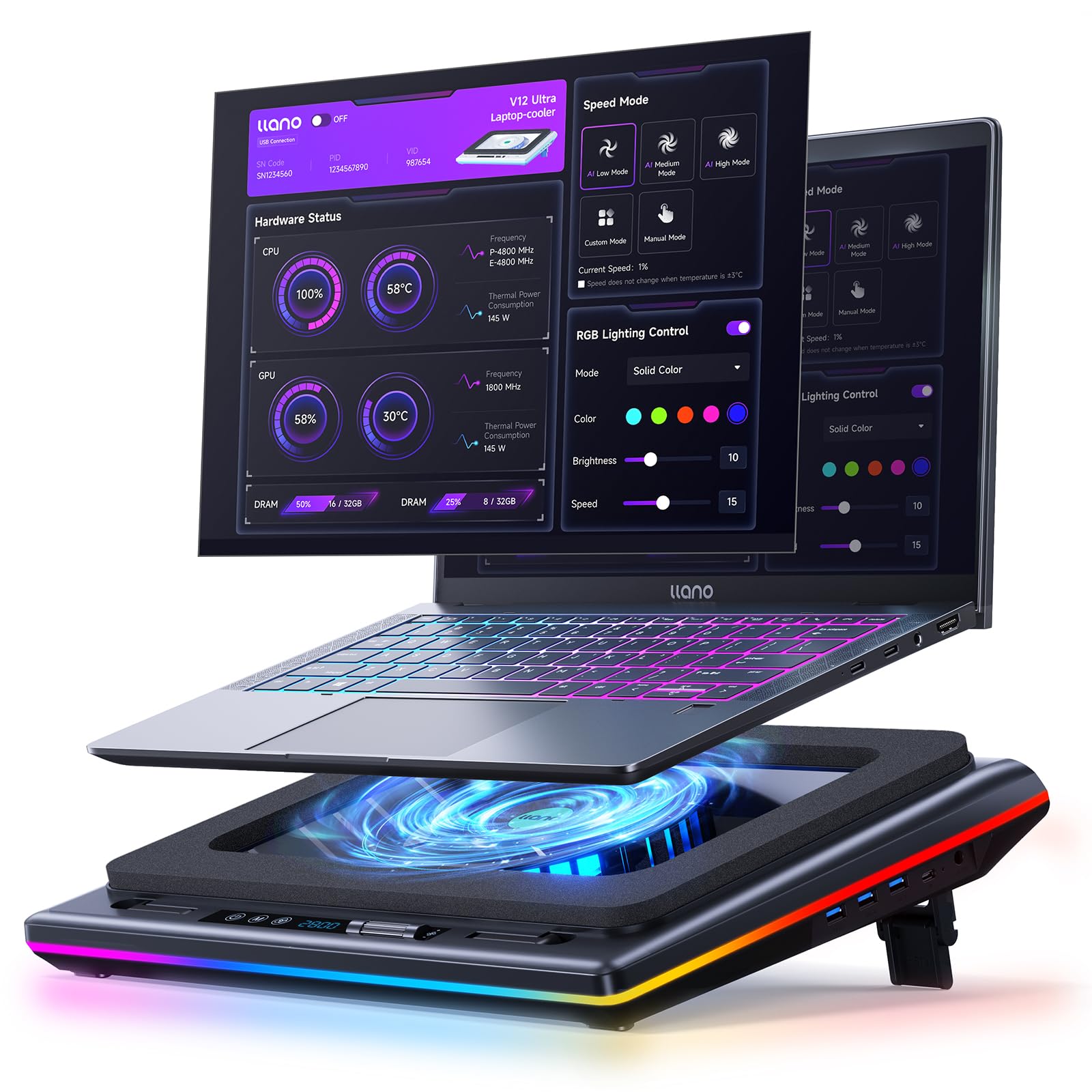
The llano V12 Ultra does the Razer's job with a different set of extras: a 5.5-inch turbofan spinning to 2800 RPM behind a memory-foam edge seal, pushing air into the intake of a 15.6- to 19-inch gaming laptop instead of washing over its base. It also adds two things the Razer leaves out — three tilt positions and a removable dust filter.

The filter is the detail we appreciate most. It sits between the fan and the laptop, traps dust before it reaches the machine's own fans, and pulls out for rinsing. On a laptop that runs hot, a clean intake is half the cooling, and it is the kind of feature that only proves itself after a year of desk life.

The Myth.cool software runs three automatic modes tied to workload, and the USB 3.0 hub is faster than the USB 2.0 hubs on the cheaper pads here. Two caveats are worth stating plainly: at 16.9 by 12.9 inches it is the largest pad in this group and will not go in a laptop bag, and the fan gets loud when it ramps, which is the price of the airflow.

Set against the Razer, it gives up software depth and lighting polish and gains the tilt adjustment, the filter, and a lower price. For a 17- or 18-inch gaming laptop that lives on a fixed desk, those are the right trades.

Pros

  • Sealed turbofan aimed at the intake
  • Removable, rinseable dust filter
  • Three tilt positions

Cons

  • Large footprint stays on the desk
  • Loud at high fan speeds
Our verdict

A sealed-chamber cooler for big gaming laptops that adds tilt adjustment and a rinseable dust filter the Razer does not have.

Check Latest Price
8

Budget 17-Inch Setups

AICHESON S035

88 /100
LBD Score Excellent

Key details

Fans
5 (1 large, 4 small)
Weight
1.9 lb
Laptop Fit
up to 17.3 in
Height Settings
4
View on Amazon

The AICHESON is the value play for a 17.3-inch laptop: five fans, four height settings, and a flip-up grip that doubles as a carrying handle. It raises the machine anywhere from 2.4 to 4.8 inches at angles between 7.5 and 21.5 degrees — a wider ergonomic range than most pads here, at one of the lowest prices in the group.

The range of positions is what makes it useful. A metal bar at the bottom gives four positive stops, so the laptop sits where you set it rather than sagging back to flat, and the grip at the front means a 17-inch machine can move between rooms in one hand. For a big laptop that stays on a desk, we think that combination earns more than another fan would.

The controls are where it gives ground. One dial runs fans and lights together, so the blue LEDs brighten as you turn the speed up and you cannot have one without the other. Five fans sounds like more cooling than the three-fan pads here, but the four small ones turn fast without moving much air and the big central fan does most of the work. And the included cord is USB-A to USB-A, so a USB-C-only laptop needs an adapter before any of it spins.

Pros

  • Fits up to 17.3-inch laptops
  • Four positions with a 21.5-degree maximum tilt
  • Flip-up grip doubles as a handle

Cons

  • Lights brighten with fan speed, no separate control
  • Modest airflow for five fans
Our verdict

A wide range of positions and a carry handle for a 17.3-inch laptop, at a price that leaves room for an adapter.

Check Latest Price

How We Chose and Tested These Cooling Pads

We built the shortlist from pads that recur in owner reviews and spec sheets — models sized for 12-inch ultrabooks and 17.3-inch gaming rigs, single-big-fan designs and five-fan arrays, thin fold-flat pads and desk stands with height stops. Anything with a pattern of dead-on-arrival fans or cracked housings got cut. From that pool we bought 12 pads at retail and used them for seven months.

They lived where laptops actually get hot: on a desk through full workdays of video calls, on a couch cushion and in bed on weekends, and through multi-hour gaming and video-export sessions. To judge cooling, we ran the same 45-minute load on each pad and logged internal temperatures against a control run with the laptop flat on a table. For noise, we recorded each pad at full speed from arm's length in a quiet room and noted the pitch as well as the volume — a low hum is easy to ignore, a whine is not.

The rest was hands-on. We typed on every pad at every height setting and pressed hard on the chassis edge to see whether the laptop slid, rocked, or crept backward mid-sentence. We counted the USB ports each pad consumed and gave back, then plugged in a drive and a mouse to confirm the pass-through held a connection. Each one went into a backpack for commutes and weekend trips so we could watch for rattles, bent grilles, and hinges that loosened over time. We also killed the lights to see how obtrusive the LED accents were after dark, and weighed the extras — ports, height stops, speed control — against what each pad asked for them.

How to Choose a Laptop Cooling Pad

Find Your Laptop's Intake First

Before you count fans, find out where your laptop breathes. Most gaming and business machines pull air through vents in the bottom panel, which is exactly where a pad can help. Plenty of thin ultrabooks vent through the hinge or the sides instead, and a fan blowing at a sealed base mostly cools the chassis. If you own a 13-inch ultrabook, buy the pad for the ergonomics and the cooler palm rest, not for a dramatic temperature drop.

Size follows from the same question. A pad rated 12 to 17 inches will hold a small laptop without overhang; a 15.6- to 19-inch design like the llano or the Razer is built around a big gaming chassis and looks oversized under anything smaller.

Fan Count Is Not Airflow

Nine small fans can move less air than three large ones. What matters is how the airflow meets the intake: mesh pads spread a broad, low-pressure wash across the whole base, while sealed designs — the Razer's foam-ringed chamber, the llano's memory-foam seal — concentrate one big fan into the vent area and hold pressure there.

On a laptop that throttles under sustained gaming load, that focus is worth paying for. On a machine used for email, browsing, and video calls, a three-fan mesh pad like our top pick is quieter and just as effective at keeping the underside from getting uncomfortable.

Noise Is the Cost You Live With

The sound that wears on you is small fans at high RPM, not large ones turning slowly. That is why the quiet pads here run 110 to 120 mm fans at roughly 1200 RPM, and why the sealed turbofans get loud exactly when they are working hardest — the Razer and llano are the two that will make you reach for a headset.

If the pad shares a room, or you record audio, favor a large-fan mesh design or a pad with a speed dial you can turn down, and accept a smaller temperature drop in exchange for a room you can think in.

Height, Tilt, and Where It Sits

Two height settings lift a screen toward eye level; five or six let you find a typing angle that does not put your wrists at an odd bend, and a front lip keeps the laptop from sliding down a steep tilt. If you type on the laptop's own keyboard all day, that range matters more than an extra fan.

Lap use is a different design entirely. A hard plastic pad with a steep tilt is uncomfortable on your legs and unstable on soft furniture, which is why the Targus uses a padded neoprene base and draws air in from the sides so a blanket cannot starve the fans.

The Parts That Fail, and the Plug You Need

Fans, USB cables, and the plastic tab that holds a laptop are what give out, and they give out on expensive pads as readily as cheap ones. Two habits help: carry the pad flat rather than by one corner, and coil the cable loosely instead of wrapping it around the frame.

Check the connector before anything else. Nearly every pad here is USB-A in and USB-A out, so a laptop with only USB-C ports needs an adapter before the fans will spin — and the short cords common on budget pads will not reach a port on the far side of a 17-inch machine.

Frequently Asked Questions

Final Verdict

The TECKNET is the pad we recommend to most people: three 110 mm fans at 1200 RPM, a 12- to 17-inch fit, a port given back rather than taken, and a run quiet enough to forget. It will not rescue a gaming laptop that is already heat-soaked, and it does not pretend to.

For that machine, the Razer's sealed chamber and the llano's turbofan with its rinseable dust filter are the two that target a hot intake directly. Buy either if your laptop spends its evenings at full load on a fixed desk, and buy the TECKNET for everything else.