Best Laptop Stands of 2026

A laptop stand has one job — raise the screen to eye level — yet the two things people want most from one tend to cancel each other out. The stands that feel like furniture hold a 16-inch laptop dead still, while the ones that fold flat enough to disappear into a backpack shimmy the moment you start typing. Add a rotating base or a height you can change and the wobble usually gets worse. What a good stand actually fixes is the neck crick from your last work-from-home setup and the heat pooling under a chassis that's been sitting on a desk all afternoon.

I've spent three months with 14 of them on and around my desk. The lesson that surprised me: price and material don't predict much. A well-braced plastic stand can hold steadier than a thin aluminum one, and one stiff hinge is worth more than a long list of height settings you'll never use. Everything below earned its spot.

1

Best Overall

Nulaxy C1 Laptop Stand

95 /100
LBD Score Outstanding

Key details

Build
Aluminum composite, silicone pads
Folded
Collapses flat
Laptop Fit
10-16 inches
Adjustability
Height and angle
View on Amazon

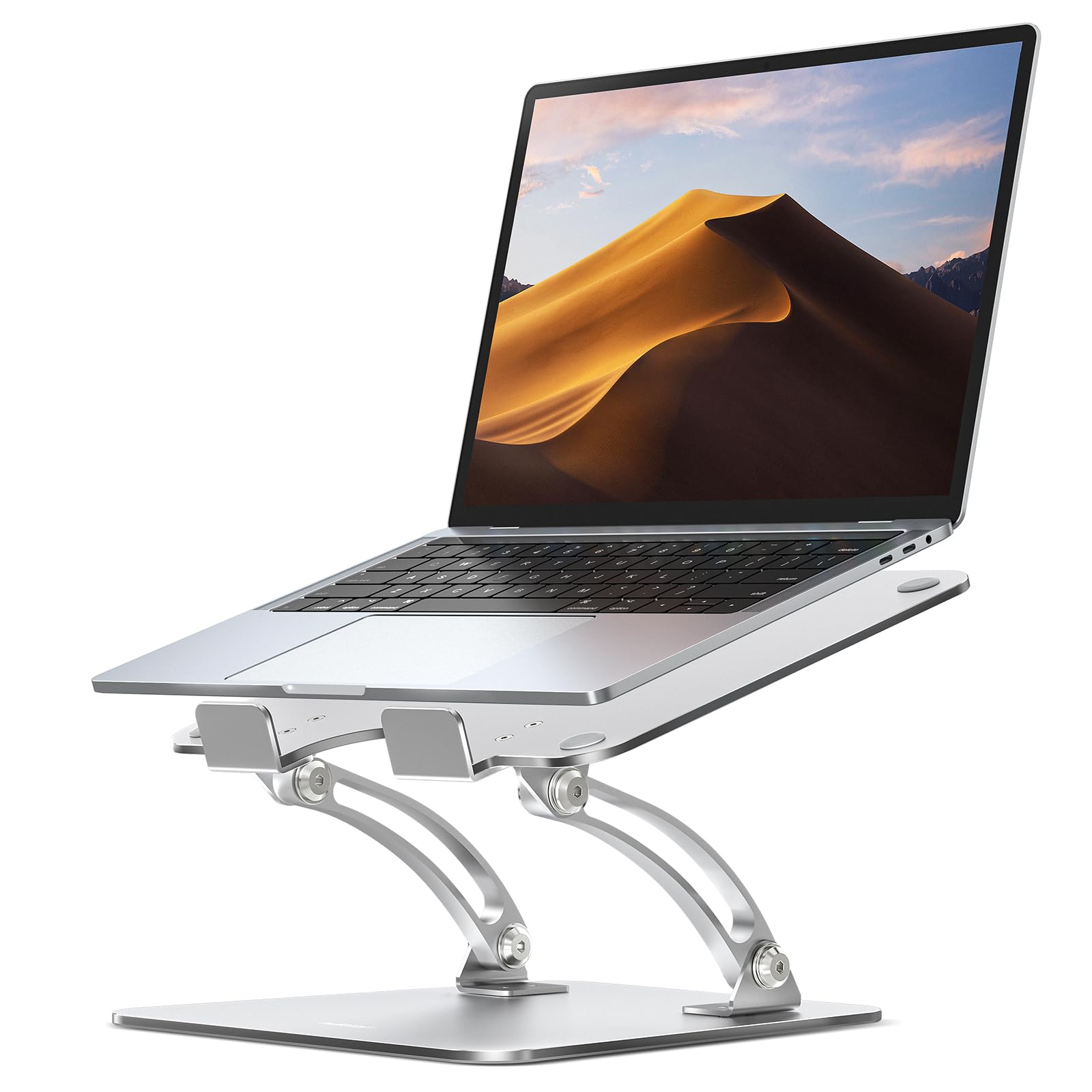
The C1 is the least expensive stand in this group that genuinely adjusts, and it does not feel like a compromise. Two folding arms and a pair of support rods carry the platform, the top panel is pierced with a vent pattern that leaves the underside of the chassis open, and the whole thing collapses flat enough to slide into a laptop bag.

Height and tilt at a budget price is what makes it our default recommendation. The screen goes roughly where you want it, a 16-inch laptop sits without complaint, and the dual-rod frame keeps the platform from twisting when you lean on it — the failure that turns most cheap stands into a wobbly nuisance within a month.

What you give up is the shake-free typing you get from a fixed riser. Type on the raised laptop itself and the platform moves with every keystroke; set an external keyboard in front of it, which is what the height is for anyway, and the question disappears. Ours stays at one setting for weeks at a time, which is how this kind of stand is used in practice.

Where it beats the single-piece aluminum risers is travel: it folds, and they do not. Where it loses is the feel of the material — the composite panel is stiff enough for a laptop, not as dead-solid as a machined slab. For a desk that needs one good height and a stand that occasionally leaves the house, neither difference matters much.

Pros

  • Adjustable height and tilt on a budget
  • Folds flat for a laptop bag
  • Dual-rod frame resists twisting
  • Ventilated panel under the chassis

Cons

  • Height changes are a two-handed job
Our verdict

The default pick: it adjusts, it holds a 16-inch laptop steady, and it folds flat, which most stands here manage only one of.

Check Latest Price
2

Best for Large Laptops

Lamicall LN09 Laptop Stand

95 /100
LBD Score Outstanding

Key details

Base
Oversized aluminum
Assembly
None required
Laptop Fit
10-17.3 inches
Adjustability
Height and angle
View on Amazon

Seventeen inches is the number that earns this stand its place. Most risers here stop at 15.6 or 16, which leaves the corners of a big gaming laptop or an older 17-inch machine hanging over the edge. The Lamicall's platform is rated to 17.3 inches and the base is wider than the rest to match, which is the part that keeps a heavy machine from feeling like it is perched.

The rest is conventional aluminum done properly: ventilation holes across the platform, silicone on the hooks and the base, height and angle that hold where you set them, and no assembly at all. It comes out of the box ready to work and folds flat when you want the desk back.

For a permanent desk with a large laptop, this is the one we point to. The trade is a firm hinge — raising or lowering it takes real effort, and you will want to take the laptop off first — but that same tightness is why the platform doesn't sag over a long workday. Buy it for the size rating first and the adjustment second.

Pros

  • Rated for laptops up to 17.3 inches
  • Oversized base resists tipping
  • Vent holes and silicone throughout
  • Ready to use with no assembly

Cons

  • Costs more than the budget aluminum risers
Our verdict

Buy it if your laptop is 17 inches: the platform and base are sized for a big machine, and the firm hinge stops it creeping downward.

Check Latest Price
3

Best Fixed-Height Value

BESIGN LS03 Laptop Stand

96 /100
LBD Score Outstanding

Key details

Height
6 inches, fixed
Assembly
Three pieces, no tools
Capacity
8.8 lb
Laptop Fit
10-15.6 inches
View on Amazon

Compare this with the adjustable stands and its whole argument becomes clear: no hinge, no rods, nothing to loosen. Three aluminum panels slot together by hand and hold a laptop at a fixed six inches, high enough to line the screen up beside a monitor and leave the desk underneath usable for a keyboard.

Build quality is why it earns a spot rather than just a price tag. The finish is even, the joints are tight, and the 8.8-pound capacity is far more than any laptop needs. It breaks down into three flat panels and goes back together in seconds, which is more travel convenience than most fixed stands offer.

It suits a desk and chair you have already set up for your own eye level, and it feels rigid in a way the hinged stands do not. Push hard on the laptop while typing, though, and it can rock forward on its front edge, so pair it with a keyboard and let it sit still.

Pros

  • Solid aluminum at a low price
  • Slots together without tools
  • Six-inch lift aligns with a monitor
  • Breaks down flat for travel

Cons

  • Fixed height, no tilt adjustment
Our verdict

The best fixed-height stand here: three aluminum pieces, no tools, a six-inch lift, and a price that undercuts nearly everything else on this list.

Check Latest Price
4

Best for Typing on the Laptop

Rain Design mStand

96 /100
LBD Score Outstanding

Key details

Build
Single-piece aluminum
Height
5.9 inches, fixed
Laptop Fit
Depths under 10.4 inches
Keyboard Space
Fits underneath
View on Amazon

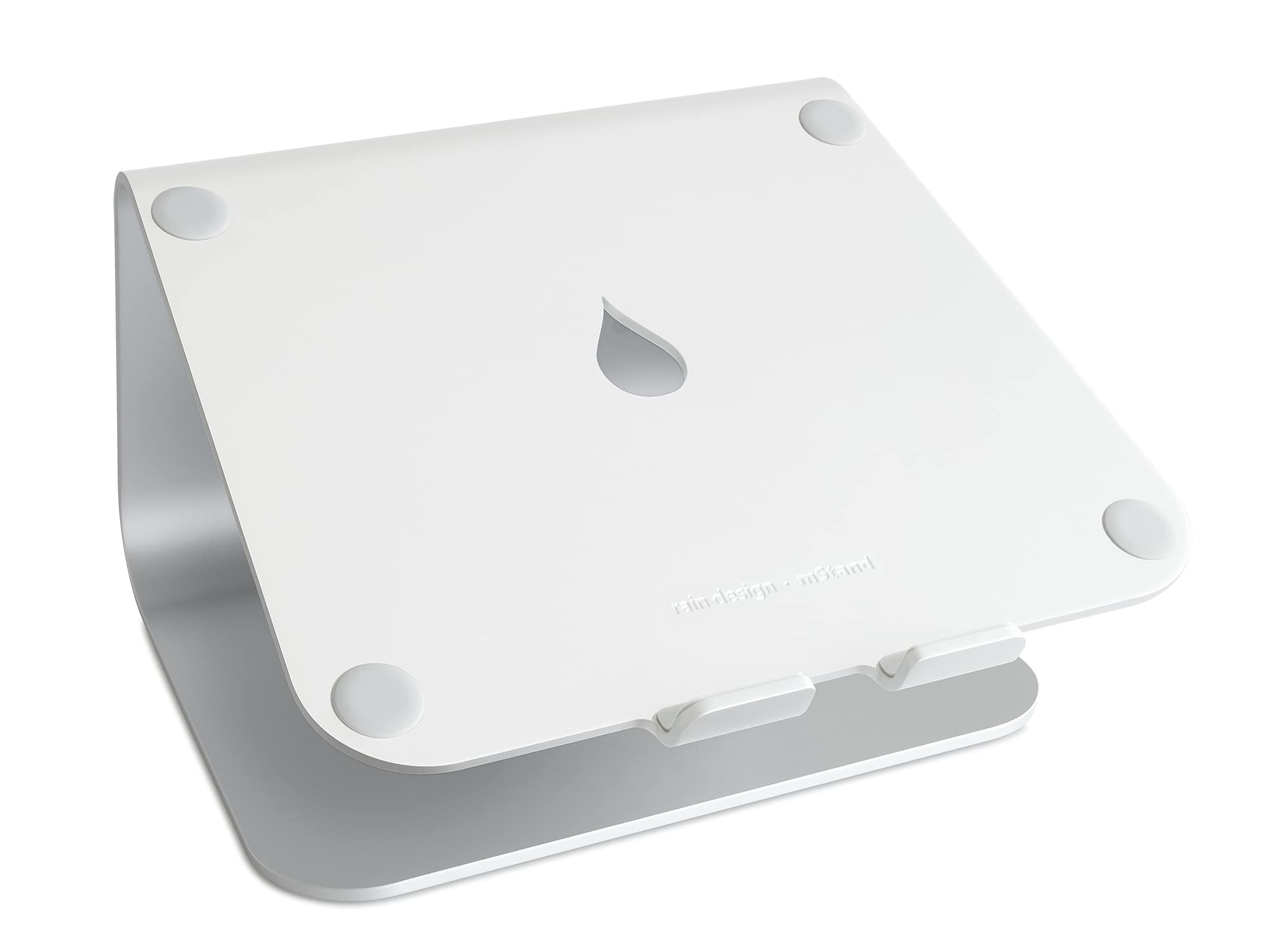
Nothing on the mStand adjusts, and that is the point. One piece of sand-blasted, silver-anodized aluminum, curved at the front to cradle the laptop and drilled at the back with a two-inch hole for cables. No hinge, no rods, no knobs, and nothing that can work loose.

The angle is shallower than the adjustable stands, and that is deliberate: it is set so you can keep typing on the laptop's own keys without the machine skating away. Most risers here make that genuinely unpleasant, which is why so many of them end up paired with a separate keyboard.

At 5.9 inches the screen lands at a comfortable seated height, and the space underneath swallows a full-size keyboard at the end of the day, which is the quietly useful part. The finish is the closest match to a MacBook in this group, and the padding on the base keeps it from marking a wood desk.

We still think it is the right stand for anyone who types on the laptop itself and wants the machine to stop moving. Nothing on it can loosen, drift or strip, which is not a claim the hinged stands here can make.

Pros

  • One-piece aluminum with no joints to loosen
  • Shallow angle you can type on
  • Rear cable hole and keyboard stash
  • Sits dead flat on the desk

Cons

  • Fixed height and a single angle
  • The most expensive stand here
Our verdict

Worth the premium if you type on the laptop's own keyboard: the single-piece body is the stillest thing here, and there is nothing to drift.

Check Latest Price
5

Best Rotating

OMOTON LA10 Laptop Stand

93 /100
LBD Score Outstanding

Key details

Folded
11.4 x 1.7 inches
Rotation
360 degrees
Laptop Fit
11-17 inches
Adjustability
Tool-free height and tilt
View on Amazon

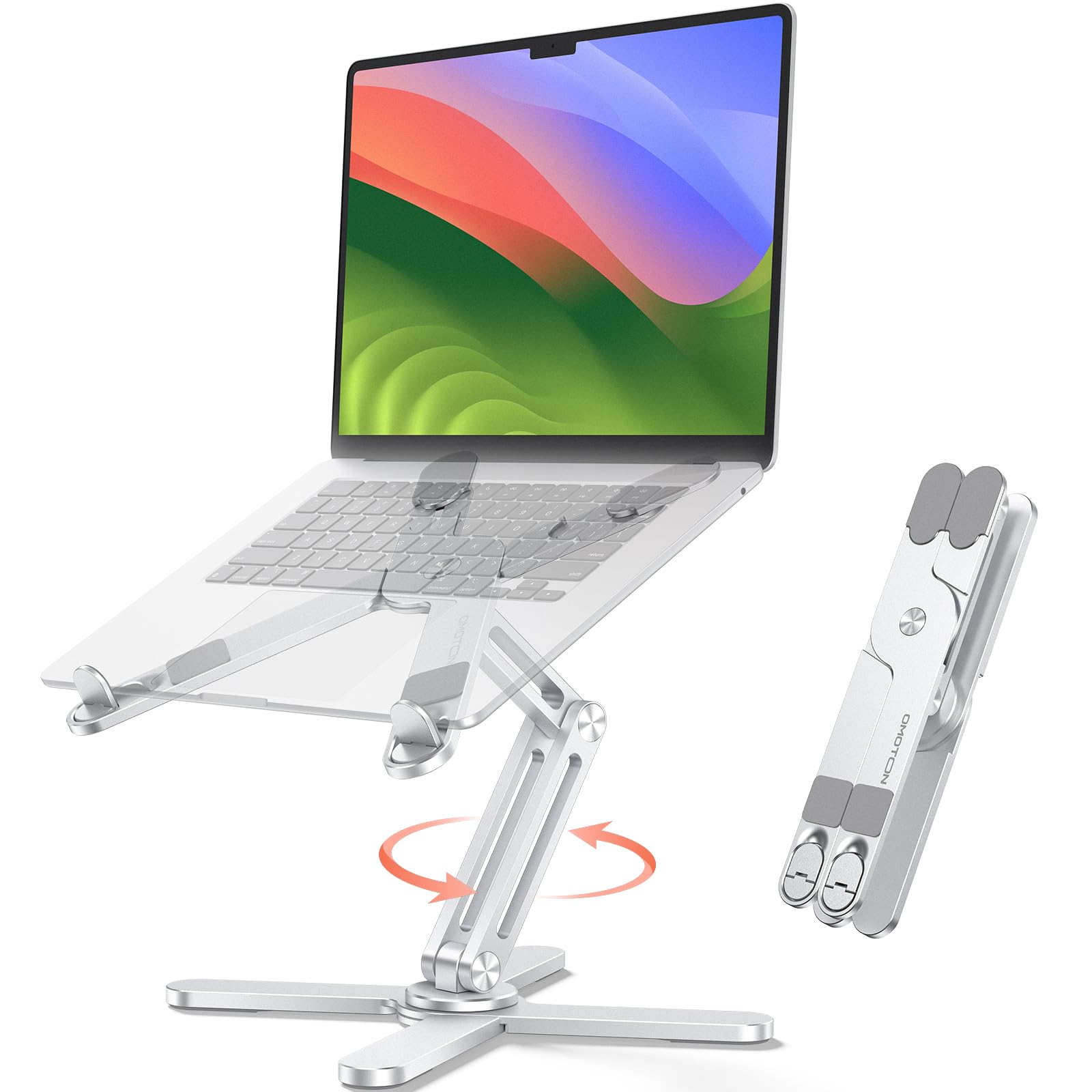
Swing the screen toward someone sitting across the desk and the point of the rotating base becomes obvious: the laptop turns, the stand stays, and you keep your place in the document. It changes how a shared desk works in a way that a taller or cheaper stand does not.

We like it for exactly that, and the friction joints are what make it hold. There are no knobs or screws to hunt for — push or pull the arms and they stay where you put them, which means one hand can reposition the screen while the other stays on the keyboard.

The tightness cuts both ways, and you should know before buying that repositioning takes some muscle. It folds to 11.4 by 1.7 inches and ships with a pouch for the bag, and the X-frame leaves the bottom vents open, which the flat-panel stands cannot manage. A heavy machine can still drag the tilt down at the joints, so set the angle with the laptop already on it.

Pros

  • 360-degree swivel without moving the base
  • Open X-frame keeps vents clear
  • Tool-free friction joints
  • Folds flat with a travel pouch

Cons

  • Tilt joints can slip under a heavy laptop
Our verdict

Our pick for a shared desk: the base swivels a full turn so you can pass the screen across the table without shifting the stand.

Check Latest Price
6

Best Budget Travel

Tonmom Foldable Laptop Stand

91 /100
LBD Score Outstanding

Key details

Folded
10.5 x 1.96 x 0.68 inches
Height
7 levels, 2.78-6.5 inches
Weight
0.53 lb
Laptop Fit
10-15.6 inches
View on Amazon

Half a pound, folded to 10.5 by 1.96 by 0.68 inches: this is the stand that disappears into a backpack and comes out when you are working somewhere that is not your desk. Nothing else in this group packs down anywhere near as small.

It is ABS plastic with a metal extension and silicone pads, and it gives you seven height stops between 2.78 and 6.5 inches. That range covers laptop-flat-on-the-table through laptop-at-eye-level, which the fixed aluminum risers cannot do at any weight.

The light build is the price of that portability. On the lowest notch the front lip does not grip as well as it should, and a laptop can slide forward if the desk gets bumped; the second notch up holds far more securely, so that is where ours lives.

On a permanent desk the aluminum stands here are steadier, and that is the honest ranking. But nothing else in this group folds this small or costs this little, and for a hotel desk or a lecture hall that is the whole argument.

Pros

  • Folds to paperback size at 0.53 pounds
  • Seven height stops from 2.78 to 6.5 inches
  • Silicone pads protect the finish
  • The least expensive stand here

Cons

  • Folds up on itself when lifted by the platform
Our verdict

The one to keep in a bag: at 0.53 pounds it is the lightest stand here, and it folds to a paperback-sized package.

Check Latest Price
7

Best for Standing Height

JOYEKY Rotating Laptop Stand

94 /100
LBD Score Outstanding

Key details

Folded
9.45 x 9.45 x 1.25 inches
Height
Up to 11.81 inches
Rotation
360 degrees
Laptop Fit
10-16 inches
View on Amazon

If you alternate between sitting and standing, this is the stand that keeps up. Extended, the platform reaches 11.81 inches off the desk — the tallest lift here by a wide margin, and high enough to take a laptop screen well past a seated eye line for a stretch of standing work.

The 360-degree swivel sits on a dual-axis base, so the platform turns as well as tilts, which is what you want when you are presenting to someone beside you. It folds to a 9.45-inch square and the aluminum is finished evenly, with grippy pads on both the platform and the feet.

Below the middle of its range the height advantage disappears and the cheaper risers do the same job, so this one earns its place at the top of the range or not at all. Folded, it tucks behind a monitor between sessions, and the pads grip an aluminum lid without marking it.

Pros

  • Reaches 11.81 inches, the highest lift here
  • 360-degree swivel on a dual-axis base
  • Folds to a 9.45-inch square
  • Aluminum frame with grippy pads

Cons

  • Wobble grows at the top of its range
Our verdict

Buy it for the height: nearly a foot of lift for standing stretches, with a swivel base that turns the whole screen.

Check Latest Price
8

Wide Height Range

Amazon Basics Laptop Stand

92 /100
LBD Score Outstanding

Key details

Folded
10 x 8.7 x 1.8 inches
Height
Up to 7 inches
Capacity
11 lb
Laptop Fit
10-15.6 inches
View on Amazon

The hinge on this one arrives stiff — genuinely stiff, the kind you push with both hands and feel resist. That is the first thing to know about it, and for a stand you set once and leave alone it is not a problem at all. It loosens with use and it never drifts.

What the stiffness buys is the widest adjustment range in the group: up to seven inches of height plus tilt on an aluminum frame rated to eleven pounds, with non-slip silicone pads and hooks that keep a laptop from sliding forward. It arrives fully assembled and folds to about 1.8 inches thick for storage.

We rank it below the C1 because the two do the same job and the C1 is friendlier to live with day to day. Where this one earns its place is the extra height and the fold: it reaches higher than the budget aluminum risers and still packs down flat for a drawer.

Pros

  • Up to seven inches of height adjustment
  • Holds up to 11 pounds
  • Comes fully assembled
  • Folds flat for storage

Cons

  • Wobbles when you type on the raised laptop
Our verdict

A sound choice if you want a wide height range and a stand that folds flat; the hinge is stiff, but it holds position once set.

Check Latest Price

How We Tested Laptop Stands

We built the shortlist by reading spec sheets and customer reviews across three broad designs: fixed-angle aluminum risers, folding models in aluminum and plastic, and rotating bases meant for sharing a screen. Anything that capped below a 15.6-inch laptop or looked too flimsy to survive a commute got cut. That left 14 stands, which we used for three months.

Each stand got the same week of work: a full workday of typing with a 13-inch laptop, then a 16-inch one, video calls at the highest setting, and an afternoon on a glass-topped desk where any rock shows up immediately. We typed a paragraph at every height and angle, pressed down on the front lip to see how much it gave, and bumped the desk to check whether the stand crept out of place. For stiffness, we cycled every hinge and rotating joint through its full range 20 times at the start and again at the end, then looked at whether the angle sagged after a day of typing — a few folded themselves flat under the weight.

Since a lot of these get packed up, we folded each one into a backpack next to a charger and a notebook and noted whether it snagged or needed two hands. We also ran a 20-minute video export on the same laptop on every stand and felt the underside of the chassis afterward, which said more about vent placement than the listings did. At the end, we wiped each one down and checked for scratches, fingerprints, and loose joints, then asked whether the extra money bought another adjustment or just a nicer finish.

How to Choose a Laptop Stand

Type on the laptop or on a keyboard

Every raised stand we handled shook a little when we typed on the laptop itself, and that is physics rather than a defect: a platform held a foot above the desk on two arms has leverage, and each keystroke pushes it. If you type on the laptop's own keys, choose a low, shallow-angle stand — the Rain Design mStand is shaped for exactly that — or keep an adjustable stand near its lowest setting. With an external keyboard and mouse, the shake stops mattering and you can raise the screen as high as your neck wants. Settle this first; it eliminates half the list.

Fixed height or adjustable

A fixed riser sets the screen at one height, usually six or seven inches, and leaves the rest to your chair and desk. It is cheaper, stiffer and simpler, and the BESIGN is the best of them here. An adjustable stand adds a hinge that takes two hands and a lifted-off laptop to change — fine if you set it once, irritating if two people share the desk or you alternate sitting and standing. Buy adjustable when the desk is shared or the chair changes; buy fixed when you have sat in the same spot for years.

Fit: size, depth, and the front lip

Most stands here are rated for 10 to 15.6 inches, which covers a 13- or 14-inch laptop with room to spare. A 16- or 17-inch machine needs a wider platform — the Lamicall is rated to 17.3 — or its corners will hang past the front hooks. Depth matters as much: a tray-style stand has to be deeper than your laptop, and a thick gaming machine can sit proud of hooks designed for a MacBook Air. Measure the width and the closed thickness before you order.

Weight, folded size, and how often it moves

If the stand stays put, weight is your friend: a heavier base resists the sideways push of typing, which is why the single-piece aluminum stands feel planted. If it travels, folded size decides it. One stand here packs to 0.68 inches and about half a pound, while the aluminum one-pieces run closer to two inches thick and want the main compartment of a bag rather than the laptop sleeve. Detachable stands break down flat but need reassembly every time.

Frequently Asked Questions

Final Verdict

For a desk where an external keyboard does the typing, the Nulaxy C1 is the stand we recommend: it adjusts, it holds a 16-inch laptop steady, and it folds flat when the desk has to become something else. If you type on the laptop's own keys, no adjustable stand will feel solid, and the Rain Design mStand is the one to buy — a single piece of aluminum set at an angle that stays put under your hands. For a 17-inch machine, go straight to the Lamicall.