Best HDMI Switches of 2026

The night I added a soundbar to my living room, I discovered my TV had one HDMI port left and three devices fighting for it. An HDMI switch fixes that: one cable to the TV, everything else into the box, and a remote or a button to choose which device gets through. What it doesn't guarantee is that your picture, sound, or settings come through intact.

I've spent three months with 14 of them, cycling consoles, streaming sticks, laptops, and a projector through one television. The gap between good and maddening is wider than the price suggests, and bandwidth is the first thing to sort out: an 8K-rated box only earns its keep if you own a current-gen console, while a plain 4K@60Hz unit is plenty for a streaming stick and a cable box.

Auto-switching, which is supposed to pick the active device for you, is magic until the box guesses wrong mid-movie and you're hunting for the remote. Every switch below handles the basics; the picks that made the cut stayed reliable once the novelty wore off.

1

Best Overall

Anker HDMI Switch 4-in-1

88 /100
LBD Score Excellent

Key details

Inputs
4
Switching
IR remote and button
Max Resolution
4K@60Hz
Supported Formats
HDR, 3D, Dolby, DTS
View on Amazon

The Acer 5-in-1 gives you five inputs for the same money as this Anker's four, and on paper that is the better deal. We still hand the Anker to most people. What you are buying is a switch that behaves: 4K at 60Hz with HDR, Dolby, and DTS passing through, one button on the front, an IR remote in the box, and a picture that does not blink every few minutes. In a category where the failure that ruins the purchase is a signal that cuts out, boring is the feature.

Four inputs covers the realistic living-room case — a console, a streaming stick, a laptop, and one slot left over — and everything stays connected, so moving from a game to a video call is a button press rather than a reach behind the TV. The remote got more use than the front button in our setup, mainly because the box always ends up somewhere you cannot see. Buy batteries with it; they are not in the box.

Two things it does not do. There is no automatic switching, so nothing happens when you wake a device and you pick the input yourself, and there is no CEC, so your TV's remote will not do it for you either. That is a fair trade in a game room where you are holding a controller anyway. In a living room where the whole point is never touching anything, the UGREEN 8K switch senses an active source and moves on its own.

One physical annoyance: the jacks sit close together, and a chunky HDMI connector crowds its neighbor. Slimmer cable ends solve it, and it is worth checking the cables you already own before the return window closes. This Anker also prefers short runs, so do not park it at the end of a long in-wall line to a projector. In the box you get a five-foot USB-C charging cable and no HDMI cables at all.

Pros

  • Four inputs with a remote included
  • Passes 4K60, HDR, and Dolby cleanly
  • Everything stays connected, no cable swapping

Cons

  • No auto-switching or HDMI-CEC
  • No HDMI cable in the box
Our verdict

The switch we tell most people to buy: four inputs, a working remote, and steady 4K60 — provided nobody needs it to switch itself.

Check Latest Price
2

Best for 8K

UGREEN 8K HDMI Switch 5-in-1

83 /100
LBD Score Excellent

Key details

Inputs
5
Bandwidth
40Gbps
Switching
IR remote, 33 ft range
Max Resolution
8K@60Hz / 4K@240Hz
View on Amazon

Forty gigabits per second is the number that matters here. That is the headroom that lets this UGREEN carry 8K at 60Hz or 4K at 240Hz from a current console or graphics card without the handshake collapsing, and it is why the box is worth its premium over the 4K60 switches.

Five inputs, one output, an aluminum body that does not feel like an afterthought, and a remote with a listed 33-foot range. Five sources behind a TV means somebody is crawling back there regularly, and the remote earns its spot on the coffee table within a week. CEC is supported too, so a source that speaks it can bring the TV along when it wakes.

Automatic switching is where we temper the enthusiasm. It works more often than not, but it does not always land on the input you meant, and a second or two of black while it decides is not what you want mid-match. Signal can also drop out briefly under load, sometimes long enough to trip a monitor's input search and send it hunting. We ended up on the remote and left it there.

It also needs its own power. A plug is included, but a free outlet behind the TV is not something every setup has, so check before you commit. Batteries for the remote and an output cable are both missing from the box, which at this price feels stingy on a product that otherwise looks and feels considered.

Pros

  • Five HDMI 2.1 inputs at 40Gbps
  • 8K60 and 4K240 for current consoles
  • Remote rated to 33 feet

Cons

  • Auto-switching can land on the wrong input
  • Needs external power, and the box is bare
Our verdict

Our pick for an 8K or 4K120 display: five HDMI 2.1 inputs, 40Gbps of headroom, and a remote that reaches the couch.

Check Latest Price
3

Best for Lots of Devices

Acer HDMI Switch 5-in-1

82 /100
LBD Score Excellent

Key details

Inputs
5
Bandwidth
18Gbps
Switching
IR remote and buttons
Max Resolution
4K@60Hz
View on Amazon

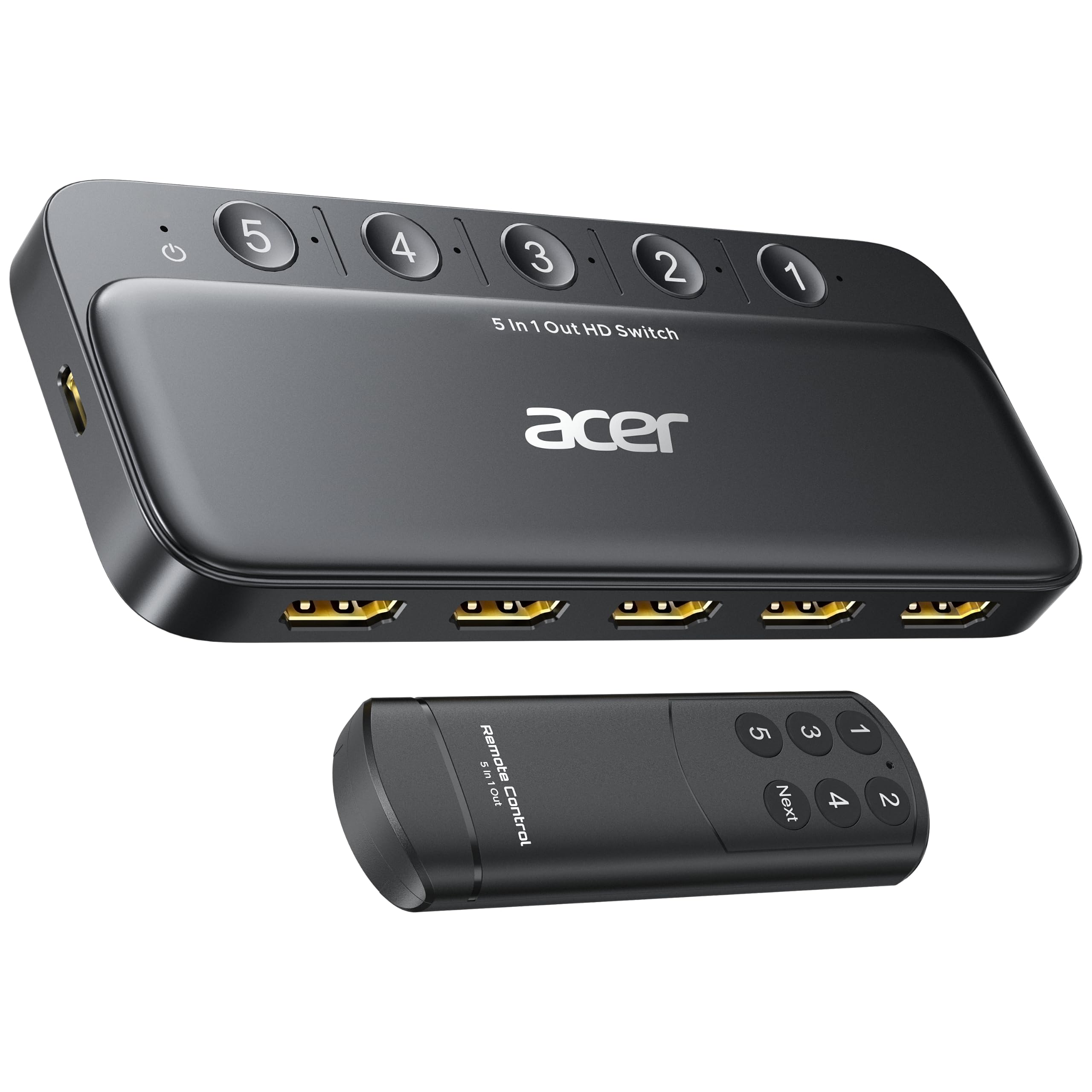
Five inputs for the price of four is the entire pitch, and it holds. Acer's 5-in-1 does 4K60 with HDR, Dolby Atmos, and DTS, ships with a remote and a row of five LED indicators that tell you which port is live, and costs what the four-port Anker costs. If your cabinet holds a console, a streaming box, a Blu-ray player, a laptop, and a spare, this is the least expensive way to stop swapping cables.

The remote is better than it has to be. The wide fisheye IR receiver does not demand a clean line of sight, and a Next button cycles inputs instead of making you hunt for the right number. The indicators are labeled to match, so input three on the remote is input three on the box — a small thing that saves real guessing when the room is dark.

Where it slips is consistency. When the handshake lands the picture is excellent, and when it does not there is nothing to watch, and this is the model in our group where the outcome varies most from one unit to the next. We rank the Anker first for exactly that reason and point to this one when the fifth port genuinely is not negotiable.

The box is light, the metallic-look shell is plastic, and that is fine for something that lives out of sight. You get a USB-A to USB-C power cable and a manual; the wall adapter, the remote battery, and every HDMI cable are sold separately. Add those to the total before you decide this is the cheaper way to five ports.

Pros

  • Five inputs at a four-port price
  • 4K60 with HDR and Dolby Atmos
  • Remote with a one-button input cycle

Cons

  • Reliability varies from unit to unit
  • No HDMI cable, adapter, or remote battery
Our verdict

Buy it when five devices need a home: a fifth input for the price of four, with the caveat that this model's track record is less even.

Check Latest Price
4

Best Budget

Acer Bidirectional HDMI Switch

87 /100
LBD Score Excellent

Key details

Power
Passive, optional USB-C
Inputs
2 (bidirectional)
Switching
Push button
Max Resolution
4K@60Hz
View on Amazon

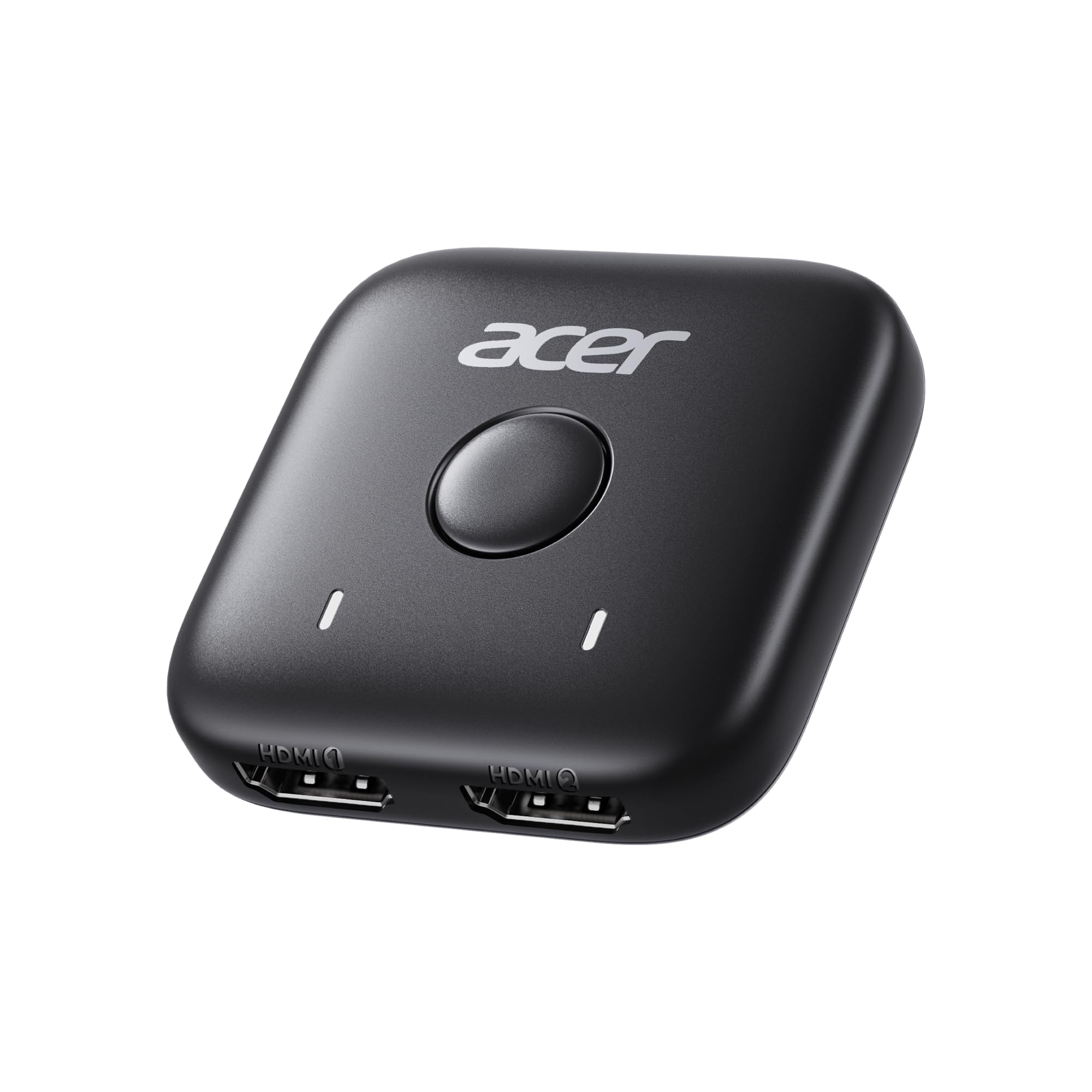
Two inputs, one button, no remote, no power supply. The Acer 2-in-1 is what you buy when the problem is small — a monitor with a single HDMI port and a laptop and a console that both want it, or a TV fed by two sources and nothing else.

It is small enough to tape to the back of a monitor, and it draws its power from the connected cables, which means no outlet to find and no adapter to lose. What we like most is the bidirectional part: run it the other way and one source feeds either of two displays, so a laptop moves between a desk monitor and a TV without a dock. Press the button, the light moves, done. Just know it is one screen at a time, not both.

What it gives up is reach. No remote means no switching from the couch, and two ports leave no room to grow. Bus power also makes it fussy about cables: a long or thin HDMI cable can be the difference between a picture and none, and there is an optional USB-C power port for a source that needs the help. The cable for that port is not included.

Treat it as a desk accessory rather than a home-theater component. On a dorm desk, a shared office monitor, or a guest-room TV it does the whole job for very little, and since nothing needs an outlet it is the one switch here you can carry to another room and use immediately.

Pros

  • Tiny, and needs no outlet
  • Works in either direction
  • One button, clear status light

Cons

  • Two inputs and no remote
  • Optional USB-C power cable not included
Our verdict

The pick for a two-device desk or a single-port monitor: tiny, cordless, bidirectional, and the cheapest way to add an input.

Check Latest Price
5

Cheaper 8K Entry

JCHICI 8K HDMI Switch 4-in-1

85 /100
LBD Score Excellent

Key details

HDCP
2.3
Inputs
4
Bandwidth
48Gbps
Max Resolution
8K@60Hz / 4K@120Hz
View on Amazon

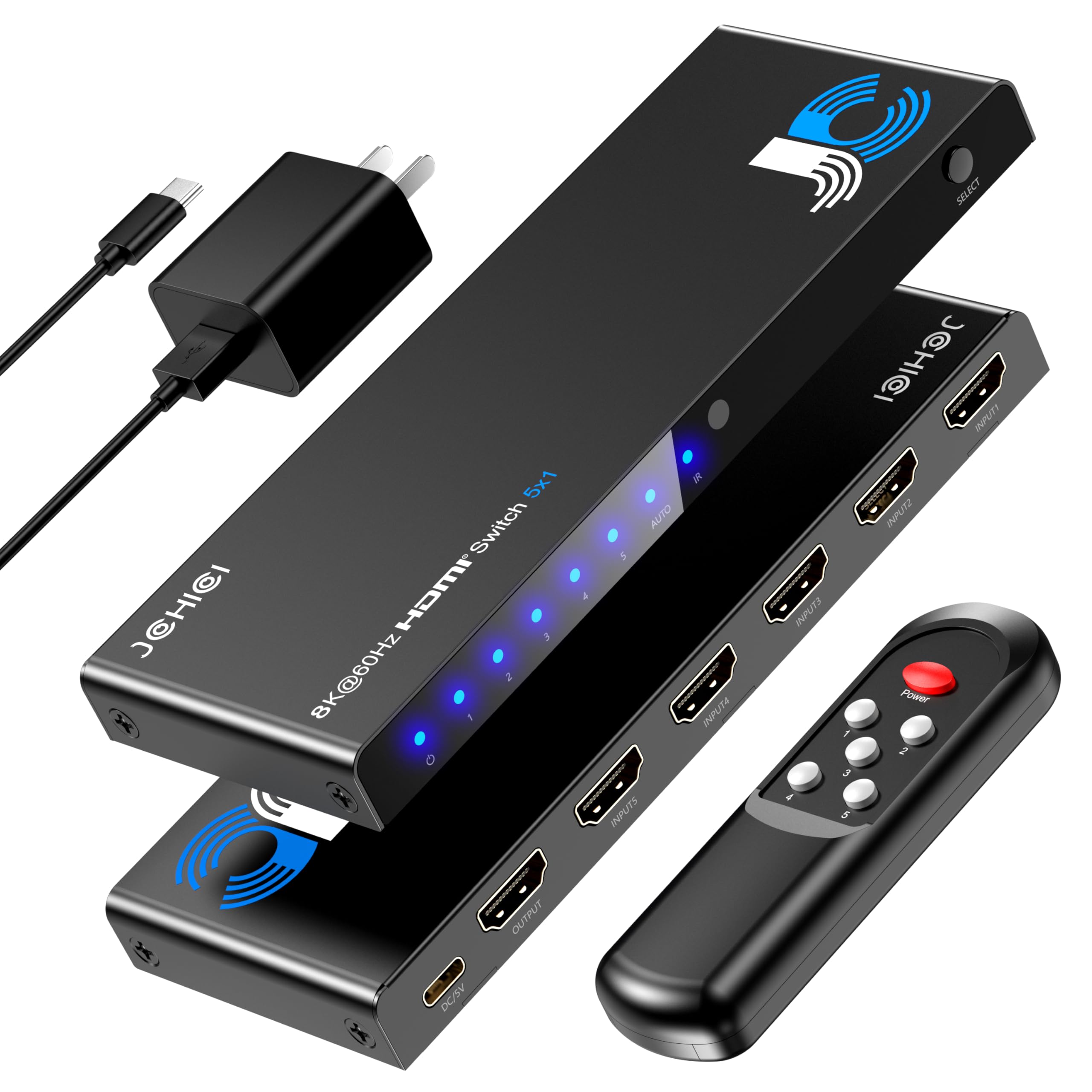
The fine print on this one is the honest part: JCHICI states outright that both the source and the display have to support 8K bandwidth before you get 8K. Below that ceiling it is flexible — 4K at 120Hz, 2K at 240Hz — and VRR, ALLM, and QFT pass through, so a current console keeps its low-latency modes instead of losing them at the switch.

Four inputs, HDCP 2.3, 48Gbps, and Dolby Atmos over a slim aluminum slab that hides behind a wall-mounted TV more easily than the UGREEN's wider body. It is the plainest-looking box in this group and the easiest to forget about, which is roughly the job description.

Our reservation is about how it behaves when it is out of sight. Automatic switching is convenient when it guesses right and irritating when it does not, and the correction is a button press on a box you cannot see. That is the argument for spending a little more on the UGREEN, with its longer remote and sturdier feel; the JCHICI is simply the cheaper way into the 2.1 bandwidth.

Where it fits: a PS5 or a Series X, a 4K120 display, and three other things. If your TV tops out at 4K60, skip it — the Anker does the same visible job, and 8K would be a badge you pay for without ever seeing it.

Pros

  • 8K60 and 4K120 for less than the other 8K picks
  • VRR, ALLM, and QFT pass through
  • Slim body hides behind a TV

Cons

  • Auto-switching sometimes needs a manual correction
  • 8K needs an 8K source, display, and cable
Our verdict

The value route to 8K: four HDMI 2.1 inputs, 4K120, and VRR, for less than the other 8K picks here.

Check Latest Price
6

No-Surprise Switching

JCHICI 8K HDMI Switch 5-in-1

85 /100
LBD Score Excellent

Key details

Inputs
5
Bandwidth
48Gbps
Switching
IR remote, manual lock
Max Resolution
8K@60Hz / 4K@120Hz
View on Amazon

This is the switch for someone who does not want the switch making decisions. JCHICI's 5-in-1 includes a manual-lock mode that pins the input where you put it, which matters in a game room where a background device waking up can otherwise steal the screen mid-match. Five HDMI 2.1 inputs, 8K at 60Hz, 4K at 120Hz, HDR10+ and Dolby Vision, 48Gbps: the full 2.1 feature list rather than a partial one.

The remote is the practical reason it costs what it does, with a listed 26-foot range for a room where the TV is on one wall and the couch is on the other. Auto-source detection is there too, and unlike most of the boxes in this group you can turn it off and leave it off.

The premium is the honest sticking point. Nothing here improves a 4K60 setup — if that is your TV, the Anker does the same visible job for much less — and five inputs is more than most people fill. The money is justified by a current console, a 4K120 or 8K display, and a household where more than one person turns things on.

Pros

  • Manual lock stops surprise input changes
  • Five HDMI 2.1 inputs with HDR10+ and Dolby Vision
  • Remote rated across a large room

Cons

  • The most expensive switch in this group
  • Five 8K inputs is more than a 4K60 setup needs
Our verdict

For the game room that cannot afford a surprise: five HDMI 2.1 inputs and a manual lock that keeps the input where you put it.

Check Latest Price

How We Tested the Best HDMI Switches

We started with every switch we could find that had at least three inputs, supported current HDCP and HDR standards, and shipped with a remote, then narrowed to a deliberate mix of plain 4K@60Hz boxes and higher-bandwidth 8K and 120Hz models. Reviews flagged units that dropped signal or died early. Fourteen made the cut.

Each switch went into the same living room setup — a 4K TV, two game consoles, a streaming stick, a laptop for video calls, and a projector we rotated in — with a soundbar handling audio. Every unit ran as the only switch in the chain for at least a week, used the way anyone would: a movie at night, a console in the evening, a call before work.

Switching speed was measured in black-screen seconds, meaning how long the picture took to reappear after we pressed a button or woke a device. Auto-switching got its own test: every source left powered on for a couple of days, then woken one at a time to see whether the box chose the source we wanted or jumped to whatever stirred first. For signal quality, we plugged a console straight into the TV, noted the resolution and refresh rate it reported, then repeated the run through the switch, watching an hour of gameplay for flicker or dropouts. A protected streaming app on each box confirmed the HDCP handshake held, and we checked that surround sound reached the soundbar instead of being downmixed to stereo.

The remotes got the least scientific but most revealing test: aimed from the far corner of the room, at an angle, in the dark, and through a couch cushion. We plugged and unplugged cables into every port dozens of times to see which jacks loosened up, and noted which units arrived without a power adapter or batteries.

How to Choose an Hdmi Switch

Count inputs, not devices

A switch multiplies a port rather than sharing it, so every source that needs to be available at the same time needs its own input. The streaming stick, the console, the work laptop, and the Blu-ray player that gets used twice a year — that last one is a device, not a reason to buy five ports. Count what is plugged in and powered on in a normal week, then add one for growth.

Two inputs covers a monitor shared by a laptop and a console. Four is the comfortable living-room number, and it is why the Anker is our default. Five is for people who genuinely have five things, and the Acer 5-in-1 gives you that fifth port for the same money as the four-port Anker. Port count is the one specification you cannot add later.

Match the bandwidth to your display

4K at 60Hz runs on HDMI 2.0-class bandwidth, around 18Gbps. 8K at 60Hz or 4K at 120Hz needs HDMI 2.1 and its 40 to 48Gbps, and that is the only reason to pay the premium the 8K switches here command. A console that can output 4K120 is wasted on an 18Gbps box; a 4K60 television gains nothing from a 48Gbps one.

The trap is buying the switch first and the cables second. An 8K switch with a 2.0 cable on either side is a 4K60 switch, and the JCHICI listing says so plainly: source, display, and cable all have to support 8K. Check what your TV accepts at 4K in the console display settings. If the answer is 60Hz, buy a 4K60 switch and spend the difference on cables.

Decide how you want to switch

Three mechanisms, and they are not interchangeable in daily use. A button on the box is fine on a desk and useless taped behind a wall-mounted TV. A remote fixes that, which is why we weight it heavily: the Anker, the Acer 5-in-1, and both JCHICIs include one, while the Acer 2-in-1 does not, which limits it to desk duty.

Automatic switching is the third option and the one people have opinions about. It follows whichever source wakes up, which is lovely until a background device grabs the screen; the JCHICI 5-in-1 can lock the input instead. CEC, where a switch supports it, lets your TV remote do the switching, so look for it if one remote on the table matters to you.

Plan for power and what is in the box

Some switches are passive, drawing what they need from the HDMI cables. Others take a USB power feed, and a few want a proper adapter. None of that is a problem until you are behind a TV with no free outlet, so check before you buy, and remember that a charging cable in the box is not the same as a charger.

Then add up the accessories. HDMI cables are rarely included, remote batteries almost never are, and a switch with a fixed pigtail cable saves you one purchase at the cost of replacing the whole unit if that cable fails. Port spacing matters too: several boxes here set the jacks close enough that two chunky connectors will not sit side by side.

Frequently Asked Questions

Final Verdict

The Anker 4-in-1 is the switch to put behind most TVs. Four inputs, a remote you will actually use, 4K60 with HDR and Dolby, and none of the dropouts that make people give up on a switch — at a price that undercuts every 8K box here.

Buy the UGREEN 8K 5-in-1 instead if your display does 4K at 120Hz or you are wiring a current console that needs the bandwidth. Buy the Acer 5-in-1 if a fifth input is the thing standing between you and a cabinet you never open again.