Best GPUs for 4K Gaming of 2026

At 4K, the thing that ends a gaming session early usually isn't the GPU core. It's memory, heat, or noise, roughly in that order — a card can post beautiful numbers in a benchmark and then, three hours later, have its fans roaring and its boost clock quietly sagging. I wanted to know which cards hold their frame rates at 4K without becoming the loudest component in the case, so my team spent eight months living with eight of them rather than running a few loops of a canned benchmark.

Two things are worth knowing before you read a single spec sheet: 16GB has become the sensible floor for 4K, and a 12GB card should be priced like the compromise it is. The cooler matters as much as the chip, too — a well-cooled card that boosts steadily feels faster than a hotter one with a bigger number printed on it. And yes, looks count now that most of us view these through tempered glass. Below are the ones I'd genuinely buy.

1

Best Overall

ASUS Prime RX 9070 EVO

92 /100
LBD Score Outstanding

Key details

GPU
Radeon RX 9070
Memory
16GB GDDR6
Slot Width
2.5-slot
Card Length
12 in
View on Amazon

The card we keep steering people toward is the least dramatic one on this page. The Prime RX 9070 EVO is 12 inches long, 2.5 slots thick, and carries 16GB of GDDR6, so it slides into mid-towers that would need surgery for a 13-inch 5070 Ti, and it does the 4K job without flagship money. If you want one card that covers a 4K/60 panel now and a high-refresh 1440p screen later, this is the one we name first.

We spent most of our time with it on the two things that decide whether a 4K card is pleasant to own: heat and noise. The 2.5-slot heatsink, with a phase-change thermal pad instead of ordinary paste, keeps the GPU composed through long sessions, the fans stop entirely at idle, and the dual-ball bearings on the Axial-tech fans are rated for twice the life of conventional sleeve designs. Dual BIOS is the feature you forget about until a driver update misbehaves, and then it's the difference between a ten-minute switch and a lost evening.

Looks are usually the least useful thing to write about, but this one earns a mention: no RGB, a matte shroud, and a card that reads as hardware rather than a toy. In a windowed build it looks deliberate rather than unfinished, and we appreciated that more than we expected to.

The honest caveats are small. It's a 9070, not a 9070 XT, so the XT cards here pull ahead in the heaviest 4K scenes and you'll lean on FSR a little sooner. It also costs more than the Challenger, which runs the same chip. What you're paying for is the cooler, the compact body, and the dual BIOS — and on a card that's going to live in your case for years, that's a fair trade.

Pros

  • 16GB GDDR6 clears 4K texture loads
  • 12-inch, 2.5-slot body fits ordinary mid-towers
  • Zero-RPM idle and quiet under load
  • Dual BIOS and a clean RGB-free design

Cons

  • Not the fastest 4K card in this group
  • Costs more than the other RX 9070 here
Our verdict

Sixteen gigabytes, a 12-inch 2.5-slot body that fits a normal mid-tower, and quiet running make this the 4K card we put in most builds.

Check Latest Price
2

Best Value

ASRock RX 9070 Challenger

91 /100
LBD Score Outstanding

Key details

Memory
16GB GDDR6
Card Size
290 x 123 x 51 mm
Power Connector
Two 8-pin
Recommended PSU
700W
View on Amazon

Two numbers decide whether this card goes into your case: 290 mm of length and 51 mm of thickness. The Challenger is a 2.5-slot card with two 8-pin connectors and a 700W system recommendation, which is the friendliest power story on this page — no 12V-2x6 adapter to route, no third slot sacrificed, no guessing about whether the side panel closes.

What we didn't expect at this price is how little the savings cost you day to day. It's the same 16GB and the same RDNA 4 chip as our top pick, with a slightly lower 2520 MHz factory boost, a 0dB fan-stop mode at idle, and a cooler that holds up under sustained load rather than getting ragged. Nothing about it feels like the cheap one in the lineup.

The trade is the chip, not the build. In the newest titles at 4K you'll lean on upscaling sooner than you would with an XT card, and the frame-rate ceiling sits a step lower. On a 4K/60 display that's a step you mostly won't notice, and it's the step that saves you the most money on this list.

For a first 4K build, or a second card going into a living-room PC, this is where the money goes furthest. We keep coming back to it because it refuses to feel like a compromise — it just does less of the bleeding edge.

Pros

  • Lowest-priced 16GB card here
  • 290 mm, 2.5-slot body, two 8-pin power
  • Quiet at load with zero-RPM idle
  • Factory overclock to 2520 MHz

Cons

  • Non-XT chip caps 4K frame rates
Our verdict

Buy this if the build has to come in at the lowest spend here: same 16GB and same 9070 chip as our top pick, with power connectors your old supply already has.

Check Latest Price
3

Best for High-Refresh 4K

GIGABYTE RX 9070 XT Gaming OC

90 /100
LBD Score Outstanding

Key details

GPU
Radeon RX 9070 XT
Memory
16GB GDDR6
Boost Clock
3060 MHz
Card Length
11.34 in
View on Amazon

There's a step change between the 9070 cards here and the XT versions, and you feel it in the heaviest 4K scenes. The Gaming OC runs the XT chip at a 3060 MHz boost with 16GB on a 256-bit bus, and in the demanding titles we put it through, the extra headroom showed up as settings you can leave switched on rather than frames you have to count.

Cooling is where this card earns its place. WINDFORCE puts three fans over a dense fin stack with server-grade thermal gel instead of pads, and the result is a card that holds its clocks without heat becoming the story of the session. GIGABYTE's out-of-box fan curve leans hard toward cooling, though, so the fans ramp further than they need to under sustained load — a custom curve in the software is the first thing we set on a card like this, and it turns noticeable into inaudible.

At 11.34 inches it's as compact as any 9070 XT here, which matters more than the spec sheet suggests: a decade-old mid-tower will take it, and you're not moving drive cages to make room. The RGB is there if you want it and off if you don't, which is the correct way for a card to handle lighting.

What keeps it behind our top pick is price transparency rather than performance — and what puts it ahead for the right buyer is the XT chip. If your monitor runs at 144Hz or above and you want to use it, this is the card on this page that does it without a flagship budget.

Pros

  • XT chip at 3060 MHz with 16GB
  • Cooler holds clocks without heat drama
  • 11.34-inch body fits older cases
  • RGB you can switch off

Cons

No notable drawbacks to flag.

Our verdict

We point high-refresh 4K builds here — the XT chip at 3060 MHz, 16GB, and a cooler that keeps its clocks, in a body short enough for older cases.

Check Latest Price
4

Best for Ray Tracing

GIGABYTE RTX 5070 Ti Gaming OC

88 /100
LBD Score Excellent

Key details

GPU
GeForce RTX 5070 Ti
Memory
16GB GDDR7
Boost Clock
2600 MHz
Card Length
13.46 in
View on Amazon

Ray tracing at 4K is the one place where the software stack does as much work as the silicon. DLSS 4 with frame generation is why a 16GB 5070 Ti holds 4K ultra in titles that would otherwise need settings turned down, and it's why this card keeps a place on a list where the AMD options cost less.

What surprised us is how little noise it makes while doing that. WINDFORCE keeps the three fans lazy, temperatures stay low through long sessions, and coil whine hasn't been part of the story with this one. GIGABYTE also includes a support bracket, which isn't padding: a 13.46-inch, 3.9-pound card will sag over a year or two, and a bracket is the cheapest insurance in a build.

Size is the thing to check before you order. At 13.46 inches it's the second-longest card in this group behind the Sapphire 7900 XT, so measure from the back of the case to the front fan and account for any radiator. This is not a card that squeezes.

The premium is the honest trade. You're paying for the ray-tracing and upscaling stack rather than raw raster value, and if your 4K library leans on ray-traced titles, that money buys something you'll see on screen every session. If it doesn't, the 9070 XT cards here give you more frames for the spend.

Pros

  • 16GB GDDR7 with DLSS 4 frame generation
  • Quiet, cool WINDFORCE cooler
  • Support bracket included

Cons

  • Second-longest card here at 13.46 inches
  • Premium money for the ray-tracing advantage
Our verdict

For ray-traced 4K with DLSS doing half the work, this is the card we pick: 16GB GDDR7, a quiet cooler, and a bracket to hold its 13-inch body.

Check Latest Price
5

Best for Small Cases

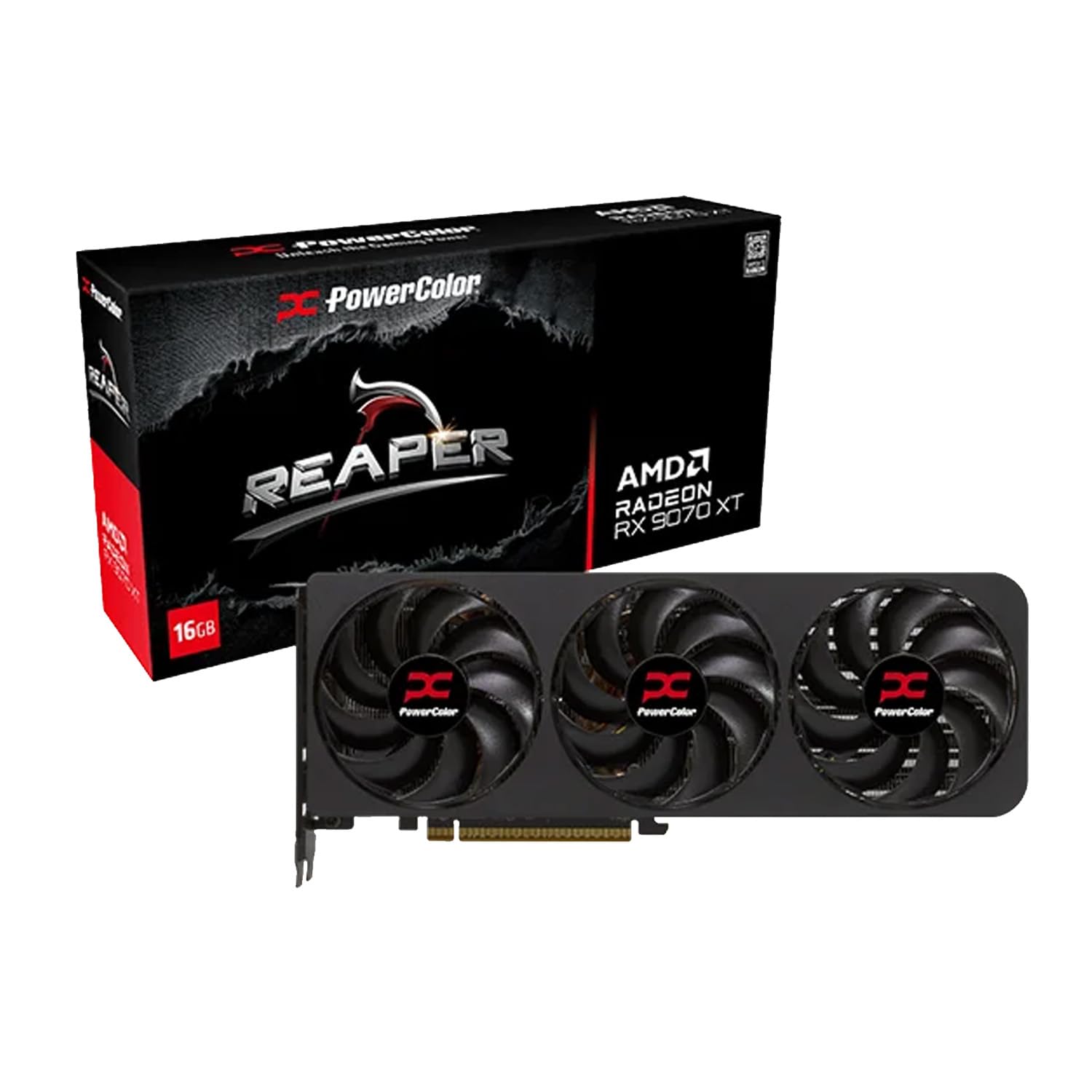
PowerColor Reaper RX 9070 XT

85 /100
LBD Score Excellent

Key details

Memory
16GB GDDR6
Card Size
289 x 111 x 41 mm
Minimum PSU
750W
Power Connector
Two 8-pin
View on Amazon

A 41 mm card shouldn't be able to carry an XT chip and stay quiet, and that's the assumption we went in with. The Reaper measures 289 x 111 x 41 mm with two 8-pin connectors and a 750W recommendation — genuinely two-slot territory — and it holds its clocks without turning into a hairdryer.

The cooler is the whole trick here: two fans, a heatsink squeezed into that 41 mm, and a fan curve that errs toward silence rather than bragging rights. In a case with real airflow it stays composed and you forget it's there, which is the highest compliment a card in a small build can get. Give it airflow; a sealed box undoes most of what the cooler is doing.

What you give up for the size is thermal headroom. There's less heatsink here than on the full-size XT cards, so heavy overclocking isn't the game — this is a card for someone who wants XT frame rates in a small box, not a weekend project. It's also the cheapest route to XT performance on this page, which matters when the alternative is dropping a size class.

Pros

  • 289 mm, 41 mm body is true two-slot
  • Two 8-pin power, no adapter needed
  • Quiet for a cooler this thin
  • Full 16GB and XT clocks

Cons

  • Less overclocking headroom than the big XT cards
Our verdict

Our pick for tight builds: a 289 mm, 41 mm-thick 9070 XT that stays quiet and holds its clocks where a full-size card won't fit.

Check Latest Price
6

Quiet 4K Builds

Sapphire Nitro+ RX 9070 XT

87 /100
LBD Score Excellent

Key details

GPU
Radeon RX 9070 XT
Memory
16GB GDDR6
Weight
5.73 lb
Boost Clock
3060 MHz
View on Amazon

Picking this card up is a different experience from the rest of the list: 2.6 kg, a steel frame around the cooler, and a magnetic backplate that covers the power connectors so you're not looking at a cable nest through your side panel. Sapphire clearly spent money where you can feel it.

The cooler is the reason it's here. A large heatsink, three fans, and a card that stays quiet under sustained 4K load — this is the one we reach for when the build is going to sit on a desk within arm's reach. It also gives you two HDMI and two DisplayPort outputs, one more of each than most cards in this group, which is the difference if you're running a TV and a monitor off the same machine.

The premium is the caveat. It's the priciest 9070 XT on this page, and the extra buys finish and cooling rather than frame rates — the GIGABYTE card runs the same chip at the same 3060 MHz boost. Weigh that honestly before you fall for the way this thing looks, because the way it looks is genuinely persuasive.

Pros

  • Steel-framed cooler with a magnetic backplate
  • Quiet under sustained 4K load
  • Two HDMI and two DisplayPort outputs
  • 3060 MHz boost with 16GB GDDR6

Cons

  • Priciest 9070 XT here for the same chip
  • 2.6 kg is the heaviest card in this group
Our verdict

The best-finished 9070 XT here — heavy, quiet, and beautifully cooled — if you're happy paying for the cooler rather than the frame rate.

Check Latest Price
7

VRAM-Heavy 4K

Sapphire RX 7900 XT

83 /100
LBD Score Excellent

Key details

Memory
20GB GDDR6
Interface
PCIe 4.0
Slot Width
3-slot
Card Length
14.5 in
View on Amazon

Twenty gigabytes on a 320-bit bus is more memory than anything else on this page, and it changes what you can leave switched on at 4K: high-resolution texture packs, large frame buffers, and the kind of creative work that eats VRAM before it ever touches the GPU.

It's an older generation, and that shows up in the details rather than the frame rate. PCIe 4.0 instead of 5.0, RDNA 3 rather than RDNA 4, and a three-slot, 14.5-inch body that will not fit in the case most people bought for a 3070. If you have the room and the power, it's still a lot of card.

The detail we didn't expect to care about is the USB-C output sitting next to the HDMI and the two DisplayPorts. That's a genuinely useful port for a VR headset or a USB-C display, and nothing else in this group has one. If that's your setup, it settles the decision on its own.

For pure 4K gaming, the newer cards here are the better buy — they run cooler for the same frame rate and they'll hold value longer. This one earns its place on memory and ports, and on the fact that no other card here gives you 20GB.

Pros

  • 20GB GDDR6 on a 320-bit bus
  • USB-C output alongside HDMI and DisplayPort
  • Three-fan cooler on a 3-slot body

Cons

  • 14.5 inches and three slots need a large case
  • RDNA 3 and PCIe 4.0 put it a generation behind
Our verdict

Twenty gigabytes of VRAM and a USB-C output are the reasons to buy this over newer cards; for pure 4K frame rate, the 9070 XT pair is the better spend.

Check Latest Price
8

Small Nvidia Builds

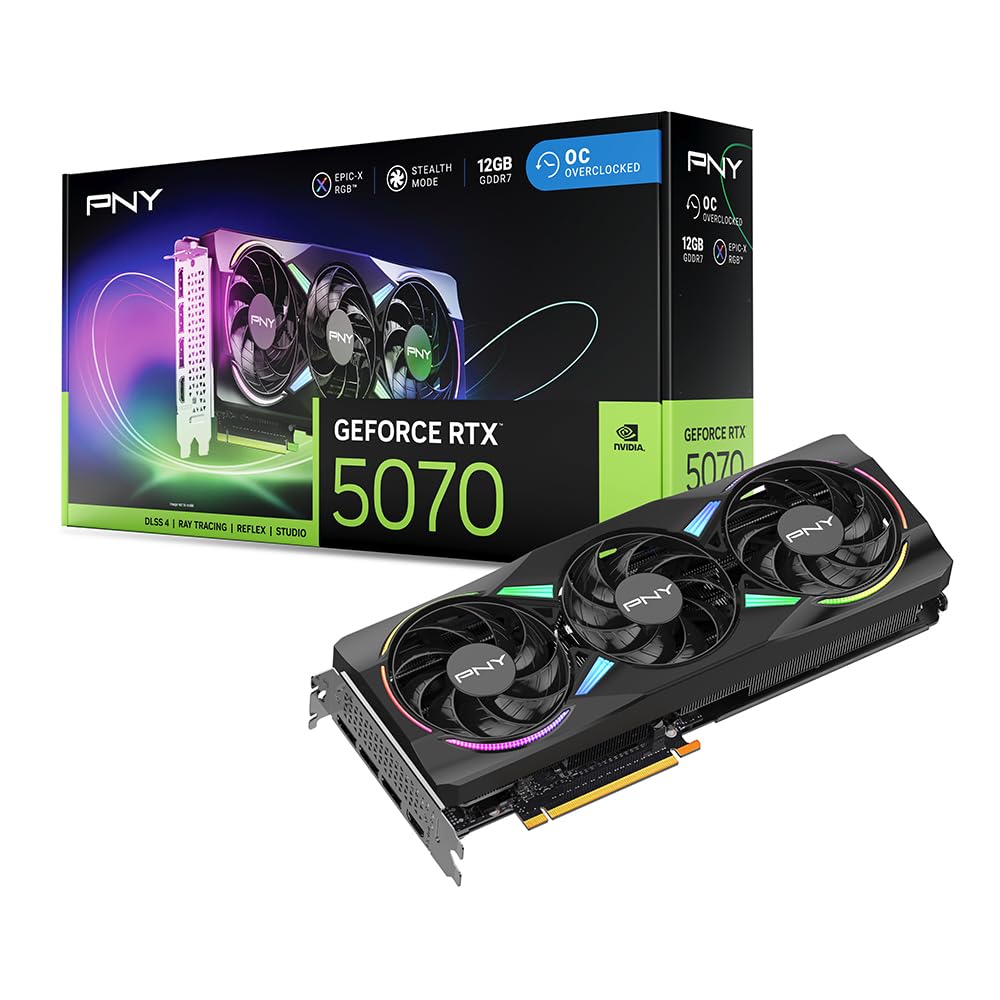
PNY RTX 5070 Epic-X

90 /100
LBD Score Outstanding

Key details

GPU
GeForce RTX 5070
Memory
12GB GDDR7
Slot Width
2.4-slot
Card Length
11.8 in
View on Amazon

SFF-Ready is the phrase on the box, and for once it means something: 11.8 by 4.7 inches, 2.4 slots, three 90 mm fans, and a 16-pin connector with an adapter that splits to two 8-pin cables. If you've been putting off a small-form-factor build because every card worth owning is a foot long, this is the one that changes the maths.

Here's the honest position, though: 12GB of GDDR7 on a 192-bit bus is a 1440p card that can do 4K with DLSS doing some of the work. In a 4K ultra scene with ray tracing on, you'll be lowering texture settings or leaning on frame generation. We recommend it for small builds and for people who already know they'll use upscaling — not as a straight-ahead 4K card.

Where it's genuinely good is the fit and the temperament. At 11.8 inches it's the shortest Nvidia card here, 250W of board power leaves room in a modest build, and the triple-fan cooler keeps it quiet while the dual-ball bearings do the long-haul work. Bandwidth lands at 672 GB/s, which is plenty for what this card is for.

Buy it with your eyes open about memory and it's the least fussy Nvidia option on the page. Buy it expecting 4K ultra with ray tracing and no upscaling and you'll be disappointed by a card that's doing exactly what it was built to do.

Pros

  • SFF-ready at 11.8 inches and 2.4 slots
  • 12GB GDDR7 at 672 GB/s
  • 250W board power with a two-8-pin adapter
  • Quiet triple-fan cooler

Cons

  • 12GB is tight for 4K ultra with ray tracing
  • Older supplies need the included adapter
Our verdict

The Nvidia card for small cases and 4K with DLSS on — 11.8 inches, 12GB, and 250W, provided you accept 12GB as the limit.

Check Latest Price

How We Tested These Cards at 4K

The shortlist started with hard filters: current-generation cards with at least 12GB of memory, PCIe 5.0, and display outputs that can actually feed a high-refresh 4K panel. From there I read spec sheets and owner reports, then cut anything that demanded an enormous power supply or a slot thickness most mid-tower cases won't clear.

Eight cards came in, and they stayed in my own machine and on the test bench for eight months. Each one ran the same handful of games at 4K with settings turned up, and I logged average frame rates alongside the 1% lows — a card that averages 70 fps and dips to 40 feels worse than one that sits flat at 60. I measured power draw at the wall with a meter, and test-fit every card in a mid-tower to see how much room the cooler actually ate.

Cooling and noise were measured together: an hour of sustained load in a closed case, a decibel reading from arm's length, and a separate listen for coil whine during menus and loading screens. I also watched how each card behaved at idle, since the fan-stop designs stay silent until they don't. Between runs I photographed them through a glass side panel, tracked stability across months of driver updates and sleep-wake cycles, and checked each output against a high-refresh 4K display. The cards that made the cut did all of it without drawing attention to themselves.

How to Choose a 4K Gaming Gpu

Memory is the setting you can't add later

At 4K, texture and ray-tracing data push past what 12GB handles comfortably in the newest titles, which is why 16GB is the working standard across this group — the ASUS Prime 9070 EVO, the ASRock Challenger, both 9070 XT cards and the 5070 Ti all carry it. A 12GB card isn't obsolete; it asks you to lean on upscaling and drop texture settings in the heaviest scenes, which is exactly the trade the PNY RTX 5070 makes.

If you plan to keep the card through a monitor upgrade or two, buy the 16GB version. Memory is the one part of a graphics card you cannot add later.

Measure the case before the benchmarks

Length across these cards runs from 11.34 inches on the GIGABYTE 9070 XT to 14.5 inches on the Sapphire 7900 XT, and thickness from a true two slots on the PowerColor Reaper to three on the 7900 XT. Those two numbers decide whether a card installs at all. The trap is the word compact: on a listing it means compact for its class, so a 289 mm 9070 XT is short for an XT and still far too long for many small-form-factor cases.

Measure from the back of the case to the front fan, subtract any front-mounted radiator, and check how many slots your board actually leaves free. Cards past 13 inches, like the GIGABYTE 5070 Ti and the 7900 XT, want a support bracket as well.

Power and connectors decide the rest of the build

Two 8-pin cables and a 700W to 750W system recommendation cover most of this group, including the ASRock Challenger, the PowerColor Reaper and the Sapphire cards. The Nvidia 5070 Ti and 5070 use a 16-pin 12V-2x6 connector instead, and the PNY cards ship with an adapter that splits to two or three 8-pin cables.

If your supply predates the new connector, budget for a modern unit rather than trusting a chain of adapters, and seat the plug fully. A 750W unit with the right native cable removes a whole category of future annoyance.

Ray tracing and upscaling are part of the spec now

Raw frame rate is only half of what you're buying. DLSS 4 with frame generation is why a 16GB 5070 Ti holds 4K ultra in ray-traced titles, and AMD's FSR is the equivalent on the 9070 and 9070 XT cards. If ray tracing is central to the games you play, the premium on the GIGABYTE 5070 Ti buys something real.

If your library is mostly raster titles and shooters, the 9070 XT cards give you more frames for the money instead. Settle this before you shop, because it is the one difference no driver update will fix.

Plan for noise, not just temperatures

Most of these cards run cool enough; the difference is how hard the fans work to get there. Zero-RPM idle modes are common here, so the desktop is silent either way. Under load the group splits: the PowerColor Reaper and the ASRock Challenger stay quiet, the GIGABYTE 9070 XT runs its fans harder, and a custom fan curve in the vendor software is the cheapest upgrade in PC building.

If the machine sits within arm's reach on a desk, weight noise as heavily as clock speed.

Frequently Asked Questions

Final Verdict

Most 4K builds should start with the ASUS Prime RX 9070 EVO. Sixteen gigabytes is the memory you want, 12 inches and 2.5 slots fit a normal mid-tower, and the cooler stays quiet enough to forget about — all without the XT premium. Put the difference toward a better monitor.

If ray tracing is the reason you're upgrading, the GIGABYTE RTX 5070 Ti is the alternative worth the extra money. If the case is small, it's the PowerColor Reaper.