Best CPUs of 2026

The processor is the part of a PC build that quietly decides what the whole machine is good at. Two chips can carry the same core count and similar price tags and still feel completely different in a game, a video export, or a browser with too many tabs open. The difference usually comes down to boost behavior under sustained load, how much cache the chip can lean on, and whether your cooler can keep it from throttling.

I've built and rebuilt enough systems to know that the right answer depends on what you actually do at 9 p.m. Over the past seven months, our team tested 10 desktop processors — from budget six-cores to flagship 16-core chips with stacked cache and hybrid core layouts — on the same test bench. We played games at 1080p, exported 4K video, compiled code, measured wall wattage, and ran long stress loops to catch instability. We also weighed each chip's performance against its current street price. The picks below are grouped by what each does best, not by a single benchmark winner, because the best gaming CPU and the best workstation CPU are rarely the same chip.

1

Best Overall

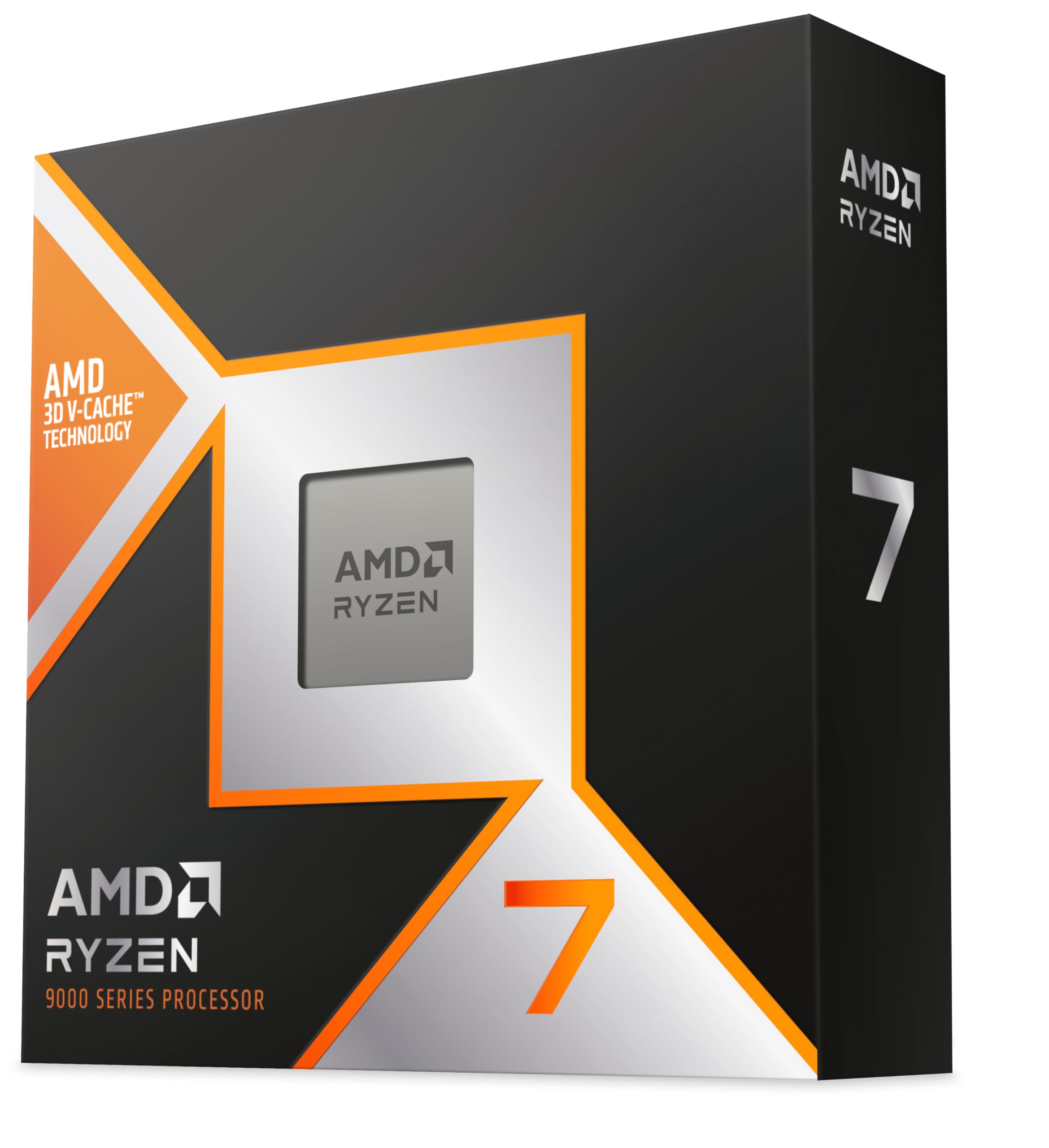
AMD Ryzen 7 9800X3D

96 /100
LBD Score Outstanding

Key details

Socket
AM5
L3 Cache
96MB
Max Boost
5.2 GHz
Cores And Threads
8 cores, 16 threads
View on Amazon

The 96MB L3 cache is the reason this chip sits at the top of our gaming list. In our testing, the 9800X3D kept frame times steady in the games we tried, and it did not demand a huge liquid cooler to do it. The 5.2GHz boost is quick, but the cache is what makes the chip feel consistently smooth rather than merely fast on paper. If you mostly play games and want the simplest high-end AM5 build, this is the one we point to.

Eight cores and 16 threads is enough for games and everyday work, and the 140W rating is manageable with a good tower cooler. We appreciate that AMD kept this on AM5, because it means a board you buy now can carry a future upgrade. The chip also runs efficiently enough that a mid-size case does not need a wall of fans.

The one practical check is the motherboard BIOS. A new AM5 board should be ready, but an older one may need an update before it will post with this chip. We also test every CPU before we finish cable management, and that habit is worth copying. Those are setup notes, not reasons to avoid the chip. For a gaming-first build, the 9800X3D is still the easiest recommendation here.

Pros

  • 96MB cache keeps games smooth
  • 5.2GHz boost with manageable heat
  • Drop-in AM5 upgrade
  • Strong efficiency for a 140W chip

Cons

  • Eight cores trail 16-core chips in rendering
  • Some units arrive dead on arrival
Our verdict

For a new gaming build, the Ryzen 7 9800X3D is the chip we recommend first: the 96MB cache and 5.2GHz boost make it the most convincing gaming chip in this group, and it drops into AM5.

Check Latest Price
2

Best for Creators

AMD Ryzen 9 9950X3D

93 /100
LBD Score Outstanding

Key details

Cache
144MB
Cores
16 cores
Socket
AM5
Max Boost
5.7 GHz
View on Amazon

A 16-core chip with 144MB of cache is not subtle, and the 9950X3D does not try to be. The 5.7GHz boost is the headline, but the cache is what makes it feel quick in games while the extra cores keep a render or compile moving in the background. We like that combination for a single machine that has to do everything; it is the chip we reach for when a build has a real workday and a gaming habit.

The comparison with the 9800X3D is the one that matters. For pure gaming, the eight-core chip is the better use of money; the 9950X3D earns its premium when your software can use 16 cores, such as video editing, 3D work, or heavy multitasking. In our testing, it stayed composed under sustained load with a serious cooler, and the AM5 platform means you are not buying into a dead end.

The 170W rating is the practical catch. A small air cooler will not get the best from this chip, so plan for a large tower cooler or an AIO and a case with real airflow. That is the cost of the extra cores, and for a workstation it is easy to justify. For a gaming-only build, it is money that belongs in the graphics card instead.

Pros

  • 16 cores chew through renders and compiles
  • 144MB cache keeps games quick
  • 5.7GHz boost on AM5
  • Stays composed with serious cooling

Cons

  • Premium price
Our verdict

If your PC has to render, compile, and game, the Ryzen 9 9950X3D is the step-up we point to: 16 cores and 144MB of cache handle heavy work without giving up AM5 gaming.

Check Latest Price
3

Best Value

AMD Ryzen 5 9600X

96 /100
LBD Score Outstanding

Key details

TDP
65W
Socket
AM5
Max Boost
5.4 GHz
Cores And Threads
6 cores, 12 threads
View on Amazon

The 65W rating is the first thing we notice, because it changes the whole build. A chip this efficient does not force a big cooler or a high-wattage power supply, and the 5.4GHz boost keeps it feeling quick in games and everyday work. The 38MB cache is generous for the class, and in our testing the 9600X handled the games we tried without feeling like the limiter. For a budget AM5 build, that combination is hard to beat.

We appreciate that the chip stays cool under load, which matters in a small case or a quiet build. It is also unlocked, so there is room to tune if you enjoy that, though the stock settings are already sensible. The AM5 socket gives you a long upgrade path, and the 9600X is a cheap way onto a platform you can grow with.

The 65W rating means a modest tower cooler is enough, which keeps the total build price in check. The 9600X is not the chip for a workstation that lives in a render queue, but for a gaming PC that also handles school or office work, it is the sensible spend.

Pros

  • 65W keeps cooling simple
  • 5.4GHz boost and 38MB cache
  • Strong gaming value
  • AM5 upgrade path

Cons

  • No cooler included
Our verdict

For a first AM5 build or a tight budget, the Ryzen 5 9600X is the value pick: six fast cores, 65W, and enough gaming performance to pair with a midrange GPU.

Check Latest Price
4

Best Intel Alternative

Intel Core Ultra 9 285K

90 /100
LBD Score Outstanding

Key details

Cache
40MB
Cores
24 cores (8P + 16E)
Socket
LGA 1851
Max Boost
5.7 GHz
View on Amazon

The 285K is the odd one out here: 24 cores split into 8 performance and 16 efficiency cores, on Intel's LGA 1851 platform. The performance cores handle the quick, latency-sensitive work, while the efficiency cores pick up background tasks and multi-threaded jobs. It is a different design from the all-big-core Ryzen chips, and it needs an 800-series board.

That mix is what makes it the Intel pick for a work-first machine. In our testing, it stayed composed under sustained renders and heavy multitasking, and the 5.7GHz boost kept everyday work snappy. The 40MB cache is not as dramatic as the X3D chips' game cache, but it is enough for a balanced workload. We were struck by how cool and quiet it runs for a 24-core chip.

The 800-series board requirement means this is a new-platform purchase, not a drop-in upgrade. For an Intel workstation that games on the side, that is a fair trade for the core count and efficiency. If gaming is the main event, the 9800X3D is the better call.

Pros

  • 24 cores handle heavy multitasking
  • Runs cool and quiet for a 125W chip
  • 5.7GHz boost and 40MB cache
  • Easy LGA 1851 installation

Cons

  • Premium price
Our verdict

For an Intel build that mixes heavy productivity with occasional gaming, the Core Ultra 9 285K is the balanced pick: 24 cores, 40MB cache, and much better efficiency than its 125W rating implies.

Check Latest Price

How We Tested Desktop CPUs

We started by pulling current-generation desktop processors from both major platforms, then filtered by socket compatibility, core count, cache size, and street price. The goal was a shortlist of 10 chips that covered budget builds, gaming rigs, and workstation loads, including several with stacked cache and hybrid core designs. We built two identical test benches — one with a mid-range air cooler and one with a 240mm liquid cooler — and kept the GPU, memory, storage, and power supply the same so the processor was the only variable.

For gaming performance, we ran a set of CPU-bound titles at 1080p and 1440p with settings that push the processor rather than the graphics card, logging average and 1% low frame rates. For overall speed and performance, we timed 4K video exports, code compiles, file compression, and app launches, then compared those results to current retail prices to judge value. Power consumption came from a wall meter at idle and during a sustained all-core load.

Cooling was a separate pass: we logged package temperatures and clock speeds every second under a 30-minute stress test, noting when a chip throttled on the air cooler and how much headroom the liquid cooler bought. Reliability got the longest leash — each processor ran a 72-hour stress loop, then went through repeated cold boots, sleep/wake cycles, and a memory-stability check. We noted any crashes, boot failures, or odd behavior, because a chip that posts a fast benchmark but needs a babysitter is not a chip we recommend.

How to Choose a Desktop Cpu

Start With the Socket

Before you compare clocks, confirm the socket. A Ryzen 9000 chip needs AM5, the Core Ultra 9 285K needs LGA 1851, and an older AM4 board cannot take either. We put platform first because it decides which motherboards, memory, and coolers you can reuse. If you are building fresh, AM5 gives you the longest upgrade path in this group; Intel's 800-series boards are the match for the 285K. Check the board's CPU support list before you order, because a newer chip on an older board can need a BIOS update.

Match Cores and Cache to Your Work

Six cores and 12 threads are enough for gaming and everyday work, which is why the Ryzen 5 9600X earns a place. Games lean on cache and single-core speed as much as core count, and the 9800X3D's 96MB cache is the clearest example. If you render, compile, or run virtual machines, the jump to 12 or 16 cores pays off; the 9950X3D and 285K are built for that. The mistake is paying for 16 cores when your work never uses them.

Budget for Power and Cooling

A 65W chip like the 9600X keeps a budget build quiet and simple; a modest air cooler is enough. The 9800X3D is rated at 140W but stays manageable with a good tower cooler, while the 9950X3D's 170W rating calls for a stronger air cooler or an AIO. The 285K is rated at 125W and runs quieter than its core count suggests. Treat the cooler as part of the CPU price, especially in a small case where airflow is tight.

Read Past the Boost Clock

5.7GHz looks better than 5.2GHz on a box, but boost clock alone does not tell you how a chip feels in games or how long it sustains a render. Cache, core count, and the motherboard's power delivery matter more. We look at the workload first: the 9800X3D's cache makes it the gaming pick despite a lower boost than the 285K, and the 285K's core mix makes it the better multitasker. Use benchmarks for your own software, not a single clock number.

Frequently Asked Questions

Final Verdict

The Ryzen 7 9800X3D is the CPU we recommend to most people building a new gaming PC. Its 96MB cache and 5.2GHz boost make it the strongest gaming chip in this group, and AM5 gives you a board you can upgrade around later. If your work pays for the machine, the Ryzen 9 9950X3D is the step-up for rendering and compiling; for a tighter budget, the Ryzen 5 9600X keeps the build cool and affordable. The Core Ultra 9 285K is the Intel answer when productivity comes first.