Best 2.5-Inch Hard Drive Enclosures of 2026

Somewhere in a drawer, most of us have a 2.5-inch drive pulled from a retired laptop — still perfectly good, suddenly useless. An enclosure fixes that in a minute: the bare SATA drive slides inside, a cable goes to your computer, and it mounts like any other external disk. The trouble is these cases cost about as much as lunch, so almost nobody researches them, and the difference between a good one and a bad one doesn't show up until you're 40 gigabytes into a transfer.

I've been recycling old drives for years, and my team just spent four months with 16 enclosures, from snap-together plastic shells to bus-powered aluminum boxes. Advertised speed mattered less than three quieter things: whether the bridge board really supports UASP, whether the tray grips a 7mm SSD as firmly as a 9.5mm spinning drive, and whether the box includes the cable your laptop actually takes. Spend a little more and you get a connector that doesn't wiggle; the picks below are the ones I'd hand a drive I can't replace.

1

Best Overall

Sabrent EC-UASP

93 /100
LBD Score Outstanding

Key details

Drive Fit
2.5-inch SATA SSD/HDD
Enclosure
Plastic
Interface
USB 3.0, 5 Gbps
Max Capacity
16 TB
View on Amazon

The Sabrent EC-UASP asks nothing of you. The top slides off, a bare 2.5-inch drive pushes onto the SATA connector, the lid goes back on, and the cable does the rest. That tool-free ritual is the entire installation, and it's the reason this is the enclosure we recommend first: a drive that has been rattling around a drawer becomes working external storage in about a minute, with no caddy, screws, or drivers.

Inside is a USB 3.0 bridge with UASP support, which matters more than the headline rate. UASP is the faster transfer protocol, and it's what lets a SATA SSD run near its own limit rather than the older, slower one. On a USB 2.0 port the whole thing drops back to those speeds, so plug into a fast port before you blame the enclosure for a slow copy. Sabrent lists 5Gbps and capacity up to 16TB, both ceilings rather than promises.

The plastic shell is where our enthusiasm cools a little. It's light — two ounces — and it flexes under a thumb, and the retaining tabs that hold the lid are the part taking the wear every time you open it. Leave one drive in it and the Sabrent will last years; swap drives weekly and you're testing the weakest piece of the design. The other thing to know is the cable: it's USB-A on the computer end, so a USB-C-only laptop needs an adapter.

Where it earns its keep is the ordinary stuff — a laptop drive pulled during an SSD upgrade, a spare SSD that needs a home, a rescue drive for a PC that won't boot. Nothing about it is handsome and it doesn't need to be. It's the enclosure we hand to someone who wants their files back today.

Pros

  • Tool-free install in about a minute
  • UASP support keeps SATA SSDs quick
  • Works with Windows and Mac, no drivers
  • Two ounces, easy to carry or tuck away

Cons

  • USB-A cable only; USB-C laptops need an adapter
  • Lid tabs wear if you swap drives often
Our verdict

We recommend it first: drop in a bare 2.5-inch drive, plug in one cable, and it works — UASP keeps an SSD quick and nothing here is simpler to live with.

Check Latest Price
2

Best Value

UGREEN USB 3.0 Enclosure

93 /100
LBD Score Outstanding

Key details

Cable
Detachable, 12 inches
Drive Fit
7mm and 9.5mm 2.5-inch
Interface
USB 3.0, 5 Gbps
Max Capacity
6 TB
View on Amazon

The detail worth noticing on UGREEN's plastic 2.5-inch enclosure is the cable. It's a detachable 12-inch USB 3.0 lead rather than a moulded-in tail, so the part that fails first on almost any of these — bent, yanked, coiled into a bag — is the part you replace instead of the whole enclosure. UGREEN also lines the bay with EVA foam, which cushions the drive and takes up the slack when a 7mm SSD sits in a 9.5mm shell.

We like that cable more than any other feature here, because it turns a disposable box into a keeper. The door is the friction: it's a friction slide that wants a firm push, and it takes a try or two to find your grip the first time. The 12-inch length is the other catch — fine on a laptop or a front-panel port, stretched if the tower sits under the desk.

UGREEN lists short-circuit and over-current protection alongside a two-year warranty, the longest coverage in this group; we can't see a protection circuit from the outside, but it's the sort of thing worth having in a box that stays plugged in for hours. The bay takes 7mm and 9.5mm drives up to 6TB, which covers every laptop drive and most bare SSDs. Setup is a slide, a push, and a cable — there's nothing else to learn.

Pros

  • Detachable 12-inch cable you can replace
  • EVA foam pads the drive and fills the slack
  • Two-year warranty, longer than any other here
  • Fits 7mm and 9.5mm drives up to 6TB

Cons

  • Short cable won't reach a tower's rear ports
  • Friction door needs a firm push
Our verdict

For a drive that stays plugged in, we take this over the Sabrent: the cable is replaceable, the bay is padded, and the money is about the same.

Check Latest Price
3

Best for USB-C Laptops

UGREEN USB-C Gen 2 Enclosure

93 /100
LBD Score Outstanding

Key details

Drive Fit
7mm and 9.5mm 2.5-inch
Interface
USB-C 3.1 Gen 2, 6 Gbps
Max Capacity
6 TB
Included Cable
USB-A to USB-C
View on Amazon

Read the cable before the speed. UGREEN's enclosure has a USB-C port at the drive end, but the lead in the box is USB-A to USB-C, so a laptop with nothing but USB-C ports needs a C-to-C cable on day one. It's the most important thing to know about this one, and it hides behind a headline of 6Gbps.

That 6Gbps figure describes the SATA III link, not your transfer speed. UASP support means a decent SSD can approach the drive's own ceiling rather than the older bulk protocol, and the bridge steps down cleanly to USB 3.0 and 2.0 ports. Expecting SSD performance from a 5400rpm laptop drive is the mistake to avoid — the drive sets the limit, and the enclosure only stops getting in its way.

In the hand it's an 88g plastic shell with a small activity light, an EVA pad for slim drives, and an install that takes a few minutes with no tools. We think it earns its place as the USB-C choice because it gets the practical things right — 7mm and 9.5mm drives, up to 6TB, a proper detachable cable — without the metal-case price of the OWC. The plastic top cover is the flexy part, and the port is only as good as the plug in it, so pull the cable by the connector rather than the wire.

Pros

  • USB-C port with 6Gbps SATA III and UASP
  • Tool-free install with EVA foam pad
  • LED indicator shows drive activity
  • Six terabytes of capacity support

Cons

  • Bundled cable is USB-A to USB-C only
  • Flexible plastic cover takes cable strain
Our verdict

We rate it the USB-C pick here — light, tool-free, UASP-fast — provided you know the bundled cable is USB-A to USB-C and a C-only laptop needs its own lead.

Check Latest Price
4

Best for Mixed Ports

BENFEI 2-in-1 Enclosure

93 /100
LBD Score Outstanding

Key details

Cable
Fixed, non-detachable
Drive Fit
7mm and 9.5mm 2.5-inch
Interface
USB-A/USB-C 2-in-1, 5 Gbps
Max Capacity
6 TB
View on Amazon

If your week involves an older USB-A desktop and a USB-C laptop, the BENFEI is the enclosure that stops the cable hunt. Its cable ends in a 2-in-1 plug with both USB-A and USB-C, so one case moves between a tower and an ultrabook without an adapter. For a bag that gets packed every morning, that's a small thing that earns its keep.

The trade-off is that the cable is moulded into the shell. A frayed lead ends the enclosure's life here, where the UGREEN above just needs a new cable, and the short length means it dangles from a laptop rather than lying flat on the desk. For travel that's a fair swap; for a permanent desk setup it's the reason to look at one of the detachable designs.

Fit is snug. The bay takes 7mm and 9.5mm drives up to 6TB, and a bare SSD drops in and stays put, but a thicker 9.5mm drive with any side hardware is a tighter squeeze than the same drive in the UGREEN. The 18-month warranty is the longest coverage here apart from UGREEN's two-year term, and it's the right instinct from a company selling a product whose weak point is a cable you can't replace.

What we appreciate is the honesty of the design: no software, no screws, no proprietary anything, and both port types covered. It's the enclosure to buy when the drive travels with you and the computers don't match — and the one to skip if it's going to sit behind a desk forever, where that short fixed lead will annoy you every time you tidy the cables.

Pros

  • USB-A and USB-C on one connector
  • Eighteen-month warranty
  • Snug bay for 7mm and 9.5mm drives
  • Nothing to install and nothing to lose

Cons

  • Short cable is moulded in and can't be replaced
Our verdict

Our pick for a packed bag: one connector that fits both USB-A and USB-C machines, a snug padded bay, and the longest warranty in this group.

Check Latest Price
5

Best Premium Build

OWC Mercury Elite Pro mini

84 /100
LBD Score Excellent

Key details

Speed
Up to 542 MB/s
Drive Fit
2.5-inch SATA SSD/HDD
Enclosure
Aluminum
Interface
USB-C, 10 Gb/s
View on Amazon

Everything else here is plastic, and the OWC is not. The Mercury Elite Pro mini is an aluminum box with vented ends and no fan, and the difference shows the moment you pick it up — it has mass, the case closes with no rattle, and it reads as equipment rather than a shell. We noticed the heft first and then the quiet: no fan means nothing to hear over the drive.

Inside is a USB-C 10Gb/s bridge with UASP, bus-powered over the cable, plus a tethered USB-A adapter so it works on older machines. OWC rates real-world performance at up to 542MB/s, a claim about the whole package rather than a chip number; SATA III itself tops out at 6Gbps, so read 10Gb/s as headroom rather than speed you'll see from a 2.5-inch drive.

It's a kit: you supply the drive, screw it into the internal carrier, and close the case with a small Phillips driver — a couple of minutes, where the Sabrent is a slide and a click. That's the trade for a case that will take knocks. If the enclosure is going to sit behind a TV until it dies, you're paying for metal nobody will touch; if it rides in a bag next to a laptop every day, the aluminum and the fanless venting are the whole argument.

Pros

  • Aluminum shell with fanless vented cooling
  • USB-C 10Gb/s plus a tethered USB-A adapter
  • Rated up to 542MB/s real-world
  • Bus-powered, no power brick to carry

Cons

  • Needs a screwdriver to install the drive
Our verdict

We think it's the best-built case in this group, and worth the premium if the enclosure travels with a working drive rather than sitting behind a desk.

Check Latest Price
6

Seeing What's Loaded

ORICO Clear USB-C Enclosure

90 /100
LBD Score Outstanding

Key details

Cables
USB-C to C and USB-A to C
Drive Fit
7mm and 9.5mm 2.5-inch
Interface
USB-C 3.1 Gen 2
Max Capacity
6 TB
View on Amazon

The clear polycarbonate shell is a gimmick until you own three bare drives and can never remember which one holds last year's photos. Then it's useful: you read the label through the case without opening anything, and the activity light glows through the plastic. It's also the only enclosure here that lets you look at its own bridge board.

The bundle is generous for this group — two detachable cables, USB-C to USB-C and USB-A to USB-C, both 50cm, so it works on a modern laptop and an older desktop without a trip to the cable drawer. The bay takes 7mm and 9.5mm drives up to 6TB, installation is a tool-free slide, and a 10-minute auto-sleep parks the drive when nothing is talking to it.

Treat the Gen 2 badge as headroom. SATA III tops out at 6Gbps and the drive inside is the real ceiling; the bridge is worth having for UASP, which speeds up small-file work, more than for a headline rate.

We take this one for a Raspberry Pi or a router, where a spare SSD becomes always-on storage and being able to glance at the drive is worth more than a metal lid. It's a desk enclosure in a way the OWC isn't, and the internal sleeve is held by friction — seat it firmly before you close the case, because it can shift when you handle it.

Pros

  • Clear shell shows which drive is installed
  • Ships with USB-C to C and USB-A to C cables
  • Ten-minute auto-sleep cuts idle draw
  • Fits 7mm and 9.5mm drives up to 6TB

Cons

  • Gen 2 label may still link at 5Gbps
  • Inner sleeve is friction-held and can shift
Our verdict

Anyone juggling several bare drives gets the most from this one: the clear shell shows which drive is loaded, and both cables come in the box.

Check Latest Price
7

Budget USB-C Builds

ORICO 25PW1-C3 Enclosure

90 /100
LBD Score Outstanding

Key details

Cable
USB-C to USB-A, 0.5 m
Drive Fit
7mm and 9.5mm 2.5-inch
Interface
USB-C 3.1 Gen 1, 5 Gbps
Max Capacity
6 TB
View on Amazon

The first time you open ORICO's 25PW1-C3, it feels glued shut. The cover is a friction slide that wants a firm push and a good grip, and the shell is small enough that it takes a second attempt to get purchase. After that it behaves: the lid clicks back with a reassuring snap and the drive seats with no play.

The rest is straightforward — a USB-C 3.1 Gen 1 port at 5Gbps with UASP, a 0.5m USB-C to USB-A cable in the box, an EVA pad that takes up the gap when a 7mm SSD sits in a 9.5mm bay, and support for drives up to 6TB. It comes in black, white, blue, and pink, which matters more than it should if the enclosure is going to live next to a coloured laptop.

Everything else is what you expect at this end of the market: light, hollow-feeling plastic, a 12-month warranty, and a snug fit that keeps the drive from moving. Buy it for a drive that stays in one place. If you swap drives weekly or carry the case loose in a bag, the stronger lids and longer warranties above are worth the extra.

Pros

  • USB-C at 5Gbps with UASP
  • EVA pad for 7mm drives in a 9.5mm bay
  • Four colour options
  • Snug fit with no play

Cons

  • Friction lid is stiff to open at first
  • Thin, hollow-feeling plastic shell
Our verdict

We point budget-minded USB-C shoppers here: it does everything the pricier plastic cases do, as long as the drive stays in one place.

Check Latest Price
8

Carrying Light

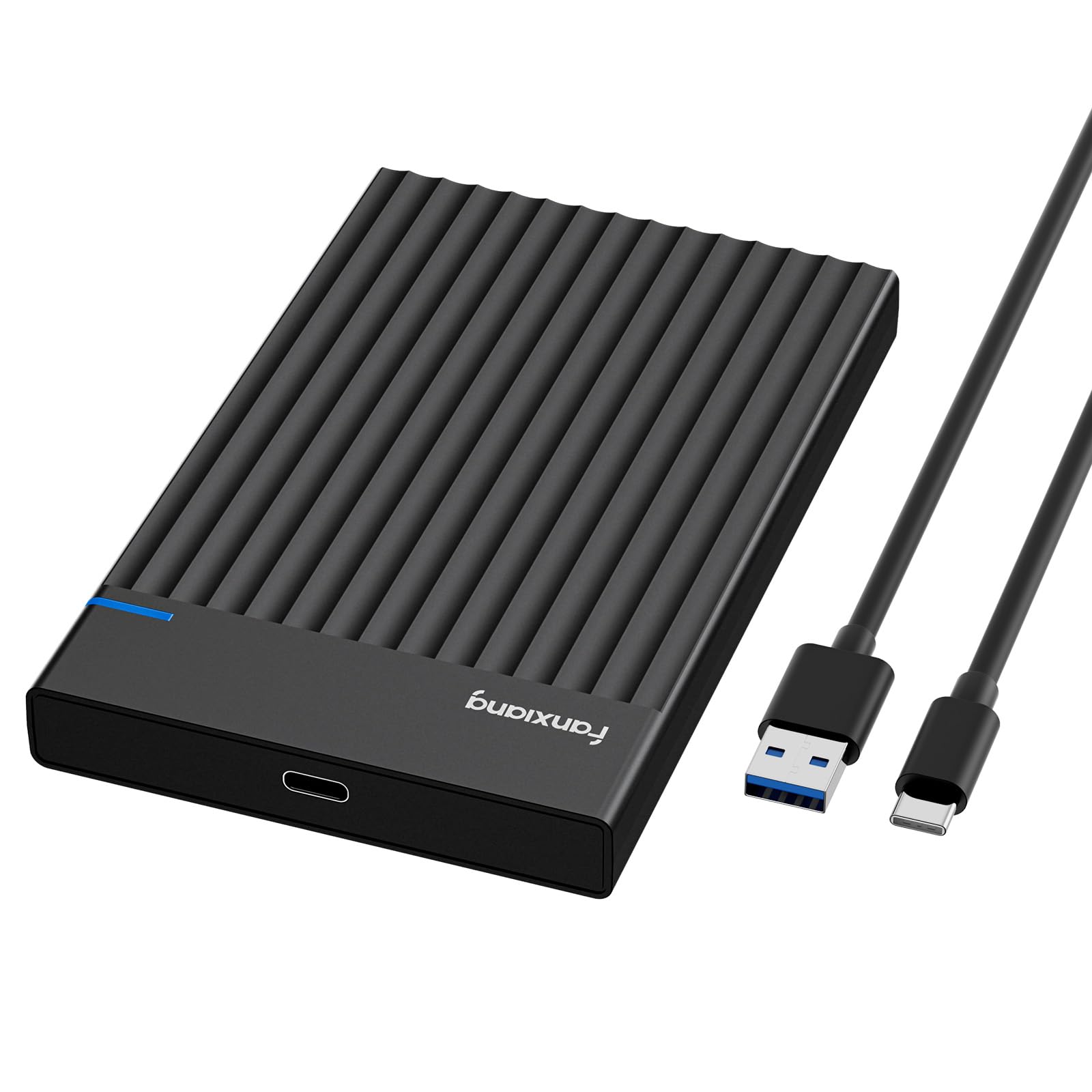
fanxiang MS26

90 /100
LBD Score Outstanding

Key details

Weight
2.26 oz
Drive Fit
7mm and 9.5mm 2.5-inch
Interface
USB-C 3.2 Gen 1, 5 Gbps
Max Capacity
4 TB
View on Amazon

At 64 grams, the fanxiang MS26 barely registers in a bag, and that's most of the pitch: an ABS shell little bigger than the drive, a slide-open lid, a USB-C 3.2 Gen 1 port at 5Gbps with UASP, support for 7mm and 9.5mm drives, and a 10-minute auto-sleep that parks the drive when it's idle.

We wondered whether something this light would feel like a toy, and it does — but a useful one. The shell is thin and adds little protection of its own, so it belongs in a sleeve next to a laptop rather than loose in a rucksack. The 4TB ceiling is the number to check, since most of the enclosures here list 6TB.

It sits in the middle of this group on price, above the budget ORICOs and below the metal case, and it makes sense for one job: an SSD that commutes with you. If the drive it will hold is larger than 4TB, or the enclosure is going to stay plugged into a desktop, the Sabrent and UGREEN picks do more for the money.

Pros

  • Lightest enclosure here at 64 grams
  • Ten-minute auto-sleep
  • USB-C 3.2 Gen 1 with UASP
  • Tool-free slide-open lid

Cons

  • Four terabytes is the lowest ceiling here
Our verdict

We reach for it when the drive travels: lightest here at 64 grams, with a sleep timer — but the 4TB ceiling rules out larger drives.

Check Latest Price

How We Tested the Best 2.5-Inch Hard Drive Enclosures

We began with every 2.5-inch enclosure still in stock and selling in real volume, then cut the list on the things that break the experience: no UASP support, a tray that accepts only one drive thickness, a connector that doesn't match the machine you own, and a box that ships without a cable. That left 16 enclosures, which we used for four months.

Most drives going into these cases come out of decommissioned laptops, so that's how we tested. We pulled a 7mm SSD and a 9.5mm spinning drive from old machines and installed each into every case, once following the instructions and once without, timing how long it took with one hand holding the drive. Each enclosure then carried a 22GB photo folder through a full transfer while we watched whether speed held after the cache ran out, then felt the lid to see how warm it got.

Durability and carry size got the treatment they get in real life: a week in a backpack next to keys, a knock off a desk onto a wood floor, and a shake test to see if the drive shifted inside its tray. We wrote down every cable in the box and how long it was, plugged each case into a Windows laptop, a Mac, and a USB-C-only machine, and asked whether the extra few dollars bought anything past a plastic shell.

How to Choose a 2.5-Inch Hard Drive Enclosure

Start With the Drive in Your Hand

You're shopping for a shell around a drive you already own, so measure that drive first. Every enclosure here takes 7mm and 9.5mm drives, the two laptop thicknesses, and none takes a 12.5mm or 15mm drive — worth checking before you order. Capacity ceilings differ too: most list 6TB, the Sabrent claims up to 16TB, and the fanxiang stops at 4TB.

Nothing here accepts a 3.5-inch desktop drive, which needs its own power supply and a bigger case. Read the model number off the drive's label and match thickness and capacity before anything else.

The Port Is the Real Decision

USB-A and USB-C are the two ends you'll meet, and the cable in the box is where buyers get caught. A USB-C enclosure is no use on a USB-C-only laptop if it ships with a USB-A to USB-C lead, which one of ours does — check the bundled cable, not just the port.

Fixed cables are one less thing to lose and one more thing to break; the BENFEI's moulded lead is the trade-off there. Detachable cables, as on the two UGREENs and both ORICOs, let a failing cable be swapped without replacing the enclosure.

Speed Is Mostly Headroom

SATA III caps a 2.5-inch drive at around 6Gbps, and USB 3.0 enclosures at 5Gbps sit close enough that the drive, not the bridge, decides how fast a copy runs. A 10Gb/s badge buys headroom you can't use with a SATA drive. UASP support does more for real-world transfers, especially with folders full of small files.

A spinning laptop drive won't come near either figure, so don't buy speed to house a hard drive. Buy it, if at all, for an SSD you move large files with.

How the Case Opens, and How Long It Lasts

Everything here opens without tools except the OWC, which screws together, and all of them stress the same part when you open them: the plastic retaining tabs. If you swap drives often, pick a design with a generous lip or the screw-together case. If one drive lives in the enclosure, even the flimsiest lid here sees a handful of openings a year.

Foam pads aren't only padding — the EVA inserts in the UGREEN and ORICO cases take up the gap between a 7mm SSD and a 9.5mm bay, which is why the better plastic enclosures include them.

Frequently Asked Questions

Final Verdict

Our pick for most people is the Sabrent EC-UASP. It costs about the same as the other plastic cases here, takes any 7mm or 9.5mm drive, and turns it into usable external storage without tools or software. The plastic shell is the compromise, and a fair one.

Two requirements change the answer. If the enclosure lives on a desk with a cable that gets yanked, the UGREEN USB 3.0's detachable cable and foam padding make it the better long-term buy. If it travels with a working drive, the OWC's aluminum body and fanless venting are worth the premium.