Best Xbox Controllers of 2026

Stick drift is what kills a controller. One evening your character is walking left on its own, and no amount of dead-zone tweaking brings your aim back. What surprised me over the past six months is how far the fix has traveled down the price ladder — magnetic sensors that don't physically wear out are now showing up in controllers that cost less than a new game.

We put 13 of them through their paces, wired and wireless, passing them around during weekly co-op nights and logging long solo sessions in shooters, racers, and platformers. The differences that mattered weren't the flashy ones. Adjustable trigger travel, back buttons you can actually reach without regripping, and a shell that doesn't shift in your palms after an hour turned out to matter far more than lighting effects or a companion app.

If you've been burned by a mushy face button or a grip that squeaks, that's exactly what these picks were sorted on — the ones that survived the most hours are the ones I'm still reaching for.

1

Best Overall

GameSir G7 Pro ZZZ

88 /100
LBD Score Excellent

Key details

Sticks
TMR, Hall effect
Triggers
Hall effect or micro-switch
Connectivity
2.4G Xbox; wired/2.4G PC; Bluetooth Android
Remappable Buttons
4
View on Amazon

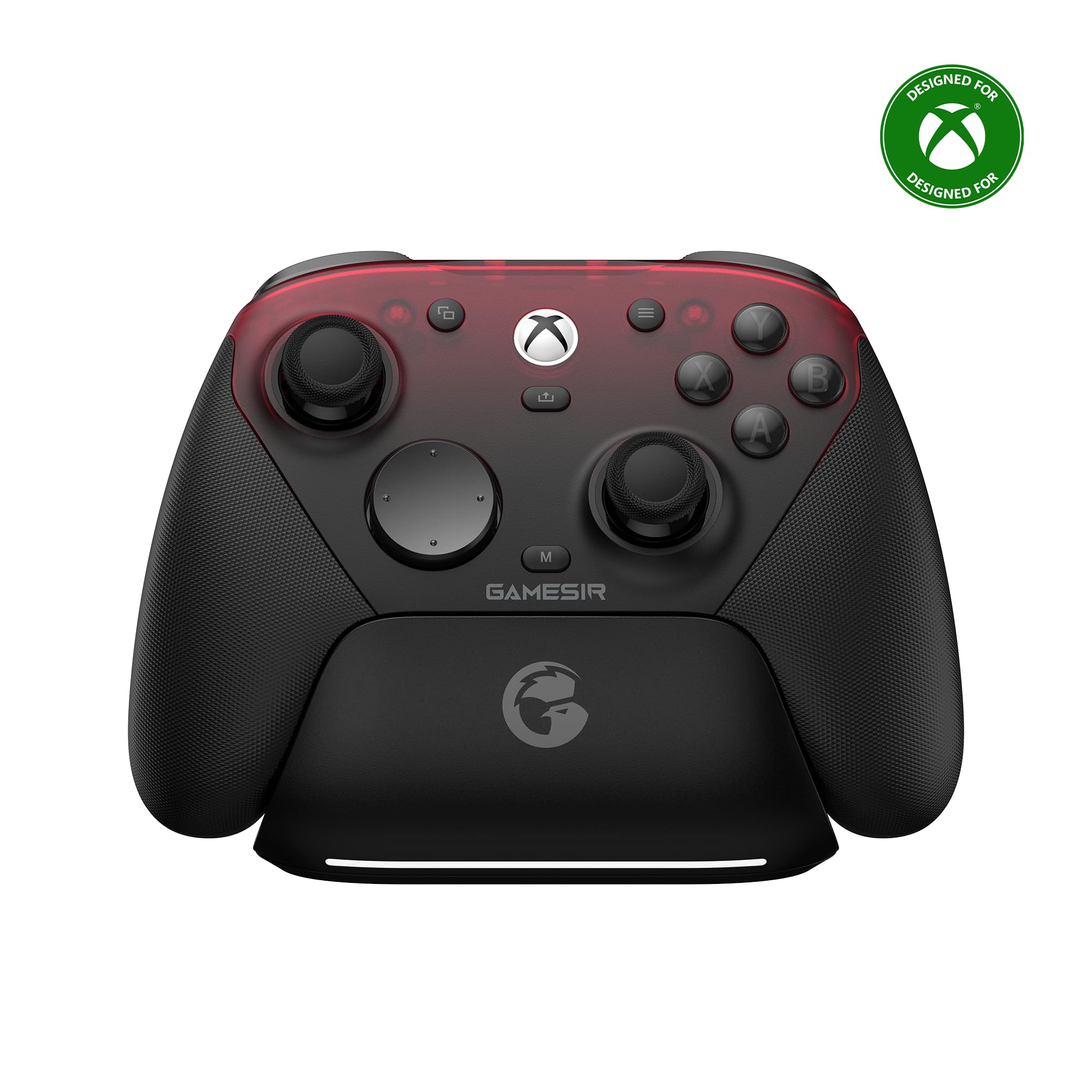
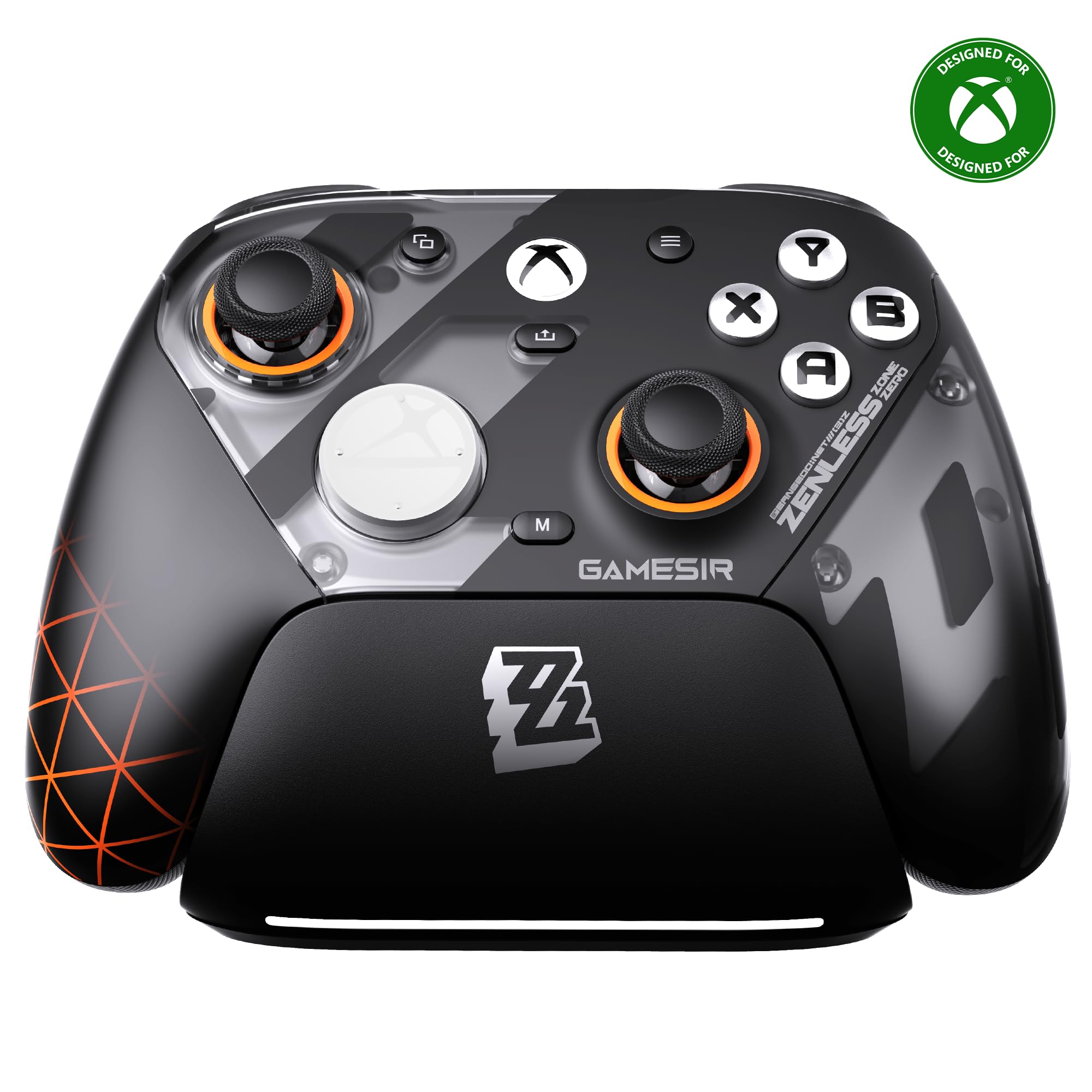
An official Xbox wireless badge, a charging dock, and a set of TMR sticks are an unusual combination in a third-party pad. The Zenless Zone Zero artwork is the obvious visual hook, but the hardware is why the G7 Pro ZZZ is our top pick: it covers the basics a console player needs without asking you to tether a cable or give up back buttons.

The four remappable buttons sit within easy reach, and the trigger toggle is the detail we appreciated most. You can switch from Hall-effect linear triggers for racing to a micro-switch click for shooters, which makes the same controller feel purpose-built for different games. The TMR sticks are smooth and recenter cleanly; we also noticed the stick caps take a surprising amount of effort to pull off the first time, so plan to set them once and leave them.

The dock keeps it topped up between sessions, and the 1000Hz polling rate on PC is there for players who split time between console and desktop. That PC number is not a console claim, but it makes the pad a more useful bridge if your desk and your TV share the same controller.

If you want the same shape and stick technology for less, the wired G7 Pro is the obvious alternative; the wireless version earns the top spot because the dock and cable-free play make it the one we leave connected to the console.

Pros

  • Official Xbox wireless with charging dock
  • TMR sticks and switchable trigger modes
  • Four remappable buttons within reach
  • 1000Hz polling on PC

Cons

  • Wireless connection can drop
Our verdict

The G7 Pro ZZZ is what we recommend first if you want wireless Xbox play with pro-style controls, and its charging dock makes it easy to live with.

Check Latest Price
2

Best Premium Official

Xbox Elite Series 2 Core

88 /100
LBD Score Excellent

Key details

Thumbsticks
Adjustable tension
Battery Life
Up to 40 hours
Connectivity
Xbox Wireless, Bluetooth, USB-C
Trigger Locks
Three-step hair trigger
View on Amazon

The Core name is the first thing to understand: this is the Elite Series 2 without the carrying case, extra thumbsticks, paddles, or charging dock. What remains is the part that matters most for play: the adjustable-tension sticks, the three-step hair trigger locks, and the rubberized grip.

We think that is the right trade for someone who wants the Elite feel without paying for accessories they may never use. The tension adjustment is not a gimmick: you can tighten the sticks for shooters and loosen them for racing, and the trigger locks shorten the pull for faster inputs. The 40-hour battery claim is the other number that matters, because a premium pad that needs a cable every night loses some of its appeal.

The official Xbox wireless connection and Bluetooth pairing are the least complicated parts of living with it. The caveat is long-term reliability: bumpers and triggers can fail, and the controller is expensive enough that a bad unit stings. We still recommend it for players who value the official ecosystem and the adjustable hardware, but we advise buying from a seller with a straightforward return policy.

For most players, the Core is the version we point to; the extras only make sense if you know you will use the paddles and case.

Pros

  • Adjustable-tension thumbsticks and trigger locks
  • Official Xbox wireless plus Bluetooth
  • Up to 40 hours of battery life

Cons

  • Core trim omits case, paddles, and extra sticks
Our verdict

The Elite Series 2 Core is the premium official pick for players who want adjustable sticks and trigger locks, though the Core trim leaves out the case and paddles.

Check Latest Price
3

Best Wired Pro Features

Flydigi Vader 5S

83 /100
LBD Score Excellent

Key details

Sticks
Hall effect; 40gf to 100gf tension
Triggers
Micro-click or Hall effect
Connectivity
Wired Xbox and Windows
Remappable Buttons
6
View on Amazon

The Vader 5S puts its tuning controls where your hands already are: twist the rings under the sticks and change tension from 40gf to 100gf, then flip the triggers between a micro-click and a Hall-effect linear pull. That is the reason we like it for competitive play: it lets you change the feel of the controller without opening software.

The six remappable buttons give you room to move inputs without leaving the sticks, and the clicky face buttons are satisfying in a way that suits shooters. The four vibration motors add weight to impacts, though the effect is more of a rumble than a precise haptic language.

The ergonomics are solid for a desk-and-console controller, and the extra buttons fall naturally under the fingers. The trade-off is that this is not the pad for lounging across the room; the wireless G7 Pro is the better fit there. We also found the PC side less consistent than the Xbox side, so treat it as an Xbox-first controller.

If you spend more time tuning your aim than traveling with your console, the Vader 5S is the wired pick we hand over first.

Pros

  • Adjustable 40gf to 100gf stick tension
  • Switchable micro-click and Hall triggers
  • Six remappable buttons
  • Four vibration motors

Cons

  • Wired only; no wireless option
Our verdict

The Vader 5S is the wired controller we recommend to players who like to tune stick tension and trigger feel, and it costs less than the wireless top pick.

Check Latest Price
4

Best Wired All-Rounder

GameSir G7 Pro Wired

88 /100
LBD Score Excellent

Key details

Sticks
TMR (Mag-Res)
Triggers
Hall effect analog
Connectivity
Wired Xbox; 2.4G/wired PC; Bluetooth Android
Polling Rate
1000Hz on PC
View on Amazon

The wired G7 Pro is the same controller idea as our top pick, but it trades the dock and wireless Xbox connection for a cable. That sounds like a downgrade, and for couch play it is, but it also makes the pad simpler: no charging dock to find, no battery to think about, and the same TMR sticks and Hall-effect triggers.

We appreciated the flexibility on PC and Android. The controller switches to 2.4G or wired on PC and Bluetooth on Android, and hits a 1000Hz polling rate on PC, so it can do double duty as a desktop pad. The 272-gram weight gives it a substantial feel without making it tiring, and the 3.5mm jack is there when you want headset audio.

The caveats are the ones that come with the design. The buttons are clicky and responsive, but the d-pad can feel a little touchy. We still choose it for a desk setup or a player who prefers a cable; just don't buy it expecting wireless Xbox play.

If you split time between Xbox and PC, this is the more versatile of the two G7 Pro models; if you mostly play on the console from the couch, the wireless ZZZ is worth the step up.

Pros

  • TMR sticks and Hall-effect triggers
  • 2.4G and Bluetooth for PC and Android
  • 1000Hz polling on PC
  • Substantial 272-gram build

Cons

  • Buttons can develop squeaks
Our verdict

The wired G7 Pro is the version we point to for Xbox players who want the top pick's sticks and triggers without paying for the wireless dock.

Check Latest Price
5

Best Budget Wired

PowerA Wired Controller

86 /100
LBD Score Excellent

Key details

Feedback
Dual rumble; impulse triggers
Cable Length
10 ft
Connectivity
Wired USB-C
Compatibility
Xbox Series X|S, Xbox One, Windows
View on Amazon

The PowerA does the basics without pretending to be a pro controller: a wired Xbox pad, a 10-foot USB-C cable, dual rumble motors, and impulse triggers. At the budget end of this group, that is the right feature set: nothing to charge, nothing to pair, and a cable long enough to sit back a little.

We liked the long cable more than we expected. It takes the anxiety out of a controller that lives on a coffee table or gets passed between players, and the two-year limited warranty is a meaningful cushion for a budget purchase. The ergonomics are comfortable for long sessions, though the plastic and buttons feel closer to the price than the Elite or the GameSir pads.

The PowerA is a plain controller by design, and that is why it fits a spare-pad or starter role. If you want competitive extras, the Flydigi or the wired G7 Pro gives you more to work with; if you want a cable you never have to charge, this is the one we hand over.

Pros

  • 10-foot USB-C cable
  • Dual rumble and impulse triggers
  • Two-year limited warranty
  • Comfortable for long sessions

Cons

  • No back buttons or trigger stops
Our verdict

The PowerA wired controller is the budget pick we recommend for a spare pad, a kid's setup, or anyone who wants a 10-foot cable and doesn't need wireless.

Check Latest Price
6

Official Basic Play

Xbox Wireless Controller

89 /100
LBD Score Excellent

Key details

Grip
Textured
Weight
9.88 oz
Connectivity
Xbox Wireless; Bluetooth
Compatibility
Xbox One, Windows 10
View on Amazon

The compatibility list is the first thing to check here: Xbox One, Xbox One S, Xbox One X, and Windows 10. That makes it a sensible official pad for an Xbox One console or a PC, but it is not the version we point to for a Series X|S player who wants the current feature set.

We still like the shape. The textured grip is comfortable, the Bluetooth pairing is useful on Windows, and the claimed wireless range is up to twice that of previous Xbox One controllers. The 9.88-ounce weight gives it a familiar heft, and the battery-powered design means you are not tied to a charging cable.

For an Xbox One or a Windows 10 setup, the official layout and Bluetooth pairing are enough. For a Series X|S console, the Elite Core or the G7 Pro ZZZ is the better match. We keep this one in the guide as the official baseline, not as the first choice for a new Series X|S setup.

Pros

  • Official Xbox One layout and textured grip
  • Bluetooth for Windows 10
  • Up to twice the range of earlier Xbox One pads

Cons

  • Bumpers can break after a drop
Our verdict

This is the official Xbox One-era wireless controller, and we recommend it only if you want the familiar shape for an Xbox One or Windows 10 setup and don't need Series X|S features.

Check Latest Price

How We Tested Xbox Controllers

We started by pulling every Xbox-compatible controller we could find and cutting the list down by the things that actually change how one plays: sensor type, trigger adjustability, whether the rear buttons are reachable mid-game, wired versus wireless, and price. That left 13 controllers, which we ran for six months across weekly co-op nights, solo campaigns, and PC and cloud sessions on a laptop and a phone.

Most of the testing happened on a couch, because that's where these live. Each controller got the same rotation: a two-hour session in a shooter, an evening of racing, and a split-screen night with friends passing it around. I noted where my thumbs naturally landed, whether my hands cramped at the hour mark, and how the grips felt after a warm room and a tense boss fight.

For stick performance, I set each controller down in a menu with no input and watched for cursor creep, then ran the same aiming drills in a shooter to see how small movements registered. Triggers got measured travel before and after the stops clicked into place, and every face button and bumper took a few thousand presses across fighting games and platformers. Remappable buttons only counted as useful if I could hit them without shifting my grip.

Reliability meant unpairing and reconnecting each one to a console, a PC, and a phone, and timing how long it took to come back. Battery life was tracked across a week of normal play, and every controller survived a few drops off the couch onto a rug. Last, we weighed price against what each one actually gives you — one that costs twice as much has to feel twice as good.

How to Choose an Xbox Controller

Wireless or Wired: Match the Controller to the Room

Start with where the controller lives. A wireless pad is the easier choice for a couch, a shared living room, or a console hooked to a TV, but it adds a battery, a charging routine, and one more connection to troubleshoot. A wired pad is simpler and never needs a charge, which is why it still makes sense at a desk or for a player who sits close to the console.

The trap is assuming every third-party pad is wireless on Xbox because it says wireless somewhere in the title. Some models are wireless on PC and wired on the console. Read the connectivity line for the Xbox side specifically. If you want the least fuss, an official Xbox wireless model such as the Elite Core or the G7 Pro ZZZ is the safer baseline; if you play at a desk, a wired model gives you more hardware for the money.

Sticks and Triggers: What Hall Effect and TMR Change

Hall-effect and TMR sticks use magnetic sensing rather than the physical wiper that wears in a conventional potentiometer, which is why they are marketed as drift-resistant. That does not make drift impossible, but it is the feature we look for first in a controller that will see heavy use. TMR is the label GameSir uses on the G7 Pro models; the Flydigi relies on Hall effect.

Triggers matter just as much for shooters and racing games. A trigger stop or micro-switch mode shortens the pull for faster fire, while a linear Hall trigger gives you a smoother range for throttle and braking. If you play one genre most of the time, choose the trigger feel that suits it; if you move between shooters and racing games, a switchable design such as the Vader 5S or the G7 Pro ZZZ earns its keep.

Back Buttons and Customization: Buy Only What You Will Map

Extra buttons are useful only if you will actually map them. Two back buttons can cover jump and crouch in a shooter; four or six give you more options but also more to remember. The G7 Pro models put four remappable buttons within reach, while the Vader 5S adds six and on-controller tuning. The Elite Core supports button mapping through the Xbox Accessories app, but the Core trim does not include the paddles.

If you play casually or mainly single-player games, skip the extra buttons and put the money toward comfort or a longer cable. If you play competitively, buy the layout that matches your grip: back buttons are easier to reach than a crowded face button cluster, and the best mapping is the one you can use without looking.

Fit, Weight, and the Parts That Wear

A controller can have the right features and still feel wrong in your hands. Weight is a useful proxy: the G7 Pro wired is 272 grams, the Vader 5S is 450 grams, and the Xbox Wireless Controller is listed at 9.88 ounces. Heavier pads can feel substantial, but they can also tire smaller hands over a long session. If you have never used a back-button controller, start with a shape that matches the official Xbox pad you already know.

Durability is the other long-term question. Bumpers, triggers, and stick caps are the parts that take the most abuse, and Hall-effect sticks do not protect the rest of the shell. Buy from a seller with a straightforward return policy, and test the bumpers and triggers in the first week. A two-year warranty, like the one on the PowerA, is a real advantage at the budget end.

Official or Third-Party: What the Xbox Badge Buys

An officially licensed Xbox controller is tested for the console's wireless protocol and system features, which is why it usually pairs with less fuss. The Elite Core is the premium official route; the G7 Pro ZZZ is the third-party pick that carries the official badge. Unlicensed pads can still work, but you may lose console-level features or need a dongle.

Third-party makers are where the hardware experiments happen: TMR sticks, adjustable tension, trigger switches, and four to six remappable buttons show up there first. If you want the lowest-friction console experience, stay official. If you want the most adjustable hardware for the money, a licensed third-party model is the better compromise.

Frequently Asked Questions

Final Verdict

The GameSir G7 Pro ZZZ earns our top recommendation because it combines official Xbox wireless, a charging dock, TMR sticks, and four remappable buttons in one pad. It is the one we point to for most Series X|S and Xbox One players who want pro-style control without a cable. If you play at a desk, the Flydigi Vader 5S gives you adjustable stick tension and six remappable buttons for less; if you want the official premium ecosystem, the Elite Series 2 Core is the alternative, provided you can live without the case and paddles.