Best VR Headsets of 2026

A VR headset is really a decision about friction. Standalone sets boot up in seconds and live on a shelf; PC-tethered rigs ask for a cable, base stations, and a graphics card in exchange for bigger, sharper worlds. Choose wrong and the thing ends up in a closet, not because it isn't impressive but because you never feel like setting it up.

I've had headsets sit in a drawer for exactly that reason, which is why the question I care about isn't the spec sheet but whether I keep reaching for it. My team and I have spent the past eight months wearing six of them through ordinary evenings, weekend game nights, and a couple of sweaty workouts, and the pattern held: the ones that got used had the least distance between wanting to play and playing. Resolution matters less than you'd think, too. A good lens and a strap that doesn't dig in are things you feel immediately, while the extra pixels you paid for are often the last thing you notice.

Below are the headsets that survived all that, whether you want a standalone set you can pass around the living room, a cheaper one for the kids to share, or a rig that squeezes everything out of a gaming PC. All of them clear the same bar: you'll want to put it on again tomorrow.

1

Best Overall

Meta Quest 3 (512GB)

91 /100
LBD Score Outstanding

Key details

Storage
512 GB
Resolution
2064 x 2208 per eye
Battery Life
2.2 hours
Refresh Rate
120 Hz
View on Amazon

The step up in price from the Quest 3S buys optics, and that turns out to be the right place to spend it. Pancake lenses and 2064 x 2208-per-eye panels make menu text crisp and distant detail readable, and the 120 Hz refresh keeps the world steady when you whip your head around mid-firefight. Swapping between the two Quests, the difference was obvious within a minute, and it's why this is the headset we keep coming back to.

The Snapdragon XR2 Gen 2 with 8 GB of RAM does the heavy lifting, with twice the graphics power in the specs and load times short enough that you're not left staring at a logo. Mixed reality is the feature to treat as a bonus rather than a reason to buy: the color passthrough cameras genuinely let you drop a browser or a game board into your living room, and it works, but the games built around it are still a thin slice of the catalogue. You'll spend most nights in ordinary VR, and that's fine.

Two practical things to plan around. Battery is the weak spot — 2.2 hours is the rated figure, and a strap with a built-in battery solves it far better than rationing playtime. Storage is the opposite story: 512 GB here means you stop managing installs, where the 3S gives you a quarter of the room.

The bundle is easy to miss on the listing and worth catching: GOLF+ with 1,800 in-game credits and three months of Meta Horizon+ come with the headset, which covers most of a first month of gaming. For the sharpest picture in this group and storage you won't fight with, this is the one.

Pros

  • Sharpest picture in this group
  • 512 GB of storage, no install juggling
  • Snapdragon XR2 Gen 2 with twice the graphics power
  • GOLF+ and three months of Horizon+ included

Cons

  • Rated 2.2-hour battery is short of a long session
Our verdict

Our pick for most people: the Quest 3 has the sharpest picture in this group, 512 GB of storage, and a library that covers games, fitness and film.

Check Latest Price
2

Best Value

Meta Quest 3S (128GB)

93 /100
LBD Score Outstanding

Key details

Storage
128 GB
Resolution
1832 x 1920
Battery Life
2.5 hours
Field Of View
128 degrees
View on Amazon

The Quest 3S makes one compromise that matters, and you see it as soon as the menu loads: at 1832 x 1920 per eye the picture is softer than the Quest 3's, and small text in a virtual desktop shows it. What you've used before decides how much that stings. As a first headset it still reads as sharp; as a second one, the step down is immediate.

We think the trade is worth making, because almost nothing else changes. You get mixed reality passthrough, the full 128-degree field of view and every title in the Horizon OS catalogue, and nothing in the store is fenced off because you bought the cheaper model. The 128 GB of storage is where the budget genuinely bites — a handful of big titles will have you deleting games to make room.

Battery is the one place the cheaper headset wins outright: 2.5 hours rated, against 2.2 on the Quest 3, and in a device most people use in short bursts that's a genuine advantage rather than a footnote. Nothing about a session on the 3S feels like a stripped-down experience — the setup, the passthrough and the store are all the same.

Before you check out, look at what ships in the box: Batman: Arkham Shadow and a three-month Meta Horizon+ trial come with it, which is a real first month of games rather than a demo disc.

Pros

  • Plays the entire Quest library
  • Rated 2.5 hours, the longest battery in this group
  • Batman: Arkham Shadow and a Horizon+ trial included

Cons

  • Softer picture than the Quest 3
  • 128 GB fills quickly with large titles
Our verdict

The 3S is the one to buy first: it plays the entire Quest library, outlasts the pricier model on rated battery, and the softer picture is the only real cost.

Check Latest Price
3

PC VR

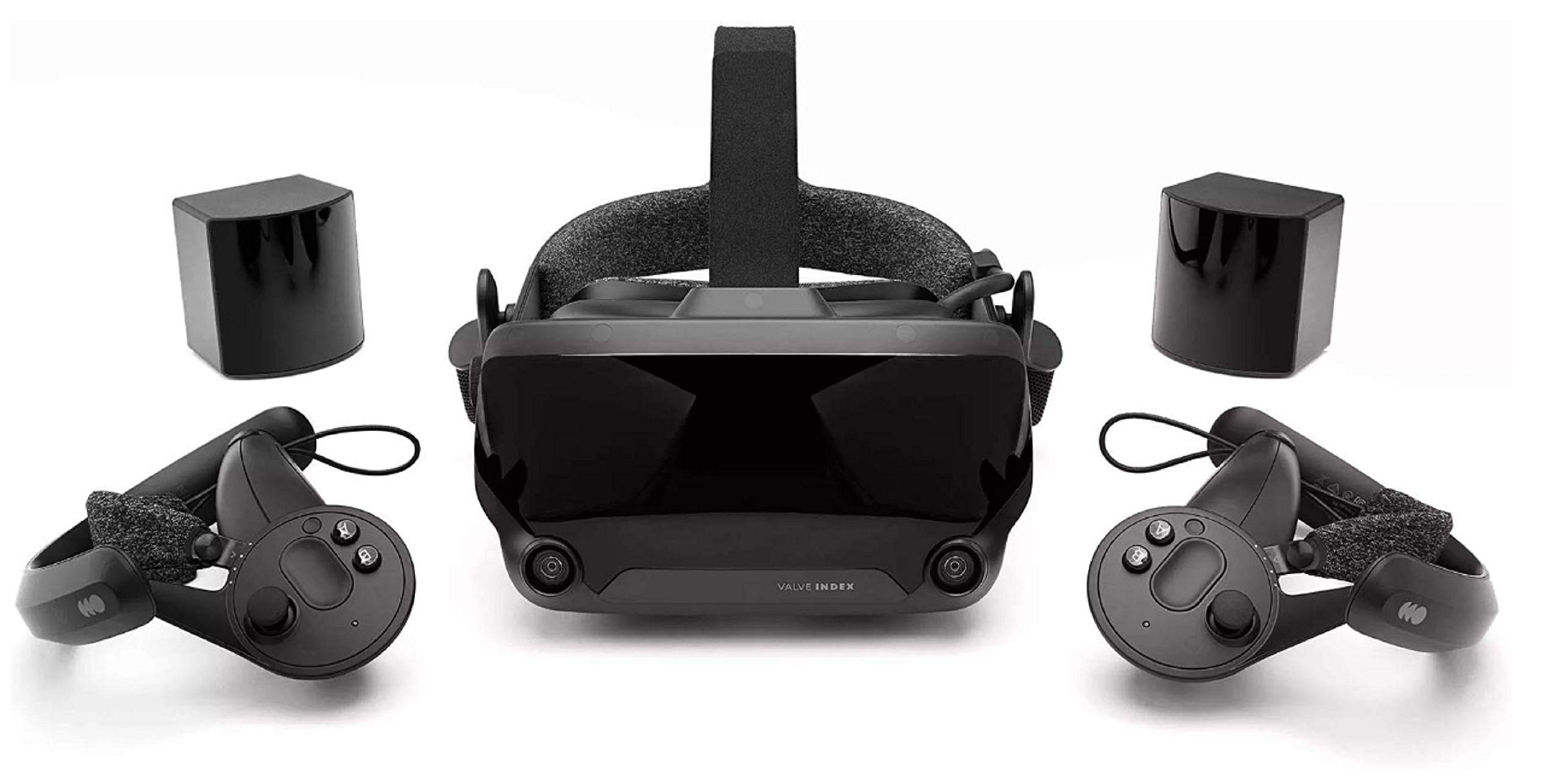
Valve Index Full Kit

80 /100
LBD Score Excellent

Key details

Displays
Dual 1440 x 1600 LCDs
IPD Range
58mm - 70mm
Refresh Rate
144 Hz
Field Of View
130 degrees
View on Amazon

The Index begins with a requirement rather than a feature: a VR-ready gaming PC with a free DisplayPort output. Nothing in this kit works until that's true, and it decides whether the rest of this matters to you. If it is true, you're getting 130 degrees of field of view, dual 1440 x 1600 LCDs at up to 144 Hz, and physical adjustment for IPD between 58 and 70 mm plus eye relief — the kind of dialing-in the standalone headsets leave you to solve with straps.

SteamVR tracking is the reason people still pay for it. The base stations read the headset and controllers with a precision the camera-based Quests don't quite match, and the Index controllers, with per-finger sensing and grip straps, are the best-feeling controllers in this group by a wide margin. We kept finding excuses to come back to them after a session on the Quests.

The cost isn't only the higher price. Base stations need mounting at opposite corners of the room with a clear view of the play area, and each one needs power, so setup is an afternoon rather than ten minutes. Check the box contents on day one, too — a missing power cord or a dead headphone is exactly the sort of thing you want to find while returns are still simple.

What keeps it in the guide is the detail most people skip past: 0.330 ms of persistence at 144 Hz. That's why fast pans stay clean instead of smearing, and it's the part of the Index that still impresses long after the novelty of a new headset wears off.

Pros

  • 144 Hz refresh with very low persistence
  • 130-degree field of view
  • Physical IPD and eye-relief adjustment
  • Most precise controllers in this group

Cons

  • Needs a VR-ready PC with a DisplayPort output
  • Priciest headset here before you add the PC
Our verdict

Buy the Index for its tracking and 144 Hz, and only if a VR-ready PC with a free DisplayPort output is already on your desk.

Check Latest Price

How We Tested VR Headsets in Living Rooms, Not Labs

We started by pulling every current headset we could actually buy and cutting the list by how each one runs: standalone, PC-tethered, or linked to a console. From there we filtered by price, tracking method—inside-out cameras versus external base stations—and whether the platform had a games library worth owning six months in. Six made the cut, from budget models to high-end kits, and we spent eight months using each one the way a buyer would.

Testing happened where headsets live: a cleared living room at 9 p.m., a tight apartment corner with barely enough room to swing an arm, a game night with family passing the set back and forth, and one hot afternoon with a fitness app. We timed how long each took from unboxing to first game, then counted the steps required the next day—pick it up, turn it on, get into something. We watched whether new players needed help getting in, and whether the fun survived the tenth person in line.

For visual quality, we read menus, in-game signage, and objects far in the distance, noting where text shimmered at the edges or the picture went soft near the rim, plus lens fogging and glare in dark scenes. Comfort was checked at the 45-minute mark and again after two hours: strap pressure, weight on the cheekbones, and whether glasses fit underneath without pinching. We logged battery drain across full sessions rather than trusting the estimate on the box, then ran each PC-capable set over a link cable and over Wi-Fi to see how setup and streaming held up. Price jumps got the last word—we asked whether the next tier up bought a visibly better experience or just a heavier headset.

How to Choose a Vr Headset

Standalone or tethered comes first

A standalone headset carries its own processor, storage and battery, which is why the two Quests work anywhere with a patch of clear floor. A tethered headset is a display and sensor rig for a gaming PC, and the Valve Index is the pure example here: it needs a VR-ready machine and a free DisplayPort output before it does anything at all.

The trap is the word compatible on a laptop. Many gaming laptops have the graphics card but route it through HDMI or USB-C, so confirm there's a DisplayPort you can actually use — or plan on a desktop — before ordering the Index. If you don't own that machine already, the cost of the headset is only half the purchase.

Per-eye resolution tells you less than the lenses do

Resolution is the easy number to compare — 2064 x 2208 per eye on the Quest 3 against 1832 x 1920 on the 3S — but the optics in front of the panel decide how much of it reaches your eye. The Quest 3's pancake lenses keep the field crisp and the headset shallow; the 3S is noticeably softer, and fine text is where you notice it.

That makes the choice fairly clean. If you'll read documents, browse a virtual desktop or watch films, the sharper optics are worth the money. If the headset is for standing-up games where you're moving rather than reading, the 3S holds up better than its spec sheet suggests.

Battery, comfort and how long a session really lasts

Both Quests are rated around two and a half hours — 2.2 on the Quest 3, 2.5 on the 3S — and you should treat those figures as ceilings. A head strap with a built-in battery is the single most useful accessory you can add, and it costs far less than a second headset.

Comfort decides session length as much as the battery does. Weight and facial-interface shape vary in how they sit on a given face, so if a headset presses on your cheekbones after twenty minutes, that's a fit problem with a fixable part rather than a reason to give up. Plan on replacing the interface or strap at some point.

Storage and the library you're buying into

Storage is the one specification you can't upgrade, so choose it once. 128 GB fills quickly with a handful of big titles and forces you to delete games to make room; 512 GB lets you keep a library installed and stop thinking about it. That's the main practical reason to pay more for the Quest 3.

The library matters just as much, and it's where the split is sharpest. Both Quests run Meta Horizon OS and share one catalogue, so the cheaper headset plays everything the expensive one does. The Index runs SteamVR titles off your PC — which is the whole point if your games already live on Steam, and a reason to skip it if they don't.

Frequently Asked Questions

Final Verdict

The Meta Quest 3 is the headset we point most people to. It has the sharpest picture in this group, 512 GB of storage so you stop managing installs, and a catalogue that covers games, fitness and film — and the rated battery life is the one thing you'll work around rather than enjoy.

If money is the deciding factor, the Quest 3S keeps the same library with a softer picture and less storage, and it's the one we'd hand to a first-timer or a shared family headset. The Valve Index earns its place only when a VR-ready PC with a free DisplayPort is already sitting on your desk; without one, it's an expensive ornament.