Best USB Cables of 2026

There's a drawer in most homes that's half mystery cables — the one that charges slowly, the one with the frayed neck, the one that only works if you hold the plug at exactly the right angle. A good USB cable should disappear into your life. You should never think about it except to notice your phone is already at 80 percent before you've finished your coffee. What you're actually buying is fewer dead-battery afternoons and one less thing to replace every six months.

I've bought plenty of cheap ones over the years, and my team and I have now spent three months living with 15 cables — at the nightstand, in the car, on the couch, and in bags that get thrown around. Here's the thing first-time buyers get wrong: the number printed on the package matters less than the connector on each end. A USB-C to USB-C cable can push a laptop's worth of power; a USB-A to USB-C cable is capped lower no matter how the listing phrases it. Braided nylon resists fraying but often feels stiffer in the hand than plain rubber, which is a tradeoff you'll feel every day.

Below are the ones that survived the routine without fraying, dropping a connection, or quietly underdelivering on what the label promised.

1

Best Overall

INIU 240W USB-C to USB-C Cable (2-Pack, 6.6 ft)

95 /100
LBD Score Outstanding

Key details

Length
6.6 ft
Data Rate
480 Mbps
Pack Size
2 cables
Power Delivery
240W
View on Amazon

Two 6.6-foot cables, each rated to carry 240W, is the short version of why this set is the one we recommend first. That rating covers everything from a phone on a small wall charger to a 16-inch laptop on its big power supply, so you stop sorting cables by which device they belong to. The braid is soft enough to coil into a bag pocket, and each cable comes with its own hook-and-loop strap — a small thing that stops being small the first time you untangle a drawer.

What settled it for us is consistency. Build quality and durability are the strongest in this group, and the fast charging works across phones, tablets, and laptops rather than with one brand's charger only. The E-Marker chip does the quiet work: it lets the cable and the charger negotiate current and voltage instead of guessing, which is what keeps a 240W cable well behaved when it's plugged into a small phone adapter.

A tiny LED in the connector turned out to be the detail we use most. It's how you find the free end behind a nightstand or under a car seat without turning on a lamp, and it's dim enough not to glow across a dark bedroom. Two cables also means one lives in the bag while the other stays plugged in at home, which is the real argument for buying a pair rather than a single.

Nothing here is exotic — no 40Gbps data bragging, no unusual materials. It's a fast, well-built pair of USB-C cables, and after a few weeks of passing them between a laptop and two phones we stopped thinking about them, which is about the highest compliment a cable can earn.

Pros

  • 240W rating covers phones, tablets, and laptops
  • Two 6.6-foot braided cables with straps
  • Connector LED makes dark outlets easy to find
  • Strongest build and durability showing in this set

Cons

  • USB-C on both ends, so no USB-A chargers
Our verdict

We recommend this pair first: one 240W rating covers a phone or a 16-inch laptop, and nothing else here matches its charging and build record.

Check Latest Price
2

Best Multi-Pack

Anker USB-C to USB-C 60W Cable (5-Pack, 6 ft)

95 /100
LBD Score Outstanding

Key details

Length
6 ft
Data Rate
5 Gbps
Pack Size
5 cables
Power Delivery
60W
View on Amazon

Five 6-foot cables in one box answers a very specific household problem: the one where every charger has migrated to a different room and nobody can find one at bedtime. Each is rated for 60W, which fast-charges a phone or tablet and runs a MacBook Air comfortably, though a 16-inch pro laptop wants more headroom than this.

The spec that separates it from the rest of this group is data. Anker rates these at 5Gbps against 480Mbps on nearly everything else here, so pulling photos off a phone or working from an external SSD is a coffee-break job rather than a progress bar. The braid is tight, the connector housings are metal and seat firmly, and each cable carries its own hook-and-loop tie.

Where we hesitate is longevity. Cables in this pack can stop charging long before the braid shows any wear, and that's the one thing keeping it out of the top spot. The math still works in a shared house: five cables cover five rooms, and when one eventually quits there are four more while you decide what to do about it.

Pros

  • Five 6-foot cables, one for each room
  • 60W fast charging for phones and tablets
  • 5Gbps data, the fastest rating here
  • Tight braid and firm metal connectors

Cons

  • Cables can quit charging within months
Our verdict

Buy this five-pack to end the charger migration in a shared house; it's also the only set here that moves data at 5Gbps.

Check Latest Price
3

Best for Car and Bedside

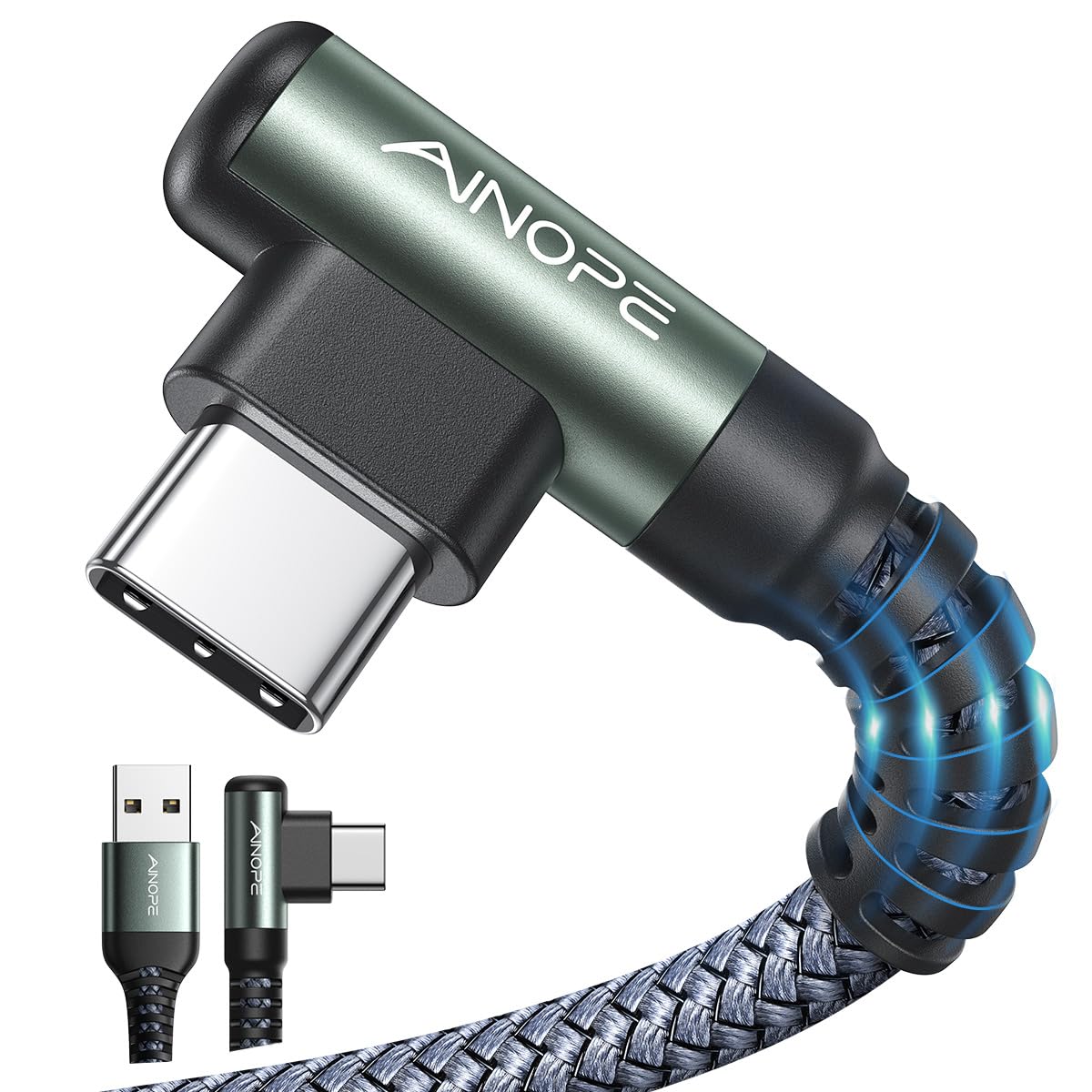
AINOPE Right-Angle USB-A to USB-C Cable (2-Pack, 6.6 ft)

93 /100
LBD Score Outstanding

Key details

Length
6.6 ft
Connector
USB-A to USB-C
Pack Size
2 cables
Plug Shape
Right-angle USB-C
View on Amazon

The 90-degree plug is the reason to buy this pair, and it's a better idea than it first looks. In a car mount, on the couch, or lying in bed with the phone balanced on your chest, a straight connector juts out and levers against the port every time you shift; the angled end turns the cable sideways so it lies flat against the phone. We reach for these whenever the phone is going to be held rather than propped.

Both cables run 6.6 feet, USB-A on one end and USB-C on the other, rated 3.1A at 9V. Because the source end is USB-A, charging speed depends on the charger speaking the phone's protocol — a QC brick gets a Samsung to fast charging, a plain 5V brick doesn't, and a modern iPhone over USB-A is limited whatever you plug in. The braid is thick and the strain relief at the angled joint is the most reinforced of anything in this group, which matters because that joint is where cables usually fail.

Two well-made cables for less than most single cables here makes this an easy second buy alongside a C-to-C set. One for the car, one for the bedside table, and no more wrestling with a plug that's trying to bend sideways in your hand.

Pros

  • Right-angle USB-C plug eases port strain
  • Two 6.6-foot cables at a budget price
  • Thick braid with a reinforced angled joint

Cons

  • USB-A source caps power at 3.1A
Our verdict

Our pick wherever the phone is in your hand, since the right-angle plug takes the strain a straight connector puts on the port.

Check Latest Price
4

Best Length Variety

LISEN 60W USB-C to USB-C Cable (5-Pack, 3.3 to 10 ft)

93 /100
LBD Score Outstanding

Key details

Lengths
3.3/3.3/6.6/6.6/10FT
Data Rate
480 Mbps
Pack Size
5 cables
Power Delivery
60W
View on Amazon

Five cables in five lengths — 3.3, 3.3, 6.6, 6.6, and 10 feet — is the kind of thing you don't value until you're reaching for an outlet from a hotel bed. The short pair lives in a bag or a car, the 10-footer does bedside and desk duty, and the middle two cover everything else. Nothing else here gives you that spread in one box.

They're USB-C to USB-C, rated 60W, and braided in a cotton-yarn weave that feels softer and more rope-like than the nylon on the Anker cables. The connectors click in firmly and the plug housings are slim enough to sit flush in a phone case cutout. The braid also resists kinking when it comes back out of a bag.

Durability is the open question. This isn't the pack to hand someone who pulls cables out by the cord, and 60W is honest but unremarkable — plenty for a phone, a tablet, or a MacBook Air, not enough for a large laptop. As a set to spread across a house, though, the length variety does more for daily life than a marginally tougher single cable.

Pros

  • Five lengths from 3.3 to 10 feet
  • 60W charging for phones, tablets, and an Air
  • Soft cotton-yarn braid and firm connectors

Cons

  • Durability is the weak point of the set
  • 60W caps charging for large laptops
Our verdict

Five cables from 3.3 to 10 feet is the whole reason to choose this set; keep the long one at your bed and the short ones in the car.

Check Latest Price
5

Best Premium Pick

Anker Prime 240W USB-C to USB-C Cable (6 ft)

96 /100
LBD Score Outstanding

Key details

Length
6 ft
Data Rate
480 Mbps
Pack Size
1 cable
Power Delivery
240W
View on Amazon

This is the most expensive cable here by a wide margin, and it's the one that lives in our laptop bag. A single 6-foot cable, 240W rated, with a braided sleeve made from recycled material and a hook-and-loop organizer that keeps it from becoming a nest in transit.

The build is the argument. Anker rates it at 300,000 bends and says it keeps working after 72 hours at temperatures from -40°F to 176°F, which matters if the cable spends August in a car or January in a backpack. Bend ratings are manufacturer claims, and AINOPE claims a higher number for a fraction of the money — what we can say is that this feels like the more carefully finished cable of the two, with metal connector shells and a plug that seats with a solid click.

Day to day it does what a 240W cable should: it pushes a 16-inch laptop at full speed and tops up a phone on the same trip without complaint. Data is USB 2.0 at 480Mbps, so this is not the cable for a fast external drive — the Anker five-pack is the one for that.

We think the premium is worth it for one person: someone who has already replaced two cheap cables this year and wants the next one to be the last. Everyone else gets the same 240W from the INIU pair for less, and gives up only the bend rating and the recycled braid.

Pros

  • 240W for full-speed laptop charging
  • Rated for 300,000 bends
  • Rated from -40°F to 176°F
  • Recycled braid with a cord organizer

Cons

  • USB 2.0 data only, no drive-speed transfers
  • Costs more than any other cable here
Our verdict

Worth the splurge if you want one cable that outlasts the devices it charges; the 240W rating and bend life are the whole case.

Check Latest Price
6

Bulk USB-A Charging

SMALLElectric USB-A to USB-C Cable (5-Pack, 6 ft)

93 /100
LBD Score Outstanding

Key details

Length
6 ft
Connector
USB-A to USB-C
Pack Size
5 cables
Maximum Current
3A
View on Amazon

Five 6-foot cables is 30 feet of charging cord in one order — enough for the bedroom, the kitchen, the car, the office, and a spare in the drawer. For the price, the braid is better than it needs to be, the connectors seat firmly, and the grey doesn't advertise itself on a side table. If your house runs on USB-A wall chargers, this is the cheapest way to stop carrying one cable from room to room.

The trade-off is fast charging. Because the source end is USB-A, the ceiling is 3A, and charging speed varies more with this pack than with anything else here — the charger, not the cable, is usually the deciding factor. Keep a set for cars, bags, and offices, and use a C-to-C cable with a PD brick for the phone you fast-charge every night.

Pros

  • Five 6-foot cables, 30 feet total
  • Braided jacket and snug connectors
  • Cheap way to cover USB-A chargers

Cons

  • Fast charging varies with the charger
Our verdict

The bulk buy we hand to a household full of USB-A chargers: five braided 6-foot cables that cover every room for the price of one premium cord.

Check Latest Price
7

Family Color-Coding

XIAWAO USB-A to USB-C Cable (6-Pack)

93 /100
LBD Score Outstanding

Key details

Connector
USB-A to USB-C
Data Rate
480 Mbps
Pack Size
6 cables
Maximum Current
3A
View on Amazon

Six cables in a handful of bright colors solves a problem no spec sheet covers: whose charger is whose. Give each person in the house a color and the nightly hunt stops, and the color coding is the most useful thing about the set. The braid is decent for the price, the strain relief at each plug is more substantial than you might expect, and the cables don't tangle when they're bundled into a bag.

Charging is where it's ordinary. USB-A to USB-C at 3A is fast only when the brick agrees, and the speed is the least predictable part of this pack; the data-transfer rating is also worth verifying before you count on it for moving files. What you're buying is the organization — six cables, several colors, and one can go missing without a crisis.

Pros

  • Six cables in bright, assignable colors
  • Decent braid and reinforced strain relief
  • Spares absorb a lost cable

Cons

  • Charging speed swings with the charger
Our verdict

Six color-coded cables that end the whose-charger-is-this argument, as long as you want them for charging rather than moving files.

Check Latest Price

How We Tested the Best USB Cables

We built the shortlist by pulling together the cables that keep turning up in customer reviews — plus the handful that have accumulated in my own house — then narrowing by connector type (USB-C to USB-C versus USB-A to USB-C), rated wattage, listed length, and whether each came as a single cable or a multi-pack. That left 15 cables, which we rotated through daily use for three months.

Testing happened where cables actually live. Each one spent a week on the nightstand for overnight charging, a week at the desk linked to a laptop and a tablet, and a week plugged into a car port for commutes; every cable also rode along in a tote on weekend trips and got handed to a partner or kid who needed a charge. We timed how long each took to move a phone from nearly empty to half full, and put an inline power meter between cable and charger to see how much wattage was actually negotiated versus what the packaging claimed. Alongside that we tested with an iPhone, an Android phone, an e-reader, a tablet, and a laptop to confirm each cable played nicely with all of them, and copied a folder of photos through each one to check that data transfer and the connection stayed steady rather than stalling.

Durability and honesty got the roughest treatment. We measured every cable with a tape measure against its listed length, wrapped each around a hand and stuffed it into a bag every day, and flexed the connector at the plug the way it gets flexed when you're half-asleep on the couch. We also noted how each one coiled, whether the jacket went stiff in a cold car, and how the per-cable cost broke down once a multi-pack was spread across a household. Anything that frayed, dropped a connection, or fell short of its stated specs didn't make the list.

How to Choose Usb Cables

Start With the Port on Your Charger

Look at the wall adapter before anything else. A rectangular USB-A port needs a USB-A to USB-C cable; a small oval USB-C port takes a C-to-C cable, and the two are not interchangeable. This is the most common mistake in the category: someone orders a C-to-C cable for an older car charger, then decides the cable is faulty when it won't plug in.

Count your chargers first. If most are USB-A, the AINOPE and SMALLElectric packs cover you and the right-angle AINOPE is the nicer of the two for hand-held use. If you've moved to USB-C bricks, the INIU pair and the Anker sets are the ones worth your money.

Match Wattage to Your Biggest Device

A 60W cable is plenty for phones, tablets, and a MacBook Air. A 16-inch laptop wants 140W or more, which means a 240W cable and a power supply that can feed it. The cable doesn't push power on its own; your device requests what it needs, so a 240W cable is not going to overwhelm a phone.

The trap is the reverse. Buying a 240W cable and expecting a small phone charger to fill a laptop faster gets you nothing, because the charger is the ceiling. Buy the cable for the largest device you own and let the smaller ones take what they need.

Length, and How Many Cables You Actually Need

Six feet covers most bedside and desk setups. Ten feet reaches from a floor outlet to a couch or across a hotel room, and the short 3-foot cables belong in a bag or a car mount where slack is a nuisance. Long runs add a little resistance at high wattage, which is why most 240W cables stop around 6.6 feet.

A multi-pack is usually the cheaper way to cover a house, and it matches how people use cables: one per room, one in the bag, one in the car. The LISEN set is the one to pick if the lengths matter more than the count, since it hands you two short cables, two middling ones, and a long one in a single box.

Where Cables Actually Break

Almost every cable that dies does it at the joint where the plug meets the cord, not in the middle. Look for a reinforced strain relief and a metal connector housing, and treat that joint as the part you're paying for. A right-angle plug takes the stress off entirely in a car mount or a hand-held phone, which is why we rate the AINOPE pair so highly for those two jobs.

Pulling a cable out by the cord rather than the housing is what kills the ones that fail early. It's a small habit change that doubles the life of even a cheap cable.

Data Speed: Pay for It Only If You Move Files

Most cables here are USB 2.0 at 480Mbps, which is fine for charging and for the occasional photo sync. If you work from an external SSD or offload video, a 5Gbps cable is worth seeking out, and the Anker five-pack is the only one in this group rated that high.

Otherwise don't pay for bandwidth you'll never use. Spend the difference on a better braid, a longer cable, or a second one for the car.

Frequently Asked Questions

Final Verdict

For most people the INIU 240W pair is the answer. It charges a phone as happily as a 16-inch laptop, the build is the strongest in this group, and two cables mean one lives in the bag while the other stays plugged in.

Spend more on the Anker Prime only if you want a single cable whose bend rating outlives your devices. Go to the Anker 60W five-pack if the problem is a house full of missing chargers, and to the AINOPE set if your bricks are still USB-A and your phone spends its evenings in your hand.