Best USB-C Flash Drives of 2026

A USB-C flash drive is a gadget that earns its keep after the fact. You buy one because your phone is full or a file is stranded on a laptop without a USB-A port, and suddenly it’s what you reach for before a trip or a presentation. The appeal is simple: storage that lives on your keyring, not in a cloud account.

After three months with 16 USB-C drives, the category is less plug-and-play than it looks. Read-speed claims are only half the story; write speeds, connector fit, and how warm a drive gets during a long transfer are what separate a handy tool from a drawer ornament. Dual USB-C and USB-A connectors help if you move between a phone and an older computer, and metal housings survive bag life better than plastic—though a swivel or retractable body matters more if you hate losing caps. Value is usable storage and real transfer times, not the capacity printed on the package, so the picks below are the ones that held up to use rather than a benchmark.

1

Best Overall

SanDisk Ultra Dual Drive Go 128GB

91 /100
LBD Score Outstanding

Key details

Capacity
128GB
Warranty
5-year limited
Connectors
USB-C and USB-A
Read Speed
Up to 400MB/s
View on Amazon

Two connectors on one body is the whole premise of this category, and the Ultra Dual Drive Go is the smallest convincing version of it we've handled. It's about the length of a AAA battery and weighs under four grams, with both plugs on one tiny shell and no separate cap to keep track of. Nothing to install, nothing to remember, nothing to unscrew in a parking lot.

That's the case for making it our top pick. It never asks you to think about which port is in front of you, and it moves real files quickly: SanDisk rates it at up to 400MB/s read over USB 3.2 Gen 1, and the five-year limited warranty is the longest in this group. On a phone it's the difference between a storage warning and getting on with your day, and the Memory Zone app will handle automatic camera-roll backups if you want that off your hands.

The catch sits on the way in rather than the way out. Write speeds fall a long way below the read rating, so copying a folder of video onto the drive takes noticeably longer than pulling it off, and not every USB-C phone will mount it — some handsets need OTG switched on before they'll see any drive at all. That's a setting rather than a fault, but it's worth checking before you decide the thing is dead.

Where it wins is breadth. Of everything here, it's the one equally at home in a work laptop, a friend's older desktop and a phone, and small enough to live on a keyring without becoming a lump in your pocket. If every device you own has made the jump to USB-C, the Samsung below is faster and tougher for a lot more money. If you still meet the occasional USB-A port, this is the drive that spares you the hunt for an adapter.

Pros

  • Two connectors in one pocket-sized body
  • Reads up to 400MB/s over USB 3.2 Gen 1
  • Five-year limited warranty
  • Automatic phone backup through the Memory Zone app

Cons

  • Write speeds fall well below the read rating
  • Not every USB-C phone will mount it
Our verdict

Our pick for most people: a genuinely pocketable drive with both connectors, fast reads and a five-year warranty, so no device is off limits.

Check Latest Price
2

Best for USB-C-Only Devices

Samsung Type-C Flash Drive 256GB

91 /100
LBD Score Outstanding

Key details

Capacity
256GB
Connector
USB-C
Read Speed
Up to 400MB/s
Write Speed
Up to 300MB/s
View on Amazon

No USB-A connector here, and that's the point. This is the drive for a kit that has finished moving to USB-C — a recent laptop, an iPad, an Android phone, a handheld — and Samsung has built it as small as that allows: a reversible plug with barely more body around it than the connector itself.

The numbers are the reason to pay attention. Samsung rates it at up to 400MB/s read and 300MB/s write on USB 3.2 Gen 1, and only the SSK below quotes a faster write, which is what turns a phone backup or a folder of 4K clips from an errand into a minute of waiting. There's 256GB of room, the drive is rated waterproof, and the five-year warranty matches the longest here.

We reach for this one when the file is large and the device is new. The speed is the point, and it's the difference between backing up a phone monthly and never doing it at all. Two things to know: a thick phone case can stop the short plug seating properly — take the case off and it clicks home — and this is comfortably the most expensive drive in the group. Neither bothers anyone moving serious video off a handset every week.

Pros

  • Up to 400MB/s read and 300MB/s write
  • 256GB holds large photo and video libraries
  • Waterproof body and five-year warranty

Cons

  • Highest price in this group
  • Some drives have died within a year of light use
Our verdict

Buy this one if every port in your life is already USB-C and you want the fastest sustained writes in a body smaller than a key fob.

Check Latest Price
3

Best Plug-And-Stay Drive

SanDisk Extreme Fit 256GB

92 /100
LBD Score Outstanding

Key details

Profile
Flush, low-profile body
Capacity
256GB
Connector
USB-C
Read Speed
Up to 400MB/s
View on Amazon

We pushed one into the side of a laptop to free up space before a trip and then spent a week forgetting it was there, which is exactly the job this drive is built for. It sits almost flush, so it doesn't catch on a sleeve or snap off when the machine goes into a bag, and for plug-and-stay use that puts it ahead of every protruding drive here.

Underneath the low profile it's a straightforward USB-C drive: 256GB, USB 3.2 Gen 1, reads quoted up to 400MB/s, and the SANDISK app for managing files on Windows or Mac. The flush fit is what makes it genuinely useful where a normal thumb drive is a nuisance — a car's media socket, a dashcam, the tight port on a slim laptop, a handheld console where a stick would sit right under your hands.

It's USB-C only, so it can't rescue an older desktop or a USB-A hub, and that's the trade: you give up the second connector for a body that stays out of the way. Flush cuts both ways, too — a drive this unobtrusive is easy to walk away from, so label it if it's going to live in a machine you don't own. At the same 256GB it asks less than the Samsung, which is the other reason it stays on our shortlist.

Pros

  • Sits almost flush in a laptop or car port
  • 400MB/s reads from a tiny body
  • Less expensive than the Samsung at 256GB

Cons

  • USB-C only, so no USB-A machines
Our verdict

For a drive that stays plugged into one machine and effectively vanishes, this flush-fitting 256GB USB-C stick is the one we leave in place.

Check Latest Price
4

Best for Large File Transfers

SSK SD301 128GB

89 /100
LBD Score Excellent

Key details

Capacity
128GB
Connectors
USB-C and USB-A
Read Speed
Up to 550MB/s
Write Speed
Up to 500MB/s
View on Amazon

550MB/s read and 500MB/s write is a different order of speed from the rest of this group, and it's the reason to look at the SSK at all. Those figures need USB 3.2 Gen 2 at the other end to mean anything — on an older USB 3.0 machine you'll see a fraction of them — but plugged into a current laptop, 128GB moves fast enough that you stop scheduling your day around transfers.

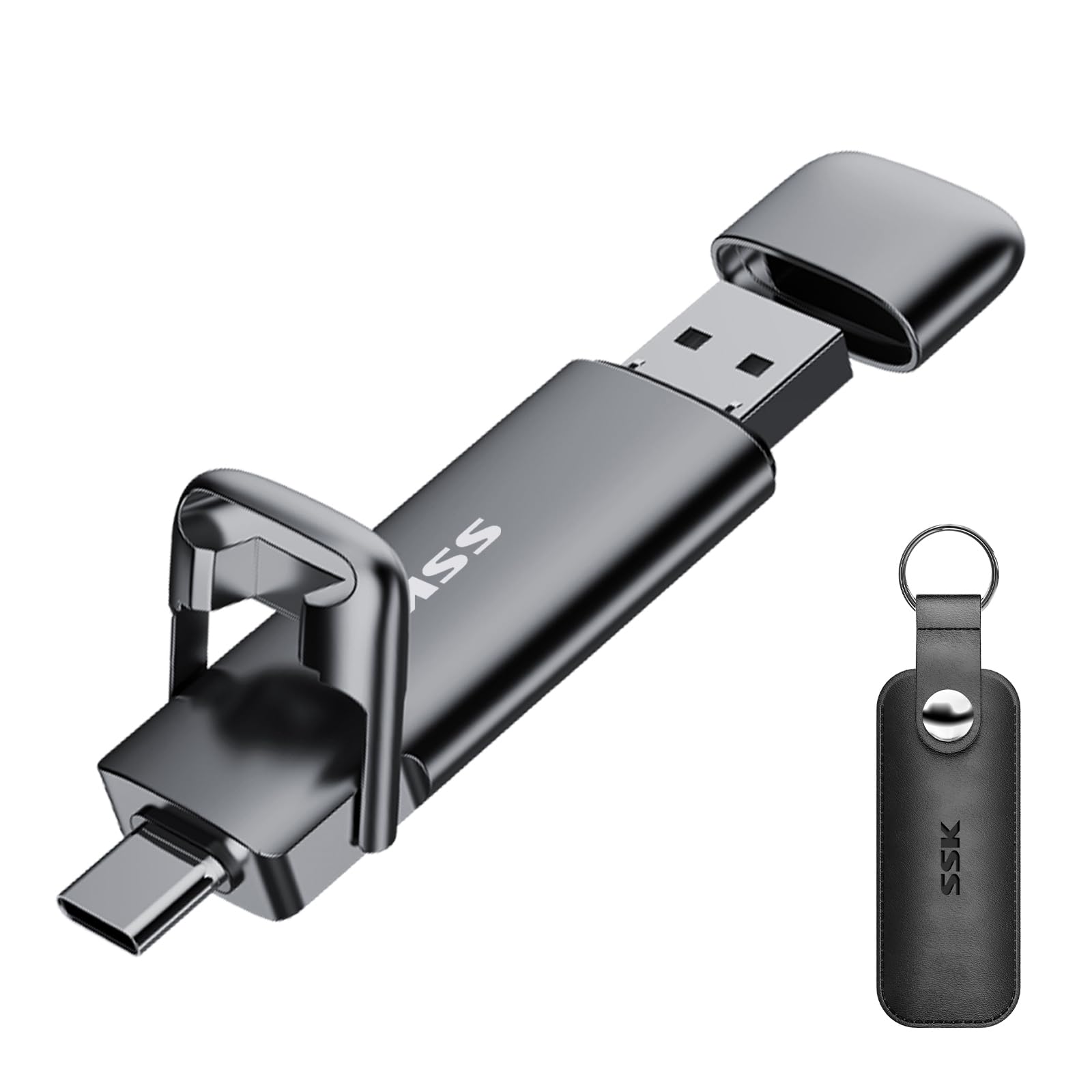
We keep it for the jobs that used to be an errand: a video project, a full photo library, a system image. The zinc alloy shell feels like a tool rather than a freebie, both connectors get their own protective cover, and the three-year warranty is a reasonable match for something likely to be carried in a laptop bag rather than a pocket.

The cost of the speed is heat. Sustained writes make the metal body properly hot, so long jobs are better run with the drive somewhere you can leave it alone until it finishes rather than in your hand. It's also around 50g, which is fine in a bag and a lump on a keyring next to the tiny SanDisk drives here.

Compatibility is the other thing to check. It works with Android phones, Windows and Mac machines, but iOS is the usual stumbling block, so don't buy it planning to offload an iPhone. For a Windows-and-Android household shifting big files, it's the quickest thing on this page and the easiest recommendation to make.

Pros

  • Reads up to 550MB/s and writes up to 500MB/s
  • Zinc alloy body with protective covers
  • Works with phones, Windows and Mac

Cons

  • Gets hot during long transfers
  • Around 50g, heavy for a keyring
Our verdict

You're paying for speed here, and it shows: the SSK is the drive we hand someone who moves video for a living rather than documents.

Check Latest Price
5

Best Metal Dual-Connector Value

Lexar D40E 128GB

88 /100
LBD Score Excellent

Key details

Capacity
128GB
Warranty
3-year limited
Connectors
USB-C and USB-A
Read Speed
Up to 100MB/s
View on Amazon

Same two connectors as our top pick, built the opposite way. Where the SanDisk is a featherweight with both plugs on one tiny shell, the Lexar hangs a metal body on a 360-degree swivel, and at 26g it has enough heft that you notice it in your hand. That's not a criticism — a drive that lives in a laptop bag rather than a pocket can afford to feel like something.

The numbers are modest: Lexar quotes up to 100MB/s read and 80MB/s write on USB 3.2 Gen 1. That's not the drive for a 60GB video library, but it's quick enough for documents, photo dumps and phone backups, and it brings two things the featherweight drives here don't: 256-bit AES encryption software for work files, and a three-year limited warranty.

Where it earns its place is as the dual-connector drive for someone who wants substance over minimalism. The swivel parks whichever connector is idle, so neither plug sits exposed at the bottom of a bag, and 128GB comfortably holds a working set of documents plus a phone's worth of photos. It's the pick here if the palm-sized drives feel like something you'll lose before you lose the data.

Pros

  • Metal swivel body protects both connectors
  • AES 256-bit encryption for sensitive files
  • Three-year limited warranty

Cons

  • 100MB/s reads trail the fastest drives here
  • Some have come apart within a month of use
Our verdict

A metal dual-connector drive that feels like an object rather than a giveaway, though its read speed is a step behind the front of this group.

Check Latest Price
6

Best Multipack

PNY Elite Type-C 128GB 3-Pack

81 /100
LBD Score Excellent

Key details

Pack
3 drives
Capacity
128GB per drive
Connector
USB-C
Read Speed
Up to 120MB/s
View on Amazon

If you want a drive in the laptop bag, one in the car and one in the desk drawer, buying them one at a time adds up. This is the three-pack we suggest for that job: 128GB USB-C drives for about what a single premium drive costs, and the case for it is simple — hand two out, keep one, stop worrying about which bag you left it in.

Each drive is USB-C only, with a sliding collar instead of a cap and reads quoted up to 120MB/s. That's fine for documents, photos and phone backups, and slow next to the 400MB/s drives here, so if video is a regular part of your week, this isn't the pack. Plug-and-play on Windows, Mac and Android, and no cap to lose.

The bigger question is whether three ordinary drives beat one good one. For a lot of people they do: a spare for the car, one that stays plugged into a desktop, one to lend and not chase. The catch is that a dud in the pack is a real possibility, so test all three the day they arrive and don't make any of them the only copy of something that matters.

Pros

  • Three 128GB drives for one premium drive's price
  • 120MB/s reads suit documents and photos
  • Cap-less sliding collar, nothing to lose

Cons

  • USB-C only, so no USB-A fallback
  • An occasional dead drive in the pack
Our verdict

Three drives, one for each bag, and that's the whole pitch — this is the pack we suggest when someone wants spares rather than a single good drive.

Check Latest Price
7

Metal Dual-Port All-Rounder

Amazon Basics 128GB Dual-Port

91 /100
LBD Score Outstanding

Key details

Casing
Metal, rotating
Capacity
128GB
Connectors
USB-C and USB-A
Read Speed
Up to 400MB/s
View on Amazon

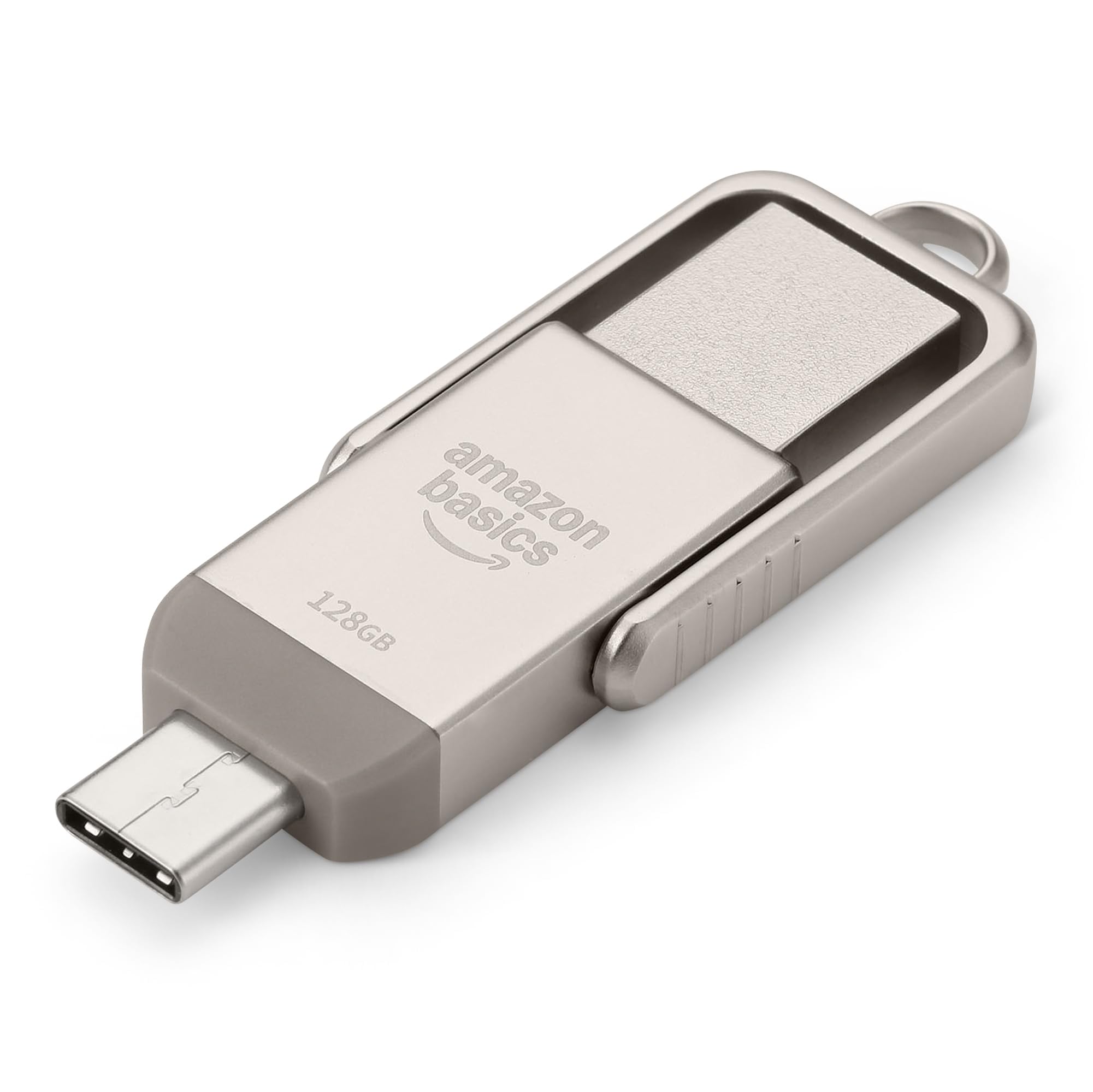
The first surprise is that it doesn't feel like a house-brand accessory. The casing is champagne-silver metal, the body rotates to cover one connector at a time, and there's a lanyard hole at the end. In the hand it's the closest thing here to the Lexar above, with similar heft and the same idea of a shell that protects whichever plug is idle.

The specification is where it raises an eyebrow: 128GB over USB 3.2 Gen 1 with reads quoted up to 400MB/s, the same figure our top pick quotes, in a body that feels more substantial. It arrives formatted exFAT, so it reads and writes on Windows, macOS and Android without reformatting, and both connectors are full-size and easy to seat in a port.

In daily use it behaves like the rest of the metal dual drives: the laptop picks it up, the phone picks it up, and a photo library moves across without fuss. Recognition is the wrinkle — a USB-C port on a phone doesn't guarantee the drive will mount, and some iPhones simply won't see it. Test it with the handset you actually plan to use before you rely on it.

So why isn't it higher? Because it asks more than our top pick while quoting the same read speed, and the SanDisk is smaller, lighter and just as quick on paper. The case for this one is the finish and the feel: if you want a metal dual-port drive that looks like it cost more than it did, buy it — just check that price against the SanDisk first.

Pros

  • Same 400MB/s quoted read as our top pick
  • Metal rotating body with lanyard hole
  • Ships in exFAT for Windows, macOS and Android

Cons

  • Costs more than our top pick
  • Some iPhones won't mount it
Our verdict

A quietly competent metal dual-port drive that quotes the same read speed as our top pick, which makes its higher price the only real argument against it.

Check Latest Price
8

Color-Coded File Sorting

KOOTION 64GB 5-Pack

80 /100
LBD Score Excellent

Key details

Pack
5 drives
Capacity
64GB per drive
Interface
USB 2.0
Connectors
USB-C and USB-A
View on Amazon

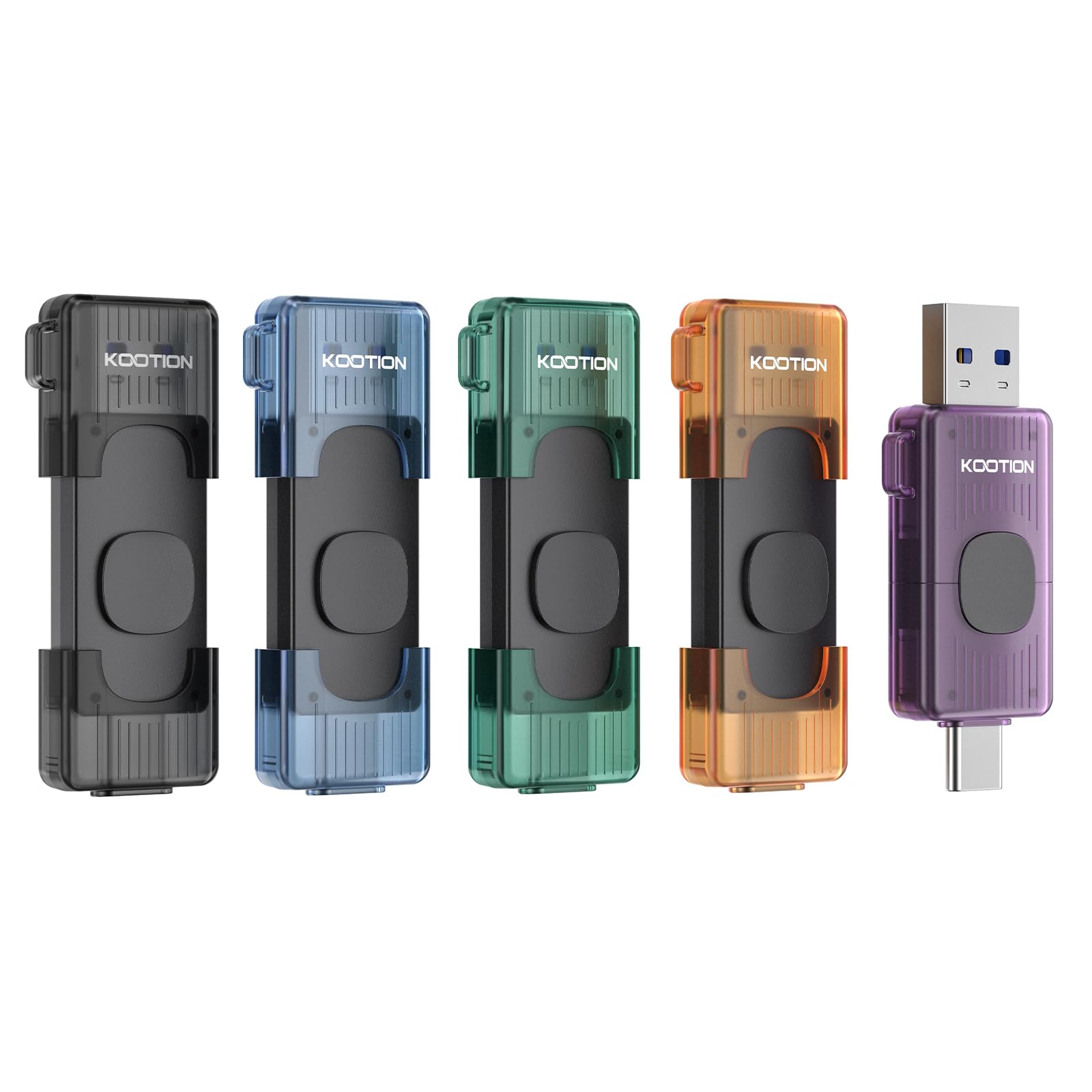
Five drives, five colors, one for each project — that's the appeal, and it's a real one if you've ever stood at a desk squinting at three identical black sticks trying to work out which one has the tax documents on it. The colors do the labelling for you, and at this pack size you can leave one in each place you work.

The specification is honest but modest: 64GB per drive on USB 2.0, a retractable cover that slides back over the connector, and a hole for a keyring. USB 2.0 is the part to take seriously. It's fine for documents, spreadsheets, music and a few hundred photos, and painful for video or a full phone backup — if speed matters at all, this is the wrong shelf.

What you get instead is spread. One in the car, one in a camera bag, one at work, one spare, one lent to a colleague you may never see again, and none of it stings. The one-year warranty is among the shortest here, though, and 64GB fills up faster than it did a few years ago.

Our take: this is a set for organizing small files across places, not for moving big ones. If you want a single drive that does everything, the SanDisk at the top of this list is the better buy by a distance. If you want five labelled places to put things and no anxiety about losing one, nothing else here does that job.

Pros

  • Five colors make labelling unnecessary
  • 64GB per drive across five drives
  • Retractable covers and keyring holes

Cons

  • USB 2.0 speeds only
  • One-year warranty is among the shortest
Our verdict

Five color-coded drives solve the labelling problem better than anything else here, as long as you only move documents, music and photos.

Check Latest Price

How We Tested USB-C Flash Drives

We built the shortlist by scanning current USB-C drives for connector type, stated capacity, price, and real-world size, then filtering out anything that looked too bulky to leave in a laptop or too flimsy for a keyring. We ended up with 16 drives and used them for three months, swapping them between a USB-C laptop, a tablet, a phone with a case, and an older USB-A desktop. They rode in a jacket pocket, went loose in a bag with keys, and came along on a weekend trip where the only computer was a tablet.

Speed testing wasn't a single drag-and-drop. I copied a folder of 4K video clips, a few thousand photos, and a stack of small documents, timing both the write and the read, then watched whether the transfer stayed quick or fell off after several gigabytes. I also felt each drive's connector after long writes; a little warmth was normal, but one that got uncomfortable to hold lost points. Capacity got checked by filling each drive until it refused more files, since the usable number is always lower than the label.

Compatibility and ease came down to small physical things: whether the drive plugged into a phone without removing its case, whether it blocked the neighboring port on a laptop, and whether the cap, swivel, or retractable body worked one-handed. I plugged and unplugged each one repeatedly over the three months, checked that files still opened afterward, and noted any wiggle in the connector or scratches in the housing. For value, I compared usable storage and sustained transfer times rather than the biggest read-speed number on the package.

How to Choose a Usb-C Flash Drive

Decide on one connector or two

A USB-C-only drive is smaller and, at the same capacity, usually quicker and tougher — the Samsung and the Extreme Fit here are the purest examples. A dual C-and-A drive costs you a little bulk and buys you the ability to plug into an older desktop, a projector or a colleague's laptop without hunting for an adapter.

We lean dual for the one drive that travels with you and single-connector for a drive that lives permanently in one machine. The trap: a USB-C port on a phone doesn't guarantee the drive will mount, and some handsets need OTG switched on in settings before they will see it at all.

Read speed sells the drive; write speed is what you feel

Every box leads with read speed, and reads are the easy direction. Copying files onto a drive uses write speed, which is usually far lower — our top pick quotes 400MB/s in and 150MB/s out. That gap is why a drive that copies a photo library off in seconds can take minutes to load up.

Pay for real USB 3.2 Gen 2 speed, like the SSK's 550MB/s, only if the port at the other end supports it and you move video or disc images regularly. On an older laptop, a fast drive simply runs at the port's pace and your money buys nothing.

Match capacity to what you actually move

128GB is the comfortable middle: a photo library, a phone backup and a working set of documents with room over. Step up to 256GB if you shoot 4K video or back up a whole laptop. Drop to 64GB only for documents and music, where a five-pack of small drives makes more sense than one big one.

Capacity only helps if the file fits on the device at the other end, too. A drive is a bridge between two machines, not a place to archive the only copy of anything.

Pick a body that suits where it lives

A drive that stays in a laptop wants a flush, low-profile body like the Extreme Fit, so nothing snaps off when the machine slides into a bag. A drive that rides on a keyring wants a lanyard hole and enough bulk to find by feel in a pocket.

Swivel and retractable covers keep the idle connector out of pocket lint, which matters more than it sounds. And check the housing width if you use a phone in a thick case — a boxy shell can stop the plug seating, which is the most common reason a drive 'doesn't work' with a handset.

Warranties and multipacks

Warranty terms vary more than you'd expect in one category, from a single year on the budget packs to five on the SanDisk and Samsung drives, and it's a fair read on how much confidence the maker has in the memory inside.

Multipacks trade speed and finish for spread: three or five drives so you can leave one everywhere and not care. Our advice is to buy one fast drive for the files that matter and a cheap pack for the ones you hand around.

Frequently Asked Questions

Final Verdict

For most people our recommendation is simple: the SanDisk Ultra Dual Drive Go, because it covers a phone, a laptop and an older machine without an adapter, then disappears onto a keyring between jobs.

Buy the Samsung instead if everything you own is USB-C and you want the fastest writes in a small body. Buy the SSK if your files are big enough that a transfer used to cost you an afternoon.