Best Tablet Keyboards of 2026

A tablet with a keyboard is a laptop; the same tablet without one is an expensive video player. Where the models actually differ is in how they connect: Bluetooth keyboards pair once and run on their own battery, while magnetic pogo-pin models draw power straight from the tablet and never need charging at all — something you won't think about until a keyboard dies mid-flight.

I've spent the past six months typing on 12 of them, from folio cases that prop the screen up to ultra-slim boards that live in a bag, plus trackpad models that behave like a small laptop. The gap between a good one and a cheap one shows up within a week. Backlighting matters more than you'd guess if you write at night, and a keyboard that adds real weight to your bag quietly stops coming with you.

The picks below run from something close to a laptop replacement to one you barely notice in a carry-on, and they're all things I kept happily typing on after the novelty wore off.

1

Best Overall

Logitech Combo Touch

90 /100
LBD Score Outstanding

Key details

Modes
Type, Read, Sketch, View
Power
From iPad, no charging
Trackpad
Large, multi-gesture
Connection
Smart Connector
View on Amazon

Power is the detail that decides this one. The Combo Touch carries no battery of its own; it draws what it needs through the iPad's Smart Connector, so there is nothing to charge, nothing to pair, and no cable to forget at home. Snap the tablet onto the magnetic edge and the keys are live. A keyboard you never have to think about is a keyboard that actually gets used, and that is why this is the pick we hand most iPad owners first.

The typing is the closest thing in this group to a small laptop. Keys are full-size and backlit, with a top row of iPadOS shortcuts that includes dedicated screenshot and dictation keys, and the trackpad is big enough for three-finger app switching and two-finger scrolling inside a document. We spent most of a working session on the trackpad instead of the touchscreen, which is the test a keyboard case has to pass.

Four modes cover more than typing. The keyboard detaches magnetically, and the rear leg props the screen at whatever angle you set rather than snapping into three fixed grooves, so the same case works for sketching flat on a desk and for watching something at the kitchen counter. Reading with the keyboard off is the mode we came back to most, because the tablet gets dramatically lighter in the hand.

The number worth knowing is 572 g: that is the case on its own, before the iPad goes in. This is a keyboard you leave on, not one you add and remove, so if most of your tablet time is reading in bed, a bare iPad plus a slim standalone board will feel better.

Pros

  • No charging: power comes from the Smart Connector
  • Full-size backlit keys with a dedicated function row
  • Large multi-gesture precision trackpad
  • Four modes and a detachable keyboard

Cons

  • Tight frame makes removing the iPad awkward
  • Costs more than a standalone Bluetooth keyboard
Our verdict

If you own an iPad 10th generation or A16 and want laptop-style typing, this is the one we recommend: it pulls power from the iPad, so it never needs charging.
Check Latest Price
2

Best Standalone for Travel

Arteck HB030B

89 /100
LBD Score Excellent

Key details

Battery
Up to 6 months per charge
Backlight
7 colors, 2 brightness levels
Connection
Bluetooth
Dimensions
9.7 x 5.9 x 0.24 in
View on Amazon

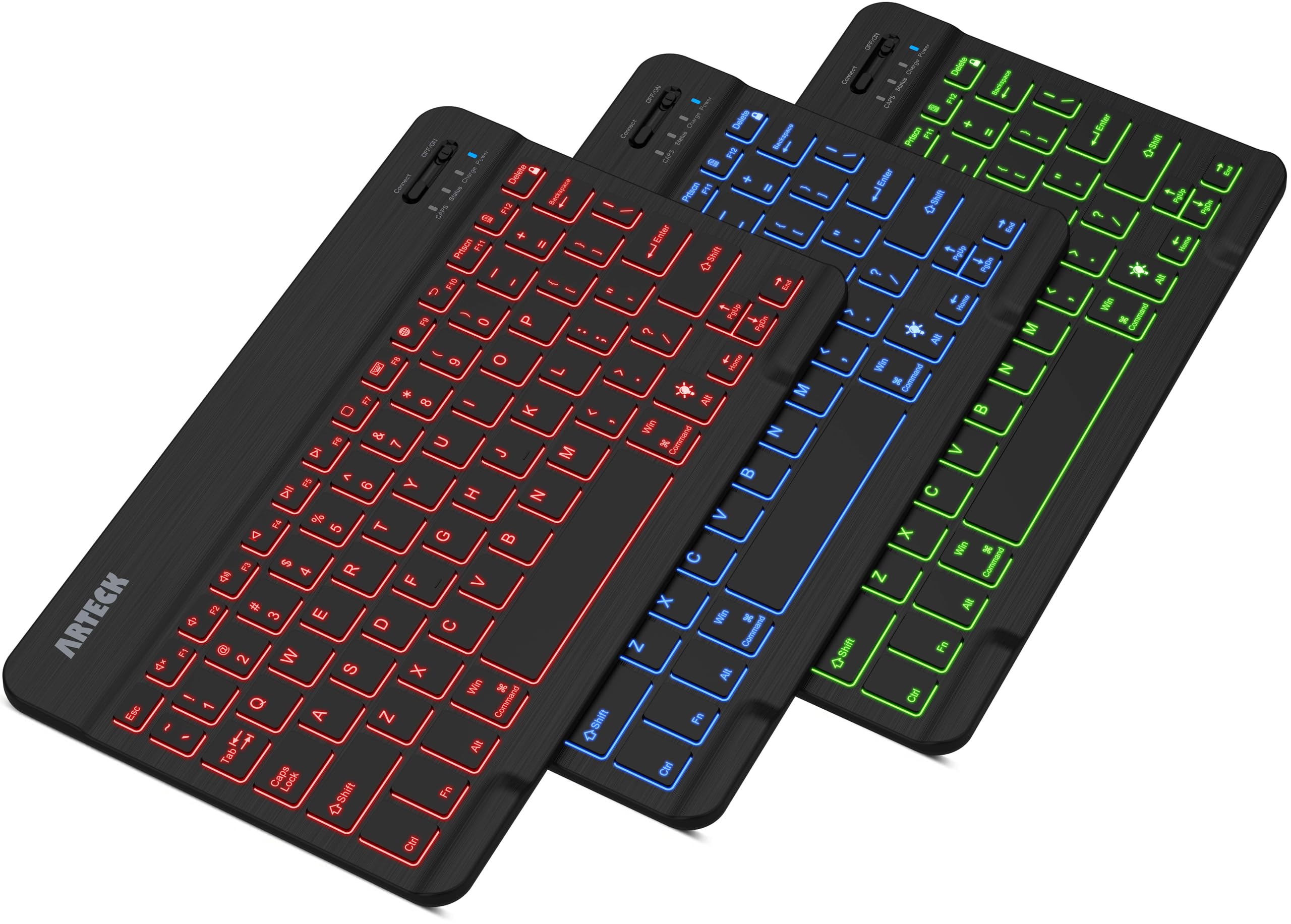
Seven backlight colors with two brightness levels reads like a gimmick on the listing and stops reading like one the first time you type in a dark hotel room. The Arteck is a 9.7 by 5.9 inch scissor keyboard on a zinc-alloy plate, with 78 keys and a light you can dim, recolor, or switch off entirely.

Endurance is what keeps it in our bag. Arteck rates the battery at six months between charges on two hours of daily use with the backlight off, and the board sleeps on its own when you walk away. It also pairs with iOS, Android, macOS, and Windows from the same unit, which is why it is the one we pack when a trip involves a tablet, a phone, and a borrowed laptop.

The compromise is shape. There is no tilt adjustment, so it lies flat and your wrists do the adapting, and there is no case, stand, or trackpad, which means the tablet still needs propping against something. That is the trade for a board this thin that talks to everything. Treat it as the second keyboard, the one that lives in a backpack for the days you are writing away from your desk.

Pros

  • Seven backlight colors, two brightness levels
  • Rated six months between charges
  • Pairs with iOS, Android, macOS, and Windows
  • 0.37 lb and a quarter-inch thick

Cons

  • Backlighting cuts deeply into the battery rating
  • Charge retention can fade over time
Our verdict

We recommend this to anyone who types on more than one device: it pairs with iOS, Android, macOS, and Windows, lights up in seven colors, and runs for months on a charge.

Check Latest Price
3

Best First-Party for iPad (A16)

Apple Magic Keyboard Folio

88 /100
LBD Score Excellent

Key details

Design
Two-piece, magnetic, detachable
Trackpad
Built-in
Function Row
14 keys
Compatibility
iPad (A16) and 10th gen
View on Amazon

Two pieces, and the separation is the whole idea. The back panel sticks to the iPad magnetically and carries an adjustable stand; the keyboard is its own slab that attaches when you need it and lifts away when you don't. Read with the keyboard on the nightstand, then snap it back on for email.

The typing hardware is straightforwardly good: a 14-key function row across the top, a built-in trackpad, and scissor keys rather than the mushy domes some budget cases use. It runs off the iPad rather than an internal battery, so there is no pairing screen and no charging cable in the equation. That combination is what we point people toward when they want Apple's keys on this exact iPad and refuse to think about power at all.

Protection is the compromise. The panel covers the back and the screen, and the iPad's edges stay exposed, so this suits a tablet that lives around the house or rides in a bag beside soft things. Packed against a laptop in a rucksack, the bezels are the part taking the knocks.

One practical note: the stand is a rear kickstand rather than a cantilever, so it wants a flat surface. On a train tray or across your knees it is less settled than the Logitech, which hangs the screen off a hinged leg. Set it on a table and it is excellent.

Pros

  • Keyboard detaches for reading and sketching
  • 14-key function row and built-in trackpad
  • Nothing to charge or pair

Cons

  • Two halves can separate in a bag
  • Costs more than comparable keyboard cases
Our verdict

Buy this if you want Apple's own keys and trackpad on an iPad (A16) or 10th generation, and you like the idea of leaving the keyboard behind when you just want to read.

Check Latest Price
4

Best for iPad Pro

Apple Magic Keyboard (iPad Pro 11)

88 /100
LBD Score Excellent

Key details

Keys
Backlit scissor, 10-key function row
Charging
USB-C pass-through
Trackpad
Glass, haptic feedback
Compatibility
iPad Pro 11-inch (M4, M5)
View on Amazon

The priciest keyboard here is also the most narrowly fitted: this Magic Keyboard works with the iPad Pro 11-inch in its M4 and M5 versions and nothing else. If that is your tablet, the decision is close to made for you, because nothing else on this list gives you a haptic glass trackpad and a ten-key function row under Apple's own keycaps.

The hardware is genuinely laptop-grade. Backlit scissor keys, a function row that reaches brightness and volume without a modifier, a trackpad that clicks with haptic feedback instead of a physical button, and a two-cantilever hinge that holds the screen at any angle rather than three preset grooves. Apple also builds in USB-C pass-through, so the tablet's only port is not spent while you charge it.

Where it gives ground is protection. Folded shut it covers the front and the back, and that is the extent of it; this is a stand with a keyboard attached rather than an armored case. Buy it because you want the trackpad and the hinge on that specific iPad, not because you want to carry it loose in a tote.

Pros

  • Glass trackpad with haptic feedback
  • Backlit scissor keys with a 10-key function row
  • USB-C pass-through charging
  • Two-cantilever hinge holds any angle

Cons

  • The most expensive keyboard in this guide
Our verdict

If you own an iPad Pro 11-inch in M4 or M5, this is the keyboard made for it: haptic glass trackpad, backlit keys, and a hinge that holds any angle.

Check Latest Price
5

Best Budget

OMOTON Ultra-Slim Keyboard

89 /100
LBD Score Excellent

Key details

Power
2 AAA batteries (not included)
Layout
78 keys, 12 iOS hotkeys
Dimensions
11.2 x 4.7 x 0.2 in
Battery Life
Up to 400 hours
View on Amazon

No charging port at all: the OMOTON runs on two AAA batteries, which aren't in the box, and it sleeps after ten minutes idle. OMOTON rates it at up to 400 hours, or roughly 100 days at two hours a day. It measures 11.2 by 4.7 by 0.2 inches and weighs 160 g, so it sits close to the width of a 10- or 11-inch tablet without adding a bulge to a bag.

That battery arrangement is exactly why we recommend it as the budget pick. You never hunt for a cable, you swap two cells roughly twice a year, and the board keeps working long after a sealed cell would have started to sag. The twelve hotkeys cover volume, brightness, and playback the way a function row does, and it found our iPad on the first pairing attempt.

Two limits to go in knowing about. The shortcut row is tuned for iPadOS and iOS, so on an Android tablet you are paying for keys that do nothing. And the board is shallow: 4.7 inches deep means tighter key spacing than a laptop, which is fine for email and two-thumbed notes and less fine if you touch-type at speed.

Pros

  • Up to 400 hours on two AAA batteries
  • 12 iOS shortcut keys built in
  • 0.2 inch thick and 160 g
  • Pairs quickly over Bluetooth

Cons

  • No backlight for dim rooms
  • Keys can pop loose with heavy use
Our verdict

Our budget pick: two AAA batteries are rated for up to 400 hours, and the twelve iOS hotkeys do most of what a function row would.

Check Latest Price
6

Best Budget Keyboard Case

Harvopu iPad Keyboard Case

89 /100
LBD Score Excellent

Key details

Stand
3 anti-slip grooves
Trackpad
Multi-touch
Backlight
7 colors
Compatibility
iPad (A16) 11-inch, 10th gen
View on Amazon

A full iPad case, a stand, a backlit keyboard, and a trackpad for about the money of a bare Bluetooth board: that is the pitch, and the Harvopu mostly delivers it. The folio is a soft-shell material with three anti-slip grooves inside the cover for the stand angle and a holder for the Apple Pencil, while the keyboard half attaches magnetically and lifts out when you want the tablet flat.

The keyboard half is where the money went. Seven backlight colors, a row of iPadOS shortcuts, and a multi-touch trackpad that reads two- and three-finger gestures — the trio that normally pushes a case into a higher bracket. Typing is fine for notes and email rather than a full day of writing, and pulling the keyboard off is quick enough that you actually do it.

Our view is that this is the right first keyboard case for a student or a light-duty user: it turns the iPad into something you can type an essay on, and it protects the tablet while doing it. Go in expecting the keyboard to be the part that ages and the case to be the part you keep, and the value holds up. Anyone typing for a living should spend more and buy the Logitech.

Pros

  • Case, stand, backlight, and trackpad in one
  • Three stand grooves and a pencil holder
  • Keyboard detaches magnetically

Cons

  • Keyboard can slide out of position on its base
  • Charge can run down faster than expected
Our verdict

The least expensive way to get a backlit keyboard, a trackpad, a pencil holder, and a stand in one for an iPad (A16) or 10th generation.

Check Latest Price
7

Bag and Travel Backup

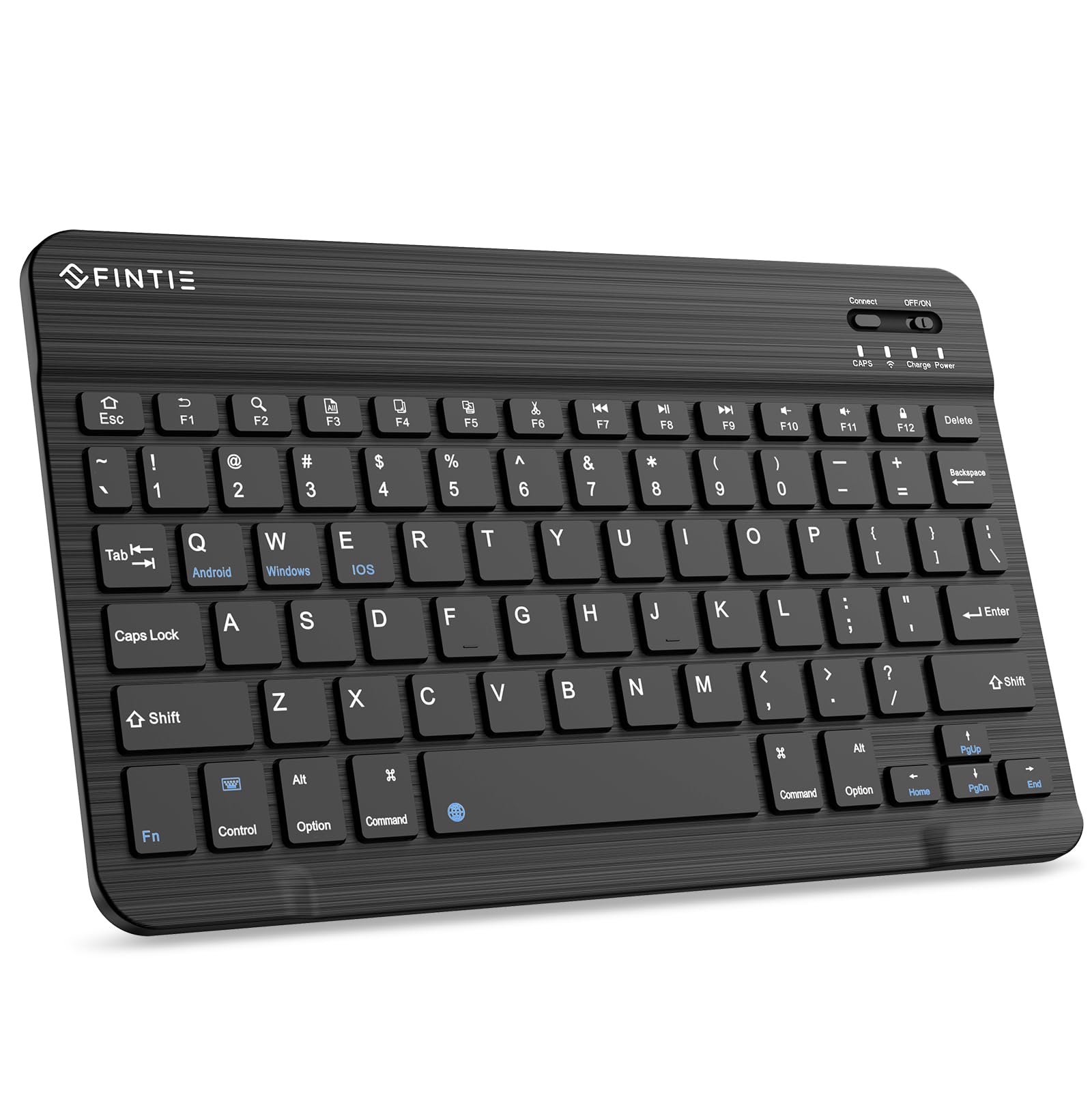
Fintie 10-Inch Keyboard

87 /100
LBD Score Excellent

Key details

Keys
78 scissor keys
Battery
Rechargeable, 2-hour charge
Connection
Bluetooth
Dimensions
9.74 x 5.91 x 0.26 in
View on Amazon

At a quarter of an inch thick, the Fintie is the board that disappears into a bag: 9.74 by 5.91 inches, 78 scissor keys, and a USB-C port that fills it in about two hours. There is nothing to fold, nothing to snap on, and nothing adding bulk to a bag that already has a charger and a notebook in it.

It pairs over Bluetooth with iOS and Android, which covers an iPad, a Galaxy Tab, a Fire tablet, or a phone, and it sleeps on its own after a stretch of inactivity. Fintie ships a printed key map in the box, so the shortcut layer stops being guesswork in the first week.

What it does not have is a case or a stand, so the tablet still needs propping against something. The keycaps are small and the board rocks on anything less than a flat surface while you type, which is the usual trade for a body this thin.

The detail we kept coming back to is the magnetic back: it clings to a compatible folio instead of sliding loose, which is more than most boards this thin manage. Add a 90-day warranty and it earns its spot as the keyboard you keep in the bag for the days you don't want to carry the case.

Pros

  • 0.26 inch thick and very light
  • Magnetic back grips a folio cover
  • USB-C charge in about two hours

Cons

  • No backlight or trackpad
  • Charge can stop holding over time
Our verdict

A sensible second keyboard: thin, light, and inexpensive enough to leave in a work bag, as long as you do not expect a case or a trackpad.

Check Latest Price

How We Chose and Tested the Best Tablet Keyboards

We started with spec sheets and filtered hard: does the footprint match the tablet's actual dimensions, does it connect over Bluetooth or a magnetic rail, is there a trackpad, and does the price make sense for what is essentially a slab of plastic with keys. That narrowed the field to 12 keyboards, which we typed on for six months.

They went everywhere the tablets did — a kitchen counter during morning email, a train tray table, a lecture hall, the couch, and a carry-on. At a desk we typed the same 500-word passage on each and counted the words we fumbled. On a lap and on a tray table we noted whether the tablet tipped backward when we reached for the top row, and we used each trackpad to drop a cursor mid-word and scroll a long document, since small pads make both fiddly.

Backlighting got checked in a dark room: whether the legends were evenly lit or hot-spotted, and whether the glow bled around the keys. We typed in a quiet room and a shared office and judged the sound — crisp, hollow, or clacky enough to annoy a seatmate. For the magnetic connection, we picked each tablet up by the screen, gave it a shake, then carried it in a bag for a week. Battery life we ran down with the backlight on, then timed a full charge, and we judged durability by the hinge and corners after repeated detaching. Finally, we weighed every one on a kitchen scale with the tablet attached, because a case that doubles what you're carrying is one you leave on the desk.

Value came down to whether the price bought backlighting, a usable trackpad, and a stable connection, or just a name on the box.

How to Choose a Tablet Keyboard

Start with the model number, not the keyboard

A title that says "for iPad" covers a decade of tablets that share nothing but a logo. Open Settings, then General, then About, and read the model name before you buy a case-style keyboard: Apple's Magic Keyboard Folio fits the iPad (A16) and 10th generation only, and the Magic Keyboard for iPad Pro fits the 11-inch M4 and M5 models only, with no overlap between them.

Standalone Bluetooth boards are the exception, because they pair with anything that supports Bluetooth, which is why one survives a tablet upgrade and a case does not.

Case or standalone board

A keyboard case solves typing, standing, and protection in one purchase, and it commits you to one tablet. A standalone board pairs with an iPad, an Android tablet, and a phone, weighs less, and leaves you to prop the screen on a stand or a folded jacket.

We reach for a case when the tablet is the only thing we are carrying, and for a standalone board when the bag already holds a laptop. Don't buy a case for a tablet you plan to replace next year.

How it gets power, and what that costs you

Three arrangements, three habits. Smart Connector keyboards draw from the iPad, so there is no charging routine and no pairing step — the Logitech Combo Touch and Apple's Folio both work this way. Rechargeable Bluetooth boards need a cable every week or month, and the sealed cell is the first part to degrade. AAA boards such as the OMOTON swap cells instead, which is why a 400-hour rating can outlast a battery you cannot replace.

Read the battery claim closely. A six-month figure usually assumes two hours of typing a day with the backlight off, and the light is exactly what drains it.

Key size and the ten-inch compromise

Ultra-slim boards run 4.7 to 5.9 inches deep, narrower than a laptop's key field, and the difference shows up in your error rate rather than on the spec sheet. If you touch-type at speed, buy the widest board your bag accepts and look for keys with real travel; if you type in short bursts, a compact board is fine and the saved weight matters more.

Backlighting earns its cost if you write on night flights or in bed next to someone asleep, and it is the feature that most separates a budget board from a midrange case.

Trackpads, stands, and viewing angles

A built-in trackpad keeps your hands off the screen, and on iPadOS it behaves like a cursor rather than a finger: three-finger swipes between apps, two-finger scrolls inside a document. A standalone keyboard gives you none of that, so budget for a stand as well.

Stand design matters too. Three molded grooves give you three angles, a hinged rear leg gives you a continuous range, and a cantilever hinge holds the screen up off your lap. None of them work well on a duvet.

Frequently Asked Questions

Final Verdict

Our default for an iPad 10th generation or A16 is the Logitech Combo Touch. It draws power from the tablet, so there is no charging routine to keep up with, and the backlit keys, trackpad, and kickstand make it the one case here that genuinely stands in for a small laptop.

If one keyboard has to serve a tablet and a phone, the Arteck earns its place in the bag, and on a tight budget the OMOTON handles the typing for a fraction of the money. Owners of an 11-inch iPad Pro in M4 or M5 should go straight to Apple's Magic Keyboard made for that model — nothing else fits it.