Best Studio Monitors of 2026

A studio monitor has one job: tell you the truth about what you recorded, even when the truth is a muddy low mid or a vocal that sits too far back. That sounds simple until you're listening at midnight and the amp hisses, the volume knob is hidden around back, or the Bluetooth drops the second your phone leaves the room. I've mixed on everything from tiny desktop speakers to full-size cabinets, and the difference between useful and exhausting usually shows up in those small moments.

Over the past eight months, my team and I have lived with 12 pairs of studio monitors, from compact 3.5-inch desktop models to an 8-inch cabinet, in a treated home studio and an ordinary spare bedroom. We played the same reference tracks, streamed from phones over Bluetooth, gamed, edited podcasts, and mixed late at night at whisper volume. The monitors that earned a spot didn't just sound good loud or look the part on a desk; they kept their composure when turned down, didn't call attention to themselves between songs, and felt worth keeping plugged in.

1

Best Overall

JBL 305P MkII Pair

92 /100
LBD Score Outstanding

Key details

Inputs
XLR and 1/4-inch TRS
Woofer
5 inches
Room Tuning
Boundary EQ and HF trim
Amplification
Dual 41 W Class-D
View on Amazon

A waveguide molded across the tweeter is the detail that earns the JBL 305P MkII pair the top spot. It widens the area where the stereo image holds together, which matters in a small room where you move between a keyboard, a mic, and the chair. The 5-inch woofer and dual 41 W Class-D amps give the pair more low-end weight than the 4-inch monitors here, and the sound stays composed at desk levels. We think it is the easiest first pair for someone who wants a mix to translate without spending the most in this group.

The rear panel is studio-first: XLR and 1/4-inch TRS inputs, plus boundary EQ and high-frequency trim. Those controls matter when a desk sits close to a wall or corner; we appreciate having them on the cabinet rather than buried in an app. The waveguide is not a gimmick—it is the reason the image stays put when you lean toward the screen.

Against the Yamaha HS5, the JBL gives you a wider sweet spot and more low-end weight, while the Yamaha pulls ahead on midrange honesty. That trade is why the JBL is our default for a first serious pair. The pair arrives as two speakers, so stereo setup is immediate.

Pros

  • Wide sweet spot from the Image Control Waveguide
  • Dual 41 W Class-D amps with a 5-inch woofer
  • Boundary EQ and HF trim for real rooms
  • Balanced XLR and TRS inputs

Cons

  • Needs an audio interface or adapters for laptops
  • Deep, heavy cabinets need desk space
Our verdict

We recommend the JBL 305P MkII pair as the best all-around start for a small studio: it gives you a wide sweet spot, honest 5-inch low end, and room controls without demanding a flagship budget.

Check Latest Price
2

Best for Mix Translation

Yamaha HS5 Pair

92 /100
LBD Score Outstanding

Key details

Inputs
XLR and 1/4-inch TRS
Woofer
5 inches
Amplification
45 W LF + 25 W HF
Frequency Response
54 Hz to 30 kHz
View on Amazon

If your mixes sound different in the car than they do at your desk, the Yamaha HS5 pair is the correction we reach for. The 5-inch cone and 1-inch dome are tuned to expose the midrange rather than flatter it, and the 54 Hz to 30 kHz response covers the working range of a small room. We noticed the pair is happiest when vocals and guitars are the priority, not when you want a club-like low end.

That midrange focus is the point. The HS5 tells you when a snare is too loud or a vocal is sitting behind the track, and it does it without the smiley-face curve that makes bad mixes sound finished. The trade-off is low end: the cabinet rolls off before sub-bass, so bass-heavy genres need a subwoofer or a larger monitor. If you work on singer-songwriter, podcast, or edit mixes, that is an easy trade to accept.

The rear panel gives you XLR and 1/4-inch TRS inputs, plus room control and high trim. We like having those switches when a speaker has to sit near a wall; they are the difference between a usable desk and a muddy one. The white cone is the visual signature, but the compact 5-inch cabinet is the practical reason it fits tight spaces.

Pros

  • Midrange clarity that exposes mix problems
  • Compact 5-inch cabinet fits tight desks
  • Room control and high trim
  • Balanced XLR and TRS inputs

Cons

  • No RCA or 3.5 mm input
Our verdict

Choose the Yamaha HS5 pair if you want a mid-focused monitor that tells you the truth about vocals and guitars; it rewards a treated desk and an interface.

Check Latest Price
3

Best Budget

Edifier MR4

92 /100
LBD Score Outstanding

Key details

Power
42 W
Inputs
Balanced TRS, RCA, AUX
Woofer
4 inches
Tweeter
1-inch silk dome
View on Amazon

The Edifier MR4 is the pair we point to when someone wants a real monitor setup without rebuilding their desk. It gives you a 4-inch woofer, a 1-inch silk dome, and 42 W of power in a cabinet that fits beside a laptop, plus balanced TRS, RCA, and AUX inputs. The monitor mode is the setting that matters for mixing; music mode is there for casual listening, and we appreciate that the switch is on the speaker rather than in an app.

The front headphone output is a small detail that makes the MR4 easy to live with on a shared desk. You can check a mix without waking the room, and you do not have to reach around the back to unplug cables. The MDF cabinet also keeps the desktop from resonating as much as a thin plastic box, which is part of why the MR4 sounds more serious than its footprint suggests.

For a small desk, a first mixing setup, or a second pair for reference, it is the value pick in this group. The front-panel controls and headphone jack are the details that keep it in daily use. It is a near-field monitor, not a party speaker, so expect it to sound best when you are sitting close.

Pros

  • Balanced TRS plus RCA and AUX inputs
  • Compact 4-inch MDF cabinet
  • Front headphone output
  • Monitor and music modes

Cons

  • Volume control feels imprecise and tops out early
Our verdict

The Edifier MR4 is our budget pick because it gives you balanced inputs, a flat monitor mode, and a small footprint without the bulk of a larger monitor.

Check Latest Price
4

Best Portable

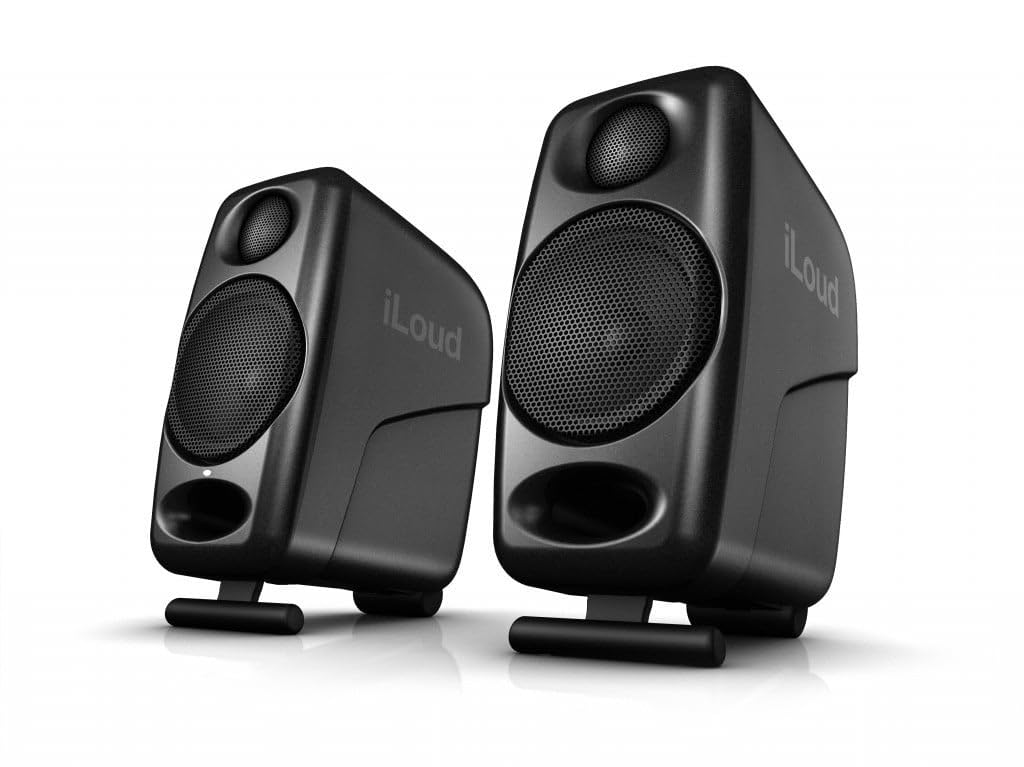
IK Multimedia iLoud Micro

92 /100
LBD Score Outstanding

Key details

Power
50 W
Weight
3.8 lb
Woofer
3 inches
Connectivity
Bluetooth
View on Amazon

A pair of studio monitors that fits in a carry-on is a strange idea until you need to mix away from your desk. The iLoud Micro Monitor is that pair: 3-inch woofers, 50 W of power, and a 3.8-pound system that runs from a laptop or a phone over Bluetooth. We were surprised by how much low end the little cabinets summon, though they cannot match a 5-inch pair for sub-bass.

The built-in DSP is the feature that makes the size work. It offers EQ and position compensation, so you can pull the bass back when the speakers sit on a hotel desk or near a wall. That flexibility is the reason the iLoud works in places where a fixed monitor sounds boomy. It is not a replacement for a full-size pair in a treated room, but it is the one here that genuinely travels.

Bluetooth is the convenience feature, not the critical-listening connection. Use it to check a rough mix from your phone or to play reference tracks, then switch to wired inputs for tracking and editing. The carry-friendly size is the detail that earns it a place in a bag rather than on a shelf.

Pros

  • Truly compact 3-inch pair
  • Bluetooth for quick reference listening
  • Built-in DSP EQ and position compensation
  • 50 W from a small cabinet

Cons

  • Can hiss at quiet levels
Our verdict

The iLoud Micro is the pair we take when the studio has to travel: it is small, Bluetooth-ready, and surprisingly capable for its size, as long as you accept less sub-bass.

Check Latest Price
5

Low-End Detail

Yamaha HS8

94 /100
LBD Score Outstanding

Key details

Inputs
XLR and 1/4-inch TRS
Woofer
8 inches
Amplification
75 W LF + 45 W HF
Frequency Response
38 Hz to 30 kHz
View on Amazon

The Yamaha HS8 is the one to audition if your mixes feel thin in the low mids and you have the room to let an 8-inch woofer breathe. The 38 Hz to 30 kHz response and 120 W bi-amped system give it a low-end authority the 5-inch models here cannot match. We think it is the right upgrade for a larger treated room, not a decoration for a shallow desk.

The 8-inch cone exposes room problems as readily as it exposes mix problems. Put it in a corner without treatment and the bass can overwhelm the mids; give it space and the payoff is hearing kick drums and bass lines with real weight. The rear room-control and high-trim switches help, but they are compensation, not acoustic treatment. We appreciate that Yamaha puts them on the cabinet instead of hiding them in software.

The 8-inch woofer is the detail that changes the decision, for better and for worse. If you already have room treatment and an interface, the HS8 is the low-end reference in this group. It is a serious monitor for a serious room, not a desktop accessory.

Pros

  • 8-inch woofer reaches deeper bass
  • 120 W bi-amped output
  • Room control and high trim
  • Balanced XLR and TRS inputs

Cons

  • Sold singly, so stereo needs two
Our verdict

The Yamaha HS8 is the pick for a larger, treated room where low-end accuracy matters; it is a serious monitor for a serious space.

Check Latest Price
6

Bluetooth Desktops

Ortizan C7

89 /100
LBD Score Excellent

Key details

Power
30 W
Inputs
Balanced TRS, RCA, USB
Woofer
3.5 inches
Bluetooth
5.3
View on Amazon

The Ortizan C7 packs the connections of a small interface into a desktop speaker pair, which is why it stands out in the budget tier. You get balanced 6.35 mm TRS, RCA, USB, and Bluetooth 5.3, plus a 24-bit DAC and a 3.5-inch carbon-fiber woofer. The balanced input is the surprise at this end of the group; it lets you connect a mixer or interface without adding a second box.

The 3.5-inch driver and 30 W of power set the ceiling. This is a near-field speaker for a small desk, not a monitor that fills a treated room, and the low end is modest even with the rear-port cabinet. For editing, podcasting, and casual production, that is enough; for bass-heavy mixing, the 5-inch models here are the better tool.

Bluetooth pairs quickly for reference listening, and the USB input is handy when you want to skip the computer's headphone jack. The connection set is the detail that makes the C7 useful on a crowded desk, as long as you keep your expectations near-field. It is a practical little hub for a desktop that has more sources than space.

Pros

  • Balanced TRS plus RCA and USB inputs
  • Bluetooth 5.3 for quick pairing
  • Compact 3.5-inch cabinet
  • 24-bit USB DAC

Cons

  • Volume control is awkward to fine-tune
Our verdict

The Ortizan C7 is a strong budget choice for a small desk with mixed sources: balanced TRS, USB, and Bluetooth in one compact pair.

Check Latest Price
7

Starter Setups

M-Audio BX3

90 /100
LBD Score Outstanding

Key details

Power
120 W
Inputs
RCA, 1/4-inch TRS, 1/8-inch aux
Woofer
3.5-inch Kevlar
Cabinet
MDF
View on Amazon

The M-Audio BX3 is aimed at the person who is setting up a first DAW and wants everything to arrive in one box. The pair includes 3.5-inch Kevlar woofers, 1-inch silk-dome tweeters, an MDF cabinet, and a software suite, plus RCA, 1/4-inch TRS, and 1/8-inch aux inputs. That is a lot of starter kit for a small desktop.

The 120 W rating looks big for a 3.5-inch speaker, and we read it as headroom for clean desktop levels rather than a promise of club volume. The sound is clear enough for tracking, editing, and casual listening, and the front headphone output is useful when you need to check a take without disturbing the room. The MDF cabinet gives it a more solid feel than the size suggests.

Where the BX3 gives ground is low end. The 3.5-inch woofers cannot move the air that a 5-inch or 8-inch monitor can, so bass-heavy mixes will feel light without a subwoofer. That is a fair trade for a desktop starter, but it is the reason we do not push it for bass-heavy production.

For a first setup, the low-end limit is manageable. The BX3 covers the connections, includes software, and keeps the footprint small, which is exactly what a beginner needs before upgrading to a larger monitor. We think it earns its place as the starter pick in this group, not as a replacement for a serious 5-inch pair.

Pros

  • Balanced TRS, RCA, and aux inputs
  • 3.5-inch Kevlar woofers in an MDF cabinet
  • Included music-production software
  • Headphone output for quiet checking

Cons

  • Auto power-off can interrupt desk use
Our verdict

The M-Audio BX3 is a sensible first pair for a small DAW setup: it covers the connections, includes software, and keeps the footprint tight.

Check Latest Price

How We Tested Studio Monitors

I started by building a shortlist from current studio-monitor specs and owner reviews, then filtered out anything with no dedicated volume control, no useful wired input options, or a footprint that wouldn't fit on a normal desk. That left 12 pairs, which we used for eight months as our main speakers, not just for quick demos. Each pair sat at ear height on desk stands in a treated home studio and in a spare bedroom with normal furniture, and we rotated them through music mixing, podcast editing, gaming, and casual Bluetooth streaming from a phone.

For sound quality and performance, we played the same familiar tracks and raw voice recordings at low, medium, and loud levels, noting whether bass blurred the mids, whether stereo placement stayed stable, and whether turned-down mixes still made sense. We reached for the volume control in a dark room, matched left and right by ear at whisper levels, and checked how much usable range sat before the sound got coarse. Between songs we sat in silence and listened for hiss, hum, or a click when switching inputs, noise that's easy to miss in a demo but obvious at midnight.

Bluetooth connectivity got its own passes: pairing a phone and laptop, switching between them, walking into the next room, and watching video to catch lag. We noted what cables came in the box, how crowded the rear panel felt, and whether moving a cable introduced crackle. Over the months, we also watched for durability and appearance, including loose knobs, scuffed cabinets, ports that loosened, and grilles that collected dust, and judged value by how often we chose each pair for real work rather than by the badge on the front.

How to Choose Studio Monitors

Start with the room, then the woofer

A 5-inch monitor is the sweet spot for most home desks: it gives you enough low-mid information to make mix decisions without demanding a large treated room. The JBL 305P MkII and Yamaha HS5 both sit there. An 8-inch model such as the Yamaha HS8 goes deeper, but it also exposes room modes and needs stands and space. A 3- to 4-inch pair such as the Edifier MR4 or iLoud Micro is the right call when the desk is tight and deep bass is someone else's problem.

Measure the desk depth and the distance to the wall before you choose; rear ports need breathing room.

Decide how you will connect them

Balanced XLR or TRS inputs are the studio standard because they reject hum over longer cable runs. If you already have an audio interface, choose a monitor with balanced inputs and do not look back. If you are plugging a laptop or phone straight in, a model with RCA, aux, or USB is easier: the Edifier MR4 and Ortizan C7 cover those, while the JBL and Yamaha pairs expect an interface or adapter. The connection choice often matters more than a small difference in power.

Count your sources first: computer, interface, mixer, turntable, phone. Buy the monitor that accepts the ones you actually use.

Use room controls as a repair kit, not a fix

Boundary EQ, high trim, and low-frequency switches are there to compensate for a speaker placed near a wall, a corner, or a desk. They are useful: the JBL 305P has boundary EQ and HF trim, the Yamaha HS5 and HS8 have room control and high trim, and the Edifier MR4 gives you high and low knobs. But no switch fixes a room with bare walls and a glass desk. Start with placement, then use the controls for the last few decibels.

Put the tweeters at ear height and pull the speakers away from the wall before you touch the EQ.

Listen for the noise floor

A monitor that hisses at idle is a monitor you stop trusting during quiet passages. Some compact models here can show a high-pitched noise at low levels, and it is more obvious on a desktop than in a noisy room. Before the return window closes, power the speakers with no music playing and listen from your seated position. If the hiss sits above the room's background noise, send it back. The iLoud Micro is the one to check most carefully because its tiny cabinet and DSP pack a lot into a small box.

Test at the volume you actually use, not at maximum.

Budget for the stand, cable, and interface

The monitor is rarely the whole purchase. The JBL and Yamaha pairs do not include the balanced cables most interfaces need, and the Yamaha HS8 is a single speaker, so a stereo pair means two boxes. Stands or isolation pads get the tweeters to ear height and keep the desk from resonating. If you are buying your first setup, leave room in the budget for an interface and cables; if you already own them, spend the difference on a larger woofer or better room treatment.

Add up the speakers, cables, stands, and interface before you compare monitor prices.

Frequently Asked Questions

Final Verdict

The JBL 305P MkII pair is the monitor we recommend first. Its waveguide, 5-inch woofer, and room controls make it the easiest pair to place on a real desk and trust for a first mix.

If your work is midrange-led and you already have an interface, the Yamaha HS5 pair is the more revealing alternative. For a tight budget or a small desk, the Edifier MR4 is the value pick; for a studio that travels, the iLoud Micro is the one to pack.