Best Sound Cards of 2026

You buy a decent headset, plug it into the laptop, and the person on the other end says you sound like you're calling from the bottom of a well. The headset is fine — the chip soldered to the motherboard is the problem, sitting millimeters from the power hardware and picking up whatever noise drifts past. A sound card gives you a clean headphone output and, more to the point, a mic input that doesn't sound underwater.

My team and I have spent four months with 15 of them, moving each between work laptops, a desktop tower, a console, and one long-suffering tablet. The sample-rate numbers on the packaging barely matter; what separates them is the noise floor, how much clean gain the mic input has before it hisses, and whether you get two jacks or one combo port that quietly turns a stereo mic into mono.

The picks below split along that line: adapters that give a dead jack a second life and install themselves in seconds, and cards built for people who want their headphones driven properly.

1

Best Overall

Sound Blaster Play! 3

91 /100
LBD Score Outstanding

Key details

Surround
5.1
Bit Depth
24-bit
Connection
USB-A
Max Sample Rate
96 kHz
View on Amazon

A crackly headphone jack is usually what starts the search, and the Sound Blaster Play! 3 is the adapter we hand people first. It is a small USB stick with a headset jack that handles both output and mic, 24-bit/96 kHz conversion, and virtual 5.1 surround. Unlike the bargain dongles, it also comes with Sound Blaster Command software for EQ, profiles, and a dialogue boost that makes movie voices easier to follow.

What makes it our top pick is the balance: it is clearly better specified than the cheap adapters, but it does not demand an open PCIe slot or a software project. We plugged it into a Windows laptop and a Mac and it was recognized without a driver install. The software is where the extra control lives; we used the profile presets and the dialogue boost, and both are the kind of feature you notice in daily use rather than on a spec sheet.

The limits are real but narrow. High-impedance headphones can sound quiet until you enable the high-gain setting in the software, which is a control-panel step rather than a hardware fault. For a typical laptop headset, the Play! 3 is still the one that makes the fewest compromises.

For a laptop, a desktop without a free slot, or a headset with a single plug, this is the one we pack. It is not the cheapest adapter here, but it is the one that feels like an upgrade rather than a stopgap.

Pros

  • 24-bit/96 kHz output
  • Useful EQ and dialogue-boost software
  • Works with single- or split-plug headsets
  • No driver install

Cons

  • Faint hiss possible with sensitive earbuds
Our verdict

We recommend the Play! 3 as the default for laptop and desktop audio because it delivers 24-bit/96 kHz sound and useful software without a driver install.

Check Latest Price
2

Best Internal

Sound BlasterX AE-5 Plus

87 /100
LBD Score Excellent

Key details

Surround
7.1
Interface
PCIe x4
Dynamic Range
122 dB
Max Sample Rate
384 kHz
View on Amazon

The Sound BlasterX AE-5 Plus starts with a requirement: a free PCIe x4 slot and enough clearance below the graphics card. In exchange, you get a 32-bit/384 kHz DAC, 122 dB dynamic range, 7.1 surround, Dolby Digital Live and DTS encoding, and a discrete Xamp headphone amplifier.

For a desktop used for gaming, that combination is the reason to choose an internal card over a USB stick. The AE-5 Plus can feed a surround speaker set or an AV receiver over optical, and the headphone amp gives high-impedance cans more headroom than the bus-powered adapters here. We like the RGB strip as a small bonus, but it is not why the card earns a place.

We choose the AE-5 Plus when the desktop is the center of a gaming or movie setup and the headphones are serious. The control panel is deep enough to be worth a few minutes; we settled on a profile and left it alone. The card also needs an internal power lead for the RGB strip, which is easy to miss when you are planning the build.

If you just need a headphone jack, this is overkill. If you want a desktop card that can drive a surround setup and a serious pair of headphones, the AE-5 Plus is the one here we choose.

Pros

  • 32-bit/384 kHz DAC with 122 dB range
  • 7.1 surround with Dolby/DTS encoding
  • Xamp headphone amp for high-impedance cans
  • Useful Sound Blaster Command profiles

Cons

  • Software has a learning curve
Our verdict

If you have a desktop with a free PCIe slot and want real 7.1 surround plus a headphone amp, the AE-5 Plus is the internal card we choose.

Check Latest Price
3

Best USB-C

Sabrent USB-C Audio Adapter

84 /100
LBD Score Excellent

Key details

Bit Depth
24-bit
Mic Input
Mono
Connection
USB-C
Max Sample Rate
96 kHz
View on Amazon

The Sabrent AU-UCMA is the adapter for a laptop or tablet that has USB-C and no headphone jack. The plug is built into a short integrated cable, the shell is aluminum, and the two 3.5mm jacks are separate: stereo out for headphones or powered speakers, mono mic in.

We choose it for USB-C machines because it handles 24-bit/96 kHz output, which is a step above the 16-bit/48 kHz dongles here, and it is small enough to leave in a bag. It is an output-first adapter, though, and the mic side is the place to look closely before you buy.

The two jacks sit close together, so a bulky plug can crowd its neighbor; slim cables help. Plug-and-play is genuine on Windows, macOS, and Linux, and the aluminum body feels more substantial than the plastic sticks.

For a USB-C laptop where headphones and speakers matter more than recording, this is the compact pick. If you need a mic for streaming, the Play! 3 or ENVEL is the better route.

Pros

  • 24-bit/96 kHz output
  • Aluminum body and integrated USB-C cable
  • Plug-and-play on Windows, macOS, Linux
  • Compact enough for a bag

Cons

  • Mono microphone input
Our verdict

For a USB-C laptop or tablet, we pick this Sabrent for its 24-bit/96 kHz output and aluminum body, as long as you do not need a stereo mic input.

Check Latest Price
4

Best Budget

ENVEL USB Audio Adapter

90 /100
LBD Score Outstanding

Key details

Jacks
Two 3.5mm TRS
Connection
USB-A
Max Sample Rate
48 kHz
Signal-to-noise Ratio
120 dB
View on Amazon

The ENVEL adapter is the budget pick we reach for when a laptop needs separate headphone and mic jacks. It is a small USB-A stick with two 3.5mm TRS ports, 48 kHz sampling, and a stated 120 dB signal-to-noise ratio. At this price, the appeal is simple: you get the two connections most desktops and laptops need, and you do not pay for software or surround.

We used it as a plug-and-play replacement for a failed headphone jack, and it was recognized immediately on Windows and Linux. The sound is clean enough for calls, videos, and casual listening, but it is not as refined as the Play! 3; voices are clear, while music can sound a little flat.

The jacks are separate TRS, not a single four-pole combo, so a gaming headset with one plug needs a splitter. That is the main thing to check. The plastic shell is light and the short cable is fine for a laptop, but less tidy on a desktop with rear ports.

For a cheap mic-and-headphone setup, it is the one we reach for before the no-name dongles. Just bring a splitter if your headset has a single plug.

Pros

  • Separate headphone and mic jacks
  • Plug-and-play on Windows, Mac, Linux
  • Very affordable
  • Works with PS4 and PS5

Cons

  • No software or tone controls
  • Sound is a step below the top pick
Our verdict

The ENVEL is the budget pick we reach for when a laptop needs separate headphone and mic jacks, as long as you do not expect software or high-res sound.

Check Latest Price
5

Best for Surround

Vantec USB 7.1 Audio Adapter

83 /100
LBD Score Excellent

Key details

Optical
Input and output
Channels
7.1
Mic Inputs
Two
Sample Rate
48/44.1 kHz
View on Amazon

The Vantec USB 7.1 adapter is the odd one out here: a box rather than a stick, with eight-channel analog output, optical input and output, and two separate microphone inputs. It supports 48/44.1 kHz sampling and connects over USB 2.0, which is enough for its job but a reminder that this is an older design.

It is not a Dolby Digital or DTS decoder. That distinction matters if you are hoping to send a bitstream from a game console or disc player and have the Vantec unpack it; it passes multichannel analog and optical audio, but the decoding happens elsewhere. For a desktop with a 5.1 or 7.1 speaker set, or for feeding a receiver over optical, the connection set is unusually complete.

We choose it when surround and optical matter more than portability. The separate left and right mic inputs are a genuine bonus for stereo recording, and the volume is strong. The box is desk-bound, but that is the trade for the connections.

If you need a simple headset adapter, look at the Play! 3 or ENVEL. If you are wiring a desktop to a receiver and need multichannel output, the Vantec is the one here that does it.

Pros

  • 7.1 analog output
  • Optical input and output
  • Two separate mic inputs
  • Plug-and-play on Windows

Cons

  • Bulky and heavy compared with a dongle
  • Not a Dolby/DTS decoder
Our verdict

For a desktop surround setup or an optical feed to a receiver, the Vantec is the external card we choose, provided you can live with a desk-bound box.

Check Latest Price
6

Compact Replacement

UGREEN USB Sound Card

89 /100
LBD Score Excellent

Key details

Warranty
24 months
Connection
USB-A
Audio Output
Stereo
Signal-to-noise Ratio
90 dB
View on Amazon

The UGREEN adapter is the one we keep for a simple output fix, not for microphone duty. It is a tiny ABS stick with a USB-A plug, a 3.5mm jack, and a 24-month warranty that is longer than most of the adapters here. It is plug-and-play on Windows, macOS, Linux, PS4, and PS5, and it is small enough to leave plugged into a laptop.

The headphone sound is fine for calls and videos, and the 90 dB signal-to-noise ratio is respectable for the size. It is 16-bit on Windows, so it is not the choice for high-res listening. For the money, it is a tidy output fix rather than an upgrade.

The microphone input is the part we do not rely on. If you need a headset mic for meetings or streaming, the Play! 3 or the ENVEL is the better route. The 24-month warranty is the reason it stays on the list for a simple output replacement.

Pros

  • 24-month warranty
  • Plug-and-play across Windows, Mac, Linux, PS4, PS5
  • Compact ABS body
  • Respectable 90 dB SNR

Cons

  • 16-bit audio on Windows
Our verdict

We recommend this UGREEN for headphones and speakers, not as a microphone upgrade; its long warranty is the bonus on a tiny output fix.

Check Latest Price
7

Headphone Output

Sabrent USB Audio Adapter

88 /100
LBD Score Excellent

Key details

Mic Input
Mono
Connection
USB-A
Max Sample Rate
48 kHz
Signal-to-noise Ratio
98 dB
View on Amazon

The Sabrent AU-MMSA is the smallest and least expensive way here to add a headphone jack. The 9 g body ends in a USB-A plug, with a stereo output and a mono mic input on the other end. It is plug-and-play on Windows, Mac, and Linux, and it costs less than the Play! 3.

The output is the reason to buy. It is clean enough for calls, videos, and casual listening, and the 48 kHz/98 dB specification is adequate for a laptop fix. It is not a high-res DAC, and there is no software to tune it, but at this end of the market that is the deal.

The plug is wider than a bare USB connector, so it can block the port next to it on a tightly packed laptop. That is a small thing until you need the adjacent port. For a desktop rear port or a laptop with space around the USB-A, it is an easy output fix.

For a desktop rear port or a laptop with room beside the USB-A, this is the output fix we keep as a spare. It is not the adapter to buy for a mic, and it is not the one to buy if the adjacent port is precious.

Pros

  • Very inexpensive
  • Separate headphone and mic jacks
  • Plug-and-play on Windows, Mac, Linux
  • Light and pocketable

Cons

  • Microphone input can be unreliable
Our verdict

We recommend the Sabrent for headphone output only: it is the least expensive way here to add a jack, and the mic input is not worth relying on.

Check Latest Price
8

Simple USB-A Fix

biaze USB Audio Adapter

88 /100
LBD Score Excellent

Key details

Jacks
Two 3.5mm
Weight
1.06 oz
Warranty
18 months
Connection
USB-A
View on Amazon

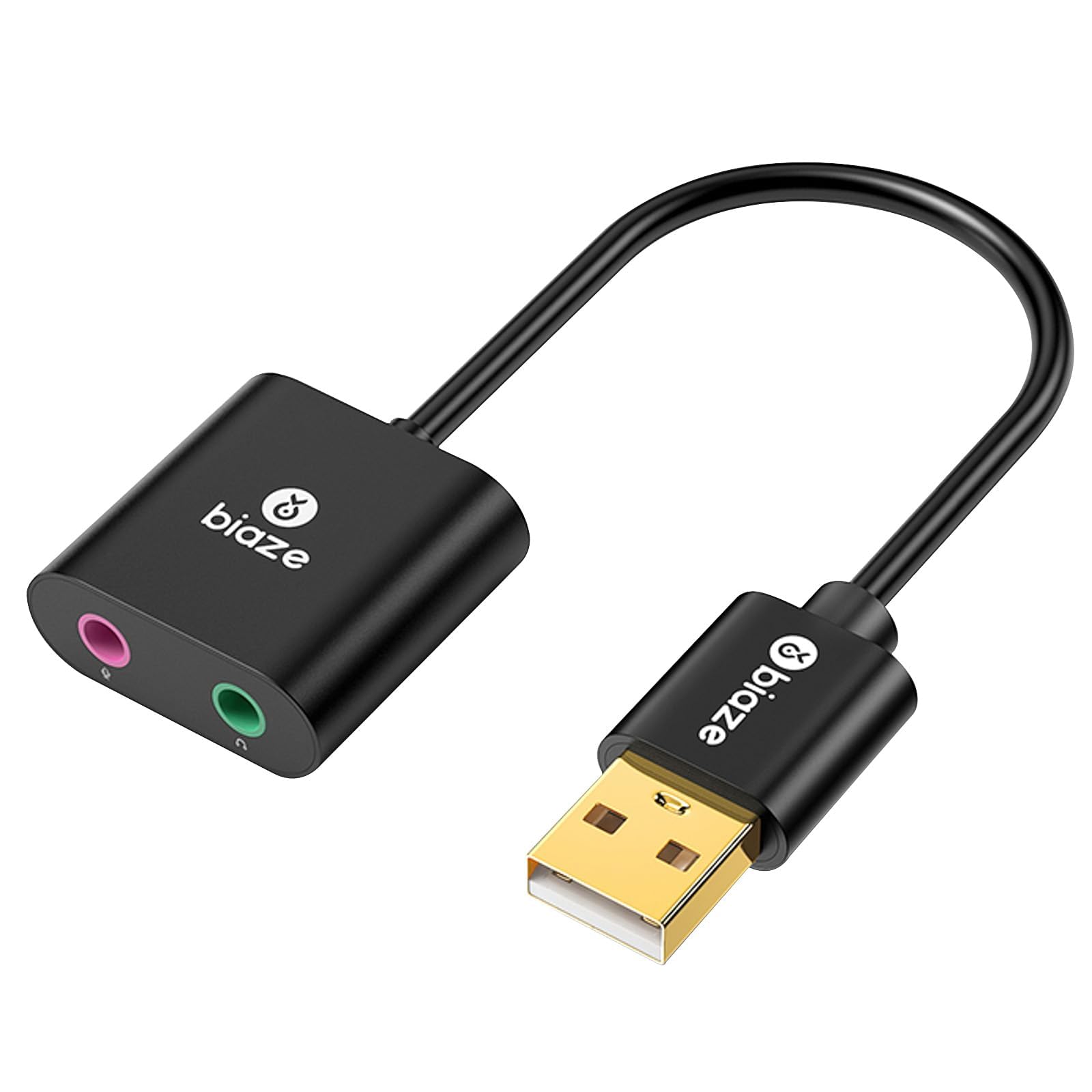
The biaze adapter is a plain black USB-A stick with separate 3.5mm headphone and microphone jacks, a 30 g body, and an 18-month warranty. It supports Windows, macOS, Linux, and Chrome OS, and it is plug-and-play like the rest of the cheap adapters here.

The two-jack layout is the same idea as the ENVEL, but the warranty is longer and the shell is a little more substantial. There is no software, no surround processing, and no high-res claim; the job is simply to give a laptop or desktop a working headphone and mic connection.

It costs more than the ENVEL, so the ENVEL remains the better budget default for most people. The biaze makes sense if the 18-month warranty is worth the premium to you, or if you want a simple spare that does not ask for any setup.

We recommend the biaze as a warranty-backed replacement jack, not as an upgrade. If you want the best sound for the money, go with the Play! 3; if you want the lowest-cost two-jack option, go with the ENVEL.

Pros

  • 18-month warranty
  • Separate headphone and mic jacks
  • Plug-and-play on Windows, Mac, Linux
  • Compact 30 g body

Cons

  • No software or surround
Our verdict

We recommend the biaze when a longer warranty matters more than price; otherwise the ENVEL is the better budget default for most people.

Check Latest Price

How We Chose and Tested the Best Sound Cards

The shortlist started with specs, not reviews: every USB and PCIe audio adapter we could find with a documented microphone input, a stated sample rate, and no driver download required on a current version of Windows or macOS. That filter removed a surprising number of listings that turned out to be headphone-only, and it left us with 15 units to test over four months.

Each one went into rotation across the same four setups: a laptop with no 3.5mm jack at all, a desktop tower, a console on the living room floor, and a bag that travels with a headset using separate headphone and mic plugs. We hot-swapped them mid-call, plugged them into hubs and ports sitting right beside a wireless mouse dongle, and used them for ordinary work days rather than one-off listening sessions.

For sound quality, the test that told us the most was recording 30 seconds of silence at full mic gain and listening back — the noisy units announced themselves immediately. We pushed the mic gain until hiss appeared to find where each one broke, then checked whether system volume tracked cleanly from 30 to 100 percent or jumped and dropped along the way. Headphone output got tested with a pair of high-impedance headphones, listening for whether the bass collapsed as we turned it up.

Compatibility was a matter of plugging each adapter into every machine we had and watching whether it appeared as an audio device without a prompt. Reliability meant carrying them around, yanking cables, and seeing which ones still worked after a few weeks in a bag. The units we stopped thinking about are the ones that made the list.

How to Choose a Sound Card

Start with the port you have

A USB-A adapter is the safe choice for an older laptop or desktop, while a USB-C model like the Sabrent AU-UCMA is the one to carry with a modern ultraportable. An internal card such as the Sound BlasterX AE-5 Plus needs a free PCIe x4 slot and enough clearance below the graphics card, so check the case before you fall for the specifications. Do not buy a USB-C adapter for a USB-A port and assume a passive adapter will fix it; the connection is part of the product.

Microphone quality is the real dividing line

A sound card can be perfect for headphones and still be a poor choice for a mic. The cheapest adapters often use a single combo jack or a mono mic input, and that is where the weak point tends to be. If you need a headset mic for meetings or streaming, start with the Play! 3 or the ENVEL, both of which give the mic its own path. If you only need output, the Sabrent and UGREEN adapters are fine. Count the plugs on your headset before choosing.

How much resolution do you need?

For calls, videos, and casual listening, 16-bit/48 kHz is enough, and many of the budget adapters stop there. The useful step up is 24-bit/96 kHz, which is what the Play! 3 and Sabrent AU-UCMA deliver; it gives cleaner headroom and is the sweet spot for a laptop setup. The 32-bit/384 kHz internal cards are for a desktop with serious headphones or a surround system, not for a pair of earbuds. Do not pay for numbers you cannot use.

Surround, optical, and headphone power

Virtual 5.1 from a USB stick is a different thing from discrete 7.1 analog output. If you are feeding a receiver or a set of surround speakers, check for optical or multichannel outputs and confirm whether the card decodes Dolby Digital or DTS; many multichannel adapters pass the signal but leave decoding to the receiver. High-impedance headphones also need more power than a bus-powered dongle can give, which is where the AE-5 Plus and its Xamp amp earn their keep.

Software, drivers, and warranty

Plug-and-play is the baseline, not a bonus. The Play! 3 adds Sound Blaster Command for EQ and profiles, while the budget adapters rely on the operating system's own controls. On an internal card, check the current driver support for your Windows build before you buy, because a card that works today can stumble after a major update. Warranty is the other quiet differentiator: UGREEN covers 24 months and biaze covers 18, which matters when the adapter lives in a laptop bag.

Frequently Asked Questions

Final Verdict

Most people should buy the Sound Blaster Play! 3. It is the best balance here of clean 24-bit/96 kHz output, a usable headset jack, and software that adds real control without turning setup into a project. If you have a desktop with a free PCIe slot and want 7.1 surround, the Sound BlasterX AE-5 Plus is the upgrade. For a USB-C laptop, the Sabrent AU-UCMA is the compact output-first choice.