Best Smart Displays of 2026

A smart display is supposed to be the calm center of a busy kitchen — a place to check a recipe, take a video call, and silence a timer without hunting for your phone. The wrong one becomes an expensive digital clock with a mediocre speaker. The best models earn their counter space by pairing a bright, well-sized screen with sound that carries across the room, then staying reliable when your Wi-Fi hiccups.

Over eight months, we lived with 10 smart displays from the major brands, using them for morning routines, weeknight dinners, and video calls with family. Some looked great but sounded thin; others had gorgeous screens and connection quirks that drove us nuts. Appearance matters more than you'd think, since these screens sit in public view all day, and screen size is a Goldilocks problem — too small feels cramped for recipes, too large can overwhelm a counter. The picks below are the ones that balanced all of it — sound, looks, screen, reliability, and fair value — and each one is suited to a slightly different spot in the house.

1

Best Overall

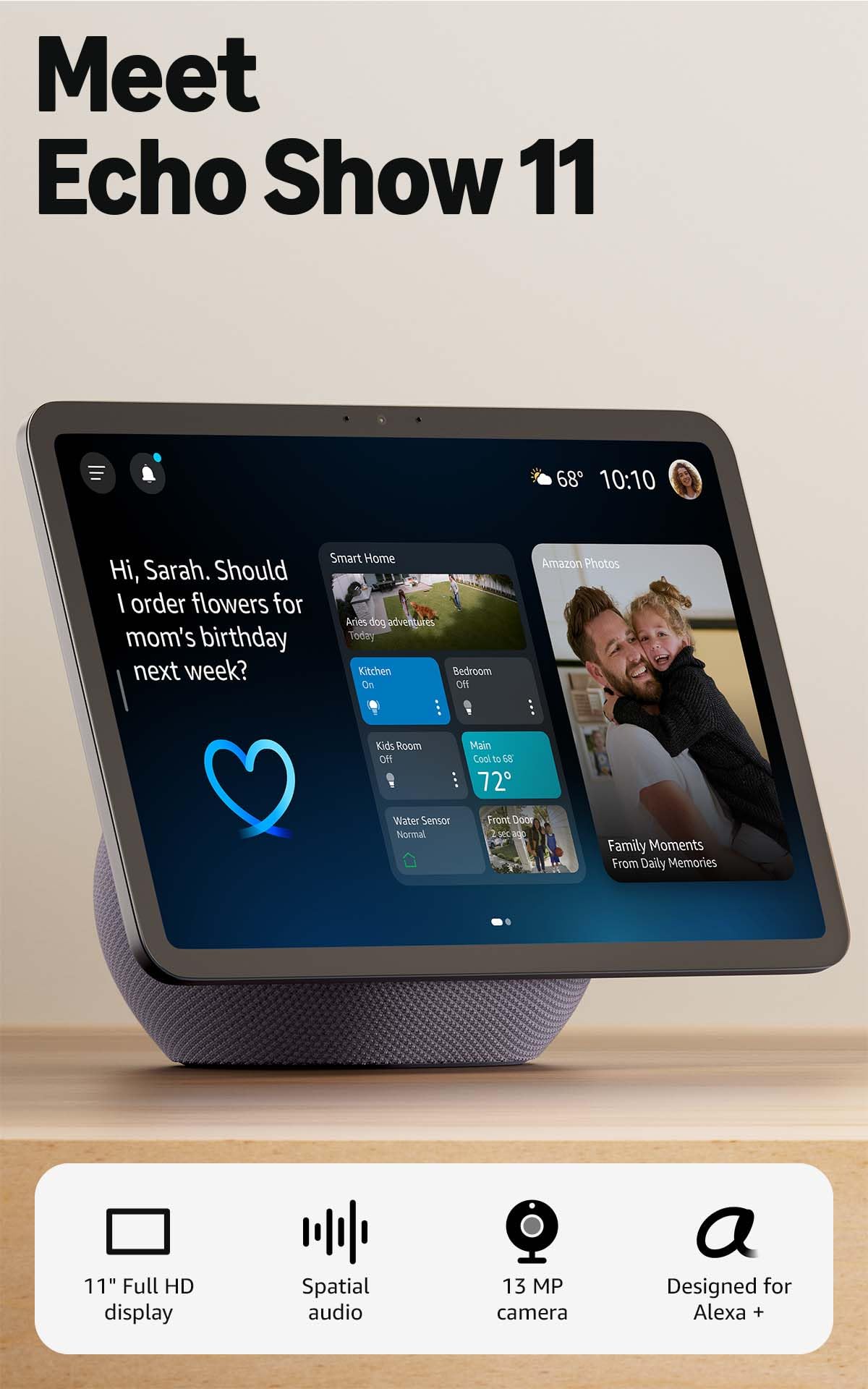
Amazon Echo Show 11

86 /100
LBD Score Excellent

Key details

Audio
Spatial audio
Camera
Auto-framing, 3.3x zoom
Display
11-inch Full HD
Smart Home
Built-in hub
View on Amazon

The 11-inch screen is the reason the Echo Show 11 lands in the sweet spot for a kitchen counter. It is large enough to read a recipe from a few steps back or keep a video call in view while you chop, but it does not take over the room the way the 15.6- and 21-inch models do. We set it up where the household passes by, and the Full HD panel stayed bright and easy to scan for calendars, weather, and camera feeds. The centered camera also earns its place: auto-framing keeps you in the shot as you move, and the 3.3x zoom gives you a tighter view when you need it.

Sound is the other reason this one stays on our counter. The spatial audio gives music and shows a wider, fuller presence than we expected from a display this size, and dialogue stays clear when you're watching a recipe video or a show. The built-in smart-home hub is just as practical if you already have compatible lights, plugs, or cameras; we liked pulling up a camera feed and running a scene from the same screen without reaching for a phone.

The caveat is responsiveness. The interface can feel slow when you're moving between widgets or asking follow-up questions, and that occasional lag is worth testing during the return window. If you want phone-fast taps, this may frustrate you. For a countertop display that has to handle recipes, calls, music, and smart-home controls, though, the balance is right.

Pros

  • 11-inch Full HD screen is a practical countertop size
  • Spatial audio gives music and shows a wide sound stage
  • Built-in hub controls compatible smart-home devices
  • Auto-framing camera and 3.3x zoom improve calls

Cons

  • No motorized screen rotation
Our verdict

We recommend the Echo Show 11 for most homes because its 11-inch screen, spatial audio, and built-in smart-home hub handle everyday kitchen and family use without the bulk of the largest models.
Check Latest Price
2

Best for Large Kitchens

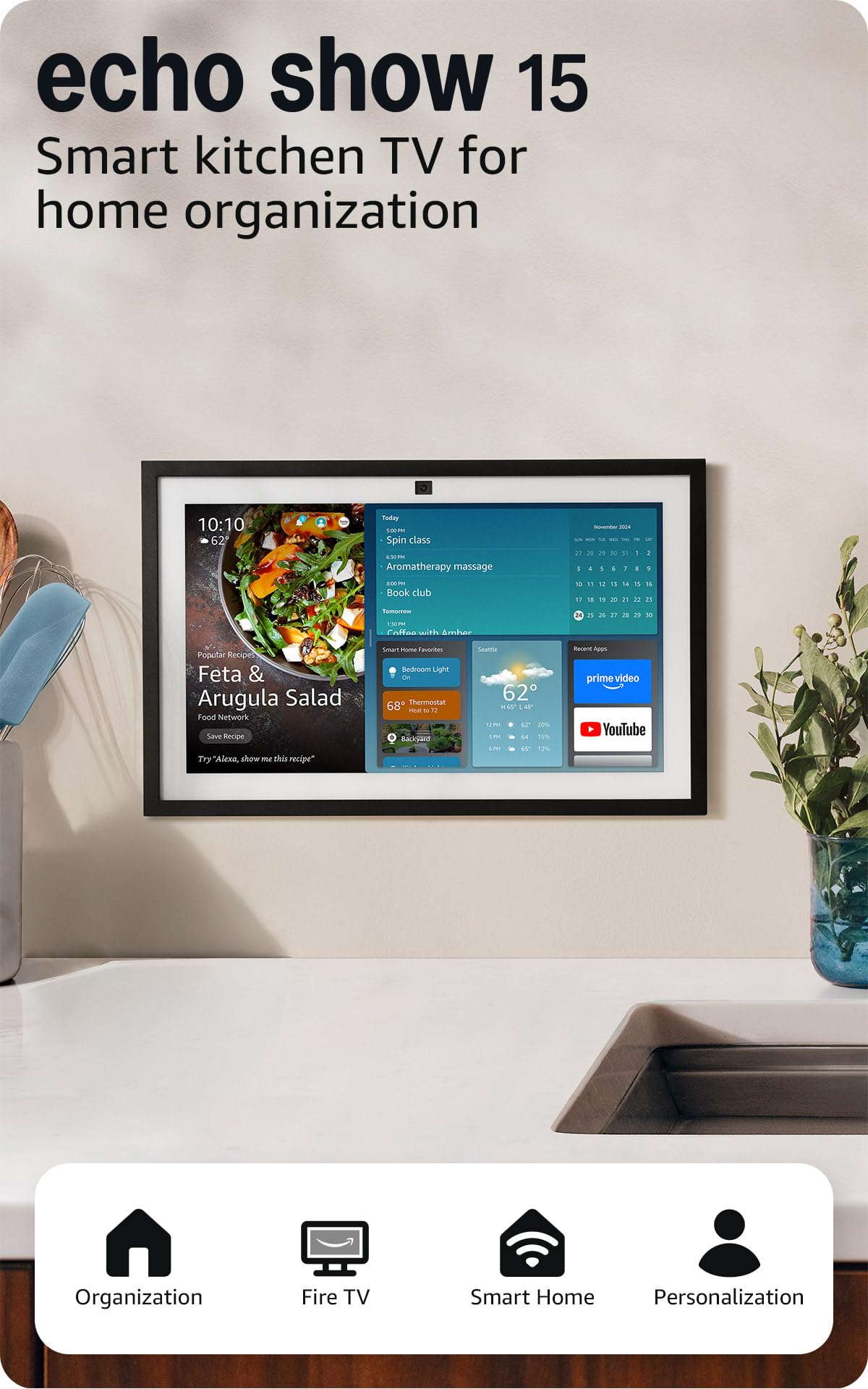
Amazon Echo Show 15

89 /100
LBD Score Excellent

Key details

Display
15.6-inch Full HD
Smart Home
Built-in hub
Home Screen
Customizable widgets
Entertainment
Built-in Fire TV
View on Amazon

The Echo Show 15 is less a countertop gadget than a family bulletin board that happens to stream TV. Its 15.6-inch Full HD screen is large enough to keep a calendar, to-do list, weather, smart-home controls, and a photo slideshow visible at once, which is exactly the point. We set it up as a shared household hub and found the widgets readable from across the kitchen, not just up close. That sounds like a small thing until you're trying to check a schedule with wet hands.

The built-in Fire TV is what makes it more than a dashboard. You can stream from apps like Prime Video, Netflix, YouTube, and Apple TV, so it doubles as a small kitchen TV when you're cooking or cleaning up. We like that the screen can shift from family logistics to entertainment without a second device. The customizable widgets also let you put the household's actual priorities—calendar, lists, weather, cameras—front and center.

The trade-off is the size. A 15.6-inch display needs a dedicated counter or shelf and a nearby outlet, and it will dominate a small kitchen. It is not the display for a bedside table or a cramped apartment. But for a busy kitchen where several people need to see the same information, the extra screen real estate is the feature, not an accident.

Pros

  • 15.6-inch Full HD screen keeps family info glanceable
  • Built-in Fire TV adds streaming apps
  • Customizable widgets suit a shared household
  • Built-in smart-home hub controls devices

Cons

  • Premium price for the extra screen
Our verdict

We recommend the Echo Show 15 for households that want a shared kitchen command center, because its 15.6-inch screen and built-in Fire TV turn a counter into a family dashboard.

Check Latest Price

How We Tested Smart Displays

We started by narrowing the field to smart displays sold by the major voice-assistant platforms, filtering out models with outdated software, cramped screens, or prices that seemed out of step with their features. That left us with 10 units, which we placed in real homes rather than a lab: kitchen counters, bedside tables, living room consoles, and home-office desks. Each stayed in place for eight months, long enough for the novelty to wear off and the annoyances to surface.

To judge sound quality, we played the same podcast episode, playlist, and video call test in each room and noted whether voices stayed clear at a normal speaking volume or turned muddy when we stepped back. For screen quality and size, we pulled up recipes from across the kitchen, checked glare near a sunny window, and compared how much of a video call fit on the display without scrunching faces. Appearance got a blunt household vote: did the screen look like furniture or a gadget that belonged in a drawer, and did the housing feel solid or plasticky?

Connectivity and reliability were tested the unglamorous way. We paired each display with a mix of smart bulbs, plugs, and cameras, then watched how quickly commands registered and whether the screen recovered after we deliberately rebooted the router. We also tracked dropped video calls, frozen recipe pages, and morning alarms that failed to fire. Value for money came down to a simple question at the end of the eight months: would we buy this with our own money for the spot it occupied? The units that scored best did all the basics without making us babysit them.

How to Choose a Smart Display

Match the Screen to the Room

A 5.5-inch display is a bedside clock that can take a video call; an 8- to 11-inch screen is the countertop sweet spot for recipes, calendars, and short videos; a 15.6- or 21-inch panel turns a kitchen into a shared family hub. Bigger is not automatically better. The larger the screen, the more dedicated space and viewing distance it needs, and a giant display in a small kitchen becomes an obstacle.

We chose the 11-inch Echo Show 11 as our default because it is large enough to read from a few steps away without swallowing the counter. If you have a dedicated spot where several people gather, the 15.6-inch Echo Show 15 makes better use of that space.

Decide How Much Sound and Camera You Need

If the display will mostly answer questions and show the weather, a basic speaker and camera are enough. If you plan to play music, watch shows, or make video calls, prioritize spatial audio, a centered camera, auto-framing, and noise reduction. Those features make a visible difference in a kitchen, where you're moving around and background noise is constant.

The Echo Show 11 is the stronger all-around choice here because it pairs spatial audio with an auto-framing camera and 3.3x zoom. A larger screen with weaker sound can still work for glances, but it is less satisfying for media.

Check the Hub and Compatibility

A smart display can control compatible lights, plugs, cameras, and thermostats directly, but the built-in hub only helps with devices that work with its assistant. Make a short list of the gear you want to control—doorbell, thermostat, robot vacuum—and confirm each one works with Alexa before you buy.

Both of our picks include a built-in smart-home hub, which means you can pair devices and run scenes without adding a separate hub. Connectivity can still be fussy in a crowded Wi-Fi environment, so test the display and your most important device in the first week.

Plan for Setup and Daily Use

A smart display is only as useful as the widgets you pin to it. Set up the calendar, shopping list, weather, and camera feeds you actually check, and move or remove the rest. Put the display where you naturally pause—beside the coffee maker, at the end of the counter—rather than in a spot that looks good but adds a detour.

Test voice commands, video calls, and smart-home routines during the return window. Responsiveness is the most common day-to-day friction on a smart display, and a unit that feels slow in your first week is unlikely to become less noticeable later.

Frequently Asked Questions

Final Verdict

We recommend the Echo Show 11 for most households. Its 11-inch Full HD screen is large enough for recipes, calendars, and video calls without taking over a counter, and the spatial audio and built-in smart-home hub make it useful beyond voice queries.

If your kitchen has a dedicated spot for a shared family dashboard and you want built-in Fire TV, the Echo Show 15 is the better buy; its 15.6-inch screen is the difference. Otherwise, the 11-inch model is our pick.