Best Mechanical Keyboards of 2026

Mechanical keyboards went from niche hobby to default upgrade for one reason: sound. That soft, solid thock turns typing into a series of small satisfying events. But loudness and quality get confused constantly — a board can sound deep and expensive without being loud, and a cheap one can rattle loudly enough to clear a room. Price is rarely what separates them.

I've typed on mechanical boards for years; over the past eight months, my team and I have lived with 12 of them, full-size and 75%, wired and tri-mode wireless, low-profile and chunky. They saw full workdays, late-night gaming, and the commute between a home desk and a shared office. We swapped switches, carried them in bags, and passed them to people with very different hand sizes.

Two things surprised us. Hot-swappable sockets matter more than any single switch choice, because they let you change your mind later without buying another board. And backlighting quietly wrecks battery estimates — one rated for weeks of charge gives you days with the RGB turned up. The picks below all earned a permanent spot on our desks.

1

Best Overall

AULA F75

92 /100
LBD Score Outstanding

Key details

Extras
Volume roller, spare switches
Layout
75% (81 keys)
Switches
Linear, hot-swappable
Connectivity
Bluetooth 5.0, 2.4 GHz, USB-C
View on Amazon

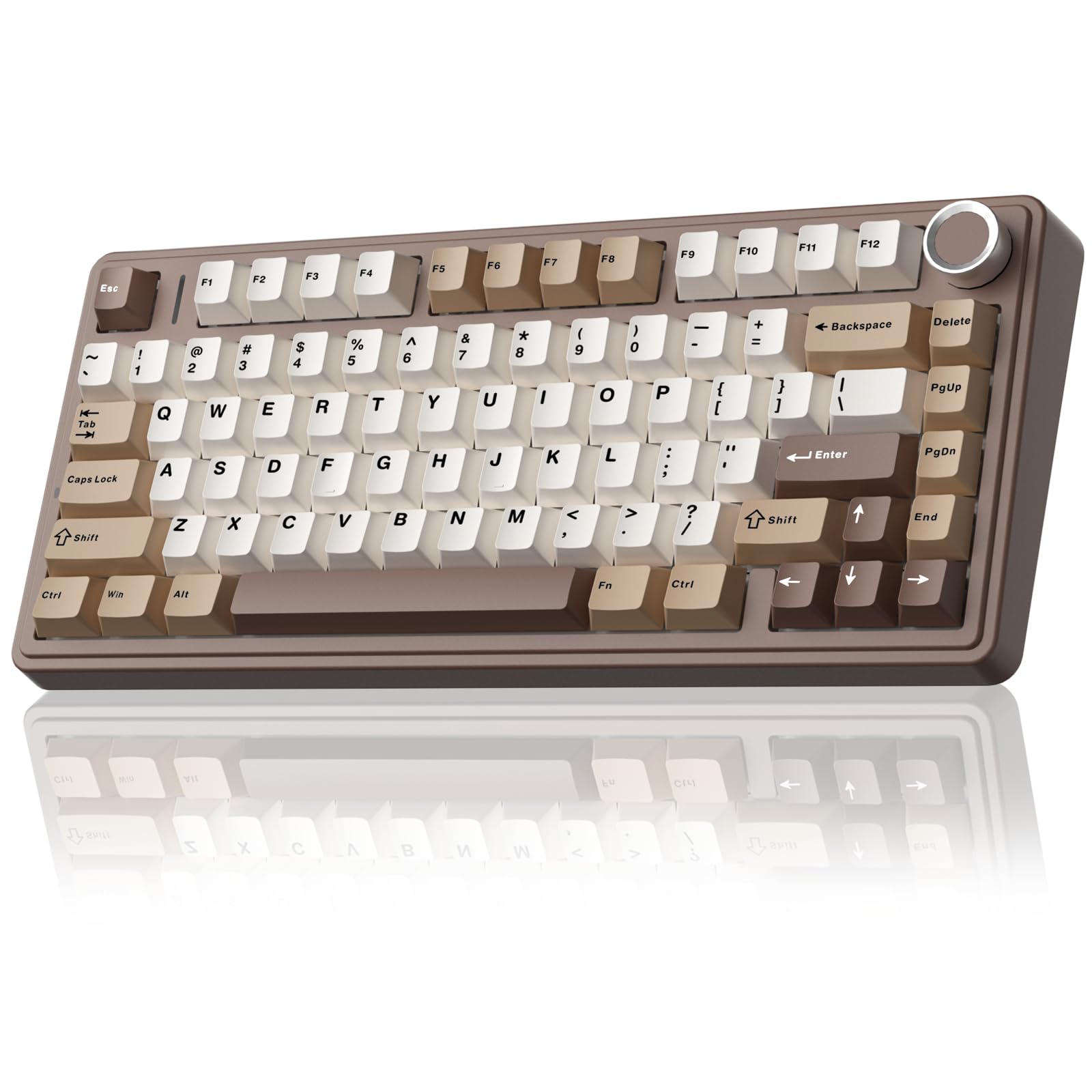
The first thing that stands out about the AULA F75 is how finished it feels before you change a thing. The pre-lubed linear switches have a soft, creamy sound, and the dampened body takes the hard edge off each keystroke. We think that combination is why it earns the top spot here: it gives you the custom-keyboard experience without requiring you to build one. The 75% layout keeps the mouse close, and the 81 keys still leave you with arrows and a function row.

Tri-mode wireless is the practical half of the story. You can pair up to five devices across Bluetooth, 2.4 GHz, and USB-C, which is more flexibility than most desks need, and the volume roller is a small touch we kept using. The hot-swap socket accepts 3- or 5-pin switches, and AULA includes spare switches and a puller, so you can tune the feel later without soldering. At about 1.02 kg, the board is heavy enough to stay planted without feeling like a brick.

The plastic case and six-month warranty are the compromises. Neither is unusual at this level, but the case will not feel as cool as aluminum and the coverage is shorter than we like. For a general desk that does some gaming and a lot of typing, the F75 is the one we reach for first.

Pros

  • Creamy, pre-lubed linear feel
  • Tri-mode wireless with five-device pairing
  • Hot-swappable sockets and spare switches
  • Solid 1.02 kg build

Cons

  • No dedicated number pad
Our verdict

We recommend the AULA F75 as the best all-around mechanical keyboard here: its creamy switches, hot-swap sockets, and tri-mode wireless make a polished daily driver without the custom-build price.

Check Latest Price
2

Best Full-Size Value

Logitech G413 SE

90 /100
LBD Score Outstanding

Key details

Layout
Full-size (108 keys)
Keycaps
PBT
Switches
Tactile
Connectivity
USB 2.0 wired
View on Amazon

The G413 SE is the full-size keyboard we reach for when the priority is a sturdy, no-nonsense wired board. The brushed aluminum top case and PBT keycaps are the parts you notice first; both are unusual at this level and make the board feel more expensive than it is. The black finish and white backlighting keep it looking serious rather than flashy.

We like it best for people who type hard and do not want to think about charging. The tactile switches have a clear bump, the 108-key layout gives you a number pad, and six-key rollover covers everyday gaming. The white backlighting is single-color rather than RGB, so it is a poor fit if you want per-key color. The PBT caps should also resist the shine that shows up on cheaper keycaps.

The trade-off is feel and sound. The switches are heavier and louder than the quiet linear boards here, and the space bar is the loudest key on the board. If you share a room or record audio, the AULA F75 is the gentler choice; if you want a full-size board that feels planted and takes abuse, this is the one.

Pros

  • Aluminum frame and PBT keycaps
  • Full-size 108-key layout
  • Tactile switches with a clear bump
  • Six-key anti-ghosting

Cons

  • Wired-only design
  • Single-color white backlighting
Our verdict

Our pick for a full-size wired desk is the G413 SE, which pairs a sturdy aluminum frame and PBT keycaps with tactile switches that suit typing and gaming.

Check Latest Price
3

Best Premium Wireless

Logitech MX Mechanical

85 /100
LBD Score Excellent

Key details

Layout
Full-size low-profile (104 keys)
Battery
Up to 15 days
Switches
Tactile quiet
Connectivity
Bluetooth, Logi Bolt
View on Amazon

The MX Mechanical is the board we point to when a mechanical keyboard has to live on a professional desk. The low-profile keys and tactile quiet switches keep the sound down, and the graphite aluminum top case looks like office equipment rather than a gaming rig. The full-size layout keeps the number pad, and the low height makes for a shorter reach to the keys.

What makes it worth considering is the wireless handoff. It pairs with up to three devices over Bluetooth or the included Logi Bolt receiver, and the backlight wakes as your hands approach. We found the low-profile typing position comfortable for long stretches, and the 15-day battery rating is decent for a backlit board. USB-C charging is convenient. The switches are not hot-swappable, and the low-profile keycaps limit replacement options.

The premium is the sticking point. This board costs more than the wired full-size picks here, and the smart backlight can turn off faster than you want in a dim room. We still recommend it for a quiet, multi-device office where comfort and battery life matter more than tinkering; if you want to swap switches, the AULA F75 or RK S98 is the better fit.

Pros

  • Quiet tactile low-profile switches
  • Pairs with three devices
  • Smart backlight and USB-C charging
  • Aluminum build

Cons

  • Not hot-swappable
  • Low-profile keycaps limit replacements
Our verdict

We keep the MX Mechanical for quiet, multi-device office work; it types comfortably, looks professional, and goes wireless, as long as you do not need hot-swap switches.

Check Latest Price
4

Best Wireless With Numpad

RK Royal Kludge S98

88 /100
LBD Score Excellent

Key details

Layout
96% (98 keys)
Controls
Display and knob
Switches
Linear, hot-swappable
Connectivity
Bluetooth 5.0, 2.4 GHz, USB-C
View on Amazon

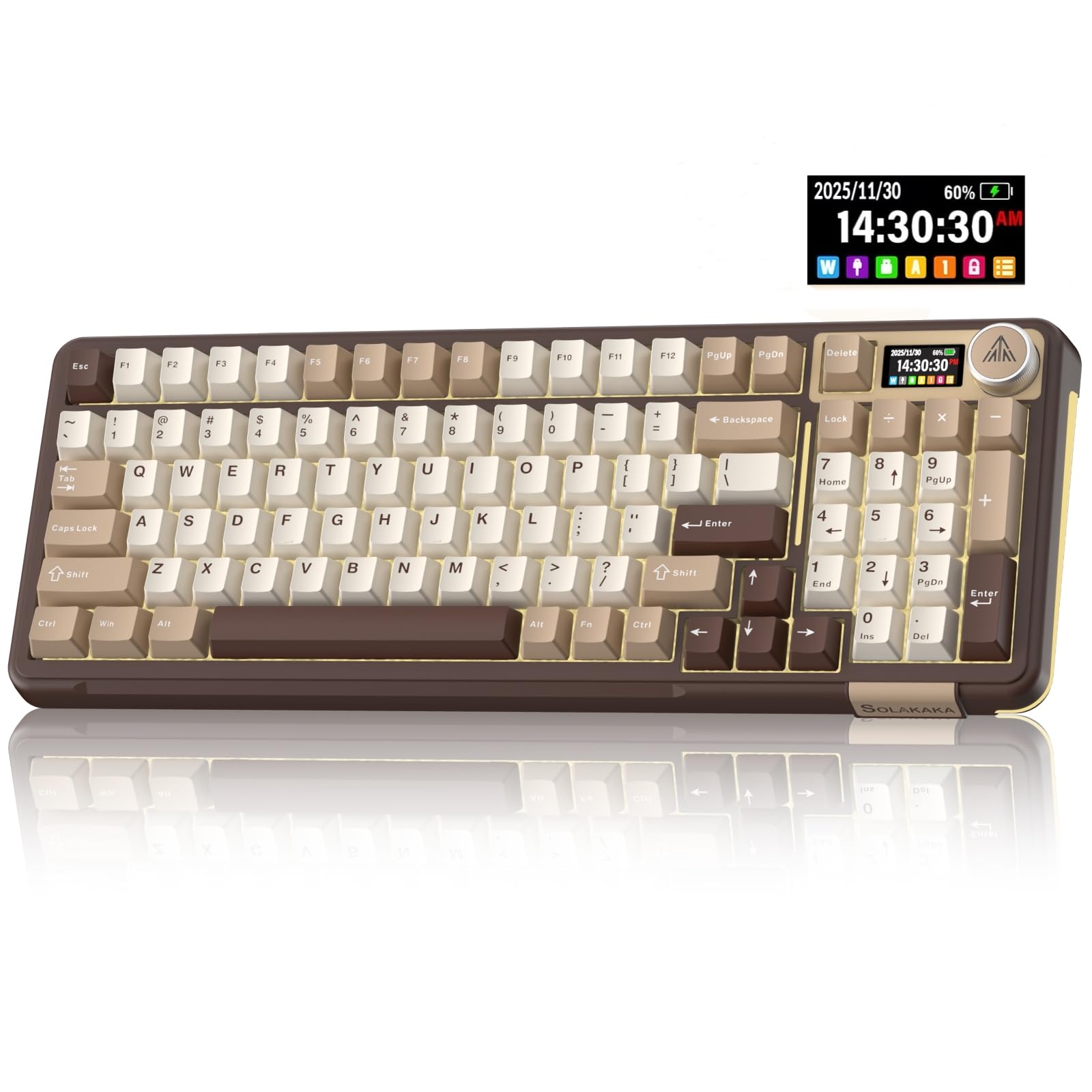
The S98 is for the desk that needs a number pad but does not want a full-size slab. Its 96% layout keeps the numpad and most of the navigation cluster while trimming the outer frame, and the small display and knob add controls you can use without opening software. The clay-green colorway is a nice change from black gaming boards.

We think the S98 earns its place because it bundles the features people usually pay extra for: tri-mode wireless, hot-swap sockets, a top-mount gasket design, and five layers of dampening. The pre-lubed linear switches have a creamy, clacky sound, and the knob handles volume and backlight adjustments. The display shows battery status and connection mode, which is genuinely useful on a wireless board. The included dust cover and spare switches are small touches that add value.

The compromises are weight and wireless consistency. At 3 pounds it stays put, but it is not a board you toss in a bag. Battery life and charging are the weak spots, and some units have developed keys that stop responding. Buy it for a stationary desk where the numpad matters, and keep the AULA F75 in mind if you want a lighter, more proven 75% wireless board.

Pros

  • 96% layout with number pad
  • Tri-mode wireless and hot-swap
  • Display and knob are useful
  • Five-layer dampening

Cons

  • Heavy at 3 pounds
  • Battery and charging can be inconsistent
Our verdict

For numpad users who want wireless freedom, we choose the S98 for its 96% layout, useful screen and knob, and creamy out-of-box sound.

Check Latest Price
5

Best Wired Custom

Womier SK80

93 /100
LBD Score Outstanding

Key details

Layout
75% (82 keys)
Display
Color multimedia screen
Switches
Linear, hot-swappable
Connectivity
USB-C wired
View on Amazon

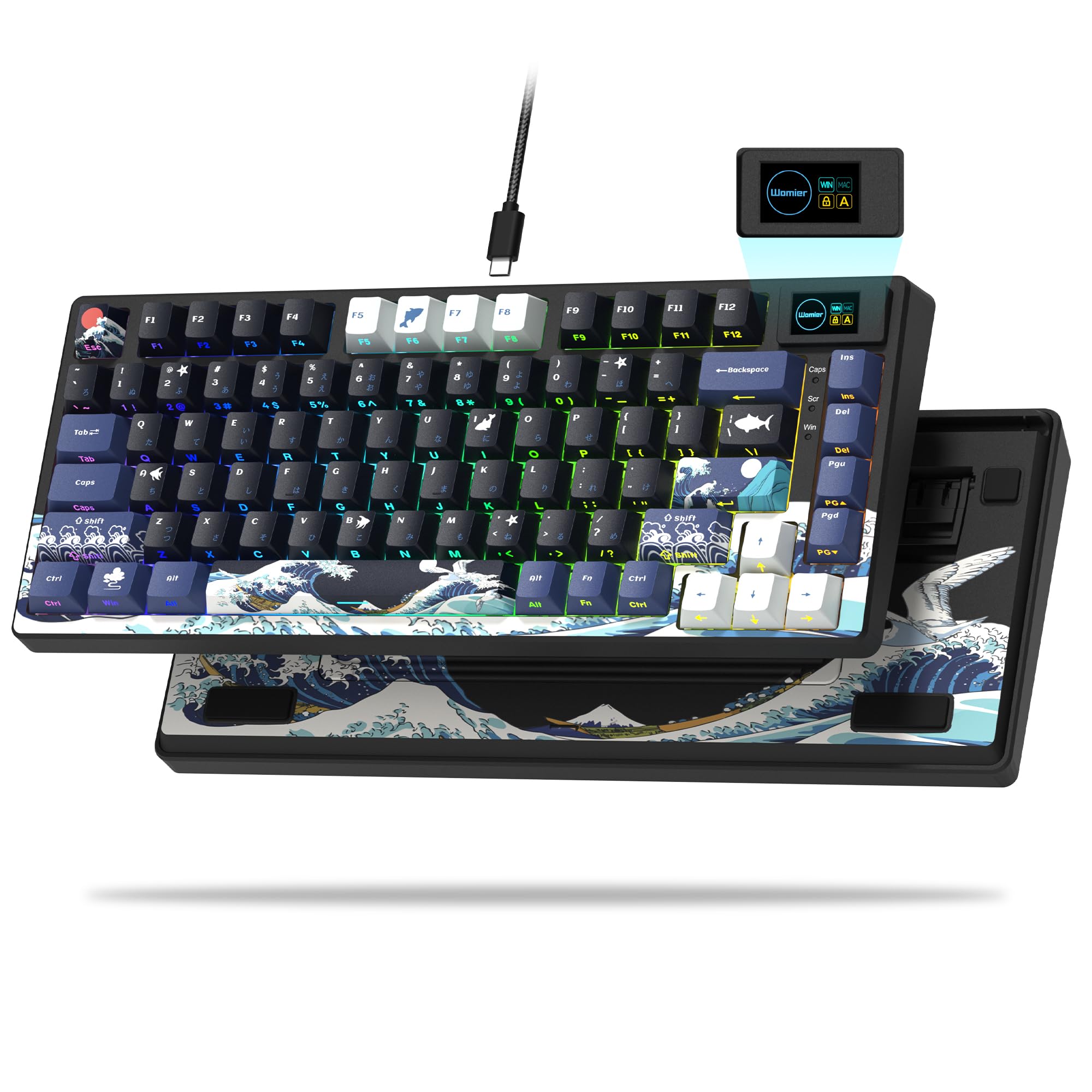
The little color screen in the corner is what makes the Womier SK80 memorable, but the reason we keep coming back to it is the typing feel. The gasket-mounted 75% body and pre-lubed linear switches produce a soft, creamy sound, and the 82-key layout leaves room for arrows and a function row without crowding the mouse. We think it is one of the most fun wired boards here for someone who wants a custom look without building a custom board.

The display can show a GIF, caps lock, connection status, and other small cues, and the software lets you customize the RGB and screen. The hot-swap sockets are a real plus if you want to try different switches later, and the metal enclosure gives it more heft than the plastic budget boards. The 19 lighting effects give you plenty to play with.

The catch is that it is wired only, and the 75% layout leaves out the number pad. The south-facing LEDs also mean some keycap sets will not show backlighting the way you expect. That is a fair trade for a desk-bound board with this much personality; if you need wireless or a numpad, the AULA F75 or RK S98 makes more sense.

Pros

  • Smooth gasket-mounted feel
  • Hot-swappable switches
  • Color display and RGB customization
  • Metal enclosure

Cons

  • Wired-only design
  • No number pad
  • South-facing LEDs limit some keycaps
Our verdict

We like the SK80 for a wired 75% desk with personality; the color display and smooth gasket feel make it fun, provided you do not need wireless or a number pad.

Check Latest Price
6

Best for Macros

Redragon K580

93 /100
LBD Score Outstanding

Key details

Extras
5 macro keys, media wheel
Layout
Full-size (104 keys)
Switches
Clicky Blue, hot-swappable
Connectivity
USB-C wired
View on Amazon

The K580 is built around a simple idea: put the controls a gamer reaches for most right on the board. Five dedicated macro keys sit on the left edge, and the media wheel and dedicated media buttons handle volume without a function-layer shortcut. The full-size layout also keeps the number pad, which matters for MMO and simulation players who use it.

We like the K580 for anyone who wants macro control without relying on software. You can record combos on the fly, and the board has 18 pre-programmed lighting schemes you can edit from the hardware. The blue switches are properly clicky, the double-shot keycaps should resist fading, and the hot-swap sockets accept most switches if you want to change the feel later. The aluminum plate adds stiffness without making the board too heavy to move.

The sound is the dividing line. Blue switches are loud and high-pitched, and this board is not the one for a shared office or a microphone-sensitive room. It is also wired only, and the plastic-and-aluminum case feels sturdy but not premium.

That is why we keep it on the list for macro-heavy players rather than as a general typing board. The 50-million-keystroke switch rating and double-shot keycaps matter here because those macro keys get pressed as often as the letters.

Pros

  • Five on-board macro keys
  • Dedicated media wheel and buttons
  • Hot-swappable clicky switches
  • Full-size layout with number pad

Cons

  • Loud clicky switches
  • Wired-only design
Our verdict

We recommend the K580 for macro-heavy gaming on a private desk, where its five macro keys and media wheel outweigh the loud clicky switches and wired-only design.

Check Latest Price
7

Quiet Full-Size Office

ProtoArc K310 Pro

89 /100
LBD Score Excellent

Key details

Case
Aluminum
Layout
Full-size low-profile (108 keys)
Switches
Linear quiet
Connectivity
Bluetooth, 2.4 GHz, USB
View on Amazon

The K310 Pro is the quiet, low-profile full-size board for someone who wants mechanical feel without a gaming look. The aluminum top case and space-gray finish are restrained, and the linear red switches are designed to be smooth and quiet rather than clicky. It pairs with up to three devices over Bluetooth or a 2.4 GHz receiver, and the 108-key layout keeps the number pad.

We see the appeal for a shared office or a home desk where sound carries. The low-profile keys make for a shorter typing motion, and the single-color backlighting is less distracting than RGB. The 10 backlight effects and macro customization add some flexibility. The board also supports Windows, macOS, Android, and iOS.

The trade-offs are feel and flexibility. The low-profile action is shallower and less crisp than a standard-height mechanical board, and the switches are not hot-swappable. The single-color backlight also will not satisfy someone who wants per-key color. The case is aluminum, but the board has a lighter, more office-first feel than the premium Logitech.

For a shared office, the quiet action is the feature that matters, and the two-year warranty is the detail that makes it easier to take a chance on. That is why it sits in also-consider rather than a top tier: it is a specialized board, not the default for everyone.

Pros

  • Quiet low-profile linear switches
  • Aluminum full-size case
  • Bluetooth and 2.4 GHz multi-device
  • Two-year warranty

Cons

  • Not hot-swappable
  • Low-profile feel is less crisp
Our verdict

We see the K310 Pro as a quiet full-size wireless board for shared offices, with an aluminum case and long warranty, though its low-profile feel is not for tinkerers.

Check Latest Price
8

Compact Wireless Desk

SOLAKAKA A99 Pro

87 /100
LBD Score Excellent

Key details

Layout
97 keys
Controls
LCD screen and metal knob
Switches
Linear, hot-swappable
Connectivity
Bluetooth 5.0, 2.4 GHz, USB-C
View on Amazon

The A99 Pro packs a number pad, a small LCD, and a metal knob into a 97-key body that takes up less width than a full-size board. We like that combination for a compact work-and-play desk: the screen shows battery, connection, and time, and the knob is more useful than another row of function shortcuts. The gasket structure and five layers of dampening give it a softer, creamier sound than its plastic case suggests.

The hot-swap sockets accept 3- or 5-pin switches, and the tri-mode connection covers Bluetooth, 2.4 GHz, and USB-C. The 16 RGB modes and side lighting add some fun, and the board is easy to set up across devices. The companion software is the weak link for remapping and screen customization; the hardware controls are the better way to live with it.

The 97-key layout takes a little adjustment if you are used to a full-size board, and some units have developed unresponsive keys or Windows-key issues. We still like it for a compact wireless setup because the screen and knob are the details that make it feel more expensive than it is. If you want the longest proven record, the RK S98 is the safer pick.

Pros

  • Compact 97-key layout with number pad
  • LCD screen and metal knob
  • Hot-swappable gasket design
  • Tri-mode wireless

Cons

  • Software is clunky
  • Some units develop unresponsive keys
Our verdict

We recommend the A99 Pro for a compact wireless desk that wants a number pad, screen, and knob; just accept weaker software and a less proven reliability record.

Check Latest Price

How We Tested the Best Mechanical Keyboards

We started with a long list of boards from established brands and filtered it by the things shoppers actually compare: switch type and whether the board is hot-swappable, mounting style and internal dampening, connection options, backlighting, and how the case is put together. From there we narrowed to 12, deliberately mixing sizes, layouts, and price tiers so we weren't testing one flavor of keyboard 12 times.

Each board spent at least two weeks as a daily driver, and most stayed on a desk far longer — eight months in total. They went through full workdays of writing and spreadsheets, evening gaming sessions, and the back-and-forth between a home office and a shared desk, where a loud board gets noticed by everyone within earshot. We also carried them in backpacks to see how the cases and keycaps held up in transit.

Before touching any software, we typed on each one for at least an hour, listening for rattle in the space bar and shift keys and pressing every key to catch a dead or mushy switch. We flexed the cases to see whether they creaked, checked how legible the legends stayed under different lighting, and watched how quickly the keycaps showed shine. For wireless models we paired to a laptop, a phone, and a desktop, then ran the battery down with the backlight at full brightness and again at its lowest setting.

We swapped switches on the hot-swap boards to judge how forgiving the sockets were, and lived with each brand's software long enough to know whether it was worth installing. Any board that developed a sticky key, a dropped connection, or a flaky backlight in month two was out.

How to Choose a Mechanical Keyboard

Start With Layout and Footprint

Layout changes more than desk space. A 75% board like the AULA F75 keeps arrows and a function row while freeing room for the mouse; a 96% board like the RK S98 adds a number pad in a narrower frame than full-size; a full-size board like the G413 SE gives you every key and a wider footprint. Measure your desk and decide whether the number pad is non-negotiable before you fall for a switch. If you use spreadsheets daily, a 96% or full-size board is the easier long-term choice.

Match Switch Feel to the Room

Linear switches are smooth from top to bottom and tend to be the safest choice for gaming and shared spaces. Tactile switches add a bump before actuation, which many typists prefer, while clicky switches add a sharp sound that can carry across a room. Hot-swappable sockets let you change course later: the AULA F75 and Womier SK80 both accept replacement switches without soldering. If you are unsure, start with a pre-lubed linear switch and a hot-swap board; you can make it heavier or clickier without replacing the keyboard.

Choose Wired, Wireless, or Both

Wired is the simplest choice for a stationary desk: no charging, no pairing, no sleep behavior. Wireless matters when you switch between a desktop, laptop, and tablet, or when you want a cleaner desk. Tri-mode boards like the AULA F75, RK S98, and SOLAKAKA A99 Pro cover Bluetooth, 2.4 GHz, and USB-C, but battery life and connection stability vary by model. Count how many devices you actually switch between, then decide whether multi-device pairing is worth the charging routine.

Prioritize Build and Keycaps

PBT keycaps resist the shiny wear that shows up on cheaper ABS caps, and a metal plate or case adds weight and a more planted feel. Gasket-mounted designs like the Womier SK80 and SOLAKAKA A99 Pro use flexible mounting and foam to soften the typing sound; a stiff tray mount feels firmer and often louder. We prioritize stable stabilizers and PBT keycaps over a metal case alone, because rattly space bars and worn caps affect daily typing more than the material name on the spec sheet.

Decide Which Extras Earn Their Space

Knobs, screens, macro keys, and RGB are useful only if you will use them. A knob is genuinely handy for volume; a screen is best when it shows battery and connection status; macro keys make sense for MMOs and repetitive workflows. Software support matters too: the Redragon K580 records macros on the board, while some screens and remapping features depend on a companion app. Buy for the controls you can use without software, then treat the app as a bonus rather than the foundation.

Frequently Asked Questions

Final Verdict

For most people, the AULA F75 is the mechanical keyboard to buy first. It delivers the sound and feel of a custom board, adds tri-mode wireless and hot-swap sockets, and does it in a compact 75% layout that leaves room for a mouse. If a number pad is non-negotiable, choose the RK S98 for wireless or the G413 SE for a wired full-size board. If you want the quietest, most polished office experience, the Logitech MX Mechanical is the premium alternative.