Best Split Keyboards of 2026

A split keyboard does one thing, and everything else follows: it lets each hand sit where your shoulder actually wants it instead of pinning both to a single rigid slab. That freedom turns a long typing day from an ache you manage into something you forget about. The trade-off is muscle memory — the Y, B, and N keys move, and for a week or two your typing gets worse before it gets better.

I've typed on split boards for years, and my team has now spent eight months with 12 of them, from flat membrane decks to contoured mechanical builds. The spec I'd check first isn't the switch type, it's how far the halves actually separate — a board that opens two inches is barely different from the one you already own. Wrist support and tilt come next, plus the issue nobody mentions: a loud board is a problem on every call you take.

Wrist rests flatten and wireless models live or die on their pairing, and neither problem shows up during the first week. The picks below survived both.

1

Best Overall

Kinesis Freestyle2

86 /100
LBD Score Excellent

Key details

Footprint
15.94 x 9.25 x 1.26 in
Connection
Wired USB
Separation
Up to 9 inches
Switch Type
Low-force membrane
View on Amazon

Nine inches is the number that matters here. The Freestyle2 ships as two separate modules joined by a detachable pivot tether, and you set them as close together or as far apart as your shoulders want, something no fixed ergonomic board can do. We typed a full day with the halves wider than any standard keyboard allows and noticed the difference between the shoulder blades before we noticed anything at the wrists.

That's why it's our top pick: it addresses the geometry that pushes most people toward a split in the first place. The keys are a custom low-force membrane with a soft tactile bump, so fingers do less work over an eight-hour day, and the standard Windows layout keeps cut, copy, and paste where your hands already know them. Nothing needs software. It's plug-and-play over USB on Windows, Linux, and Chrome.

Check the box before you assume. It holds the keyboard, the pivot tether, and a quick start guide, with no palm rest and no freestanding number pad, just an embedded ten-key layout you reach through a function key. The number pad is an extra purchase, worth budgeting for if you live on one, and the flat profile means most people will want some kind of palm support underneath.

The adjustment is real but short. Typing on two floating halves takes a few days of hunting for the b and the 6, and the value question is fair, because this is a membrane keyboard at a price that buys mechanical boards elsewhere. What you get for it is the one thing nothing else here does as well: opening your chest and dropping your shoulders mid-sentence.

Pros

  • Halves separate up to 9 inches
  • Low-force keys reduce finger fatigue
  • Plug-and-play, no drivers or software
  • Adjustable splay for each half

Cons

  • No palm rest or number pad in the box
  • Wired only, with no backlight
Our verdict

Buy this if your discomfort starts in your shoulders or upper back: the Freestyle2 is the split that actually moves, and its light keys keep long days comfortable.

Check Latest Price
2

Best One-Piece Split

Logitech Ergo K860

89 /100
LBD Score Excellent

Key details

Tilt
0, -4 and -7 degrees
Footprint
17.95 x 9.17 x 1.89 in
Connection
Bluetooth or USB receiver
Wrist Rest
Pillowed memory foam
View on Amazon

Two halves, one body. The K860 splits its keyframe down the middle and curves it, but the pieces stay fixed in a single chassis with a pillowed memory-foam rest across the front. That makes it the pick for anyone who wants the wrist and forearm benefit without two loose boards to reposition every time they sit down.

The keys are Logitech's Perfect Stroke scissor switches: shallow, quiet, and lightly scooped so fingertips settle in the middle rather than on an edge. Three palm-lift settings (0, -4 and -7 degrees) let you match a seated or standing desk, and the board runs on two AAA batteries over Bluetooth or the included USB receiver, covering Windows, macOS, Linux, and Chrome OS. It is also the quietest full-size keyboard in this group, which matters in a shared room.

Durability is where we hesitate. This board has the weakest long-term hardware record in this set, with tilt feet that detach and keys that stop registering as the recurring themes. It isn't every unit, and registering the warranty the day it arrives is the sensible hedge. What you get in return is the fastest transition from a normal keyboard we found: the curve and scooped caps cut the adjustment to days rather than weeks.

Pros

  • Curved split frame with a pillowed rest
  • Three tilt settings for sit or stand
  • Bluetooth plus included USB receiver
  • Quiet scissor keys

Cons

  • Fixed halves, no width adjustment
  • Premium price for a one-piece design
Our verdict

The pick for anyone who wants ergonomic relief without managing two loose boards: comfortable, quiet, and the quickest adjustment from a normal keyboard here.

Check Latest Price
3

Best Full-Size

Perixx PERIBOARD-512B

89 /100
LBD Score Excellent

Key details

Layout
Full-size with number pad
Footprint
19.09 x 9.29 x 1.73 in
Connection
Wired USB
Switch Type
Tactile membrane
View on Amazon

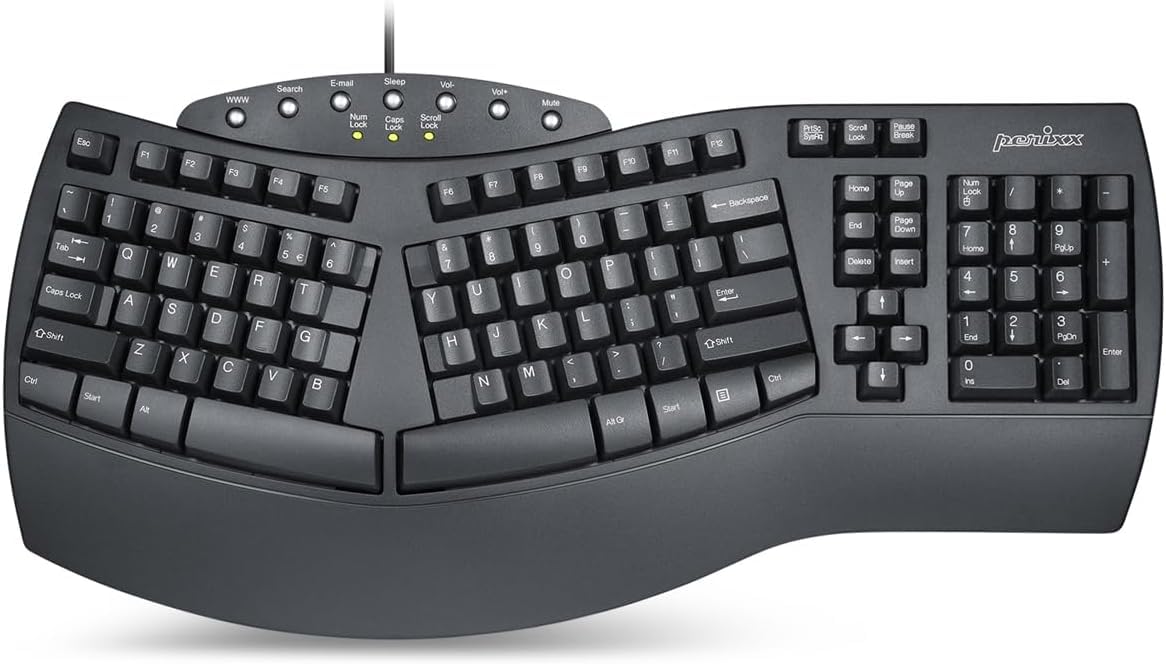
The cheapest way into a full-size split. The PERIBOARD-512B divides its keys into left and right zones inside a single body, puts a number pad on the right, and runs an integrated wrist rest across the front. The plastic is plain, but the thing has heft, and it sits at the entry-level end of this group without feeling like a toy.

Long key travel with a soft tactile bump is the reason we keep it on the list. It's closer to a brown mechanical switch than to the shallow scissor keys on most ergonomic boards, so if you like a positive, audible press, this delivers it for less than any mechanical option here. The stepped, curved rows tip your hands slightly forward, and the wrist rest takes pressure off the heels of your palms during long sessions.

Two things to measure before you order. The body runs 19.09 inches wide and 9.29 deep, so it needs a wide tray and won't drop into a compact drawer. And it's loud: the clack carries across a room, which matters in a shared office or a bedroom where someone else is sleeping. It's a Windows board, and the arrow and function clusters sit where a full-size layout usually puts them, so muscle memory mostly holds.

Pros

  • Long-travel tactile keys with a bump
  • Full-size layout with a number pad
  • Integrated wrist rest
  • Lowest entry price in the set

Cons

  • Loud enough to hear across a room
  • Windows only, no macOS support
Our verdict

If you want a number pad, a big positive keypress, and a low entry price, the 512B delivers, as long as you can give it 19 inches of desk and warn your office neighbors.

Check Latest Price
4

Best Budget Wireless

Arteck Split Keyboard

86 /100
LBD Score Excellent

Key details

Battery
Up to 6 months
Footprint
16.5 x 9.6 x 1.02 in
Connection
2.4G USB receiver
Switch Type
Scissor switch
View on Amazon

A split layout, a cushioned palm rest, and no cable. The Arteck pairs over a nano receiver that tucks into the back, runs on a rechargeable battery rated for six months at two hours of typing a day, and tops up over USB-C. Laid out flat and low at 16.5 inches wide, it's built for a laptop desk rather than a corner office, and that combination is what earns it the budget-wireless place here.

The scissor keys are light, quick, and sensitive enough that they fire as your fingers land. That's great for speed and less great when you rest your hands mid-thought, since a half-pressed finger can add a letter you didn't plan on. The palm rest is soft and generous, but it's molded in place across the front, which adds depth you can't reclaim on a shallow desk.

There's no Bluetooth, so the dongle owns a USB-A port, and the board is Windows-only. Six months of battery life is tied to two hours of daily use, so heavy days draw it down faster than the headline suggests. The layout curves gently rather than splitting hard, so expect a week of small accuracy losses while your hands relearn where the middle of the keyboard is.

Pros

  • Six months of use per charge
  • Cushioned palm rest across the front
  • Wireless with no software setup

Cons

  • Dongle only, no Bluetooth
  • Fixed wrist rest adds desk depth
Our verdict

For a laptop desk and a modest budget, this is the easy buy: cordless, cushioned, and months between charges.

Check Latest Price
5

Best Wrist Support

Nulea Split Keyboard

86 /100
LBD Score Excellent

Key details

Tilt
Three angles
Layout
101 keys
Connection
Wired USB-C
Wrist Rest
Oversized leatherette
View on Amazon

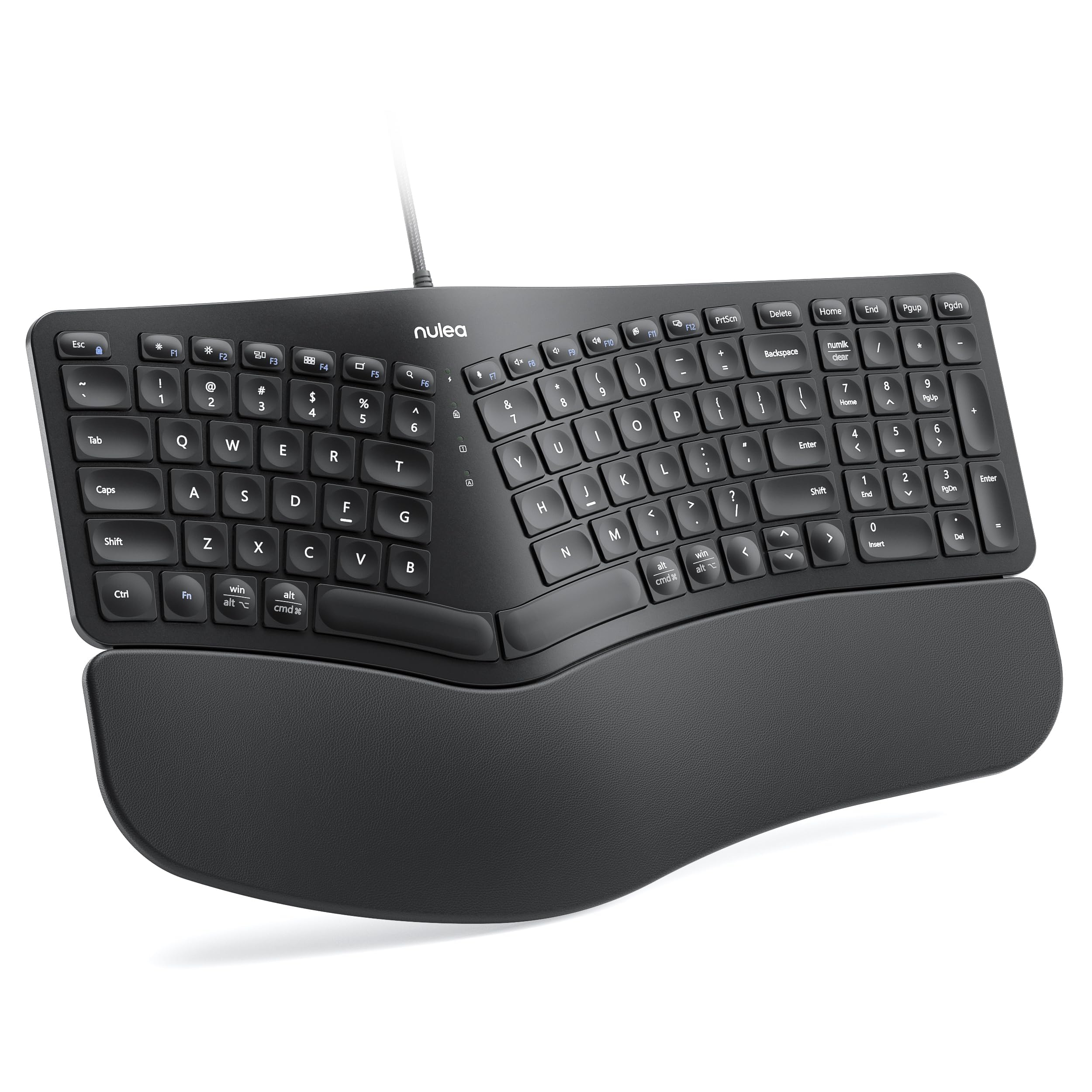
The wrist rest is the whole argument. Nulea runs a wide leatherette pad across the full front of this board, deeper than most, with three tilt settings underneath so you can match the angle to your chair. Of the one-piece splits here, this is the one we point to when palm and wrist comfort comes first.

Under that rest sits a gentle split, with the key zones angled away from each other rather than forming a hard V, plus 101 keys and a braided USB-C cable that won't fray at the strain point. Setup is genuinely plug-and-play, and it's one of the few wired boards here that covers Windows, macOS, and Linux out of the box. It types quietly, with a soft, slightly mechanical-feeling press that doesn't announce itself across the room.

The thing to weigh is key registration. A shift key that stops responding is the recurring risk on this model, and at least one board quit entirely after a few months. That's a real gamble at this price, and it's a good reason to buy from a seller with simple returns rather than the cheapest listing. If yours is sound, you've got the most comfortable palm support in the group for very little.

Pros

  • Oversized leatherette wrist rest
  • Three adjustable tilt angles
  • Works with Windows, macOS, and Linux
  • Quiet keys at a budget price

Cons

  • Shift key can stop registering
  • Wired only
Our verdict

Buy it for the palm support: the deepest wrist rest here, three tilt angles, and a quiet, gentle split at a budget price.

Check Latest Price
6

Best Keyboard and Mouse Combo

ProtoArc EKM01 Plus

83 /100
LBD Score Excellent

Key details

Layout
Full-size with number pad
Battery
USB-C rechargeable
Devices
Up to 3 devices
Connection
2.4G and Bluetooth
View on Amazon

Two things in the box: a full-size split keyboard and a sculpted vertical mouse, both rechargeable over USB-C, both able to hop between three devices over Bluetooth or the 2.4G receiver. The pairing is the point. One desk, one set of peripherals, and a work laptop and a personal machine you can switch between without crawling under the desk.

The keyboard carries a curved split frame, low-profile scissor keys, a number pad, and a memory-foam palm rest. The mouse has a thumb shelf, 800, 1300 and 2000 DPI steps, and forward and back buttons for browsing. Both are quiet enough for a shared room, and the keyboard runs for weeks between charges rather than days.

We point people to this set when the mouse hand hurts as much as the keyboard hand. A vertical mouse takes the forearm twist out, and this one is shaped to keep the palm supported rather than perched on top. The trade-off is responsiveness: lag after the computer wakes and connections that occasionally need re-establishing are the pattern to plan around, so keep the dongle in a port you can reach.

Pros

  • Switches between three devices
  • Vertical mouse included
  • Quiet keys and long battery life

Cons

  • Occasional lag and re-pairing
  • Two devices to keep charged
Our verdict

The pick if your mouse hand is half the problem: a comfortable split board and vertical mouse that share a receiver and switch between three devices.

Check Latest Price
7

Premium Contoured Typing

Kinesis Advantage360 Professional

79 /100
LBD Score Very Good

Key details

Layout
76 keys, contoured wells
Switches
Kailh Box Pink silent
Warranty
3 years
Connection
Bluetooth
View on Amazon

Most ergonomic keyboards bend the rows. This one bowls them. Each half of the Advantage360 is a contoured well with keys set in columns, thumb clusters where your thumbs actually rest, and tenting underneath, a shape that shortens how far your fingers reach for the top and bottom rows. It is also the most expensive keyboard in this guide by a wide margin.

What the money buys is a genuinely different relationship with the keyboard. Fingers stay closer to home, thumbs take over work the pinky usually does, and the wells hold your hands in a fixed, relaxed curve instead of asking them to arch. We think it's the most complete ergonomic rethink in this set, and the one that asks the most of you in both money and practice.

The hardware is serious: Kailh Box Pink silent linear switches rated for 50 million presses, backlighting, Bluetooth with a wired option, open-source programmability, and a three-year warranty. It's also 3.2 pounds and three inches tall at the back, so it wants a real desk and a chair you can adjust, not a lap or a shallow tray.

Two cautions before you commit. Plan on a week or two of slow typing while your fingers learn columns instead of rows, because shortcuts you use without thinking will move. And the long-term record here is thinner than on anything else we recommend, with Bluetooth trouble and at least one board that lost a row of keys entirely. At this price, buy where returns are simple.

Pros

  • Contoured wells with thumb clusters
  • Silent mechanical switches
  • Three-year warranty and programmability

Cons

  • Steep learning curve
  • Thin long-term reliability record
Our verdict

For anyone with serious hand or wrist pain and the budget to match, the Advantage360's contoured wells are the most radical relief here, if you'll accept the relearning.

Check Latest Price
8

Cheap Bluetooth Split

TECKNET Ergonomic Keyboard

84 /100
LBD Score Excellent

Key details

Tilt
0, 1.2, 3 and 6.2 degrees
Battery
500mAh rechargeable
Connection
Bluetooth 5.0 and 2.4G
Wrist Rest
Memory foam
View on Amazon

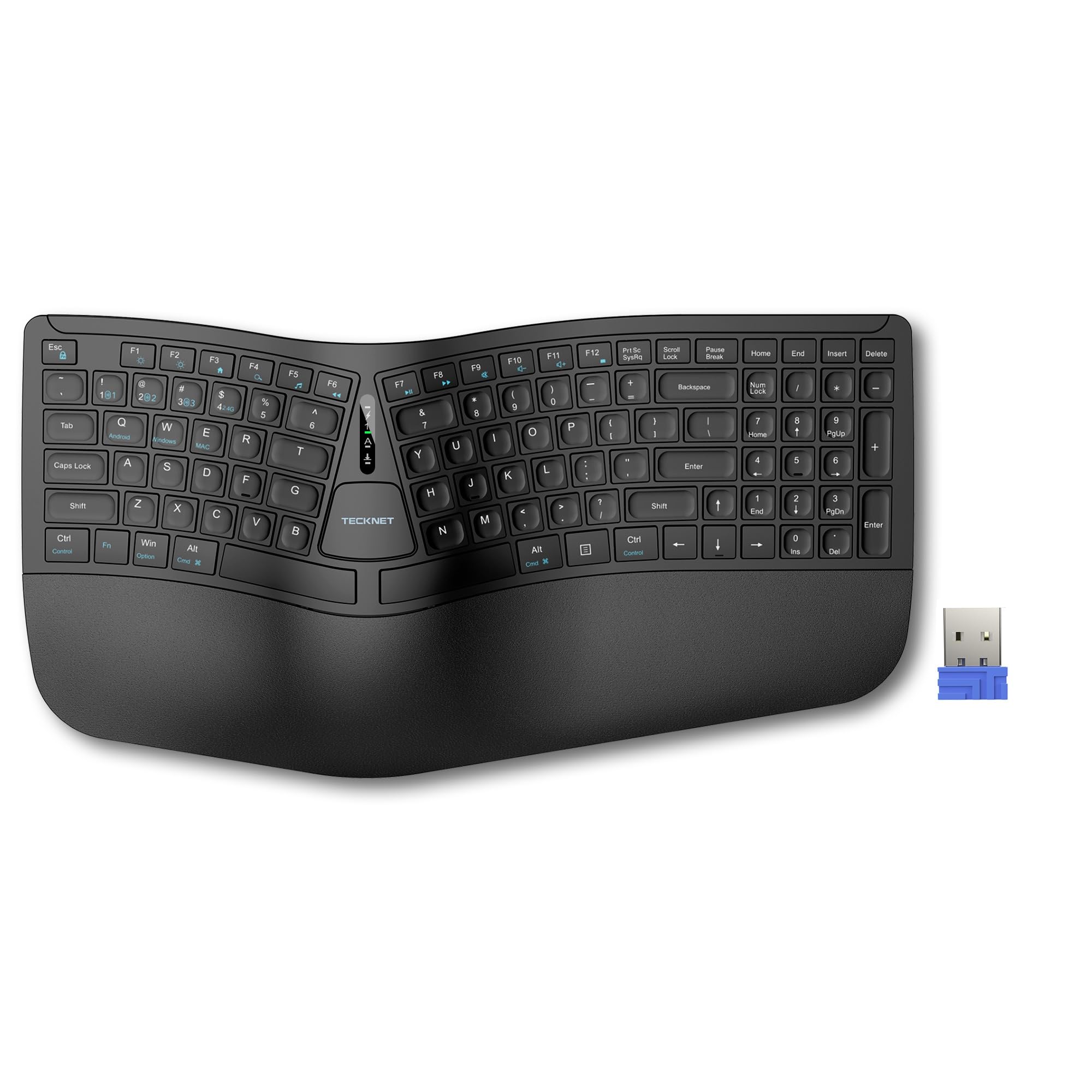
Bluetooth, a memory-foam wrist rest, and a split frame at the bottom of this group's price range. That combination is why the TECKNET earns a spot: if you want to find out whether a split layout helps before spending real money, this is the least expensive experiment on the page.

Connectivity is better than the price suggests. Bluetooth 5.0 holds pairing memory for three devices, there's a 2.4G dongle in the box, and the 500mAh battery charges in about four hours. Four-stage feet let you set 0, 1.2, 3 or 6.2 degrees of tilt, which is a wider range than several pricier boards offer. The keys are quiet and low, with a springy press that doesn't wear your fingers out.

Two trade-offs come with the savings. It's light enough to skate across a slick desk when you push it, so a desk mat earns its keep, and the compact spacing will cramp large hands, though the payoff is a footprint small enough to leave room for a mouse. Longevity is the open question, since a few of these quit within weeks, so buy where the return window is generous.

Pros

  • Bluetooth plus 2.4G for three devices
  • Four-stage tilt adjustment
  • Memory-foam wrist rest
  • Lowest cost of entry here

Cons

  • Slides on smooth desks
  • Compact spacing cramps large hands
Our verdict

The cheapest way to try a split layout with Bluetooth and a padded rest; just set it on a mat and buy it somewhere returns are easy.

Check Latest Price
9

Compact Alice Desk

LEOBOG A75

85 /100
LBD Score Excellent

Key details

Layout
75% Alice
Switches
Hot-swappable linear
Backlight
RGB
Connection
Bluetooth, 2.4G, USB-C
View on Amazon

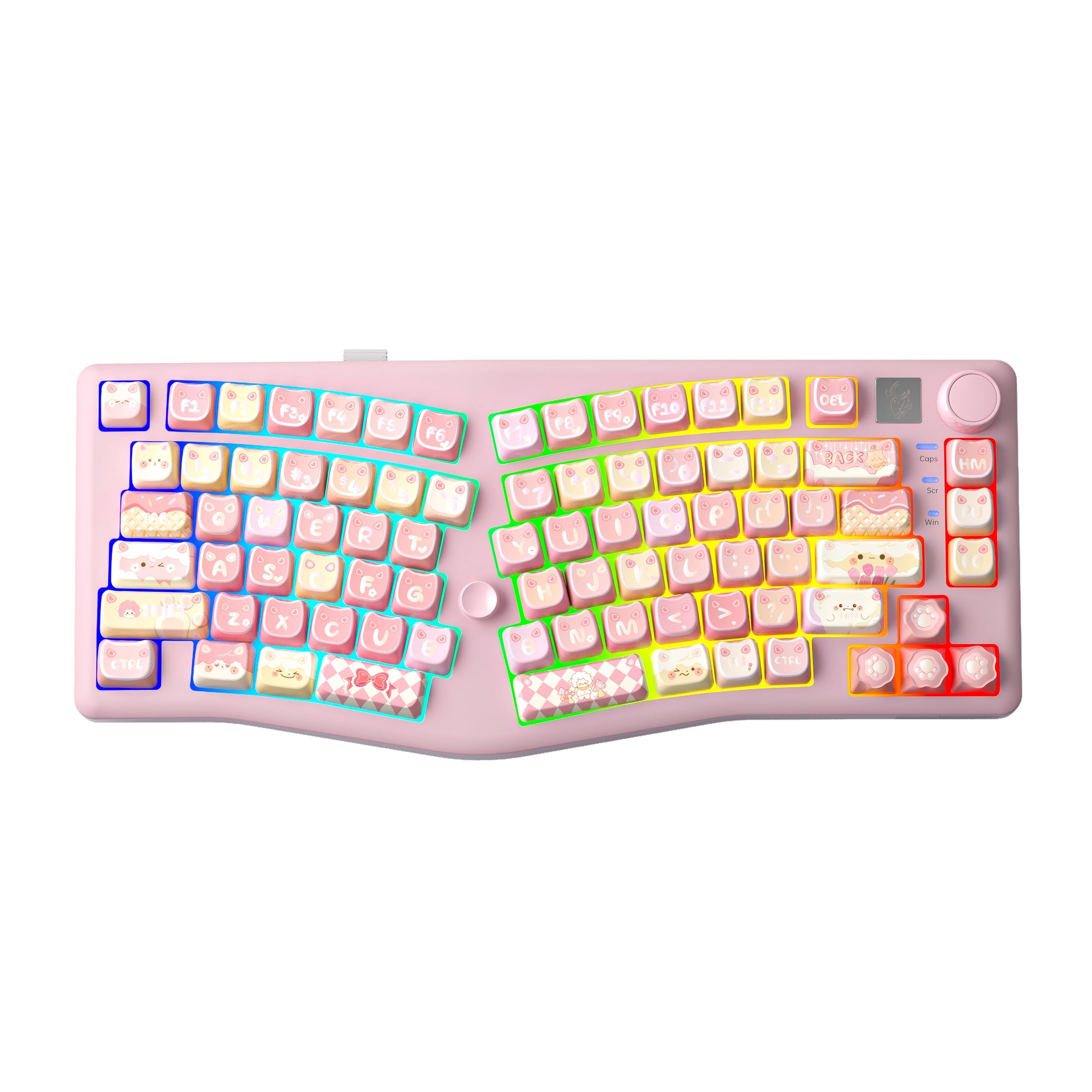
Pink, cat-shaped keycaps, a knob, and a tiny joystick that handles the arrow and enter keys. The A75 looks like a desk toy and types like a serious mechanical board. The layout is Alice, meaning the two halves angle toward each other inside a single 75% frame, so your wrists open up without two separate pieces to chase around.

Under the caps it's gasket-mounted with four layers of sound deadening, which is why it lands soft and low rather than sharp. The linear switches are hot-swappable, so a different feel is one purchase away, and the board connects over Bluetooth 5.0, 2.4G, or USB-C across up to five devices. At 14.4 inches wide it leaves real room for a mouse, and the 16.8 million color backlighting has 16 presets if the pink isn't enough.

We like it as the fun pick that's also easier on the hands. The Alice splay does the same work a split does, stopping your wrists from collapsing inward, in a package that fits a small desk and doesn't look like medical equipment. It's a newer design than the rest of this list, which is worth knowing if you keep keyboards for years rather than seasons.

Two limits to accept. There's no Insert or End key on the board itself; both live on the function layer, which is fine until you need them all day. And the 75% layout drops the number pad entirely. Neither is a flaw for a gaming or writing desk, but a spreadsheet job will feel the second one immediately.

Pros

  • Alice splay in a compact body
  • Hot-swappable mechanical switches
  • Three ways to connect, five devices
  • Quiet, dampened sound

Cons

  • No dedicated Insert or End key
  • No number pad
Our verdict

For a small desk, a mechanical feel, and a bit of personality, the A75's Alice layout is a genuinely comfortable way to type, provided you don't need a number pad.

Check Latest Price
10

Cheap Two-Piece Split

Perixx PERIBOARD-524B

77 /100
LBD Score Very Good

Key details

Tilt
Adjustable
Layout
Tenkeyless, 86 keys
Connection
Wired USB
Separation
Up to 2 feet
View on Amazon

Two feet of separation in a tenkeyless body, at the entry-level end of this group. The PERIBOARD-524B comes apart into two pieces you can splay, tilt, and push apart, which is the whole point of a split keyboard and the thing a one-piece board can't do no matter how its keys are angled.

The range of adjustment is what you're paying for: separation, splay, and a tilt mechanism underneath, all without software. The keys are low-profile membrane with a tactile bump, quiet enough for an open office, and the compact body leaves room for a mouse between the halves, useful if you've been reaching over a number pad all day.

The friction is placement. Your right shift sits further out than muscle memory expects, the arrow cluster is tighter than a full-size board's, and the first week is genuinely slow. Perixx issued a firmware update in June 2023 that addressed phantom keys and repeating letters, so confirm you're buying current stock rather than old inventory.

If you've been curious whether real separation helps and don't want to spend Kinesis money to find out, this is the honest test. The body is plastic, the magnetic feet wobble on an uneven desk, and nothing here feels premium. But nothing else at this price gives you two independent halves to move around.

Pros

  • Halves separate up to 2 feet
  • Adjustable splay and tilt
  • Compact tenkeyless body
  • Firmware fixes phantom keys

Cons

  • Right shift sits out of reach
  • Magnetic feet can wobble or detach
Our verdict

The least expensive way to try genuinely separated halves; expect a week of misplaced shifts and a plastic build, and you get the experiment you wanted.

Check Latest Price

How We Tested 12 Split Keyboards Over Eight Months

We started with every board sold as a true split — two pieces, not a curved one-piece — and cut the list by layout, separation range, whether a wrist rest came included, and how it connected. Then we bought 12 at retail and set them up where people actually type: a home office desk, a standing desk, a kitchen table shared with two other people, and a coworking space where nobody wants to hear your spacebar. Testing ran eight months, long enough for the novelty to wear off and the keycaps to shine.

Each board got the same treatment. We measured how far the halves genuinely separate with a tape measure, then typed a full workday at maximum spread. We typed the same 500-word passage on day one and again after a month, tracking speed and error rate, since an adjustment period is expected but it should end. Every wrist rest got a four-hour session, and we noted whether it was still supporting at hour four, whether it ran warm, and whether the fabric had pilled or the padding had flattened by month three.

For sound, we set each keyboard beside an open mic on a video call and listened back to the recording instead of judging by ear in a carpeted room. For connectivity, we paired every wireless model to a work laptop, a home desktop, and a tablet, switched between them mid-sentence, and counted dropped connections and failed wake-ups. Durability came down to pressing the corners of each case, wiggling keycaps, and checking whether tilt legs held their angle after weeks of use. At the end we weighed price against what came in the box, since several of the more affordable boards make you buy the wrist rest separately.

How to Choose a Split Keyboard

Real separation or a curved one-piece?

An ergonomic keyboard can split its keys and still be one piece. That fixed angle takes pressure off the wrists, but it can't change how wide your hands sit, so it does little for shoulders that round forward. A two-piece board, like the Freestyle2, the PERIBOARD-524B, or the Advantage360, lets you set width and splay yourself.

The cost is desk space, an extra cable or two, and the small habit of putting the halves back where you like them. If your tension runs up into the neck and shoulders, go two-piece. If your wrists are the whole story and you want something you never have to reposition, a fixed split does the job.

Match the key feel to your hands

Three feels dominate this category. Scissor keys (K860, Arteck, ProtoArc) are shallow, quiet, and light, closest to a laptop. Long-travel membrane (512B, 524B) gives a positive bump and a sound you either love or can't share an office with. Mechanical (Advantage360, A75) offers the most feedback and the most noise.

If you type eight hours a day and your fingers ache, low activation force matters more than travel. If you like feeling a key land, long-travel membrane gets you there for less money than mechanical switches.

Decide what the wrist rest is for

A rest supports the heel of your palm between bursts of typing; it is not a place to plant your wrists while you type. A built-in pillowed rest is convenient but adds depth and can't come off, and the Arteck's pad runs the full front of the board. A separate pad moves where you want it and disappears when it isn't working.

Tilt matters too. A slight negative slope keeps wrists flatter, which is why the K860 offers 0, -4 and -7 degrees and the Nulea builds in three angles. Match the setting to whether you sit or stand.

Check the layout against your muscle memory

Most of the adjustment trouble with split keyboards isn't the split. It's keys that moved: a right shift pushed out, arrows in a tighter cluster, the 6 on the left half, or a number pad that only exists on a function layer. Count what you actually use, numpad and Insert and End included, before you fall for a shape.

Budget a week or two of slower typing. Most people are back to speed inside that window, and the ones who aren't usually picked a layout with a key they need daily sitting somewhere new.

Wired, dongle, or Bluetooth

Wired boards (Freestyle2, 512B, Nulea, 524B) never need charging and never drop a keystroke. A 2.4G dongle (Arteck, TECKNET, ProtoArc) is nearly as steady but claims a USB-A port and sometimes limits you to Windows. Bluetooth buys device switching, three devices on the TECKNET and ProtoArc and five on the A75, at the cost of occasional re-pairing.

If you sit at one desk all day, wired is the least trouble you can buy. If you move between a work laptop and a personal machine, Bluetooth earns its quirks.

Frequently Asked Questions

Final Verdict

We recommend the Kinesis Freestyle2 to most people shopping for a split keyboard. It's the one that actually moves: two independent halves, nine inches of separation, adjustable splay, and low-force keys. That combination fixes the shoulder and forearm geometry a fixed board only partly addresses.

If two loose halves sound like a hassle, the Logitech Ergo K860 gives you a curved split and a memory-foam rest in one piece, with a faster learning curve and a weaker durability record. On a tight budget, the Perixx PERIBOARD-524B is the cheapest route to genuinely separated halves.