Best MagSafe Stands of 2026

I have propped my phone against a coffee mug on more video calls than I care to admit, and the mug always loses. A magnetic stand solves that small daily indignity: the phone snaps onto a mount at eye level, stays there while you type, and lifts off with one hand when the call ends. It also turns the phone into something you can actually watch, film, or follow a recipe on without holding it. Over the past four months my team and I have lived with 14 stands, from pocketable tripods to weighted desk towers to charging docks, and the differences showed up fast.

Here's what first-time buyers get wrong: the magnet gets all the hype, but the base decides whether you'll like the thing. A strong magnet on a light base just means the whole stand comes up with the phone every time you grab it. Fit matters just as much, since a thick non-magnetic case can neuter even a good mount, which is why a few of these ship with steel rings for phones that don't have magnets built in.

The picks below cover a wide spread of jobs: a desk, a nightstand, a kitchen counter, a gym floor, a suitcase. What they share is that they held our phones where we put them.

1

Best Overall

COOPER MagStand

92 /100
LBD Score Outstanding

Key details

Charging
None — mount only
Mounting
Magnet, plus 2 steel rings
Adjustment
360° rotation, 55° tilt
Height Range
9 to 13 inches
View on Amazon

Nine inches at the bottom, thirteen at the top — that's the range this rod adjusts through, and it's the reason it's our top pick. At full height the phone sits close to eye level for most people at a desk, which turns a video call from a chin-up angle into something closer to a conversation. It costs a fraction of what a charging dock does, and it does the one job in the name: it holds the phone where you can look at it.

The base is a wide disc of metal alloy with foam padding underneath, and it's the part we ended up trusting. Tapping through a recipe or scrolling a call list doesn't walk the stand across the desk or tip it forward the way a light folding frame can. Above it, the head tilts 55° and turns a full 360°, so portrait, landscape, and a slight upward angle for filming all land where you want them.

iPhones from the 12 on attach bare or through a MagSafe case. For anything else — an Android phone, an older iPhone — COOPER puts two steel rings in the box, which is the difference between an iPhone-only stand and a stand for the phone you actually own. The ring is adhesive, so line it up once, centered on the coil, and leave it there.

Assembly takes an Allen wrench, which is included along with a spare screw, and the arm locks with a nut rather than a friction spring. That's why it doesn't sag under a Pro Max, and it's why the height is exactly where you left it every morning. Living with this set for a while, we noticed the plain mounts gave us less to grumble about than the ones that also charge — and this one had the shortest list of all.

Pros

  • Puts the phone near eye level, not desk level
  • Wide padded base stays put when you tap
  • Two steel rings for non-MagSafe phones
  • Arm locks firmly and doesn't sag

Cons

  • Doesn't fold, so it stays on one desk
Our verdict

It's the stand we hand to anyone who wants the phone up at eye level without paying for a charger: the tall arm, planted base, and two rings make it the safest default here.

Check Latest Price
2

Best for Desk Positioning

UGREEN MagSafe Desk Stand

94 /100
LBD Score Outstanding

Key details

Weight
6.88 oz
Charging
None — mount only
Material
Aluminum
Adjustment
2 arms, 3 rotating joints
View on Amazon

Where the COOPER above holds its height on a threaded rod, this UGREEN gets its positions from three rotating joints and two aluminum arms — and the friction in those joints is the whole product. Set the phone at an angle for a call, flatten it for typing, drop it low to read: it stays where you put it. Nothing in the arm feels loose or tired.

The frame is aluminum with a smooth grey finish, and it folds down small enough to drop in a backpack without a second thought. At 195 grams it moves between a desk and a kitchen counter easily. There's a metal ring in the box for a phone that needs one, and the magnet grips a MagSafe case solidly enough that a swipe doesn't send the phone sliding.

We keep reaching for it on the desk where the phone isn't just parked — calls, a second screen for messages, propped up to shoot a video. The joints are tight enough that the arm holds its angle, which is the thing we care about most in a folding stand, and the flip side is that re-aiming is a two-handed job: one hand on the base, one on the arm. If you adjust constantly, prepare for that.

Pros

  • Friction joints hold any angle without sagging
  • Aluminum frame with a clean finish
  • Folds for a bag at 195 grams
  • Metal ring included for non-MagSafe phones

Cons

  • No charging
Our verdict

If you want the phone angled exactly where you put it, this is our pick — the aluminum arms hold their position, and the price of that grip is a two-handed adjustment.

Check Latest Price
3

Best Charging Stand

Anker MagGo 360° Stand

90 /100
LBD Score Outstanding

Key details

Charging
15W Qi2 wireless
Warranty
24 months
Adjustment
360° rotation, adjustable tilt
In The Box
Stand and USB-C cable
View on Amazon

The head on this one spins a full 360° on a ring, so a phone mounted in portrait becomes a landscape clock or a video player with one push — no unclipping, no second magnet position. Anker builds it to Qi2 and rates it at 15W, and the magnet holds a Pro Max through a MagSafe case.

Ours has lived on a nightstand, where the rotation earns its keep: upright for the alarm, sideways for a podcast before sleep. It's the pick we hand to anyone who wants one device doing the standing and the charging, because there's no separate cable to fish for in the dark and no puck to line up. Build is Anker's usual — matte plastic around a metal face, nothing rattling.

The rotation is also the weak spot. A heavy phone left in landscape overnight can drift back toward portrait, so the stand rewards people who leave the phone in one orientation and mildly frustrates those who don't. That's a small thing on a nightstand and a bigger one on a desk where you're turning it all day.

Pros

  • 15W Qi2-certified wireless charging
  • Head spins 360° without unclipping
  • Holds a Pro Max through a MagSafe case
  • Temperature and overcurrent protection built in

Cons

  • No power adapter in the box
Our verdict

This is the charging stand we hand to iPhone owners: a certified 15W Qi2 head that spins to landscape, as long as you bring your own USB-C wall brick.

Check Latest Price
4

Best for Travel

Lamicall Magnetic Tripod

92 /100
LBD Score Outstanding

Key details

Mounts
1/4-inch screw, Arca-Swiss
Weight
3.17 oz
Charging
None — mount only
Height Range
0.55 to 11 inches
View on Amazon

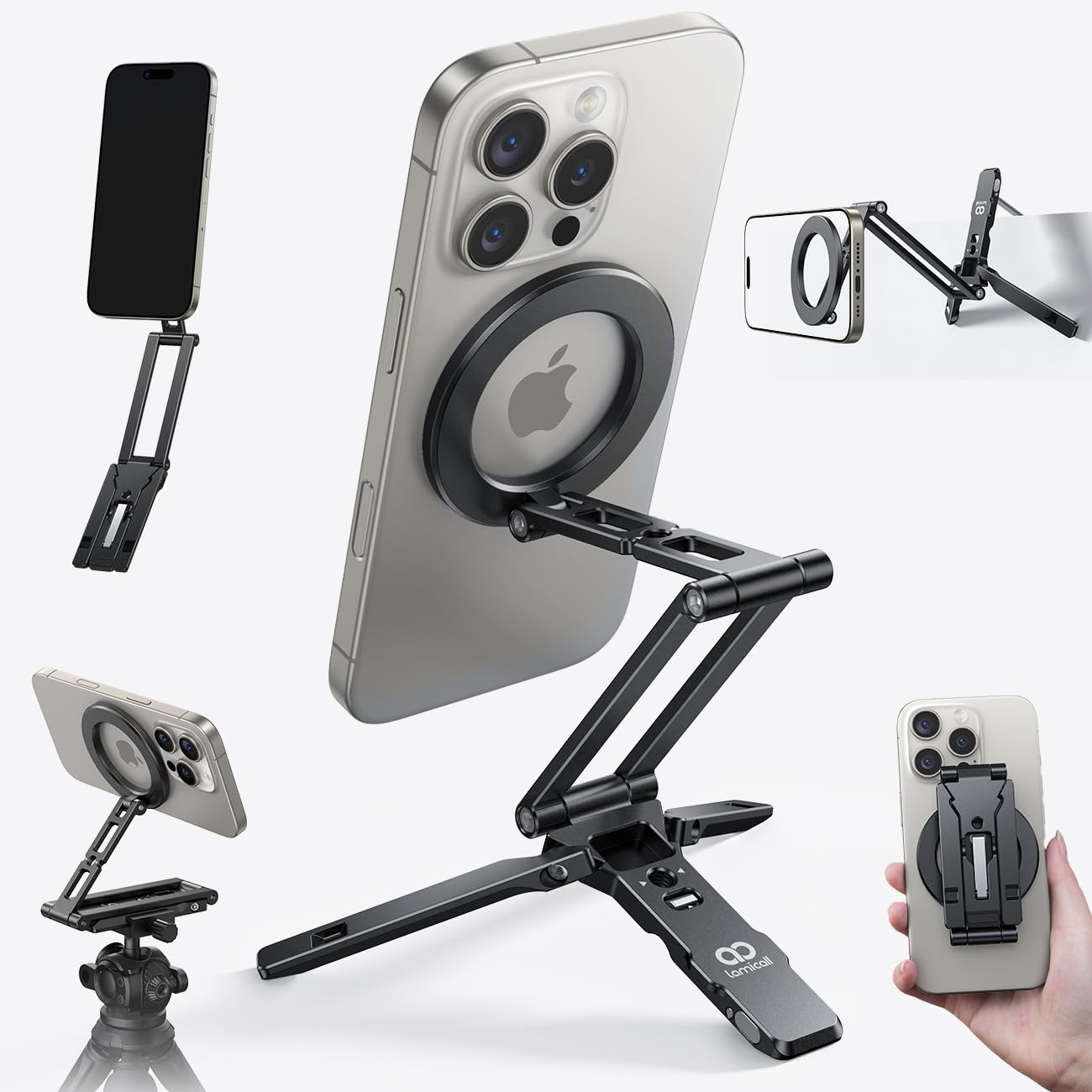
Some stands are for a desk, and some are for the places a desk doesn't reach: a kitchen counter with a recipe on screen, a gym bench between sets, a hotel nightstand. This is the second kind. Closed, it's a bar about eleven inches long and 90 grams light; open, the legs spread and the head takes the phone wherever you point it.

Aluminum all the way through, with smooth pivots that don't rattle when you carry it. The magnetic plate grabs with a click rather than a slide, and Lamicall's claim of a 20x magnet is at least in the right ballpark — an iPhone in a MagSafe case doesn't wobble when you tap the screen.

The three axes cover 225°, 360°, and 270°, more range than most people will use, and there's a 1/4-inch screw plus Arca-Swiss compatibility underneath if you want it on a light stand or a camera tripod. The reach tops out around eleven inches, so treat it as a table stand rather than a face-level desk arm.

We took it out of the house more than any other stand here, and that's the recommendation. Folded, it goes in a jacket pocket or a bag's water bottle sleeve and you forget about it until you need it — which is more than we can say for the stands that live on a desk and stay there.

Pros

  • Folds to pocket size at 90 grams
  • Reaches angles a desk stand can't
  • 1/4-inch screw and Arca-Swiss mount underneath
  • Pivots feel solid, not rattly

Cons

  • Legs need a level surface to stand steady
Our verdict

Our travel pick — 90 grams of aluminum that folds into a pocket and holds a phone at angles no desk stand here can reach.

Check Latest Price
5

Best for a Nightstand

Ouotoo 3-in-1 Charging Stand

91 /100
LBD Score Outstanding

Key details

Light
Blue ambient, switchable
Charging
15W phone, Watch, AirPods
Warranty
3 years
In The Box
20W adapter and cable
View on Amazon

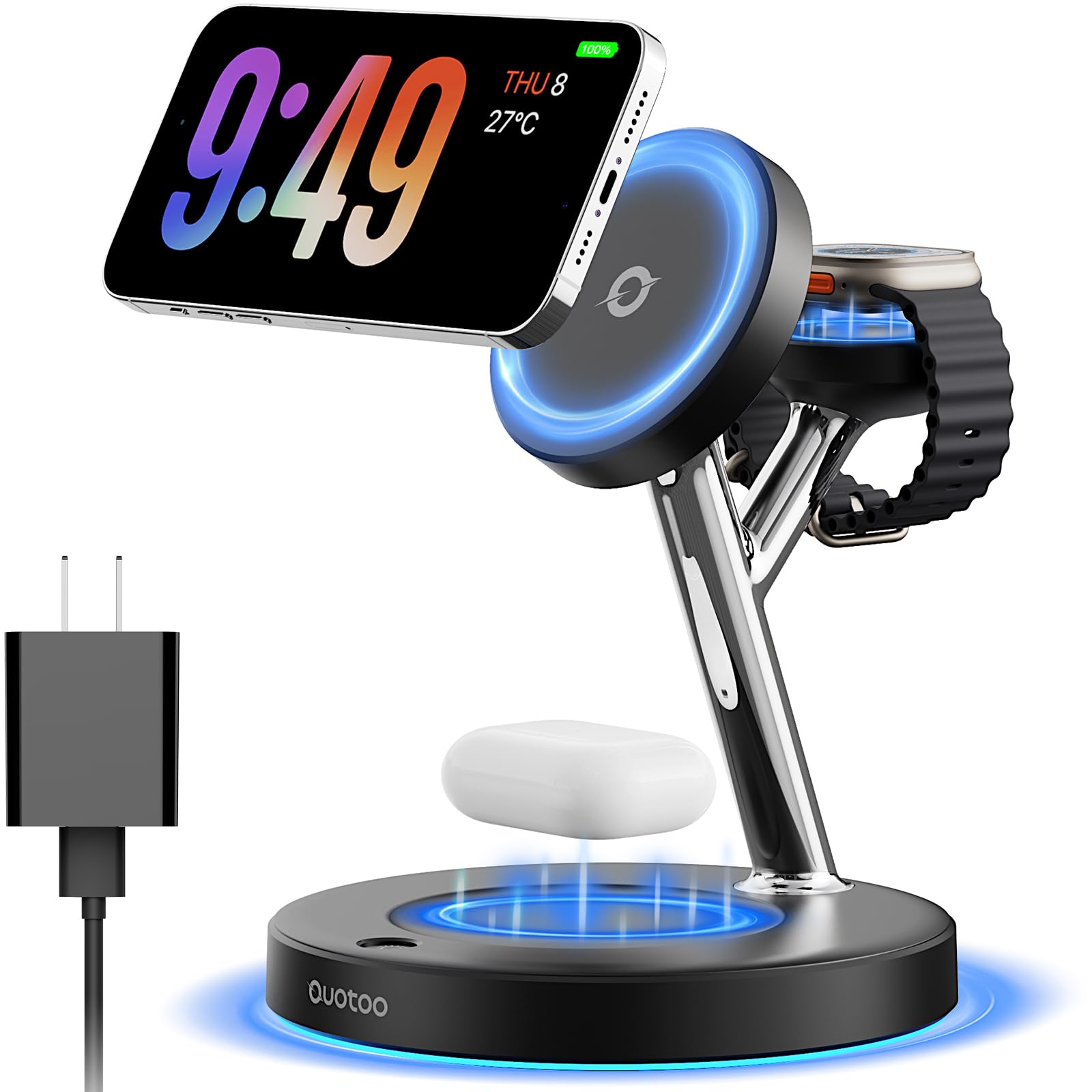
Three devices, three cables, one outlet — that's the mess this dock exists to end. The phone stands upright on a magnetic pad at the top, the watch lies on a small puck, and an AirPods case drops into a recess at the base, all from a single plug.

Ouotoo includes the 20W adapter and the cable, which is not a given in this set, and the base has a soft blue ring light you can switch off when you don't want a nightlight. Setup is one USB-C connection and nothing to configure.

The phone pad is rated at 15W behind an N52 magnet, and the snap is firm enough that a knock doesn't send the phone to the floor. The watch puck and the earbuds recess do their jobs quietly. Build quality surprised us for the money — the dock feels denser than the plastic it looks like, and it doesn't skate across the nightstand when you lift the phone off.

What earns it a place here is the combination: a stand, a watch charger, and an earbuds pad in a footprint that fits a crowded nightstand, with the adapter in the box and a three-year warranty behind it. If you're charging one phone and nothing else, it's more dock than you need. For a household with an iPhone, a Watch, and AirPods, this is the one we plug in.

Pros

  • Phone, Watch, and AirPods from one plug
  • 20W adapter and cable included
  • Small enough for a crowded nightstand
  • Three-year warranty behind it

Cons

  • Watch pad is Apple Watch only
Our verdict

The one that clears the nightstand: phone, Watch, and AirPods off a single plug, with the 20W adapter already in the box.

Check Latest Price
6

Tight Spaces

OMOTON TP02 Tripod Mount

91 /100
LBD Score Outstanding

Key details

Weight
5.57 oz
Charging
None — mount only
Mounting
Clamp, magnet, or tripod legs
Clamp Opening
Flat edges up to 1.57 inches
View on Amazon

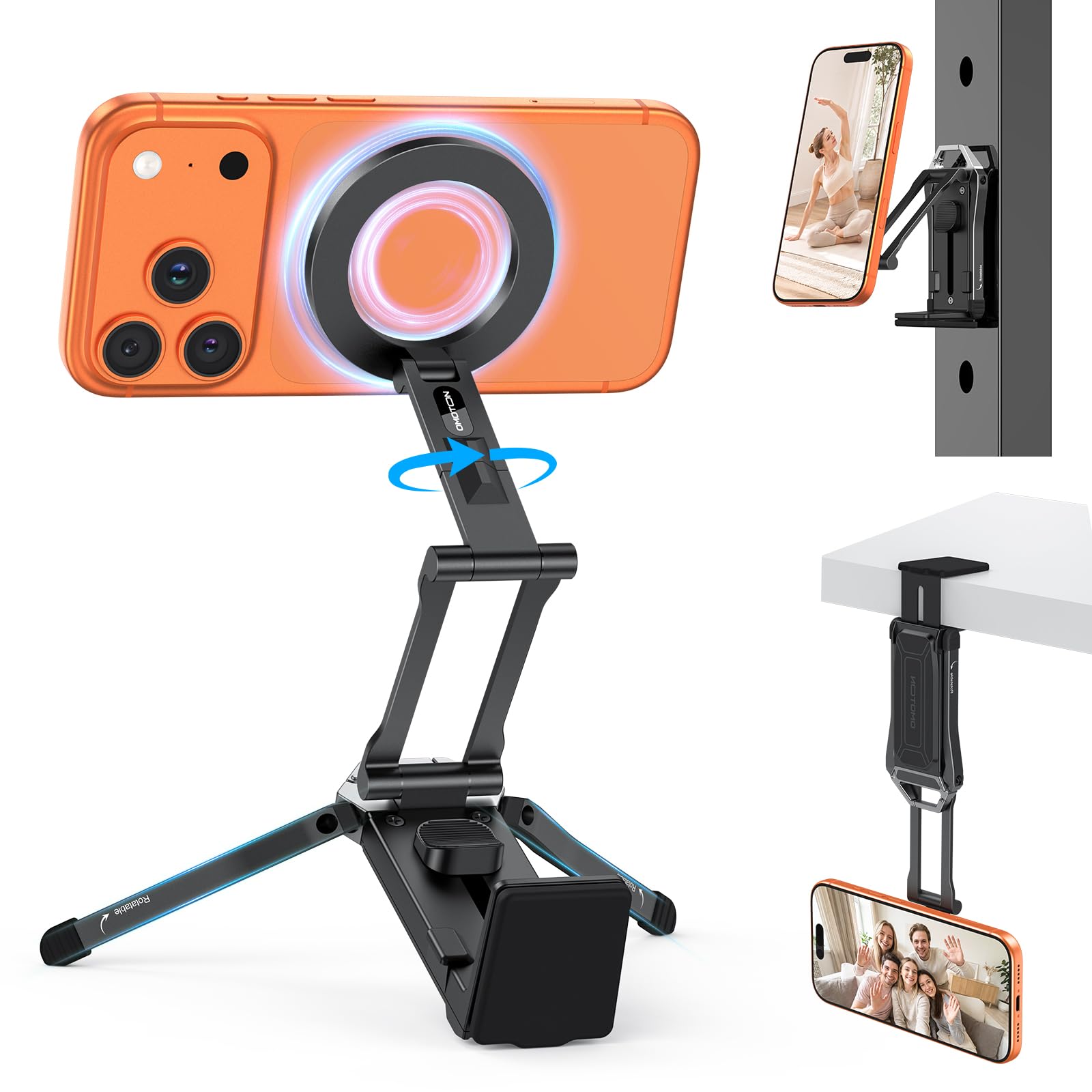
Most stands here assume a desk. This one doesn't: it clamps to a flat edge up to 1.57 inches, sticks to metal on eight magnets set into its back, or stands on three legs, with a magnetic plate at the front that pivots through 360°.

We ended up using the clamp more than the legs. Gripped to the edge of a shelf above a counter, or to the lip of a tray table, it puts the phone where there's no surface to set a stand on at all, and the pivot lets you angle the screen down toward you instead of looking up at it.

Folded, it's about the size of a deck of cards and 158 grams, so it rides in a bag without a second thought. The magnetic back is the sleeper feature — stick it to a fridge door or a gym rack and the whole mount disappears.

Pros

  • Clamps, sticks to metal, or stands alone
  • 360° pivot holds the angle you frame
  • Grips flat edges up to 1.57 inches
  • Pocketable at 158 grams

Cons

  • Clamp needs a flat edge
  • Feels denser in the hand than the photos suggest
Our verdict

We recommend it for the places a stand can't go — clamped to a shelf, stuck to a fridge, or standing on a gym bench when there's no desk in sight.

Check Latest Price
7

Second Desk

OMOTON MS04 Stand

90 /100
LBD Score Outstanding

Key details

Weight
7.05 oz
Charging
None — mount only
Material
Aluminum
Adjustment
360° rotation, lockable tilt
View on Amazon

At the bottom of the price range sits this folding aluminum stand, and it does the thing cheap stands usually skip: it holds its position. Two hex screws let you lock the height and the tilt where you want them, and the head still turns 360° without a tool.

The magnet is strong for the size, and with a MagSafe case on the phone it holds steady through a swipe. Folded, it's about 1.3 inches thick and 200 grams, so it disappears into a bag or a drawer, and there's a metal ring in the box for a phone without magnets.

Our verdict is straightforward: this is the second stand you buy, not the only one. Lock the angle, park it beside a laptop, and it keeps the phone upright and reachable for very little money — which is exactly what a second stand should cost.

Pros

  • Locks height and tilt with hex screws
  • Aluminum frame folds to 1.3 inches
  • Strong magnet for its size
  • Metal ring included for older phones

Cons

No notable drawbacks to flag.

Our verdict

The cheapest stand here that still locks its angle, and a sensible second stand for a desk where the phone just needs to sit upright.

Check Latest Price
8

Reusing a Puck

CreaDream MagSafe Stand

89 /100
LBD Score Excellent

Key details

Fits
Apple MagSafe charger, 15W or 25W
Angle
Fixed 55 degrees
Material
Aluminum with silicone pads
In The Box
Stand only, no charger
View on Amazon

If there's already an Apple MagSafe charger on your nightstand, this is the least expensive way to get it standing up: a thick slab of aluminum with a silicone-lined cradle cut to the diameter of Apple's own puck. Push the charger in, run the cable down the back, and the phone sits at a 55° angle instead of lying flat.

It looks better than it costs. The aluminum has a smooth, even finish, the silicone pads keep the phone from sliding, and the fixed 55° is honest about what this is — a perch for a nightstand or a desk, not an adjustable arm. There's nothing to assemble.

The catch is the fit. The cradle is cut for Apple's 15W and 25W MagSafe charger and not for third-party discs, so check what you own before ordering. And because the puck is held by friction, lifting the phone off smartly can pull the charger out with it; a dab of silicone on the back of the puck keeps it seated.

Pros

  • Turns an Apple MagSafe puck into a stand
  • Aluminum body with a clean finish
  • Silicone pads hold the phone steady
  • Nothing to assemble

Cons

  • Fits Apple's own MagSafe charger only
Our verdict

Buy it if you already own Apple's MagSafe charger and want it standing up — just check the puck is Apple's own and not a third-party disc.

Check Latest Price

How We Chose and Tested MagSafe Stands

We started by pulling every magnetic stand we could find, then filtered out the ones with vague magnet specs, unstable-looking bases, or listings that couldn't say clearly whether a charger was included. That left us with 14 units, which we ran for four months — long enough for novelty to wear off and for the annoying details to surface.

Each stand went to work on a real desk for video calls and second-screen use, on a nightstand for overnight charging, on a kitchen counter for recipes, and in a bag for travel and gym filming. We pressed a phone onto each mount and lifted it by the phone alone to see whether the base stayed down or came with it. We tilted every stand toward 45 degrees to find the angle where the phone finally slid, then repeated the whole thing with a thick case and, on the Android-friendly models, with a steel ring stuck to the back.

On the charging stands, we ran the battery down to 20 percent and logged how much a 30-minute session added, and noted whether the phone got warm enough to notice. Build quality we judged by feel and by wear: fingerprints on the aluminum, wobble at the hinge after weeks of daily repositioning, and whether the folding models still clicked into place on the tenth trip. We also weighed each one packed up, since a stand you leave home because it's heavy isn't versatile.

What we couldn't test is the magnetic field inside your specific phone, so where a stand's grip depended heavily on case thickness, we say so.

How to Choose a Magsafe Stand

Decide whether the stand charges or only holds

Both jobs are legitimate, and they pull in different directions. A charging stand means one plug on the nightstand and no cable to find in the dark. A plain mount costs less, has no coil or power path to go wrong, and moves around the house without hunting for an outlet. Across this set, the charging stands are the ones with a question mark over the charging itself; nobody argues about the magnets.

If you go the charging route, read the box contents before you order. The Anker MagGo ships with a cable and no wall adapter; the Ouotoo includes a 20W adapter. That's the difference between plugging in and going shopping again.

Match the height to how you'll sit

Adjustable is the most oversold word in this category: on most of these stands it means the head tilts and swivels while the height is fixed. If the phone doubles as a video-call camera and a second screen, you want an arm that reaches toward eye level — the COOPER runs from 9 to 13 inches — because a phone sitting at desk height makes you look down and puts the camera under your chin.

If it's a clock, a recipe, or a video, a folding arm that tops out near six inches is easier to live with and takes up less room. Check the height range in the specifications, not the word.

Look at the base before you judge the magnet

The magnets here all hold a phone; what separates them is what happens when you push on the screen. A wide, weighty base — the COOPER's metal disc, the Lamicall's spread legs — stays planted while you scroll. A light folding frame shifts, which is fine for a phone you set down and leave alone.

If you tap and swipe while it's mounted, base mass matters more than any pull rating printed on the box, and a stand with a nut or a locking screw keeps its angle better than a friction joint you move fifty times a day.

Think about how the phone comes off

The moment that decides whether you like a stand is the one where you grab the phone and walk away. A magnetic mount releases with a straight pull, which is the whole appeal. A cradle that holds a charging puck — the CreaDream is the one here — grips by friction, so the puck can come out with the phone; a dab of silicone on its back fixes that for good.

And if the phone doesn't snap on with a click, the case is the first thing to swap rather than the stand.

Frequently Asked Questions

Final Verdict

The stand to buy first is the COOPER MagStand. It gets the phone to eye level, its base stays put when you tap, and the two steel rings in the box mean it works with whatever phone you're carrying — for a fraction of what the charging stands here cost.

If the stand should charge the phone, buy the Anker MagGo and put a USB-C wall adapter in the cart with it. If the stand leaves the house, the Lamicall tripod beats both. And if you already own Apple's MagSafe puck, the CreaDream is the cheapest way to put it back to work.