Best Label Makers of 2026

A label maker sounds like a solution in search of a problem until the third time you dig through a bin of unmarked charging cables. Then it earns its drawer space — and the choice usually comes down to something the listings bury: how the label actually gets printed. The cheap ones burn the image into thermal paper, no ink, no cartridges, but those labels fade in a hot car or on a sunny windowsill. Tape-based machines cost more per label and survive the freezer and the dishwasher.

I spent four months with 14 label makers — handheld keyboards, phone-only printers, and hybrids that do both — labeling spice jars, breaker panels, school folders, and more cables than I'd like to admit. The ones you keep using take about ten seconds from power-on to printed, whether through physical keys or an app that connects on the first try. Compact size matters more than the specs suggest: anything that won't fit in a kitchen drawer stops getting used, and anything that dies mid-project because it eats AA batteries stays there.

A few also swallow an inch of blank tape before every print, which quietly doubles your cost per label. What follows is the shortlist worth the tape.

1

Best Overall

Brother P-Touch PT-D220

91 /100
LBD Score Outstanding

Key details

Power
6 AAA batteries or optional adapter
Tape Width
12 mm (0.47 in)
Saved Labels
30
Print Resolution
180 dpi
View on Amazon

A label maker is mostly a tape machine, and the PT-D220 takes Brother's laminated TZe cassettes in 12 mm width. That is the detail worth understanding before anything else. Laminated film is what lets a label sit on a freezer bag, a dishwasher door, a garage shelf, or the inside of a lunch box without curling off within the month. The tape is the part you keep buying, so a machine tied to a broad cassette family keeps paying you back long after the box is recycled.

We kept reaching for this one because it finishes the job without a phone. The keyboard is full-size for a handheld, 25 built-in templates cover the ordinary work — pantry, files, cables, name tags — and 30 saved labels mean the September school labels don't get retyped every year. Output at 180 dpi is plenty for a half-inch strip: text is clean rather than dotty. The 14 fonts, 99 frames, and 600-plus symbols are more than we ever used, but they keep a kid's lunch box from looking like office equipment.

Twelve millimeters is the ceiling. That's fine for jars and folders and not fine for a shelf you need to read from across a room. If your labels go on warehouse shelving or equipment tags, the PT-D610BT prints at twice the width; if you want to design with icons and photos, the Nelko does that on your phone. The D220 sits deliberately in the middle, and most households never need to leave it.

Power is the one thing to plan. It runs on six AAA batteries, the adapter is sold separately, and it does go through them. If the machine will live on a desk, order the adapter in the same breath. If it lives in a drawer, keep a pack of batteries beside it — a label maker you can grab without hunting for a cable gets used far more often, and that's the argument for the drawer.

Pros

  • Laminated TZe tape survives freezer and kitchen duty
  • Full QWERTY keyboard, no phone or app needed
  • Saves 30 labels for reprinting the same jobs
  • 25 templates plus 14 fonts and 600+ symbols

Cons

  • Dim display is hard to read in low light
Our verdict

Buy the PT-D220 if you want one label maker that handles the pantry, the file drawer, and the cable box without a phone in your hand.
Check Latest Price
2

Best Budget

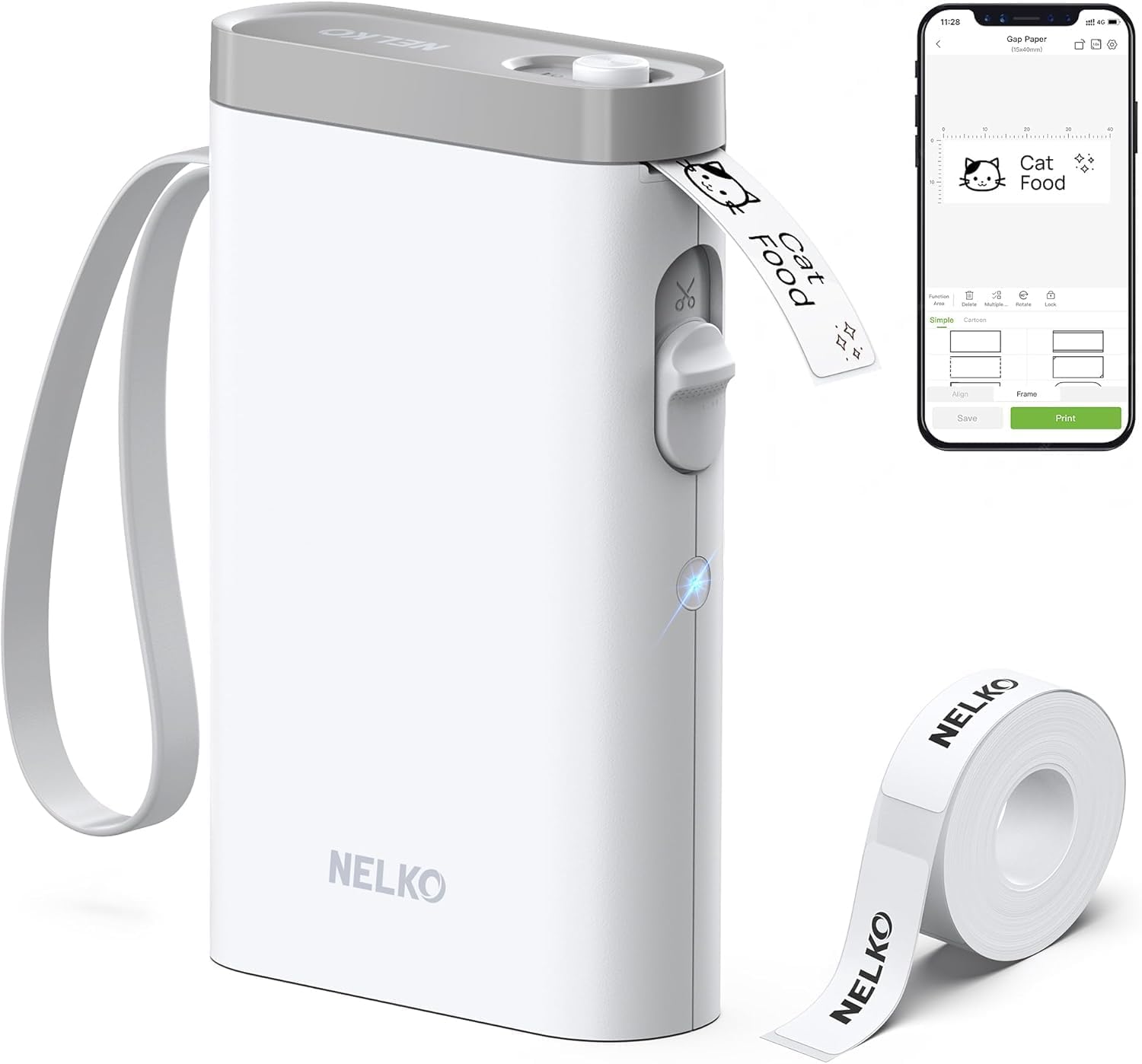
Nelko P21

89 /100
LBD Score Excellent

Key details

Charging
USB-C, rechargeable
Connection
Bluetooth, iOS and Android
Max Label Size
14 x 75 mm
Print Resolution
203 dpi
View on Amazon

The P21 gets labels that look designed rather than typed, and it gets there by leaving out the keyboard, the screen, and the menus. You type on your phone, the Nelko app shows the label at actual size, and 203 dpi thermal printing puts it on the tape. Templates, fonts, and icons mean a row of spice jars can match — a hundred keypresses on a keyboard machine become one tap here.

The hardware is about the size of a thick phone at just over 11 ounces, and it charges over USB-C, so it lives in a drawer or a backpack without a power brick. It prints on labels from 12 x 40 mm up to 14 x 75 mm, which covers jar lids, cable flags, file tabs, and name tags. The roll in the box is short. Order refills when you order the printer, or you'll be mid-project and out of tape.

Two limits are worth weighing. Fourteen millimeters is the widest tape it takes, so big shelf signage is out. And the phone is the only interface: a dead battery or an uninstalled app means no labels at all. We found the trade easy to accept for anything decorative or fiddly, and less so for a long run of identical plain labels, which is still faster on keys. Budget ten minutes with the app before your first real label — the design tools are the product.

Pros

  • App templates, fonts, and icons make labels look designed
  • 203 dpi printing on labels up to 14 x 75 mm
  • Pocketable and USB-C rechargeable
  • Least expensive machine in this group

Cons

  • No keyboard or screen; the phone is required
  • Tape width tops out at 14 mm
Our verdict

The P21 is the pick for anyone who would rather design a label on a phone than type one on a keyboard, and the least expensive machine here.

Check Latest Price
3

Best for Wide Labels

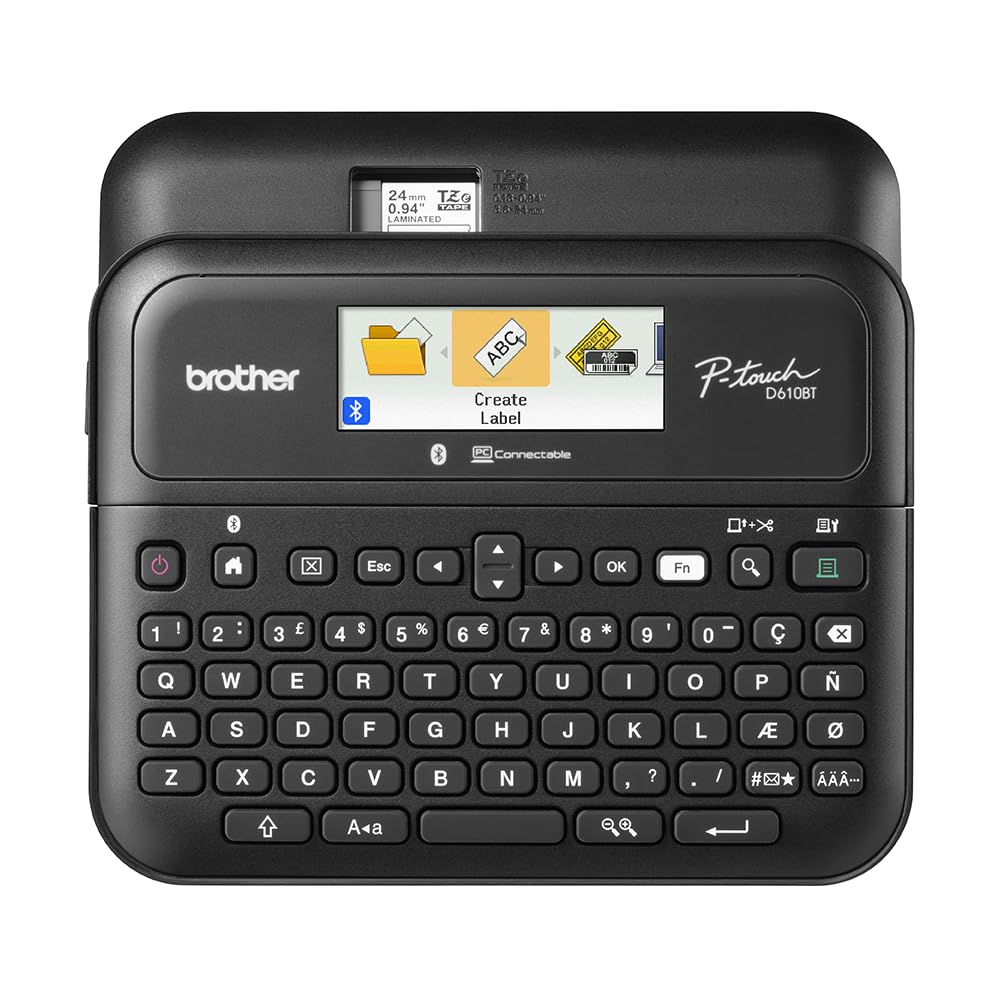
Brother P-Touch PT-D610BT

89 /100
LBD Score Excellent

Key details

Connection
Bluetooth and USB
Saved Labels
90
Max Tape Width
24 mm (1 in)
Print Resolution
180 x 360 dpi
View on Amazon

Labels up to 24 mm wide — a full inch — are the reason to look at this machine. At that width and 180 x 360 dpi, a shelf or bin label reads from across a stockroom, two lines of text fit with room for a border, and an asset tag looks like something a facilities department issued. The 20-character, two-line color LCD previews all of that in a dim closet, which is more than we can say for the monochrome screens on most of this list.

It also bridges the two ways people make labels. The QWERTY keyboard handles the label you need right now; Bluetooth or USB hands a batch to a phone, tablet, or the P-touch Editor software on a computer, where 175 business templates and 90 saved labels do the repetitive work — inventory codes, a whole aisle of shelf tags, the same warning label on forty bins. Several people can design on their own devices and print to one machine, which is the point of an office label maker.

This is the one worth the premium when labeling is part of the work rather than a weekend project. The memory and templates save more retyping than they cost, and the wide tape does jobs the 12 mm machines simply can't. Pairing is the weak spot: Bluetooth connections to Macs and to Windows 11 PCs can take several attempts, and USB is the reliable path when it sulks. Buy it for the output, not for the app.

Pros

  • Prints labels up to 24 mm (1 inch) wide
  • Bright two-line color LCD for previewing
  • 90-label memory and 175 business templates
  • Keyboard, Bluetooth, and USB in one machine

Cons

  • Bluetooth pairing can fail with Macs and some PCs
Our verdict

For a workshop, small business, or busy home office that labels the same things repeatedly, the D610BT's wide labels and 90-label memory justify the premium.

Check Latest Price
4

Best Keyboard-And-App Hybrid

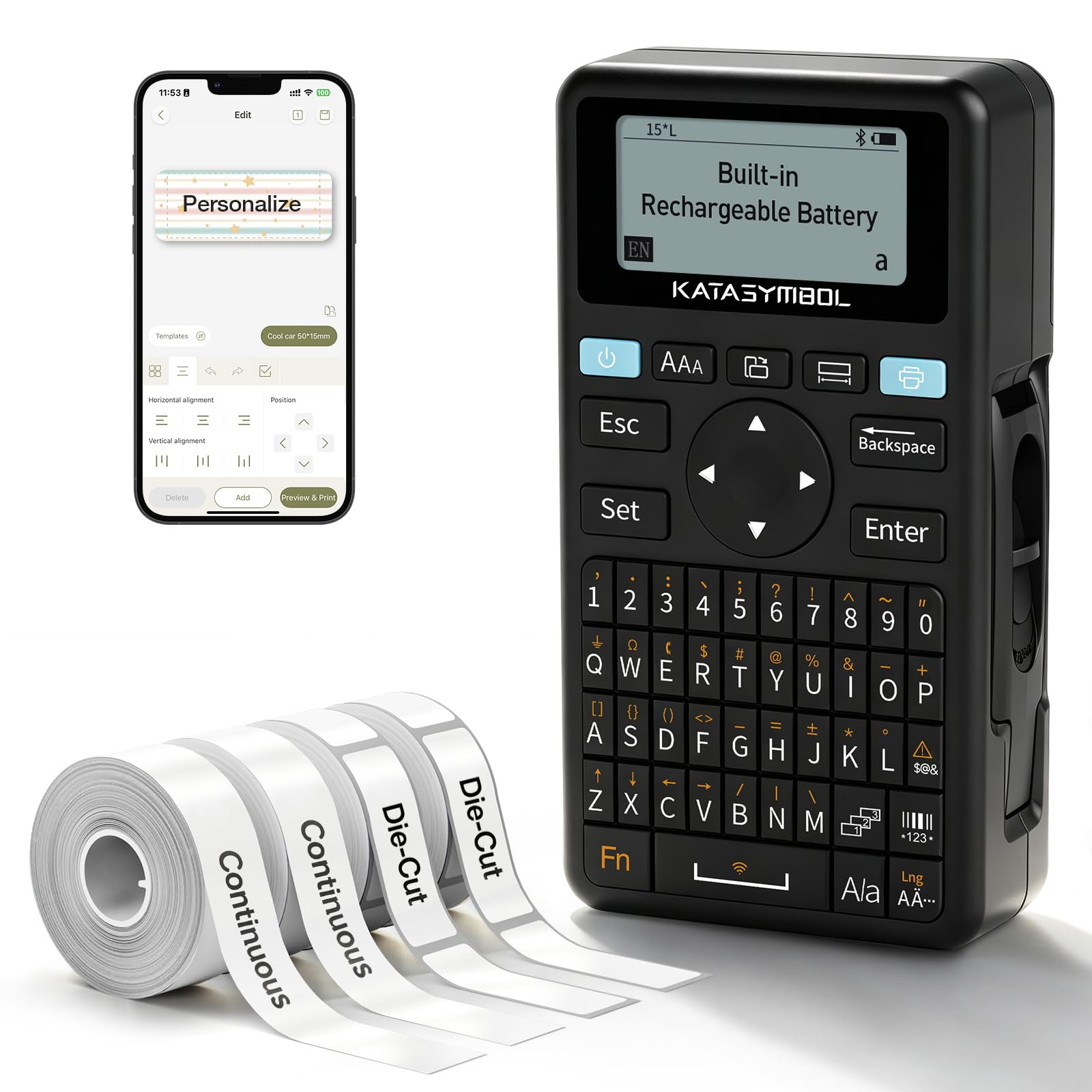
SUPVAN E11

91 /100
LBD Score Outstanding

Key details

Battery
1200 mAh, rechargeable
Design Options
30+ fonts, 660+ icons
Max Tape Width
15 mm
Print Resolution
203 dpi
View on Amazon

Two-tenths of an inch is the margin the E11 leaves before and after your text, roughly a fifth of what most machines here spend. On one jar label that's nothing. Across a batch of forty it's the difference between finishing the roll and hunting for a spare. We noticed it most on short labels, where the leading blank strip on other machines is often as long as the text itself.

The rest of the machine is a sensible compromise between the two camps. The keyboard prints instantly when you want a quick label; the app opens 30-plus fonts, 50-plus frames, 660-plus icons, and 17 languages when you want something prettier. It's half a pound and 1.5 inches thick, charges over USB-C, and comes with four tapes — two continuous rolls and two die-cut — so you can start without ordering refills.

Order-time realities: the tape ceiling is 15 mm, so labels stay in jar-and-cable territory, and the keyboard is small enough that two-thumbed typing is optimistic. The printed manual is close to useless, and the app explains more in five minutes than the booklet does at all. Charge it and print a test label before the first real project, so you find out about any charging problem while returns are still easy.

For one machine that covers both habits, this is the pick: keyboard speed for the pantry, app design for anything with an icon, and a margin that keeps tape consumption down. The two-year warranty is a reassuring detail on a device with a battery sealed inside it.

Pros

  • Prints from the keyboard or a Bluetooth app
  • 0.2-inch margins waste less tape
  • Four tapes included in the box
  • Rechargeable, 203 dpi, and light enough for a bag

Cons

  • Battery can stop accepting a charge
  • Tape width capped at 15 mm
Our verdict

If you can't decide between typing labels and designing them on a phone, the E11 does both in one small rechargeable machine for midrange money.

Check Latest Price
5

Best No-Fuss Handheld

DYMO LetraTag 100H

93 /100
LBD Score Outstanding

Key details

Display
Graphical LCD
Tape Width
1/2 inch (12 mm)
Tape System
LetraTag LT cassettes
Print Styles
5 font sizes, 7 print styles, 8 box styles
View on Amazon

Three cassettes come in the box — paper black-on-white, plastic black-on-white, and plastic black-on-clear — which tells you what this machine is for. Paper labels go on file folders, boxes, and shelves; plastic ones survive handling and a wipe. Neither is the laminated film the Brothers use, so we keep LetraTag labels indoors, and a freezer is not a place we trust one.

The interface is the friendliest here. A graphical display previews the label as you type, 5 font sizes, 7 print styles, and 8 box styles are all reachable without digging, and auto-off saves the batteries when the machine gets set down mid-project. At 12 mm wide and about a pound, it's the one that comes to the shelf with you instead of making you carry the shelf to it.

Where it beats the rest of this group is the first five minutes: no app to install, no pairing, no menu to learn. Type, preview, print, peel, stick. That immediacy is the whole argument, and for a household making twenty labels a year it fits better than a more capable machine with more setup. Treat it as the folder-and-shelf tool and it earns its drawer space.

Pros

  • Three LT cassettes included to start with
  • Graphical display previews before printing
  • Dedicated keys for font sizes, print styles, and boxes
  • Auto-off preserves battery life between jobs

Cons

  • Paper jams can halt a run mid-label
  • Some units never print at all
Our verdict

The LetraTag is the handheld we hand to a first-timer: type, preview, stick, no app and no learning curve, as long as the labels stay indoors.

Check Latest Price
6

Dorms and Students

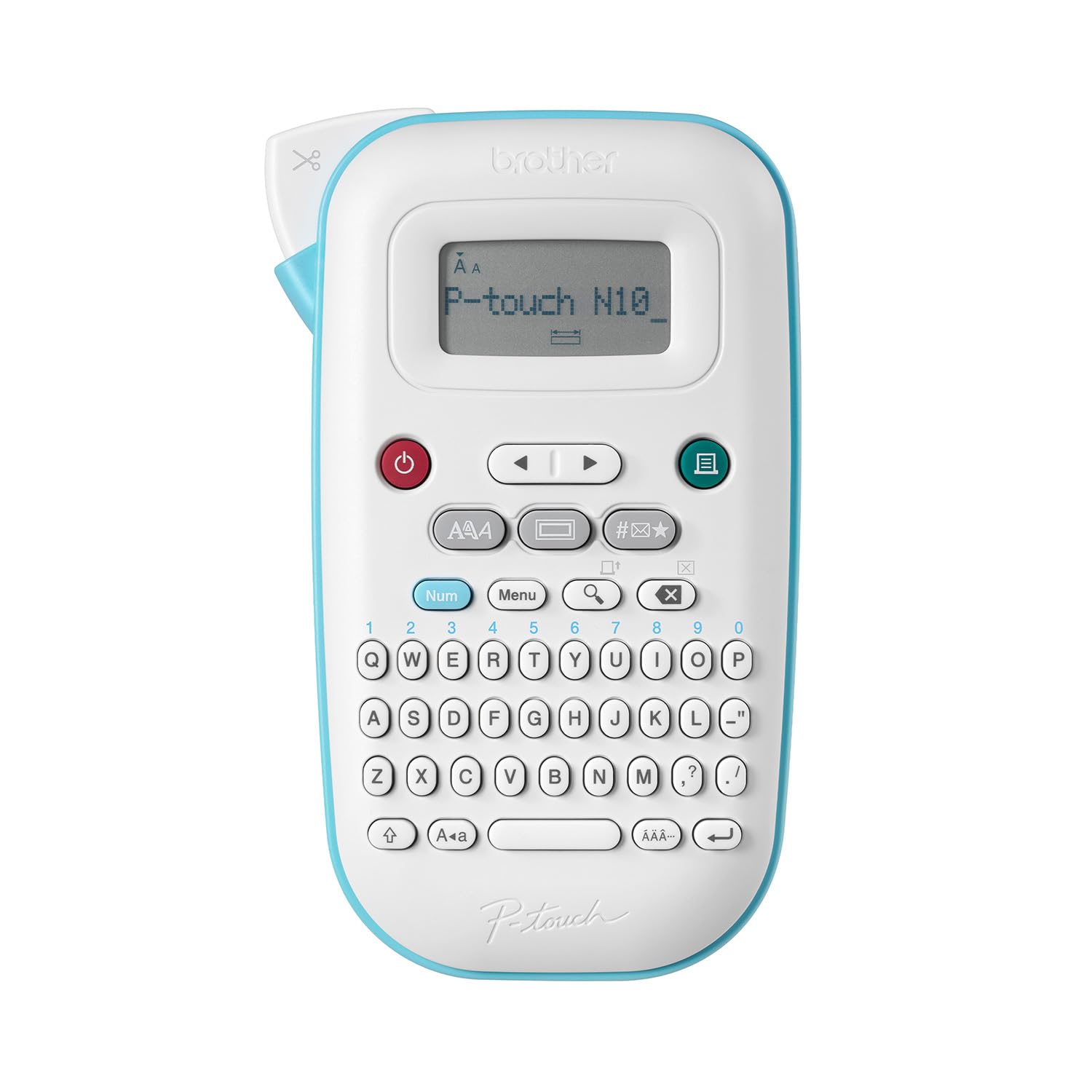
Brother P-Touch PT-N10

87 /100
LBD Score Excellent

Key details

Tape
Brother Btag, 12 mm
Power
6 AAA batteries
Display
12-character LCD
Print Resolution
180 x 180 dpi
View on Amazon

If a phone has no place in your labeling — a dorm drawer, a classroom, a kitchen where your hands are sticky — this is the least expensive keyboard machine here, and it doesn't feel like a compromise. The QWERTY layout is comfortable, a 12-character display previews your text before it prints, and the built-in cutter gives a clean edge without scissors. Print at 180 dpi is crisp, and Btag tape comes in 17 colors, so a shelf or a child can be color-coded.

The catch is the tape. Btag cassettes are 12 mm wide and 4 metres long, and the machine takes nothing else — no laminated TZe, no wider stock. Text is capped at two lines and 7 mm of combined height, so it stays small. Add six AAA batteries that aren't included and instructions that aren't either, and the first hour is more work than the price suggests. Once it's set up, though, it's the one we leave out on the counter.

Pros

  • Full QWERTY keyboard with a preview display
  • 17 Btag tape colors for coding
  • Clean 180 dpi print and a built-in cutter
  • Small, battery-powered, no phone required

Cons

  • Btag tape only; no TZe or wider stock
  • No printed manual and no batteries in the box
Our verdict

For a dorm drawer or a classroom cupboard where a phone has no place, the PT-N10 is the least expensive keyboard machine here that still prints cleanly.

Check Latest Price
7

Cable Labeling

Brother P-Touch PT-H111

91 /100
LBD Score Outstanding

Key details

Display
Graphical LCD
Tape Widths
3.5, 6.0, 9.0 and 12.0 mm
Special Keys
Cable wrap, cable flag, faceplate, serialize
Print Resolution
180 dpi
View on Amazon

Cable wrap, cable flag, faceplate, serialize — four one-touch keys that exist because labeling a network rack or an electrical panel is not the same job as labeling a spice jar. The PT-H111 also takes tape in 3.5, 6.0, 9.0, and 12.0 mm widths, and 3.5 mm is the size you need to flag a bundle without the label folding back on itself.

This is the one we point at wiring and panel work. The 12 mm flexible ID tape in the box is the right stock to start on, the one-touch keys turn a flag label into three presses instead of a menu hunt, and a wrist strap plus a 14-ounce body means it can hang off your hand while you're up a ladder. Two lines of text and a graphical preview cover everything a cable label has to say.

What it isn't is a general-purpose design machine. Three fonts and a basic formatting set are the thinnest here, so pantry labels from this one look plain, and the D220 or the Nelko makes a better-looking jar label. For the job it was built for, the trade is easy: a dedicated key beats a general machine and a lot of patience.

Pros

  • Cable-specific one-touch keys
  • Takes tape down to 3.5 mm for cable flags
  • Graphical preview with two-line printing
  • Wrist strap and a light body for ladder work

Cons

  • Spends about an inch of tape on every label
  • Thinnest font and formatting set here
Our verdict

Buy the PT-H111 if you're labeling cables, panels, or racks; it's the only machine here built around that job rather than adapted to it.

Check Latest Price

How We Tested the Best Label Makers

I built the shortlist by reading spec sheets and hundreds of owner reviews for two dozen machines, then narrowing by tape width, printing method, whether the unit has a physical keyboard or leans entirely on a phone app, and — the part shoppers underestimate — what replacement tape costs and how easy it is to find. Fourteen made the cut, and each one got four months of real use rather than a single afternoon.

The testing happened where labels actually get made: kitchen counters for spice jars, freezer containers, and leftovers; a home office with cable bins, a breaker panel, and file folders; school supplies in September; and garage shelving. I timed every job from power-on to a printed, peeled label, and counted how much blank tape each machine spat out before the first character.

On the first pass I deliberately skipped the instructions and noted how far I got before giving up and opening the manual — a few needed it for nothing more than loading tape, while others had me lost in nested app menus. Readability was judged by printing the same 12-character label at every available size and reading it from arm's length and up close. Durability meant sticking labels on jars that went through the dishwasher, containers that went into the freezer, and a windowsill that takes direct afternoon sun, then checking weekly for fading, curling, and peeling.

Battery life and power supply got their own log: I ran each machine until it quit, recorded the print count, and noted whether it recharged over USB or fed on AA batteries. Reliability surfaced on its own over the months — jams, misfeeds, Bluetooth connections that dropped halfway through a label, and cutters that left ragged edges instead of a clean line.

How to Choose a Label Maker

Start With the Tape, Not the Machine

Every label maker is locked to one cassette family, and that family sets the ceiling on what your labels survive. Brother's laminated TZe film handles freezers, dishwasher doors, garden stakes, and garage shelves. Btag, LetraTag, and D1 cassettes are narrower in ambition: right at home on folders, boxes, and indoor shelving, less convincing where moisture and handling are involved. Laminated tape costs more per label, so if your labeling runs mostly to file folders once a year, an inexpensive machine tied to inexpensive tape is the smarter buy.

Decide where the labels are going first, then pick the machine that takes the right cassette. Working backward from a sale sticker is how people end up with a label maker whose tape they resent buying.

Keyboard, Phone, or Both

An app-only maker like the Nelko P21 is the smallest and the most creative: fonts, icons, and templates that take a hundred keypresses on a keyboard take one tap. The cost is dependency — a charged phone, an installed app, and hands free enough to use it. A keyboard machine prints with nothing else in the room, which matters in a basement, a workshop, or a kitchen with dough on your fingers. The SUPVAN E11 is the one here that does both, and that flexibility justifies the step up if you genuinely don't know which way you'll work.

Count the labels you'll make in a sitting before you decide. Three a month is a phone job; a whole pantry in one afternoon is faster on keys.

Width, Lines, and the Margin You Pay For

Twelve millimeters — half an inch — covers jars, folders, cables, and name tags, and most households never need more. Extra width buys readability at distance: a 24 mm label on a shelf or a bin can be read across a room, which is the whole reason the PT-D610BT exists. Narrow matters too. The PT-H111 takes 3.5 mm tape for flagging cable bundles, and a 12 mm machine can't do that job cleanly. On 12 mm stock, plan on two lines maximum and lettering around 7 to 9 mm tall.

Margin is the quiet cost. Every machine feeds blank tape before and after the text, and the spread here is wide: the SUPVAN E11 trims its margin to 0.2 inch, while the loosest machines in this group spend close to an inch on every print. Across a hundred labels that is several cassettes.

Power, Display, and the Settings Worth Having

Almost nothing in this category arrives ready to run. The Brothers take six AAA batteries and sell the adapter separately; the Nelko and SUPVAN charge over USB-C. Put batteries or the adapter in the same order, because a label maker with a dead battery is a paperweight with a keyboard. The display is the other daily irritant: monochrome LCDs go dim in a closet or a basement, and the color screen on the PT-D610BT is the only one here we never had to tilt toward a light.

Then check memory if you reprint the same labels — 30 saved labels on the PT-D220, 90 on the PT-D610BT — and pay little attention to font counts beyond the dozen you'll actually use.

Frequently Asked Questions

Final Verdict

The Brother P-Touch PT-D220 is the label maker we recommend first. Laminated TZe tape means the labels survive the freezer and the garage shelf, the keyboard and 25 templates mean you can print one without unlocking your phone, and 30 saved labels handle the jobs you repeat every year. A dim screen is the price of admission.

If designing on a phone appeals more than typing on keys, the Nelko P21 does it for the least money here. If your labels have to be read from across a stockroom, pay for the PT-D610BT and its inch-wide printing.