Best Keycaps for Gaming of 2026

The keycaps that ship on most gaming keyboards are the cheapest parts of the build, and a year of daily use makes that plain: legends wear thin, plastic turns slick under your fingers, and the board rings hollow no matter which switches sit underneath. A new set is the least expensive way to change how a keyboard looks, sounds, and feels.

The catch is fit. Beautiful sets arrive missing the 1.75u right shift a 65% board needs, or with a spacebar that binds on the stabilizers, and you find out after the return window closes. Profile changes the feel more than most buyers expect, and shine-through legends only pay off if your board's LEDs actually reach them — clear caps glow beautifully at night and fight you at noon. We've spent five months pulling and reseating 15 sets across 60%, 75%, and full-size boards, and some genuinely pretty ones never made it past week one; the picks below are the ones that stayed.

1

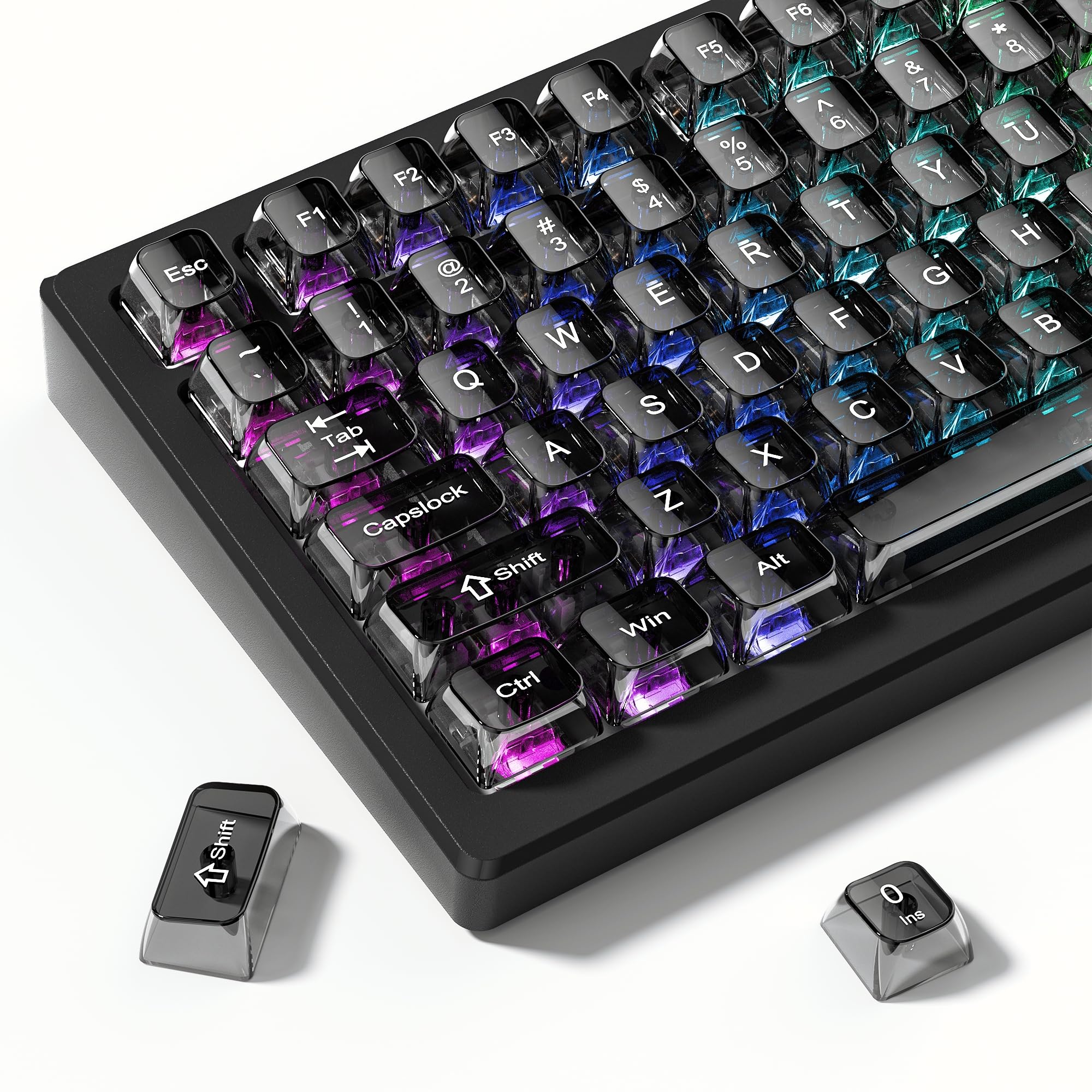
Best Overall

HyperX Pudding Keycaps

93 /100
LBD Score Outstanding

Key details

Layout
Standard bottom row
Profile
OEM
Material
Double-shot PBT
Key Count
104
View on Amazon

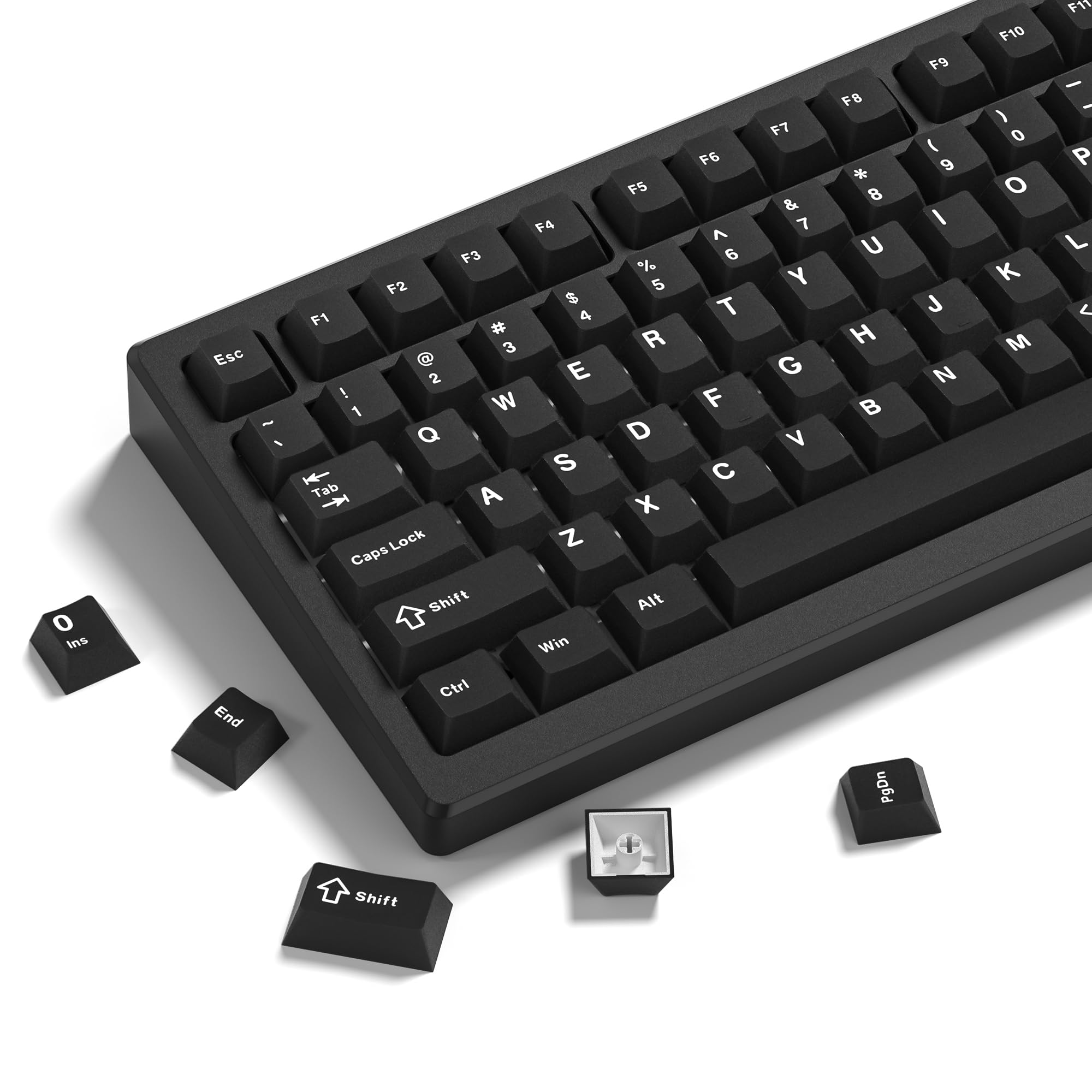
The lower half of every cap in this set is translucent, and that one detail does more for a backlit board than any lighting mode you can cycle through. Instead of a thin slot of light around a legend, the whole bottom wall of the key glows, so the deck reads as an even field of color instead of a grid of dots.

That is why it is the set we recommend first. It gets the glow without making you give anything up for it: thick double-shot PBT walls, HyperX's bold wide legends, and a surface with a little more bite than the slick ABS most gaming keyboards ship with. Warm hands do not skate across it in the middle of a match.

What you have to settle is the bottom row. The set is built for standard layouts, so a full-size or TKL board is covered completely; a compact board with a 1u right shift or narrow right-hand modifiers may leave you a key short, and a shortened spacebar will not fit at all. Measure your spacebar and the four keys beside it before ordering.

The walls are thick and the caps seat with a firm press, so the whole thing reads as a proper keycap set that happens to glow rather than a lighting gimmick with keys attached. That is the difference between a set you keep on the board and one you swap out once the novelty fades.

Pros

  • Best light spread of any set here
  • Thick double-shot PBT walls
  • Grippier surface than stock ABS
  • Bold, wide, easy-to-read legends

Cons

  • Most expensive set in this guide
  • HyperX logo stamped across the spacebar
Our verdict

We recommend it for any standard-bottom-row gaming board: thick double-shot PBT that feels solid, plus the most even backlight glow of any set here.
Check Latest Price
2

Best PBT Feel

Womier Double Shot PBT Keycaps

88 /100
LBD Score Excellent

Key details

Layout
61 to 108 keys
Profile
Cherry
Colorway
Vintage grey and black
Material
Double-shot PBT
View on Amazon

Not every upgrade is about light. This Womier set is what we point to when someone wants their keyboard to look and feel better without turning it into a light show: double-shot PBT in a vintage grey and black, cut in a Cherry profile, with a matte finish that never catches a reflection.

The texture is why it takes this slot. It is smooth without being slippery, and it gives a low, thocky sound instead of the hollow clack thin caps make. Coverage runs from 61-key boards up to full-size, with enough spares for everything in between, and a keycap puller is in the box.

One detail worth knowing: the red accent keys carry dark legends that nearly disappear, so a board built around those keys is harder to read at a glance than the black and grey ones. Everything else here is quietly good. The set arrived packed properly in a labeled box, which sounds like a small thing until you have sorted 132 loose caps on a desk.

Pros

  • Smooth matte PBT that does not slip
  • Low, thocky sound
  • Fits 61-key up to full-size boards
  • Vintage grey and black colorway

Cons

  • No Mac modifier keys included
Our verdict

We steer anyone who wants a better typing surface rather than a light show to this set: matte PBT, a low Cherry profile, and no shine anywhere.

Check Latest Price
3

Best for Quiet Gaming

EPOMAKER AegisSil Keycap Set

87 /100
LBD Score Excellent

Key details

Layout
ANSI 60% to full-size
Profile
Cherry
Material
Silicone
Key Count
113
View on Amazon

If you play after everyone else in the house has gone to bed, start here. The AegisSil caps are molded from silicone rather than plastic, and the material swallows the sharp report of a bottom-out in a way no PBT set on this list can.

The feel is what we did not expect to like as much as we did. Silicone gives under the finger, so a hard press lands soft, and the surface grips instead of sliding; warm, dry hands stay put through a long session. The caps are semi-transparent enough to carry a soft halo of color around each key rather than a hard glare, and the Cherry profile keeps the whole thing low.

The thing worth measuring before you order is your right-hand modifier row: on some 65% and 75% boards the Ctrl, Fn, and Alt keys are wider than the versions in this set, which leaves a visible gap. Everything else argues for it — nothing here quiets a board like silicone, and the grip is the second reason to choose it over the plastic sets.

Pros

  • Silicone cushions every keystroke
  • Quietest set in this guide
  • Grippy surface for warm hands
  • Soft, diffused glow

Cons

  • Small legends are hard to read at a glance
Our verdict

We hand this to anyone gaming in a shared room: silicone is the only material here that makes a mechanical board genuinely quieter.

Check Latest Price
4

Best Budget RGB

dagaladoo Clear PC Keycaps

87 /100
LBD Score Excellent

Key details

Layout
60% to full-size
Profile
MDA
Material
Polycarbonate
Key Count
115
View on Amazon

The dagaladoo set is the budget route into the clear, glass-keyboard look. All 115 caps are polycarbonate — you can see the switches underneath — and the tint is dark enough that a whole board does not end up looking like a toy.

What makes it work is the frosted top. A fully polished clear cap is where fingers slip during a long session; the frosted tops keep some bite and scatter the LED instead of letting it punch straight through. The MDA profile is the other half of the feel: flatter than Cherry, with wide rounded tops that give your fingertips more to land on.

Coverage runs from 60% boards through full-size and includes the odd 75% layouts that trip up narrower kits, and the caps sit tight on Gateron switches without wobble. A plain black board stops looking plain the moment they go on, which is most of what anyone wants from a clear set.

Pros

  • Clear look for a small spend
  • Frosted tops keep some grip
  • Wide, comfortable MDA tops
  • Fits odd 75% layouts

Cons

  • Legends are hard to read with the LEDs on
Our verdict

We recommend this to anyone chasing the clear, glass-keyboard look on a tight budget, as long as they type by feel rather than sight.

Check Latest Price
5

Best Stealth Look

XVX Forged Carbon Keycaps

87 /100
LBD Score Excellent

Key details

Layout
ANSI 60% to full-size
Profile
Cherry
Material
Carbon-infused polycarbonate
Key Count
119
View on Amazon

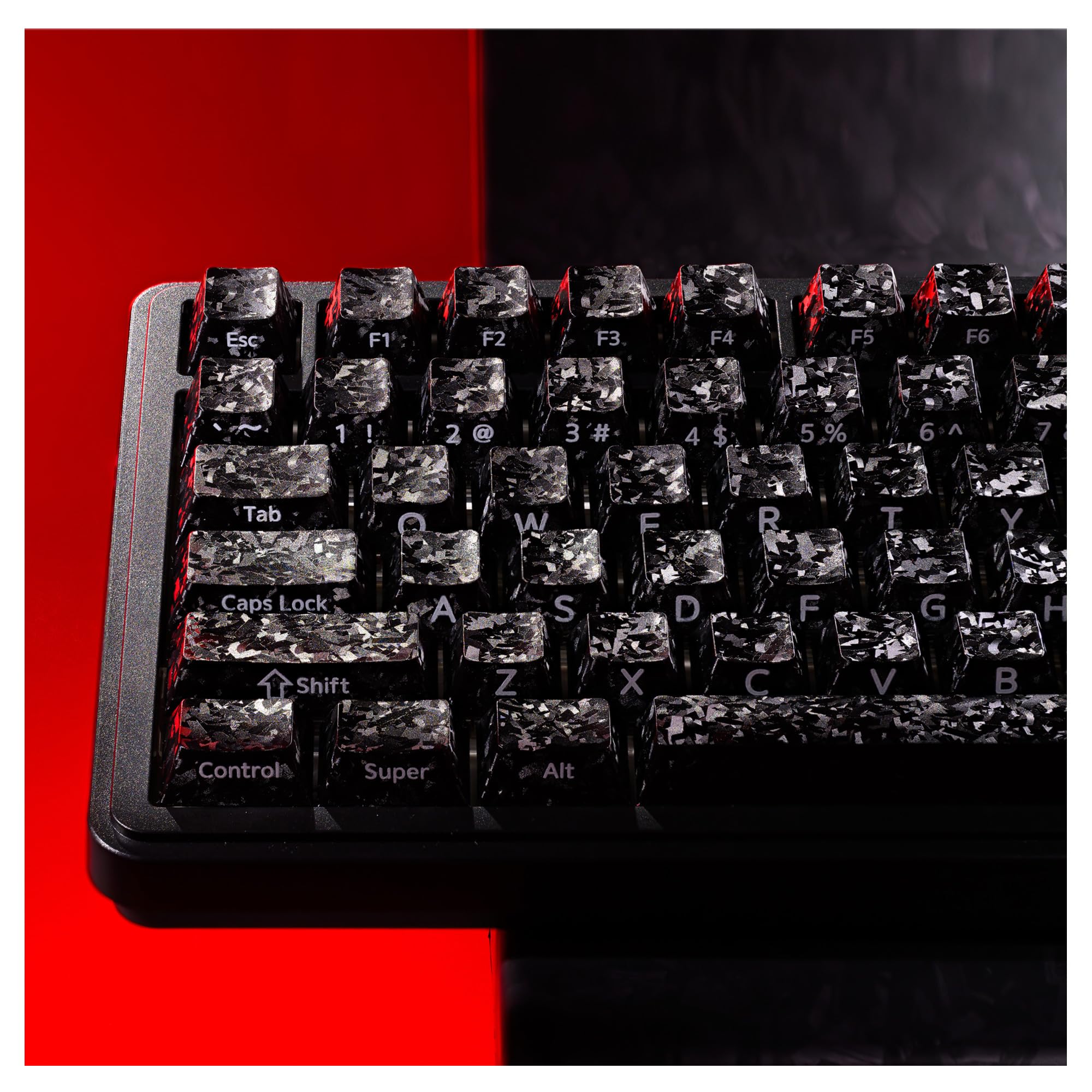
Run a thumb across these caps and you hit texture, not polish — and that texture is the reason we keep coming back to this set. The forged carbon pattern is molded into a carbon-infused polycarbonate shell that feels dense and faintly rough, the opposite of the glassy black most stealth sets go for.

It is the grippiest plastic cap here. Smooth PBT turns slick once your hands warm up; this does not, and the difference shows late in a session. Cherry profile keeps your wrists low, 119 keys cover ANSI boards from 60% up to full-size, and the puller in the box does the swap without drama.

The set carries more weight than the PBT kits here — 288 grams for the caps alone — and you hear it: a lower, denser clack that suits linear switches. On a board built for looks first, that heft is part of the appeal rather than a tax.

Pros

  • Grippiest plastic surface here
  • Forged carbon look unlike anything else here
  • Low Cherry profile
  • Heavy, dense sound

Cons

  • Side-printed legends never light up
Our verdict

We like this for dark builds and warm hands: the forged-carbon texture gives the best grip of the plastic sets here, and the Cherry profile stays low.

Check Latest Price
6

Cheap Minimalist Decks

XVX Side-Printed PBT Keycaps

86 /100
LBD Score Excellent

Key details

Legends
Side printed
Profile
OEM
Material
Double-shot PBT
Key Count
136
View on Amazon

The wide font on these caps is cut for light. The letters run big along the side face, so a backlit board throws a lot of glow through them and the top of each key stays blank and clean. With the backlight off, that same print is thin and low-contrast, which is the trade you make for the price.

Underneath it is a proper set: 136 double-shot PBT caps — 104 standard keys plus 32 spares for compact and alternate layouts — in an OEM profile with a matte texture that does not shine up quickly. The legends are molded in rather than printed on, so they will not rub away, and a puller comes in the box.

For a dark room and a lit board, it is the best value in this guide, and the coverage drops onto most 60% through full-size keyboards without gaps. The spacebar is the piece to check: it is not the right length for every board, and it is the one part of a set that cannot be worked around.

Pros

  • Cheapest full set in this guide
  • Matte PBT with a weighty sound
  • 104 keys plus 32 spares
  • Molded legends that will not wear off

Cons

  • Black reads more charcoal than black
Our verdict

We point budget buyers to it for a dim room and a lit board, where the wide side-printed font does exactly what it was designed to do.

Check Latest Price
7

Anime Desk Setups

137-Key Anime PBT Keycaps

87 /100
LBD Score Excellent

Key details

Legends
Side printed, shine-through
Profile
Cherry
Material
Double-shot PBT
Key Count
137
View on Amazon

Most printed keycap sets look like a sticker pack applied one key at a time. This one holds together: the artwork runs across the set in black and white, the print is crisp, and the base is neutral enough that it sits on almost any board instead of fighting it.

Under the artwork it is a real keycap set. Double-shot PBT with dye-sublimated printing, Cherry profile, 137 keys including spares for Mac and alternate layouts, and a puller in the box. The surface has a soft, almost velvet texture, and the sound is a low thock rather than a thin click.

It sits above the plain sets here on price, and the extra buys printing rather than more keys or a better material. What you get for it is a board nobody else at the table has — the kind of thing people ask about before they ask what switches you are running.

We like it for a desk that is already a showcase, because the typing underneath is good enough that the looks are not a compromise. If you want a quiet, plain deck instead, the Womier set does that job for less.

Pros

  • Artwork that covers the whole set
  • Soft, velvet-textured PBT
  • Spares for Mac layouts
  • Deeper sound than stock caps

Cons

  • Legends only glow on south-facing boards
  • Spacebar alignment is off on some boards
Our verdict

We recommend it when the desk is already a showcase: real artwork on a genuinely good PBT set, not a novelty print glued to cheap caps.

Check Latest Price

How We Tested the Keycaps

We started with every set we could find that covered more than one layout — 60%, 65%, 75%, and full-size — then filtered by material and legend method: double-shot PBT, silicone, polycarbonate, side-printed, forged-finish. Standard cross-shaped stems were the price of entry. That left 15 sets, which we bought at full price and lived with for five months.

Fit came first, because nothing else matters if the caps don't seat. Each set went onto a hot-swap 75%, a full-size board, and a 60%, and I checked the awkward keys by hand: the 1.75u right shift, the 1u bottom row, whether the spacebar cleared the stabilizers or bound against them, and whether the stems gripped tight or wobbled. Then I pulled everything back off with a wire puller to see whether any stem had cracked.

For appearance and legibility, we skipped the product photos. Every set sat on my desk for two weeks of real work and evening gaming, and I read the same paragraph under a lamp at midday and again in a dark room with the backlight on. On the translucent and clear sets, I noted where light bled between caps and whether the legends still read once the glow washed over them.

To judge functionality and value, I typed the same few paragraphs and played the same shooters on each set, listening for a hollow ring or a dead, mushy press, then wiped each one with a damp cloth after a few weeks to check for shine on the home row and fading legends. We counted what was actually usable in the box, too — spare spacebar, extra keys, a puller — so a big key count only earned credit if those keys fit something real.

How to Choose Keycaps for Gaming

Start With Your Board, Not the Key Count

More keys is not automatically better; the right set is the one that covers your board without a gap. A 104-key set covers a full-size or TKL deck completely and gives a 60% everything it needs, but compact boards with a 1u right shift or narrow right-hand modifiers need the spares that only a 130-plus-key kit includes.

The trap is the bottom row. Plenty of gaming keyboards use a shortened spacebar or non-standard widths, and a set that fits one brand's board will not necessarily fit yours. Count the widths of Ctrl, Win, Alt, and the spacebar on your own keyboard before you order anything.

Profile Decides Where Your Hands Sit

OEM is the tall, sculpted shape most gaming keyboards ship with, so it feels familiar and pairs naturally with a wrist rest. Cherry is lower and more gently stepped, which keeps your hands flatter over a long session, and it is the profile we lean toward for a mix of play and typing. MDA is flatter still, with wide rounded tops that give your fingertips more to land on and less row-to-row guidance.

None of these is faster. The difference shows up after two hours, which is why we treat profile as a comfort decision. If stock caps have never bothered you, OEM is the safe answer; if your wrists complain, Cherry is the one to try.

Material and Legends Decide How It Ages

Double-shot PBT is the default for good reason: the legend is molded through the cap rather than printed on top, and PBT resists the greasy shine that ABS picks up within months. Polycarbonate is the clear-cap material, tougher than it looks, usually printed, and often smoother under the finger. Silicone is its own category — softer, quieter, grippier.

Where a set is printed rather than double-shot, judge the print in photos: misaligned artwork is the most common failure on budget printed sets. We spend the extra on double-shot PBT unless the clear look is the whole point of the build.

Match the Legends to Your Lighting

Side-printed legends look cleaner because the top of the cap stays blank, but they only light up when the LED reaches that side face — on a north-facing board, the printed side faces away from the light. Top-printed shine-through is more forgiving.

Pudding caps take a third route: the top stays solid and the lower wall glows, spreading light across the whole deck rather than a grid of dots. Before you buy a side-printed or clear set, hold a phone flashlight under one of your own caps and watch where the light escapes.

Frequently Asked Questions

Final Verdict

The HyperX Pudding set is the one we point most gamers to. It fits any board with a standard bottom row, its double-shot PBT walls feel as good as anything here, and no other set spreads a backlight so evenly.

If your board is compact or its bottom row is non-standard, start with the Womier 138-key set instead — coverage runs down to 61-key layouts, and the matte PBT is the nicer surface to type on. And if the room is shared, the EPOMAKER silicone set is the only one here that makes a board quieter.