Best Hot Swappable Keyboards of 2026

A hot-swappable keyboard is a promise that the board outlives the switches: a tiny socket on the PCB lets you pull a switch with a claw tool and press in another, no soldering involved. That's the fix — you stop replacing keyboards and start tuning one. And since nearly every board has that socket now, the mount, the case dampening, and the keycaps are what actually separate them.

We've spent six months typing on 14 of these, from 60 percent decks to full-size boards with dedicated shortcut keys, and the pattern held: sound is engineered by the whole board, not the switch alone, and texture comes down to whether the caps are PBT or the ABS that goes slick by month three.

Looks count for more than keyboard people admit — the colorway and backlight are what you stare at daily — and so does the boring stuff: stable wireless, software that remembers your remaps after a reboot, cases that survive a backpack. We weighed all of it, along with whether each board earns its spot. The picks below are the ones we kept reaching for.

1

Best Overall

Redragon K745 PRO

90 /100
LBD Score Outstanding

Key details

Layout
108 keys (full-size)
Keycaps
Round PBT, shine-through
Hot-swap
3-pin and 5-pin
Connection
2.4GHz, Bluetooth, USB-C
View on Amazon

There's a desk this board was built for: a personal desktop, a work laptop, and a tablet that all want the same keyboard. The K745 PRO holds all three — 2.4GHz, Bluetooth, and USB-C — and moving between them takes a key combination rather than a re-pairing ritual. It's also the most complete package here: 108 keys, a gasket mount with five layers of dampening, PBT keycaps, and hot-swap sockets that accept 3- and 5-pin switches.

Typing on it is what settled it for us. Redragon's custom linear switch lands soft, the gasket gives a little under the keystroke, and the dampening keeps the sound low and creamy instead of hollow — we typed a full workday on it without noticing the board at all, which is the compliment a keyboard should want. Redragon also throws in spare switches and a puller, so the swap-ready socket isn't theoretical. You can change how this one feels without buying anything else.

Four shortcut keys sit above the numpad, factory-set to mute, calculator, screen lock, and desktop, and Redragon's Pro software lets you reassign them or write macros. We used the calculator and volume keys constantly and never touched the macros, which is probably the normal split. Per-key lighting lives in the same app, and the three connection modes are switched from the board itself rather than a dongle hunt.

Pros

  • 2.4GHz, Bluetooth, and USB-C in one board
  • Gasket mount with five layers of dampening
  • Spare switches and puller in the box
  • PBT keycaps resist shine

Cons

  • Full-size footprint eats desk space
  • Round keycap profile won't suit everyone
Our verdict

If one keyboard has to serve a desktop, a laptop, and a tablet while keeping a numpad, this is the board we tell people to buy.

Check Latest Price
2

Best Value

AULA F99

90 /100
LBD Score Outstanding

Key details

Mount
Gasket with silicone pad
Layout
99 keys (96%)
Battery
8,000mAh
Connection
BT5.0, 2.4GHz, USB-C
View on Amazon

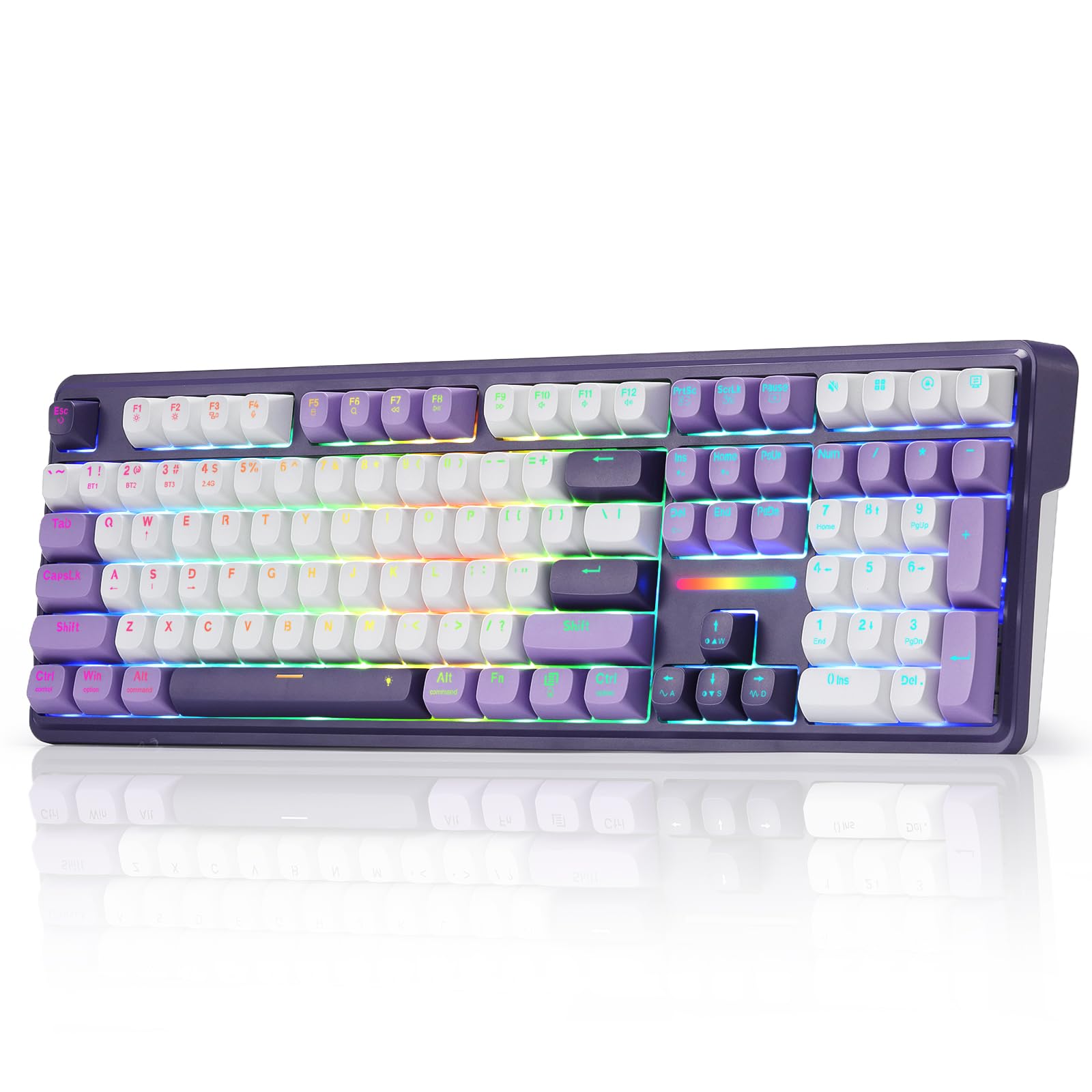
The F99 is a reminder that a creamy, gasket-mounted board doesn't have to be expensive. Ninety-nine keys in a 96% layout, an 8,000mAh battery, PBT keycaps, and three ways to connect — Bluetooth 5.0, 2.4GHz, and USB-C — in a case that feels heavier and more solid than the price does.

Sound is the reason this board gets recommended, and it earns the reputation. The gasket structure floats the plate, a full-length silicone pad and a single-key slotted PCB soak up the ping, and the pre-lubed linears land with a deep, soft clack that stays on the right side of loud. At 1,500 g it doesn't wander around the desk either, which matters more than it sounds once you're typing fast. Two extra switches and a puller come in the box, and the 16 lighting modes cover everything from subtle to game-room.

What keeps it out of the top spot is what happens later. Some units develop keys that lag or stop registering after months of use, and that's the failure to know about before you commit. Buy from a seller with a generous return window, press every key on the board during the first few weeks, and you've covered most of the risk. If it holds, you have a board that sounds better than our top pick for less money — that's the trade on offer.

Pros

  • Creamy, low-pitched sound out of the box
  • 8,000mAh battery for long wireless stretches
  • Bluetooth, 2.4GHz, and USB-C
  • 96% layout keeps arrows and numpad

Cons

  • Six-month warranty is the shortest here
Our verdict

Buy this if you want the creamiest sound here in a 96% wireless board, and accept that long-term key reliability is a gamble.

Check Latest Price
3

Best 75% Keyboard

Womier SK80

93 /100
LBD Score Outstanding

Key details

Layout
82 keys (75%)
Display
Color multimedia screen
Switches
Pre-lubed linear, hot-swap
Connection
USB-C wired
View on Amazon

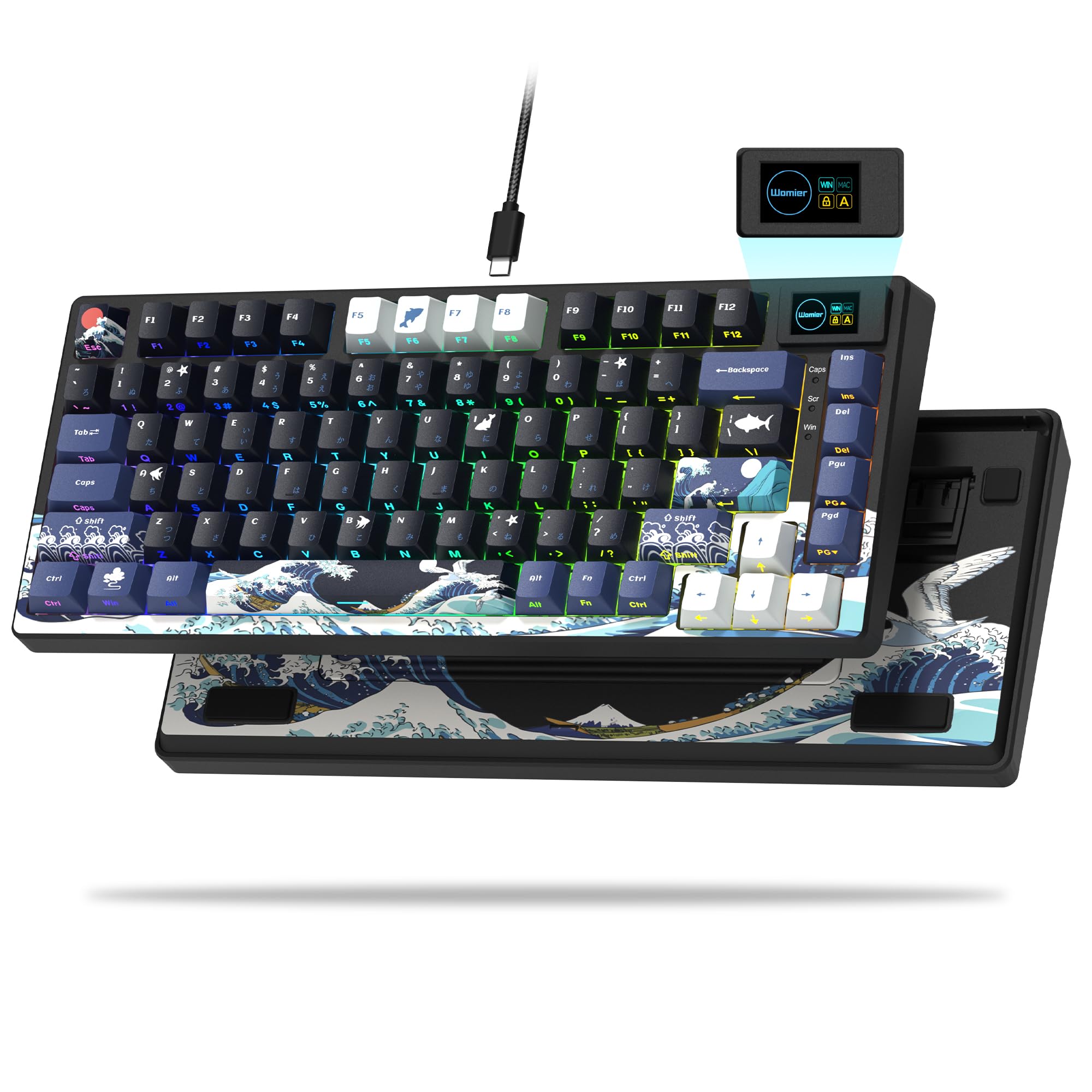
There's a small color screen in the top-right corner of the SK80, and it does more than look cute: it shows caps lock and connection status, and it plays any GIF you load through the driver. That's the party trick. Underneath sits a 75% board — 82 keys with the function row and arrows, a metal enclosure, gasket mounting, pre-lubed stabilizers, and linear switches under cherry-profile keycaps.

What makes it worth the desk space is how little work it needs. The stabilizers arrive lubed and rattle-free, which is normally the first job on a new board and the one thing we didn't have to do here, and the gasket softens the bottom-out so it thocks instead of clacking. Nineteen lighting effects and nine colors are more than we ever used. The sound is the reason to buy it.

Seventy-five percent is the compromise most people can live with: the numpad goes, everything else stays, and the screen is easy to ignore if GIFs aren't your thing. It's a USB-C board with no battery to think about and no Bluetooth either, so plan the cable route before it lands. The puller and driver handle the rest.

Pros

  • Stabilizers arrive lubed and rattle-free
  • Gasket mount with a soft, creamy bottom-out
  • Corner screen shows status and custom GIFs
  • 75% layout keeps arrows and function row

Cons

  • Backlight doesn't shine through the legends
Our verdict

This is the 75% board to buy if you want a finished-sounding keyboard on day one and don't need wireless.

Check Latest Price
4

Best Premium Build

ASUS ROG Strix Scope II X

89 /100
LBD Score Excellent

Key details

Build
Aluminum top plate, PBT
Layout
104 keys (full-size)
Switches
ROG NX Snow V2 linear
Connection
USB-C wired
View on Amazon

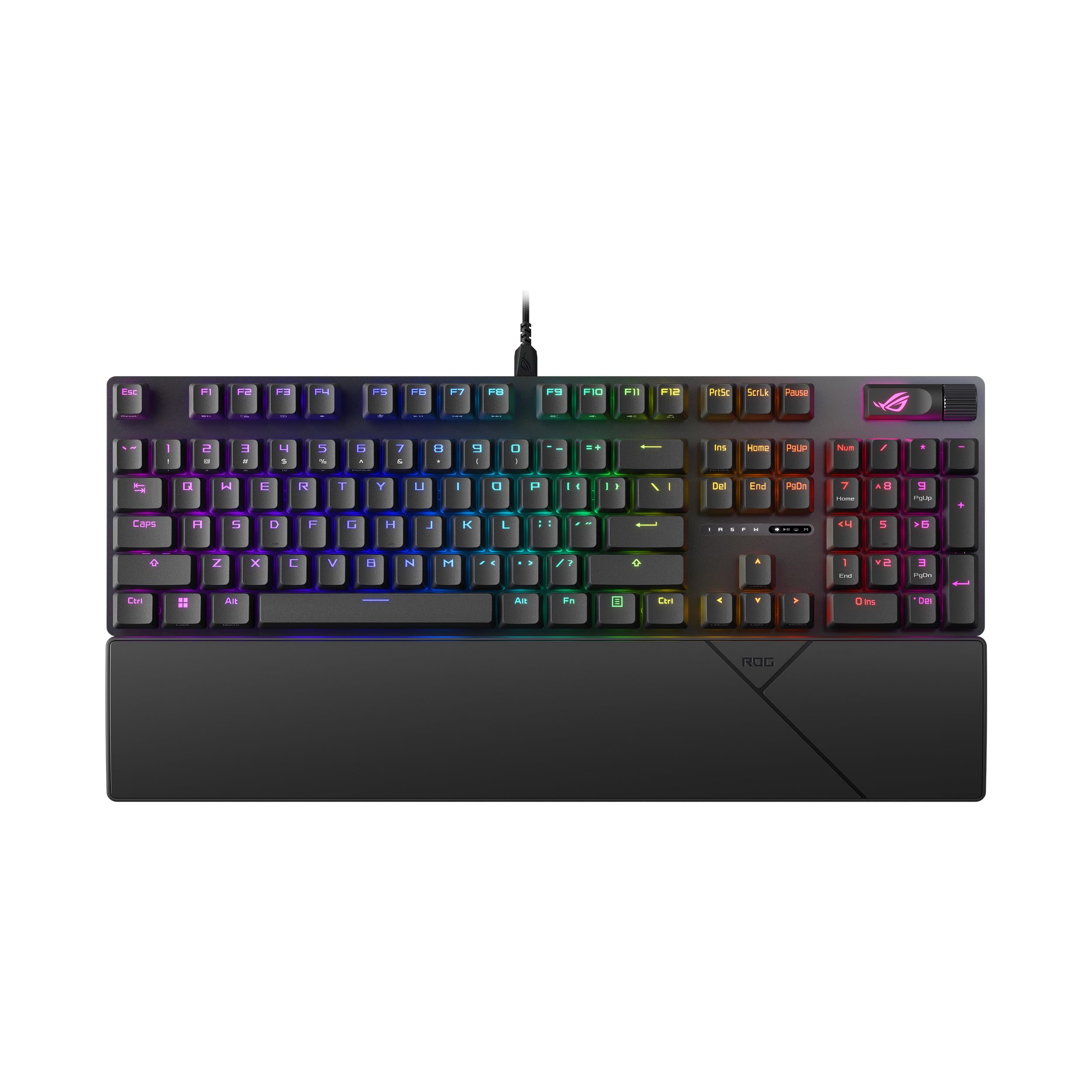
This is the most expensive keyboard on the list, and it's the one that feels most like finished equipment: an aluminum top plate, doubleshot PBT keycaps, three tilt angles, a wrist rest, and a detachable USB-C cable rather than a cord that dies with the board.

The switches are ROG's NX Snow V2 linears, pre-lubed and sitting in hot-swap sockets, with a lens over each LED so light spreads across the cap instead of pooling at the top. Foam inside the case and pads under each switch do the acoustic work — this is one of the quieter full-size boards in this group, and the ping that plagues aluminum cases never shows up.

Where the money goes is the stuff you feel daily rather than read on a spec sheet: the plate doesn't flex or ring, the caps keep their dry texture, and the wrist rest is actually shaped for wrists. If you type for a living and want one board you stop thinking about, this is the one we point at, and the five pre-programmed hotkeys for Game Bar and recording are a small bonus on top.

The first-week job is to run every key and every LED — if a board arrives with an unlit zone, exchange it rather than living with it. After that the maintenance is easy: the cable detaches, the sockets are hot-swap, and the two-in-one puller in the box handles both caps and switches.

Pros

  • Aluminum top plate and doubleshot PBT caps
  • Pre-lubed ROG NX Snow V2 linears
  • Foam and switch pads quiet the ping
  • Wrist rest and detachable cable included

Cons

  • Wired only, with no wireless mode
Our verdict

Pay for this one if you type for a living and want a full-size board that feels finished the day it arrives.

Check Latest Price
5

Best Budget Full-Size

Redragon K668

89 /100
LBD Score Excellent

Key details

Extras
Two keycap sets included
Layout
108 keys (full-size)
Hot-swap
3-pin and 5-pin
Connection
USB-C wired
View on Amazon

Open the box and a second full set of keycaps and a handful of spare switches are sitting on top of the board. That's the K668's whole argument: a 108-key hot-swap keyboard with two looks included and enough spares to fix a dead switch yourself. It's the board we point at when someone wants full-size, wants to try switches, and doesn't want to think about it again.

The typing is better than the rest of the package suggests. Redragon's linear reds are light under the finger, the case is cushioned so the sound lands soft rather than hollow, and the two-stage feet put the angle where you want it. The socket accepts 3- and 5-pin switches, and the stock linears are quiet enough for a shared room without being silent.

Four hotkeys above the numpad handle mute, calculator, screen lock, and desktop, and the Pro software covers macros plus per-key lighting across 19 modes. The second keycap set isn't a gimmick — swap it and the board reads like a different product, and having a puller and spare switches in the box makes taking it apart feel a lot less final.

Pros

  • Two keycap sets and spare switches included
  • 3-pin and 5-pin hot-swap socket
  • Four dedicated shortcut hotkeys
  • Cushioned, soft sound for the price

Cons

  • Wired only, no wireless option
  • Plastic housing feels basic
Our verdict

For a full-size hot-swap board with two looks and spare switches included, this is the budget pick we hand people.

Check Latest Price
6

Best for Competitive Gaming

Aula WIN60 HE

89 /100
LBD Score Excellent

Key details

Layout
61 keys (60%)
Polling
8,000Hz
Switches
Magnetic Hall-effect
Connection
USB-C wired
View on Amazon

A 0.02mm rapid-trigger step sounds like a spec-sheet flex until you understand what it does. The magnetic switches report position rather than contact, so the board re-arms the moment a key starts coming back up, and with 8,000Hz polling that reset lands faster than a mechanical switch can manage. Sixty-one keys, PBT caps, per-key RGB, USB-C.

For tactical shooters this is the most useful keyboard on the list. Rapid trigger changes how a key behaves — press a fraction of the way and it registers, release a hair and it stops — and in Valorant or CS2 that's the difference between a clean counter-strafe and a slide. We think it's the pick for anyone whose main game is a tac shooter, and overkill for anyone who splits time between games and documents.

Sixty percent means no arrows, no function row, and no numpad, so the driver matters more than it does on a full-size board — and that's the weak spot. The software is hard to track down and limited in what it can reassign, and the Windows and function keys stay where they are. It's also a Windows PC board with no PlayStation support, so console players should stop here.

Pros

  • Magnetic switches with adjustable actuation
  • Rapid trigger with a 0.02mm step
  • 8,000Hz polling rate
  • Solid, smooth feel for the money

Cons

  • Replacement switches must be Hall-effect
  • Bundled software is hard to find and limited
Our verdict

If your main game is a tactical shooter, this is the board to buy — rapid trigger matters more than anything else here.

Check Latest Price
7

Shared Offices

SOLAKAKA KI99 Pro

84 /100
LBD Score Excellent

Key details

Layout
96 keys (96%)
Battery
10,000mAh
Switches
Silent linear, hot-swap
Connection
BT5.0, 2.4GHz, USB-C
View on Amazon

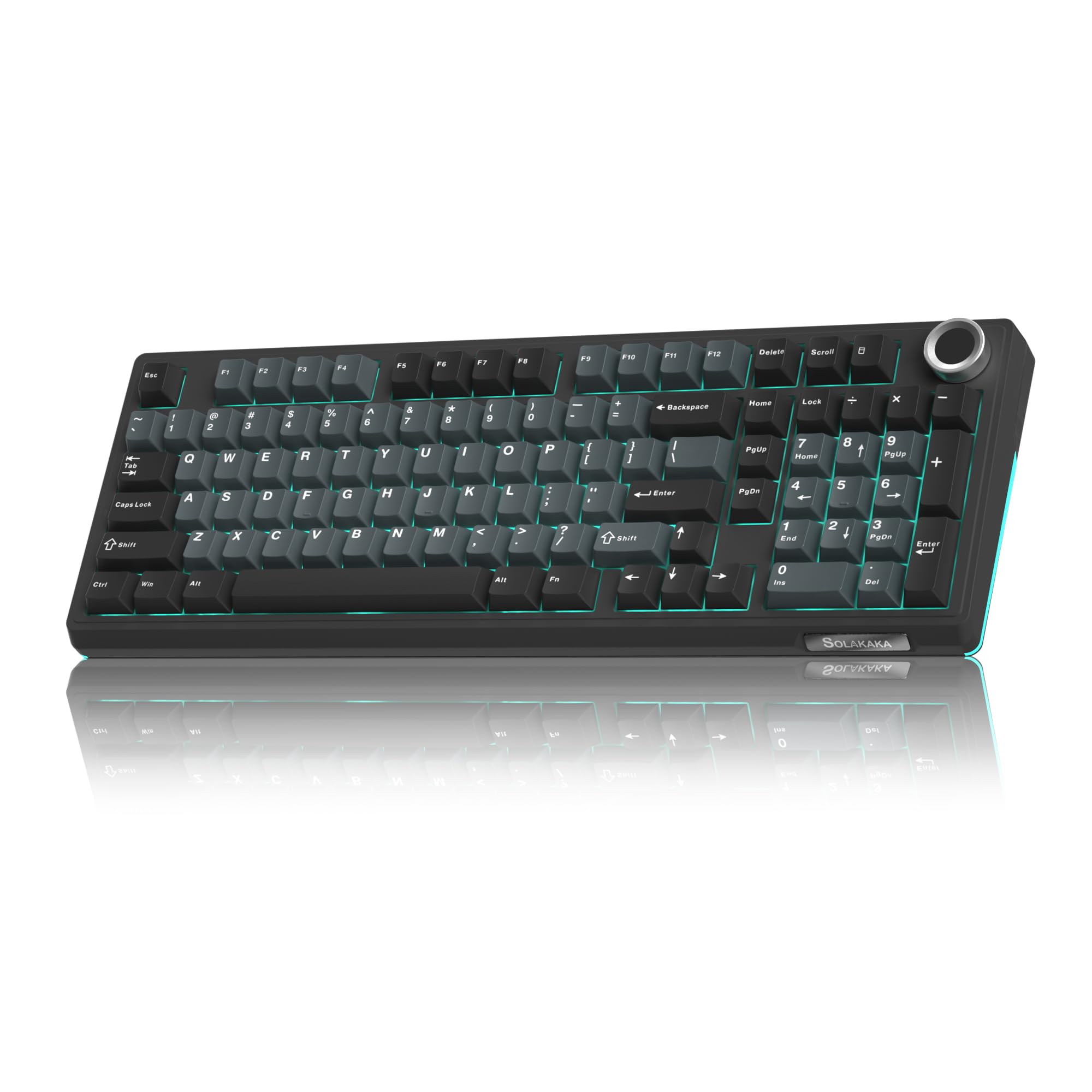
An open office is the hardest place to own a mechanical keyboard. The KI99 Pro is built for that room: silent linear switches, a gasket structure with five noise-reducing layers, and a 1.2mm flex-cut PCB that takes the edge off the bottom-out.

The rest of the package is a 96% layout with a metal knob for volume, media, and brightness, tri-mode Bluetooth 5.0, 2.4GHz and USB-C, PBT keycaps, and a 10,000mAh battery that should stretch charging from days into weeks. Hot-swap support covers 3- and 5-pin switches with no tools, so the silent set isn't a life sentence if your situation changes.

The quiet claim holds. Typing on it lands as a soft, velvety thud rather than a clack, and the pitch is low enough that it disappears into office background noise, which is exactly what you're paying for. The trade is feel: silent switches bottom out soft, and some of the snap that makes a good linear fun is missing. If you want one board for the office and a different one for home, this handles the first job properly.

Pros

  • Silent switches suit shared offices
  • 10,000mAh battery stretches charging intervals
  • Gasket structure with five noise layers
  • Knob controls volume and brightness

Cons

  • Legends block part of the backlight
Our verdict

Buy this one for an open office, where its silent switches and five noise layers do more for your day than snap ever will.

Check Latest Price
8

Tiny Desks

YOUSUOMASTER X82

88 /100
LBD Score Excellent

Key details

Knob
Volume control
Layout
66 keys (60%)
Hot-swap
3-pin and 5-pin
Connection
USB-C wired
View on Amazon

If the magnetic switches on the Win60 HE are more board than you need, the X82 does the small-keyboard trick for less: 66 keys, a metal volume knob in the corner, a gasket mount, and a USB-C cable.

The hot-swap socket takes 3- and 5-pin switches, the stock red linears are smooth enough to live with until you buy something better, and the shine-through keycaps plus bright RGB keep the legends legible in the dark. The included software handles remapping and lighting, and it installs without drama.

Sixty percent takes adjusting — arrows and function keys live on layers — but the volume knob earns its place immediately, and Windows, Mac, and Linux are all listed as supported. At 499 g it's light enough to move between desks or drop in a bag, which is more than most boards here can claim.

For a first hot-swap board or a second board for a small desk, this earns its place: nothing else here gets you a gasket mount, a knob, and swappable sockets this cheaply. It's a board to learn on rather than the one you keep for a decade, and treating it as an inexpensive platform for switches and caps you actually want is the right way to buy it.

Pros

  • Gasket mount at an entry price
  • Volume knob on a 60% layout
  • 3-pin and 5-pin hot-swap socket
  • Light 499 g frame

Cons

  • No stated warranty
  • Case flexes under pressure
Our verdict

This is the cheapest way here to get a gasket mount, a knob, and swappable sockets in a small board, with no warranty behind it.

Check Latest Price

How We Tested the Best Hot-Swappable Keyboards

We built the shortlist from retailer listings, spec sheets, and customer reviews, then cut anything without a genuine five-pin hot-swap socket, anything with no key remapping of any kind, and near-duplicates within the same size family. That left 14 keyboards spanning compact 60 percent to full-size layouts, wired and tri-mode. Rather than a lab bench, they rotated through one work-from-home desk over six months, so every board got weeks of real typing, spreadsheets, and late-night gaming instead of an afternoon.

For sound and feel, each board got the same treatment: the same paragraph and a long spreadsheet session, typed on a foam mat with my phone mic at a fixed distance so we could listen back and compare recordings side by side. We noted thock versus clack, ping from the case, and steadiness in the longer keys. Texture was judged with a thumb rub and again after a month of daily use, watching for shine on dark caps and fingerprints that wouldn't wipe off. Then we pulled and reseated every switch in the top row at least twice with the included tool, checking for bent pins, how firmly the socket gripped on the second and third pull, and whether the plate gave the way a gasket mount should.

Software went onto both a Windows machine and a Mac, where we remapped keys, built macros, and then unplugged and rebooted to see whether those settings survived. Wireless boards ran a full week on their dongles and again over Bluetooth paired to a tablet, so we could watch wake-up lag and how fast the battery dropped. Durability meant a backpack commute, a wobble check on the case, and a hard look at keycap wear. Value was the last question we asked: what each board gives you for what it costs, and whether the cheaper ones in the group gave up anything that actually mattered.

How to Choose a Hot-Swappable Keyboard

Start With What the Socket Accepts

Hot-swappable is not a universal standard. Most boards here take standard 3-pin and 5-pin mechanical switches — the K668 and the K745 PRO list both — so a set of tactiles or clickies you already own will drop straight in. Magnetic boards are a different ecosystem: the Win60 HE reads Hall-effect switches, which means any replacement set has to be Hall-effect too.

Decide which world you want before you shop. If trying switch types is the point, buy mechanical and enjoy a huge aftermarket. If rapid trigger is the point, accept the smaller magnetic ecosystem and check that a replacement set matches before you order one.

Match the Layout to the Work You Do

Sixty percent boards like the Win60 HE and the X82 give back a foot of desk and send you the bill in layers: arrows, function keys, and the numpad all move onto key combinations, and the bundled software becomes part of the keyboard's usability. A 75% keeps the function row and arrows, while 96% and full-size boards keep the numpad.

If numbers are part of your day — spreadsheets, CAD, accounting — pay for the numpad and stop reading. If they aren't, the smaller board buys back the desk space your mouse wants.

Wired, Tri-Mode, and the Battery Question

A wired board is one less thing to charge, and there is nothing wrong with that. Tri-mode earns its keep when one keyboard has to serve a desktop, a work laptop, and a tablet: 2.4GHz for the machine you game on, Bluetooth for the ones you switch between without re-pairing.

Battery figures are worth comparing. The F99 is rated at 8,000mAh and the KI99 Pro at 10,000mAh, which is the difference between charging monthly and charging when you happen to remember. Bright RGB eats into both, so turn it down if longevity matters more than the light show.

What Actually Makes It Feel Good

Three things decide whether a board feels expensive: the mount, the dampening, and the keycaps. A gasket mount floats the plate on soft pads so the bottom-out gives a little; foam layers inside kill the hollow ping; PBT keycaps hold their texture while ABS goes shiny within months.

Pre-lubed stabilizers are the fourth. A rattle-free spacebar is the difference between a board that sounds finished and one that doesn't, and it's the first job most new boards need. Comparing two boards on paper, gasket plus PBT is the combination we pay for.

Read the Software and Warranty First

On a full-size board the software is a convenience. On a 60% it is part of the layout, because the keys you lost have to live somewhere. Check that the app exists for your operating system and can actually remap what you'll miss — the Win60 HE's driver won't reassign the Windows or function keys, which stings on a board with no function row.

Warranty length varies more than it should here: the K668, K745 PRO, and SK80 carry a year, while the F99 and Win60 HE list six months. On a board you plan to keep and re-switch for years, that coverage is part of what you're buying.

Frequently Asked Questions

Final Verdict

Our pick is the Redragon K745 PRO. It covers the most situations at once: a full-size layout with a numpad, wireless across three machines, a gasket-mount feel that's soft without going mushy, and spare switches in the box so the hot-swap socket is something you'll actually use.

Take the AULA F99 instead if you want a 96% board that costs less and sounds even creamier, and go in knowing its long-run key reliability is the open question. If your main game is a tactical shooter, the Win60 HE's rapid trigger is the reason to give up arrows and a numpad.