Best GaN Chargers of 2026

A GaN charger does what the brick in your phone box does, using a semiconductor that wastes less energy as heat — which is why something the size of a matchbox can power a laptop. The wattage on the front tells you less than you'd think. Over eight months, my team and I ran 14 of them through everyday charging, from palm-sized two-port blocks to a desk station with ports for a full work setup.

The number on the box is a ceiling, not a promise: add a second device and the charger splits its output. I've also learned that a charger hot enough to need a coaster is one you quietly stop trusting. A couple of models now show live wattage on a small touchscreen, which sounds like a gimmick until you're hunting for the slow port.

Size and weight split the field nearly as sharply — foldable prongs and a pocket-sized body at one end, a brick that lives on a desk at the other. Every pick below earned its place on how it held up in real use, not on its spec sheet.

1

Best Overall

Anker 735 Nano II 65W

95 /100
LBD Score Outstanding

Key details

Plug
Foldable prongs
Ports
2 USB-C, 1 USB-A
Weight
4.9 oz
Total Output
65W
View on Amazon

A 65-watt charger the size of an AirPods Pro case is why this one takes the top spot. It powers a 13-inch MacBook Pro at full speed from a single port, which is the bar that matters, and it handles a phone and a tablet alongside it. Anker has been refining this shape for years, and what we appreciate most is how little there is to think about when you plug it in.

In a bag it's close to invisible: 4.9 ounces, prongs that fold flat, and a body that slips into a laptop sleeve's accessory pocket. Two USB-C ports plus a USB-A is the right mix for right now, because the USB-A covers an older cable, a fitness band, or a friend's forgotten device. When all three ports are in use the 65W is shared, so a laptop plus two phones slows down — single-device charging is where this earns its keep.

One physical quirk is worth knowing: the body is longer than it is wide, and in a worn wall socket it can hang loose enough to droop. A power strip or a firm outlet settles it. Everything else about living with this charger is uneventful, which is the highest compliment we can pay a power brick.

Pros

  • 65W into one laptop from an earbuds-case body
  • Two USB-C ports plus a USB-A for older gear
  • Folds flat and weighs under 5 ounces
  • 18-month warranty backing a long-running design

Cons

  • No charging cable in the box
Our verdict

Our pick for most people: 65W in a body the size of an earbuds case, enough for a laptop, a phone, and a tablet, from the most proven design here.

Check Latest Price
2

Best Value

UGREEN Nexode 65W

95 /100
LBD Score Outstanding

Key details

Ports
2 USB-C, 1 USB-A
Weight
4.6 oz
Warranty
1 year
Total Output
65W
View on Amazon

This is the value answer to the same question: 65W, two USB-C ports and one USB-A, a foldable plug, and 4.6 ounces — a near-match for the top pick at a lower price. The GaN II internals make it about half the size of the 61W brick it replaces, and in a backpack you won't know which of the two you grabbed.

We recommend it without much hesitation for anyone whose laptop is an ultraportable. UGREEN quotes a MacBook Air M3 at 51% in half an hour, and 65W is the right size for that class of machine. It's the same job as the top pick in a plainer finish, which is the whole point of it.

Two limits to plan around. At a full laptop load it gets properly warm, so give it open air rather than the inside of a bag or the top of a duvet. And a 16-inch MacBook Pro or a gaming laptop will charge slowly here — this is a charger for thin machines.

Pros

  • 65W and three ports at the lowest price here
  • 4.6 ounces with a foldable plug
  • Fast-charges ultraportable laptops

Cons

  • One-year warranty, shorter than the Anker picks
Our verdict

We recommend this to anyone who wants 65W, three ports, and a foldable plug for the least money here — a one-year warranty is the only real concession.

Check Latest Price
3

Best for Laptop Travel

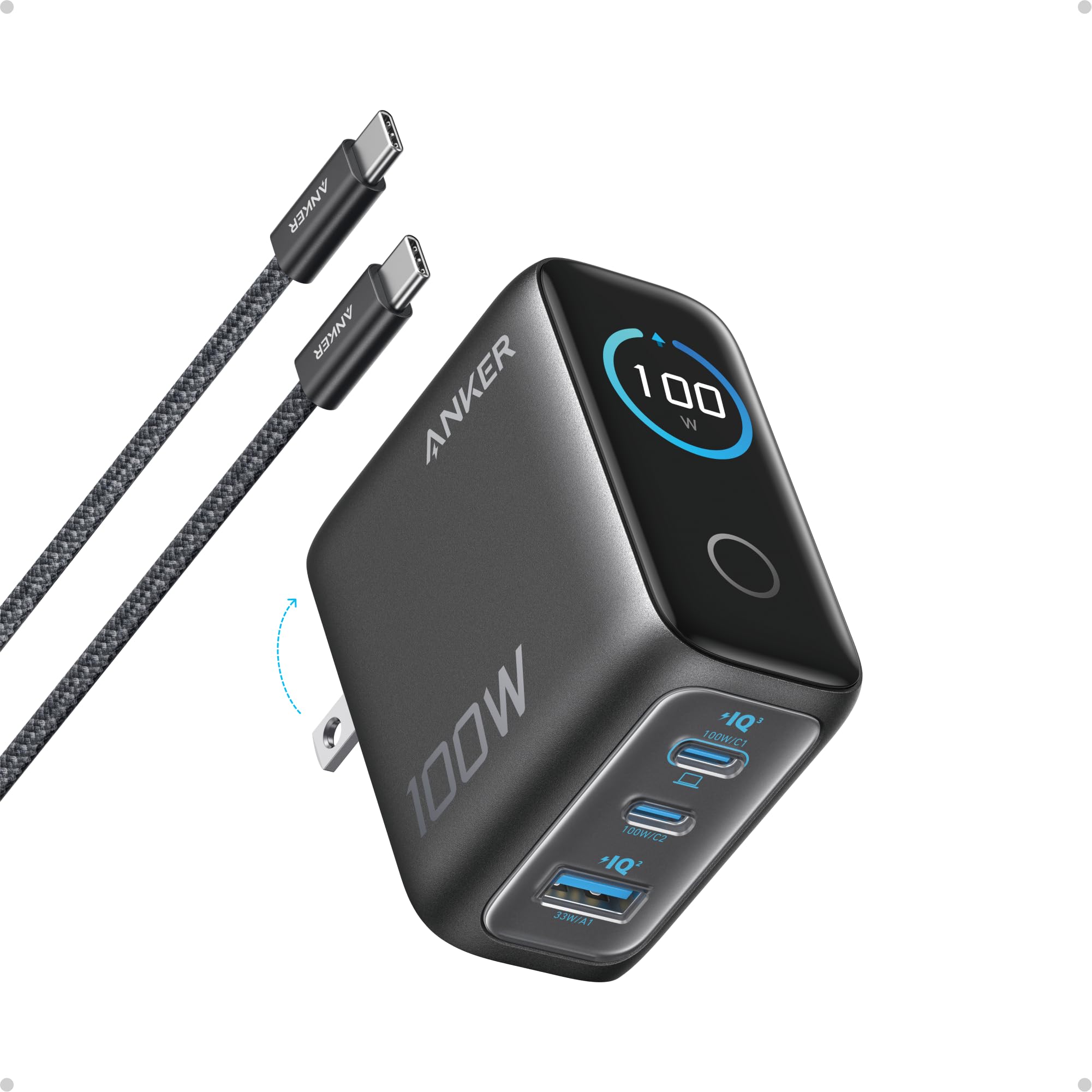
Anker 100W with Display

93 /100
LBD Score Outstanding

Key details

Size
2.72 x 2.17 x 1.34 inches
Ports
2 USB-C, 1 USB-A
Total Output
100W
Included Cable
4.9 ft USB-C
View on Amazon

The screen is what you notice first — live wattage, temperature, and per-port status, with touch controls for switching modes — but the number that earns this charger its place is 100, on either USB-C port. On the 65W picks here, plugging in a second device starts dividing the total. Here you grab whichever port is free and still get laptop-grade speed.

That's the difference between packing one brick and packing two. A 15-inch MacBook Air or a work ThinkPad takes everything this can give, and the low-current mode handles the other end of the range: leave earbuds drawing almost nothing on USB-C2 or the USB-A port and it shifts to a 95W-plus-5W split instead of refusing to charge them.

The ports sit on the bottom face, so plug your cables in before the brick goes into the outlet — the reverse order means wrestling a live charger. It also runs warm at a sustained 100W, and the display shows the internal temperature, which you can read as reassurance or as one more thing to watch.

Pros

  • Full 100W on either USB-C port
  • Display shows live wattage and temperature
  • Ships with a 4.9-foot USB-C cable
  • Foldable plug and a compact footprint

Cons

  • Heavier than the 65W picks at 7.5 ounces
Our verdict

For laptop-first travel we take this: a full 100W on either USB-C port and a display that tells you what each device is drawing.

Check Latest Price
4

Best for Two Laptops

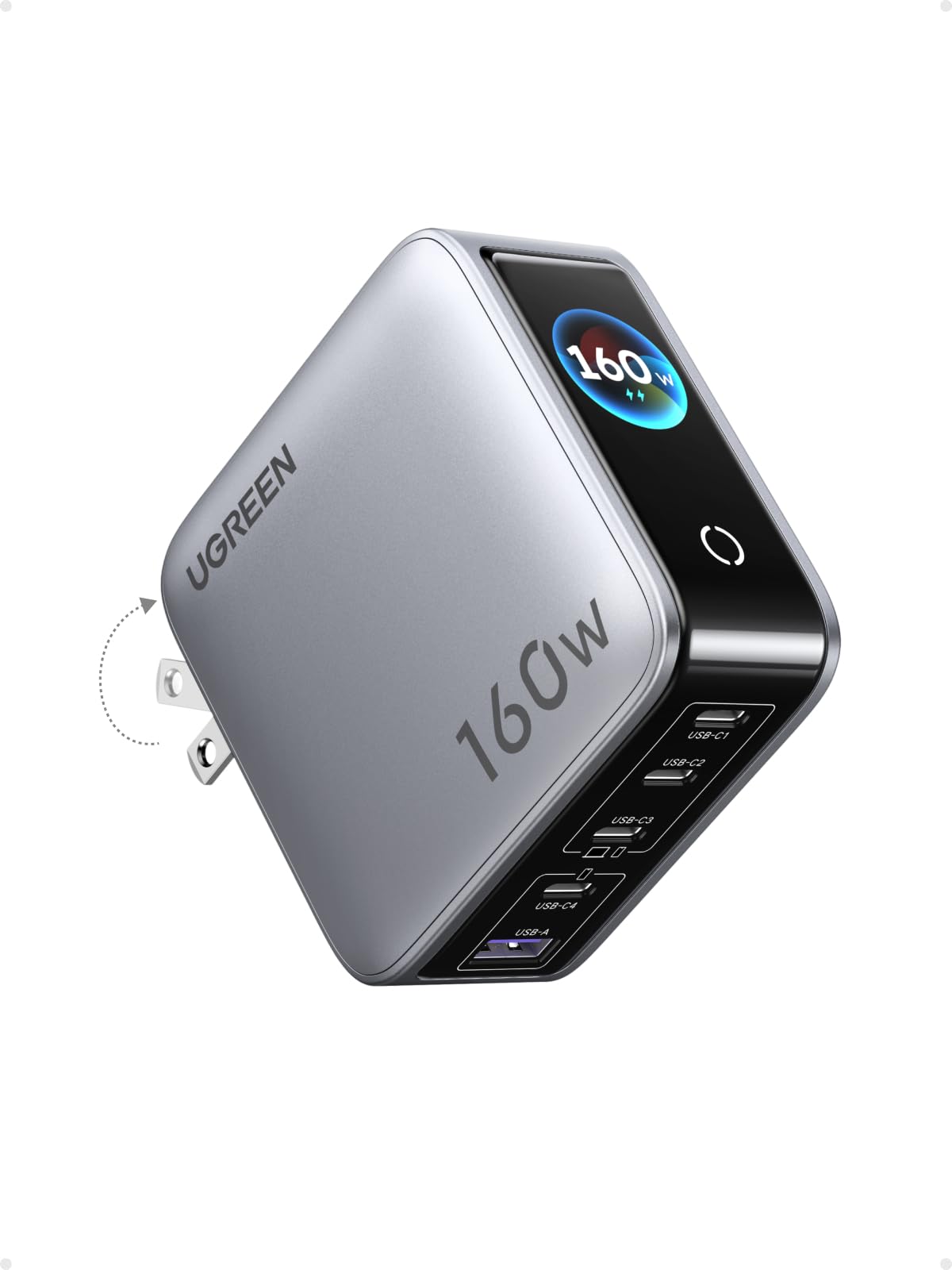
UGREEN Nexode Pro 160W

91 /100
LBD Score Outstanding

Key details

Ports
4 USB-C, 1 USB-A
Display
Rotatable touchscreen
Total Output
160W
Single-port Max
140W
View on Amazon

One hundred and forty watts from a single port is the figure that separates this from everything else here. That's what a 16-inch MacBook Pro asks for, and it's the reason to spend more than a 100W brick if a big laptop is part of your day. Around that port UGREEN built a five-port charger: four USB-C, one USB-A, with automatic allocation that moves power where it's needed.

The appeal is how little thinking it takes. Two laptops, a tablet, a phone, and a watch cable all live on one brick, and the rotatable display shows the total going out, so you can tell at a glance when a laptop has finished. On a shared desk or a home office with a work machine and a personal one, that's a tidier arrangement than two 65W blocks and a power strip.

The plug folds, so it travels, but this is a desk charger first — five ports and 160W put it in a different class of object from a pocket brick. It gets warm when it's working hard, and having the display tell you so is more useful than pretending otherwise.

Pros

  • 140W to a single port for large laptops
  • Four USB-C ports plus one USB-A
  • Rotatable display shows total output
  • Foldable plug for travel

Cons

  • Priciest pick, and 160W is more than most bags need
Our verdict

Our pick for a desk with two laptops on it: 140W to a single port, five ports in total, and a display that shows the total going out.

Check Latest Price
5

Shared Desk Station

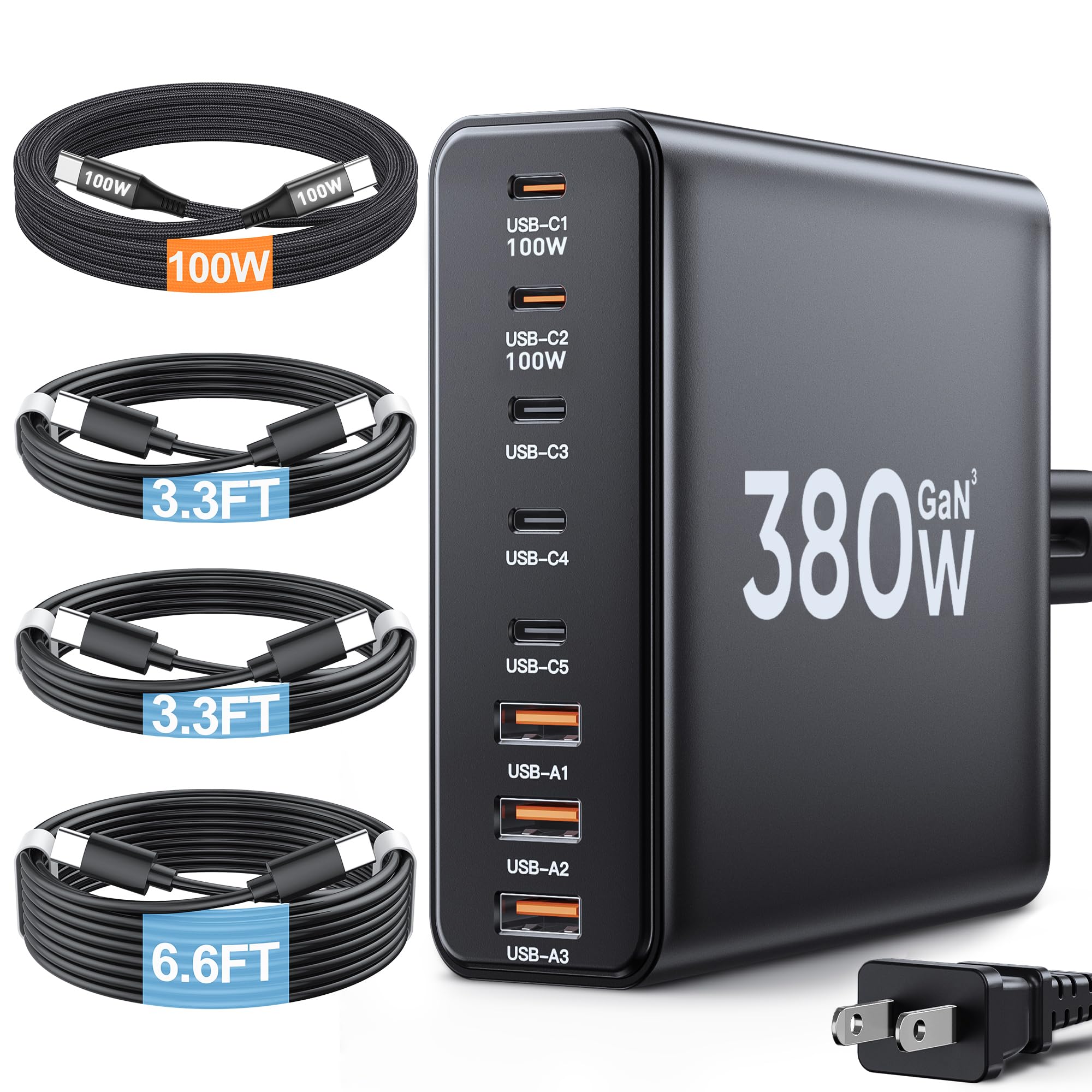
Ediliow 380W 8-Port

88 /100
LBD Score Excellent

Key details

Ports
5 USB-C, 3 USB-A
Total Output
380W
Included Cables
Four USB-C cables
Single-port Max
100W
View on Amazon

Eight ports and four cables in the box is the pitch, and it's a good one: two USB-C ports at 100W each, three more USB-C and three USB-A at 30W, and a five-foot cord so the block sits on a desk instead of hanging off the wall.

As a household station it makes a lot of sense. Everyone's phone, tablet, earbuds, and a laptop or two plug into the same place, the cables are already attached, and the unit is small enough to tuck behind a monitor or strap to a desk leg. Two 100W ports cover a MacBook Pro and a work laptop at the same time, which is more than most desks actually need.

Longevity is where we hesitate. The units that go wrong tend to go wrong inside the first year, and for something that sits plugged in moving this much power, that's the number that matters. The two-year warranty is the mitigation, and it's why this stays in the guide as a desk station rather than climbing higher.

Pros

  • Eight ports, two of them at 100W
  • Four USB-C cables and a power cord included
  • Compact enough to hide behind a monitor

Cons

  • Needs desk space and a free outlet for its cord
Our verdict

We recommend this as a desk station for a house full of devices: eight ports, two of them at 100W, cables included, and a two-year warranty covering the durability question.

Check Latest Price
6

Two-Room Charging

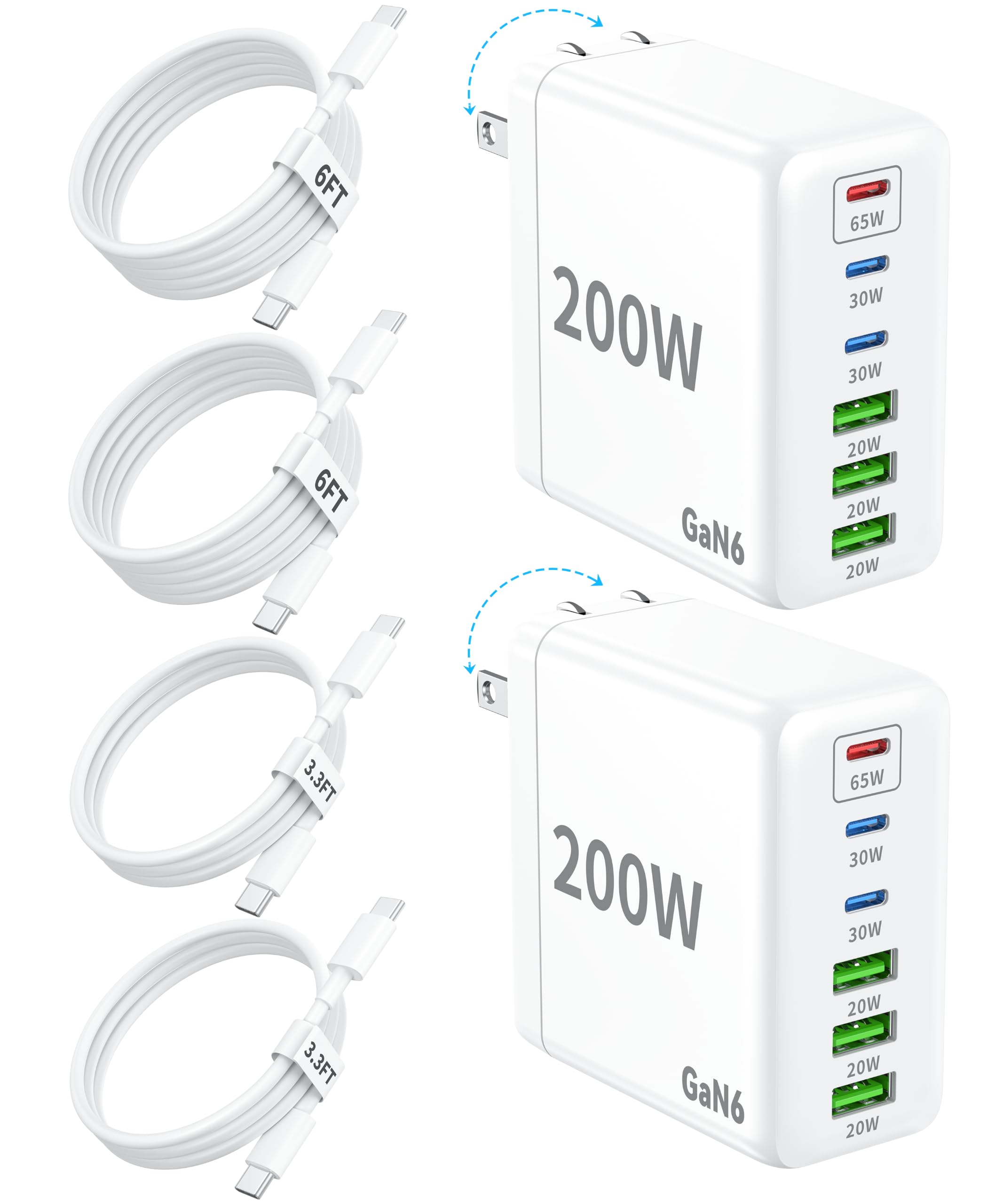
Dimiway 2-Pack 6-Port

87 /100
LBD Score Excellent

Key details

Pack
Two chargers
Plug
Foldable prongs
Ports
3 USB-C, 3 USB-A
Single-port Max
65W
View on Amazon

Two six-port chargers for roughly the price of one mid-size brick is the whole argument, and it's a decent one if your problem is outlets in two places rather than power in one. Each unit carries one 65W USB-C port, two 30W USB-C ports, three 15W USB-A ports, and a foldable plug.

The split makes sense for a family: phones and earbuds on the 30W and 15W ports, a thin laptop on the 65W one. One charger by the sofa and one in a travel bag covers a lot of ground, and the foldable plug means neither takes up much room when it isn't in use.

What you give up is speed at the top. Only one of the six ports reaches 65W, so a laptop plus a tablet plus a phone spreads thin, and the USB-A ports are for overnight topping up rather than quick hits. As a pair of chargers for the rooms where phones and tablets pile up, with a laptop on the side, the math still works.

Pros

  • Two six-port chargers for about one brick's price
  • 65W USB-C port for a thin laptop
  • Foldable plugs on both units

Cons

  • Port failures within weeks are the risk here
Our verdict

We like the two-pack math — six ports in each, one for each room — as long as you treat them as second chargers rather than the one your work laptop depends on.

Check Latest Price

How We Tested the Best GaN Chargers

We started with every GaN charger we could find from brands we'd already lived with and a few we hadn't, then filtered on the things that change how a charger actually gets used: how many USB-C ports it has, whether the prongs fold flat, how the claimed wattage divides when several devices are plugged in, and whether the price made sense for the power. That left 14 chargers, which we rotated through eight months of ordinary charging — laptops on deadline nights, phones overnight on a nightstand, a tablet and a watch on weekend trips.

Each charger went on a USB-C power meter. We drained a laptop and a phone, then logged the wattage at five, twenty, and forty-five minutes to see whether it held or tapered as the battery filled. Then we loaded every port at once and watched what each device was actually receiving, and whether plugging in a second device knocked the first one down a tier.

Heat got its own pass. We took a surface temperature reading after half an hour at full load, then picked the charger up to judge whether it was comfortable to hold or needed to be moved off a cushion. For the ones with a screen, we held the displayed number against the meter to see if it told the truth. We also dropped each one from desk height onto hardwood, folded and unfolded the prongs a few dozen times, and pulled cables out at an angle to see if the ports loosened.

Finally, we weighed each charger on a kitchen scale and carried it in a jacket pocket and a tote bag to see whether the size was genuinely pocketable or just marketed that way. The picks below are the ones that stayed cool, held their output, and survived being hauled around.

How to Choose a Gan Charger

Size It to Your Biggest Device

A 65W charger is the right match for a MacBook Air, a Dell XPS 13, or any ultraportable, and it will top up a phone and earbuds from the same brick. If the laptop is a 16-inch MacBook Pro or a gaming machine, look at 100W and above, ideally with one port that can deliver that figure on its own. A phone-only carry needs 30W at most. Buying for the hungriest device you own is the whole calculation; everything beyond that is spare capacity you'll pay for in size and weight.

Read How the Watts Split

Total output is shared. Plug a laptop and two phones into a 65W three-port charger and each device gets a fraction of it, which is fine overnight and frustrating when the laptop needs to be full in an hour. Two designs ease the squeeze: a 100W charger that puts full power on either USB-C port, or a 160W unit with enough headroom that the laptop's share stays generous with other devices connected. Count what you charge at the same time, then buy the total that leaves your laptop its share.

Carry Size and the Plug

GaN shrank the brick, and a 65W charger now fits in an earbuds case. Two details decide whether it's pleasant to carry: foldable prongs, which keep the plug from snagging a bag lining, and the shape of the body. A long, narrow charger can hang loose in a worn outlet and droop out of contact, while a wider one grips better. If your outlets are old, plan on a power strip or a short extension rather than fighting gravity every night.

Expect Heat, and Give It Air

Pushing 65W or more through something the size of a matchbox makes heat; that's the trade for the size, not a fault. What separates a good charger is behavior under load: it holds its output and gets warm, while a struggling one throttles back to a lower wattage partway through a laptop charge. Keep any charger out of bedding and closed bags while it's working. A display that reports internal temperature is useful information, not a warning light.

Wall Block or Corded Station

If everything charges in one place — a desk, a hallway shelf, a kitchen counter — a corded station with six or eight ports is tidier than a row of blocks, and the cables stay plugged in where you need them. If charging happens in different rooms, one 65W block in a bag does more for you than a station ever will. The station is furniture; the block is luggage.

Frequently Asked Questions

Final Verdict

Buy for the biggest device in your bag and the rest follows. Our pick for most people is the Anker 735: 65W, three ports, and a body small enough to forget, from the most proven design here. If a 16-inch laptop or two machines at one desk are part of your day, step up to the UGREEN Nexode Pro 160W and its 140W port. And if budget decides it, the UGREEN Nexode 65W does the same job for less.