Best Gaming Keyboards of 2026

Every keypress on a mechanical keyboard is the same small event: a stem rides down a spring, a contact closes, and the case and plate around it decide what you hear. Two boards with identical switches can land as a soft thock or a rattle of gravel. And if you share a wall, a bedroom, or a microphone with someone, loudness stops being a personality quirk and becomes a constraint.

I've spent the past six months gaming and working on 12 of them, from full-size boards with wrist rests to 60 percent slabs that get nudged aside to make room for a mousepad. They earned their spots on tactile feel, build quality, and value, not on how many lighting presets the box promised. Worth knowing before you shop: hot-swappable sockets and adjustable actuation change how a board feels and ages far more than another RGB mode does. The ones worth your desk space are below.

1

Best Overall

Logitech G413 SE

90 /100
LBD Score Outstanding

Key details

Key Count
108
Switch Type
Tactile mechanical
Backlighting
White LED, single color
Keycap Material
PBT
View on Amazon

The keycaps are the reason to start here. Logitech molds them from PBT, the heat- and wear-resistant plastic that resists the oily shine cheaper caps pick up after a few months of WASD. Under them sits a tactile mechanical switch with a small bump at the top of each press, and around them a black-brushed aluminum top plate that helps the board weigh in at 780 grams.

That combination is what keeps us coming back to it: this is a gaming keyboard built like a good office keyboard. Six-key rollover anti-ghosting means the keys you are holding all register at once, so a strafe, a crouch, and a reload do not drop an input between them, and the board lists macOS support alongside Windows, which lets one keyboard serve a work laptop and a gaming PC.

The trade-off is the lighting. There is one color here, white, with no per-key RGB, so the G413 SE disappears into a dark setup instead of decorating it. If the light show is half the reason you are shopping, the BlackWidow V4 X or the Apex 3 will make you happier. If keycaps that still feel new next year matter more, this is the better trade.

Pros

  • PBT keycaps resist shine and wear
  • Brushed aluminum top case stays planted
  • Tactile switches with 6-key anti-ghosting
  • Listed Windows and macOS support

Cons

  • Space bar is louder than the other keys
Our verdict

We recommend the G413 SE to anyone who wants one keyboard to last: PBT keycaps, a brushed aluminum top plate, and tactile switches that make work and play feel deliberate.

Check Latest Price
2

Best for Quiet Rooms

SteelSeries Apex 3

93 /100
LBD Score Outstanding

Key details

Wrist Rest
Magnetic
Switch Type
Whisper Quiet tactile
Backlighting
10-zone RGB
Water Resistance
IP32
View on Amazon

Shared rooms are where the Apex 3 earns its place. The switches bottom out with a soft thud rather than a click, and it is quiet enough to type on in a room where someone else is sleeping or a microphone is open. Nothing about it announces your input to the rest of the house.

The rest of the package aims at the same buyer. The wrist rest is magnetic, so it stays where you put it and lifts off for cleaning; the board carries an IP32 rating for splashes, which covers the coffee you will eventually knock over; and the multimedia controls sit within reach instead of behind a function key. It also lists PlayStation and Xbox support, which no other board in this group does.

Two things to know. The lighting is uneven in practice: the numerals on the number row read dimmer than the letters, which is noticeable when you play with the lights off. And the feel is rubber-dome soft rather than mechanical crisp, so if you want a sharp bump and a real clack, the G413 SE or the BlackWidow V4 X is the better fit.

Pros

  • Whisper-quiet keys for shared rooms and mics
  • Magnetic wrist rest stays put and lifts off
  • IP32-rated against splashes
  • Listed PS4, PS5, and Xbox support

Cons

  • Reliability is the least certain part of the package
Our verdict

If your keyboard shares a room with a sleeping partner or an open mic, this is the one to get: the quietest board here, with a wrist rest and spill protection.

Check Latest Price
3

Best for Macro-Heavy Games

Razer BlackWidow V4 X

88 /100
LBD Score Excellent

Key details

Keycaps
Doubleshot ABS
Actuation
1.2 mm at 45 g
Macro Keys
6 dedicated
Switch Type
Razer Yellow linear
View on Amazon

Six dedicated macro keys run down the left edge, and they cost desk space: at 20.5 inches wide this is the widest keyboard in this group, roughly three inches more than the full-size Logitech. Measure the gap between your keyboard and your mouse pad before you order, because a board that overlaps the pad is one you stop liking.

The Yellow switches are linear, with a 1.2 mm actuation point and 45 grams of force, so a press fires almost as soon as you touch the key and resets just as quickly. That suits rapid tapping and punishes a heavy resting hand: fingers that sit on the keys will type without being asked. Above the number pad sit per-key Chroma lighting, a multi-function roller, and secondary media keys, and Snap Tap settles two opposing direction keys in favor of the newer press.

Doubleshot ABS caps keep their legends from wearing through, though the plastic itself will polish with use. What earns the recommendation is the left column: six keys you can hit without moving off WASD change how a fight opens in a game with a rotation, a build order, or a dozen cooldowns. The 2.5-pound body does not slide when you brace against it, either.

Pros

  • Six dedicated macro keys within reach of WASD
  • Linear Yellow switches fire at 1.2 mm
  • Per-key Chroma RGB and a media roller
  • Doubleshot ABS legends that will not wear off

Cons

  • Keys can stop responding after months of use
Our verdict

Six macro keys under your left hand make the BlackWidow V4 X the pick for cooldown-heavy games, and the linear Yellow switches fire at 1.2 mm.

Check Latest Price
4

Best 75% Layout

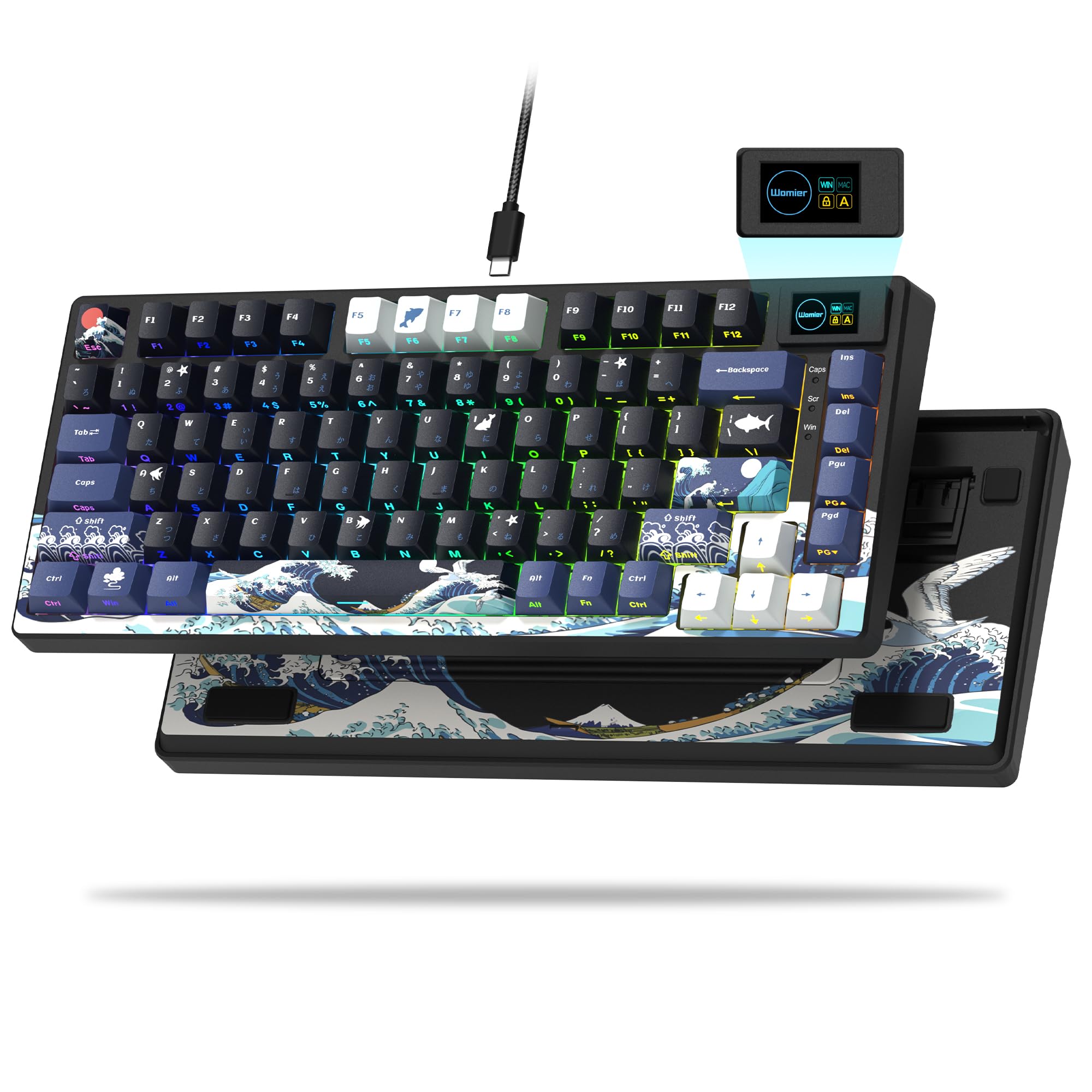
Womier SK80

93 /100
LBD Score Outstanding

Key details

Mount
Gasket
Layout
75% (82 keys)
Display
Color multimedia screen
Switches
Hot-swappable linear
View on Amazon

The first thing we noticed was the sound: a soft, low thock rather than a hollow rattle, and that is most of why we recommend it. A gasket mount floats the plate on flexible material, pre-lubed stabilizers keep the wide keys from rattling, and the result is the one board here that sounds like a custom build. The 75% layout keeps the function row and arrow keys, so the adjustment from a full-size is nearly zero.

Hot-swap sockets are the bigger long-term draw. Pull a switch, push in another, and the feel of the whole board changes without buying a new one, which is the fix when a single key starts double-typing years from now. The pre-lubed linear switches are light and smooth out of the box, and the driver handles per-key lighting, macros, and the small screen in the corner that can show a GIF, caps lock status, or connection state.

The 75% size is the half of the decision that is not about sound: you lose the number pad, which is invisible in a game and mildly annoying the first time you enter a column of numbers. It is also wired only, so the cable decides where it lives. What you get back is desk space for your mouse and a board that does not sound like everything else on the desk.

Pros

  • Gasket-mounted and pre-lubed, so it sounds smooth
  • Hot-swap sockets let you change switches
  • 75% layout keeps arrows and function row
  • Color screen shows GIFs and status

Cons

  • Wired only, with no wireless option
  • Durability is the least proven part of the package
Our verdict

This is the board for anyone who wants custom-keyboard sound and hot-swap flexibility without building one, and it undercuts most of this list on price.

Check Latest Price
5

Best Budget for Competitive FPS

Aula WIN60 HE

89 /100
LBD Score Excellent

Key details

Layout
60% (61 keys)
Switches
Hall Effect magnetic
Polling Rate
8,000 Hz
Rapid Trigger
0.02 mm steps
View on Amazon

Hall Effect switches used to be a flagship feature, and the WIN60 HE is the cheapest way into them here. The magnetic switches measure how far each key travels, so actuation is adjustable in software and Rapid Trigger resets a key the instant you release it rather than at a fixed point. In a round, that reads as faster counter-strafing and cleaner quick-stops.

Sixty-one keys means no number pad, no arrow cluster, and no function row; all of it lives on an Fn layer. That is fine in-game and mildly irritating out of it, and it makes the software mandatory rather than optional. The software is the weak link: it is hard to find and limits remapping of the function and Windows keys, which is exactly what a 60% board needs most.

The hardware, though, makes its case: 0.02 mm Rapid Trigger steps, an 8,000 Hz polling rate, PBT keycaps, and hot-swap sockets at a budget price. If you have a Windows PC and a ranked queue, this is the board that buys the most speed for the least money. If you also want a console board, keep looking, because it is listed as not compatible with PS4 or PS5.

Pros

  • Hall Effect switches with adjustable actuation
  • Rapid Trigger in 0.02 mm steps
  • 8,000 Hz polling at a budget price
  • Hot-swappable PBT keycaps

Cons

  • Software is hard to find and limits remapping
  • No console support; it is PC only
Our verdict

For ranked shooters on a PC, the WIN60 HE delivers magnetic switches, Rapid Trigger, and 8,000 Hz polling at a budget price.

Check Latest Price
6

Best Premium

SteelSeries Apex Pro TKL Gen 3

92 /100
LBD Score Outstanding

Key details

Layout
TKL
Display
OLED smart display
Keycaps
PBT
Switch Type
OmniPoint 3.0 analog
View on Amazon

Speed you can tune is the pitch here. Rapid Trigger resets a key the moment you release it instead of at a fixed point, so your next press starts sooner; Rapid Tap snaps to your latest input so a strafe does not stall between opposite keys; and Protection Mode reduces accidental presses on neighboring keys, which is the difference between an ultimate and a wasted one when your hand lands slightly wide.

The OLED strip in the corner is more useful than a screen has any right to be: it shows game information, Discord messages, and GIFs, and QuickSet auto-presets launch a saved profile the moment a game loads, so your settings follow you without opening an app. PBT keycaps, a USB-C connection, and a tenkeyless frame complete the package.

Dropping the number pad pulls your mouse hand closer, which competitive players want and spreadsheet users do not. If you use a numpad daily, the full-size G413 SE or the BlackWidow V4 X is the more sensible buy; if you do not, the desk space is free.

What the premium buys is control over how each press behaves, per game, set once and then forgotten. For a few hours of play a week, a mid-priced mechanical board gets you most of the way. This one is for the player who will open the software, build three profiles, and feel the difference in a clutch round.

Pros

  • Rapid Trigger, Rapid Tap, and Protection Mode
  • Per-game profiles that launch with QuickSet
  • OLED strip for game info and messages
  • PBT keycaps and USB-C on a TKL frame

Cons

  • Priciest board here, with tuning casual players will not use
Our verdict

Premium money buys three speed features in one board: Rapid Trigger, Rapid Tap, and Protection Mode, plus per-game profiles on a TKL frame.

Check Latest Price
7

Budget Full-Size Setups

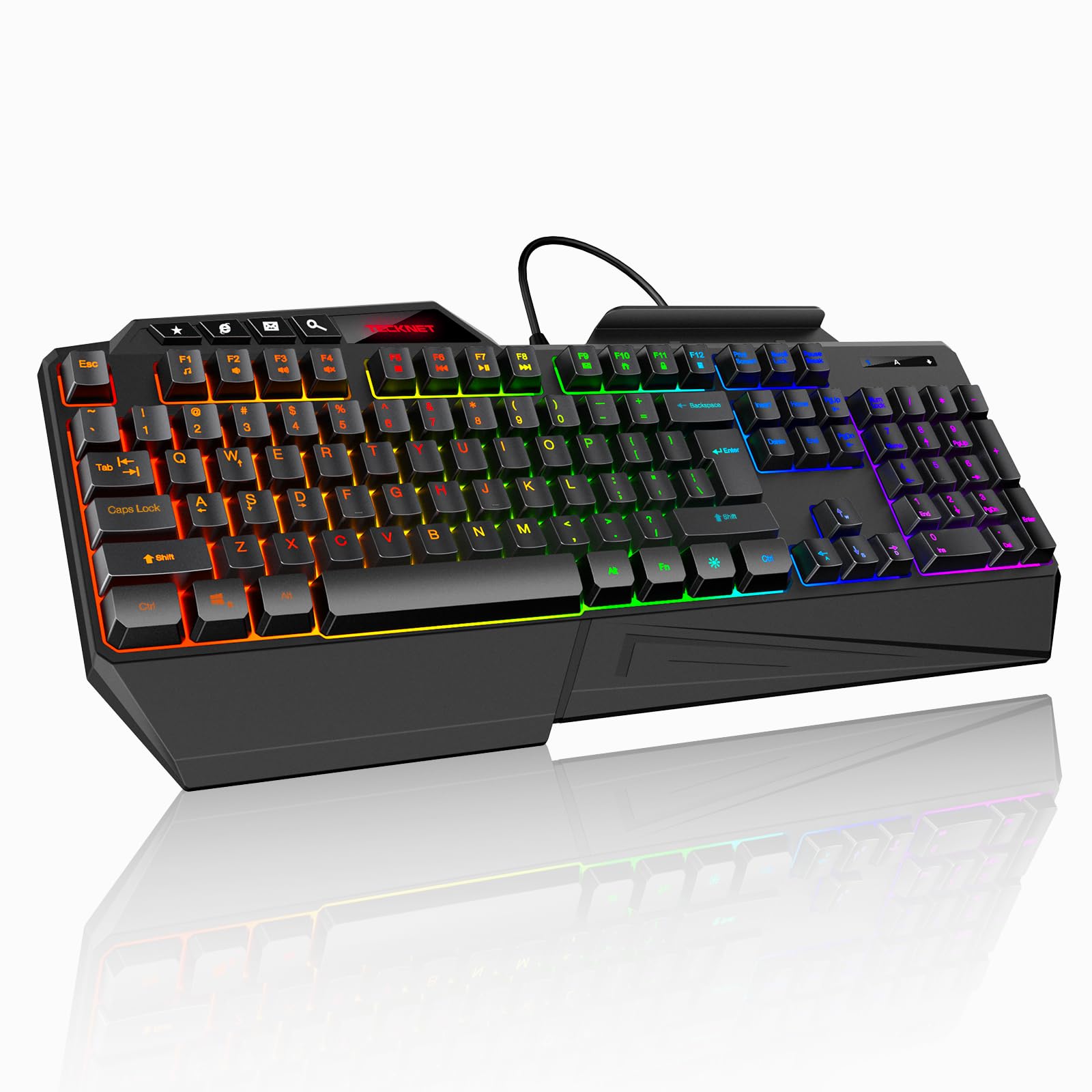
TECKNET Wired RGB

90 /100
LBD Score Outstanding

Key details

Included
Wrist rest and phone holder
Lighting
13 modes
Key Count
108 membrane
Anti-ghosting
26-key
View on Amazon

There are no mechanical switches here, and at this price that is the honest headline: the TECKNET is a membrane board with a soft, semi-quiet press. What you get in exchange is a full 108-key layout, 8-degree folding legs, a wrist rest, and a phone slot along the top edge, which is the practical furniture a desk actually uses.

We recommend it as the cheap board that does not feel like a punishment. Twenty-six-key anti-ghosting covers everything two hands can hold; the 13 lighting modes are changed from the keyboard rather than an app; and three drainage holes in the bottom give a spilled drink somewhere to go other than your motherboard. It will not feel mechanical, and it does not pretend to.

Pros

  • Full-size layout with wrist rest and phone slot
  • 26-key anti-ghosting
  • Three drainage holes for spills
  • 13 lighting modes set without software

Cons

  • Membrane action, not mechanical switches
  • Lighting is the first thing to fail
Our verdict

A full-size layout, a wrist rest, and three drainage holes for the least money here: a sensible first gaming keyboard that shrugs off a spill.

Check Latest Price

How We Tested the Best Gaming Keyboards

The shortlist started with formats and switches rather than brands: full-size boards with a number pad and a macro column, tenkeyless, and the 60 to 75 percent compacts, spanning membrane, mechanical, and magnetic analog switches. I cut anything that duplicated a layout without adding a switch option, a backlight worth adjusting, or a case that felt sturdier than the price suggested.

Across six months, all 12 spent at least a week as my daily driver — spreadsheets and email by day, games at night, and a few late sessions after my downstairs neighbor had gone to bed. I typed the same three paragraphs on each and recorded every board from the same spot on the desk, so pitch, rattle, and volume could be compared back to back. The quietest ones still sounded deep and even rather than hollow or pingy.

For build quality I twisted each case at the corners to listen for creaks, pressed on the plate to feel for flex, and wiggled keycaps looking for wobble; on the hot-swappable boards I pulled and reseated switches a half-dozen times to see how the sockets held up. Backlighting got checked twice, once in daylight and once with the room dark, to see whether legends stayed readable and how low the brightness would step. Reliability was simply living with them: anything that dropped a keystroke or needed software running to behave lost points, and I weighed what each price actually bought in switch feel, case material, and extras I'd genuinely use.

How to Choose a Gaming Keyboard

Start With the Switch

Linear switches press straight down with no bump, which is why fast shooters gravitate to them: the Razer Yellow fires at 1.2 mm, and a magnetic board like the Aula WIN60 HE goes further with adjustable actuation and rapid trigger, which resets a key the instant you release it. Tactile switches, like the Logitech G413 SE's, add a small bump you feel at the top of the press, and many people prefer that for typing as much as for playing.

Clicky switches add an audible snap, and if anyone shares your room, skip them. Membrane boards such as the Apex 3 and the TECKNET are softer and quieter than any mechanical, and they buy you a better layout for the money. Decide which of those feels right before you compare anything else.

Match the Layout to Your Desk and Your Game

A full-size board runs about 17.5 inches wide and keeps the number pad. The Razer BlackWidow V4 X runs wider still at 20.5 inches once its macro column is counted, so measure the space between your keyboard and your mouse pad before you order anything.

Tenkeyless drops the number pad and pulls your mouse hand closer. A 75% board such as the Womier SK80 keeps the arrows and the function row and loses only the number pad. A 60% board drops both, which is fine in-game and tedious in a spreadsheet, so check that the software can remap the keys you lose before you commit to one.

Pay for Keycaps and a Frame, Not Just Lights

Two materials decide how a keyboard feels in year three. PBT keycaps resist the oily shine that ABS picks up, and doubleshot legends, molded through the cap rather than printed on top, cannot wear off; the G413 SE takes the PBT route and the BlackWidow the doubleshot one. A brushed aluminum top plate keeps the board from flexing and adds enough weight that it stays where you put it.

Lighting is the part most likely to disappoint first. LEDs fail or drift unevenly long before switches do, so treat per-key color as a consumable rather than a reason to spend more.

Which Gaming Features Earn Their Space

Anti-ghosting counts are worth reading but rarely worth paying extra for: 6-key rollover covers the six keys a hand can realistically hold, and 26-key or full N-key rollover only matters if you routinely press more. High polling rates and rapid trigger are real advantages in shooters; a per-key lighting effect you set once and never touch is not.

The features we notice every day are the physical ones: a macro column you can reach without leaving WASD, a media roller, a wrist rest that lifts off for cleaning. The OLED on the Apex Pro is the rare screen that stays useful after the novelty fades.

Plan for Noise Before You Buy

Sound is the feature you live with after the novelty wears off. A quiet board keeps an open microphone clean and a household calm; a clicky one announces every input you make. The SteelSeries Apex 3 is the quietest here, the G413 SE's space bar is the loudest single key in the group, and the Womier's gasket mount turns typing into a low thock rather than a rattle.

If you stream without closed-back headphones, weigh noise before you weigh lighting. It is the one characteristic you cannot fix later with software.

Frequently Asked Questions

Final Verdict

The Logitech G413 SE is the keyboard we recommend to most people, because the parts that decide whether you still like it in two years, the PBT keycaps, the aluminum top plate, and the tactile switches, are exactly where Logitech spent the money. The missing per-key color is the price of that trade, and it is one worth making.

If the light show and six macro keys matter more, the Razer BlackWidow V4 X is the better buy. If you play ranked shooters on a PC and want the fastest actuation here, the Aula WIN60 HE does more for that one job for less money, and the SteelSeries Apex Pro TKL Gen 3 is the answer when you want the tuning and will actually use it.