Best Ergonomic Keyboards of 2026

The ache usually shows up midafternoon, a dull catch at the base of the wrist. A different keyboard won't undo years of typing, but its shape changes how your forearms and wrists sit all day: split and wave layouts roll your hands toward a handshake position instead of pinning them flat, which is easier on the wrist.

I rolled my eyes at these for years — they look like a keyboard someone bent over a knee. Then I spent six months typing on a dozen of them, wired and wireless, and the difference showed up in my shoulders before my wrists. The surprise was where the comfort came from: the wrist rest matters more than the split, and a pad that sits too high pushes your palms up and quietly undoes the design.

Two things to know before you shop. Going split costs a few days of speed while your fingers relearn the reach — give it a week. And check the footprint, since these boards are wide; one that crowds out your mouse is just a desk ornament. The picks below all earned the room.

1

Best Overall

Perixx PERIBOARD-512B

89 /100
LBD Score Excellent

Key details

Layout
Split-key, QWERTY
Connection
Wired USB
Dimensions
19.09"L x 9.29"W x 1.73"H
Wrist Support
Built-in wrist rest
View on Amazon

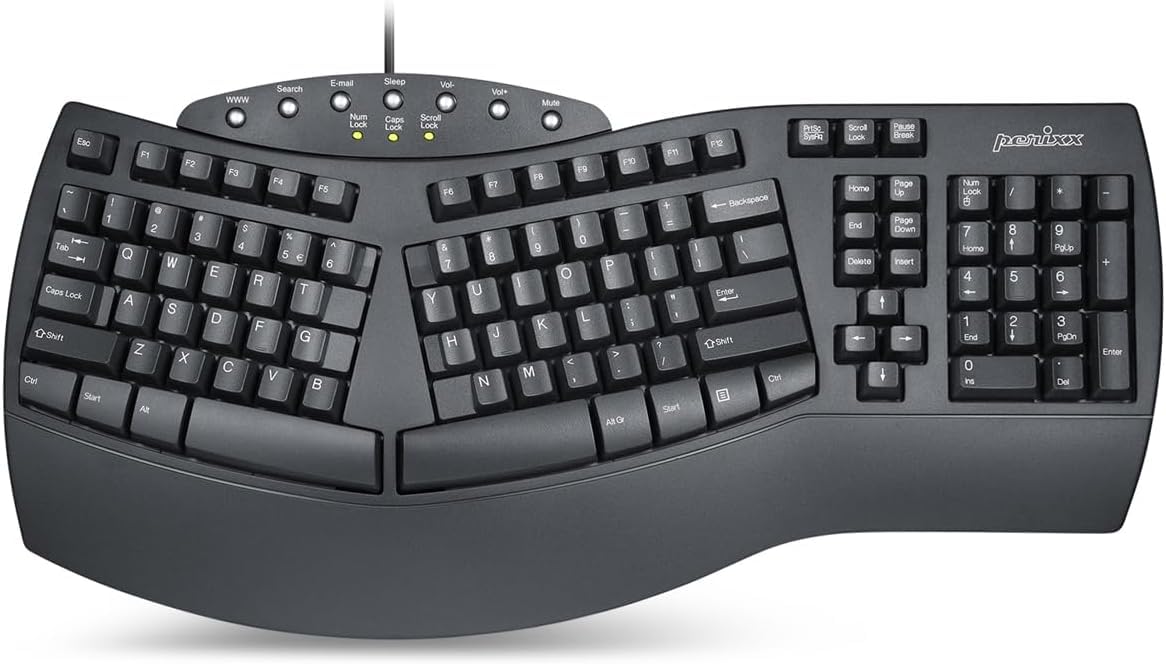
The Perixx PERIBOARD-512B makes its case the moment you set your hands down: the keys split into left and right zones, the rows curve gently, and the built-in wrist rest fills the space where a flat keyboard leaves your palms hovering. That shape is why it is our top pick. It nudges your wrists into a straighter line without asking you to relearn typing from scratch.

We like the weight of it, too. At 2.3 pounds, the board stays planted while you type, and the long key travel gives each press a tactile confirmation that is closer to a good mechanical switch than to the mushy membrane boards we avoid. The tactile bump is noticeable without being heavy, and the keys bottom out with a soft thud rather than a sharp clack. The full-size layout is a real asset for spreadsheets and shortcuts, though the 19.09-inch width takes up desk space.

What kept us coming back to the Perixx is the wrist rest. It is broad enough to support the heel of the hand rather than just brushing it, and it does not collapse under a long session. The split takes a day or two of slower typing before the layout stops feeling like a puzzle, but the payoff is a board that disappears under your hands. The curved keycaps, with flatter tops and a raised back edge, are a small detail that keeps our fingers from sliding off center.

Pros

  • Split layout with broad wrist support
  • Tactile long-travel keys with clear feedback
  • Stays planted during typing
  • Full-size layout with number pad

Cons

  • Wired USB only, no wireless option
  • Audible keystrokes in quiet rooms
Our verdict

We recommend the Perixx PERIBOARD-512B to desk workers who want a proven split layout and a built-in wrist rest without a premium price.

Check Latest Price
2

Best Plug-And-Play Wireless Split

Arteck Split Ergonomic

86 /100
LBD Score Excellent

Key details

Layout
Split
Battery
Rechargeable, 6-month claim
Connection
2.4G USB wireless
Dimensions
16.5"L x 9.6"W x 1.02"H
View on Amazon

The Arteck Split Ergonomic is the split keyboard we point to when the setup needs to be as simple as possible. The nano receiver lives in a compartment on the back, so you plug it in, pull the keyboard out of the box, and start typing. There is no software, no pairing dance, and no Bluetooth menu to negotiate.

We like that the split is gentle rather than radical. The left and right zones angle outward, the wrist rest is soft, and the scissor keys are light and responsive. They are sensitive enough that we had to slow down for the first few minutes; a resting thumb can trigger a keypress. The 2.4G connection is stable in our use, and the rechargeable battery avoids a drawer full of AAAs.

The built-in wrist rest is the detail we appreciated most. It is broad and cushioned, not a token strip, and it makes the split shape feel more natural for long stretches. The rechargeable battery is the practical bonus: one less recurring purchase, and no cable running across the desk. The receiver compartment is a small thing we appreciate, because the dongle does not disappear into a desk drawer the first week.

Pros

  • Plug-and-play 2.4G receiver
  • Soft cushioned wrist rest
  • Rechargeable battery with long runtime
  • Gentle split shape for easy transition

Cons

  • No Bluetooth, so one computer at a time
  • Fixed wrist rest cannot be removed
Our verdict

We suggest the Arteck split to anyone who wants an easy, plug-and-play wireless ergonomic keyboard and does not need Bluetooth device switching.

Check Latest Price
3

Best Adjustable Budget Split

TECKNET Wireless Ergonomic

84 /100
LBD Score Excellent

Key details

Tilt
0°, 1.2°, 3°, and 6.2°
Layout
Split
Battery
500mAh rechargeable
Connection
Bluetooth 5.0 and 2.4G
View on Amazon

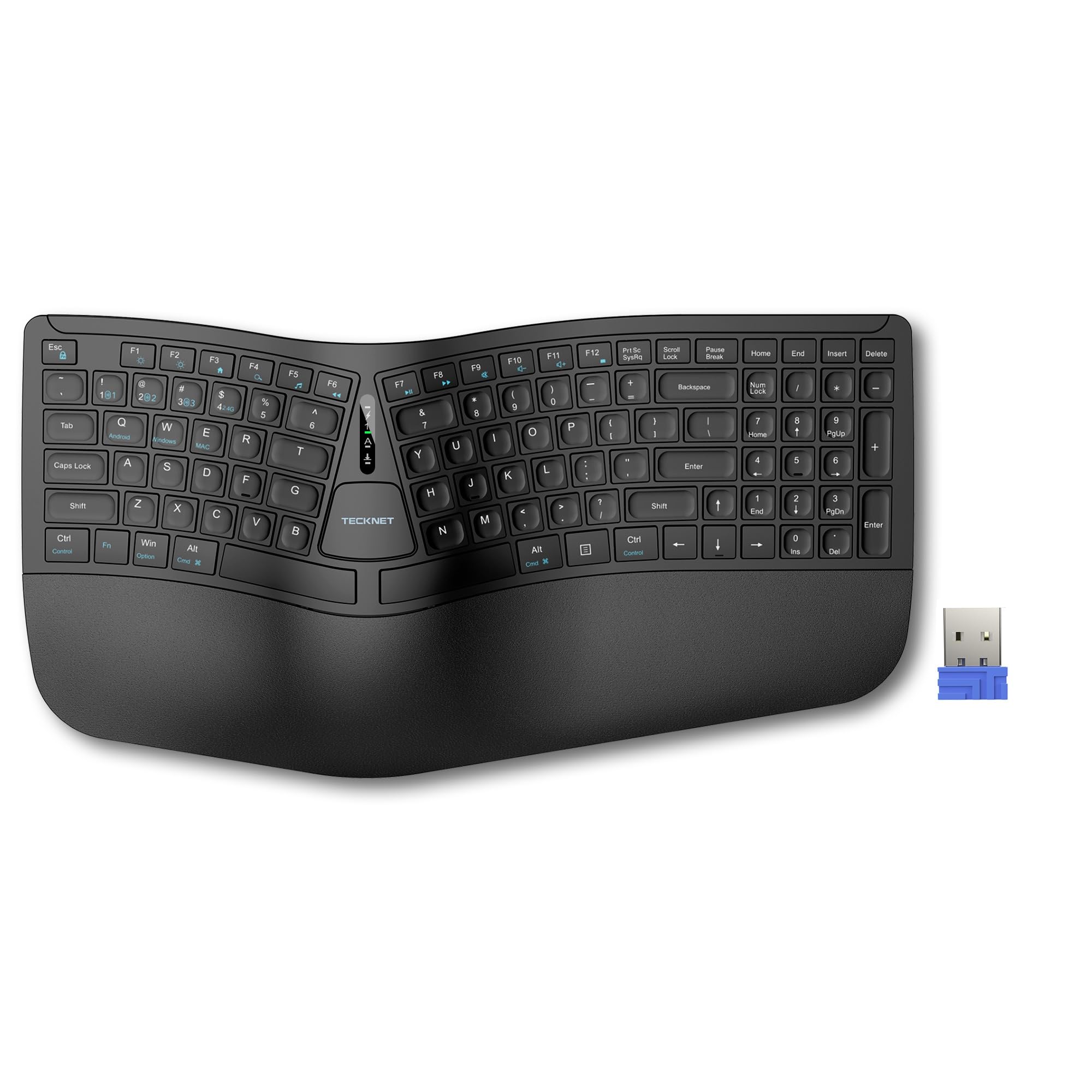
The TECKNET Wireless Ergonomic Keyboard gives you more ways to set the angle than anything else in this group. The feet click into four positions from flat to a 6.2-degree rise, so you can match the board to a low desk, a standing setup, or a lap desk without stacking books under it.

We appreciate that flexibility because ergonomic comfort is often a matter of a few degrees. The split layout and memory-foam wrist rest put your hands in a relaxed line, and the 500mAh battery charges in about four hours over the included USB cable. Bluetooth 5.0 and the 2.4G dongle cover both a laptop and a desktop, and the board remembers the pairing. The keys are light and quiet, which makes it a good fit for a shared office.

The four-stage tilt is the feature we kept adjusting, and that is a good sign: it is easy to find a position and forget about it. The wrist rest is memory foam rather than hard plastic, a comfort detail that is easy to take for granted until you use a board without it. The TECKNET is not the most substantial keyboard here, but it is the one that lets you fine-tune the angle for the least money.

Pros

  • Four-stage tilt for fine adjustment
  • Bluetooth 5.0 and 2.4G wireless
  • Memory-foam wrist rest adds comfort
  • 500mAh battery charges quickly

Cons

  • Some units quit after a short run
Our verdict

We recommend the TECKNET to budget-minded typists who want a split layout, Bluetooth flexibility, and adjustable tilt in a compact body.

Check Latest Price
4

Multi-Device Split Typing

Nulea Ergonomic Keyboard

87 /100
LBD Score Excellent

Key details

Layout
Split
Battery
200-hour rechargeable
Connection
Bluetooth and 2.4G
Wrist Support
Oversized leatherette rest
View on Amazon

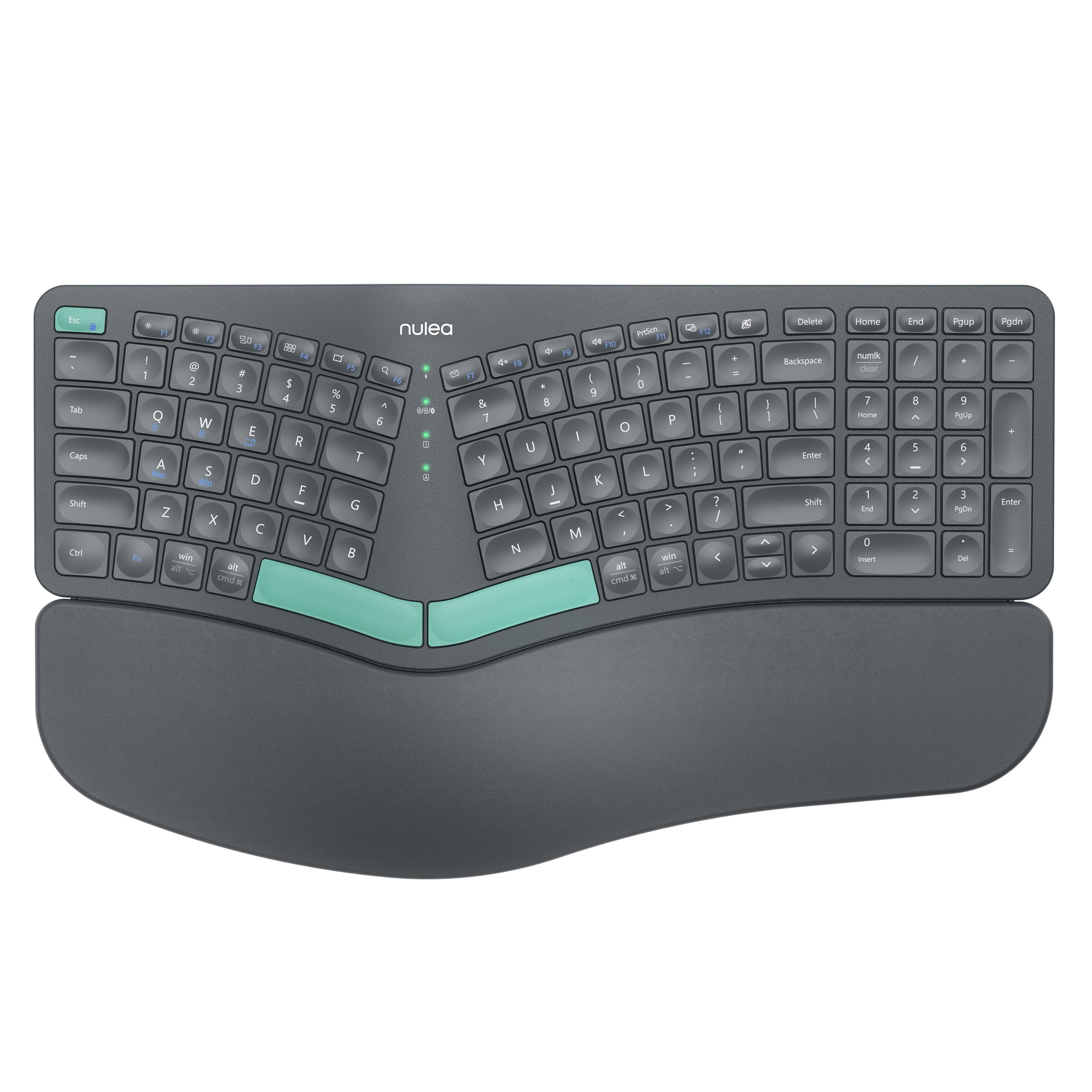
The Nulea Ergonomic Keyboard is the pick for a desk with more than one computer on it. It pairs over Bluetooth or the included 2.4G receiver and remembers three devices, so you can jump from a work laptop to a personal desktop to a tablet without moving a cable.

We noticed the wrist rest first. It is oversized and covered in a soft leatherette, and it gives the heels of your hands more room than the compact rests on most budget splits. The split layout is gentle, the keys are membrane rather than mechanical, and the three tilt angles let you choose a flatter or steeper deck. The 200-hour battery claim is generous; at eight hours a day, it works out to roughly a month between charges, though device switching and sleep settings will change that.

The one thing we cannot yet judge is how the finish and switches hold up after a couple of years. That uncertainty is why we stop short of a stronger recommendation. The feature set is the most modern here: USB-C charging, dual-mode wireless, and a wrist rest that feels more expensive than the rest of the board. The USB-C charging port is the practical detail we kept noticing: one cable for the keyboard and the laptop, with no proprietary brick to lose.

Pros

  • Three-device Bluetooth and 2.4G switching
  • Oversized leatherette wrist rest
  • 200-hour rechargeable battery life
  • Three adjustable tilt angles

Cons

  • Long-term durability is unproven
Our verdict

We like the Nulea for people who move between a laptop, tablet, and desktop and want a split shape with a generous wrist rest.

Check Latest Price
5

Budget Wave Typing

MEETION Wireless Ergonomic

78 /100
LBD Score Very Good

Key details

Power
2 AAA batteries
Layout
Wave, full-size
Connection
2.4G USB-A
Wrist Support
Hard plastic rest
View on Amazon

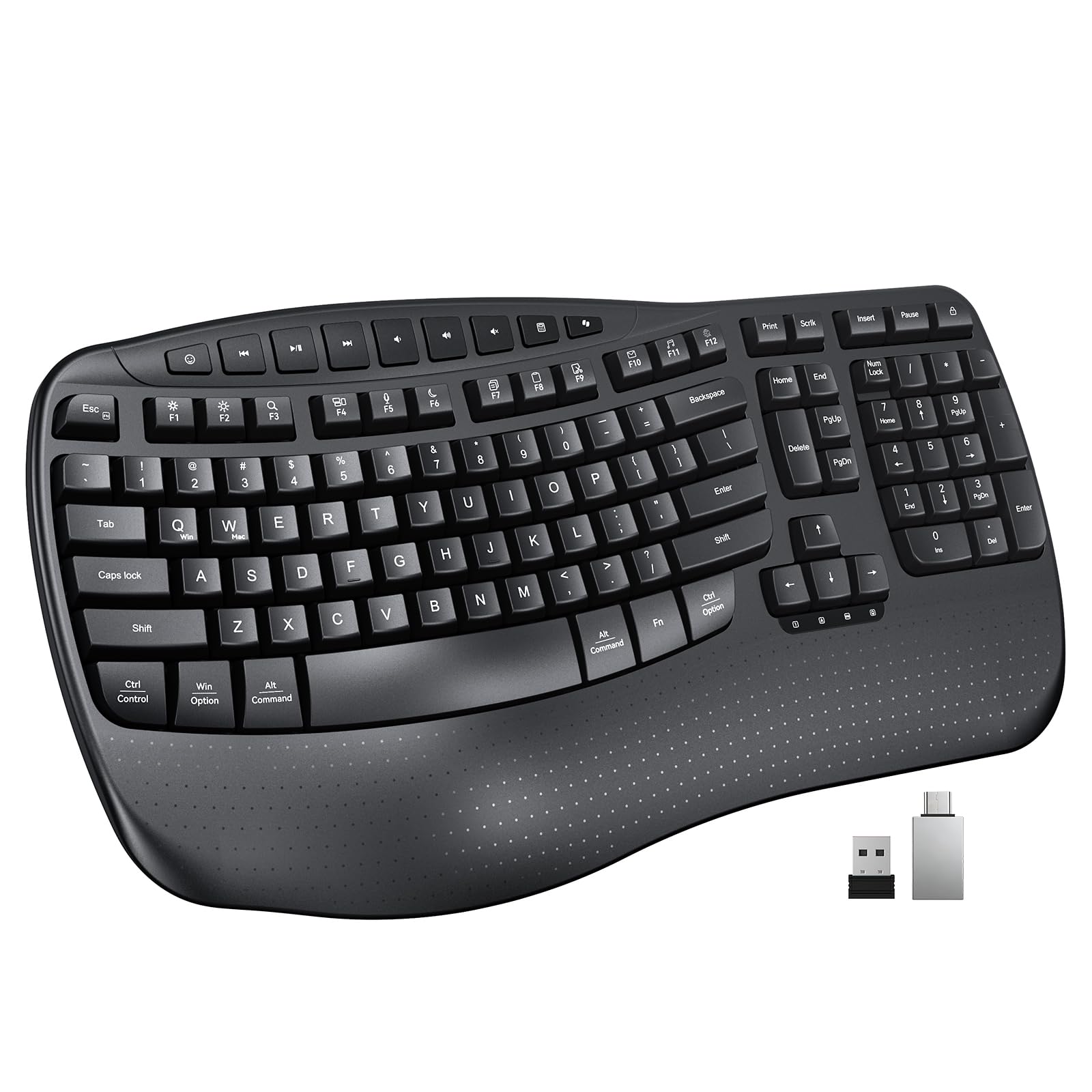
The MEETION Wireless Ergonomic Keyboard is a wave board for someone who is not ready for a split. The keycaps rise and fall in a gentle arc across the rows, so your fingers travel a shorter path, while the layout stays close enough to a standard keyboard that the first day is not a relearning project.

We found the firm plastic wrist rest to be the defining trade-off. It gives your palms a stable ledge and keeps the front of the board from feeling flimsy, but it does not cushion the way the memory-foam rests on the Arteck or Nulea do. The full-size layout is 17.39 inches wide, so it needs a real desk, and the membrane keys are quiet enough for a shared office. The 20-minute auto-sleep is a small but useful power saver.

The MEETION runs on two AAA batteries and uses a 2.4G receiver, with a USB-C adapter in the box for laptops that have dropped USB-A. At the budget end, that is a fair trade: you get the wave shape, a number pad, and a stable connection without paying for features you may not use. The USB-C adapter is a thoughtful extra for a budget board; it means a newer laptop without a USB-A port can still use the receiver.

Pros

  • Wave keys for a gentle transition
  • Full-size layout with number pad
  • Quiet membrane keys for shared offices
  • USB-C adapter included for newer laptops

Cons

  • No Bluetooth, so one device at a time
Our verdict

We see the MEETION as a sensible first wave keyboard for someone curious about ergonomic typing on a tight budget.

Check Latest Price
6

Spill-Prone Wired Desks

RECCAZR Ergonomic Keyboard

84 /100
LBD Score Excellent

Key details

Layout
Wave
Connection
Wired USB
Wrist Support
Built-in wrist rest
Spill Resistance
Water resistant
View on Amazon

The RECCAZR Ergonomic Keyboard is the one we keep on a desk where drinks are allowed. The membrane deck is spill-resistant, with drain holes underneath, so a knocked-over glass has somewhere to go besides the switches. That practical detail matters more than it sounds in a shared kitchen or a home office with a coffee habit.

The rest of the board is deliberately simple. The keys are wave-shaped, the wrist rest is built in, and there is no pairing, no battery, and no wake-up lag. We like the quiet membrane keys for a shared room; they are soft rather than clicky, and the foldable stand gives you a little tilt. The 104-key layout includes a number pad, so it is a full desk board rather than a compact one.

What we do not get is refinement. The plastic body feels basic, and the wrist rest is a ledge rather than a cushion, so it supports without pampering. The RECCAZR earns its place as a wired wave board for a messy desk, not as the most comfortable keyboard here. If you want a softer rest or a wireless setup, the MEETION and Arteck are the better fits.

Pros

  • Spill-resistant deck with drain holes
  • Built-in wrist rest supports the palms
  • Quiet membrane keys for shared rooms
  • Full-size layout with number pad

Cons

  • Wired USB only, no wireless option
Our verdict

We recommend the RECCAZR for a wired desk setup where spills happen and a quiet, simple wave layout is enough.

Check Latest Price

How We Tested a Dozen Ergonomic Keyboards

We started with a long list of ergonomic keyboards and filtered it down by layout (split versus wave), connection type (wired, 2.4 GHz dongle, and Bluetooth), wrist rest material and height, and whether the tilt could be adjusted. Price mattered, but mostly as a tiebreaker — we were after boards that reviewers still called comfortable after months, not days. Twelve made the cut, and each one lived on a desk here for six months: full workdays of email, spreadsheets, and long documents, plus evening sessions at a standing desk and one genuinely cramped home office where the mouse has to sit close.

Every board typed the same 500-word passage so we could compare key feel head to head: crisp or mushy, keys that bottomed out hard, a space bar that rattled. For noise, we typed through video calls and in a shared room and noted who looked up. Wrist comfort got the longest look — we tracked whether palms stayed planted or slid off the front edge, whether a firm pad felt supportive or bruising by hour six, and whether the tilt legs changed the angle our wrists actually held. To judge build quality, we pressed the deck at both corners and checked each key for side-to-side wiggle.

Setup was timed and done without the manual — plugging in a dongle, pairing a second device over Bluetooth, switching between a work laptop and a desktop mid-sentence — and we kept a log of dropped connections, missed keystrokes, and recharge intervals. We traced each footprint on the desk to see what room was left for a mouse, since these boards run wide. And we weighed what each one gave back against what it asked; wired models with excellent keys held their own against wireless boards that wanted a cable every few days.

How to Choose an Ergonomic Keyboard

Start With the Shape, Not the Feature List

A split keyboard separates the left and right hand zones, which is the biggest change you can make to wrist posture. A wave keyboard keeps the familiar single-piece layout but raises and curves the keys, so the adjustment is gentler. We start split-curious typists with a board like the Perixx when they want the full ergonomic effect, and point them to the MEETION or RECCAZR when they want a shorter learning curve. The right choice is the one you will keep using after the novelty wears off.

Wrist Support Is About Position, Not Padding

A wrist rest should support the heel of the hand without pushing your wrist up into an extension. Foam rests, like the ones on the Arteck and TECKNET, feel softer; hard plastic rests, like the MEETION's, are easier to keep clean and give a firmer ledge. Adjustable tilt matters just as much: a few degrees can mean the difference between a flat forearm and a cocked wrist. Set the board so your elbows stay near a right angle and your hands do not reach up or down to type.

Wireless Is Convenient Until You Manage Three Devices

A wired board like the Perixx or RECCAZR is the simplest thing to live with: no charging, no pairing, no sleep delay. A 2.4G receiver, as on the Arteck and MEETION, is nearly as simple and works with one computer. Bluetooth earns its keep when you move between a laptop, desktop, and tablet, which is where the TECKNET and Nulea make sense. Pay for multi-device memory only if you will actually use it; otherwise a receiver is less to troubleshoot.

Measure the Footprint Before You Fall for the Layout

Full-size ergonomic boards are wide. The Perixx is 19.09 inches across and the Arteck is 16.5, so a compact desk can run out of mouse room quickly. If you use a number pad all day, that width buys real speed. If you do not, a smaller board leaves more space for a mouse and a notebook. Tape the width onto your desk before you order, and leave at least a few inches for a mouse.

Key Feel and Durability Decide Whether You Keep Using It

Membrane keyboards are quieter and cheaper; scissor keys are lighter and shorter; long-travel tactile keys give more feedback but can be louder. We prefer quiet membrane keys for shared offices and tactile keys for people who want confirmation with every press. Durability is the bigger long-term question: key legends, wrist rests, and switches are where ergonomic boards tend to age. Buy from a seller with a clear return policy, and test every key in the first week.

Frequently Asked Questions

Final Verdict

The Perixx PERIBOARD-512B is our default because it delivers the core ergonomic change—split keys, a broad wrist rest, and a planted full-size frame—without asking you to manage a battery or a pairing menu. It is the one we point to for a fixed desk and a single computer.

If you need wireless, the Arteck is the simpler plug-and-play split, while the TECKNET adds Bluetooth and four tilt positions for a budget setup. The Nulea is the one to consider when three-device switching matters, as long as you accept a shorter durability record. Start with the Perixx unless one of those specific needs changes the decision.