Best Electronics Kits for Kids of 2026

Electronics kits for kids tend to die the same death: an hour of real excitement, a tangle of wire, and then the box goes on the shelf and stays there. What separates the ones that keep coming back out isn't the project count splashed across the front — it's whether a kid can get through the first build without an adult leaning over their shoulder, and whether the parts come apart cleanly enough to build something else tomorrow. My team and I spent six months building with 14 kits, from snap-together sets for five-year-olds to Arduino-compatible boards with real sensors, and that pattern never broke.

The age range on the box is the least reliable number in the category; a breadboard kit rated 8+ can defeat a patient nine-year-old, while a six-year-old can run a snap-together set alone. Kits that connect to a computer also tend to outlive the rest, because the projects get harder instead of repeating — worth knowing if you're buying a gift for a kid whose shelf is already full. The picks below are grouped by who's actually going to use them, starting with the ones a kid can open alone.

1

Best Overall

Snap Circuits Extreme SC-750

96 /100
LBD Score Outstanding

Key details

Parts
80
Projects
750+
Recommended Age
8 years and up
Computer Interface
Software and PC cable included
View on Amazon

Seven hundred and fifty projects is a marketing number until you open the manual and watch it climb: a lamp and a switch first, then a lie detector, an adjustable light controller, a solar cell, and eventually an AM radio. That spread is why we hand this one to a household rather than a single birthday. It has the highest ceiling of the snap-together kits here, and an 8-year-old and a 12-year-old can work out of the same box on different pages.

The parts list is what makes that possible: 80 pieces including a variable capacitor, an analog meter, a photo resistor and a power amplifier, all clicking onto one grid with no soldering and no tools. The piece we didn't expect to care about is the PC interface. Plug in the cable, install the software, and a kid can watch the waveform behind the buzzer instead of taking the sound on faith. That's the jump from following instructions to seeing what a circuit is doing.

Snapped connections turn out to matter more than they sound. A finished project can be carried across the room to show someone without the wiring coming apart, and it breaks down just as quickly when the next build starts, with no soldering iron and no adult holding a screwdriver. Plenty of kits die in the take-apart phase. This one doesn't.

Where it lands: an 8-year-old can start alone, and a 6-year-old can do the first dozen projects with you reading the steps aloud. Below that the pieces are too small and the pages assume a reader. So if the birthday is for a 5- or 6-year-old, get the Beginner now and keep this one in mind for two years' time. That handoff is worth planning for.

Pros

  • 750+ projects across 80 reusable parts
  • No soldering, no tools, parts click together
  • PC interface and software show live waveforms

Cons

  • Manual shows wiring but explains little theory
Our verdict

If you want one kit that a kid won't exhaust, this is what we recommend: 750 builds, no soldering, and enough parts that there's always another project waiting.
Check Latest Price
2

Best for Learning to Code

ELEGOO UNO R3 Starter Kit

95 /100
LBD Score Outstanding

Key details

Tutorial
PDF download
Controller
UNO R3
Programming
Arduino IDE
Guided Projects
22+
View on Amazon

The first time a kid uploads a few lines of code and an LED blinks on command, the kit stops being a toy. This one is built around that moment. Every project is half wiring on a breadboard and half code in the Arduino IDE, and the lessons are ordered so the two halves arrive together rather than a month apart.

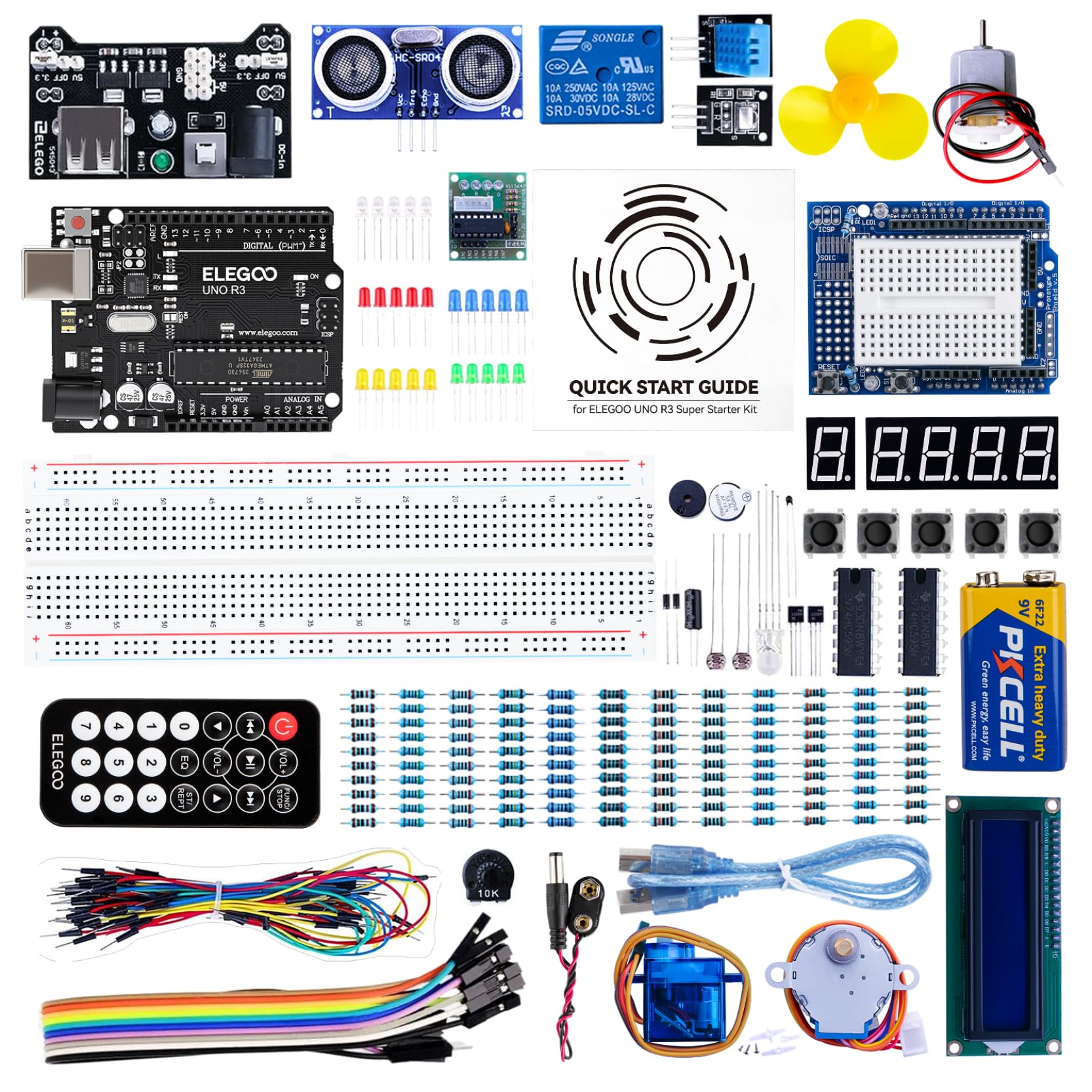
For the money, it's the best-equipped kit here: an UNO R3 board, an LCD1602 with its header already soldered, an ultrasonic sensor, a DHT11, a joystick, an IR receiver, a servo, a stepper motor with its driver, 65 jumper wires and a 120-piece resistor pack, plus 22-plus lessons that actually use them. The pre-soldered LCD is the detail we appreciated most, because a first kit that starts with a soldering iron is a kit that starts with a parent.

The tutorial is where it wobbles. Some lessons spell out every jumper, others assume you already know which breadboard row is which, and the first setup (install the IDE, find the right port, get the board to talk) is where most of the frustration lives. Run the blink sketch before anything else and the rest of the kit opens up. After that first session, a 10-year-old can work it alone.

Pros

  • 22+ lessons covering sensors, motors and displays
  • Pre-soldered LCD and solderless breadboard
  • Teaches real Arduino code, not just wiring
  • Deepest parts box here for the money

Cons

  • Tutorial is a download, not a printed manual
  • Fine breadboard wiring needs steady hands
Our verdict

For a kid ready to type code and watch a circuit obey, this is our pick: 22 lessons, a deep parts box, and a real path into Arduino.

Check Latest Price
3

Best First Kit for Ages 5 to 7

Snap Circuits Beginner SCB-20

94 /100
LBD Score Outstanding

Key details

Manual
Illustrated color manual
Assembly
Snap-together, no tools
Projects
21
Recommended Age
5 to 9 years
View on Amazon

Electronics kits usually fail small kids at the hands rather than the head. The parts are too fine, the diagrams too dense, and the last three steps end up being yours. The Beginner is the version built for that problem: fewer pieces per build, simpler projects, and a manual drawn large enough for a kid who is still sounding out words.

This is the one we hand to a 5-year-old without hesitating. The 21 projects are short enough to finish in one go, the lighted color-changing fan gives the box a payoff worth calling someone over for, and the diagrams are the kind a kid can follow alone once an adult has walked through the first build with them. The age rating and the design finally line up.

The color-changing fan is the project kids come back to, and it's what makes the set feel like a toy instead of a lesson. When the box has been through every build in it, the Science Kidz kit is the natural next step: same snap-together logic, far more projects, still aimed at the under-10 crowd.

Pros

  • Rated for ages 5 to 9
  • Picture-first manual a new reader can follow
  • 21 short projects, one sitting each
  • Color-changing lighted fan is a real payoff

Cons

  • Only 21 projects, so it is outgrown quickly
  • Fan lights and beeper are the delicate parts
Our verdict

The right first kit for a 5- or 6-year-old: pieces that fit small hands, pictures instead of paragraphs, and 21 projects they can finish without you hovering.

Check Latest Price
4

Best Big Project List for Young Kids

Science Kidz 188 Experiments Kit

93 /100
LBD Score Outstanding

Key details

Manual
Illustrated color manual
Assembly
Snap-together, no tools
Projects
188
Recommended Age
5 to 10 years
View on Amazon

One hundred and eighty-eight projects is the longest list you can put in front of a 6-year-old in this guide, and that's the whole reason the kit earns its place. The parts snap together with no tools, the manual is illustrated in color with teaching notes beside each build, and the experiments run from a flying UFO to sound effects and light shows, all inside an age rating that starts at five. For a young kid who works through kits fast, we think it buys more weekends of building than anything else here at that end of the range.

The limit is depth. Everything stays in lights-and-sounds territory, with no code, no sensors and nothing that measures, so a 9- or 10-year-old will hit the ceiling and start eyeing the wired or coding kits. For the 5-to-8 crowd, though, that's a lot of building for the money, and the notes beside each project give a parent something to talk through while the kid snaps.

Pros

  • 188 snap-together projects
  • Rated for ages 5 to 10
  • Illustrated manual with teaching notes
  • No tools, no soldering

Cons

  • Projects stay at lights and sounds, with no code or sensors
Our verdict

For a young kid who finishes kits faster than you can buy them, this is the longest runway here: 188 projects, snap-together parts, and an illustrated manual.

Check Latest Price
5

Best Wired Build

National Geographic 120 Circuit Kit

92 /100
LBD Score Outstanding

Key details

Projects
120+
Connections
Wires snap to components
Instructions
Illustrated plus video
Recommended Age
8 years and up
View on Amazon

Where the Snap Circuits sets link modules on a grid, this kit joins components with wires that snap onto the parts themselves. It looks and feels closer to the inside of a real device, and that's the point of it: a kid who has already built everything a snap grid can do gets a different kind of build, still with no tools and still at age 8 and up.

The 120-plus projects include keyboard mode for playing tunes and a light show, and the instructions come two ways, as an illustrated guide and as video walkthroughs. The video is the safety net for a struggling reader, since following a build on screen doesn't depend on decoding a diagram on paper.

Who it suits: an 8- or 9-year-old who has outgrown snapping but isn't ready to code, and a household that wants the screen to stay off until the kid asks for it. It can't match the flagship's range and it won't teach programming, which is what the ELEGOO is for. As the step between snapped circuits and written code, it's the one we choose.

Pros

  • Wired connections instead of snap modules
  • 120+ projects with music and light shows
  • Illustrated guide plus video instructions
  • No additional tools required

Cons

  • No programming or sensor projects
Our verdict

Ages 8 and up who have outgrown snap modules get a kit that looks like real circuitry, with more than 100 projects and no code to set up.

Check Latest Price
6

Best One-Sitting Project

CYOEST Bluetooth Speaker Kit

90 /100
LBD Score Outstanding

Key details

Builds
Bluetooth speaker
Assembly
No soldering required
Material
Wood
Recommended Age
10 years and up
View on Amazon

The payoff arrives the same day: a speaker on the desk that pairs with a phone and plays music, and the kid built it. The enclosure is laser-cut wood, the parts go together with nuts and bolts, and there's nothing to solder, so a child who is old enough to follow a diagram can work through it with an adult nearby.

What we like is that the build is a complete arc, wiring, enclosure and finished object, rather than a circuit that gets taken apart before dinner. The directions walk through the assembly in order, and the size of it matters too: it fits on a desk and gets used, which is more than most kits can say a week later.

Have a small screwdriver on the bench before you start, since the nuts and bolts want one and the kit doesn't include it, and plan on the Bluetooth pairing taking a couple of tries before it holds. What it teaches is assembly and a little about audio, not circuit theory, so a kid who wants to know why the amplifier works needs the ELEGOO instead. For a birthday that ends with something in use, this is the one we reach for.

Pros

  • Ends with a working Bluetooth speaker
  • No soldering, clear step-by-step directions
  • Finishes in a single sitting
  • Laser-cut wood enclosure looks finished

Cons

  • Single project, with nothing to rebuild afterward
Our verdict

A single-sitting build that ends with a speaker a kid actually uses, and the best pick here for a gift that has to produce something tangible.

Check Latest Price
7

After the Basics

ELEGOO Mega 2560 Starter Kit

95 /100
LBD Score Outstanding

Key details

Storage
Case and parts box
Components
200+
Controller
Mega 2560 R3
Guided Projects
35+
View on Amazon

This is not the kit to buy first. The Mega makes sense once the UNO's lessons are done and projects start wanting a display, a sensor and a motor running at the same time: same idea, a far bigger parts box, and a board that doesn't run out of pins halfway through an idea.

Two hundred-plus components, including an RFID reader, a real-time clock, a PIR motion sensor, a water-level sensor, a MAX7219 display driver, a keypad, a rotary encoder and a relay, plus 35-plus guided projects that use them. The storage case and small-parts box are the detail we noticed first, because 200 components in a flimsy insert end up as a drawer of loose resistors.

The board is the argument for the upgrade: 54 digital pins, 15 of them PWM, 16 analog inputs, four serial ports and 256 KB of flash. In practice that means a display and a couple of sensors can stay plugged in while the next thing gets added, which is the wall most kids hit on a smaller board.

Before handing it over, run the board and a few sensors in the first week, while a dead part is still a swap rather than a mystery. And plan to be nearby for the first build or two, because the Mega rewards a kid who already knows what a jumper wire does. What it unlocks is the good stuff: RFID access, a clock that sets itself, motion sensing, the projects kids show their friends.

Pros

  • 200+ components including RFID, clock and motion sensors
  • 54 I/O pins leave room for bigger builds
  • Storage case and parts box included
  • 35+ guided projects

Cons

  • Documentation is thin for the size of the kit
Our verdict

Buy this for the kid who has finished a starter kit and wants more pins, more sensors and more to plug in, since it is the upgrade that keeps going.

Check Latest Price

What Six Months of Kitchen-Table Circuit Building Taught Us

We started by pulling in every kit we could find aimed at ages five to fourteen, then trimmed the list by reading the manuals before buying anything — a kit whose instructions assumed an engineering degree didn't make it. Fourteen kits survived that cut, and we built with each one for six months, mostly at kitchen tables after school and on rainy Saturdays, with kids from five to thirteen rotating through.

For each kit, a kid opened the box first while we stayed quiet, and we counted how many times they asked for help before finishing the first project; the best needed none, the worst needed an adult to essentially build it. We then built every project in the first section of each manual ourselves to confirm the diagrams matched the parts, and flagged any step where the component count was wrong. Kits that had us hunting for a missing piece or a mislabeled wire got marked down, no matter how good the finished project looked.

Durability was tested by living: kits went into backpacks for a weekend at a grandparent's house, got rebuilt a dozen or more times, and we checked afterward for snap fasteners that no longer clicked, jumper wires with bent pins, and battery holders that had lost their grip. For the kits that plug into a computer, we installed the software on both a Windows laptop and a Mac and timed how long it took to get from unboxing to a first blinking light, noting whether the setup steps in the manual matched what actually appeared on screen.

Engagement was the number we couldn't fake — we noted which kits a kid pulled back out unprompted by day four. Afterward we asked each kid to explain in their own words what the circuit had done, and counted value by the projects that actually worked rather than the ones printed on the box. Since so many of these are bought as gifts, we also watched whether a kid could get started without an adult having read ahead the night before.

How to Choose an Electronics Kit for Kids

Match the connection style to your kid's hands

Three formats cover almost everything here. Snap-together modules click onto a plastic grid and need no fine motor control, which is why they dominate the 5-to-10 range. Wired kits, where leads snap onto exposed components, ask for more care and suit an 8-year-old who has already built a few snap circuits. Breadboard kits with a microcontroller add code and suit ages 10 and up.

The trap is buying project count instead of fit. A 750-project set in the hands of a 6-year-old becomes a kit you build while they watch. If the kid is under 7, start with a set rated from age 5 and let them finish it; the bigger kits will still be for sale when they're ready.

Decide whether code belongs in the box

A circuit kit teaches components: what a switch does, why a resistor matters, how a motor turns. An Arduino kit teaches control. The child writes a few lines, uploads them over USB, and the circuit obeys. Both are electronics, and they lead to different places a year later.

Code costs extra in adult time. Somebody has to install the software, find the right port, and sit through the first failed upload. If nobody in the house wants that job, buy a no-code kit now and revisit coding when the kid asks for it. If somebody does, the coding kit is the one still in use after the manual's projects run out.

Check how the instructions arrive

Manuals come three ways in this category: a printed full-color book, a PDF download, and video. The printed book is the one that lets a kid work at the kitchen table without a screen. A PDF means a laptop or a print job, and video means following along on a phone, which is fine for some kids and a distraction for others.

Look at which one you're buying, because it decides who can use the kit independently. A picture-first printed manual is the reason a five-year-old can finish a build alone. A download is the reason a ten-year-old needs you for the first session.

Look past the project number to variety and storage

A big project count can be twenty circuits rearranged. What separates a kit that lasts is whether the parts grow with the kid: sensors, displays, motors, a clock, an RFID reader. Compare the component list against the project list and see whether the builds worth doing are actually reachable with what's in the box.

Storage matters more than it sounds. Two hundred resistors and a handful of sensors need a case or a parts box, or they migrate to a drawer. If the kit is going to travel to a grandparent's house, a case stops being a nicety and becomes the reason the set survives.

Frequently Asked Questions

Final Verdict

For most families, the Snap Circuits Extreme SC-750 is the kit to buy. Seven hundred and fifty projects, 80 parts, a computer interface that turns a buzzer into something a kid can look at, and enough range that it stays interesting from age 8 upward. It costs more than anything else here, and it earns that by being the one nobody finishes.

If your kid is still small enough that fine parts are a problem, start with the Beginner and move up in a year or two; that beats buying the flagship and doing the snapping yourself. And if what they actually want is to make a machine obey code, skip both and buy the ELEGOO UNO R3.