Best Dynamic Microphones for Gaming of 2026

The first time a teammate asked why they could hear my keyboard better than my callouts, I just moved the headset mic closer. It helped for a week. What actually fixed it was a dynamic microphone — a capsule built to be spoken into from a few inches away, not to sit across the desk listening to the whole room. In a bedroom with a fan running and keys clacking, that's the whole game.

I've had 12 of them on my desk and my team's over the past six months, and the field splits fast. Some are USB and have you talking in five minutes; some are XLR-only and need an interface; several do both. Dynamic mics also put out a weaker signal than the condensers most people upgrade from, so a cheap interface turned to the top will hiss.

We also watched the things you only notice after a week: a mute button you can find without looking, a mount that doesn't rattle when you type, noise software that doesn't leave you sounding like a fax machine. The picks below survived all of it.

1

Best Overall

Shure MV7+

93 /100
LBD Score Outstanding

Key details

Weight
1.9 lb
Connectivity
USB-C and XLR
Polar Pattern
Unidirectional
Frequency Range
50 Hz - 16 kHz
View on Amazon

The MV7+ is the mic we point gamers to when they want one box that works now and later. It has USB-C and XLR, so you can plug into a PC today and move to an interface without replacing the mic. The LED touch panel shows levels and mutes with a tap. The auto level and denoiser are the features that matter most for gaming: they compensate for you leaning back in your chair or yelling at a teammate.

We like that Shure did not make the USB side a toy. The same mic gives you XLR output, and the metal body feels like it will survive a desk. The auto level is not magic—it can pump up room noise if your gain is already high—but for a normal room and close placement it kept our voice consistent. The denoiser is useful for keyboard and fan noise, though we prefer to fix the source first. This is the best default here for a gamer who wants premium sound without a studio.

The reverb modes are fun for streams but not something we leave on for gaming. What sells the MV7+ is the combination: USB-C for a bare desk, XLR for a grown-up setup, and processing that hides the setup mistakes most of us make. It is the one we reach for first.

Pros

  • USB-C and XLR in one mic
  • Auto level and denoiser for gaming
  • Touch panel shows levels and mutes
  • Solid metal build

Cons

  • Touch panel can be brushed accidentally
  • No on/off switch
Our verdict

The MV7+ is our default gaming mic: USB-C for now, XLR for later, and auto level that keeps your voice even without a studio.
Check Latest Price
2

Best Budget USB/XLR Gaming Mic

FIFINE AmpliGame AM8

91 /100
LBD Score Outstanding

Key details

In The Box
USB-C cable, stand, windscreen
Connectivity
USB and XLR
Polar Pattern
Unidirectional
Frequency Range
50Hz-16KHz
View on Amazon

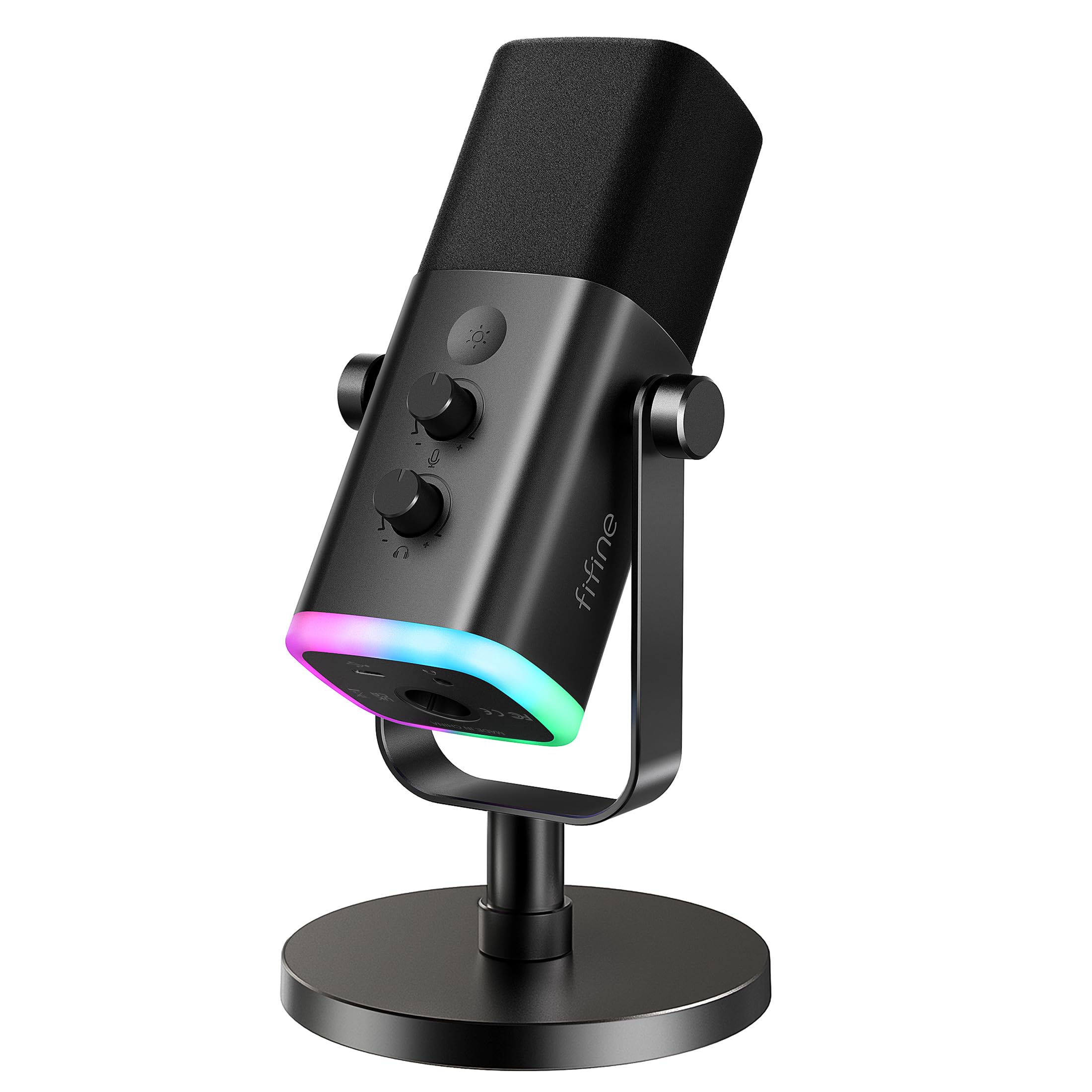
The AM8 is built for the gamer who wants a real dynamic mic without rebuilding the desk. It has USB-C and XLR, a mute button, a headphone jack, and an RGB ring that you can set to match the rest of your setup. We think that combination is the reason to pick it: you can plug it into a PC, monitor your voice, and mute with a tap, then move to XLR when you add an interface. The stand is included, which makes it a complete first setup.

The sound is clear and forward for voice, and the cardioid pattern keeps most of the room out when you stay close. We noticed the RGB is easy to set and forget—it lights the desk without demanding attention. The headphone jack is the feature we used most: it lets you hear your own level while you play. The mute sits where your thumb expects it, so you can cut the mic without looking.

Placement matters. The included stand puts the capsule low, so a boom arm gets it closer to your mouth and lets you lower the gain. We also like that the mic has both USB-C and XLR—it is a genuine upgrade path, not a dead-end USB mic. The headphone jack is the part that makes it feel like gaming gear rather than a repurposed podcast mic.

Pros

  • USB-C and XLR in one mic
  • On-mic mute and headphone monitoring
  • RGB lighting you can set to match your setup
  • Includes a desktop stand

Cons

  • Long-term reliability is mixed
Our verdict

The AM8 is the budget gaming mic we recommend when you want USB and XLR, on-mic monitoring, and a setup that looks the part.

Check Latest Price
3

Best XLR Value for Streamers

RØDE PodMic

96 /100
LBD Score Outstanding

Key details

Weight
2.07 lb
Connectivity
XLR
Polar Pattern
Unidirectional
Frequency Range
20Hz ~ 20kHz
View on Amazon

The PodMic is the XLR mic we recommend when someone wants broadcast style without paying broadcast money. The body is all metal, and the internal pop filter and shock mounting mean you do not need a separate screen or shock mount to get clean speech. It has a swing mount built in, so it attaches to a boom arm or stand without an adapter.

The sound is mid-forward and clear, the kind of voice tone that cuts through game audio. It is a low-output dynamic, so you need an interface with enough clean gain; a cheap interface at maximum gain will sound noisy. We like the internal shock mount because desk thumps are the enemy of a gaming setup. The pop filter does its job on plosives, though a foam cover is still worth adding if you record close and loud.

None of that makes it a plug-and-play first mic. You need an XLR interface, and you need one with enough clean gain to get the most from it. Once you have that, it is the best XLR value here for a streamer who wants a durable, broadcast-style mic without extras.

Pros

  • Internal pop filter and shock mount
  • All-metal build
  • Broadcast-style voice tone
  • Built-in swing mount

Cons

  • Heavy for light boom arms
Our verdict

The PodMic is the XLR streamer's value pick if you already have a clean interface and want broadcast tone without extra accessories.

Check Latest Price
4

Best Broadcast-Quality Voice

Shure SM7B

96 /100
LBD Score Outstanding

Key details

Weight
2.7 lb
Connectivity
XLR
Polar Pattern
Unidirectional
Frequency Range
50 Hz - 20 kHz
View on Amazon

The SM7B is the mic people recognize from podcasts and streams, and it earns that reputation with a warm, smooth voice sound that flatters speech. We think it is the best broadcast-style voice in this group. But it is not a casual upgrade: Shure recommends at least 60dB of gain to get the tone people expect. If your interface is noisy at high gain, you will hear that before you hear the SM7B at its best.

The build is tank-like, and the included windscreens and yoke mount give you a complete mounting setup. The cardioid pattern and internal shock isolation do a good job of keeping room and handling noise out, which is why it works in untreated rooms. We like the detachable windscreen for close speech, and the all-metal body feels solid in the hand.

The catch is the supporting cast. You need an interface or mixer with clean gain, and many budget interfaces will struggle without a booster. That is not a flaw in the mic so much as a requirement of owning it. If you already have the gain, the SM7B is the broadcast sound we choose—but it is not the first mic for a bare desk.

Pros

  • Warm broadcast voice
  • Excellent room noise rejection
  • Rugged all-metal build
  • Includes windscreens and yoke mount

Cons

  • XLR-only, no USB option
Our verdict

The SM7B is the broadcast voice to buy once your interface can supply the clean gain it needs.

Check Latest Price
5

Best XLR Mic Without a Signal Booster

Elgato Wave DX

92 /100
LBD Score Outstanding

Key details

Weight
14.4 oz
Connectivity
XLR
Polar Pattern
Unidirectional
Frequency Range
50 Hz - 15 kHz
View on Amazon

The Wave DX is the XLR mic for someone who wants a dynamic without adding a signal booster. It is designed to work with any XLR preamp or interface, and the speech-optimized capsule has a forgiving cardioid pattern. That is a practical combination for gaming: you can put it on a boom arm, talk across it, and not fight the interface for every bit of gain.

We like the size and the swivel mount. It is compact enough not to block your monitor, and the mount lets you angle it without putting stress on the cable. The sound is clear and warm rather than hyped, which suits voice chat and streaming. It does not have the last word in room rejection—keyboard clatter can still get in if you are not close—but close placement still matters. For a tight XLR desk, it is the easiest recommendation here.

If you already have an interface and a stand, the Wave DX is a smart, compact choice. It is a desk-space decision as much as a sound decision. The mic disappears into a small setup, and the swivel mount makes small adjustments easy.

Pros

  • Compact desktop footprint
  • Speech-optimized warm tone
  • Works with normal XLR gain
  • Swivel mount included

Cons

  • XLR-only, so an interface is required
Our verdict

The Wave DX is the compact XLR choice for a tight desk, provided you have an interface and a stand already.

Check Latest Price
6

All-In-One Kits

MAONO PD200XS

90 /100
LBD Score Outstanding

Key details

In The Box
Boom arm, shock mount, USB-C cable, manual
Connectivity
USB and XLR
Polar Pattern
Unidirectional
Frequency Range
40Hz-16kHz
View on Amazon

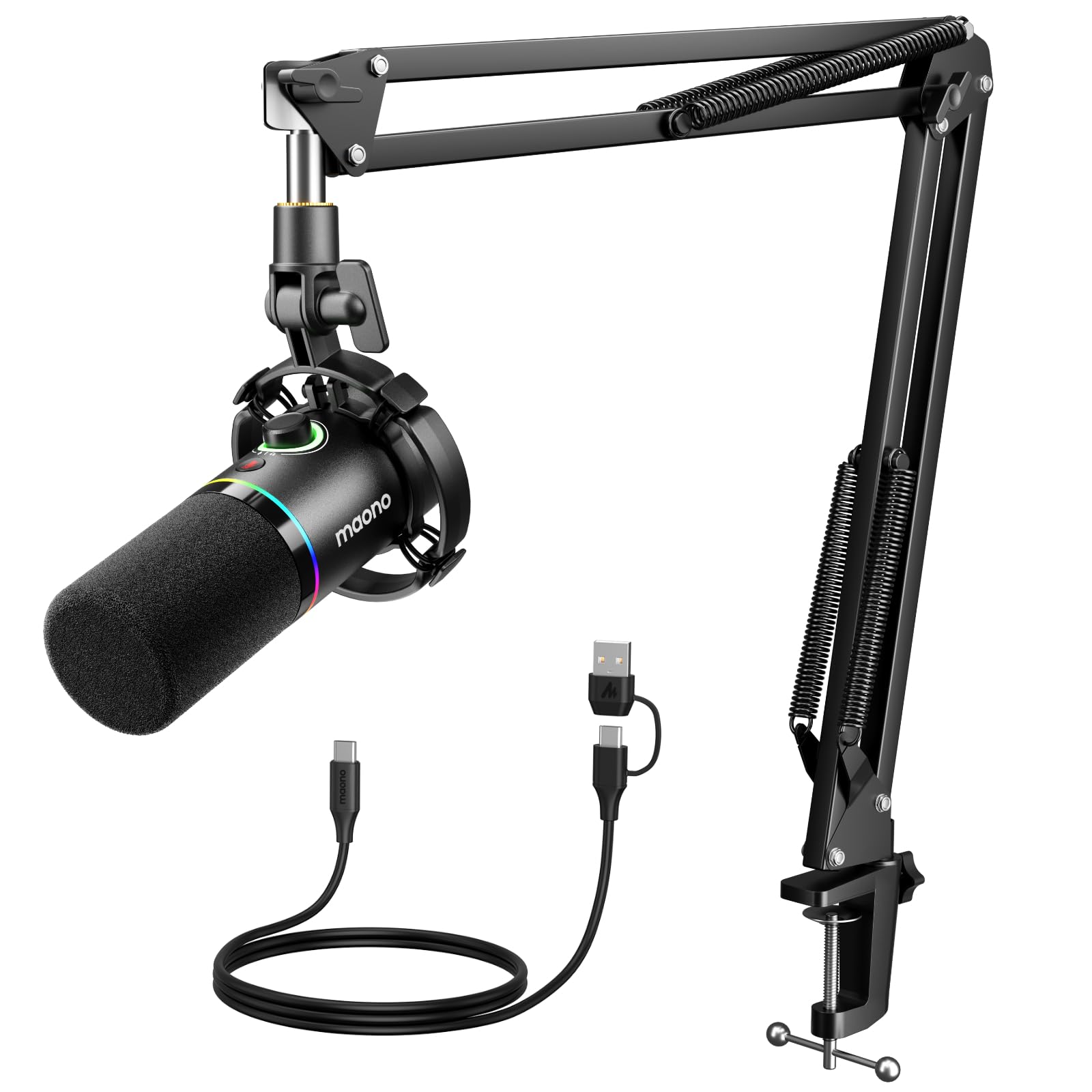
The PD200XS is the kit we suggest when someone wants the whole streaming desk in one box. It includes a boom arm, shock mount, and USB-C cable, and the mic itself has USB and XLR outputs. That is a lot of setup for a budget-minded kit, and it means you can start with USB and move to XLR later.

The sound is clear and full for voice, and the 2-in-1 knob for gain and headphone volume is genuinely useful during a stream. We like the tap mute with the LED indicator, and the software gives you more control over EQ and noise processing than the on-mic controls suggest. The RGB is there if you want it, but it is easy to ignore.

The kit is the point: buying the arm and shock mount separately adds up, and having them matched to the mic saves a shopping step. We like that the USB-C cable is included too, so the USB side works out of the box. The arm has enough reach for a normal desk, and the shock mount keeps the mic stable while you type.

We think the PD200XS is a good first streaming kit if you want the arm and shock mount included and a clear upgrade path from USB to XLR. It gets a new streamer on the air with a complete setup, and the software gives you room to tune the sound later. The bundle, not the mic alone, earns the place.

Pros

  • Complete boom-arm kit
  • USB and XLR connectivity
  • Useful gain and headphone knob
  • Tap mute with LED

Cons

  • Boom arm and shock mount feel less robust
  • Long-term reliability is mixed
Our verdict

The PD200XS is a complete first streaming kit, with the arm and shock mount included and USB/XLR flexibility.

Check Latest Price
7

Cheap Starter Setups

TONOR TD510 AIR H+

90 /100
LBD Score Outstanding

Key details

Audio Modes
Three EQ modes
Connectivity
USB and XLR
Headphone Jack
3.5mm jack
Noise Reduction
AI noise reduction
View on Amazon

The TD510 is the cheapest way into a USB/XLR dynamic mic here, and it does not look or feel like a bare-bones afterthought. It has a tap mute, a headphone jack, volume control, and three EQ modes, plus AI noise reduction. For a gamer on a tight budget, that is a lot of buttons and flexibility.

The sound is clear and can be shaped with the EQ modes; the vocal clarity setting is the one we left on for chat. USB is the easy path, and XLR gives you an upgrade later. The AI noise reduction helps with fan hum and low rumble, but it will not remove a mechanical keyboard right next to the mic. The boom arm gets the mic off the desk, which matters more for keyboard noise than any software mode.

The tap mute is the control we use most in game; it is faster than reaching for software. The headphone jack is also useful for checking your level without adding a mixer. We think the TD510 is a strong cheap starter if you want to try USB and XLR without spending much. It is a lot of mic for a starter setup.

Pros

  • Low-cost entry point
  • USB and XLR connectivity
  • Tap mute and headphone monitoring
  • Three EQ modes

Cons

  • Not compatible with Xbox
Our verdict

The TD510 is a low-cost way to try USB and XLR, with enough controls to feel like a real gaming mic.

Check Latest Price

How We Tested a Dozen Dynamic Mics in a Bedroom, Not a Studio

We started by pulling every dynamic mic sold for gaming and streaming and reading both the spec sheets and the one-star reviews. We filtered for connection type — USB, XLR, or both — whether a stand or boom arm came in the box, and price, then brought in 12 to test: the budget USB/XLR hybrids with RGB and mute buttons, the broadcast-style workhorses, and the mid-priced XLR-only mics that assume you already own an interface.

For six months they lived on real desks through weeknight Discord calls, ranked matches, and the occasional stream, in small rooms with genuine problems: a window AC unit, a mechanical keyboard, a roommate on a call in the next room. We recorded the same paragraph at the same distance on each mic and listened back on headphones, then pushed the gain up until the noise floor showed itself, to hear how much hiss a mic added before it got loud. Every XLR model ran through the same interface so differences came from the mic, not the chain.

Mid-sentence, we typed on a mechanical keyboard and knocked the desk to hear how much bled through, and we reached for each mute button without looking to see if we got it on the first try. We switched each mic's onboard or software noise processing on and off and compared the recordings, unplugged and re-plugged every model across a PC and a laptop, and watched how each one looked sitting in frame on camera. After six months we noted which finishes had scuffed, which knobs had gone scratchy, and which mounts had started to droop.

How to Choose a Dynamic Gaming Microphone

Start With Your Signal Chain

The first decision is USB, XLR, or both. A USB mic plugs straight into your PC and is the fastest path to better voice chat; an XLR mic needs an audio interface or mixer, which adds cost and a gain knob to learn. A dual USB/XLR model like the Shure MV7+ or FIFINE AM8 lets you start simple and move to XLR later without replacing the mic. If you already own an interface, an XLR-only mic often buys more sound quality for the same money. The trap is buying XLR because it sounds more serious, then discovering your interface has weak gain.

Plan for Gain, Not Just the Mic

Dynamic mics put out less signal than condensers, so gain is part of the purchase. The Shure SM7B is the clearest example: Shure recommends at least 60dB of clean gain, and a budget interface at maximum gain can add hiss before the mic sounds its best. The RØDE PodMic is also low-output and wants a decent interface. If your interface is noisy, a Cloudlifter-style booster or a better preamp matters more than a fancier mic. Buy the mic your interface can drive, not the one you wish it could.

Match the Pickup Pattern to Your Room

All the mics here are cardioid or unidirectional, which means they favor what is in front of them and reject more of the room behind. That is why a dynamic is a good first stop for a bedroom with hard walls or a mechanical keyboard. It is not a license to sit far away: if you back off, you turn up the gain and pull the room back in. Put the mic close, angle it slightly off your mouth, and use a boom arm so the desk does not transmit thumps. The Elgato Wave DX and Shure MV7+ both reward that kind of placement.

Controls, Mounting, and Build

For gaming, the small controls matter more than they do in a studio. A tap mute is faster than software, a headphone jack lets you monitor your voice, and a gain knob saves you from alt-tabbing mid-match. Mounting is the other half: a desktop stand is fine to start, but a boom arm gets the capsule closer and reduces keyboard noise. Check that the mic has the thread adapters or shock mount you need. Metal bodies like the PodMic and SM7B feel reassuring, but a sturdy arm matters just as much as the mic shell.

Frequently Asked Questions

Final Verdict

The Shure MV7+ is the one we recommend first for gaming. It works over USB-C without an interface, has XLR for later, and its auto level and denoiser do the setup work most gamers do not want to do.

If you already have a clean interface and want the classic broadcast sound, the Shure SM7B is the upgrade. If you want to spend less, the FIFINE AM8 is the budget pick, as long as you accept the mixed long-term reliability.